Balruno 테이블/입력 UX 기술 디테일: 드래그 성능, 셀-수식바 동기화, IME 처리

목차
스프레드시트 UX의 체감은 결국 셀 인터랙션의 디테일에서 결정됩니다. Balruno에서 이 부분을 다듬어가며 가장 시간을 많이 쓴 세 가지, 즉 드래그 성능, 셀↔수식바 동기화, IME 입력 처리를 한 글에 모았습니다.
1. 테이블 드래그 성능: O(N)에서 O(1)로
1.1 문제
- 환경: React 18 + TanStack Table 기반 스프레드시트 컴포넌트 (
SheetTable.tsx, 약 2,000줄) - 현상: 마우스 드래그로 셀 범위 선택 시 눈에 띄는 lag, 10행 이상에서 빠르게 드래그하면 프레임 드랍
- 목표: 60fps 유지 + 100×10 규모에서도 지연 없이 동작
1.2 원인 분석
React DevTools Profiler + 코드 정적 분석으로 세 지점이 병목으로 드러났습니다.
문제 1 — O(N) 시간복잡도의 셀 상태 조회
// 매 셀 렌더링마다 O(N) 조회const isCellSelected = useCallback( (rowId: string, columnId: string) => selectedCells.some((c) => c.rowId === rowId && c.columnId === columnId), [selectedCells]);- 100개 셀이 선택된 상태에서 500개 셀 렌더링 →
500 × 100 = 50,000번 비교 - 드래그 중 매 프레임마다 반복
문제 2 — 과도한 useMemo 의존성 (28개)
const columns = useMemo(() => { /* 컬럼 정의 ~400줄 */}, [ sheet.columns, sheet.rows, editingCell, // ... 25개 더 fillPreviewCells, // 드래그마다 변경됨 moveTargetCell, // 드래그마다 변경됨]);fillPreviewCells/moveTargetCell이 의존성에 포함 → 마우스 이동마다 컬럼 재생성 → 테이블 전체 재렌더 cascade
문제 3 — Throttle 미적용
mousemove는 마우스 폴링 레이트에 따라 초당 60–120+회 발생- 매 이벤트마다
setSelectedCells→ 리렌더 → 브라우저 렌더 사이클(16.67ms)보다 빈번한 상태 업데이트
1.3 1차 최적화: Set 자료구조 + Throttle
Set 기반 O(1) 조회:
const cellKey = (rowId: string, columnId: string) => `${rowId}:${columnId}`;
const selectedCellsSet = useMemo( () => new Set(selectedCells.map(c => cellKey(c.rowId, c.columnId))), [selectedCells]);
const isCellSelected = useCallback( (rowId: string, columnId: string) => selectedCellsSet.has(cellKey(rowId, columnId)), [selectedCellsSet]);기존 배열 구조는 유지하고 useMemo로 Set만 파생해 기존 로직 변경을 최소화했습니다.
Throttle 유틸리티 (16ms = 60fps):
function throttle<T extends (...args: Parameters<T>) => void>(fn: T, delay: number): T { let lastCall = 0; let timeoutId: ReturnType<typeof setTimeout> | null = null; return ((...args: Parameters<T>) => { const now = Date.now(); const remaining = delay - (now - lastCall); if (remaining <= 0) { if (timeoutId) { clearTimeout(timeoutId); timeoutId = null; } lastCall = now; fn(...args); } else if (!timeoutId) { timeoutId = setTimeout(() => { lastCall = Date.now(); timeoutId = null; fn(...args); }, remaining); } }) as T;}1차 결과:
| 지표 | 개선 전 | 개선 후 | 개선 |
|---|---|---|---|
| 셀 상태 조회 복잡도 | O(N) | O(1) | — |
| 100셀 선택 + 500셀 렌더 시 비교 | ~50,000회 | ~500회 | 99% 감소 |
| 드래그 중 state 업데이트 빈도 | ~200회/초 | ~60회/초 | 70% 감소 |
1.4 2차 최적화: Excel 수준으로
오픈소스 스프레드시트(Handsontable, AG Grid, Google Sheets) 분석 후 추가 기법 도입.
기법 1 — requestAnimationFrame 기반 throttle:
function rafThrottle<T extends (...args: any[]) => void>(fn: T): T { let rafId: number | null = null; let lastArgs: any[] | null = null; return ((...args: any[]) => { lastArgs = args; if (rafId === null) { rafId = requestAnimationFrame(() => { rafId = null; if (lastArgs) fn(...lastArgs); }); } }) as T;}브라우저 V-Sync와 동기화되어 프레임 드랍 최소화 + 백그라운드 탭에서 자동 일시중지.
기법 2 — DOM 직접 조작 (드래그 중 React 우회):
const handleCellMouseEnterThrottled = useMemo( () => rafThrottle((rowId: string, columnId: string) => { if (!isDraggingRef.current) return; const rangeCells = calculateDragSelection(...);
const tableContainer = tableContainerRef.current; if (tableContainer) { tableContainer.querySelectorAll('[data-cell-selected="true"]').forEach(el => { el.removeAttribute('data-cell-selected'); (el as HTMLElement).style.outline = ''; }); rangeCells.forEach(cell => { const cellEl = tableContainer.querySelector( `[data-cell-id="${cellKey(cell.rowId, cell.columnId)}"]` ) as HTMLElement; if (cellEl) { cellEl.setAttribute('data-cell-selected', 'true'); cellEl.style.outline = '2px solid var(--primary-blue)'; } }); }
pendingSelectionRef.current = rangeCells; // mouseup 시 React state로 동기화 }), [calculateDragSelection]);- 드래그 중에는 Virtual DOM Diff + Re-render 사이클을 우회
- mouseup 시점에만 React state 동기화
- 셀에
data-cell-id속성 추가 (단, data-attribute selector는 class selector 대비 ~3배 느림. 대규모 테이블에서는 JS Map으로 셀 요소를 직접 추적하는 편이 더 효율적)
기법 3 — CSS will-change 힌트:
style={{ willChange: 'background, outline' }}브라우저가 별도 합성 레이어로 분리. 단 background/outline은 compositor-only 속성이 아니므로 해당 레이어 내 paint는 여전히 발생. 진정한 GPU 합성만으로 처리되는 속성은 transform/opacity.
2차 결과:
| 지표 | 1차 후 | 2차 후 |
|---|---|---|
| 드래그 중 React 리렌더 | 매 프레임 | 0회 (mouseup 시 1회) |
| 스타일 업데이트 방식 | Virtual DOM Diff | 직접 DOM 조작 |
| 프레임 동기화 | setTimeout (불완전) | requestAnimationFrame (완전) |
1.5 핵심 교훈
- 자료구조가 곧 성능: 같은 기능도 Array vs Set에서 O(N) vs O(1) 차이
- useMemo 의존성은 최소: 빈번히 바뀌는 값을 의존성에 넣으면 cascade 재렌더
- 빈번한 UI 업데이트는 React를 우회: 직접 DOM 조작 + ref로 중간 상태 보관, 완료 시점에만 state 동기화
2. 셀↔수식바 동기화: debounce → rafThrottle → 즉시 sync
2.1 결론 먼저
오픈소스 스프레드시트들은 debounce/throttle 없이 즉시 동기화한다.
onInput={(e) => { const val = (e.target as HTMLInputElement).value; setFormulaBarValue(val); // 즉시 동기화, 별도 throttle 없음}}도달까지 두 번의 우회를 거쳤습니다.
2.2 1차: debounce(150ms)
const debouncedSetFormulaBarValue = useMemo( () => debounce((value: string) => setFormulaBarValue(value), 150), []);타이핑 후 150ms 지연 발생 → UX 저하.
2.3 2차: rafThrottle (60fps)
const throttledSetFormulaBarValue = useMemo( () => rafThrottle((value: string) => setFormulaBarValue(value)), []);더 빠르지만 여전히 프레임 단위 지연.
2.4 3차: 오픈소스 분석 후 즉시 동기화
| 라이브러리 | 핵심 방식 | throttle/debounce |
|---|---|---|
| Fortune-Sheet | 에디터 내용을 수식바에 직접 복사 | 없음 |
| Univer | RxJS Observable 공유 | 없음 |
| Luckysheet | jQuery로 에디터 내용을 수식바에 직접 복사 | 없음 |
Fortune-Sheet 실제 코드 (packages/core/src/modules/formula.ts):
$editor.textContent = value;if ($copyTo) $copyTo.textContent = value;오픈소스가 즉시 동기화하는 이유:
- Fortune-Sheet/Luckysheet: React를 안 쓰고 DOM 직접 조작이라 상태 관리 오버헤드 자체가 없음
- Univer: RxJS Observable로 값 공유, 리렌더 없이 동기화
본 프로젝트에서 즉시 동기화가 가능한 이유:
- 수식바는 독립 컴포넌트: 테이블 전체 리렌더 없음
- React 18 batching: 여러 setState가 자동으로 하나로
- 문자열만 업데이트: 연산 부하 거의 없음
2.5 교훈
| 접근 | 결과 |
|---|---|
| 추측으로 최적화 | 불필요한 복잡성 추가 |
| 오픈소스 분석 | 검증된 패턴 발견 |
“Premature optimization is the root of all evil”. 실제로 문제가 되는지 먼저 확인하고, 오픈소스에서 검증된 방식을 따르는 게 정답입니다.
3. IME(한글·중국어·일본어) 입력 처리
3.1 문제
셀 선택 상태에서 한글 입력 시 자음/모음이 분리:
- “안녕” 입력 → “ㅇㅏㄴㄴㅕㅇ” 으로 표시
3.2 원인
- React Controlled Component 문제:
<input value={state} onChange={...} />가 IME 조합 중에value를 강제 재설정 → 조합 컨텍스트 끊김 - 편집 모드 전환 시 컴포넌트 재생성:
compositionstart에서setEditingCell()호출 → 새 input 렌더 → 기존 IME 조합 상태 손실
3.3 해결: 4가지 패턴
(1) Uncontrolled component:
<input defaultValue={editValue} onInput={(e) => { if (!isComposingRef.current) { setFormulaBarValue(e.target.value); } }}/>(2) Composition 이벤트 추적:
const isComposingRef = useRef(false);
<input onCompositionStart={() => { isComposingRef.current = true; }} onCompositionEnd={(e) => { isComposingRef.current = false; setFormulaBarValue(e.currentTarget.value); }}/>(3) 숨겨진 input으로 초기 입력 처리 (Handsontable 패턴):
<input ref={hiddenInputRef} style={{ position: 'fixed', top: -9999, left: -9999 }} onCompositionStart={() => { isComposingRef.current = true; }} onCompositionEnd={(e) => { isComposingRef.current = false; if (selectedCell && !editingCell) { const value = e.currentTarget.value; setEditingCell({ rowId: selectedCell.rowId, columnId: selectedCell.columnId }); setEditValue(value); e.currentTarget.value = ''; } }}/>(4) 키보드 이벤트에서 IME 감지:
const handleKeyDown = (e: KeyboardEvent) => { if (e.nativeEvent.isComposing || e.keyCode === 229) return; // 일반 키 처리...};3.4 전체 흐름
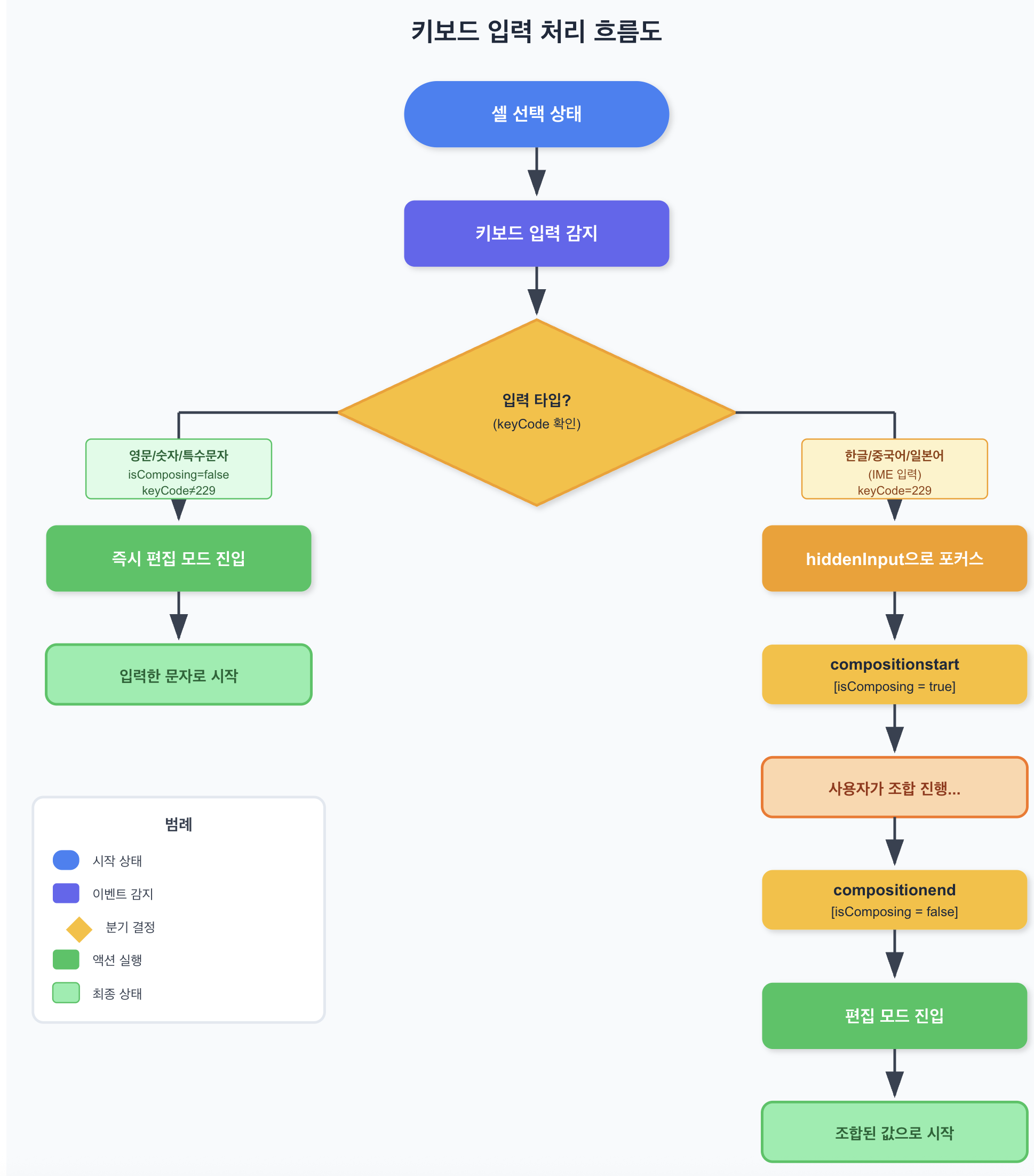
3.5 주의사항
- Enter 키: IME 조합 중 Enter는 조합 확정용.
isComposing체크해 폼 제출 방지. - Blur 이벤트: 포커스 잃을 때
isComposingRef초기화. - 접근성: 숨겨진 input은
aria-hidden="true",tabIndex={-1}설정.
정리
| 영역 | 핵심 도구 | 핵심 결정 |
|---|---|---|
| 드래그 성능 | Set + rafThrottle + DOM 직접 조작 + data-cell-id | 드래그 중 React 우회, mouseup 시점에만 state 동기화 |
| 셀↔수식바 동기화 | 즉시 setState | 추측으로 최적화하기 전에 오픈소스 검증 패턴부터 확인 |
| IME 입력 | Uncontrolled + Composition + 숨김 input | Controlled component를 IME 입력에 직접 결합하지 말 것 |
세 영역 모두 “React 자체의 추상화를 그대로 따르면 스프레드시트 UX는 60fps에 도달하지 못한다” 는 점이 공통 결론입니다. ref + DOM 직접 접근 + 브라우저 API(requestAnimationFrame, Composition Events)를 적극적으로 쓸 때만 Excel/Google Sheets 수준의 체감이 나옵니다.
참고한 오픈소스
- Fortune-Sheet —
packages/core/src/modules/formula.ts - Univer —
packages/sheets-ui/src/views/formula-bar/FormulaBar.tsx - Luckysheet —
src/controllers/menuButton.js - Handsontable —
imeFastEdit옵션 - React Issue #8683 — Composition Events
- AG Grid IME Support
- Wijmo FlexGrid —
imeEnabled
Spreadsheet UX is decided in the details of cell interaction. The three things I spent the most time on while polishing Balruno — drag performance, cell↔formula-bar sync, and IME input — are consolidated into one post.
1. Table Drag Performance — From O(N) to O(1)
1.1 The Problem
- Environment: React 18 + TanStack Table spreadsheet component (
SheetTable.tsx, ~2,000 lines) - Symptom: Noticeable lag when selecting cell ranges via mouse drag; frame drops in tables with 10+ rows under fast drag
- Goal: 60fps + no lag at 100×10 scale
1.2 Root Cause
React DevTools Profiler + static code analysis surfaced three bottlenecks.
Issue 1 — O(N) cell-state lookup:
// O(N) on every cell renderconst isCellSelected = useCallback( (rowId: string, columnId: string) => selectedCells.some((c) => c.rowId === rowId && c.columnId === columnId), [selectedCells]);- 100 cells selected, 500 cells rendered →
500 × 100 = 50,000comparisons - Repeats every frame during drag
Issue 2 — excessive useMemo dependencies (28):
Drag-changing values like fillPreviewCells / moveTargetCell were in the dependency list → entire column definition regenerated on every mouse move → cascade re-render of the whole table.
Issue 3 — no throttle:
mousemove fires 60–120+ times/sec depending on mouse polling rate, calling setSelectedCells more often than the browser’s render cycle (60fps = 16.67ms).
1.3 First Pass — Set + Throttle
Set-based O(1) lookup:
const cellKey = (rowId: string, columnId: string) => `${rowId}:${columnId}`;
const selectedCellsSet = useMemo( () => new Set(selectedCells.map(c => cellKey(c.rowId, c.columnId))), [selectedCells]);
const isCellSelected = useCallback( (rowId: string, columnId: string) => selectedCellsSet.has(cellKey(rowId, columnId)), [selectedCellsSet]);Keep the existing array; derive the Set via useMemo — minimizes existing logic changes.
Throttle utility (16ms = 60fps) — see Korean section above for implementation; trailing-edge call guaranteed; no lodash dependency.
First-pass results:
| Metric | Before | After | Improvement |
|---|---|---|---|
| Cell-state lookup complexity | O(N) | O(1) | — |
| Comparisons (100 selected, 500 rendered) | ~50,000 | ~500 | 99% reduction |
| State updates/sec during drag | ~200 | ~60 | 70% reduction |
1.4 Second Pass — Excel-Level
After analyzing open-source spreadsheets (Handsontable, AG Grid, Google Sheets), three more techniques were added.
Technique 1 — requestAnimationFrame-based throttle:
function rafThrottle<T extends (...args: any[]) => void>(fn: T): T { let rafId: number | null = null; let lastArgs: any[] | null = null; return ((...args: any[]) => { lastArgs = args; if (rafId === null) { rafId = requestAnimationFrame(() => { rafId = null; if (lastArgs) fn(...lastArgs); }); } }) as T;}Syncs with browser V-Sync, minimizes frame drops, auto-pauses in background tabs.
Technique 2 — Direct DOM manipulation (bypass React during drag):
- During drag: skip React Virtual DOM Diff + Re-render
- Sync to React state only on mouse up
- Add
data-cell-idattribute for DOM queries (note: data-attribute selectors are ~3× slower than class selectors — for very large tables, tracking cell elements directly in a JS Map could be more efficient)
Technique 3 — CSS will-change hint:
style={{ willChange: 'background, outline' }}Isolates the element into a separate compositing layer. But background/outline are not compositor-only — paint still occurs in that layer. Only transform/opacity are handled purely by the GPU compositor.
Second-pass results:
| Metric | After 1st | After 2nd |
|---|---|---|
| React re-renders during drag | every frame | 0 (1 on mouse up) |
| Style update method | Virtual DOM Diff | direct DOM manipulation |
| Frame sync | setTimeout (imperfect) | requestAnimationFrame (perfect) |
1.5 Lessons
- Data structure is performance — same feature, O(N) vs O(1) depending on Array vs Set
- Keep useMemo dependencies minimal — frequently-changing values cascade into re-renders
- Bypass React for frequent UI updates — direct DOM + ref for intermediate state, sync to state only at completion
2. Cell ↔ Formula Bar Sync — debounce → rafThrottle → immediate
2.1 Conclusion First
Open-source spreadsheets synchronize immediately, without debounce/throttle.
onInput={(e) => { const val = (e.target as HTMLInputElement).value; setFormulaBarValue(val); // immediate sync, no throttle/debounce}}It took two detours to get there.
2.2 1st Try — debounce(150ms)
debounce(setFormulaBarValue, 150) → 150ms delay after typing → UX degradation.
2.3 2nd Try — rafThrottle (60fps)
Faster, but still per-frame delay.
2.4 3rd Try — Open-Source Analysis → Immediate Sync
| Library | Approach | throttle/debounce |
|---|---|---|
| Fortune-Sheet | direct copy from editor to formula bar | none |
| Univer | RxJS Observable sharing | none |
| Luckysheet | jQuery direct copy from editor to formula bar | none |
Fortune-Sheet actual code (packages/core/src/modules/formula.ts):
$editor.textContent = value;if ($copyTo) $copyTo.textContent = value;Why open source uses immediate sync:
- Fortune-Sheet / Luckysheet — no React, direct DOM, so no state-management overhead
- Univer — RxJS Observable shares values, sync without re-render
Why immediate sync works in this project:
- Formula bar is an independent component — no full table re-render
- React 18 batching — multiple setStates merged into one
- String-only update — virtually no computational load
2.5 Lesson
| Approach | Outcome |
|---|---|
| Optimize by assumption | Added unnecessary complexity |
| Open-source analysis | Found a verified pattern |
“Premature optimization is the root of all evil” — first verify it’s actually a problem, then follow proven patterns from open source.
3. IME (Korean / Chinese / Japanese) Input
3.1 The Problem
In cell-selection state, typing Korean caused jamo (consonants/vowels) to separate:
- Typing “안녕” → displayed as “ㅇㅏㄴㄴㅕㅇ”
3.2 Cause
- React Controlled Component issue —
<input value={state} onChange={...} />forcibly resetsvaluemid-IME-composition → composition context breaks - Component recreation on edit-mode transition —
compositionstarttriggerssetEditingCell()→ React renders a new input → existing IME composition state lost
3.3 Solution — Four Patterns
(1) Uncontrolled component:
<input defaultValue={editValue} onInput={(e) => { if (!isComposingRef.current) { setFormulaBarValue(e.target.value); } }}/>(2) Track Composition events:
const isComposingRef = useRef(false);
<input onCompositionStart={() => { isComposingRef.current = true; }} onCompositionEnd={(e) => { isComposingRef.current = false; setFormulaBarValue(e.currentTarget.value); }}/>(3) Hidden input for initial input (Handsontable pattern):
<input ref={hiddenInputRef} style={{ position: 'fixed', top: -9999, left: -9999 }} onCompositionStart={() => { isComposingRef.current = true; }} onCompositionEnd={(e) => { isComposingRef.current = false; if (selectedCell && !editingCell) { const value = e.currentTarget.value; setEditingCell({ rowId: selectedCell.rowId, columnId: selectedCell.columnId }); setEditValue(value); e.currentTarget.value = ''; } }}/>(4) IME detection in keyboard events:
const handleKeyDown = (e: KeyboardEvent) => { if (e.nativeEvent.isComposing || e.keyCode === 229) return; // normal key handling...};3.4 Full Flow
3.5 Caveats
- Enter key — Enter during IME composition is for confirming. Check
isComposingto prevent form submission. - Blur event — reset
isComposingRefon focus loss. - Accessibility — for hidden inputs, set
aria-hidden="true",tabIndex={-1}.
Summary
| Area | Core tools | Key decision |
|---|---|---|
| Drag performance | Set + rafThrottle + direct DOM + data-cell-id | Bypass React during drag, sync state only on mouse up |
| Cell↔formula-bar sync | Immediate setState | Verify with open-source patterns before optimizing by assumption |
| IME input | Uncontrolled + Composition + hidden input | Never wire a controlled component directly into IME input |
A common conclusion across all three: if you stick to React’s default abstractions, spreadsheet UX will not hit 60fps. Excel/Google-Sheets-grade feel only comes from aggressively using refs + direct DOM access + browser APIs (requestAnimationFrame, Composition Events).
Referenced Open Source
- Fortune-Sheet —
packages/core/src/modules/formula.ts - Univer —
packages/sheets-ui/src/views/formula-bar/FormulaBar.tsx - Luckysheet —
src/controllers/menuButton.js - Handsontable —
imeFastEditoption - React Issue #8683 — Composition Events
- AG Grid IME Support
- Wijmo FlexGrid —
imeEnabled

댓글
댓글 수정/삭제는 GitHub Discussions에서 가능합니다.