제목, 태그, 카테고리로 검색

모든 글
약 12분 분량 이론/JVM 메모리

JVM 메모리 ③: Off-heap과 Direct Memory
목차

본 문서는 Oracle JDK 17 / 21 ByteBuffer API 공식 문서HotSpot VM 커맨드라인 레퍼런스 를 1차 소스로 해요. 1·2편이 Xmx 안쪽의 메모리(Heap과 GC)를 다뤘다면, 이 글은 Xmx 바깥의 메모리를 다뤄요.

1. 왜 이 이론을 알아야 하는가

Elasticsearch는 Heap 외부 메모리를 매우 적극적으로 사용해요. Elastic 공식 문서조차:

“Elasticsearch requires memory for purposes other than the JVM heap. For example, Elasticsearch uses off-heap buffers for efficient network communication and relies on the operating system’s filesystem cache for efficient access to files.” — Elastic — Advanced configuration

즉 ES가 “Xmx를 50% 이하로 두라”는 이유 중 하나가 off-heap buffer 예요. 이게 무엇인지 알려면 JVM에서의 off-heap 개념부터 이해해야 해요.

2. On-heap vs Off-heap

구분On-heapOff-heap
위치JVM의 -XmxJVM 프로세스의 Native 영역 (Xmx 밖)
GC 대상O (GC가 수거)X (GC가 직접 수거하지 않음)
I/O 시 복사필요 (intermediate buffer)불필요 (OS가 직접 읽기/쓰기)
접근 API일반 Java 객체ByteBuffer.allocateDirect, Unsafe, JNI, Foreign Memory API

3. Direct ByteBuffer — off-heap의 공식 API

java.nio.ByteBuffer의 공식 설명:

“A byte buffer is either direct or non-direct. Given a direct byte buffer, the Java virtual machine will make a best effort to perform native I/O operations directly upon it. That is, it will attempt to avoid copying the buffer’s content to (or from) an intermediate buffer before (or after) each invocation of one of the underlying operating system’s native I/O operations.” — Java SE 21 API — ByteBuffer

3-1. 핵심 성격

“The contents of direct buffers may reside outside of the normal garbage-collected heap, and so their impact upon the memory footprint of an application might not be obvious.” — 같은 출처

중요한 포인트:

  • direct buffer의 데이터는 heap 밖에 있어요. 하지만 DirectByteBuffer 객체 자체(참조 핸들) 는 heap 안에 있어요.
  • DirectByteBuffer 객체가 GC되면 Cleaner가 발동해서 off-heap 메모리를 해제해요. 즉 간접적으로 GC와 연결돼 있어요.
  • 문제: DirectByteBuffer 객체가 작아서 GC가 자주 일어나지 않으면, off-heap은 계속 점유된 채로 남아요. 그래서 off-heap OOM은 heap은 널널한데 native가 꽉 차서 터지는 패턴으로 나타나요.

3-2. allocation 비용

“The buffers returned by this method typically have somewhat higher allocation and deallocation costs than non-direct buffers.” — 같은 출처

따라서 공식 문서도:

“It is therefore recommended that direct buffers be allocated primarily for large, long-lived buffers that are subject to the underlying system’s native I/O operations.” — 같은 출처

짧은 수명의 작은 버퍼에는 direct buffer를 쓰지 마세요. 네트워크 I/O 큰 버퍼, 파일 I/O용 큰 버퍼가 정당한 용도예요.

4. MaxDirectMemorySize — off-heap의 상한

Direct memory는 무한정 늘어나지 않아요. HotSpot 커맨드라인 옵션의 공식 설명:

“The -XX:MaxDirectMemorySize option sets the maximum total size (in bytes) of the New I/O (the java.nio package) direct-buffer allocations… By default, the size is set to 0, meaning that the JVM chooses the size for NIO direct-buffer allocations automatically.” — Oracle — java Command-line Options

4-1. default 동작 — 정확한 서술

문서가 말하는 “JVM chooses automatically”의 실제 구현은 아래와 같아요. “Xmx와 literally 같다”고 단정하면 정확하지 않기 때문에 주의해서 서술해요.

  • -XX:MaxDirectMemorySize 를 명시하지 않으면 내부적으로 값이 0으로 초기화돼요.
  • 이 상태에서 java.nio의 Direct Buffer 구현(jdk.internal.misc.VM.maxDirectMemory())은 Runtime.getRuntime().maxMemory() 근방의 값 (즉 heap의 최대 크기에 근접한 값)을 상한으로 사용해요.
  • 이는 구현 디테일이며 JDK 버전과 플랫폼에 따라 약간씩 달라요. OpenJDK 버그 트래커도 이 동작의 일관성 문제를 여러 차례 지적해 왔어요 (JDK-8145536, JDK-8203811).

실전 운영 규칙:

  • Xmx가 16GB일 때 default 동작이면 direct buffer 한도가 대략 16GB 근방이에요. 즉 Heap + Direct 합쳐서 약 2×Xmx 까지 프로세스 RSS가 늘어날 수 있다고 봐야 해요.
  • 이 상한을 정확히 제어하려면 -XX:MaxDirectMemorySize=<값>명시적으로 지정해요.
  • Elasticsearch는 JVM 옵션으로 이 값을 기동 시 계산해서 명시적으로 설정해요 (구버전에서는 Xmx의 절반).

5. off-heap을 쓰는 다른 경로

5-1. sun.misc.Unsafe / jdk.internal.misc.Unsafe

내부 API. allocateMemory, freeMemory로 raw native 메모리를 직접 다뤄요. Netty, Chronicle 같은 라이브러리가 성능 목적으로 사용해요. 공식적으로는 사용을 권장하지 않는 내부 API 예요.

5-2. Foreign Function & Memory API (JEP 454, JDK 22 정식)

Unsafe 대체를 위한 공식 표준 API 예요. MemorySegment, Arena로 안전한 native memory 접근을 지원해요. Lucene, Netty 등이 점진적으로 도입 중이에요.

5-3. Memory-Mapped File (mmap)

FileChannel.map(...) 으로 파일을 가상 주소 공간에 매핑해요. 데이터는 OS Page Cache에 올라가고 JVM은 거기에 접근해요. 이건 Elasticsearch가 인덱스 파일을 읽는 핵심 방식이에요. 상세는 OS Page Cache가 ES 성능을 결정하는 이유 참고.

6. Native Memory의 전체 지도

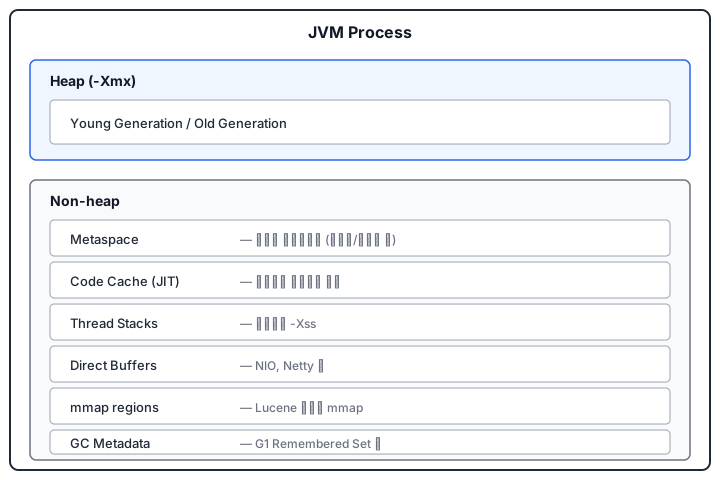
JVM 프로세스 입장에서 Heap(Xmx) 바깥에 잡히는 메모리는 대략 다음과 같아요.

JVM Process 메모리 지도 — Heap(-Xmx)과 Non-heap(Metaspace, Code Cache, Thread Stacks, Direct Buffers, mmap regions, GC Metadata)

이 전체를 Native Memory Tracking(NMT) 으로 볼 수 있어요.

-XX:NativeMemoryTracking=summary (또는 detail)
jcmd <pid> VM.native_memory summary

Oracle JDK 17 — Native Memory Tracking 참조.

7. Elasticsearch 관점에서의 의미

  1. ES의 네트워킹(Netty 기반)은 DirectByteBuffer를 적극 사용해요. 그래서 heap 외에 off-heap이 항상 추가로 잡혀 있어요.
  2. Lucene 인덱스는 hybridfs 전략에 따라 일부 파일이 mmap으로 매핑돼요 (term dictionary, norms, doc values). 매핑되지 않은 파일도 OS가 자동으로 Page Cache에 캐싱해요. mmap된 영역은 “off-heap이라기보다 OS가 관리하는 메모리”지만 JVM 프로세스의 RSS(Resident Set Size)에 합산되므로, top으로 보면 RSS가 Xmx보다 훨씬 커 보이는 게 정상이에요.
  3. ES “heap의 50%” 권장은 “나머지 50%는 Direct Memory + Page Cache + 기타 off-heap에 쓰라” 는 뜻이에요. 이걸 안 남기고 Xmx를 80~90%로 잡으면 OS OOM killer에 의해 프로세스가 강제 종료돼요.

8. 자주 혼동되는 포인트

  • “off-heap은 GC가 없다” → 절반만 맞아요. Cleaner 기반 간접 해제는 있어요. 단 즉시 해제가 아니라 heap GC 타이밍에 의존해요.
  • “Direct Memory는 빠르다” → 복사가 줄어서 I/O 관점에서 빠른 것이지, 일반 메모리 접근은 오히려 JIT 최적화가 덜 붙을 수 있어요.
  • “Xmx만 조절하면 메모리가 컨트롤된다” → 틀렸어요. MaxDirectMemorySize, Xss, Metaspace, JIT 코드 캐시를 같이 봐야 해요.

참고 문헌 (1차 소스)


앞선 글: JVM의 GC 알고리즘과 Stop-the-World

이어지는 글: OS Page Cache가 ES 성능을 결정하는 이유

Primary sources for this document are the Oracle JDK 17 / 21 ByteBuffer API official docs and the HotSpot VM command-line reference. While Parts 1 and 2 covered memory inside Xmx (Heap and GC), this post covers memory outside Xmx.

1. Why You Need This Theory

Elasticsearch uses memory outside the heap very aggressively. Even Elastic’s official docs say so:

“Elasticsearch requires memory for purposes other than the JVM heap. For example, Elasticsearch uses off-heap buffers for efficient network communication and relies on the operating system’s filesystem cache for efficient access to files.” — Elastic — Advanced configuration

So one reason ES tells you to “set Xmx to at most 50%” is off-heap buffers. To know what that is, you need to understand the JVM’s off-heap concept first.

2. On-heap vs Off-heap

AspectOn-heapOff-heap
LocationInside JVM -XmxNative area of the JVM process (outside Xmx)
GC targetyes (collected by GC)no (not directly collected by GC)
I/O copyneeded (intermediate buffer)not needed (OS reads/writes directly)
Access APIregular Java objectsByteBuffer.allocateDirect, Unsafe, JNI, Foreign Memory API

3. Direct ByteBuffer — The Official Off-heap API

Official description of java.nio.ByteBuffer:

“A byte buffer is either direct or non-direct. Given a direct byte buffer, the Java virtual machine will make a best effort to perform native I/O operations directly upon it. That is, it will attempt to avoid copying the buffer’s content to (or from) an intermediate buffer before (or after) each invocation of one of the underlying operating system’s native I/O operations.” — Java SE 21 API — ByteBuffer

3-1. Key Properties

“The contents of direct buffers may reside outside of the normal garbage-collected heap, and so their impact upon the memory footprint of an application might not be obvious.” — same source

Important points:

  • The data of a direct buffer is outside the heap. But the DirectByteBuffer object itself (the reference handle) is inside the heap.
  • When the DirectByteBuffer object is GC-ed, its Cleaner fires and frees the off-heap memory. So it is indirectly tied to GC.
  • Problem: if the DirectByteBuffer object is small and GC rarely runs, the off-heap stays occupied. So off-heap OOM typically shows up as the heap being plenty free while native is full.

3-2. Allocation Cost

“The buffers returned by this method typically have somewhat higher allocation and deallocation costs than non-direct buffers.” — same source

So the official doc adds:

“It is therefore recommended that direct buffers be allocated primarily for large, long-lived buffers that are subject to the underlying system’s native I/O operations.” — same source

So do not use direct buffers for short-lived small buffers. Big network I/O buffers and big file I/O buffers are the legitimate use case.

4. MaxDirectMemorySize — The Off-heap Ceiling

Direct memory does not grow unbounded. From the HotSpot command-line option doc:

“The -XX:MaxDirectMemorySize option sets the maximum total size (in bytes) of the New I/O (the java.nio package) direct-buffer allocations… By default, the size is set to 0, meaning that the JVM chooses the size for NIO direct-buffer allocations automatically.” — Oracle — java Command-line Options

4-1. Default Behavior — Stated Precisely

The actual implementation behind “JVM chooses automatically” is as follows. It would be inaccurate to flatly say “it equals Xmx,” so I am being precise.

  • If -XX:MaxDirectMemorySize is not specified, internally the value is initialized to 0.
  • In that state, the java.nio Direct Buffer implementation (jdk.internal.misc.VM.maxDirectMemory()) uses a value close to Runtime.getRuntime().maxMemory() (i.e., close to the heap maximum) as the ceiling.
  • This is an implementation detail and varies slightly across JDK versions and platforms. The OpenJDK bug tracker has flagged the inconsistency multiple times (JDK-8145536, JDK-8203811).

Practical operational rule:

  • With Xmx 16GB and default behavior, the direct-buffer ceiling is roughly 16GB as well. So you should plan for process RSS to grow to about 2×Xmx (Heap + Direct combined).
  • To control the ceiling precisely, explicitly set -XX:MaxDirectMemorySize=<value>.
  • Elasticsearch computes and explicitly sets this value as a JVM option at startup (in older versions, half of Xmx).

5. Other Paths to Off-heap

5-1. sun.misc.Unsafe / jdk.internal.misc.Unsafe

Internal API. Manipulates raw native memory directly via allocateMemory and freeMemory. Libraries like Netty and Chronicle use it for performance. Officially discouraged internal API.

5-2. Foreign Function & Memory API (JEP 454, finalized in JDK 22)

The official standard API intended to replace Unsafe. Provides safe native memory access via MemorySegment and Arena. Lucene, Netty, and others are gradually adopting it.

5-3. Memory-Mapped Files (mmap)

FileChannel.map(...) maps a file into the virtual address space. The data lives in the OS Page Cache and the JVM accesses it through there. This is the core mechanism Elasticsearch uses to read index files. See Why OS Page Cache Decides ES Performance for details.

6. The Full Map of Native Memory

From the JVM process’s perspective, memory taken outside the Heap (Xmx) roughly looks like this:

JVM Process memory map — Heap (-Xmx) and Non-heap (Metaspace, Code Cache, Thread Stacks, Direct Buffers, mmap regions, GC Metadata)

You can view this whole map via Native Memory Tracking (NMT):

-XX:NativeMemoryTracking=summary (or detail)
jcmd <pid> VM.native_memory summary

See Oracle JDK 17 — Native Memory Tracking.

7. What This Means From an Elasticsearch Angle

  1. ES networking (Netty-based) uses DirectByteBuffer aggressively. So off-heap is always allocated on top of heap.
  2. Some Lucene index files are mmap-ed under the hybridfs strategy (term dictionary, norms, doc values). Files that are not mmap-ed still get cached automatically by the OS Page Cache. mmap-ed regions are “memory managed by the OS rather than off-heap”, but they count toward the JVM process’s RSS (Resident Set Size), so it is normal for top to show RSS far larger than Xmx.
  3. The ES “50% of heap” recommendation means “leave the other 50% for Direct Memory + Page Cache + other off-heap usage.” If you ignore that and set Xmx to 80-90%, the OS OOM killer will kill the process.

8. Commonly Confused Points

  • “Off-heap has no GC” → only half true. There is indirect Cleaner-based release. But it is not immediate; it depends on heap GC timing.
  • “Direct Memory is fast” → it is fast from an I/O standpoint because copies are reduced; for ordinary memory access, JIT may actually optimize less.
  • “Just tuning Xmx is enough to control memory” → wrong. You need to look at MaxDirectMemorySize, Xss, Metaspace, and JIT code cache together.

References (Primary Sources)


Previous: GC Algorithms and Stop-the-World on the JVM

Next: Why OS Page Cache Decides ES Performance

Author
작성자 @범수

오늘의 노력이 내일의 전문성을 만든다고 믿습니다.

댓글

댓글 수정/삭제는 GitHub Discussions에서 가능합니다.