제목, 태그, 카테고리로 검색

모든 글
약 32분 분량 이론

JVM과 Garbage Collection 이해하기
목차

1. JVM 아키텍처 개요

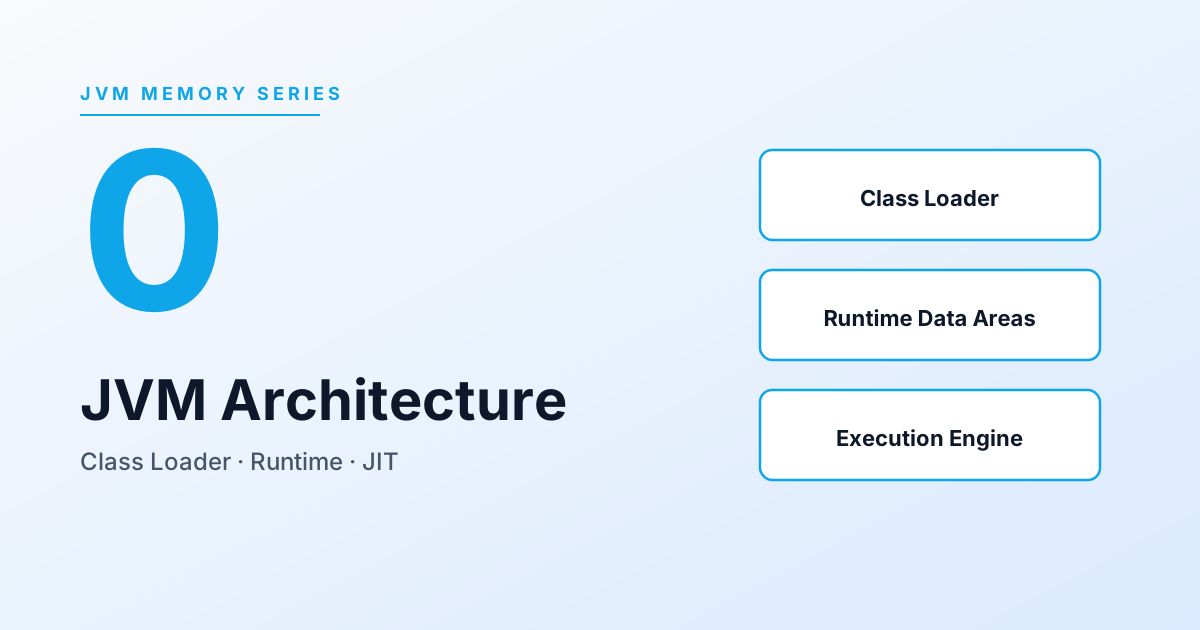
JVM(Java Virtual Machine)은 Java 바이트코드를 실행하는 가상 머신이에요. “Write Once, Run Anywhere”를 가능하게 하는 핵심 컴포넌트예요.

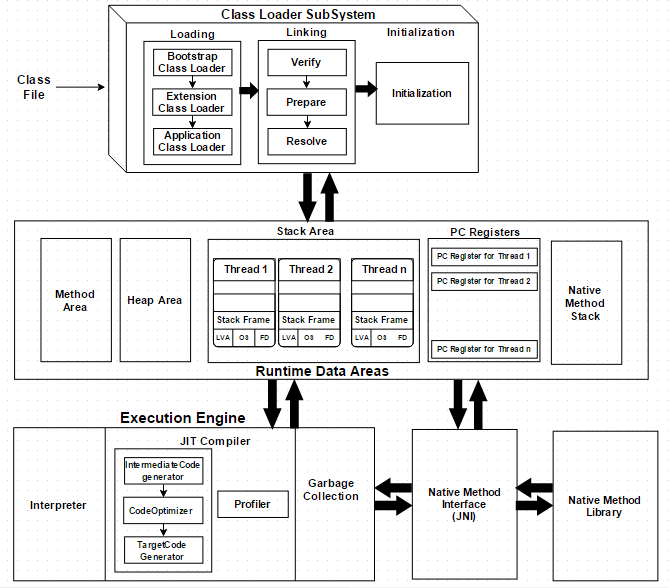
1.1 JVM 전체 구조

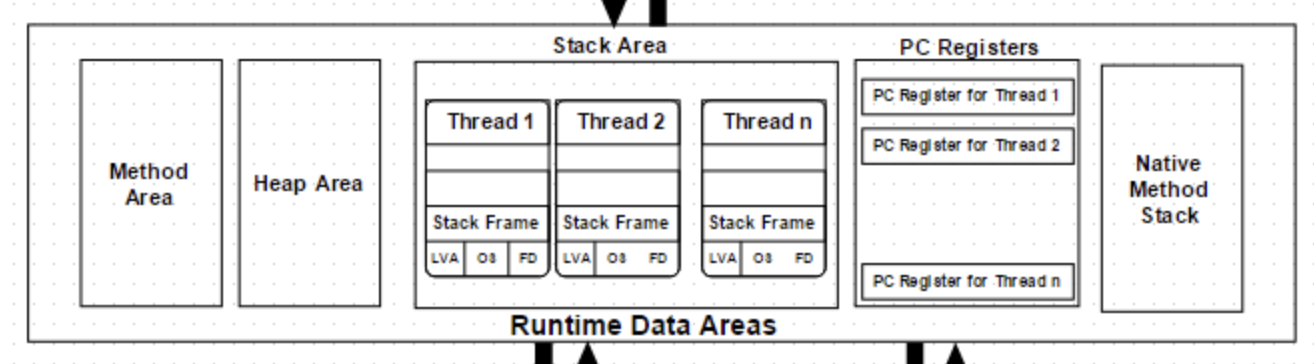
출처 : https://dzone.com/articles/jvm-architecture-explained

initialization은 static을 초기화해요

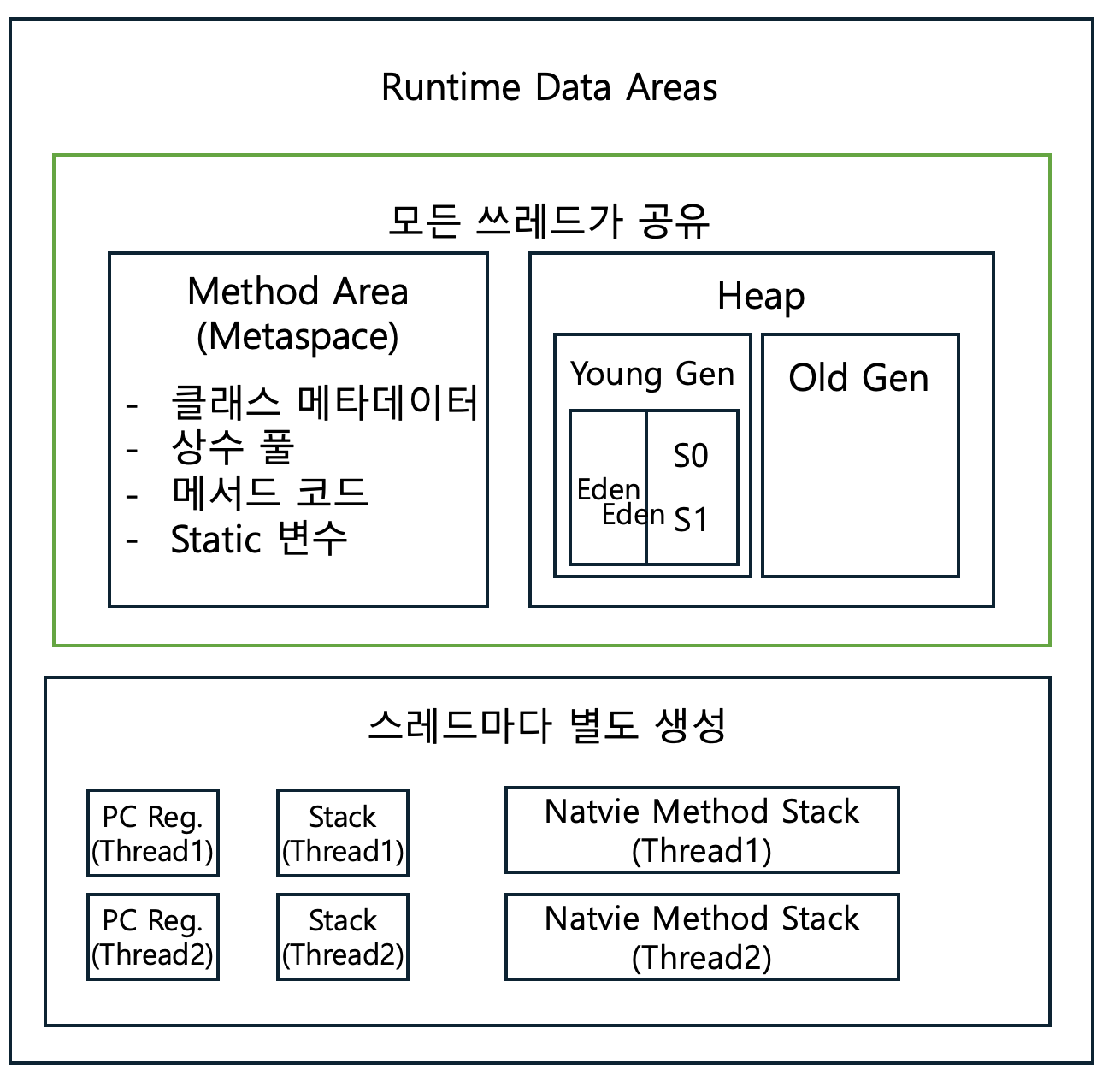
Method Area는 Metasp.로 metadata가 있어요. Stack은 per thread

출처: JVM Architecture - Oracle


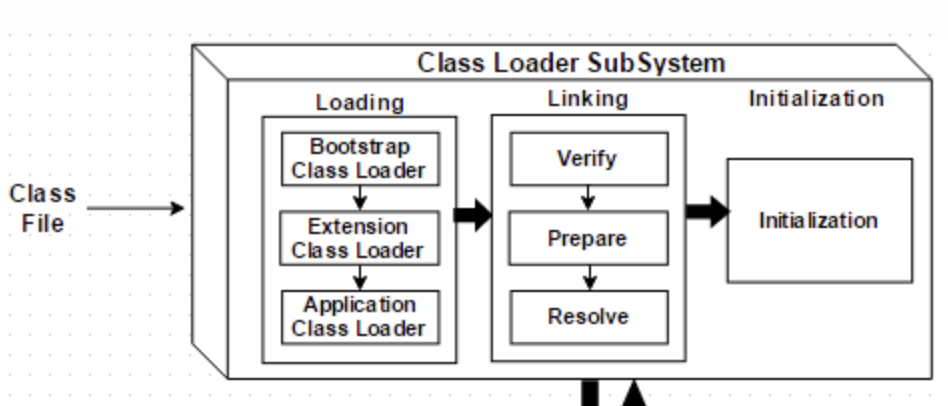
1.2 Class Loader Subsystem

Java 클래스(.class 파일)를 메모리에 로드하고 링크하는 역할이에요.

Loading (로딩)

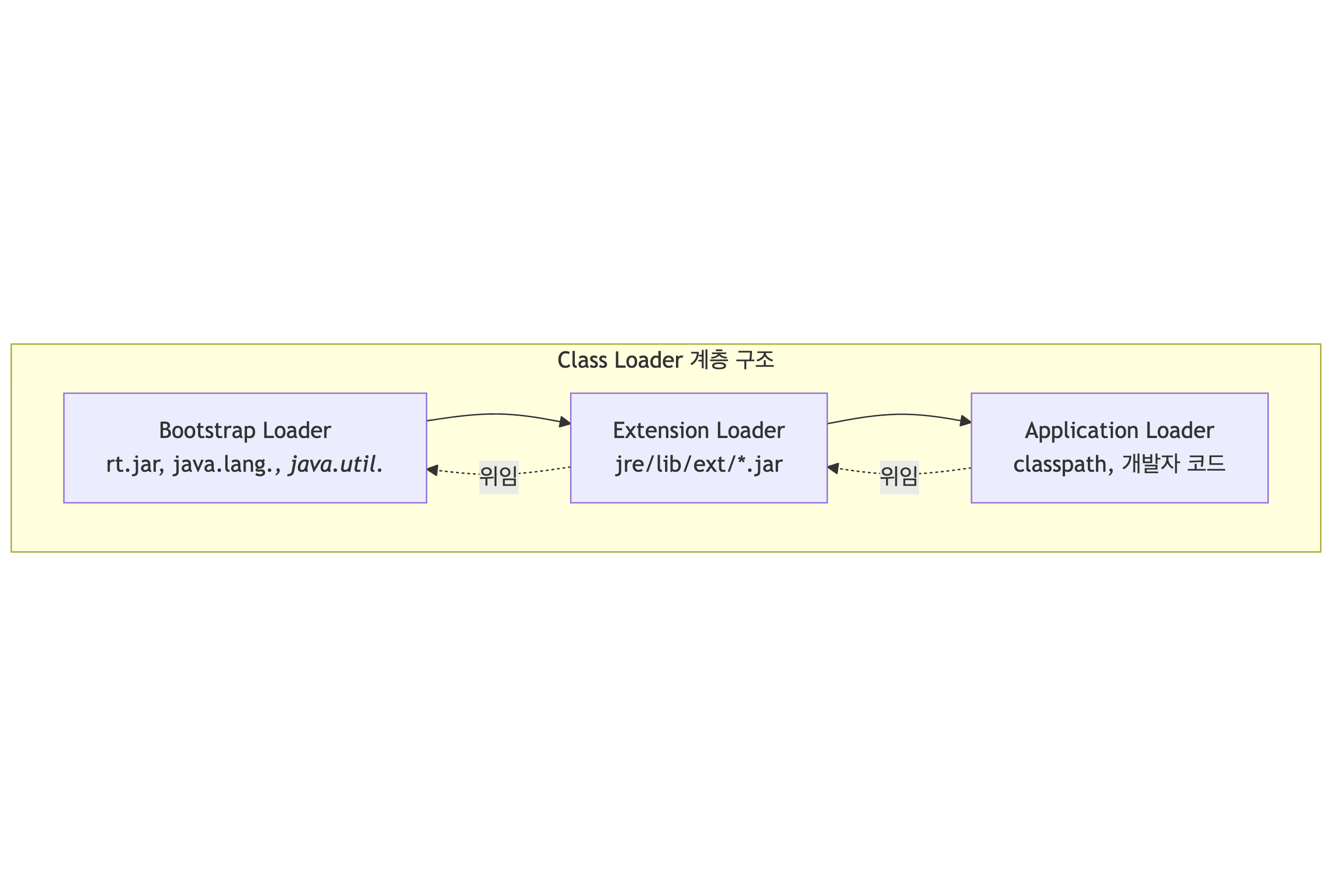
3단계 위임 모델 (Parent Delegation Model)

동작 방식:

  1. 클래스 로드 요청이 들어오면 부모에게 먼저 위임
  2. 부모가 찾지 못하면 자신이 로드 시도
  3. 어디서도 못 찾으면 ClassNotFoundException
// 클래스 로더 확인
System.out.println(String.class.getClassLoader()); // null (Bootstrap)
System.out.println(MyClass.class.getClassLoader()); // AppClassLoader

왜 이렇게 하나?

  • 보안: 악의적인 java.lang.String 클래스 로드 방지
  • 일관성: 핵심 클래스는 항상 같은 버전 사용

출처: Understanding Class Loaders - Baeldung

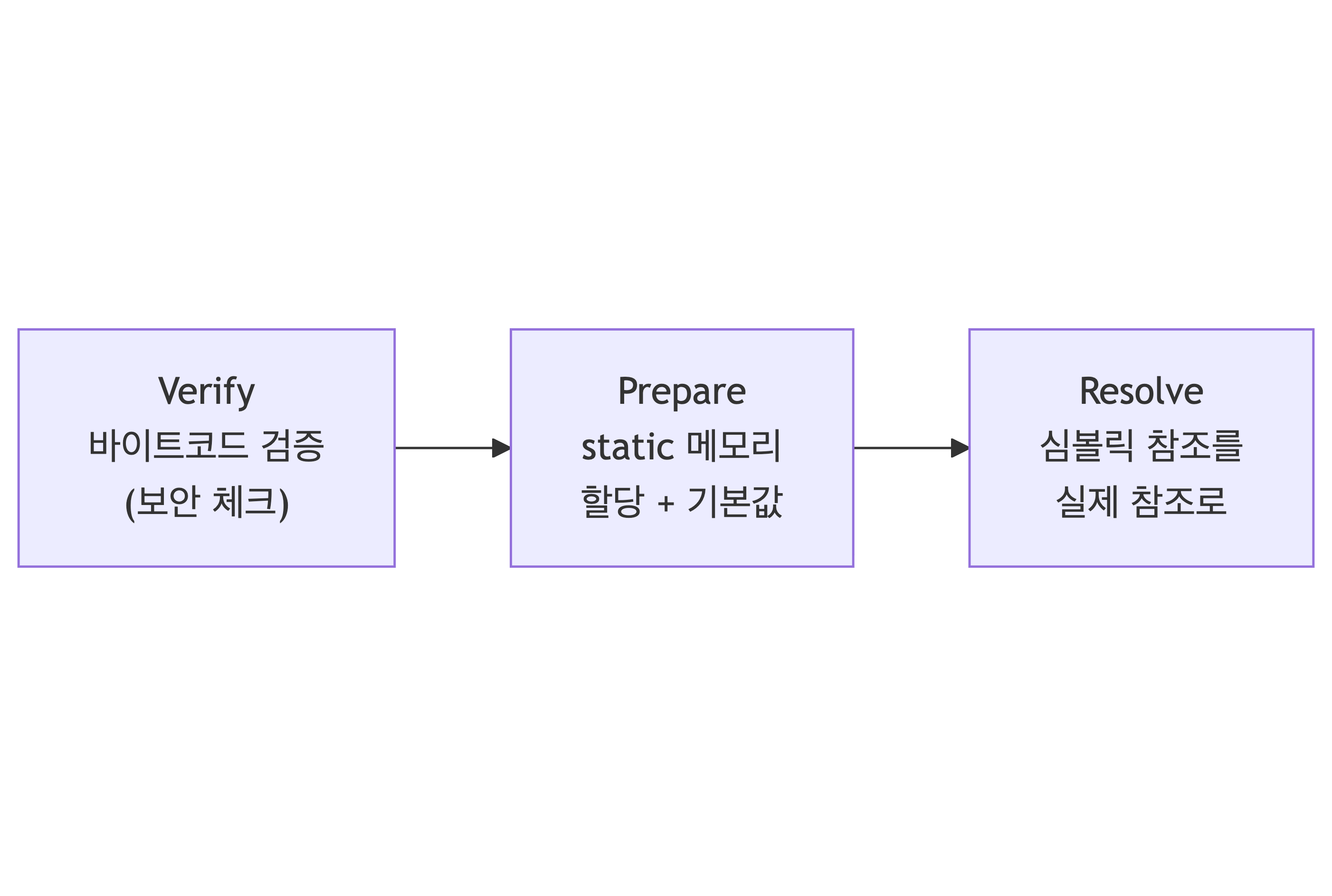
Linking (링킹)

  1. Verify: 바이트코드가 JVM 명세에 맞는지 검증
  2. Prepare: static 변수 메모리 할당, 기본값 초기화 (0, null 등)
  3. Resolve: 심볼릭 참조 → 실제 메모리 주소 (lazy하게 수행될 수 있음)

Initialization (초기화)
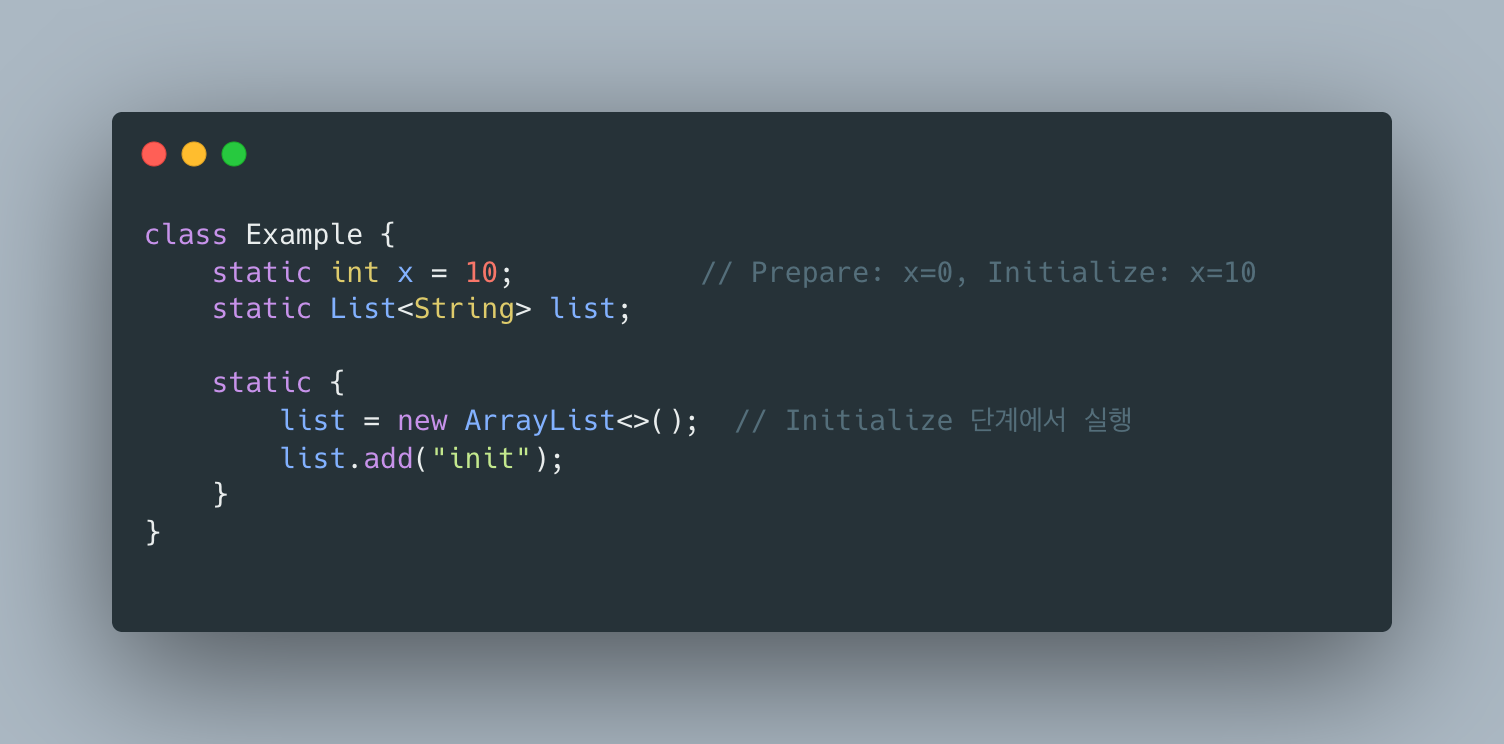
static 변수에 실제 값 할당, static 블록 실행

출처: JVM Internals - Inside Java


1.3 Runtime Data Areas

JVM이 프로그램 실행 중 사용하는 메모리 영역들이에요.

Method Area (Metaspace)

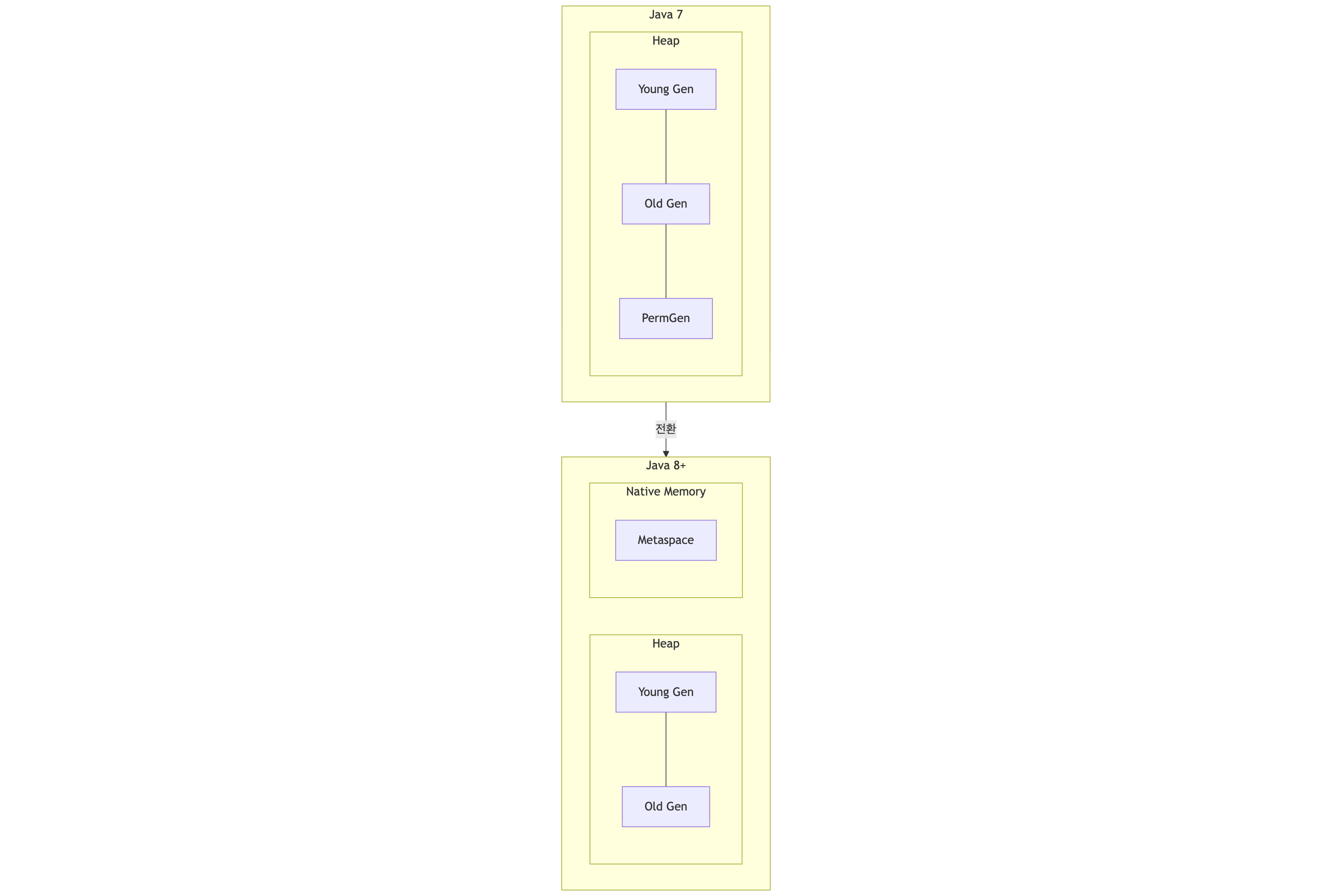
Java 8 이전: PermGen (Permanent Generation) Java 8 이후: Metaspace (Native Memory 사용)

저장 내용:

  • 클래스 구조 (필드, 메서드 정보)
  • Runtime Constant Pool
  • 메서드 바이트코드
  • static 변수
Terminal window
# Metaspace 크기 설정 (Java 8+)
-XX:MetaspaceSize=128m # 초기 크기
-XX:MaxMetaspaceSize=256m # 최대 크기 (기본: 무제한)

PermGen → Metaspace 변경 이유:

  • PermGen은 힙의 일부 → 크기 제한으로 OutOfMemoryError: PermGen space가 자주 발생했어요
  • Metaspace는 Native Memory 사용 → 자동으로 확장 가능해요

출처: Metaspace in Java 8 - Oracle

Heap

모든 객체와 배열이 할당되는 영역이에요. GC의 주요 대상이고요.

User user = new User(); // User 객체는 Heap에 생성
int[] arr = new int[10]; // 배열도 Heap에 생성

자세한 내용은 아래 Heap 구조 섹션을 참조해 주세요.

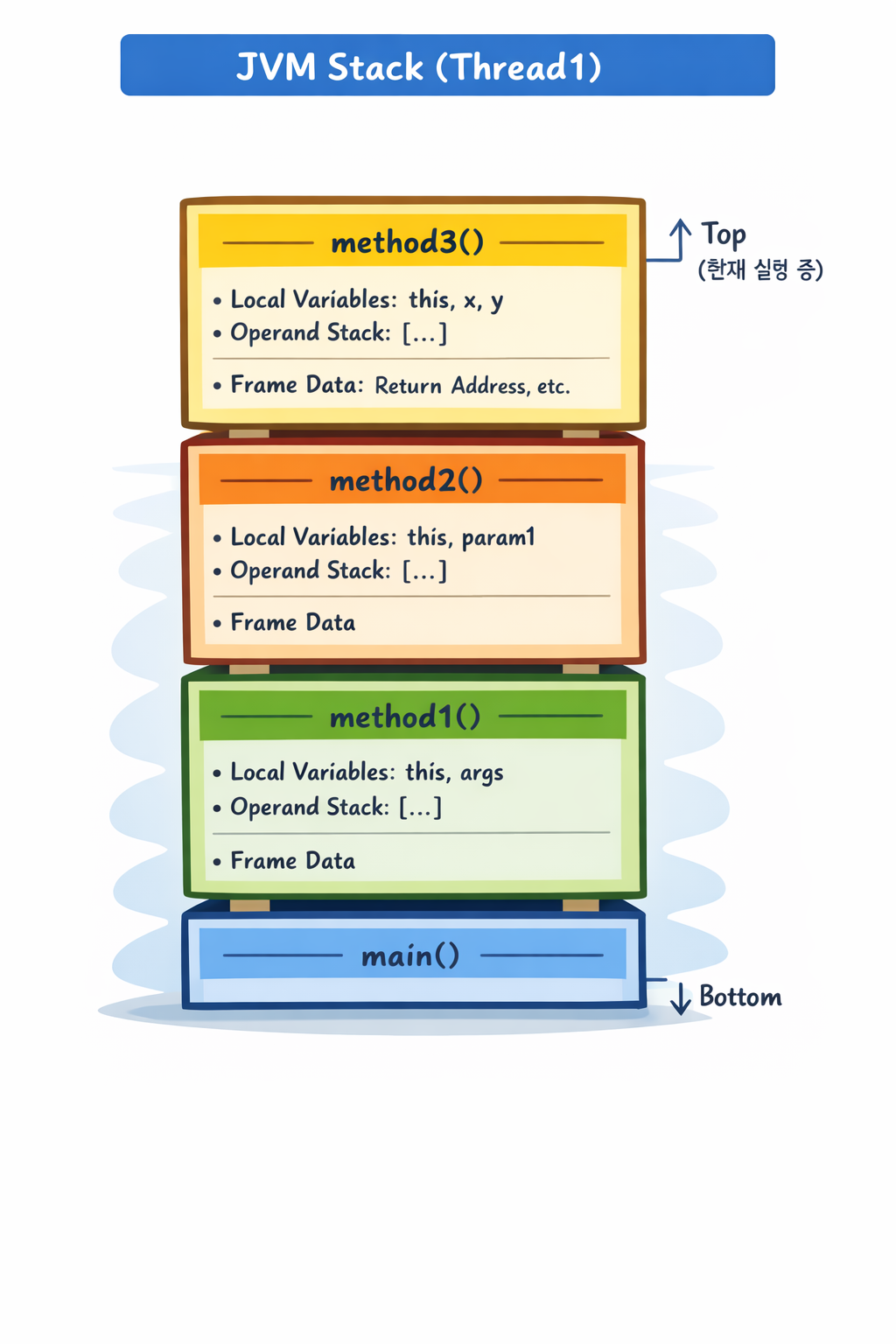
JVM Stack (per Thread)

각 스레드마다 별도로 생성돼요. Stack Frame들의 집합이에요.

Stack Frame 구성요소:

  1. Local Variables Array: 지역 변수, 메서드 파라미터
  2. Operand Stack: 연산에 필요한 값들
  3. Frame Data: 리턴 주소, 예외 테이블 참조 등
public int calculate(int a, int b) {
int sum = a + b; // Local Variables: [this, a, b, sum]
return sum * 2;
}
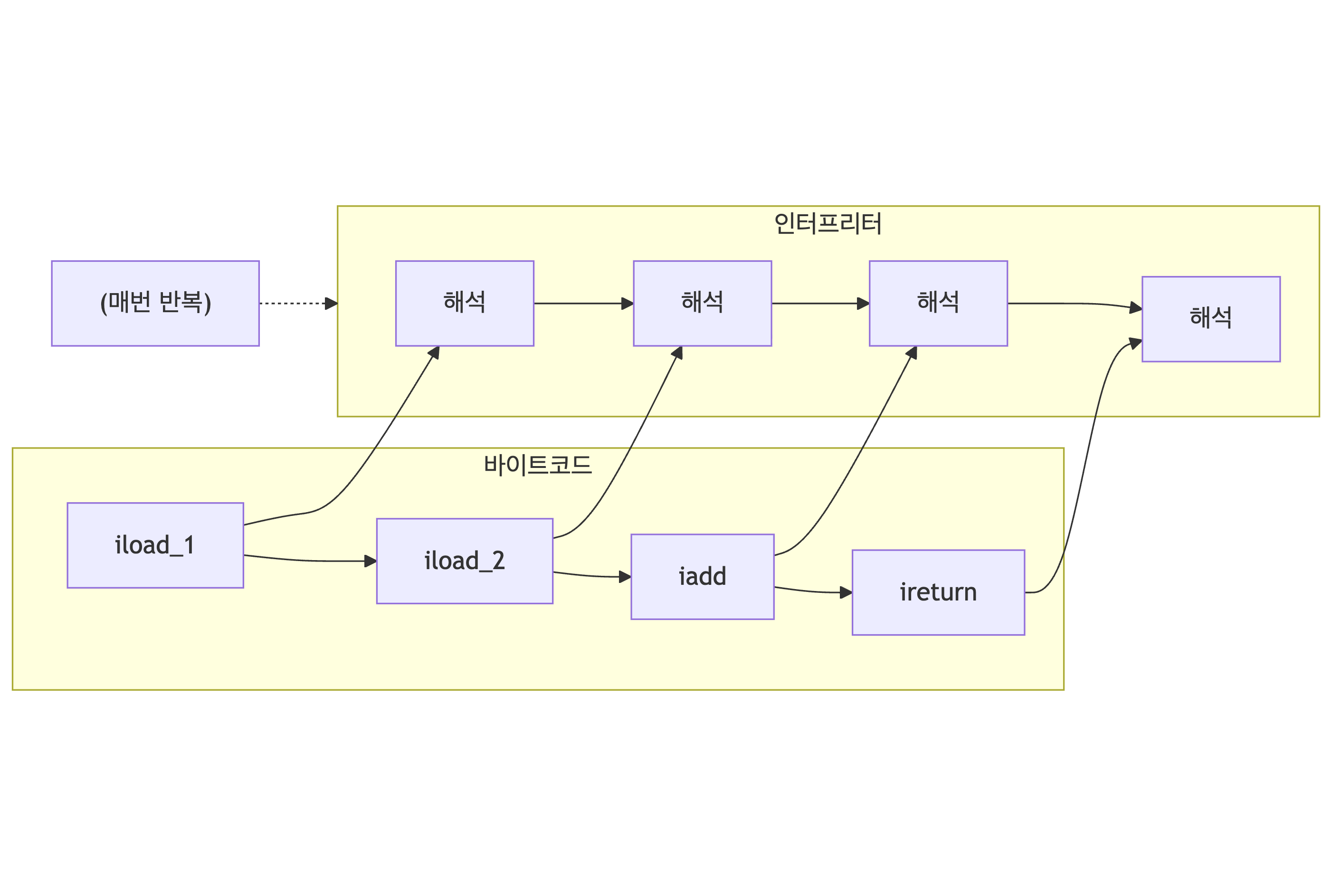
// 바이트코드 (Operand Stack 사용)
// iload_1 // a를 Operand Stack에 push
// iload_2 // b를 Operand Stack에 push
// iadd // pop 2개, 더해서 push
// istore_3 // pop해서 sum(index 3)에 저장

스택 크기 설정:

Terminal window
-Xss512k # 스레드당 스택 크기 (기본: 1MB)

StackOverflowError:

void infinite() {
infinite(); // 무한 재귀 → Stack Frame 계속 쌓임 → overflow
}

출처: JVM Stack and Heap - Oracle Java SE Specs

PC Register (Program Counter)

현재 실행 중인 명령어의 주소를 저장해요. 스레드마다 별도로 존재해요.

Thread 1: PC = 0x00A3 (method1의 10번째 바이트코드)
Thread 2: PC = 0x00F7 (method2의 3번째 바이트코드)

Native 메서드 실행 중이면 PC는 undefined예요.

Native Method Stack

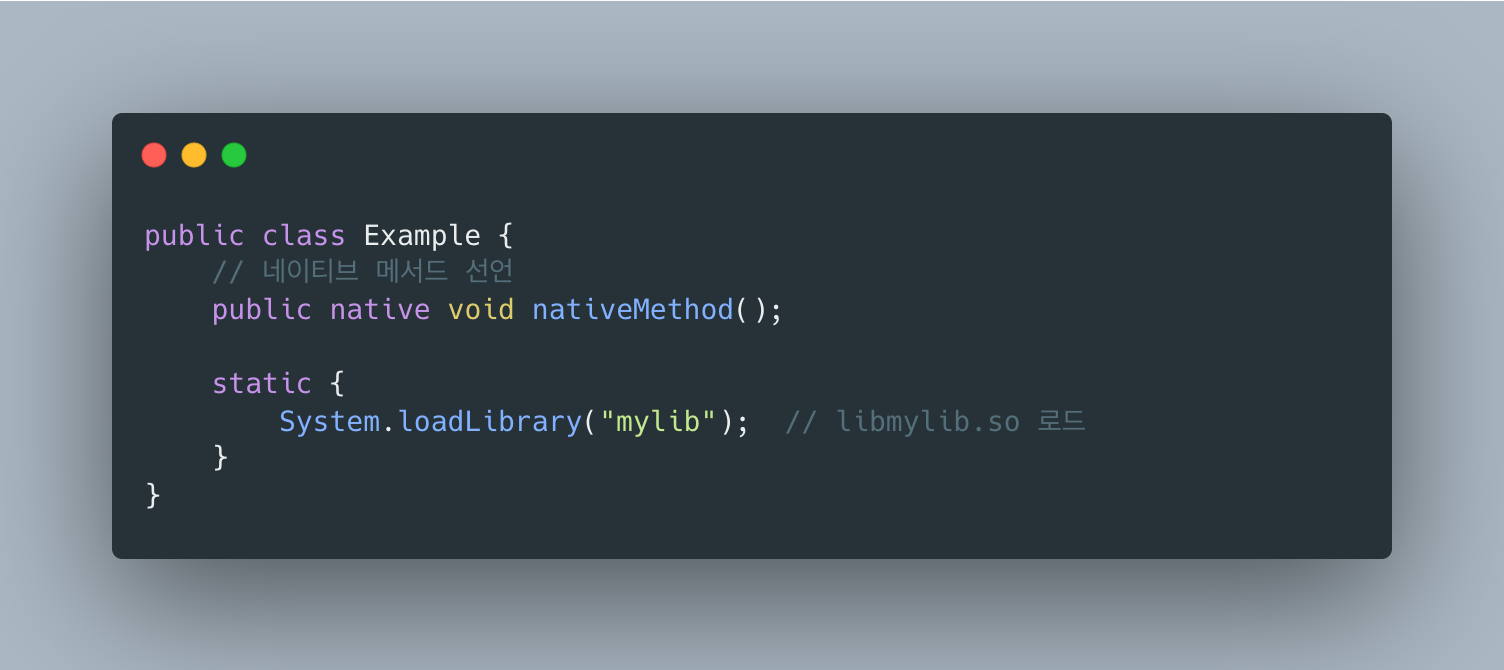
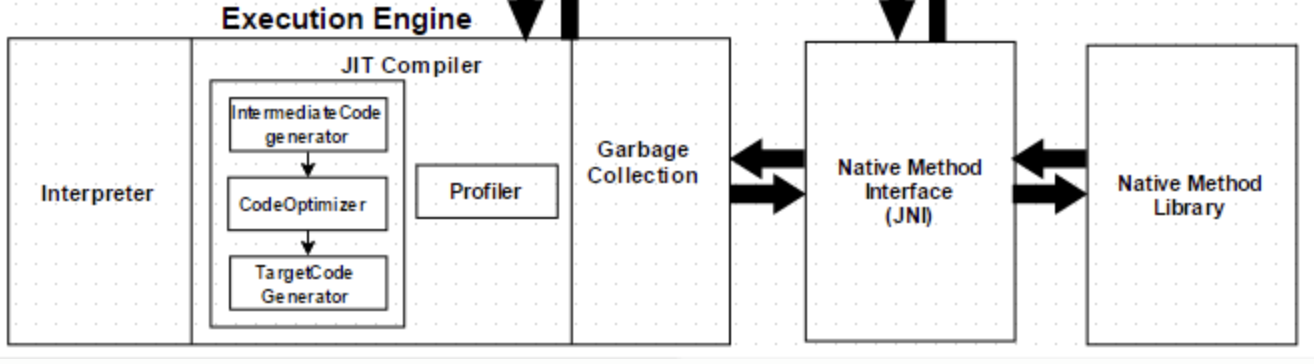
JNI(Java Native Interface)를 통해 호출되는 네이티브 메서드(C/C++)용 스택.


1.4 Execution Engine

바이트코드를 실제 기계어로 변환하여 실행해요.

Interpreter

바이트코드를 한 줄씩 읽어서 실행해요. 시작은 빠르지만 반복 실행 시 느려요.

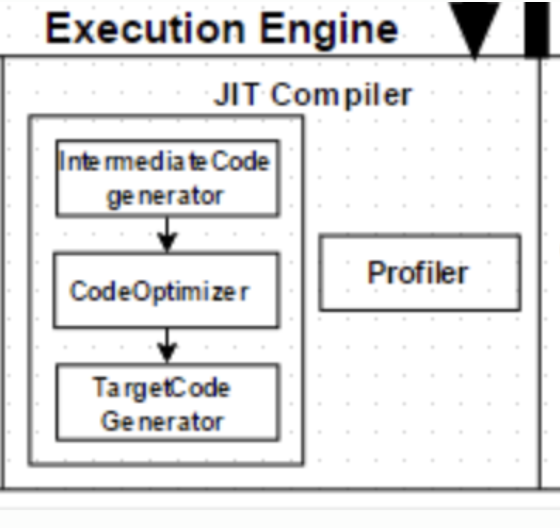
JIT Compiler (Just-In-Time)

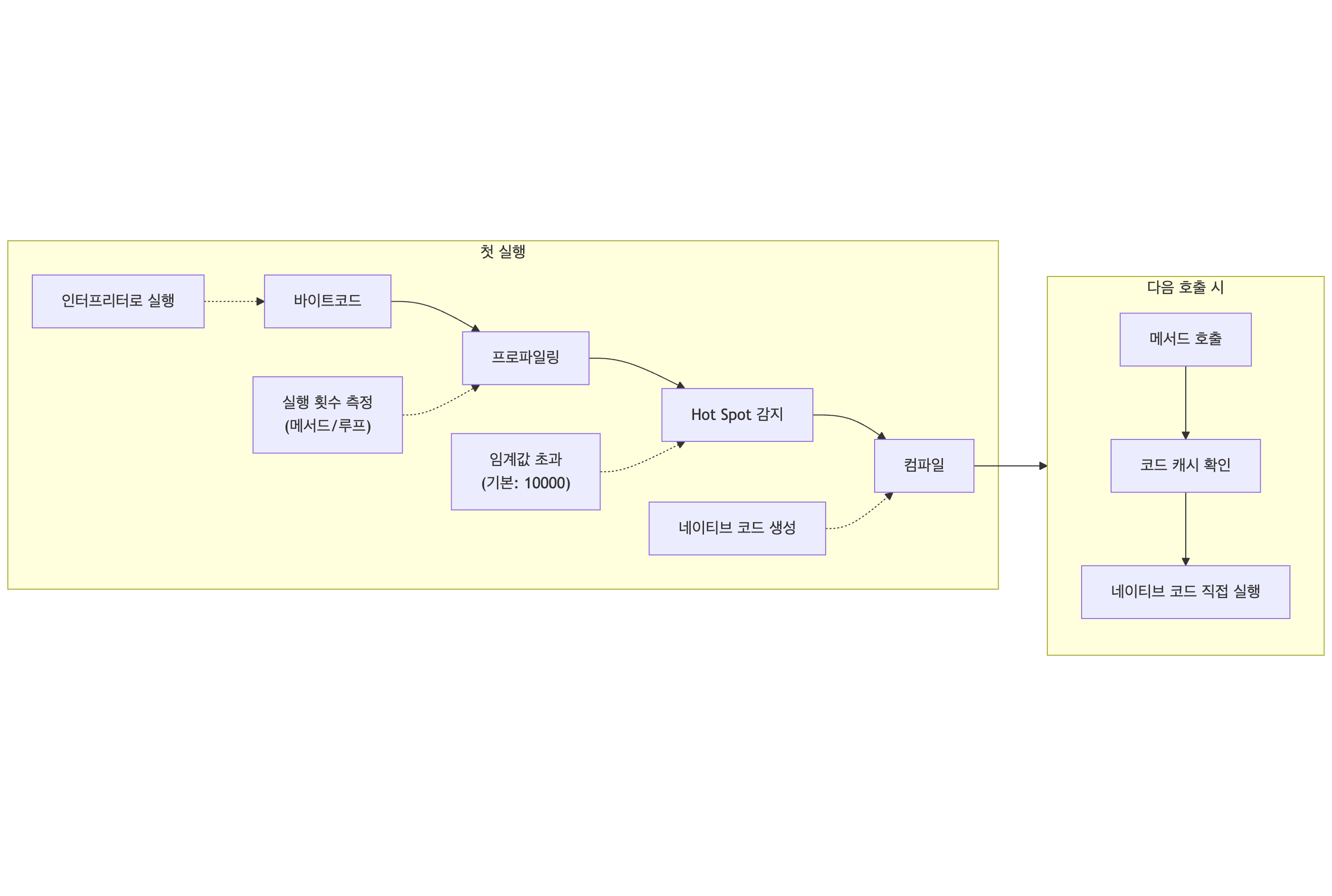
자주 실행되는 코드(Hot Spot)를 네이티브 코드로 컴파일하여 캐싱해요.

  1. 바이트 코드 (인터프리터로 실행)
  2. 프로파일링 (실행 횟수 측정 [메서드/루프])
  3. Hot Spot 감지 (임계값 초과 [기본:10000])
  4. 컴파일 (네이티브 코드 생성)

-> 다음 호출 시

  1. 메서드 호출
  2. 코드 캐시 확인
  3. 네이티브 코드 직접 실행

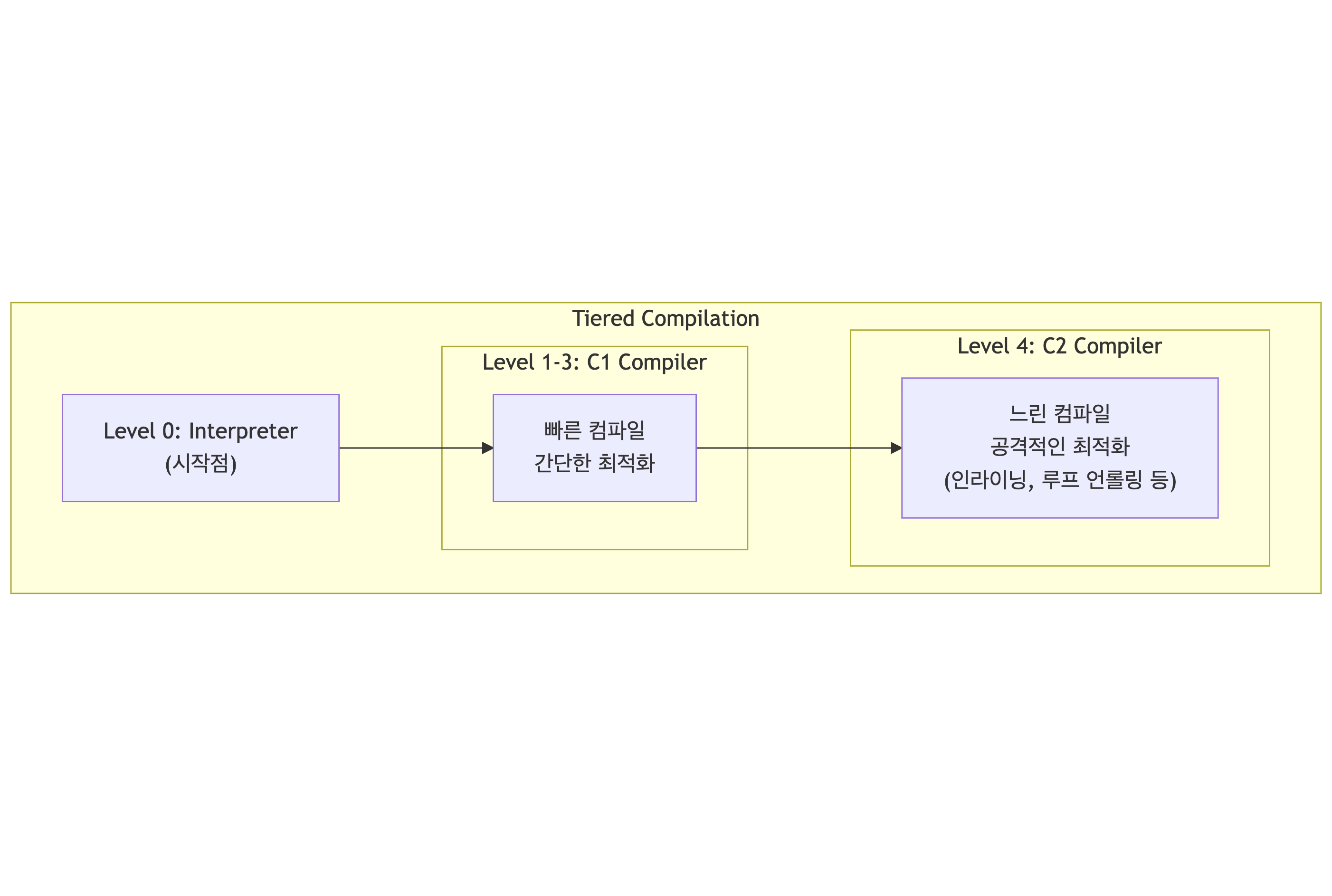
JIT 컴파일러 종류 (Tiered Compilation):

Level1-3:C1 Ompiler <- Client Compiler Level 4: C2 Compiler <- Server Compiler

JIT 최적화 기법들:

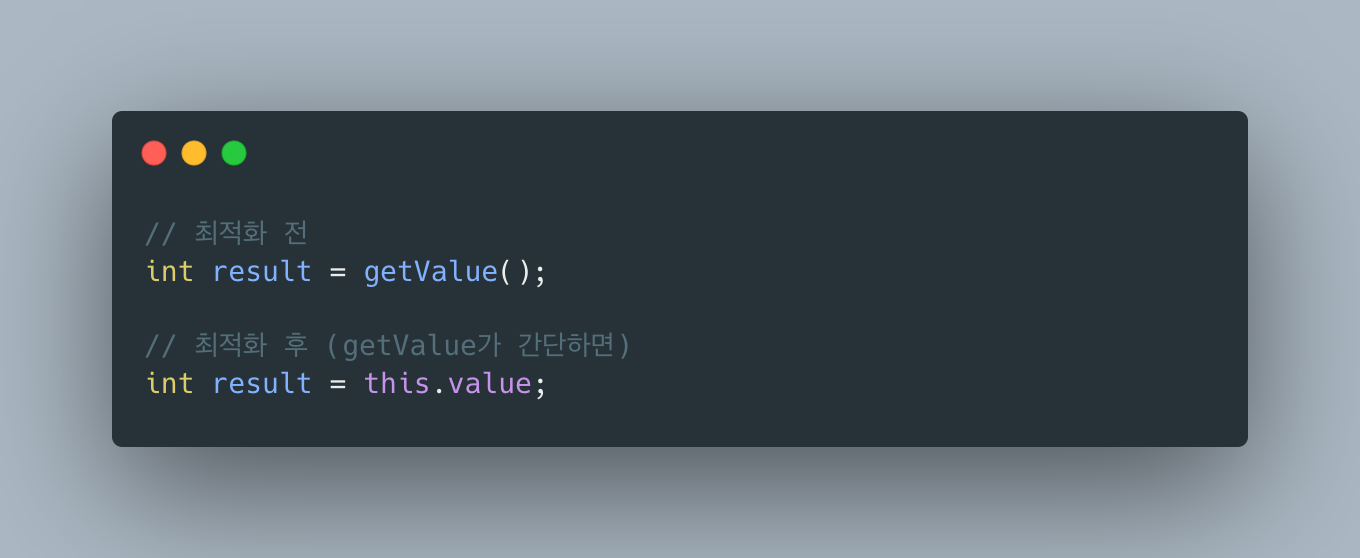
  1. Inlining: 메서드 호출을 본문으로 대체

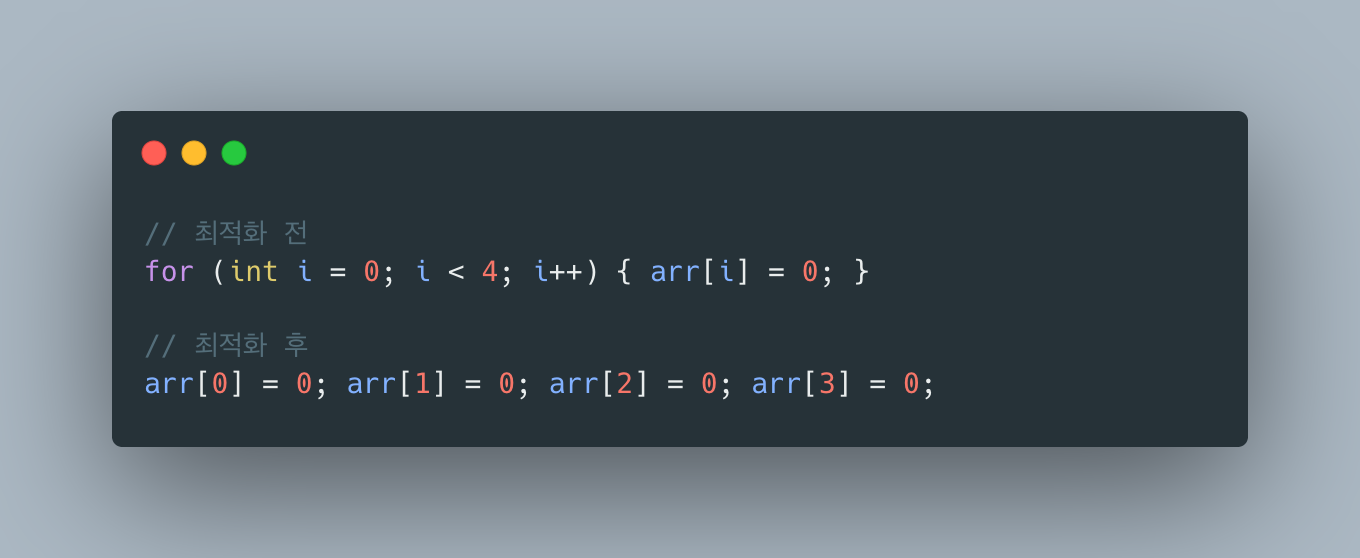
  2. Loop Unrolling: 루프 반복 줄이기

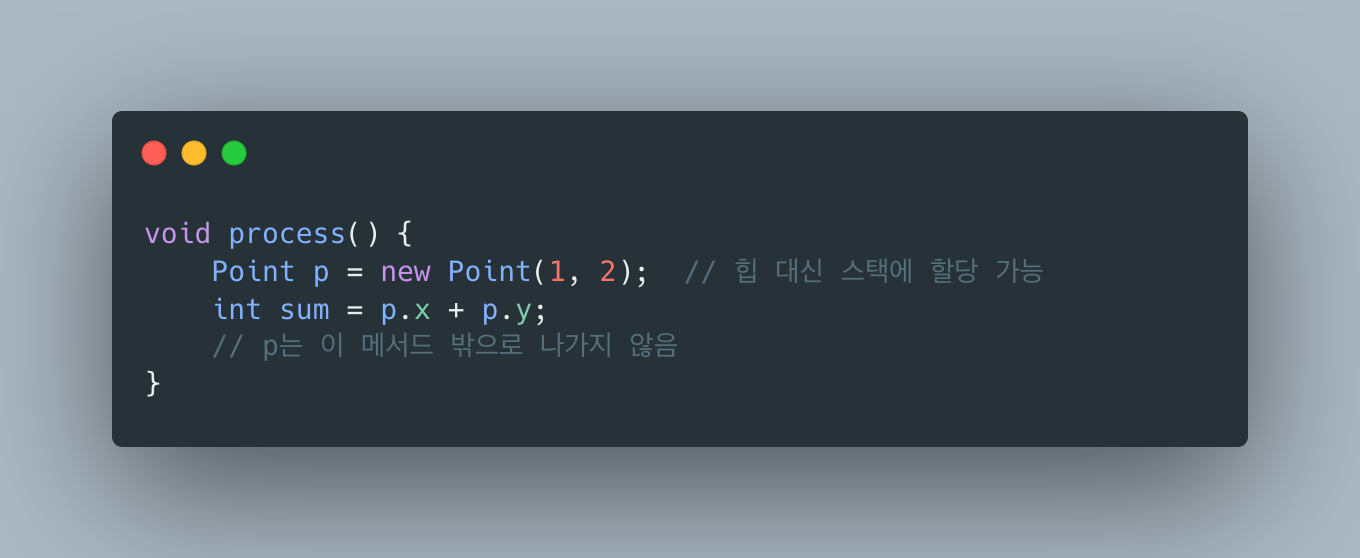
  3. Escape Analysis: 객체가 메서드 밖으로 탈출하지 않으면 스택에 할당
  4. Dead Code Elimination: 사용되지 않는 코드 제거

Terminal window
# JIT 관련 옵션
-XX:+PrintCompilation # 컴파일되는 메서드 출력
-XX:CompileThreshold=10000 # 컴파일 임계값
-XX:-TieredCompilation # Tiered Compilation 비활성화

출처: JIT Compiler - Oracle


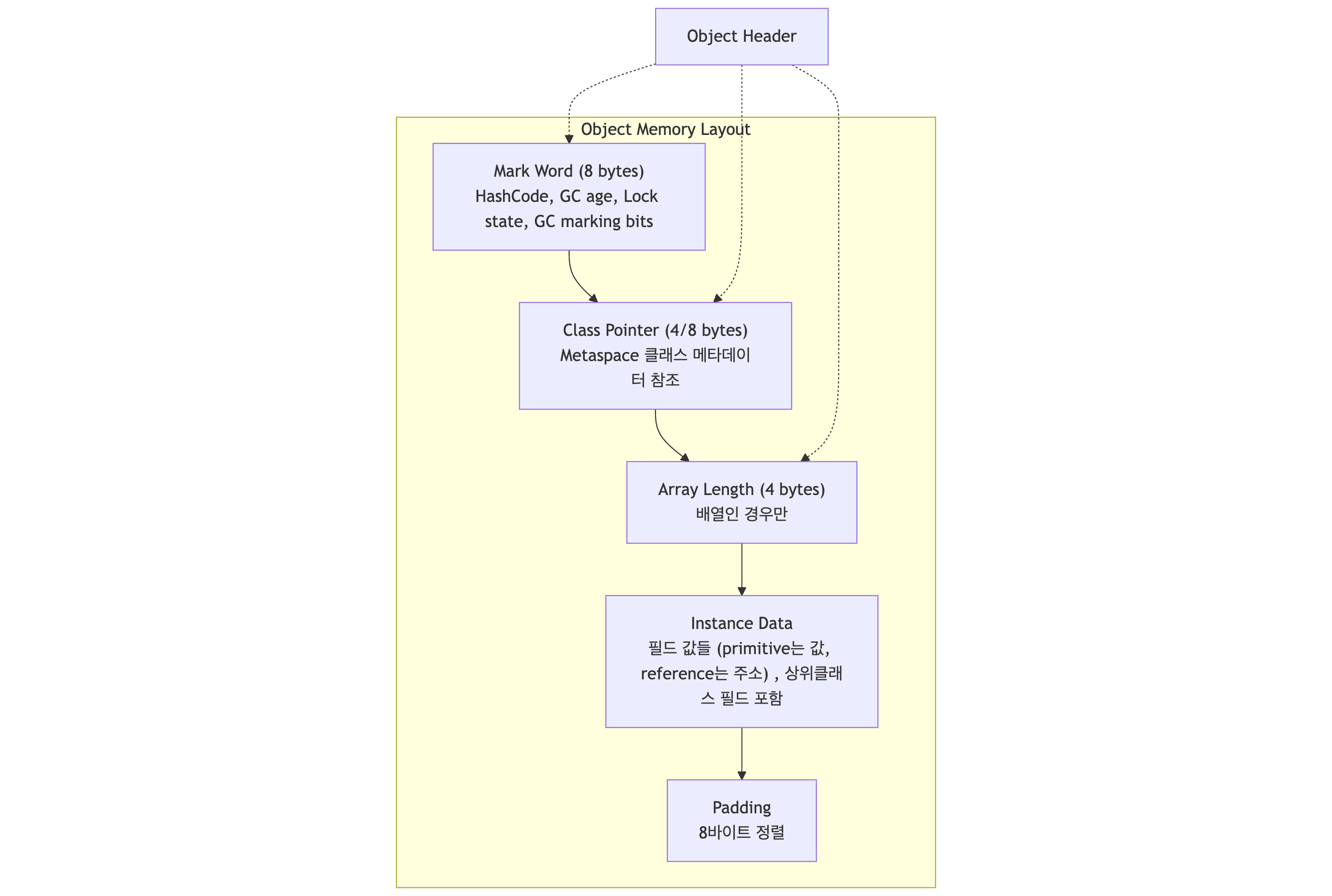
1.5 Object 메모리 레이아웃

Java 객체가 Heap에서 어떻게 저장되는지 살펴볼게요.

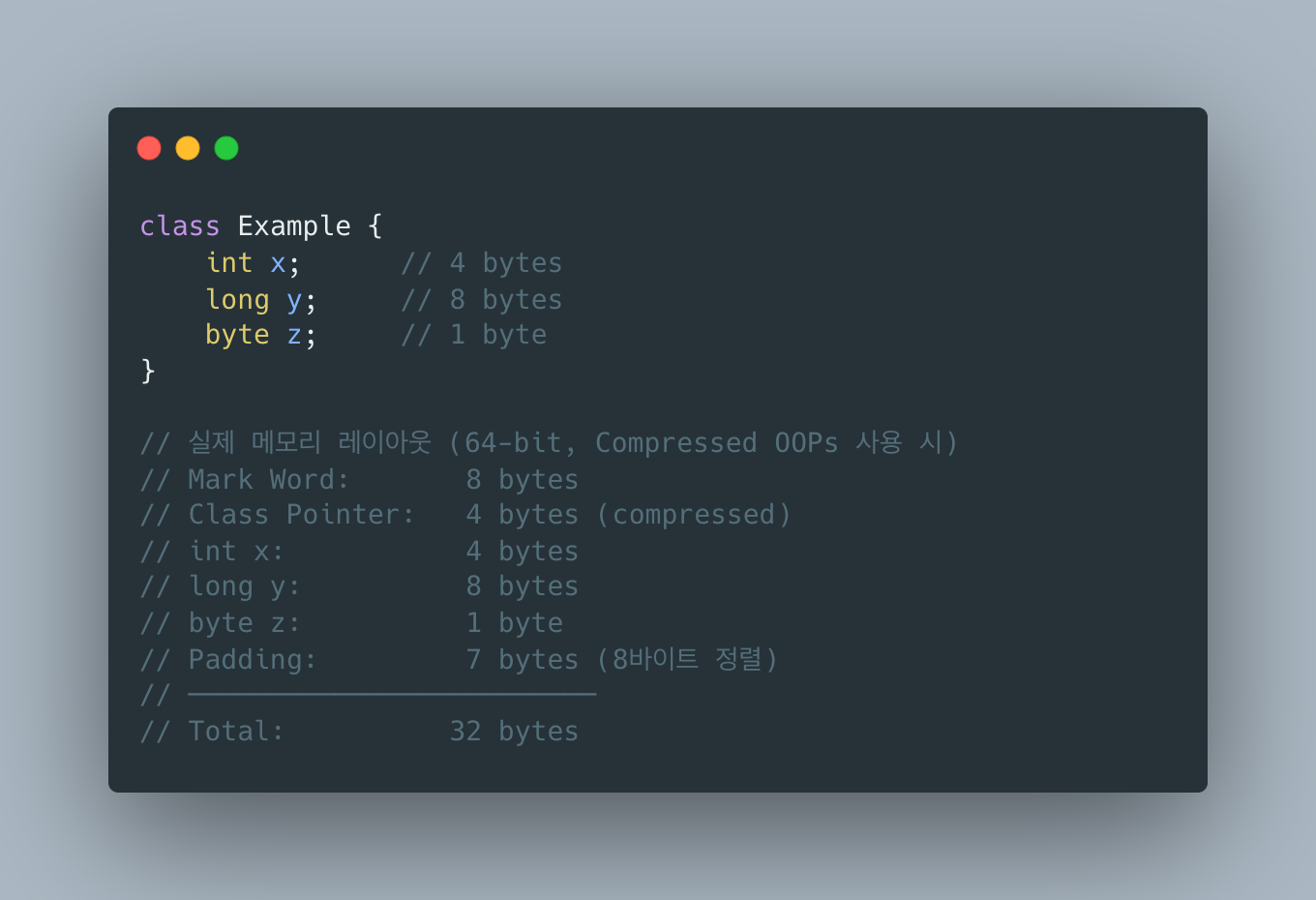
예시: 간단한 객체의 실제 크기

Compressed OOPs (Ordinary Object Pointers):

  • 힙 크기가 32GB 미만이면 자동 활성화
  • 64bit 포인터를 32bit로 압축
  • 메모리 절약 + 캐시 효율 향상
Terminal window
-XX:+UseCompressedOops # 기본 활성화 (힙 < 32GB)
-XX:-UseCompressedOops # 비활성화

출처: HotSpot Glossary - OpenJDK


1.6 String Pool과 Interning

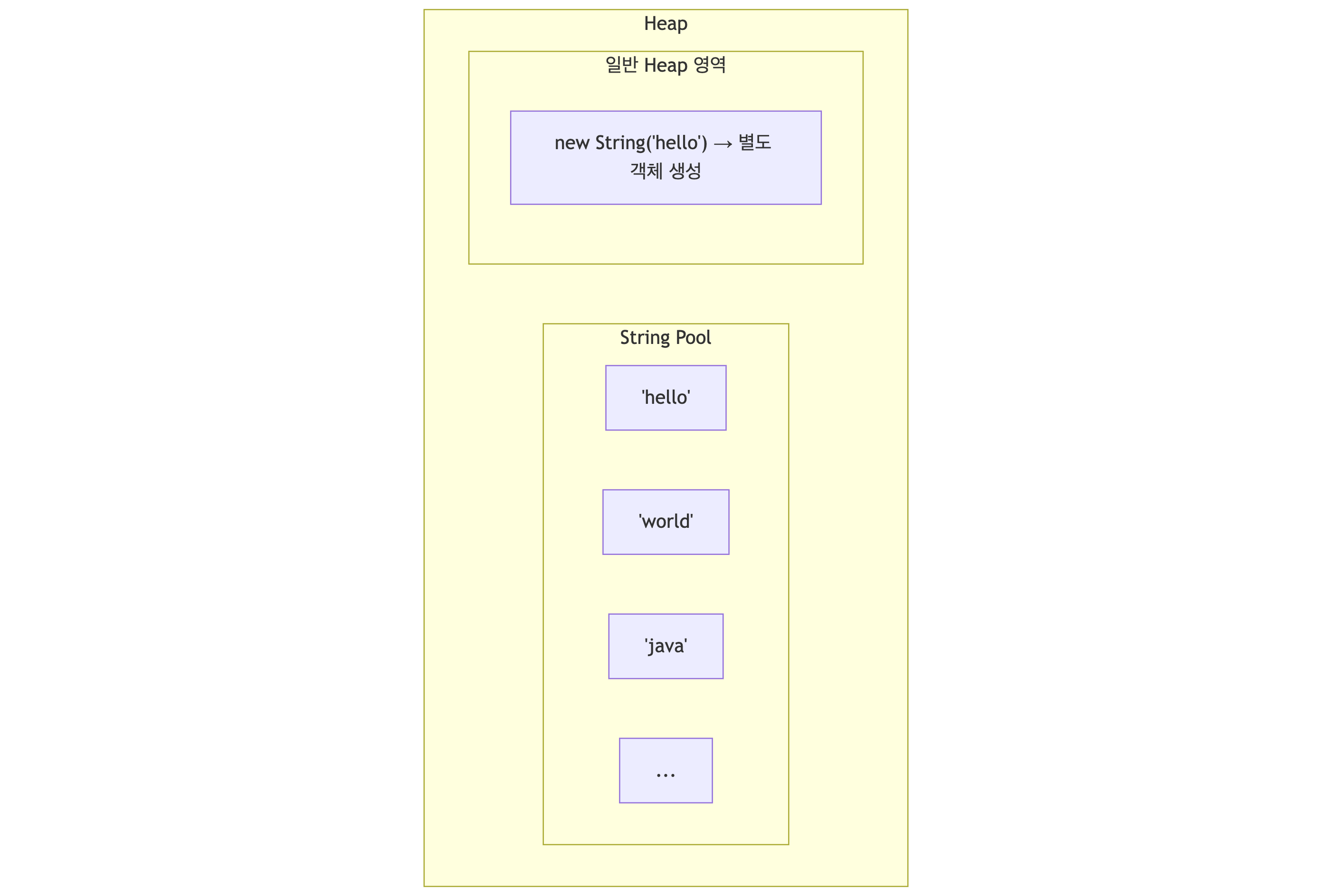
String은 특별 취급돼요. String Pool에서 중복을 제거해요.

String s1 = "hello"; // String Pool에서 가져옴
String s2 = "hello"; // 같은 객체 참조
String s3 = new String("hello"); // 새 객체 생성 (Pool 아님)
String s4 = s3.intern(); // Pool에 있는 객체 반환
System.out.println(s1 == s2); // true (같은 참조)
System.out.println(s1 == s3); // false (다른 객체)
System.out.println(s1 == s4); // true (intern으로 Pool 참조)

Java 7+: String Pool이 PermGen에서 Heap으로 이동 → GC 대상이 됨

출처: String Constant Pool - Baeldung


2. Garbage Collection이란?

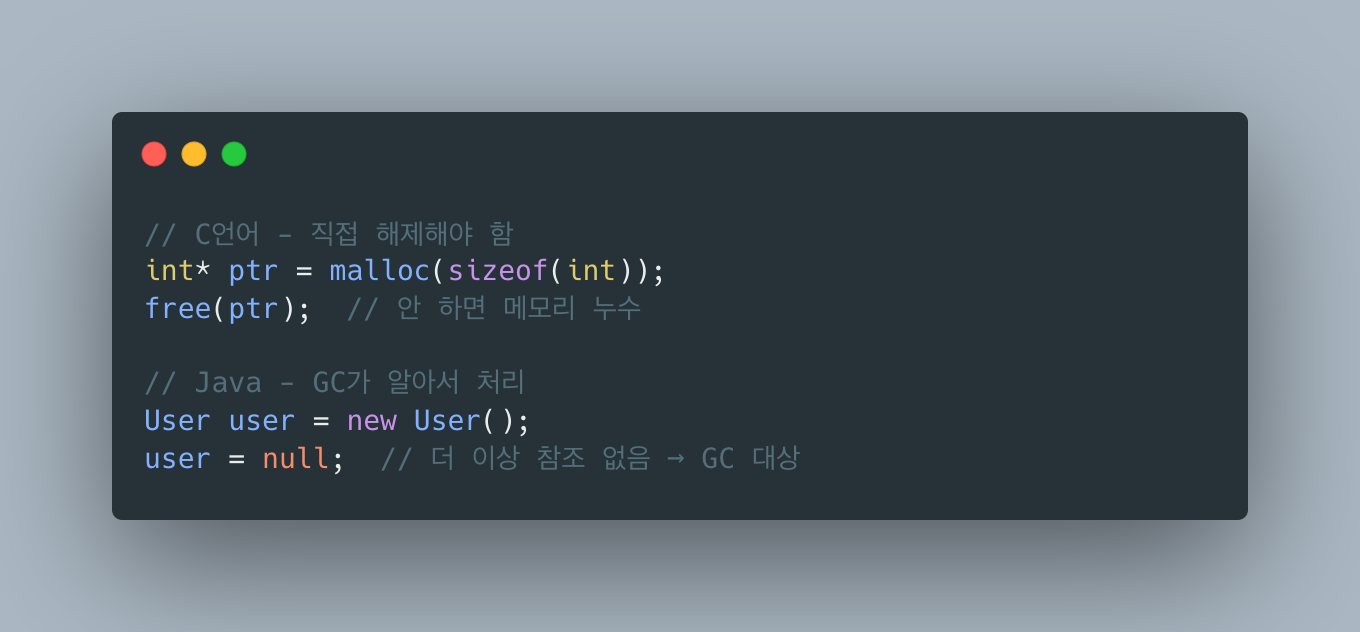
프로그래머가 직접 메모리를 해제하지 않아도 JVM이 알아서 사용하지 않는 객체를 정리해주는 거예요.

편하지만 공짜는 아니에요. GC가 동작할 때 성능 비용이 발생하거든요.

출처: Java Garbage Collection Basics - Oracle


3. Heap 메모리 구조 (Generational Heap Model)

Young Generation

새로 생성된 객체가 할당되는 영역이에요. 세 부분으로 나뉩니다:

  • Eden: 객체가 최초로 생성되는 곳이에요. Eden이 가득 차면 Minor GC가 발생해요.
  • Survivor 0, 1 (S0, S1): Minor GC에서 살아남은 객체가 이동해요. 두 영역을 번갈아 사용하고요.

Old Generation (Tenured)

Young Gen에서 오래 살아남은 객체가 이동하는 곳이에요. 객체의 age가 임계값(기본 15)을 넘으면 Promotion 돼요.

Terminal window
# Tenuring Threshold 설정
-XX:MaxTenuringThreshold=15

왜 세대를 나눠놨을까?

Weak Generational Hypothesis: 대부분의 객체는 금방 죽는다.

금방 죽는 객체를 위해 전체 힙을 스캔하는 건 비효율적이에요. Young Gen만 자주 청소하고, Old Gen은 가끔 청소해요.

출처: Generations - Oracle Java SE 8 GC Tuning Guide


4. Minor GC: Eden에서 Old Gen까지의 여정

객체가 생성되고 GC를 거쳐 Old Generation으로 이동하는 전체 과정을 단계별로 살펴볼게요.

4.1 객체 할당: TLAB (Thread-Local Allocation Buffer)

새 객체는 Eden 영역에 할당돼요. 하지만 멀티스레드 환경에서 여러 스레드가 동시에 Eden에 할당하면 동기화 비용이 발생해요. 이를 해결하기 위해 TLAB을 사용해요.

  • 각 스레드는 Eden 내에 자신만의 버퍼(TLAB)를 가져요
  • 객체 할당 시 자기 TLAB 내에서 bump-the-pointer로 빠르게 할당해요
  • TLAB이 가득 차면 새 TLAB을 할당받아요
  • 락 없이 빠른 할당 가능
// 내부적으로 이런 식으로 동작
Object obj = new Object();
// → 현재 스레드의 TLAB에서 포인터만 이동시켜 할당
// → TLAB top += sizeof(Object)

Bump-the-Pointer:

출처: Thread-Local Allocation Buffers (TLAB) - Oracle Blogs


4.2 첫 번째 Minor GC: Eden이 가득 찼을 때

Eden 영역이 가득 차면 Minor GC가 발생해요.

Step 1: Stop-The-World

모든 애플리케이션 스레드가 Safepoint에서 멈춰요.

Safepoint란?

  • GC가 안전하게 수행될 수 있는 지점
  • 모든 객체 참조가 일관된 상태
  • 예: 메서드 호출 사이, 루프 백엣지(loop back-edge)
for (int i = 0; i < 1000000; i++) {
// 루프 반복 시 safepoint 체크
doSomething(); // 메서드 호출 후 safepoint
}

출처: Safepoints: Meaning, Side Effects and Overheads - Oracle HotSpot

Step 2: GC Roots에서 시작하여 Mark

GC Root는 다음을 포함해요:

  • 스레드 스택의 지역 변수
  • static 변수
  • JNI 참조
  • 동기화 모니터

Step 3: 살아남은 객체를 Survivor로 복사

핵심: Eden은 통째로 비워져요. 살아남은 객체만 Survivor로 복사돼요.

출처: How Java Garbage Collection Really Works - InfoQ


4.3 두 번째 Minor GC: Survivor 간 이동

다시 Eden이 가득 차면 두 번째 Minor GC가 발생해요.

[시작 상태] Eden: [I][J][K][L][M] <- 새로 할당된 객체들 Survivor0: [A(1)][B(1)][C(1)] (From) <- 이전 GC 생존자 Survivor1: [_______________] (To)

참조 관계 Root -> A -> B (계속 참조 중) C, I, J, K, L, M은 더 이상 참조 안 함

Mark 결과:

Marked (살아있음): A, B Unmarked (가비지): C, I, J, K, L, M

복사

복사 후 Eden: [ 전체 해제 ] Survivor0: [ 전체 해제 ] (다음 GC의 To가 됨) Survivor1: [A(age=2)][B(age=2)] (이번 GC의 To) ...........age 증가!

Survivor 영역의 규칙

  1. 항상 하나는 비어있다 - From과 To가 번갈아가며 역할 교체
  2. Eden + From → To로 복사 - 살아남은 객체만
  3. 복사 후 Eden과 From은 통째로 해제
  4. From/To 역할 교체 - 다음 GC에서 To가 From이 됨

GC 1: Eden -> S0(To), S1(From=empty) GC 2: Eden + S0(From) -> S1(To) GC 3: Eden + S1(From) -> S0(To) GC 4: Eden + S0(From) -> S1(To) … 반복

출처: How Does Garbage Collection Work in Java? - Baeldung


4.4 Promotion: Old Generation으로 이동

객체의 age가 임계값(기본 15)에 도달하면 Old Gen으로 승격(Promotion) 돼요.

[15번째 Minor GC] Survivor0: [A(age=15)][B(age=15)] (From) Survivor1: [___________________] (To)

Promotion 발생 Old Gen: [A][B] ← age=15 이상이라 Old Gen으로 이동 Survivor1: [____] ← A, B는 여기로 안 감

A, B는 이제 Minor GC 대상이 아님 (Major GC에서만 수집)

Premature Promotion 문제

Survivor 영역이 너무 작으면 age 임계값에 도달하지 않아도 강제 승격돼요.

Survivor가 작은 경우 Eden: [A][B][C][D][E] Survivor0: [X][Y][Z] ← 이미 가득 참 Survivor1: [______] (To)

Minor GC 시

  • A, B, C, D, E 중 살아남은 객체 + X, Y, Z 중 살아남은 객체
  • Survivor1에 다 안 들어감!
  • -> 일부가 Old Gen으로 강제 승격 (Premature Promotion)

이렇게 되면 수명이 짧은 객체가 Old Gen에 쌓여 Full GC 빈도가 증가해요.

Terminal window
# Survivor 비율 조정으로 해결
-XX:SurvivorRatio=6 # Eden:S0:S1 = 6:1:1

출처: Sizing the Generations - Oracle


4.5 전체 과정 시각화


4.6 Minor GC의 성능 특성

왜 Minor GC가 빠른가?

  1. Copying GC 방식: Mark-Sweep-Compact가 아니라 살아있는 것만 복사
  2. Young Gen만 스캔: 전체 힙이 아닌 작은 영역만
  3. 대부분 죽어있음: 복사할 객체가 적음 (Weak Generational Hypothesis)

전형적인 Minor GC

  • Eden 크기: 256MB
  • 살아남는 객체: 15MB (전체의 12%)
  • 소요 시간: 5~50ms

Card Table: Old Gen → Young Gen 참조 추적

Old Gen 객체가 Young Gen 객체를 참조하면 문제가 생겨요.

Old Gen: [X] -> [A] (Eden)
Minor GC 시 X는 스캔 대상이 아님
-> A가 살아있는지 어떻게 알지?
-> Old Gen 전체를 스캔? (그럼 Minor GC 의미 없음)

이를 해결하기 위해 Card Table을 사용해요:

  • Old Gen을 512B 단위 Card로 나눔
  • Card 내 객체가 Young Gen을 참조하면 해당 Card를 Dirty로 표시
  • Minor GC 시 Dirty Card만 추가로 스캔
  • Write Barrier: 참조 대입 시 Card Table 업데이트
// Write Barrier (JVM이 자동 삽입)
oldObject.field = youngObject;
// -> Card Table[oldObject의 card index] = DIRTY;

출처: Understanding GC: Card Tables - Oracle Blogs


4.7 Minor GC 로그 읽기

Terminal window
# GC 로그 활성화
java -Xlog:gc*:file=gc.log:time,uptime,level,tags -jar app.jar

실제 로그 예시:

[0.532s][info][gc,start ] GC(0) Pause Young (Normal) (G1 Evacuation Pause)
[0.532s][info][gc,task ] GC(0) Using 4 workers of 4 for evacuation
[0.535s][info][gc,phases ] GC(0) Pre Evacuate Collection Set: 0.1ms
[0.535s][info][gc,phases ] GC(0) Merge Heap Roots: 0.1ms
[0.535s][info][gc,phases ] GC(0) Evacuate Collection Set: 2.5ms
[0.535s][info][gc,phases ] GC(0) Post Evacuate Collection Set: 0.4ms
[0.535s][info][gc,phases ] GC(0) Other: 0.2ms
[0.535s][info][gc,heap ] GC(0) Eden regions: 6->0(8)
[0.535s][info][gc,heap ] GC(0) Survivor regions: 0->1(1)
[0.535s][info][gc,heap ] GC(0) Old regions: 0->0
[0.535s][info][gc,heap ] GC(0) Humongous regions: 0->0
[0.535s][info][gc ] GC(0) Pause Young (Normal) (G1 Evacuation Pause) 24M->4M(256M) 3.245ms

해석:

  • Eden regions: 6->0(8): Eden 6개 region 사용 -> 0개로 (최대 8개)
  • Survivor regions: 0->1(1): Survivor 0 -> 1개 사용
  • 24M->4M(256M): 힙 24MB 사용 -> 4MB로 줄음 (전체 256MB)
  • 3.245ms: GC 소요 시간

출처: Analyze G1 GC logs - Oracle


5. GC 종류

GC 타입대상 영역특징
Minor GCYoung Gen자주 발생, 빠름
Major GCOld Gen덜 발생, 느림
Full GC전체 Heap가장 느림, 피해야 함

Minor GC는 보통 수 ms ~ 수십 ms예요. Full GC는 수백 ms ~ 수 초가 걸릴 수 있어요.

출처: Understanding JVM and Garbage Collection - DZone


6. Mark-and-Sweep 알고리즘

가장 기본적인 GC 알고리즘이에요.

동작 방식

1단계: Mark

GC Root(스택, static 변수, JNI 참조 등)에서 시작하여 참조를 따라가며 살아있는 객체에 표시.

2단계: Sweep

표시되지 않은 객체를 메모리에서 제거하고, 해제된 메모리를 free list에 추가.

출처: Mark-and-Sweep: Garbage Collection Algorithm - GeeksforGeeks

Mark-and-Sweep의 장점

  • 순환 참조 처리 가능: Reference Counting과 달리 순환 참조도 수집 가능
  • 추가 오버헤드 없음: 객체 할당 시 별도 작업 불필요

Mark-and-Sweep의 단점

1. Stop-The-World (STW)

GC가 동작하는 동안 애플리케이션이 멈춰요.

“JVM pauses our application from running, whenever a GC event runs.”

실시간 응답이 중요한 서비스에서 수백 ms씩 멈추면 치명적이에요.

출처: Stop-the-World Events: Why Java GC Freezes Your Application - GCeasy

2. 메모리 단편화 (Fragmentation)

Sweep 후 메모리가 듬성듬성해져요.

총 빈 공간은 충분한데, 연속된 공간이 없어서 큰 객체를 할당 못 할 수 있어요.

3. 전체 힙 스캔

살아있는 객체를 찾기 위해 전체 힙을 스캔해야 해요. 힙이 클수록 오래 걸립니다.

출처: How the Mark-Sweep-Compact Algorithm Works - GCeasy


7. Mark-Sweep-Compact

단편화 문제를 해결하기 위해 Compact 단계를 추가했어요.

장점

  • 메모리 단편화 해결
  • 새 객체 할당이 빠름 (bump-the-pointer)

단점

  • Compact 과정에서 객체 이동 → 참조 주소 업데이트 필요 → 더 긴 STW

출처: How the Mark-Sweep-Compact Algorithm Works - GCeasy


8. JVM의 GC 종류

Serial GC

Terminal window
-XX:+UseSerialGC
  • 싱글 스레드로 GC 수행
  • STW 시간이 김
  • 작은 힙, 클라이언트 애플리케이션에 적합

Parallel GC

Terminal window
-XX:+UseParallelGC
  • 멀티 스레드로 GC 수행
  • 처리량(Throughput) 최적화
  • Java 8 기본 GC

G1 GC (Garbage-First)

Terminal window
-XX:+UseG1GC
  • 힙을 작은 Region으로 나눔
  • 가비지가 많은 Region부터 수집
  • 지연시간과 처리량의 균형
  • Java 9+ 기본 GC
ESOO
OEEO
EOSH

E: Eden, S: Survivor, O: Old, H: Humongous

출처: JDK GCs Comparison - Inside.java

ZGC

Terminal window
-XX:+UseZGC
  • STW 10ms 미만 목표 (보통 250μs 이하)
  • 대용량 힙(최대 16TB)에서도 짧은 지연
  • 거의 모든 작업을 애플리케이션과 동시 수행
  • Java 15+ 정식 지원

Shenandoah

Terminal window
-XX:+UseShenandoahGC
  • ZGC와 비슷한 저지연 목표
  • Red Hat에서 개발
  • 힙 크기와 무관하게 일정한 pause time

출처: How to choose the best Java garbage collector - Red Hat Developer


9. G1 vs ZGC 비교

항목G1 GCZGC
STW 시간수십~수백 ms< 10ms (보통 < 1ms)
최대 힙 크기수십 GB 권장최대 16TB
CPU 오버헤드낮음높음
메모리 오버헤드낮음높음
적합한 상황일반적인 웹 서비스초저지연 필수 서비스

언제 G1을 쓸까?

  • 힙 크기 32GB 이하
  • 적당한 지연시간 허용 (수십~수백 ms)
  • CPU/메모리 리소스 제한

언제 ZGC를 쓸까?

  • 초저지연 필수 (트레이딩, 게임 서버)
  • 대용량 힙 (수백 GB 이상)
  • 리소스 여유 있음

출처: Enhancing Java Performance: G1GC to ZGC at Halodoc


10. GC 튜닝 기본

힙 크기 설정

Terminal window
java -Xms512m -Xmx2g -jar app.jar
  • -Xms: 초기 힙 크기
  • -Xmx: 최대 힙 크기

Tip: Xms와 Xmx를 같게 설정하면 힙 리사이징 오버헤드를 줄일 수 있어요.

GC 로그 활성화

Terminal window
# Java 9+
java -Xlog:gc*:file=gc.log:time -jar app.jar
# Java 8
java -XX:+PrintGCDetails -XX:+PrintGCDateStamps -Xloggc:gc.log -jar app.jar

Young/Old 비율 조정

Terminal window
# Young Gen을 전체의 1/3으로 (기본은 1/3)
-XX:NewRatio=2
# Survivor 영역 크기 조정
-XX:SurvivorRatio=8

출처: Sizing the Generations - Oracle


11. GC 관련 문제 상황

1. Full GC가 자주 발생

증상: 주기적으로 애플리케이션이 느려짐

원인:

  • Old Gen이 자주 차는 경우
  • 메모리 누수
  • Premature Promotion (객체가 너무 빨리 Old Gen으로 이동)

해결:

  • 힙 덤프 분석 (jmap, VisualVM, Eclipse MAT)
  • 불필요한 객체 참조 제거
  • Young Gen 크기 증가

2. OOM (OutOfMemoryError)

java.lang.OutOfMemoryError: Java heap space

원인:

  • 힙 크기 부족
  • 메모리 누수

해결:

  • 힙 크기 증가 (-Xmx)
  • 메모리 누수 찾아서 수정
  • 힙 덤프 분석

3. GC Overhead Limit Exceeded

java.lang.OutOfMemoryError: GC overhead limit exceeded

의미: GC에 전체 시간의 98% 이상 사용, 힙의 2% 미만만 회수

원인: 거의 OOM 상태. 살아있는 객체가 힙 대부분을 차지.

출처: 9 Tips to Reduce Long Garbage Collection Pauses - GCeasy


12. 실무에서의 GC

대부분의 경우

기본 설정으로 충분해요.

G1 GC가 기본이고, 대부분의 워크로드에서 잘 동작해요. 문제가 생기기 전에 튜닝하지 마세요.

튜닝이 필요한 경우

  1. GC 로그에서 긴 STW 시간이 관찰될 때
  2. OOM이 발생할 때
  3. 특수한 요구사항 (초저지연, 대용량 힙 등)

Spring Boot 권장 설정

Terminal window
# 일반적인 웹 애플리케이션
java -Xms512m -Xmx512m -XX:+UseG1GC -jar app.jar
# 저지연이 중요한 경우 (Java 17+)
java -Xms1g -Xmx1g -XX:+UseZGC -jar app.jar

13. 정리

알고리즘장점단점
Mark-and-Sweep단순함, 순환 참조 처리STW, 단편화
Mark-Sweep-Compact단편화 해결더 긴 STW
Copying (Young Gen)빠름, 단편화 없음메모리 2배 필요
G1예측 가능한 STW, 균형복잡한 내부 구조
ZGC초저지연 (< 10ms)CPU/메모리 오버헤드

핵심 포인트

  1. GC는 공짜가 아니에요 - STW가 발생해요
  2. 대부분은 기본 설정으로 충분해요 - 섣부른 최적화 금지
  3. 문제가 생기면 GC 로그부터 확인하세요 - 추측하지 말고 측정하세요
  4. 메모리 누수 먼저 해결하세요 - GC 튜닝보다 코드 수정이 우선이에요

참고 자료


1. JVM Architecture Overview

JVM (Java Virtual Machine) is a virtual machine that executes Java bytecode. It is the core component that enables “Write Once, Run Anywhere.”

1.1 Overall JVM Structure

Source: https://dzone.com/articles/jvm-architecture-explained

Initialization initializes static members.

Method Area is Metaspace, where metadata resides. Stack is per thread.

Source: JVM Architecture - Oracle


1.2 Class Loader Subsystem

Responsible for loading and linking Java classes (.class files) into memory.

Loading

Three-level delegation model (Parent Delegation Model)

How it works:

  1. When a class load request comes in, it is delegated to the parent first
  2. If the parent cannot find it, the child attempts to load it
  3. If nobody can find it, ClassNotFoundException is thrown
// Check class loaders
System.out.println(String.class.getClassLoader()); // null (Bootstrap)
System.out.println(MyClass.class.getClassLoader()); // AppClassLoader

Why this design?

  • Security: Prevents loading of malicious java.lang.String classes
  • Consistency: Core classes always use the same version

Source: Understanding Class Loaders - Baeldung

Linking

  1. Verify: Validates that bytecode conforms to the JVM specification
  2. Prepare: Allocates memory for static variables and initializes them with default values (0, null, etc.)
  3. Resolve: Converts symbolic references to actual memory addresses (may be performed lazily)

Initialization

Assigns actual values to static variables and executes static blocks.

Source: JVM Internals - Inside Java


1.3 Runtime Data Areas

Memory areas used by the JVM during program execution.

Method Area (Metaspace)

Before Java 8: PermGen (Permanent Generation) After Java 8: Metaspace (uses Native Memory)

Contents stored:

  • Class structures (field and method information)
  • Runtime Constant Pool
  • Method bytecode
  • Static variables
Terminal window
# Metaspace size settings (Java 8+)
-XX:MetaspaceSize=128m # Initial size
-XX:MaxMetaspaceSize=256m # Maximum size (default: unlimited)

Why PermGen was changed to Metaspace:

  • PermGen was part of the heap, so its size limit frequently caused OutOfMemoryError: PermGen space
  • Metaspace uses Native Memory and can expand automatically

Source: Metaspace in Java 8 - Oracle

Heap

The area where all objects and arrays are allocated. The primary target of GC.

User user = new User(); // User object is created on the Heap
int[] arr = new int[10]; // Arrays are also created on the Heap

See the Heap structure section below for details.

JVM Stack (per Thread)

Created separately for each thread. A collection of Stack Frames.

Stack Frame components:

  1. Local Variables Array: Local variables and method parameters
  2. Operand Stack: Values needed for operations
  3. Frame Data: Return address, exception table references, etc.
public int calculate(int a, int b) {
int sum = a + b; // Local Variables: [this, a, b, sum]
return sum * 2;
}
// Bytecode (uses Operand Stack)
// iload_1 // Push a onto Operand Stack
// iload_2 // Push b onto Operand Stack
// iadd // Pop 2, add, and push result
// istore_3 // Pop and store in sum (index 3)

Stack size settings:

Terminal window
-Xss512k # Stack size per thread (default: 1MB)

StackOverflowError:

void infinite() {
infinite(); // Infinite recursion → Stack Frames keep accumulating → overflow
}

Source: JVM Stack and Heap - Oracle Java SE Specs

PC Register (Program Counter)

Stores the address of the currently executing instruction. Separate for each thread.

Thread 1: PC = 0x00A3 (10th bytecode of method1)
Thread 2: PC = 0x00F7 (3rd bytecode of method2)

PC is undefined while executing a native method.

Native Method Stack

Stack for native methods (C/C++) called through JNI (Java Native Interface).


1.4 Execution Engine

Converts bytecode into actual machine code and executes it.

Interpreter

Reads and executes bytecode line by line. Fast to start but slow for repeated execution.

JIT Compiler (Just-In-Time)

Compiles frequently executed code (Hot Spots) into native code and caches it.

  1. Bytecode (executed by interpreter)
  2. Profiling (measures execution count [methods/loops])
  3. Hot Spot detection (exceeds threshold [default: 10000])
  4. Compilation (generates native code)

-> On subsequent calls:

  1. Method call
  2. Check code cache
  3. Execute native code directly

JIT Compiler types (Tiered Compilation):

Level 1-3: C1 Compiler <- Client Compiler Level 4: C2 Compiler <- Server Compiler

JIT optimization techniques:

  1. Inlining: Replaces method calls with the method body

  2. Loop Unrolling: Reduces loop iterations

  3. Escape Analysis: If an object does not escape the method, it is allocated on the stack

  4. Dead Code Elimination: Removes unused code

Terminal window
# JIT-related options
-XX:+PrintCompilation # Print compiled methods
-XX:CompileThreshold=10000 # Compilation threshold
-XX:-TieredCompilation # Disable Tiered Compilation

Source: JIT Compiler - Oracle


1.5 Object Memory Layout

How Java objects are stored in the Heap.

Example: Actual size of a simple object

Compressed OOPs (Ordinary Object Pointers):

  • Automatically enabled when heap size is under 32GB
  • Compresses 64-bit pointers to 32-bit
  • Saves memory + improves cache efficiency
Terminal window
-XX:+UseCompressedOops # Enabled by default (heap < 32GB)
-XX:-UseCompressedOops # Disable

Source: HotSpot Glossary - OpenJDK


1.6 String Pool and Interning

Strings receive special treatment. The String Pool eliminates duplicates.

String s1 = "hello"; // Retrieved from String Pool
String s2 = "hello"; // Same object reference
String s3 = new String("hello"); // New object created (not from Pool)
String s4 = s3.intern(); // Returns the object from Pool
System.out.println(s1 == s2); // true (same reference)
System.out.println(s1 == s3); // false (different objects)
System.out.println(s1 == s4); // true (Pool reference via intern)

Java 7+: String Pool moved from PermGen to Heap, making it eligible for GC.

Source: String Constant Pool - Baeldung


2. What is Garbage Collection?

Even without the programmer manually freeing memory, the JVM automatically cleans up unused objects.

It is convenient, but not free. There is a performance cost when GC runs.

Source: Java Garbage Collection Basics - Oracle


3. Heap Memory Structure (Generational Heap Model)

Young Generation

The area where newly created objects are allocated. It is divided into three parts:

  • Eden: Where objects are initially created. A Minor GC occurs when Eden fills up.
  • Survivor 0, 1 (S0, S1): Objects that survive a Minor GC are moved here. The two areas are used alternately.

Old Generation (Tenured)

Where objects that have survived long enough in the Young Gen are moved. When an object’s age exceeds the threshold (default 15), it is promoted.

Terminal window
# Tenuring Threshold setting
-XX:MaxTenuringThreshold=15

Why Divide into Generations?

Weak Generational Hypothesis: Most objects die young.

Scanning the entire heap for short-lived objects is inefficient. Instead, clean the Young Gen frequently and the Old Gen only occasionally.

Source: Generations - Oracle Java SE 8 GC Tuning Guide


4. Minor GC: The Journey from Eden to Old Gen

A step-by-step look at the entire process of an object being created, going through GC, and moving to the Old Generation.

4.1 Object Allocation: TLAB (Thread-Local Allocation Buffer)

New objects are allocated in the Eden area. However, in a multithreaded environment, synchronization costs occur when multiple threads allocate in Eden simultaneously. TLAB solves this problem.

  • Each thread has its own buffer (TLAB) within Eden
  • Objects are allocated quickly using bump-the-pointer within its own TLAB
  • When a TLAB fills up, a new TLAB is allocated
  • Fast allocation without locks
// Internally works something like this
Object obj = new Object();
// → Allocates by simply moving the pointer in the current thread's TLAB
// → TLAB top += sizeof(Object)

Bump-the-Pointer:

Source: Thread-Local Allocation Buffers (TLAB) - Oracle Blogs


4.2 First Minor GC: When Eden Fills Up

A Minor GC occurs when the Eden area becomes full.

Step 1: Stop-The-World

All application threads stop at a Safepoint.

What is a Safepoint?

  • A point where GC can be performed safely
  • All object references are in a consistent state
  • Examples: between method calls, at loop back-edges
for (int i = 0; i < 1000000; i++) {
// Safepoint check at loop iterations
doSomething(); // Safepoint after method call
}

Source: Safepoints: Meaning, Side Effects and Overheads - Oracle HotSpot

Step 2: Mark Starting from GC Roots

GC Roots include:

  • Local variables on thread stacks
  • Static variables
  • JNI references
  • Synchronization monitors

Step 3: Copy Surviving Objects to Survivor

Key point: Eden is cleared entirely. Only surviving objects are copied to Survivor.

Source: How Java Garbage Collection Really Works - InfoQ


4.3 Second Minor GC: Moving Between Survivors

When Eden fills up again, a second Minor GC occurs.

[Initial state] Eden: [I][J][K][L][M] <- Newly allocated objects Survivor0: [A(1)][B(1)][C(1)] (From) <- Previous GC survivors Survivor1: [_______________] (To)

Reference relationships: Root -> A -> B (still referenced) C, I, J, K, L, M are no longer referenced

Mark result:

Marked (alive): A, B Unmarked (garbage): C, I, J, K, L, M

Copy

After copy: Eden: [ fully cleared ] Survivor0: [ fully cleared ] (becomes To for next GC) Survivor1: [A(age=2)][B(age=2)] (To for this GC) ...........age incremented!

Rules of the Survivor areas

  1. One is always empty - From and To alternate roles
  2. Eden + From are copied to To - only surviving objects
  3. After copying, Eden and From are cleared entirely
  4. From/To roles swap - To becomes From for the next GC

GC 1: Eden -> S0(To), S1(From=empty) GC 2: Eden + S0(From) -> S1(To) GC 3: Eden + S1(From) -> S0(To) GC 4: Eden + S0(From) -> S1(To) … repeats

Source: How Does Garbage Collection Work in Java? - Baeldung


4.4 Promotion: Moving to Old Generation

When an object’s age reaches the threshold (default 15), it is promoted to Old Gen.

[15th Minor GC] Survivor0: [A(age=15)][B(age=15)] (From) Survivor1: [___________________] (To)

Promotion occurs: Old Gen: [A][B] <- Moved to Old Gen because age >= 15 Survivor1: [____] <- A, B do not go here

A and B are no longer Minor GC targets (collected only during Major GC)

Premature Promotion Problem

If the Survivor area is too small, objects are forcibly promoted even before reaching the age threshold.

When Survivor is small: Eden: [A][B][C][D][E] Survivor0: [X][Y][Z] <- Already full Survivor1: [______] (To)

During Minor GC:

  • Surviving objects from A, B, C, D, E + surviving objects from X, Y, Z
  • They don’t all fit in Survivor1!
  • -> Some are forcibly promoted to Old Gen (Premature Promotion)

This causes short-lived objects to accumulate in Old Gen, increasing Full GC frequency.

Terminal window
# Fix by adjusting Survivor ratio
-XX:SurvivorRatio=6 # Eden:S0:S1 = 6:1:1

Source: Sizing the Generations - Oracle


4.5 Full Process Visualization


4.6 Performance Characteristics of Minor GC

Why is Minor GC fast?

  1. Copying GC approach: Instead of Mark-Sweep-Compact, only live objects are copied
  2. Only scans Young Gen: Just a small area, not the entire heap
  3. Most objects are dead: Very few objects to copy (Weak Generational Hypothesis)

Typical Minor GC:

  • Eden size: 256MB
  • Surviving objects: 1-5MB (1-2% of total)
  • Duration: 5-50ms

Card Table: Tracking Old Gen to Young Gen References

A problem arises when an Old Gen object references a Young Gen object.

Old Gen: [X] -> [A] (Eden)
During Minor GC, X is not a scan target
-> How do we know if A is alive?
-> Scan all of Old Gen? (then Minor GC loses its purpose)

The Card Table solves this:

  • Old Gen is divided into 512-byte Cards
  • If an object in a Card references Young Gen, that Card is marked Dirty
  • During Minor GC, only Dirty Cards are additionally scanned
  • Write Barrier: Updates the Card Table on reference assignment
// Write Barrier (automatically inserted by JVM)
oldObject.field = youngObject;
// -> Card Table[card index of oldObject] = DIRTY;

Source: Understanding GC: Card Tables - Oracle Blogs


4.7 Reading Minor GC Logs

Terminal window
# Enable GC logging
java -Xlog:gc*:file=gc.log:time,uptime,level,tags -jar app.jar

Example log output:

[0.532s][info][gc,start ] GC(0) Pause Young (Normal) (G1 Evacuation Pause)
[0.532s][info][gc,task ] GC(0) Using 4 workers of 4 for evacuation
[0.535s][info][gc,phases ] GC(0) Pre Evacuate Collection Set: 0.1ms
[0.535s][info][gc,phases ] GC(0) Merge Heap Roots: 0.1ms
[0.535s][info][gc,phases ] GC(0) Evacuate Collection Set: 2.5ms
[0.535s][info][gc,phases ] GC(0) Post Evacuate Collection Set: 0.4ms
[0.535s][info][gc,phases ] GC(0) Other: 0.2ms
[0.535s][info][gc,heap ] GC(0) Eden regions: 6->0(8)
[0.535s][info][gc,heap ] GC(0) Survivor regions: 0->1(1)
[0.535s][info][gc,heap ] GC(0) Old regions: 0->0
[0.535s][info][gc,heap ] GC(0) Humongous regions: 0->0
[0.535s][info][gc ] GC(0) Pause Young (Normal) (G1 Evacuation Pause) 24M->4M(256M) 3.245ms

Interpretation:

  • Eden regions: 6->0(8): Eden used 6 regions -> 0 (max 8)
  • Survivor regions: 0->1(1): Survivor 0 -> 1 used
  • 24M->4M(256M): Heap usage dropped from 24MB to 4MB (total 256MB)
  • 3.245ms: GC duration

Source: Analyze G1 GC logs - Oracle


5. GC Types

GC TypeTarget AreaCharacteristics
Minor GCYoung GenFrequent, fast
Major GCOld GenLess frequent, slow
Full GCEntire HeapSlowest, should be avoided

Minor GC typically takes a few ms to tens of ms. Full GC can take hundreds of ms to several seconds.

Source: Understanding JVM and Garbage Collection - DZone


6. Mark-and-Sweep Algorithm

The most fundamental GC algorithm.

How It Works

Phase 1: Mark

Starting from GC Roots (stacks, static variables, JNI references, etc.), follows references and marks live objects.

Phase 2: Sweep

Removes unmarked objects from memory and adds the freed memory to the free list.

Source: Mark-and-Sweep: Garbage Collection Algorithm - GeeksforGeeks

Advantages of Mark-and-Sweep

  • Handles circular references: Unlike Reference Counting, can collect circular references
  • No additional overhead: No extra work required during object allocation

Disadvantages of Mark-and-Sweep

1. Stop-The-World (STW)

The application pauses while GC is running.

“JVM pauses our application from running, whenever a GC event runs.”

If a service requiring real-time responses pauses for hundreds of milliseconds, it can be critical.

Source: Stop-the-World Events: Why Java GC Freezes Your Application - GCeasy

2. Memory Fragmentation

After sweep, memory becomes scattered.

The total free space may be sufficient, but there may not be enough contiguous space to allocate a large object.

3. Full Heap Scan

The entire heap must be scanned to find live objects. The larger the heap, the longer it takes.

Source: How the Mark-Sweep-Compact Algorithm Works - GCeasy


7. Mark-Sweep-Compact

Adds a Compact phase to solve the fragmentation problem.

Advantages

  • Solves memory fragmentation
  • Fast new object allocation (bump-the-pointer)

Disadvantages

  • Objects move during compaction, requiring reference address updates, leading to longer STW

Source: How the Mark-Sweep-Compact Algorithm Works - GCeasy


8. Types of JVM GC

Serial GC

Terminal window
-XX:+UseSerialGC
  • Performs GC with a single thread
  • Long STW times
  • Suitable for small heaps and client applications

Parallel GC

Terminal window
-XX:+UseParallelGC
  • Performs GC with multiple threads
  • Throughput optimization
  • Default GC in Java 8

G1 GC (Garbage-First)

Terminal window
-XX:+UseG1GC
  • Divides the heap into small Regions
  • Collects regions with the most garbage first
  • Balances latency and throughput
  • Default GC in Java 9+
ESOO
OEEO
EOSH

E: Eden, S: Survivor, O: Old, H: Humongous

Source: JDK GCs Comparison - Inside.java

ZGC

Terminal window
-XX:+UseZGC
  • Target STW under 10ms (usually under 250us)
  • Short latency even with large heaps (up to 16TB)
  • Almost all work is performed concurrently with the application
  • Officially supported since Java 15+

Shenandoah

Terminal window
-XX:+UseShenandoahGC
  • Similar low-latency goal as ZGC
  • Developed by Red Hat
  • Consistent pause time regardless of heap size

Source: How to choose the best Java garbage collector - Red Hat Developer


9. G1 vs ZGC Comparison

ItemG1 GCZGC
STW timeTens to hundreds of ms< 10ms (usually < 1ms)
Max heap sizeTens of GB recommendedUp to 16TB
CPU overheadLowHigh
Memory overheadLowHigh
Best forGeneral web servicesServices requiring ultra-low latency

When to use G1?

  • Heap size 32GB or less
  • Moderate latency tolerance (tens to hundreds of ms)
  • Limited CPU/memory resources

When to use ZGC?

  • Ultra-low latency required (trading, game servers)
  • Large heaps (hundreds of GB or more)
  • Resources available

Source: Enhancing Java Performance: G1GC to ZGC at Halodoc


10. GC Tuning Basics

Heap Size Settings

Terminal window
java -Xms512m -Xmx2g -jar app.jar
  • -Xms: Initial heap size
  • -Xmx: Maximum heap size

Tip: Setting Xms and Xmx to the same value reduces heap resizing overhead.

Enable GC Logging

Terminal window
# Java 9+
java -Xlog:gc*:file=gc.log:time -jar app.jar
# Java 8
java -XX:+PrintGCDetails -XX:+PrintGCDateStamps -Xloggc:gc.log -jar app.jar

Adjusting Young/Old Ratio

Terminal window
# Set Young Gen to 1/3 of total (default is 1/3)
-XX:NewRatio=2
# Adjust Survivor area size
-XX:SurvivorRatio=8

Source: Sizing the Generations - Oracle


1. Frequent Full GC

Symptoms: Application periodically slows down

Causes:

  • Old Gen fills up frequently
  • Memory leak
  • Premature Promotion (objects move to Old Gen too early)

Solutions:

  • Analyze heap dumps (jmap, VisualVM, Eclipse MAT)
  • Remove unnecessary object references
  • Increase Young Gen size

2. OOM (OutOfMemoryError)

java.lang.OutOfMemoryError: Java heap space

Causes:

  • Insufficient heap size
  • Memory leak

Solutions:

  • Increase heap size (-Xmx)
  • Find and fix memory leaks
  • Analyze heap dumps

3. GC Overhead Limit Exceeded

java.lang.OutOfMemoryError: GC overhead limit exceeded

Meaning: More than 98% of total time spent on GC, less than 2% of heap recovered

Cause: Nearly OOM state. Live objects occupy most of the heap.

Source: 9 Tips to Reduce Long Garbage Collection Pauses - GCeasy


12. GC in Practice

In Most Cases

The default settings are sufficient.

G1 GC is the default and works well for most workloads. Do not tune before problems arise.

When Tuning is Needed

  1. When long STW times are observed in GC logs
  2. When OOM occurs
  3. Special requirements (ultra-low latency, large heaps, etc.)
Terminal window
# General web application
java -Xms512m -Xmx512m -XX:+UseG1GC -jar app.jar
# When low latency is important (Java 17+)
java -Xms1g -Xmx1g -XX:+UseZGC -jar app.jar

13. Summary

AlgorithmAdvantagesDisadvantages
Mark-and-SweepSimple, handles circular referencesSTW, fragmentation
Mark-Sweep-CompactSolves fragmentationLonger STW
Copying (Young Gen)Fast, no fragmentationRequires 2x memory
G1Predictable STW, balancedComplex internals
ZGCUltra-low latency (< 10ms)CPU/memory overhead

Key Takeaways

  1. GC is not free - STW occurs
  2. Default settings are usually sufficient - No premature optimization
  3. Check GC logs first when problems arise - Measure, don’t guess
  4. Fix memory leaks first - Code changes take priority over GC tuning

References

Author
작성자 @범수

오늘의 노력이 내일의 전문성을 만든다고 믿습니다.

댓글