제목, 태그, 카테고리로 검색

모든 글
약 46분 분량 이론

DB 커넥션 풀, 왜 필요하고 어떻게 설정해야 할까
목차

스레드 풀에 대해 공부하고 개념을 재정립 했는데, 자연스럽게 또 다른 의문이 생겼어요. “그럼 DB 커넥션은 어떻게 관리되는 거지?” 스레드 풀이 200개로 제한되어 있다면, DB 커넥션도 제한이 있을 것 같았거든요. 그래서 DB 커넥션 풀에 대해 파헤쳐 보기로 했어요.

1. 왜 커넥션 풀이 필요할까?

1.1 JDBC의 등장과 문제점

1997년, Java에 JDBC(Java Database Connectivity)가 등장했어요. 드디어 자바에서 데이터베이스를 다룰 수 있게 된 거예요. 하지만 JDBC에는 치명적인 문제가 있었어요.

// 1997년 스타일 JDBC 코드
class OldSchoolDatabase {
void insertUser(String name) throws SQLException {
// 1. DB 연결 생성 (비싸다!)
Connection conn = DriverManager.getConnection(
"jdbc:mysql://localhost:3306/mydb",
"username",
"password"
);
// 2. 쿼리 실행
Statement stmt = conn.createStatement();
stmt.executeUpdate("INSERT INTO users VALUES ('" + name + "')");
// 3. 연결 종료
stmt.close();
conn.close(); // 다시 만들어야 함...
}
}

매번 커넥션을 생성하고 제거하는 비용이 엄청나게 비쌌어요. TCP 연결 수립(3-way handshake), DB 인증, 메모리 할당 등 수많은 작업이 필요했거든요.

출처: Baeldung - A Simple Guide to Connection Pooling in Java, Progress - JDBC Connection Pooling in Java Tutorial

1.2 커넥션 한 번 만드는 데 얼마나 걸릴까?

실제로 DB 커넥션을 생성하는 과정은 다음과 같아요:

  1. TCP 소켓 연결: 네트워크를 통해 DB 서버와 3-way handshake
  2. DB 인증: 사용자 이름/비밀번호 검증
  3. 세션 생성: DB 서버 내부에 세션 객체 할당
  4. 메타데이터 로딩: 데이터베이스 설정, 인코딩 정보 등

이 과정은 수십 밀리초에서 수백 밀리초가 걸려요. 로컬 네트워크에서도 20~50ms 정도 소요돼요. 만약 초당 1000개의 요청이 들어온다면? 그냥 커넥션 만드는 데만 20초가 걸린다는 뜻이에요.

// 커넥션 생성 비용 측정
class ConnectionBenchmark {
public static void main(String[] args) {
long start = System.currentTimeMillis();
for (int i = 0; i < 100; i++) {
try (Connection conn = DriverManager.getConnection(
"jdbc:mysql://localhost:3306/test", "root", "password")) {
// 커넥션만 만들고 바로 닫음
}
}
long end = System.currentTimeMillis();
System.out.println("100개 커넥션 생성 시간: " + (end - start) + "ms");
// 결과: 약 3000~5000ms (30~50ms per connection)
}
}

1.3 커넥션 풀의 탄생

이 문제를 해결하기 위해 커넥션 풀(Connection Pool) 개념이 등장했어요.

// 커넥션 풀의 개념
class SimpleConnectionPool {
private Queue<Connection> pool = new LinkedList<>();
// 애플리케이션 시작 시 미리 생성
public SimpleConnectionPool(int poolSize) {
for (int i = 0; i < poolSize; i++) {
pool.add(createNewConnection());
}
}
// 커넥션 빌려주기
public Connection getConnection() {
if (pool.isEmpty()) {
throw new SQLException("커넥션 풀이 비었습니다!");
}
return pool.poll();
}
// 커넥션 반납
public void returnConnection(Connection conn) {
pool.offer(conn);
}
}

핵심 아이디어: 커넥션을 미리 만들어 두고 재사용하자!

출처: DigitalOcean - Connection Pooling in Java

1.4 왜 커넥션 풀은 싱글톤으로 만들까?

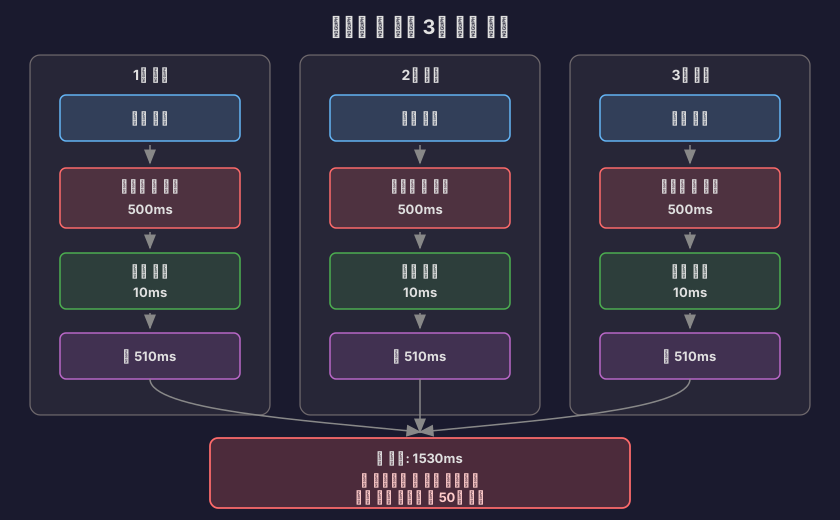
커넥션 풀 자체를 싱글톤 패턴으로 구현하는 이유는 커넥션 풀을 만드는 것도 비용이 엄청나게 비싸기 때문이에요.

커넥션 풀 생성 비용

// 커넥션 풀을 매번 새로 만든다면?
class BadConnectionPoolUsage {
void processRequest() throws SQLException {
// 문제: 요청마다 풀을 새로 생성!
HikariConfig config = new HikariConfig();
config.setJdbcUrl("jdbc:mysql://localhost:3306/mydb");
config.setUsername("user");
config.setPassword("password");
config.setMaximumPoolSize(10);
// 풀 생성 시 10개 커넥션을 미리 만듦
HikariDataSource pool = new HikariDataSource(config); // 비싸다!
// 사용
Connection conn = pool.getConnection();
// ... 쿼리 실행 ...
conn.close();
pool.close(); // 풀을 닫으면 10개 커넥션 모두 종료!
}
}

문제점:

  • 요청마다 10개의 커넥션을 새로 생성 (각 3050ms) → **300500ms 소요**
  • 요청이 끝날 때마다 10개의 커넥션을 모두 종료
  • 커넥션 풀의 의미가 완전히 사라짐!

싱글톤 패턴으로 해결

// 올바른 방법: 싱글톤으로 하나만 만들기
class ConnectionPoolManager {
// 애플리케이션 전체에서 딱 1개만 존재!
private static HikariDataSource dataSource;
// 애플리케이션 시작 시 한 번만 초기화
static {
HikariConfig config = new HikariConfig();
config.setJdbcUrl("jdbc:mysql://localhost:3306/mydb");
config.setUsername("user");
config.setPassword("password");
config.setMaximumPoolSize(10);
dataSource = new HikariDataSource(config);
// 여기서 10개 커넥션을 미리 생성 (시작 시 한 번만!)
}
public static DataSource getDataSource() {
return dataSource;
}
}
// 사용하는 곳
@Service
class UserService {
@Autowired
private DataSource dataSource; // 싱글톤 풀 주입
void processRequest() throws SQLException {
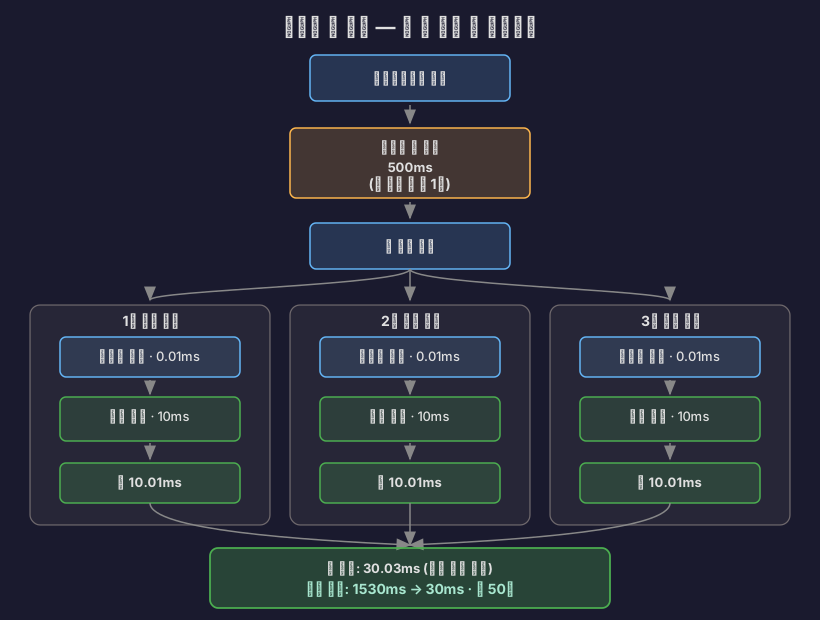
// 풀에서 커넥션만 빌려옴 (빠름!)
Connection conn = dataSource.getConnection();
// ... 쿼리 실행 ...
conn.close(); // 풀에 반납 (종료 아님!)
}
}

Spring의 DataSource 빈

Spring에서는 자동으로 싱글톤으로 관리해 줘요:

application.yml
spring:
datasource:
hikari:
jdbc-url: jdbc:mysql://localhost:3306/mydb
username: user
password: password
maximum-pool-size: 10
@Configuration
public class DataSourceConfig {
@Bean // Spring이 싱글톤으로 관리!
public DataSource dataSource() {
HikariConfig config = new HikariConfig();
config.setJdbcUrl(jdbcUrl);
config.setUsername(username);
config.setPassword(password);
config.setMaximumPoolSize(10);
// 애플리케이션 시작 시 딱 1번만 실행됨!
return new HikariDataSource(config);
}
}

비용 비교

잘못된 방법 (매번 풀 생성):

올바른 방법 (싱글톤 풀):
메모리 관점

// 잘못된 방법: 메모리 낭비
class MemoryWaste {
void badApproach() {
// 요청 1: 커넥션 풀 1개 (10개 커넥션) = 20MB
HikariDataSource pool1 = new HikariDataSource(config);
// 요청 2: 커넥션 풀 1개 (10개 커넥션) = 20MB
HikariDataSource pool2 = new HikariDataSource(config);
// 요청 3: 커넥션 풀 1개 (10개 커넥션) = 20MB
HikariDataSource pool3 = new HikariDataSource(config);
// 총 메모리: 60MB + GC 부담 증가
}
}
// 올바른 방법: 싱글톤
class MemoryEfficient {
private static HikariDataSource pool = new HikariDataSource(config);
// 애플리케이션 전체에서 20MB만 사용
void goodApproach() {
// 모든 요청이 같은 풀 공유
Connection conn = pool.getConnection();
}
}

핵심 정리

커넥션 풀을 싱글톤으로 만드는 이유:

  1. 초기화 비용 절감: 풀 생성 시 모든 커넥션을 미리 만드는데, 이 과정을 한 번만 하면 돼요
  2. 메모리 효율성: 하나의 풀만 유지하므로 메모리 사용량이 최소화돼요
  3. 커넥션 재사용 극대화: 애플리케이션 전체에서 같은 커넥션들을 공유해서 사용해요
  4. 리소스 관리 단순화: 풀이 하나만 있으면 모니터링과 관리가 쉬워요

싱글톤이 아니었다면?

  • 커넥션 풀의 의미가 없어진다 (매번 새로 만들면 일반 커넥션과 다를 게 없음)
  • 메모리 폭발과 GC 부담 증가
  • DB 서버에 불필요한 커넥션이 과도하게 생성됨

출처: Baeldung - A Simple Guide to Connection Pooling in Java, Singleton Pattern in Connection Pool

2. 커넥션 풀의 역사

2.1 초기 구현체들 (2000년대 초반)

JDBC 2.0에서 커넥션 풀링을 위한 표준 API가 추가되었고, JDBC 3.0에서는 핵심 API에 포함되었어요. 하지만 JDBC는 인터페이스만 제공했고, 실제 구현은 각 라이브러리가 담당했어요.

출처: Progress - JDBC Connection Pooling in Java Tutorial, PostgreSQL JDBC - Connection Pools and Data Sources

C3P0 (2001년 경)

가장 오래되고 유명한 커넥션 풀 라이브러리였어요. 하이버네이트와 함께 많이 사용되었고요.

<!-- C3P0 설정 (2000년대 스타일) -->
<c3p0-config>
<default-config>
<property name="driverClass">com.mysql.jdbc.Driver</property>
<property name="jdbcUrl">jdbc:mysql://localhost/test</property>
<property name="user">root</property>
<property name="password">password</property>
<property name="minPoolSize">5</property>
<property name="maxPoolSize">20</property>
<property name="acquireIncrement">5</property>
</default-config>
</c3p0-config>

문제점:

  • 설정이 너무 복잡했어요
  • 잘못 설정하면 성능 이슈나 데드락이 발생했어요
  • 멀티 코어 CPU를 제대로 활용하지 못했어요 (단일 락 사용)
  • 프로젝트가 사실상 중단됨 (2017년 기준 기여자 2명, 커밋 2개)

Apache Commons DBCP (2001년)

아파치 재단에서 만든 커넥션 풀이었어요. 많은 프로젝트에서 사용되었고요.

문제점:

  • 단일 스레드와 락을 사용해 전체 풀을 잠가 스레드 안전성을 보장했어요
  • 느렸고 멀티 코어 CPU를 제대로 활용하지 못했어요
  • 벤치마크 결과 HikariCP 대비 2000배 이상 느렸다 (5 ops/ms vs 45,289 ops/ms)

Tomcat JDBC Pool (2010년)

톰캣 팀이 DBCP의 문제를 개선하기 위해 만든 풀이었어요.

// Tomcat JDBC Pool 설정
org.apache.tomcat.jdbc.pool.DataSource ds =
new org.apache.tomcat.jdbc.pool.DataSource();
ds.setUrl("jdbc:mysql://localhost:3306/test");
ds.setDriverClassName("com.mysql.jdbc.Driver");
ds.setUsername("root");
ds.setPassword("password");
ds.setMaxActive(100);
ds.setMaxIdle(10);

DBCP보다 성능이 훨씬 좋았지만, 여전히 HikariCP에는 미치지 못했다 (2,329 ops/ms).

출처: Stack Overflow - Connection pooling options with JDBC: DBCP vs C3P0, Baeldung - Using c3p0 with Hibernate

2.2 HikariCP의 등장 (2012년)

2012년, Brett Wooldridge는 회사 프로토타입을 만들면서 커넥션 풀이 필요했어요. 기존 풀들을 사용해 봤지만 로드 테스트 중 데드락과 예외가 계속 발생했거든요.

오픈소스니까 코드를 받아서 고쳐보려고 했는데, 예상보다 수천 줄이나 더 많은 코드를 발견했어요. 결국 좌절과 필요성 때문에 직접 만들기로 결심했어요. 그렇게 HikariCP가 탄생했죠.

HikariCP의 설계 철학:

  • “Fast, simple, reliable”
  • 불필요한 기능을 의도적으로 제외 (미니멀리즘)
  • 바이트코드 수준의 최적화
  • 제로 오버헤드를 추구
  • 약 165KB의 초경량 라이브러리

성능 차이:

풀 이름성능 (ops/ms)HikariCP 대비
HikariCP45,2891x (기준)
Tomcat JDBC2,32919배 느림
DBCP221.752,081배 느림

출처: jOOQ Blog - Brett Wooldridge Shows What it Takes to Write the Fastest Java Connection Pool, HikariCP Benchmark

2.3 Spring Boot의 선택 (2018년)

2018년, Spring Boot 2.0부터 HikariCP를 기본 커넥션 풀로 채택했어요. 이전에는 Tomcat JDBC Pool을 사용했었고요.

# Spring Boot 2.0+ 기본 설정
spring:
datasource:
hikari:
# HikariCP가 기본이 됨
maximum-pool-size: 10
connection-timeout: 30000

3. HikariCP는 왜 빠를까?

3.1 바이트코드 수준의 최적화

Brett Wooldridge는 자바 바이트코드 수준까지 내려가서 최적화했어요. 몇 가지 예시를 볼게요.

불필요한 메서드 호출 제거

// 다른 풀들: ArrayList.get() 사용
Connection conn = connectionList.get(index);
// ArrayList.get()은 범위 체크를 함
public E get(int index) {
rangeCheck(index); // 불필요한 체크!
return elementData[index];
}
// HikariCP: FastList 직접 구현
Connection conn = fastList.get(index);
// 범위 체크 없이 직접 접근
public T get(int index) {
return elementData[index]; // 바로 접근
}

ConcurrentBag: 락 경합 최소화

// HikariCP의 ConcurrentBag
class ConcurrentBag<T> {
// 각 스레드가 자기 전용 리스트를 가짐 (락 없음!)
private ThreadLocal<List<T>> threadList = new ThreadLocal<>();
// 공유 큐 (백업용)
private CopyOnWriteArrayList<T> sharedList;
T borrow() {
// 1단계: 내 전용 리스트에서 찾기 (락 없음!)
List<T> list = threadList.get();
for (T item : list) {
if (item.compareAndSet(STATE_NOT_IN_USE, STATE_IN_USE)) {
return item;
}
}
// 2단계: 공유 리스트에서 찾기
for (T item : sharedList) {
if (item.compareAndSet(STATE_NOT_IN_USE, STATE_IN_USE)) {
return item;
}
}
return null;
}
}

핵심: 스레드별 전용 리스트를 사용해 락 경합을 최소화했어요.

출처: HikariCP GitHub - ConcurrentBag 구현, jOOQ Blog - Brett Wooldridge Shows What it Takes to Write the Fastest Java Connection Pool

3.2 불필요한 기능 제거

PreparedStatement 캐싱을 하지 않는 이유

대부분의 JDBC 드라이버(PostgreSQL, Oracle, MySQL 등)는 이미 드라이버 수준에서 캐싱을 해요.

// MySQL Connector/J는 이미 캐싱을 함
Connection conn = dataSource.getConnection();
// 드라이버 내부에서 이미 캐싱됨!
PreparedStatement ps = conn.prepareStatement("SELECT * FROM users WHERE id = ?");

커넥션 풀 레벨에서 또 캐싱하면 중복이고 오버헤드만 늘어나요. HikariCP는 이를 과감히 제거했어요.

출처: HikariCP GitHub - About Pool Sizing, MySQL Connector/J Connection Pooling

4. HikariCP 설정 완벽 가이드

4.1 기본 설정값

설정기본값설명
maximumPoolSize10최대 커넥션 수
minimumIdlemaximumPoolSize와 동일최소 유휴 커넥션 수
connectionTimeout30초커넥션 획득 대기 시간
idleTimeout10분유휴 커넥션 제거 시간
maxLifetime30분커넥션 최대 생존 시간
keepaliveTime2분커넥션 유지 확인 간격
validationTimeout5초연결 유효성 검사 타임아웃

4.2 Spring Boot 설정 예시

spring:
datasource:
hikari:
# 커넥션 풀 크기
maximum-pool-size: 20
minimum-idle: 20
# 타임아웃
connection-timeout: 3000 # 3초
validation-timeout: 1000 # 1초
# 생명주기
max-lifetime: 580000 # 9분 40초 (DB wait_timeout보다 짧게)
idle-timeout: 600000 # 10분
keepalive-time: 30000 # 30초
# 기타
auto-commit: true
leak-detection-threshold: 60000 # 60초

4.3 중요한 설정들

4.3.1 maximumPoolSize와 minimumIdle

권장: 같은 값으로 설정하라!

hikari:
maximum-pool-size: 20
minimum-idle: 20 # 같은 값!

이유:

  • 유휴 커넥션 제한 기능이 동작하지 않도록 하기 위함
  • 게임 서버나 라이브 스트리밍 서버처럼 항상 활성 상태인 시스템에서는 굳이 커넥션을 줄일 필요가 없다
  • 커넥션 증가/감소 과정에서 발생하는 오버헤드를 제거

4.3.2 connectionTimeout

권장: 0.5~3초

hikari:
connection-timeout: 3000 # 3초

이유:

  • 기본값 30초는 너무 길다
  • 응답이 없는 것보다는 빨리 에러를 반환하는 게 낫다
  • 사용자는 30초를 기다리지 않는다

4.3.3 maxLifetime

권장: DB의 wait_timeout보다 2~3초 짧게

hikari:
max-lifetime: 580000 # 9분 40초

이유:

  • MySQL의 기본 wait_timeout은 8시간(28800초)
  • 하지만 실제 운영에서는 10분(600초) 정도로 설정하는 경우가 많다
  • HikariCP의 max-lifetime을 DB보다 짧게 설정하면 DB가 먼저 끊는 것을 방지
-- MySQL에서 wait_timeout 확인
SHOW VARIABLES LIKE 'wait_timeout';
-- wait_timeout 설정 (10분)
SET GLOBAL wait_timeout = 600;
SET GLOBAL interactive_timeout = 600;

4.3.4 leakDetectionThreshold

권장: 60초

hikari:
leak-detection-threshold: 60000 # 60초

이유:

  • 너무 짧게 설정하면 정상 트랜잭션도 누수로 오판
  • 너무 길게 설정하면 실제 누수를 감지하지 못함
  • 60초 정도면 대부분의 정상 트랜잭션은 완료됨
// 누수 발생 예시
@Service
class UserService {
@Autowired
private DataSource dataSource;
void badMethod() throws SQLException {
Connection conn = dataSource.getConnection();
// 쿼리 실행
Statement stmt = conn.createStatement();
stmt.executeQuery("SELECT * FROM users");
// 문제: conn.close()를 안 했다!
// 60초 후 HikariCP가 경고 로그 출력
// WARN - Connection leak detection triggered
}
}

출처: HikariCP Configuration - HikariCP 설정 가이드, Spring Boot HikariCP

5. 커넥션 풀 크기는 어떻게 정할까?

5.1 유명한 공식

HikariCP 위키에 나오는 공식이 있어요:

connections = (core_count × 2) + effective_spindle_count
  • core_count: CPU 코어 수
  • effective_spindle_count: DB 서버가 동시에 처리할 수 있는 디스크 I/O 수

예시:

  • 8코어 CPU, HDD 1개 사용
  • connections = (8 × 2) + 1 = 17개

5.2 왜 “core_count × 2”일까?

CPU와 디스크/네트워크의 속도 차이 때문이에요.

CPU: 1 GHz = 10억 사이클/초
디스크: 100 IOPS = 100번/초
네트워크: 1ms 레이턴시 = 1000번/초
속도 차이: 약 100만 배!

CPU가 디스크나 네트워크를 기다리는 동안 다른 스레드를 처리할 수 있어요. 그래서 코어 수보다 많은 커넥션이 필요해요.

0.1ms
// 커넥션이 작업하는 시간 분석
class ConnectionWorkload {
void processRequest() {
businessLogic();
// 2. DB 쿼리: 10ms (I/O 대기)
executeQuery();
// 3. CPU 작업: 0.1ms
processResult();
// 총 시간: 10.2ms
// 실제 CPU 사용: 0.2ms (약 2%)
// I/O 대기: 10ms (약 98%)
}
}

CPU가 98% 시간을 놀고 있어요! 그래서 CPU 코어당 2개 이상의 커넥션이 효율적이에요.

5.3 실제로는 어떻게 정할까?

공식은 참고만 하고, 실제 측정이 중요하다!

단계 1: 스레드 수 확인

server:
tomcat:
threads:
max: 200 # 톰캣 최대 스레드

단계 2: 작업당 필요 커넥션 수 확인

@Service
class OrderService {
@Transactional
void createOrder(Order order) {
// 1개의 커넥션만 사용
orderRepository.save(order);
itemRepository.updateStock(order.getItemId());
}
}
@Service
class ComplexService {
void complexOperation() {
// 문제: 2개의 커넥션이 필요!
Connection conn1 = dataSource.getConnection(); // 1번
// ... 작업 중 ...
Connection conn2 = dataSource.getConnection(); // 2번
// 데드락 위험!
}
}

단계 3: 공식 적용

pool_size = thread_count × (connections_per_task - 1) + 1

예시:

  • 톰캣 스레드: 200개
  • 작업당 커넥션: 1개
  • pool_size = 200 × (1 - 1) + 1 = 1개?!

이건 말이 안 돼요. 왜일까요?

단계 4: 실제 동시성 고려

톰캣 스레드가 200개라고 해서 동시에 200개가 모두 DB를 쓰는 건 아니에요.

@RestController
class StreamingController {
@GetMapping("/api/stream/{id}")
void getStream(@PathVariable Long id) {
// 1. DB 조회 (커넥션 사용)
Stream stream = streamRepository.findById(id);
// 2. 비즈니스 로직 (커넥션 사용 안 함)
processStream(stream);
// 3. 캐시 확인 (커넥션 사용 안 함)
cacheService.get(id);
// 4. 외부 API 호출 (커넥션 사용 안 함)
notificationService.send(stream);
}
}

실제로는 10~20% 정도만 동시에 DB를 사용한다고 가정하면:

  • 200 × 0.2 = 40개

5.4 넷마블의 게임 서버 설정

넷마블 기술 블로그에 따르면, 게임 서버에서는 다음과 같이 설정했어요:

hikari:
maximum-pool-size: 50 # CPU 코어 수 기준, 성능 테스트로 결정
minimum-idle: 50 # maximum과 동일

중요한 점:

  • 초기값은 CPU 코어 수로 시작
  • 성능 테스트를 통해 조정
  • 모니터링하면서 최적값 찾기

출처: HikariCP GitHub - About Pool Sizing, 넷마블 - 게임 서버 시스템을 위한 HikariCP 옵션 및 권장 설정, Carrey’s 기술블로그 - HikariCP Maximum Pool Size 설정 시 고려해야할 부분

6. 언제 서버가 터질까?

6.1 시나리오 1: 커넥션 풀 고갈

상황: 갑자기 트래픽이 몰렸다.

// 설정
hikari:
maximum-pool-size: 10
connection-timeout: 3000 // 3초
// 상황
// 1초에 100개 요청 들어옴
// 각 요청은 DB 쿼리에 5초 소요
// 1초 후: 100개 요청이 10개 커넥션을 대기
// 90개 요청이 큐에서 대기
// 3초 후: connection-timeout 발생!
// 로그
org.springframework.dao.DataAccessResourceFailureException:
Unable to acquire JDBC Connection
Caused by: java.sql.SQLTransientConnectionException:
HikariPool-1 - Connection is not available,
request timed out after 3000ms.

해결:

  1. 커넥션 풀 크기 증가
hikari:
maximum-pool-size: 50 # 10 → 50
  1. 쿼리 최적화
-- Before: 5초
SELECT * FROM streams WHERE status = 'LIVE';
-- After: 0.1초 (인덱스 추가)
CREATE INDEX idx_stream_status ON streams(status);
SELECT * FROM streams WHERE status = 'LIVE';
  1. 캐싱 도입
@Service
class StreamService {
@Cacheable("liveStreams")
List<Stream> getLiveStreams() {
// DB 조회 횟수 감소
return streamRepository.findByStatus(StreamStatus.LIVE);
}
}

6.2 시나리오 2: 커넥션 누수

상황: 커넥션을 반환하지 않았다.

@Service
class BadService {
@Autowired
private DataSource dataSource;
void leakyMethod() throws SQLException {
Connection conn = dataSource.getConnection();
Statement stmt = conn.createStatement();
ResultSet rs = stmt.executeQuery("SELECT * FROM users");
// 처리...
// 문제: close()를 안 했다!
// conn, stmt, rs가 모두 닫히지 않음
}
}
// 이 메서드를 10번 호출하면?
// 커넥션 풀(10개)이 모두 고갈됨!

증상:

WARN - Connection leak detection triggered for connection

해결:

  1. try-with-resources 사용 (Java 7+)
@Service
class GoodService {
@Autowired
private DataSource dataSource;
void goodMethod() throws SQLException {
try (Connection conn = dataSource.getConnection();
Statement stmt = conn.createStatement();
ResultSet rs = stmt.executeQuery("SELECT * FROM users")) {
// 처리...
} // 자동으로 close() 호출!
}
}
  1. JPA/MyBatis 사용
@Service
class BetterService {
@Autowired
private UserRepository userRepository;
void betterMethod() {
// JPA가 알아서 커넥션 관리
List<User> users = userRepository.findAll();
}
}
  1. 누수 감지 설정
hikari:
leak-detection-threshold: 60000 # 60초

6.3 시나리오 3: DB 서버가 커넥션을 끊어버림

상황: MySQL의 wait_timeout이 만료되었다.

-- MySQL 기본 설정
SHOW VARIABLES LIKE 'wait_timeout';
-- wait_timeout = 28800 (8시간)
-- 하지만 실제 운영에서는 짧게 설정하는 경우가 많음
SET GLOBAL wait_timeout = 60; -- 60초로 변경
// 1. 커넥션 획득
Connection conn = dataSource.getConnection();
// 2. 아무것도 안 하고 70초 대기
Thread.sleep(70000);
// 3. 쿼리 실행 시도
stmt.executeQuery("SELECT * FROM users");
// 에러!
// Communications link failure
// The last packet successfully received from the server
// was 70,000 milliseconds ago

해결:

  1. HikariCP maxLifetime 설정
hikari:
max-lifetime: 50000 # 50초 (wait_timeout보다 짧게)
  1. DB wait_timeout 증가
SET GLOBAL wait_timeout = 600; -- 10분
SET GLOBAL interactive_timeout = 600; -- 10분
  1. keepaliveTime 설정 (HikariCP 4.0+)
hikari:
keepalive-time: 30000 # 30초마다 연결 확인

keepaliveTime의 원리:

// HikariCP 내부 동작
class HikariPool {
void keepalive() {
for (Connection conn : idleConnections) {
if (idleTime > keepaliveTime) {
// 간단한 쿼리로 연결 확인
conn.isValid(validationTimeout);
// 또는
stmt.execute("SELECT 1");
}
}
}
}

출처: 후덥의 기술블로그 - HikariCP는 test-while-idle과 같은 커넥션 갱신 기능이 없을까?, SK C&C - MySql/MariaDB에서 발생하는 Connection 끊김 문제 해결하기

6.4 시나리오 4: 데드락

상황: 커넥션 풀이 부족해서 데드락 발생.

@Service
class DeadlockService {
@Transactional
void problemMethod() {
// 첫 번째 커넥션 획득
Connection conn1 = dataSource.getConnection();
// ... 작업 중 ...
// 두 번째 커넥션 시도
// 하지만 풀에 남은 커넥션이 없음!
Connection conn2 = dataSource.getConnection();
// 영원히 대기... (데드락!)
}
}

발생 조건:

해결:

  1. 풀 크기 공식 적용
# pool_size = thread_count × (connections_per_task - 1) + 1
# 16 × (2 - 1) + 1 = 17
hikari:
maximum-pool-size: 17
  1. 작업당 커넥션 수 줄이기
@Service
class FixedService {
@Transactional
void fixedMethod() {
// 하나의 트랜잭션으로 통합
// 1개의 커넥션만 사용
orderRepository.save(order);
itemRepository.updateStock(itemId);
}
}

6.5 시나리오 5: 메모리 부족

상황: 커넥션이 너무 많아서 메모리 부족.

// 커넥션 하나당 메모리 사용량
class ConnectionMemory {
// TCP 소켓: ~64KB
// ResultSet 버퍼: ~1MB
// Statement 객체들: ~100KB
// 메타데이터: ~100KB
// 총합: 약 1~2MB per connection
}
// 커넥션 1000개 = 1~2GB 메모리!
hikari:
maximum-pool-size: 1000 // 위험!

해결:

  1. 적절한 풀 크기 유지
hikari:
maximum-pool-size: 50 # 적정 수준
  1. DB 서버 리소스 확인
-- MySQL 최대 커넥션 확인
SHOW VARIABLES LIKE 'max_connections';
-- max_connections = 151 (기본값)
-- 현재 커넥션 확인
SHOW STATUS LIKE 'Threads_connected';
  1. 애플리케이션 서버 분산
# 서버 1대: 커넥션 50개
# 서버 3대: 커넥션 150개
# DB max_connections: 200
# 여유 있게 설정

7. 실제 장애 사례

7.1 카카오페이: R2DBC 커넥션 풀 미생성

문제: Spring WebFlux + R2DBC에서 jar 파일 실행 시 커넥션 풀이 초기화되지 않음.

// r2dbc-pool의 특성
// 생성 시점에 커넥션을 만들지 않고,
// 실제 필요할 때 만듦 (Lazy Initialization)
// IntelliJ에서는 동작함 (왜?)
// → Actuator의 HealthCheck가 JMX를 통해 자동 호출
// → 이 과정에서 커넥션 풀이 초기화됨
// jar 실행 시에는 동작 안 함
// → HealthCheck가 자동 호출되지 않음
// → 커넥션 풀이 초기화 안 됨
// → 첫 요청에서 지연 발생!

해결:

// 명시적으로 warmup 호출
r2dbcPool.warmup().block()

교훈:

  • 개발 환경과 운영 환경의 차이를 검증하세요
  • IDE의 자동화 기능이 실제 동작을 왜곡할 수 있어요
  • 새로운 기술 도입 시 기대 동작과 실제 동작을 확인하세요

7.2 SK C&C: MySQL wait_timeout 문제

문제: wait_timeout을 60초로 짧게 설정해서 커넥션이 계속 끊김.

-- 잘못된 설정
SET GLOBAL wait_timeout = 60; -- 너무 짧음!
// 60초마다 커넥션이 끊김
// HikariCP가 끊긴 커넥션을 감지하지 못함
// 애플리케이션에서 에러 발생!
// 에러 로그
Communications link failure
The last packet successfully received from the server
was 70,000 milliseconds ago

해결:

# HikariCP 설정
hikari:
max-lifetime: 50000 # 50초 (wait_timeout보다 짧게)
# MySQL 설정
wait_timeout: 180 # 3분

교훈:

  • DB 타임아웃 설정은 신중하게 해야 해요
  • HikariCP의 max-lifetime은 DB wait_timeout보다 짧게 설정하세요
  • 너무 짧은 타임아웃은 성능 저하를 유발해요

7.3 개인 프로젝트: 커넥션 누수

문제: leak-detection-threshold를 2초로 설정해서 오탐 발생.

# 잘못된 설정
hikari:
leak-detection-threshold: 2000 # 2초 (너무 짧음!)
@Service
class SchedulerService {
@Scheduled(fixedDelay = 1000)
void scheduledTask() {
// 정상적인 작업인데 3초 소요
userRepository.findAll(); // 3초
// HikariCP가 누수로 오판!
// WARN - Apparent connection leak detected
}
}

해결:

hikari:
leak-detection-threshold: 60000 # 60초

교훈:

  • 너무 짧은 누수 감지 시간은 오탐을 유발해요
  • 정상 트랜잭션 처리 시간을 고려해야 해요
  • 60초 정도가 적절해요

7.4 생산성 저하: MySQL AbandonedConnectionCleanupThread

문제: DB 커넥션이 이상하게 많이 생성되어 메모리 사용량 증가.

// MySQL Connector/J의 문제
// AbandonedConnectionCleanupThread가 계속 생성됨
// 메모리 누수 발생!
// Thread Dump
"MySQL-AB-1" daemon
"MySQL-AB-2" daemon
"MySQL-AB-3" daemon
... (수백 개)

해결:

# JVM 옵션 추가
-Dcom.mysql.cj.disableAbandonedConnectionCleanup=true

교훈:

  • 일반 서비스는 커넥션을 직접 관리하지 않아요
  • JDBC 드라이버의 자동 정리 기능이 오히려 해가 될 수 있어요
  • 불필요한 기능은 비활성화하세요

출처: 카카오페이 - R2DBC Connection Pool 실종 사건, SK C&C - MySql/MariaDB에서 발생하는 Connection 끊김 문제 해결하기, velog - DB 커넥션 풀 누수 문제

8. 모니터링과 최적화

8.1 HikariCP 메트릭

HikariCP는 다양한 메트릭을 제공해요.

# Actuator 설정
management:
endpoints:
web:
exposure:
include: metrics,health
metrics:
enable:
hikaricp: true
// 확인 가능한 메트릭
hikaricp.connections.active // 활성 커넥션 수
hikaricp.connections.idle // 유휴 커넥션 수
hikaricp.connections.pending // 대기 중인 요청 수
hikaricp.connections.timeout // 타임아웃 발생 횟수
hikaricp.connections.usage // 커넥션 사용 시간

8.2 Prometheus + Grafana

prometheus.yml
scrape_configs:
- job_name: 'spring-app'
metrics_path: '/actuator/prometheus'
static_configs:
- targets: ['localhost:8080']

알아야 할 지표:

  • active / maximum: 80% 넘으면 풀 크기 증가 고려
  • pending: 0이 아니면 풀 부족
  • timeout: 계속 발생하면 쿼리 최적화 또는 풀 증가 필요
  • usage: 평균 사용 시간이 길면 쿼리 최적화 필요

8.3 최적화 체크리스트

1단계: 설정 확인

  • maximumPoolSize = minimumIdle로 설정했는가?
  • connectionTimeout을 3초 이하로 설정했는가?
  • maxLifetime < DB wait_timeout인가?
  • leakDetectionThreshold를 60초로 설정했는가?

2단계: 코드 확인

  • try-with-resources를 사용하는가?
  • JPA/MyBatis를 사용하는가? (직접 JDBC 사용 지양)
  • 한 트랜잭션에서 여러 커넥션을 사용하지 않는가?

3단계: 쿼리 최적화

  • 슬로우 쿼리를 찾았는가?
  • 인덱스를 적절히 사용하는가?
  • N+1 쿼리 문제를 해결했는가?

4단계: 모니터링

  • HikariCP 메트릭을 수집하는가?
  • 알람을 설정했는가? (active > 80%, timeout > 0)
  • DB 서버 모니터링도 하는가?

9. 정리

9.1 핵심 요약

  1. 커넥션 생성은 비싸다 (20~50ms)

    • 커넥션 풀로 재사용하자
  2. HikariCP가 최고다

    • Spring Boot 2.0+의 기본 풀
    • 다른 풀보다 수천 배 빠르다
  3. 설정이 중요하다

    • maximumPoolSize = minimumIdle
    • connectionTimeout = 3초
    • maxLifetime < DB wait_timeout
  4. 풀 크기 공식

    connections = (core_count × 2) + effective_spindle_count

    하지만 실제 측정이 더 중요!

  5. 주요 장애 원인

    • 커넥션 풀 고갈
    • 커넥션 누수 (close 안 함)
    • DB 타임아웃
    • 데드락
  6. 해결 방법

    • try-with-resources 사용
    • JPA/MyBatis 사용
    • 쿼리 최적화
    • 모니터링

9.2 실제 설정 예시

# 라이브 스트리밍 서버 설정
spring:
datasource:
hikari:
# 커넥션 풀
maximum-pool-size: 50
minimum-idle: 50
# 타임아웃
connection-timeout: 3000
validation-timeout: 1000
# 생명주기
max-lifetime: 580000 # 9분 40초
idle-timeout: 600000 # 10분
keepalive-time: 30000 # 30초
# 누수 감지
leak-detection-threshold: 60000
# MySQL 설정
# wait_timeout = 600 (10분)
# interactive_timeout = 600 (10분)

9.3 마치며

스레드 풀에 이어 커넥션 풀까지 공부하고 나니, 이제 라이브 스트리밍 서버가 어떻게 동시 요청을 처리하는지 전체 그림이 보이기 시작했어요.

다음엔 캐싱과 비동기 처리에 대해 더 공부해서, cs 개념을 재정립하고 더 빠르고 안정적인 서버를 만들도록 노력해야겠어요.

참고 자료

공식 문서

기술 블로그

한글 자료

벤치마크

After studying thread pools and re-establishing my understanding of the concept, another question naturally arose: “So how are DB connections managed?” If the thread pool is limited to 200, there must be a limit on DB connections too. So I decided to dig deep into DB connection pools.

1. Why Do We Need Connection Pools?

1.1 The Emergence and Problems of JDBC

In 1997, JDBC (Java Database Connectivity) was introduced to Java. Finally, Java could interact with databases. However, JDBC had a critical problem.

// 1997-style JDBC code
class OldSchoolDatabase {
void insertUser(String name) throws SQLException {
// 1. Create DB connection (expensive!)
Connection conn = DriverManager.getConnection(
"jdbc:mysql://localhost:3306/mydb",
"username",
"password"
);
// 2. Execute query
Statement stmt = conn.createStatement();
stmt.executeUpdate("INSERT INTO users VALUES ('" + name + "')");
// 3. Close connection
stmt.close();
conn.close(); // Have to create it again next time...
}
}

The cost of creating and destroying a connection every time was enormous. It required numerous operations: TCP connection establishment (3-way handshake), DB authentication, memory allocation, and more.

Source: Baeldung - A Simple Guide to Connection Pooling in Java, Progress - JDBC Connection Pooling in Java Tutorial

1.2 How Long Does It Take to Create a Single Connection?

The actual process of creating a DB connection involves:

  1. TCP socket connection: 3-way handshake with the DB server over the network
  2. DB authentication: Username/password verification
  3. Session creation: Allocating a session object inside the DB server
  4. Metadata loading: Database settings, encoding information, etc.

This process takes tens to hundreds of milliseconds. Even on a local network, it takes about 20-50ms. If 1,000 requests come in per second, just creating connections would take 20 seconds.

// Measuring connection creation cost
class ConnectionBenchmark {
public static void main(String[] args) {
long start = System.currentTimeMillis();
for (int i = 0; i < 100; i++) {
try (Connection conn = DriverManager.getConnection(
"jdbc:mysql://localhost:3306/test", "root", "password")) {
// Just create and immediately close the connection
}
}
long end = System.currentTimeMillis();
System.out.println("Time to create 100 connections: " + (end - start) + "ms");
// Result: approximately 3000~5000ms (30~50ms per connection)
}
}

1.3 The Birth of Connection Pools

To solve this problem, the concept of a Connection Pool was introduced.

// Connection pool concept
class SimpleConnectionPool {
private Queue<Connection> pool = new LinkedList<>();
// Pre-create connections at application startup
public SimpleConnectionPool(int poolSize) {
for (int i = 0; i < poolSize; i++) {
pool.add(createNewConnection());
}
}
// Lend a connection
public Connection getConnection() {
if (pool.isEmpty()) {
throw new SQLException("Connection pool is empty!");
}
return pool.poll();
}
// Return a connection
public void returnConnection(Connection conn) {
pool.offer(conn);
}
}

Core idea: Pre-create connections and reuse them!

Source: DigitalOcean - Connection Pooling in Java

1.4 Why Is the Connection Pool a Singleton?

The connection pool itself is implemented as a singleton because creating a connection pool is also extremely expensive.

Connection Pool Creation Cost

// What if you create a new pool every time?
class BadConnectionPoolUsage {
void processRequest() throws SQLException {
// Problem: creating a new pool per request!
HikariConfig config = new HikariConfig();
config.setJdbcUrl("jdbc:mysql://localhost:3306/mydb");
config.setUsername("user");
config.setPassword("password");
config.setMaximumPoolSize(10);
// Creating the pool pre-creates 10 connections
HikariDataSource pool = new HikariDataSource(config); // Expensive!
// Use
Connection conn = pool.getConnection();
// ... execute query ...
conn.close();
pool.close(); // Closing the pool terminates all 10 connections!
}
}

Problems:

  • Creates 10 new connections per request (30-50ms each) — 300-500ms overhead
  • Terminates all 10 connections when the request finishes
  • The purpose of the connection pool is completely defeated!

Solving with the Singleton Pattern

// Correct approach: create only one with singleton
class ConnectionPoolManager {
// Only 1 exists across the entire application!
private static HikariDataSource dataSource;
// Initialize once at application startup
static {
HikariConfig config = new HikariConfig();
config.setJdbcUrl("jdbc:mysql://localhost:3306/mydb");
config.setUsername("user");
config.setPassword("password");
config.setMaximumPoolSize(10);
dataSource = new HikariDataSource(config);
// Pre-creates 10 connections here (only once at startup!)
}
public static DataSource getDataSource() {
return dataSource;
}
}
// Usage
@Service
class UserService {
@Autowired
private DataSource dataSource; // Singleton pool injected
void processRequest() throws SQLException {
// Just borrows a connection from the pool (fast!)
Connection conn = dataSource.getConnection();
// ... execute query ...
conn.close(); // Returns to pool (not destroyed!)
}
}

Spring’s DataSource Bean

Spring automatically manages it as a singleton:

application.yml
spring:
datasource:
hikari:
jdbc-url: jdbc:mysql://localhost:3306/mydb
username: user
password: password
maximum-pool-size: 10
@Configuration
public class DataSourceConfig {
@Bean // Spring manages as singleton!
public DataSource dataSource() {
HikariConfig config = new HikariConfig();
config.setJdbcUrl(jdbcUrl);
config.setUsername(username);
config.setPassword(password);
config.setMaximumPoolSize(10);
// Executed only once at application startup!
return new HikariDataSource(config);
}
}

Cost Comparison

Wrong approach (creating pool every time):

Correct approach (singleton pool):

Memory Perspective

// Wrong approach: memory waste
class MemoryWaste {
void badApproach() {
// Request 1: 1 connection pool (10 connections) = 20MB
HikariDataSource pool1 = new HikariDataSource(config);
// Request 2: 1 connection pool (10 connections) = 20MB
HikariDataSource pool2 = new HikariDataSource(config);
// Request 3: 1 connection pool (10 connections) = 20MB
HikariDataSource pool3 = new HikariDataSource(config);
// Total memory: 60MB + increased GC pressure
}
}
// Correct approach: singleton
class MemoryEfficient {
private static HikariDataSource pool = new HikariDataSource(config);
// Only 20MB used across the entire application
void goodApproach() {
// All requests share the same pool
Connection conn = pool.getConnection();
}
}

Key Summary

Why the connection pool should be a singleton:

  1. Reduced initialization cost: All connections are pre-created when the pool is initialized, and this only needs to happen once
  2. Memory efficiency: Only one pool is maintained, minimizing memory usage
  3. Maximized connection reuse: The same connections are shared across the entire application
  4. Simplified resource management: With only one pool, monitoring and management are easier

What if it weren’t a singleton?

  • The purpose of a connection pool would be lost (creating a new one each time is no different from regular connections)
  • Memory explosion and increased GC pressure
  • Excessive unnecessary connections created on the DB server

Source: Baeldung - A Simple Guide to Connection Pooling in Java, Singleton Pattern in Connection Pool

2. History of Connection Pools

2.1 Early Implementations (Early 2000s)

JDBC 2.0 added a standard API for connection pooling, and JDBC 3.0 included it as a core API. However, JDBC only provided interfaces, and actual implementations were left to individual libraries.

Source: Progress - JDBC Connection Pooling in Java Tutorial, PostgreSQL JDBC - Connection Pools and Data Sources

C3P0 (circa 2001)

The oldest and most well-known connection pool library. It was widely used with Hibernate.

<!-- C3P0 configuration (2000s style) -->
<c3p0-config>
<default-config>
<property name="driverClass">com.mysql.jdbc.Driver</property>
<property name="jdbcUrl">jdbc:mysql://localhost/test</property>
<property name="user">root</property>
<property name="password">password</property>
<property name="minPoolSize">5</property>
<property name="maxPoolSize">20</property>
<property name="acquireIncrement">5</property>
</default-config>
</c3p0-config>

Problems:

  • Configuration was overly complex
  • Misconfiguration could lead to performance issues or deadlocks
  • Failed to properly utilize multi-core CPUs (used a single lock)
  • The project was effectively abandoned (as of 2017: 2 contributors, 2 commits)

Apache Commons DBCP (2001)

A connection pool created by the Apache Foundation. It was used in many projects.

Problems:

  • Used a single thread and lock to lock the entire pool for thread safety
  • Slow and failed to utilize multi-core CPUs effectively
  • Benchmarks showed it was over 2,000x slower than HikariCP (5 ops/ms vs 45,289 ops/ms)

Tomcat JDBC Pool (2010)

A pool created by the Tomcat team to address DBCP’s shortcomings.

// Tomcat JDBC Pool configuration
org.apache.tomcat.jdbc.pool.DataSource ds =
new org.apache.tomcat.jdbc.pool.DataSource();
ds.setUrl("jdbc:mysql://localhost:3306/test");
ds.setDriverClassName("com.mysql.jdbc.Driver");
ds.setUsername("root");
ds.setPassword("password");
ds.setMaxActive(100);
ds.setMaxIdle(10);

Performance was much better than DBCP, but still couldn’t match HikariCP (2,329 ops/ms).

Source: Stack Overflow - Connection pooling options with JDBC: DBCP vs C3P0, Baeldung - Using c3p0 with Hibernate

2.2 The Emergence of HikariCP (2012)

In 2012, Brett Wooldridge needed a connection pool while building a company prototype. He tried existing pools but kept encountering deadlocks and exceptions during load testing.

Since they were open source, he pulled the code to try to fix them, but found thousands more lines of code than expected. Out of frustration and necessity, he decided to build his own. That’s how HikariCP was born.

HikariCP’s design philosophy:

  • “Fast, simple, reliable”
  • Intentionally excluded unnecessary features (minimalism)
  • Bytecode-level optimization
  • Pursuit of zero overhead
  • Ultra-lightweight library at about 165KB

Performance comparison:

Pool NamePerformance (ops/ms)vs HikariCP
HikariCP45,2891x (baseline)
Tomcat JDBC2,32919x slower
DBCP221.752,081x slower

Source: jOOQ Blog - Brett Wooldridge Shows What it Takes to Write the Fastest Java Connection Pool, HikariCP Benchmark

2.3 Spring Boot’s Choice (2018)

In 2018, starting with Spring Boot 2.0, HikariCP was adopted as the default connection pool. Previously, Tomcat JDBC Pool had been used.

# Spring Boot 2.0+ default configuration
spring:
datasource:
hikari:
# HikariCP is now the default
maximum-pool-size: 10
connection-timeout: 30000

3. Why Is HikariCP So Fast?

3.1 Bytecode-Level Optimization

Brett Wooldridge optimized down to the Java bytecode level. Here are a few examples.

Eliminating Unnecessary Method Calls

// Other pools: use ArrayList.get()
Connection conn = connectionList.get(index);
// ArrayList.get() performs bounds checking
public E get(int index) {
rangeCheck(index); // Unnecessary check!
return elementData[index];
}
// HikariCP: custom FastList implementation
Connection conn = fastList.get(index);
// Direct access without bounds checking
public T get(int index) {
return elementData[index]; // Direct access
}

ConcurrentBag: Minimizing Lock Contention

// HikariCP's ConcurrentBag
class ConcurrentBag<T> {
// Each thread has its own dedicated list (no lock!)
private ThreadLocal<List<T>> threadList = new ThreadLocal<>();
// Shared queue (backup)
private CopyOnWriteArrayList<T> sharedList;
T borrow() {
// Step 1: Search in my dedicated list (no lock!)
List<T> list = threadList.get();
for (T item : list) {
if (item.compareAndSet(STATE_NOT_IN_USE, STATE_IN_USE)) {
return item;
}
}
// Step 2: Search in shared list
for (T item : sharedList) {
if (item.compareAndSet(STATE_NOT_IN_USE, STATE_IN_USE)) {
return item;
}
}
return null;
}
}

Key insight: Lock contention is minimized by using per-thread dedicated lists.

Source: HikariCP GitHub - ConcurrentBag implementation, jOOQ Blog - Brett Wooldridge Shows What it Takes to Write the Fastest Java Connection Pool

3.2 Removing Unnecessary Features

Why It Doesn’t Cache PreparedStatements

Most JDBC drivers (PostgreSQL, Oracle, MySQL, etc.) already cache at the driver level.

// MySQL Connector/J already caches
Connection conn = dataSource.getConnection();
// Already cached internally by the driver!
PreparedStatement ps = conn.prepareStatement("SELECT * FROM users WHERE id = ?");

Caching again at the connection pool level would be redundant and only add overhead. HikariCP boldly removed this.

Source: HikariCP GitHub - About Pool Sizing, MySQL Connector/J Connection Pooling

4. HikariCP Configuration Complete Guide

4.1 Default Values

SettingDefaultDescription
maximumPoolSize10Maximum number of connections
minimumIdleSame as maximumPoolSizeMinimum number of idle connections
connectionTimeout30 secondsWait time to acquire a connection
idleTimeout10 minutesTime before idle connections are removed
maxLifetime30 minutesMaximum connection lifetime
keepaliveTime2 minutesConnection keepalive check interval
validationTimeout5 secondsConnection validation timeout

4.2 Spring Boot Configuration Example

spring:
datasource:
hikari:
# Connection pool size
maximum-pool-size: 20
minimum-idle: 20
# Timeouts
connection-timeout: 3000 # 3 seconds
validation-timeout: 1000 # 1 second
# Lifecycle
max-lifetime: 580000 # 9 min 40 sec (shorter than DB wait_timeout)
idle-timeout: 600000 # 10 minutes
keepalive-time: 30000 # 30 seconds
# Other
auto-commit: true
leak-detection-threshold: 60000 # 60 seconds

4.3 Important Settings

4.3.1 maximumPoolSize and minimumIdle

Recommendation: Set them to the same value!

hikari:
maximum-pool-size: 20
minimum-idle: 20 # Same value!

Why:

  • Prevents the idle connection reduction feature from activating
  • For systems that are always active like game servers or live streaming servers, there’s no need to reduce connections
  • Eliminates overhead from connection scaling up and down

4.3.2 connectionTimeout

Recommendation: 0.5-3 seconds

hikari:
connection-timeout: 3000 # 3 seconds

Why:

  • The default of 30 seconds is too long
  • Returning an error quickly is better than no response at all
  • Users won’t wait 30 seconds

4.3.3 maxLifetime

Recommendation: 2-3 seconds shorter than the DB’s wait_timeout

hikari:
max-lifetime: 580000 # 9 min 40 sec

Why:

  • MySQL’s default wait_timeout is 8 hours (28,800 seconds)
  • But in production, it’s often set to around 10 minutes (600 seconds)
  • Setting HikariCP’s max-lifetime shorter than the DB timeout prevents the DB from disconnecting first
-- Check wait_timeout in MySQL
SHOW VARIABLES LIKE 'wait_timeout';
-- Set wait_timeout (10 minutes)
SET GLOBAL wait_timeout = 600;
SET GLOBAL interactive_timeout = 600;

4.3.4 leakDetectionThreshold

Recommendation: 60 seconds

hikari:
leak-detection-threshold: 60000 # 60 seconds

Why:

  • Too short and normal transactions will be flagged as leaks
  • Too long and actual leaks won’t be detected
  • 60 seconds is long enough for most normal transactions to complete
// Connection leak example
@Service
class UserService {
@Autowired
private DataSource dataSource;
void badMethod() throws SQLException {
Connection conn = dataSource.getConnection();
// Execute query
Statement stmt = conn.createStatement();
stmt.executeQuery("SELECT * FROM users");
// Problem: conn.close() was never called!
// After 60 seconds, HikariCP outputs a warning log
// WARN - Connection leak detection triggered
}
}

Source: HikariCP Configuration - HikariCP configuration guide, Spring Boot HikariCP

5. How Do You Determine Connection Pool Size?

5.1 The Famous Formula

There’s a formula from the HikariCP wiki:

connections = (core_count x 2) + effective_spindle_count
  • core_count: Number of CPU cores
  • effective_spindle_count: Number of concurrent disk I/O operations the DB server can handle

Example:

  • 8-core CPU, 1 HDD
  • connections = (8 x 2) + 1 = 17

5.2 Why “core_count x 2”?

It’s because of the speed difference between CPU and disk/network.

CPU: 1 GHz = 1 billion cycles/sec
Disk: 100 IOPS = 100 ops/sec
Network: 1ms latency = 1000 ops/sec
Speed difference: approximately 1 million times!

While the CPU waits for disk or network, it can process other threads. That’s why you need more connections than cores.

0.1ms
// Analyzing connection work time
class ConnectionWorkload {
void processRequest() {
businessLogic();
// 2. DB query: 10ms (I/O wait)
executeQuery();
// 3. CPU work: 0.1ms
processResult();
// Total time: 10.2ms
// Actual CPU usage: 0.2ms (~2%)
// I/O wait: 10ms (~98%)
}
}

The CPU is idle 98% of the time! That’s why 2 or more connections per CPU core is efficient.

5.3 How Is It Actually Determined?

The formula is just a reference — actual measurement is what matters!

Step 1: Check Thread Count

server:
tomcat:
threads:
max: 200 # Tomcat max threads

Step 2: Check Connections Needed Per Task

@Service
class OrderService {
@Transactional
void createOrder(Order order) {
// Uses only 1 connection
orderRepository.save(order);
itemRepository.updateStock(order.getItemId());
}
}
@Service
class ComplexService {
void complexOperation() {
// Problem: requires 2 connections!
Connection conn1 = dataSource.getConnection(); // 1st
// ... working ...
Connection conn2 = dataSource.getConnection(); // 2nd
// Deadlock risk!
}
}

Step 3: Apply the Formula

pool_size = thread_count x (connections_per_task - 1) + 1

Example:

  • Tomcat threads: 200
  • Connections per task: 1
  • pool_size = 200 x (1 - 1) + 1 = 1?!

That doesn’t make sense. Why?

Step 4: Consider Actual Concurrency

Just because there are 200 Tomcat threads doesn’t mean all 200 are using the DB simultaneously.

@RestController
class StreamingController {
@GetMapping("/api/stream/{id}")
void getStream(@PathVariable Long id) {
// 1. DB query (uses connection)
Stream stream = streamRepository.findById(id);
// 2. Business logic (no connection used)
processStream(stream);
// 3. Cache check (no connection used)
cacheService.get(id);
// 4. External API call (no connection used)
notificationService.send(stream);
}
}

In reality, assuming only about 10-20% are using the DB simultaneously:

  • 200 x 0.2 = 40

5.4 Netmarble’s Game Server Configuration

According to the Netmarble tech blog, for game servers they configured:

hikari:
maximum-pool-size: 50 # Based on CPU core count, determined by performance testing
minimum-idle: 50 # Same as maximum

Key points:

  • Start with the CPU core count as the initial value
  • Adjust through performance testing
  • Monitor and find the optimal value

Source: HikariCP GitHub - About Pool Sizing, Netmarble - HikariCP Options and Recommended Settings for Game Servers, Carrey’s Tech Blog - Considerations When Setting HikariCP Maximum Pool Size

6. When Will the Server Crash?

6.1 Scenario 1: Connection Pool Exhaustion

Situation: Traffic suddenly spikes.

// Configuration
hikari:
maximum-pool-size: 10
connection-timeout: 3000 // 3 seconds
// Situation
// 100 requests per second
// Each request takes 5 seconds for DB query
// After 1 second: 100 requests competing for 10 connections
// 90 requests waiting in queue
// After 3 seconds: connection-timeout triggers!
// Log
org.springframework.dao.DataAccessResourceFailureException:
Unable to acquire JDBC Connection
Caused by: java.sql.SQLTransientConnectionException:
HikariPool-1 - Connection is not available,
request timed out after 3000ms.

Solutions:

  1. Increase connection pool size
hikari:
maximum-pool-size: 50 # 10 → 50
  1. Optimize queries
-- Before: 5 seconds
SELECT * FROM streams WHERE status = 'LIVE';
-- After: 0.1 seconds (added index)
CREATE INDEX idx_stream_status ON streams(status);
SELECT * FROM streams WHERE status = 'LIVE';
  1. Introduce caching
@Service
class StreamService {
@Cacheable("liveStreams")
List<Stream> getLiveStreams() {
// Reduces DB query frequency
return streamRepository.findByStatus(StreamStatus.LIVE);
}
}

6.2 Scenario 2: Connection Leak

Situation: Connections were not returned.

@Service
class BadService {
@Autowired
private DataSource dataSource;
void leakyMethod() throws SQLException {
Connection conn = dataSource.getConnection();
Statement stmt = conn.createStatement();
ResultSet rs = stmt.executeQuery("SELECT * FROM users");
// Processing...
// Problem: close() was never called!
// conn, stmt, rs are all left open
}
}
// Call this method 10 times?
// The connection pool (10 connections) is completely exhausted!

Symptoms:

WARN - Connection leak detection triggered for connection

Solutions:

  1. Use try-with-resources (Java 7+)
@Service
class GoodService {
@Autowired
private DataSource dataSource;
void goodMethod() throws SQLException {
try (Connection conn = dataSource.getConnection();
Statement stmt = conn.createStatement();
ResultSet rs = stmt.executeQuery("SELECT * FROM users")) {
// Processing...
} // close() is called automatically!
}
}
  1. Use JPA/MyBatis
@Service
class BetterService {
@Autowired
private UserRepository userRepository;
void betterMethod() {
// JPA manages connections automatically
List<User> users = userRepository.findAll();
}
}
  1. Set up leak detection
hikari:
leak-detection-threshold: 60000 # 60 seconds

6.3 Scenario 3: DB Server Drops the Connection

Situation: MySQL’s wait_timeout expired.

-- MySQL default settings
SHOW VARIABLES LIKE 'wait_timeout';
-- wait_timeout = 28800 (8 hours)
-- But often set shorter in production
SET GLOBAL wait_timeout = 60; -- Changed to 60 seconds
// 1. Acquire connection
Connection conn = dataSource.getConnection();
// 2. Wait 70 seconds doing nothing
Thread.sleep(70000);
// 3. Try to execute query
stmt.executeQuery("SELECT * FROM users");
// Error!
// Communications link failure
// The last packet successfully received from the server
// was 70,000 milliseconds ago

Solutions:

  1. Set HikariCP maxLifetime
hikari:
max-lifetime: 50000 # 50 seconds (shorter than wait_timeout)
  1. Increase DB wait_timeout
SET GLOBAL wait_timeout = 600; -- 10 minutes
SET GLOBAL interactive_timeout = 600; -- 10 minutes
  1. Set keepaliveTime (HikariCP 4.0+)
hikari:
keepalive-time: 30000 # Check connection every 30 seconds

How keepaliveTime works:

// HikariCP internal behavior
class HikariPool {
void keepalive() {
for (Connection conn : idleConnections) {
if (idleTime > keepaliveTime) {
// Check connection with a simple query
conn.isValid(validationTimeout);
// or
stmt.execute("SELECT 1");
}
}
}
}

Source: Hudeop’s Tech Blog - Does HikariCP have a test-while-idle equivalent?, SK C&C - Solving Connection Drop Issues in MySQL/MariaDB

6.4 Scenario 4: Deadlock

Situation: Deadlock caused by insufficient connection pool.

@Service
class DeadlockService {
@Transactional
void problemMethod() {
// First connection acquired
Connection conn1 = dataSource.getConnection();
// ... working ...
// Attempting second connection
// But there are no connections left in the pool!
Connection conn2 = dataSource.getConnection();
// Waits forever... (deadlock!)
}
}

Conditions for occurrence:

Solutions:

  1. Apply pool size formula
# pool_size = thread_count x (connections_per_task - 1) + 1
# 16 x (2 - 1) + 1 = 17
hikari:
maximum-pool-size: 17
  1. Reduce connections per task
@Service
class FixedService {
@Transactional
void fixedMethod() {
// Consolidated into a single transaction
// Uses only 1 connection
orderRepository.save(order);
itemRepository.updateStock(itemId);
}
}

6.5 Scenario 5: Out of Memory

Situation: Too many connections causing memory shortage.

// Memory usage per connection
class ConnectionMemory {
// TCP socket: ~64KB
// ResultSet buffer: ~1MB
// Statement objects: ~100KB
// Metadata: ~100KB
// Total: approximately 1~2MB per connection
}
// 1000 connections = 1~2GB memory!
hikari:
maximum-pool-size: 1000 // Dangerous!

Solutions:

  1. Maintain appropriate pool size
hikari:
maximum-pool-size: 50 # Reasonable level
  1. Check DB server resources
-- Check MySQL max connections
SHOW VARIABLES LIKE 'max_connections';
-- max_connections = 151 (default)
-- Check current connections
SHOW STATUS LIKE 'Threads_connected';
  1. Distribute across application servers
# 1 server: 50 connections
# 3 servers: 150 connections
# DB max_connections: 200
# Set with margin

7. Real-World Failure Cases

7.1 KakaoPay: R2DBC Connection Pool Not Created

Problem: In Spring WebFlux + R2DBC, the connection pool was not initialized when running as a jar file.

// Characteristics of r2dbc-pool
// Does not create connections at creation time,
// Creates them when actually needed (Lazy Initialization)
// Works in IntelliJ (why?)
// → Actuator's HealthCheck is automatically called via JMX
// → This process initializes the connection pool
// Doesn't work when running as jar
// → HealthCheck is not automatically called
// → Connection pool is not initialized
// → Delay on first request!

Solution:

// Explicitly call warmup
r2dbcPool.warmup().block()

Lesson:

  • Verify differences between development and production environments
  • IDE automation features can distort actual behavior
  • When adopting new technology, verify expected behavior matches actual behavior

7.2 SK C&C: MySQL wait_timeout Problem

Problem: Setting wait_timeout to 60 seconds caused connections to keep disconnecting.

-- Incorrect setting
SET GLOBAL wait_timeout = 60; -- Too short!
// Connections drop every 60 seconds
// HikariCP fails to detect the broken connections
// Application errors occur!
// Error log
Communications link failure
The last packet successfully received from the server
was 70,000 milliseconds ago

Solution:

# HikariCP settings
hikari:
max-lifetime: 50000 # 50 seconds (shorter than wait_timeout)
# MySQL settings
wait_timeout: 180 # 3 minutes

Lesson:

  • Be careful with DB timeout settings
  • HikariCP’s max-lifetime should be shorter than DB wait_timeout
  • Timeouts that are too short degrade performance

7.3 Personal Project: Connection Leak

Problem: Setting leak-detection-threshold to 2 seconds caused false positives.

# Incorrect setting
hikari:
leak-detection-threshold: 2000 # 2 seconds (too short!)
@Service
class SchedulerService {
@Scheduled(fixedDelay = 1000)
void scheduledTask() {
// Normal task that takes 3 seconds
userRepository.findAll(); // 3 seconds
// HikariCP falsely flags as a leak!
// WARN - Apparent connection leak detected
}
}

Solution:

hikari:
leak-detection-threshold: 60000 # 60 seconds

Lesson:

  • Too short a leak detection time causes false positives
  • Normal transaction processing time must be considered
  • 60 seconds is generally appropriate

7.4 Productivity Loss: MySQL AbandonedConnectionCleanupThread

Problem: DB connections were being created abnormally, increasing memory usage.

// MySQL Connector/J issue
// AbandonedConnectionCleanupThread keeps being created
// Memory leak occurs!
// Thread Dump
"MySQL-AB-1" daemon
"MySQL-AB-2" daemon
"MySQL-AB-3" daemon
... (hundreds)

Solution:

# Add JVM option
-Dcom.mysql.cj.disableAbandonedConnectionCleanup=true

Lesson:

  • Regular services don’t manage connections directly
  • JDBC driver’s automatic cleanup feature can actually be harmful
  • Disable unnecessary features

Source: KakaoPay - The Case of the Missing R2DBC Connection Pool, SK C&C - Solving Connection Drop Issues in MySQL/MariaDB, velog - DB Connection Pool Leak Issue

8. Monitoring and Optimization

8.1 HikariCP Metrics

HikariCP provides various metrics.

# Actuator settings
management:
endpoints:
web:
exposure:
include: metrics,health
metrics:
enable:
hikaricp: true
// Available metrics
hikaricp.connections.active // Active connection count
hikaricp.connections.idle // Idle connection count
hikaricp.connections.pending // Pending request count
hikaricp.connections.timeout // Timeout occurrence count
hikaricp.connections.usage // Connection usage time

8.2 Prometheus + Grafana

prometheus.yml
scrape_configs:
- job_name: 'spring-app'
metrics_path: '/actuator/prometheus'
static_configs:
- targets: ['localhost:8080']

Key metrics to know:

  • active / maximum: Consider increasing pool size if over 80%
  • pending: If non-zero, pool is insufficient
  • timeout: If occurring continuously, optimize queries or increase pool
  • usage: If average usage time is long, optimize queries

8.3 Optimization Checklist

Step 1: Configuration Check

  • Is maximumPoolSize = minimumIdle?
  • Is connectionTimeout set to 3 seconds or less?
  • Is maxLifetime < DB wait_timeout?
  • Is leakDetectionThreshold set to 60 seconds?

Step 2: Code Check

  • Using try-with-resources?
  • Using JPA/MyBatis? (avoid direct JDBC usage)
  • Not using multiple connections in a single transaction?

Step 3: Query Optimization

  • Identified slow queries?
  • Using indexes appropriately?
  • Resolved N+1 query problems?

Step 4: Monitoring

  • Collecting HikariCP metrics?
  • Set up alerts? (active > 80%, timeout > 0)
  • Monitoring the DB server as well?

9. Summary

9.1 Key Takeaways

  1. Creating connections is expensive (20-50ms)

    • Reuse them with a connection pool
  2. HikariCP is the best

    • Default pool since Spring Boot 2.0+
    • Thousands of times faster than alternatives
  3. Configuration matters

    • maximumPoolSize = minimumIdle
    • connectionTimeout = 3 seconds
    • maxLifetime < DB wait_timeout
  4. Pool sizing formula

    connections = (core_count x 2) + effective_spindle_count

    But actual measurement is more important!

  5. Major failure causes

    • Connection pool exhaustion
    • Connection leak (not closing)
    • DB timeout
    • Deadlock
  6. Solutions

    • Use try-with-resources
    • Use JPA/MyBatis
    • Optimize queries
    • Monitor

9.2 Practical Configuration Example

# Live streaming server configuration
spring:
datasource:
hikari:
# Connection pool
maximum-pool-size: 50
minimum-idle: 50
# Timeouts
connection-timeout: 3000
validation-timeout: 1000
# Lifecycle
max-lifetime: 580000 # 9 min 40 sec
idle-timeout: 600000 # 10 minutes
keepalive-time: 30000 # 30 seconds
# Leak detection
leak-detection-threshold: 60000
# MySQL settings
# wait_timeout = 600 (10 minutes)
# interactive_timeout = 600 (10 minutes)

9.3 Closing Thoughts

After studying connection pools following thread pools, I can now see the full picture of how a live streaming server handles concurrent requests.

Next, I want to study caching and asynchronous processing further, re-establish my CS fundamentals, and work toward building faster and more stable servers.

References

Official Documentation

Tech Blogs

Additional Resources

Benchmarks

Author
작성자 @범수

오늘의 노력이 내일의 전문성을 만든다고 믿습니다.

댓글