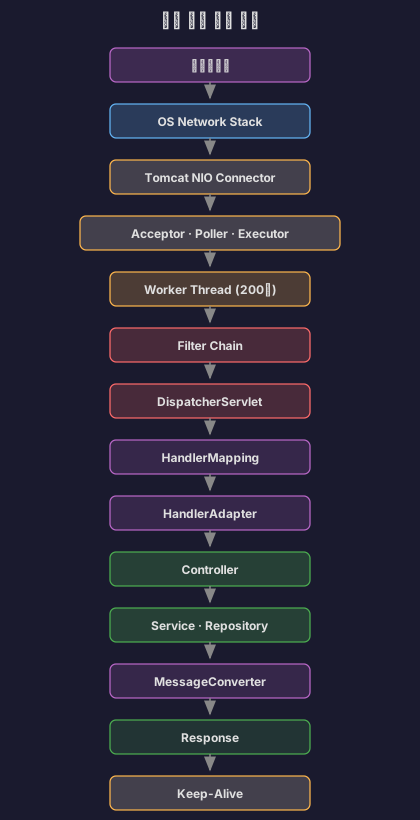
톰캣은 어떻게 수만 개의 요청을 동시에 처리할까
목차
커넥션 풀을 공부하고 나니 또 다른 의문이 생겼어요. “그래서 애초에 요청은 어떻게 들어오는 거지?” 톰캣이 수천, 수만 개의 요청을 동시에 받아서 스레드 풀에 넘기고, DB 커넥션 풀을 사용한다는 건 알겠는데, 정작 톰캣이 어떻게 그 많은 요청을 받아들이는지는 정확히, 제대로 알지는 못 했거든요.
그래서 톰캣 커넥터와 NIO, 그리고 Spring MVC의 요청 처리 과정까지 파헤쳐 보기로 했어요.
1. BIO vs NIO: 왜 톰캣은 바뀌어야 했나?
1.1 BIO Connector의 문제점
톰캣 8.0 이전까지는 BIO(Blocking I/O) Connector를 사용했어요. 구조는 단순했죠.
// BIO Connector의 동작 방식 (의사 코드)class BIOConnector { ExecutorService threadPool;
void acceptConnection() { while (true) { Socket socket = serverSocket.accept(); // 연결 수락
// 문제: 스레드 하나가 연결 하나를 전담 threadPool.execute(() -> { try { // 1. 요청 대기 (Blocking!) InputStream input = socket.getInputStream(); byte[] data = input.read(); // 데이터 올 때까지 대기
// 2. 요청 처리 processRequest(data);
// 3. 응답 전송 OutputStream output = socket.getOutputStream(); output.write(response);
// 4. 연결 유지 (HTTP Keep-Alive) // 스레드가 계속 점유됨! } finally { socket.close(); } }); } }}문제가 뭘까?
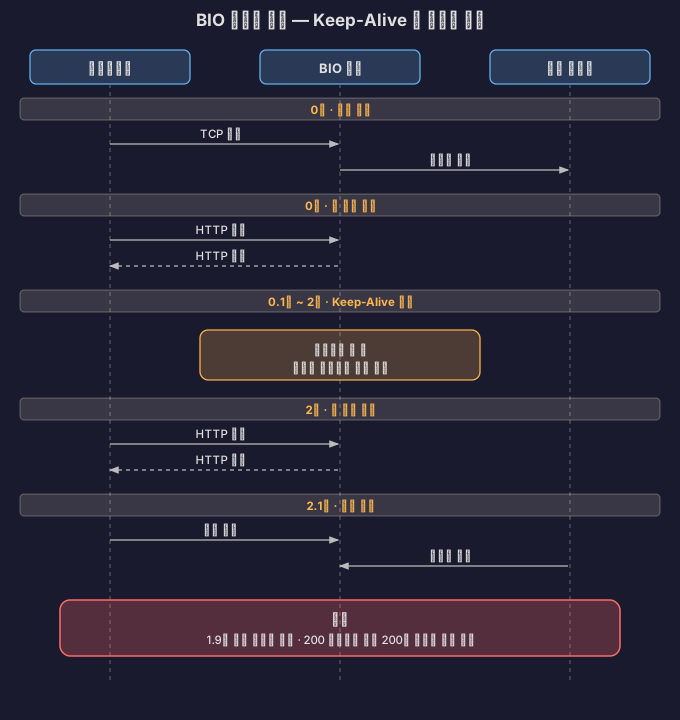
HTTP Keep-Alive를 사용하는 경우를 생각해 볼게요. 클라이언트가 첫 요청을 보내고, 2초 후에 두 번째 요청을 보낸다고 해볼게요.

스레드가 1.9초 동안 아무것도 안 하고 대기만 했어요. 이게 연결이 1000개라면?
// 최악의 시나리오class BIOProblem { public static void main(String[] args) { // 스레드 풀: 200개 // 동시 연결: 1000개 // Keep-Alive Timeout: 20초
// 시나리오: // 1000명의 사용자가 접속 // 각자 요청 1개만 보내고 Keep-Alive로 20초 대기
// 결과: // - 200개 스레드 모두 점유됨 // - 나머지 800개 연결은 대기 // - 실제로 CPU는 거의 쉬고 있음! }}1.2 NIO Connector의 등장
톰캣 8.0부터 NIO(Non-blocking I/O) Connector가 기본이 되었어요. 무엇이 달라졌을까요?
핵심 아이디어: 스레드가 데이터를 기다리지 말고, 데이터가 준비되었을 때만 스레드를 할당하자.
// NIO Connector의 동작 방식 (단순화)class NIOConnector { Selector selector; // 핵심!
void run() { while (true) { // 1. Selector가 여러 연결을 동시에 감시 int readyCount = selector.select(); // Blocking이지만 여러 채널을 감시
// 2. 준비된 채널만 처리 Set<SelectionKey> keys = selector.selectedKeys(); for (SelectionKey key : keys) { if (key.isAcceptable()) { // 새 연결 수락 acceptConnection(key); } else if (key.isReadable()) { // 데이터 읽기 준비됨 → 이때만 워커 스레드 할당! handleRead(key); } else if (key.isWritable()) { // 데이터 쓰기 준비됨 handleWrite(key); } } } }}차이점:
| 항목 | BIO | NIO |
|---|---|---|
| 스레드와 연결 | 1:1 매핑 | N:1 매핑 (Poller가 관리) |
| 데이터 대기 | 스레드가 Blocking | Selector가 감시 |
| 유휴 시간 처리 | 스레드가 낭비됨 | 스레드 즉시 반환 |
| 최대 동시 연결 | ~200개 (스레드 수 제한) | ~10,000개 (메모리만 충분하면) |
1.3 실제 성능 차이
간단한 벤치마크를 해볼게요.
# 테스트 환경spring: application: name: benchmark-testserver: tomcat: threads: max: 200// 느린 API (의도적으로 3초 대기)@RestControllerclass SlowController {
@GetMapping("/slow") public String slowApi() throws InterruptedException { Thread.sleep(3000); // DB 조회나 외부 API 호출 시뮬레이션 return "Done"; }}BIO Connector로 테스트 (가정):
동시 사용자: 1000명요청: GET /slow
결과:- 처음 200개: 3초 후 응답- 201~400번: 6초 후 응답- 401~600번: 9초 후 응답- 801~1000번: 15초 후 응답
평균 응답 시간: 9초NIO Connector로 테스트:
동시 사용자: 1000명요청: GET /slow
결과:- 1000개 모두 약 3~4초 후 응답- Poller가 1000개 연결을 모두 관리- 워커 스레드는 실제 처리 시에만 할당
평균 응답 시간: 3.2초왜 이런 차이가 날까?
BIO:연결 수 > 스레드 수 → 큐에서 대기 → 순차 처리
NIO:연결 수와 무관 → Poller가 모두 감시 → 준비된 것만 워커 스레드 할당톰캣 9.0부터는 BIO Connector가 완전히 제거되었어요. 성능 차이가 너무 명확했기 때문이에요.
2. NIO Connector의 구조: Acceptor, Poller, Executor
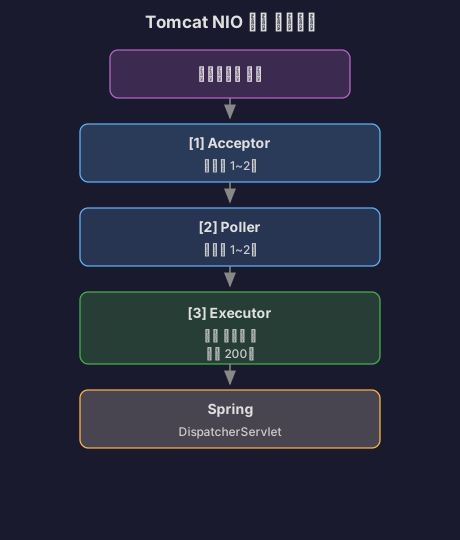
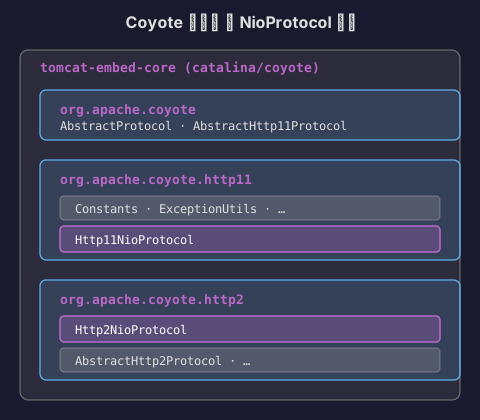
NIO Connector는 세 가지 주요 컴포넌트로 구성돼요.
2.1 전체 구조

각각 무슨 역할을 할까?
2.2 Acceptor: 연결 수락
// Acceptor의 역할 (의사 코드)class Acceptor implements Runnable { ServerSocketChannel serverSocket;
@Override public void run() { while (running) { // 1. 3-way handshake 완료된 연결 수락 SocketChannel socket = serverSocket.accept(); // Blocking
// 2. Non-blocking 모드로 설정 socket.configureBlocking(false);
// 3. Poller에게 넘김 PollerEvent event = new PollerEvent(socket, OP_READ); poller.register(event); } }}핵심:
- Acceptor는 연결만 수락하고 Poller에게 즉시 넘긴다
- CPU 사용 시간: 0.1ms 미만
- Blocking이지만 빠르게 처리되므로 1~2개 스레드면 충분
왜 Blocking인데도 괜찮을까?
// accept()는 빠르다class AcceptorPerformance { void benchmark() { long start = System.nanoTime(); SocketChannel socket = serverSocket.accept(); long end = System.nanoTime();
System.out.println("Accept time: " + (end - start) / 1000 + "μs"); // 출력: Accept time: 50μs (0.05ms)
// 초당 처리 가능: 1,000,000 / 50 = 20,000 connections/sec // 실제로는 TCP 백로그 큐에서 꺼내기만 하므로 매우 빠름 }}2.3 Poller: 이벤트 감지
Poller가 NIO의 핵심이에요.
// Poller의 역할 (의사 코드)class Poller implements Runnable { Selector selector; Queue<PollerEvent> events;
@Override public void run() { while (running) { // 1. 새로 등록된 소켓을 Selector에 등록 processEvents();
// 2. Selector로 준비된 채널 감지 int count = selector.select(1000); // 최대 1초 대기
if (count > 0) { // 3. 준비된 채널 처리 Iterator<SelectionKey> iterator = selector.selectedKeys().iterator(); while (iterator.hasNext()) { SelectionKey key = iterator.next(); iterator.remove();
if (key.isReadable()) { // 데이터 읽기 준비됨! // Executor에게 넘김 executor.execute(new SocketProcessor(key)); } } } } }
void processEvents() { PollerEvent event; while ((event = events.poll()) != null) { // Acceptor가 넘긴 소켓을 Selector에 등록 event.socket.register(selector, SelectionKey.OP_READ); } }}Poller가 해결한 문제:
// Before (BIO): 1000개 연결 = 1000개 스레드 필요// 메모리: 1000 × 1MB = 1GB
// After (NIO): 1000개 연결 = Poller 1~2개 + 필요할 때만 워커 스레드// 메모리: 2MB (Poller) + 동적 할당출처: px201226.github.io - Apache Tomcat 이해하기(NIO Connector 중심)
2.4 Executor: 실제 요청 처리
// Executor의 역할class SocketProcessor implements Runnable { SelectionKey key;
@Override public void run() { try { // 1. 소켓에서 데이터 읽기 SocketChannel channel = (SocketChannel) key.channel(); ByteBuffer buffer = ByteBuffer.allocate(8192); int read = channel.read(buffer);
// 2. HTTP 요청 파싱 HttpRequest request = parseHttpRequest(buffer);
// 3. 서블릿 컨테이너에 전달 servlet.service(request, response);
// 4. 응답 전송 channel.write(responseBuffer);
} finally { // 5. 워커 스레드 즉시 반환! // Keep-Alive 연결은 다시 Poller로 key.interestOps(SelectionKey.OP_READ); } }}중요한 점: 워커 스레드는 실제 처리 시간만 사용하고 즉시 반환돼요.
BIO:스레드 할당 → 데이터 대기 (2초) → 처리 (0.1초) → 대기 (Keep-Alive 20초)스레드 점유 시간: 22.1초
NIO:Poller 감시 (2초) → 스레드 할당 → 처리 (0.1초) → 스레드 반환 → Poller 감시 (20초)스레드 점유 시간: 0.1초2.5 Selector는 어떻게 동작할까?
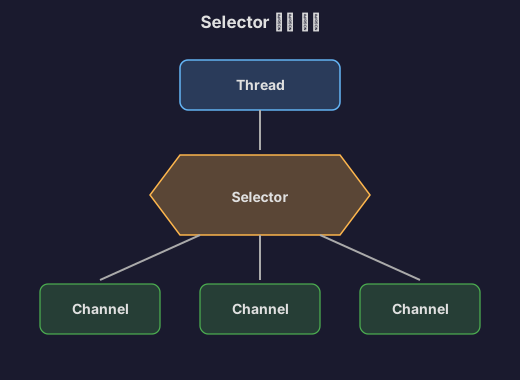
Java의 Selector는 운영체제의 I/O 멀티플렉싱 기능을 활용해요.
Linux: epoll
// Java Selector의 내부 동작 (Linux)class EPollSelectorImpl extends SelectorImpl {
int poll(long timeout) { // JNI를 통해 리눅스 epoll_wait 시스템 콜 호출 return EPoll.wait(pollArrayAddress, NUM_EPOLLEVENTS, timeout, epfd); }}epoll의 동작 원리:
// 리눅스 커널 수준// 1. epoll 인스턴스 생성int epfd = epoll_create1(0);
// 2. 감시할 소켓 등록struct epoll_event ev;ev.events = EPOLLIN; // 읽기 이벤트ev.data.fd = socket_fd;epoll_ctl(epfd, EPOLL_CTL_ADD, socket_fd, &ev);
// 3. 이벤트 대기 (Blocking이지만 여러 소켓 동시 감시!)struct epoll_event events[1000];int nfds = epoll_wait(epfd, events, 1000, timeout);
// 4. 준비된 소켓만 순회for (int i = 0; i < nfds; i++) { if (events[i].events & EPOLLIN) { // 이 소켓은 읽을 데이터가 있음! handle_read(events[i].data.fd); }}왜 빠를까?
기존 select/poll과의 차이:
// select (옛날 방식)fd_set readfds;FD_ZERO(&readfds);FD_SET(socket1, &readfds);FD_SET(socket2, &readfds);// ... 1000개 등록 ...
select(max_fd, &readfds, NULL, NULL, &timeout);
// 문제: 1000개를 매번 순회하며 확인for (int i = 0; i < 1000; i++) { if (FD_ISSET(sockets[i], &readfds)) { // 준비됨 }}// 시간 복잡도: O(N)
// epoll (새로운 방식)int nfds = epoll_wait(epfd, events, 1000, timeout);// 커널이 준비된 것만 events 배열에 채워줌!
for (int i = 0; i < nfds; i++) { // 이미 준비된 것만 순회}// 시간 복잡도: O(준비된 개수)성능 차이:
연결 1000개 중 10개만 준비된 경우:
select: 1000번 체크 → 10msepoll: 10번만 체크 → 0.1ms
100배 차이!

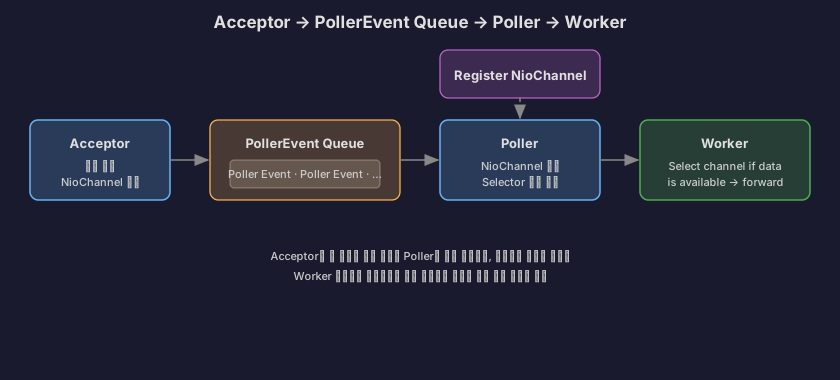
NIO Connector 동작 순서
-
Acceptor가 소켓의 요청을 받아요.
-
소켓에서 객체를 얻어 PollerEvent 객체로 변환해 줘요.
-
PollerEvent Queue에 넣어요.
-
Poller thread 속 Selector Object를 이용하여 여러 채널을 관리해요.
-
상태를 모니터링하다가 데이터를 읽을 수 있는 소켓을 얻고, worker thread를 얻으면 해당 소켓을 thread에 연결해 줘요.
-
worker thread에서 작업을 처리하면 해당 소켓으로 응답을 건네주면서 끝이에요.
3. 톰캣 설정: maxThreads, maxConnections, acceptCount
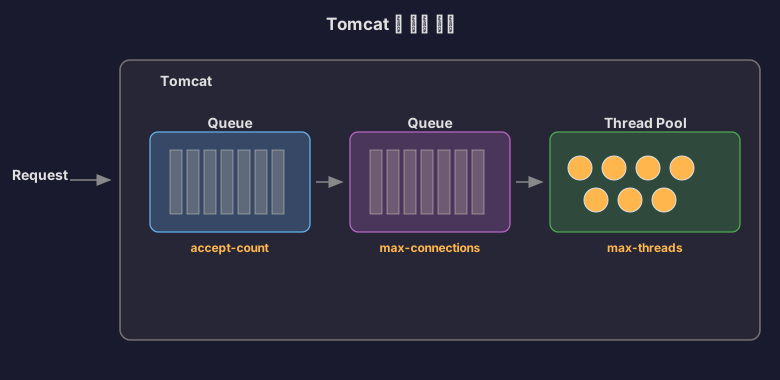
이제 톰캣 설정값들이 어떤 의미인지 이해할 수 있어요.
3.1 세 가지 설정의 관계
server: tomcat: threads: max: 200 # maxThreads max-connections: 8192 # maxConnections accept-count: 100 # acceptCount흐름:
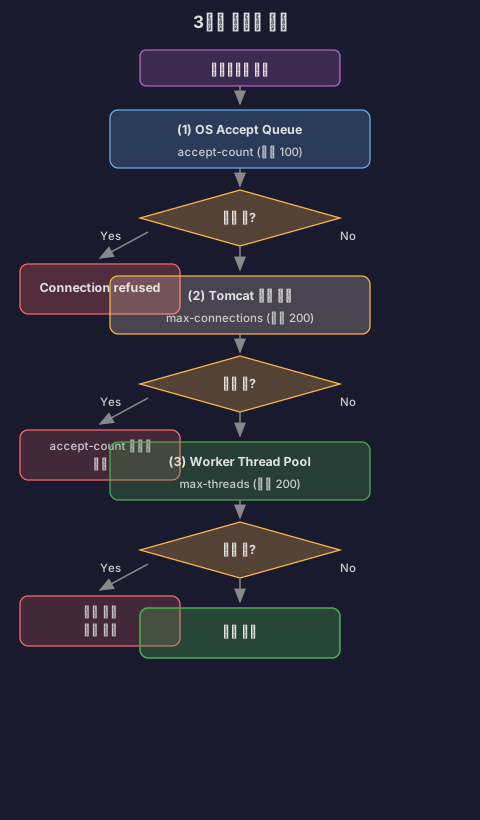
3.2 각 설정의 의미
3.2.1 maxThreads (threads.max)
실제로 동시에 처리할 수 있는 요청 개수
// maxThreads = 200이면?class WorkerThreadPool { ExecutorService executor = Executors.newFixedThreadPool(200);
void handleRequest(HttpRequest request) { if (executor.getActiveCount() < 200) { // 처리 가능 executor.submit(() -> processRequest(request)); } else { // 대기 (연결은 유지됨!) // Poller가 계속 감시 } }}언제 늘려야 할까?
# 시나리오 1: CPU 바운드 작업 (계산 위주)# 평균 처리 시간: 100ms# CPU 코어: 8개# 권장: threads.max = 8~16
# 시나리오 2: I/O 바운드 작업 (DB, 외부 API 호출 위주)# 평균 처리 시간: 500ms (그 중 450ms는 I/O 대기)# CPU 코어: 8개# 권장: threads.max = 100~200
# 시나리오 3: 혼합# 평균 처리 시간: 200ms (그 중 150ms는 I/O 대기)# CPU 코어: 8개# 권장: threads.max = 50~1003.2.2 maxConnections
Poller가 동시에 관리할 수 있는 연결 개수
// NIO에서 maxConnections의 의미class NIOEndpoint { Semaphore connectionLimitLatch; // 연결 수 제한
void setMaxConnections(int max) { this.connectionLimitLatch = new Semaphore(max); }
void acceptConnection(SocketChannel socket) { if (connectionLimitLatch.tryAcquire()) { // 연결 수락 poller.register(socket); } else { // 더 이상 연결 받을 수 없음 // OS accept queue로 이동 (acceptCount) } }
void closeConnection(SocketChannel socket) { socket.close(); connectionLimitLatch.release(); // 슬롯 반환 }}기본값 8192가 적절한 이유:
메모리 계산:- 연결 하나당 메모리: 약 50~100KB (TCP 버퍼, 소켓 메타데이터)- 8192개 연결: 400MB~800MB
CPU 계산:- Poller의 epoll_wait: O(준비된 개수)- 8192개 중 100개 준비: 1ms 미만
대부분의 경우 충분!언제 늘려야 할까?
# 잘못된 상황server: tomcat: max-connections: 10000 threads: max: 200
# 문제: 10000개 연결이 들어오면?# - 200개만 처리 중# - 9800개는 대기# - 메모리만 낭비!
# 올바른 설정server: tomcat: max-connections: 500 # threads.max의 2~3배 정도 threads: max: 2003.2.3 acceptCount
OS 레벨의 백로그 큐 크기
// ServerSocket 생성 시ServerSocket serverSocket = new ServerSocket(port, acceptCount);
// 리눅스에서 실제 동작// listen(sockfd, backlog)listen(server_fd, 100); // acceptCount = 100acceptCount의 동작:
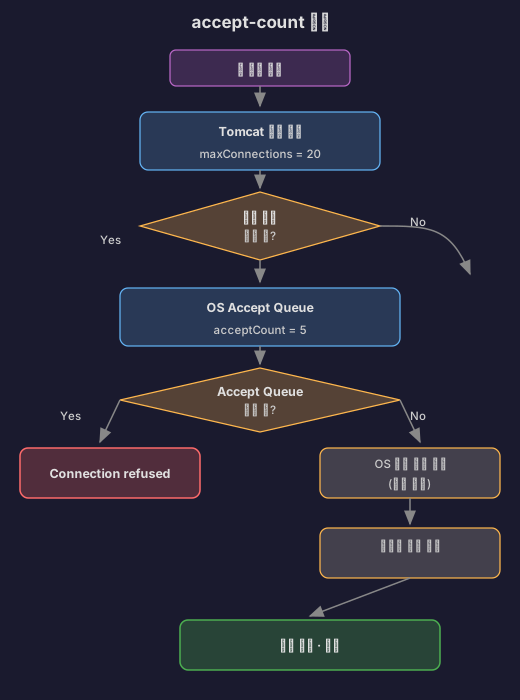
시나리오:maxConnections = 10acceptCount = 5현재 연결: 10개 (가득 참)
새 연결 요청:1. Tomcat: "maxConnections 가득 참, accept 안 함"2. OS: "그럼 내가 받아서 큐에 넣어둘게" (최대 5개)3. 클라이언트: "연결 성공!" (사실은 대기 중)
만약 acceptCount도 가득 차면:4. OS: "더 이상 못 받음"5. 클라이언트: "Connection refused" 에러Netflix의 Fail-Fast 전략:
Netflix는 acceptCount를 의도적으로 작게 설정했어요.
# Netflix의 설정 (추정)server: tomcat: threads: max: 300 max-connections: 400 accept-count: 10 # 매우 작게!이유:
큰 acceptCount (예: 1000):- 연결은 성공하지만 30초 동안 대기- 사용자: "왜 이렇게 느려?" (나쁜 UX)
작은 acceptCount (예: 10):- 빠르게 "Connection refused" 반환- 클라이언트: 재시도 또는 다른 서버로 라우팅 (빠른 실패)출처: Netflix Tech Blog - Tuning Tomcat For A High Throughput, Fail Fast System (검색 결과 참고)
3.3 실전 설정 예시
# 내가 현재 작업하고 있는 사이드 스트리밍 서비스 (I/O 위주)server: tomcat: threads: max: 200 min-spare: 50 max-connections: 500 accept-count: 20 connection-timeout: 20000
# API 서버 (빠른 응답)server: tomcat: threads: max: 100 min-spare: 20 max-connections: 200 accept-count: 10 connection-timeout: 5000
# 내부 관리 도구 (트래픽 적음)server: tomcat: threads: max: 50 min-spare: 10 max-connections: 100 accept-count: 104. Spring MVC 요청 처리 과정
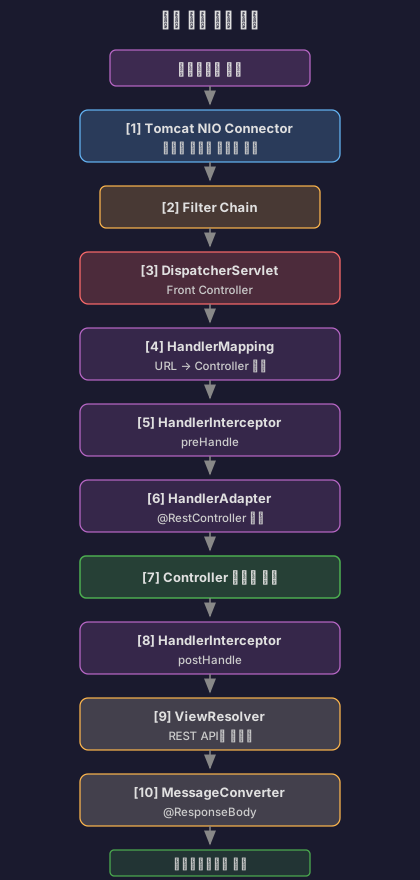
톰캣이 요청을 받았어요. 이제 Spring MVC로 넘어갈게요.
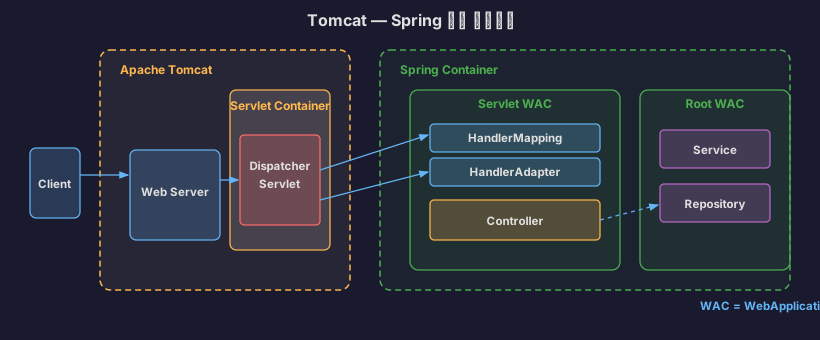
4.1 전체 흐름

4.2 DispatcherServlet: Front Controller
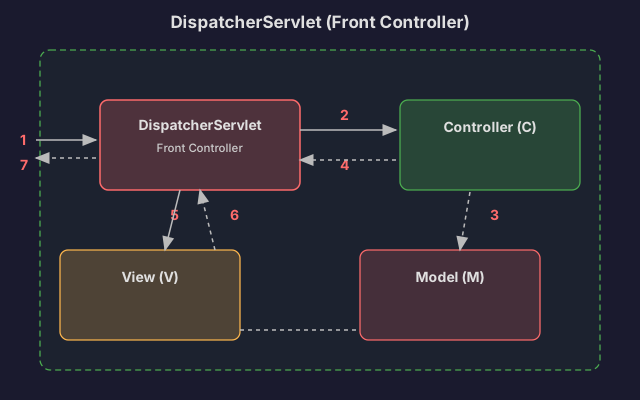
// DispatcherServlet의 핵심 메서드 (단순화)public class DispatcherServlet extends HttpServlet {
private List<HandlerMapping> handlerMappings; private List<HandlerAdapter> handlerAdapters; private List<ViewResolver> viewResolvers;
@Override protected void doDispatch(HttpServletRequest request, HttpServletResponse response) {
// 1. HandlerMapping으로 컨트롤러 찾기 HandlerExecutionChain handler = getHandler(request); if (handler == null) { response.sendError(404); return; }
// 2. HandlerAdapter 찾기 HandlerAdapter adapter = getHandlerAdapter(handler.getHandler());
// 3. Interceptor - preHandle if (!handler.applyPreHandle(request, response)) { return; }
// 4. 실제 컨트롤러 실행 ModelAndView mv = adapter.handle(request, response, handler.getHandler());
// 5. Interceptor - postHandle handler.applyPostHandle(request, response, mv);
// 6. View 렌더링 (REST API는 생략) if (mv != null) { render(mv, request, response); }
// 7. Interceptor - afterCompletion handler.triggerAfterCompletion(request, response, null); }}4.3 HandlerMapping: URL → Controller 매핑
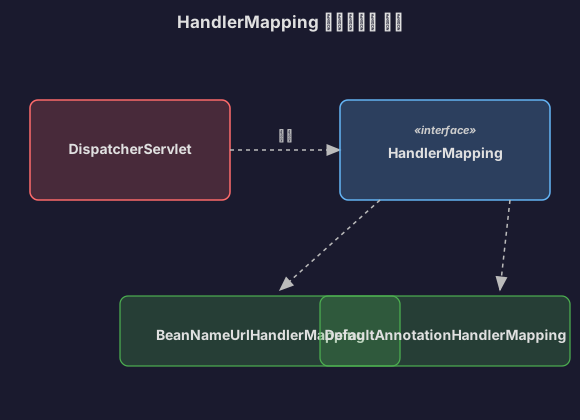
// HandlerMapping의 역할@RestController@RequestMapping("/api/streams")class StreamController {
@GetMapping("/{id}") // 이 매핑 정보를 HandlerMapping이 관리 public StreamDto getStream(@PathVariable Long id) { return streamService.findById(id); }}
// HandlerMapping이 관리하는 맵 (단순화)class RequestMappingHandlerMapping {
Map<RequestMappingInfo, HandlerMethod> mappings = new HashMap<>();
void registerMapping() { // 애플리케이션 시작 시 등록 RequestMappingInfo info = new RequestMappingInfo( "/api/streams/{id}", RequestMethod.GET );
HandlerMethod method = new HandlerMethod( streamController, // 빈 "getStream", // 메서드 이름 Long.class // 파라미터 타입 );
mappings.put(info, method); }
HandlerMethod getHandler(HttpServletRequest request) { String uri = request.getRequestURI(); // "/api/streams/123" String method = request.getMethod(); // "GET"
// 매핑 찾기 for (Entry<RequestMappingInfo, HandlerMethod> entry : mappings.entrySet()) { if (entry.getKey().matches(uri, method)) { return entry.getValue(); // StreamController.getStream } }
return null; // 404 }}여러 HandlerMapping이 있는 이유:
// Spring은 여러 HandlerMapping을 순서대로 시도List<HandlerMapping> handlerMappings = Arrays.asList( new RequestMappingHandlerMapping(), // @RequestMapping new BeanNameUrlHandlerMapping(), // 빈 이름으로 매핑 new SimpleUrlHandlerMapping() // 직접 URL 매핑);
HandlerExecutionChain getHandler(HttpServletRequest request) { for (HandlerMapping mapping : handlerMappings) { HandlerExecutionChain handler = mapping.getHandler(request); if (handler != null) { return handler; } } return null;}4.4 HandlerAdapter: Controller 실행
왜 HandlerAdapter가 필요할까?
Controller가 여러 형태를 가질 수 있기 때문이에요.
// 형태 1: @Controller 애너테이션@RestControllerclass ModernController { @GetMapping("/api/users") public List<User> getUsers() { return userService.findAll(); }}
// 형태 2: Controller 인터페이스 구현 (옛날 방식)class OldSchoolController implements Controller { @Override public ModelAndView handleRequest(HttpServletRequest req, HttpServletResponse res) { // ... }}
// 형태 3: HttpRequestHandlerclass SimpleController implements HttpRequestHandler { @Override public void handleRequest(HttpServletRequest req, HttpServletResponse res) { // ... }}HandlerAdapter는 이 차이를 흡수한다:
// HandlerAdapter 인터페이스interface HandlerAdapter { boolean supports(Object handler); // 이 핸들러 처리 가능? ModelAndView handle(HttpServletRequest req, HttpServletResponse res, Object handler);}
// 예시: RequestMappingHandlerAdapterclass RequestMappingHandlerAdapter implements HandlerAdapter {
@Override public boolean supports(Object handler) { return handler instanceof HandlerMethod; // @RequestMapping 메서드 }
@Override public ModelAndView handle(HttpServletRequest req, HttpServletResponse res, Object handler) { HandlerMethod method = (HandlerMethod) handler;
// 1. 파라미터 리졸빙 Object[] args = resolveArguments(method, req); // @PathVariable, @RequestBody 등 처리
// 2. 메서드 실행 Object result = method.invoke(args);
// 3. 반환값 처리 if (method.isAnnotatedWith(ResponseBody.class)) { // MessageConverter로 JSON 변환 writeJson(res, result); return null; }
return new ModelAndView("viewName", result); }}
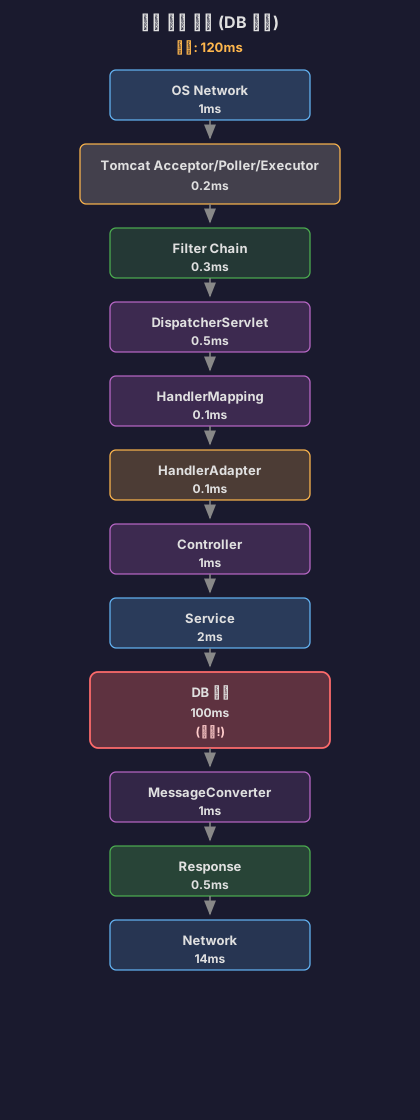
4.5 실제 요청 처리 시간 분석
@RestControllerclass PerformanceController {
@GetMapping("/api/benchmark") public String benchmark() { // 각 단계별 시간 측정 return "OK"; }}실제 측정 (로컬 환경):
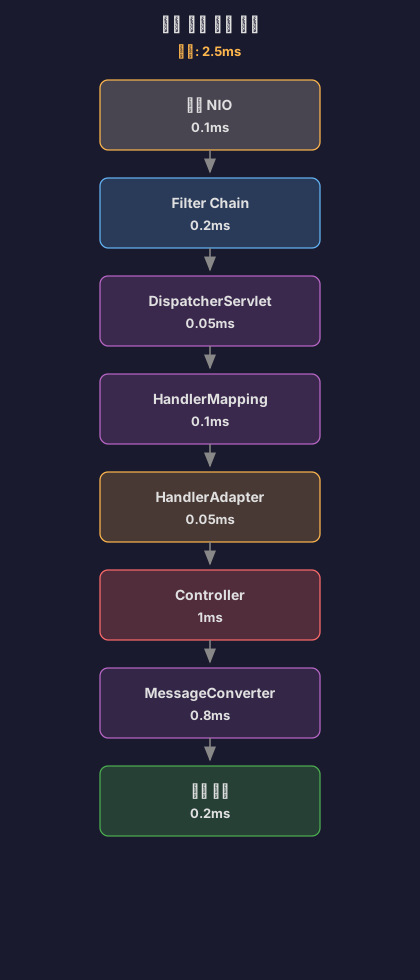
병목은 어디?
// 느린 Controller@GetMapping("/api/slow")public List<UserDto> getUsers() { // 1. DB 조회: 100ms List<User> users = userRepository.findAll();
// 2. N+1 문제: 500ms for (User user : users) { user.getOrders().size(); // Lazy Loading }
// 3. DTO 변환: 50ms return users.stream() .map(UserDto::from) .collect(Collectors.toList());}
// 총 시간: 650ms// Spring MVC 오버헤드: 2.5ms (0.4%)// 실제 로직: 650ms (99.6%)결론: Spring MVC 자체는 매우 빨라요. 병목은 대부분 비즈니스 로직에 있어요.
5. 실제 트러블슈팅 사례
5.1 카카오페이: Spring Batch 성능 최적화
문제 상황:
카카오페이 정산플랫폼팀에서 유저 등급 업데이트 배치 작업을 실행했어요. 5만 개 레코드 처리에 1시간 이상 소요되었죠.
// 문제가 있던 코드 (단순화)@Configurationclass UserGradeBatchConfig {
@Bean fun updateUserGradeJob(): Job { return jobBuilderFactory.get("updateUserGrade") .start(updateGradeStep()) .build() }
@Bean fun updateGradeStep(): Step { return stepBuilderFactory.get("updateGrade") .<User, User>chunk(1000) .reader(userReader()) .processor(gradeProcessor()) // 문제! .writer(userWriter()) .build() }}
// Processor: 외부 API 호출class GradeProcessor : ItemProcessor<User, User> { override fun process(user: User): User { // 외부 API 호출: 150ms val point = externalApi.getUserPoint(user.id) // Blocking! user.grade = calculateGrade(point) return user }}문제 분석:
Chunk 크기: 1,000외부 API 응답 시간: 150ms총 레코드: 50,000개
처리 과정:1. 1,000개 읽기2. 1,000개 처리 (각 150ms) = 150,000ms (2.5분)3. 1,000개 쓰기4. 다음 청크...
총 시간: 50 chunks × 2.5분 = 125분 (2시간)해결 방법 1: 병렬 처리 (RxKotlin)
class ParallelGradeProcessor : ItemProcessor<User, User> {
override fun process(user: User): User { // RxKotlin으로 병렬 처리 return Observable.just(user) .flatMap { u -> Observable.fromCallable { externalApi.getUserPoint(u.id) } .subscribeOn(Schedulers.io()) // 병렬 실행! } .map { point -> user.grade = calculateGrade(point) user } .blockingFirst() }}결과:
- 개선 전: 125분
- 개선 후: 12분
- 약 10배 개선
해결 방법 2: IN UPDATE 최적화
// 문제: 단건 업데이트 1,000번UPDATE users SET grade = 'GOLD' WHERE id = 1;UPDATE users SET grade = 'GOLD' WHERE id = 2;// ... 1,000번 반복
// 해결: 등급별로 그룹화하여 IN UPDATEUPDATE users SET grade = 'GOLD' WHERE id IN (1, 2, 3, ..., 500);UPDATE users SET grade = 'SILVER' WHERE id IN (501, 502, ..., 800);UPDATE users SET grade = 'BRONZE' WHERE id IN (801, 802, ..., 1000);
// 1,000번 → 3번!결과:
- 5,000개 레코드부터 90% 이상 성능 향상
5.2 톰캣 스레드 고갈
상황:
라이브 스트리밍 서비스에서 갑자기 응답이 느려졌어요.
# 기존 설정server: tomcat: threads: max: 200증상:
2025-01-10 14:23:15 WARN o.a.tomcat.util.threads.ThreadPoolExecutor- Pool exhausted with 200 threads, queue is full
2025-01-10 14:23:16 ERROR o.s.web.servlet.DispatcherServlet- Handler dispatch failed: java.util.concurrent.RejectedExecutionException원인 분석:
// 문제가 있던 API@GetMapping("/api/streams/live")public List<StreamDto> getLiveStreams() { // 1. DB 조회 (느린 쿼리): 5초 List<Stream> streams = streamRepository.findAllLive();
// 2. N+1 문제: 10초 for (Stream stream : streams) { stream.getUser().getNickname(); // Lazy Loading stream.getTags().size(); // Lazy Loading }
return streams.stream() .map(StreamDto::from) .collect(Collectors.toList());}
// 총 처리 시간: 15초// maxThreads = 200// 초당 요청: 20개
// 15초 × 20 req/s = 300개 스레드 필요!// 하지만 200개만 있음 → 고갈!해결 1: 쿼리 최적화
// Fetch Join으로 N+1 해결@Query(""" SELECT s FROM Stream s JOIN FETCH s.user JOIN FETCH s.tags WHERE s.status = 'LIVE'""")List<Stream> findAllLiveWithFetch();
// 처리 시간: 15초 → 0.5초// 필요 스레드: 0.5초 × 20 req/s = 10개해결 2: 캐싱
@Cacheable("liveStreams")@GetMapping("/api/streams/live")public List<StreamDto> getLiveStreams() { // 캐시 히트: 10ms // 캐시 미스: 500ms (쿼리 최적화 후) return streamService.findAllLive();}
// 필요 스레드: 거의 없음 (대부분 캐시 히트)5.3 maxConnections vs maxThreads 혼동
잘못된 설정:
server: tomcat: threads: max: 200 max-connections: 10000 # 너무 크다!문제:
동시 연결: 10,000개워커 스레드: 200개
상황:- 10,000개 연결 모두 Poller가 관리- 하지만 200개만 동시 처리 가능- 9,800개는 대기만 함- 메모리: 10,000 × 100KB = 1GB 낭비!올바른 설정:
server: tomcat: threads: max: 200 max-connections: 500 # threads.max의 2~3배 accept-count: 20 # 빠른 실패이유:
maxConnections = threads.max × (처리 시간 / 평균 Keep-Alive 시간)
예시:- 평균 처리 시간: 100ms- Keep-Alive timeout: 20초 (20,000ms)- 비율: 100 / 20,000 = 0.005
maxConnections = 200 × (1 + 버퍼) = 400~500
버퍼를 고려해 2~3배 정도가 적절6. 전체 흐름 정리
이제 전체 그림이 보여요.

각 계층의 처리 시간 (일반적인 REST API):

결론: 대부분의 경우 DB가 병목이에요. 톰캣과 Spring MVC는 충분히 빨라요.
7. 마치며
톰캣 커넥터부터 Spring MVC까지 공부하고 나니, 이제 요청 하나가 어떻게 처리되는지 전체 그림이 그려져요.
핵심 정리:
- BIO → NIO: 스레드 낭비를 막기 위해 Selector 기반으로 변경
- Acceptor, Poller, Executor: 각자 역할을 나눠서 효율적으로 처리
- Selector (epoll): 커널 레벨에서 여러 소켓을 동시에 감시
- maxThreads, maxConnections, acceptCount: 각각 다른 의미, 혼동 금지
- Spring MVC: DispatcherServlet이 중앙 집중식으로 요청 분배
- 병목은 대부분 DB: 쿼리 최적화가 제일 중요
나중에는 비동기 처리(WebFlux)와 리액티브 프로그래밍을 공부해서, 더 효율적인 서버를 만들어 봐야겠어요.
참고 자료
한국 기술 블로그
- nilgil.com - 톰캣은 어떻게 트래픽을 인지하고 처리하는 걸까? - 톰캣 NIO Connector 소스 코드 분석
- px201226.github.io - Apache Tomcat 이해하기(NIO Connector 중심) - Acceptor, Poller, Executor 구조 설명
- Velog - BIO, NIO Connector Architecture in Tomcat - BIO와 NIO 비교
- Velog - Tomcat BIO Connector & NIO Connector - 성능 차이 분석
- Velog - Tomcat의 maxConnections, maxThreads, acceptCount - 설정값 설명
- Hudi Blog - 톰캣 튜닝 맛보기 - 실전 튜닝 사례
- Velog - Tomcat Thread Pool 정리 - 스레드 풀 설정
- Tecoble - DispatcherServlet Part 1 - Spring MVC 동작 원리
- 카카오페이 - Spring Batch 애플리케이션 성능 향상을 위한 주요 팁 - 실제 트러블슈팅 사례
해외 기술 블로그
- Netflix Tech Blog - Tuning Tomcat For A High Throughput, Fail Fast System - Netflix의 톰캣 튜닝 전략
CS 지식
- NiklasJang’s Blog - select, poll, epoll 구조 - epoll 동작 원리
Spring 공식 문서
- Spring MVC - HandlerMapping, HandlerAdapter - HandlerMapping과 HandlerAdapter 설명

After studying connection pools, another question arose: “So how do requests actually come in to begin with?” I understood that Tomcat receives thousands or tens of thousands of concurrent requests, hands them to a thread pool, and uses a DB connection pool. But I didn’t truly understand how Tomcat accepts all those requests.
So I decided to dig into Tomcat’s Connector, NIO, and the Spring MVC request processing pipeline.
1. BIO vs NIO: Why Did Tomcat Need to Change?
1.1 Problems with the BIO Connector
Before Tomcat 8.0, the BIO (Blocking I/O) Connector was used. The architecture was simple:
// BIO Connector behavior (pseudocode)class BIOConnector { ExecutorService threadPool;
void acceptConnection() { while (true) { Socket socket = serverSocket.accept(); // Accept connection
// Problem: one thread is dedicated to one connection threadPool.execute(() -> { try { // 1. Wait for request (Blocking!) InputStream input = socket.getInputStream(); byte[] data = input.read(); // Wait until data arrives
// 2. Process request processRequest(data);
// 3. Send response OutputStream output = socket.getOutputStream(); output.write(response);
// 4. Keep connection alive (HTTP Keep-Alive) // Thread remains occupied! } finally { socket.close(); } }); } }}What’s the problem?
Consider the case of HTTP Keep-Alive. Suppose a client sends a first request and then a second request 2 seconds later.

The thread spent 1.9 seconds doing nothing but waiting. What if there are 1,000 connections?
// Worst-case scenarioclass BIOProblem { public static void main(String[] args) { // Thread pool: 200 threads // Concurrent connections: 1000 // Keep-Alive Timeout: 20 seconds
// Scenario: // 1000 users connected // Each sends just 1 request, then waits on Keep-Alive for 20 seconds
// Result: // - All 200 threads occupied // - Remaining 800 connections wait // - CPU is barely doing anything! }}1.2 The Arrival of NIO Connector
Starting with Tomcat 8.0, the NIO (Non-blocking I/O) Connector became the default. What changed?
Core idea: Instead of having threads wait for data, assign threads only when data is ready.
// NIO Connector behavior (simplified)class NIOConnector { Selector selector; // The key!
void run() { while (true) { // 1. Selector monitors multiple connections simultaneously int readyCount = selector.select(); // Blocking, but monitors multiple channels
// 2. Process only the ready channels Set<SelectionKey> keys = selector.selectedKeys(); for (SelectionKey key : keys) { if (key.isAcceptable()) { // Accept new connection acceptConnection(key); } else if (key.isReadable()) { // Data ready to read → assign worker thread only now! handleRead(key); } else if (key.isWritable()) { // Data ready to write handleWrite(key); } } } }}Differences:
| Aspect | BIO | NIO |
|---|---|---|
| Thread-to-connection | 1:1 mapping | N:1 mapping (managed by Poller) |
| Waiting for data | Thread blocks | Selector monitors |
| Idle time handling | Thread is wasted | Thread returned immediately |
| Max concurrent connections | ~200 (limited by thread count) | ~10,000 (as long as there’s enough memory) |
Source: nilgil.com - How does Tomcat recognize and handle traffic?
1.3 Actual Performance Difference
Let’s run a simple benchmark.
# Test environmentspring: application: name: benchmark-testserver: tomcat: threads: max: 200// Slow API (intentionally waits 3 seconds)@RestControllerclass SlowController {
@GetMapping("/slow") public String slowApi() throws InterruptedException { Thread.sleep(3000); // Simulates DB query or external API call return "Done"; }}Testing with BIO Connector (hypothetical):
Concurrent users: 1000Request: GET /slow
Result:- First 200: respond after 3 seconds- 201~400: respond after 6 seconds- 401~600: respond after 9 seconds- 801~1000: respond after 15 seconds
Average response time: 9 secondsTesting with NIO Connector:
Concurrent users: 1000Request: GET /slow
Result:- All 1000 respond after about 3~4 seconds- Poller manages all 1000 connections- Worker threads are assigned only during actual processing
Average response time: 3.2 secondsWhy such a big difference?
BIO:connections > threads → queued → processed sequentially
NIO:independent of connection count → Poller monitors all → worker threads assigned only to ready onesStarting from Tomcat 9.0, the BIO Connector was completely removed. The performance gap was too clear.
2. NIO Connector Architecture: Acceptor, Poller, Executor
The NIO Connector consists of three main components.
2.1 Overall Architecture

What role does each component play?
2.2 Acceptor: Accepting Connections
// Acceptor's role (pseudocode)class Acceptor implements Runnable { ServerSocketChannel serverSocket;
@Override public void run() { while (running) { // 1. Accept connections that completed the 3-way handshake SocketChannel socket = serverSocket.accept(); // Blocking
// 2. Set to non-blocking mode socket.configureBlocking(false);
// 3. Hand off to Poller PollerEvent event = new PollerEvent(socket, OP_READ); poller.register(event); } }}Key points:
- The Acceptor only accepts connections and immediately hands them to the Poller
- CPU time: less than 0.1ms
- It blocks, but since processing is fast, 1-2 threads are sufficient
Why is blocking acceptable here?
// accept() is fastclass AcceptorPerformance { void benchmark() { long start = System.nanoTime(); SocketChannel socket = serverSocket.accept(); long end = System.nanoTime();
System.out.println("Accept time: " + (end - start) / 1000 + "μs"); // Output: Accept time: 50μs (0.05ms)
// Throughput: 1,000,000 / 50 = 20,000 connections/sec // It's just pulling from the TCP backlog queue, so it's very fast }}2.3 Poller: Event Detection
The Poller is the heart of NIO.
// Poller's role (pseudocode)class Poller implements Runnable { Selector selector; Queue<PollerEvent> events;
@Override public void run() { while (running) { // 1. Register newly added sockets with the Selector processEvents();
// 2. Detect ready channels with the Selector int count = selector.select(1000); // Wait up to 1 second
if (count > 0) { // 3. Process ready channels Iterator<SelectionKey> iterator = selector.selectedKeys().iterator(); while (iterator.hasNext()) { SelectionKey key = iterator.next(); iterator.remove();
if (key.isReadable()) { // Data ready to read! // Hand off to Executor executor.execute(new SocketProcessor(key)); } } } } }
void processEvents() { PollerEvent event; while ((event = events.poll()) != null) { // Register sockets from Acceptor with the Selector event.socket.register(selector, SelectionKey.OP_READ); } }}What the Poller solved:
// Before (BIO): 1000 connections = 1000 threads needed// Memory: 1000 × 1MB = 1GB
// After (NIO): 1000 connections = 1~2 Pollers + worker threads only when needed// Memory: 2MB (Poller) + dynamically allocatedSource: px201226.github.io - Understanding Apache Tomcat (NIO Connector Focus)
2.4 Executor: Actual Request Processing
// Executor's roleclass SocketProcessor implements Runnable { SelectionKey key;
@Override public void run() { try { // 1. Read data from socket SocketChannel channel = (SocketChannel) key.channel(); ByteBuffer buffer = ByteBuffer.allocate(8192); int read = channel.read(buffer);
// 2. Parse HTTP request HttpRequest request = parseHttpRequest(buffer);
// 3. Pass to servlet container servlet.service(request, response);
// 4. Send response channel.write(responseBuffer);
} finally { // 5. Return worker thread immediately! // Keep-Alive connections go back to Poller key.interestOps(SelectionKey.OP_READ); } }}Important: Worker threads are used only for the actual processing time and returned immediately.
BIO:Thread assigned → wait for data (2s) → process (0.1s) → wait (Keep-Alive 20s)Thread occupied: 22.1 seconds
NIO:Poller monitors (2s) → thread assigned → process (0.1s) → thread returned → Poller monitors (20s)Thread occupied: 0.1 secondsSource: nilgil.com - How does Tomcat recognize and handle traffic?
2.5 How Does the Selector Work?

Java’s Selector leverages the operating system’s I/O multiplexing capabilities.
Linux: epoll
// Java Selector internals (Linux)class EPollSelectorImpl extends SelectorImpl {
int poll(long timeout) { // Calls the Linux epoll_wait system call via JNI return EPoll.wait(pollArrayAddress, NUM_EPOLLEVENTS, timeout, epfd); }}How epoll works:
// Linux kernel level// 1. Create epoll instanceint epfd = epoll_create1(0);
// 2. Register sockets to monitorstruct epoll_event ev;ev.events = EPOLLIN; // Read eventsev.data.fd = socket_fd;epoll_ctl(epfd, EPOLL_CTL_ADD, socket_fd, &ev);
// 3. Wait for events (blocking, but monitors multiple sockets!)struct epoll_event events[1000];int nfds = epoll_wait(epfd, events, 1000, timeout);
// 4. Iterate only over ready socketsfor (int i = 0; i < nfds; i++) { if (events[i].events & EPOLLIN) { // This socket has data ready to read! handle_read(events[i].data.fd); }}Why is it fast?
The difference from the old select/poll:
// select (old approach)fd_set readfds;FD_ZERO(&readfds);FD_SET(socket1, &readfds);FD_SET(socket2, &readfds);// ... register 1000 ...
select(max_fd, &readfds, NULL, NULL, &timeout);
// Problem: iterates through all 1000 every timefor (int i = 0; i < 1000; i++) { if (FD_ISSET(sockets[i], &readfds)) { // ready }}// Time complexity: O(N)
// epoll (new approach)int nfds = epoll_wait(epfd, events, 1000, timeout);// The kernel fills the events array with only the ready ones!
for (int i = 0; i < nfds; i++) { // Iterate only over the ready ones}// Time complexity: O(number of ready)Performance difference:
With 1000 connections and only 10 ready:
select: checks 1000 times → 10msepoll: checks only 10 times → 0.1ms
100x difference!Source: NiklasJang’s Blog - select, poll, epoll architecture


NIO Connector Operation Sequence
-
The Acceptor receives socket requests.
-
It obtains an object from the socket and converts it into a PollerEvent object.
-
It places it into the PollerEvent Queue.
-
The Poller thread uses the Selector Object to manage multiple channels.
-
While monitoring the state, it gets sockets that are ready to read data, acquires a worker thread, and connects the socket to that thread.
-
The worker thread processes the task, sends the response through the socket, and finishes.
Source: [Tomcat] NIO Connector Focus
3. Tomcat Configuration: maxThreads, maxConnections, acceptCount

Now we can understand what these Tomcat configuration values mean.
3.1 The Relationship Between the Three Settings
server: tomcat: threads: max: 200 # maxThreads max-connections: 8192 # maxConnections accept-count: 100 # acceptCountFlow:

3.2 Meaning of Each Setting
3.2.1 maxThreads (threads.max)
The number of requests that can be processed concurrently
// If maxThreads = 200?class WorkerThreadPool { ExecutorService executor = Executors.newFixedThreadPool(200);
void handleRequest(HttpRequest request) { if (executor.getActiveCount() < 200) { // Can process executor.submit(() -> processRequest(request)); } else { // Wait (connection is maintained!) // Poller continues monitoring } }}When should you increase it?
# Scenario 1: CPU-bound work (computation-heavy)# Average processing time: 100ms# CPU cores: 8# Recommended: threads.max = 8~16
# Scenario 2: I/O-bound work (DB, external API calls)# Average processing time: 500ms (450ms of which is I/O wait)# CPU cores: 8# Recommended: threads.max = 100~200
# Scenario 3: Mixed# Average processing time: 200ms (150ms of which is I/O wait)# CPU cores: 8# Recommended: threads.max = 50~100Source: Velog - Tomcat’s maxConnections, maxThreads, acceptCount
3.2.2 maxConnections
The number of connections the Poller can manage simultaneously
// Meaning of maxConnections in NIOclass NIOEndpoint { Semaphore connectionLimitLatch; // Connection count limiter
void setMaxConnections(int max) { this.connectionLimitLatch = new Semaphore(max); }
void acceptConnection(SocketChannel socket) { if (connectionLimitLatch.tryAcquire()) { // Accept connection poller.register(socket); } else { // Cannot accept more connections // Moves to OS accept queue (acceptCount) } }
void closeConnection(SocketChannel socket) { socket.close(); connectionLimitLatch.release(); // Release slot }}Why the default of 8192 is reasonable:
Memory calculation:- Memory per connection: ~50~100KB (TCP buffers, socket metadata)- 8192 connections: 400MB~800MB
CPU calculation:- Poller's epoll_wait: O(number of ready)- 100 ready out of 8192: less than 1ms
Sufficient for most cases!When should you increase it?
# Bad configurationserver: tomcat: max-connections: 10000 threads: max: 200
# Problem: what if 10,000 connections come in?# - Only 200 are being processed# - 9,800 are just waiting# - Memory wasted!
# Correct configurationserver: tomcat: max-connections: 500 # About 2~3x threads.max threads: max: 2003.2.3 acceptCount
OS-level backlog queue size
// When creating ServerSocketServerSocket serverSocket = new ServerSocket(port, acceptCount);
// Actual behavior on Linux// listen(sockfd, backlog)listen(server_fd, 100); // acceptCount = 100How acceptCount works:

Scenario:maxConnections = 10acceptCount = 5Current connections: 10 (full)
New connection request:1. Tomcat: "maxConnections is full, not accepting"2. OS: "Then I'll accept it and put it in my queue" (max 5)3. Client: "Connection successful!" (actually waiting)
If acceptCount is also full:4. OS: "Can't accept any more"5. Client: "Connection refused" errorNetflix’s Fail-Fast Strategy:
Netflix intentionally sets acceptCount small.
# Netflix's configuration (estimated)server: tomcat: threads: max: 300 max-connections: 400 accept-count: 10 # Very small!Why:
Large acceptCount (e.g., 1000):- Connection succeeds but waits 30 seconds- User: "Why is it so slow?" (bad UX)
Small acceptCount (e.g., 10):- Quickly returns "Connection refused"- Client: retries or routes to another server (fast failure)Source: Netflix Tech Blog - Tuning Tomcat For A High Throughput, Fail Fast System
3.3 Practical Configuration Examples
# My current side streaming service (I/O heavy)server: tomcat: threads: max: 200 min-spare: 50 max-connections: 500 accept-count: 20 connection-timeout: 20000
# API server (fast responses)server: tomcat: threads: max: 100 min-spare: 20 max-connections: 200 accept-count: 10 connection-timeout: 5000
# Internal admin tool (low traffic)server: tomcat: threads: max: 50 min-spare: 10 max-connections: 100 accept-count: 104. Spring MVC Request Processing
Tomcat received the request. Now it’s handed off to Spring MVC.
4.1 Overall Flow

4.2 DispatcherServlet: Front Controller

// DispatcherServlet core method (simplified)public class DispatcherServlet extends HttpServlet {
private List<HandlerMapping> handlerMappings; private List<HandlerAdapter> handlerAdapters; private List<ViewResolver> viewResolvers;
@Override protected void doDispatch(HttpServletRequest request, HttpServletResponse response) {
// 1. Find controller via HandlerMapping HandlerExecutionChain handler = getHandler(request); if (handler == null) { response.sendError(404); return; }
// 2. Find HandlerAdapter HandlerAdapter adapter = getHandlerAdapter(handler.getHandler());
// 3. Interceptor - preHandle if (!handler.applyPreHandle(request, response)) { return; }
// 4. Execute actual controller ModelAndView mv = adapter.handle(request, response, handler.getHandler());
// 5. Interceptor - postHandle handler.applyPostHandle(request, response, mv);
// 6. Render view (skipped for REST APIs) if (mv != null) { render(mv, request, response); }
// 7. Interceptor - afterCompletion handler.triggerAfterCompletion(request, response, null); }}4.3 HandlerMapping: URL to Controller Mapping

// HandlerMapping's role@RestController@RequestMapping("/api/streams")class StreamController {
@GetMapping("/{id}") // HandlerMapping manages this mapping info public StreamDto getStream(@PathVariable Long id) { return streamService.findById(id); }}
// Map managed by HandlerMapping (simplified)class RequestMappingHandlerMapping {
Map<RequestMappingInfo, HandlerMethod> mappings = new HashMap<>();
void registerMapping() { // Registered at application startup RequestMappingInfo info = new RequestMappingInfo( "/api/streams/{id}", RequestMethod.GET );
HandlerMethod method = new HandlerMethod( streamController, // bean "getStream", // method name Long.class // parameter type );
mappings.put(info, method); }
HandlerMethod getHandler(HttpServletRequest request) { String uri = request.getRequestURI(); // "/api/streams/123" String method = request.getMethod(); // "GET"
// Find mapping for (Entry<RequestMappingInfo, HandlerMethod> entry : mappings.entrySet()) { if (entry.getKey().matches(uri, method)) { return entry.getValue(); // StreamController.getStream } }
return null; // 404 }}Why there are multiple HandlerMappings:
// Spring tries multiple HandlerMappings in orderList<HandlerMapping> handlerMappings = Arrays.asList( new RequestMappingHandlerMapping(), // @RequestMapping new BeanNameUrlHandlerMapping(), // Mapping by bean name new SimpleUrlHandlerMapping() // Direct URL mapping);
HandlerExecutionChain getHandler(HttpServletRequest request) { for (HandlerMapping mapping : handlerMappings) { HandlerExecutionChain handler = mapping.getHandler(request); if (handler != null) { return handler; } } return null;}4.4 HandlerAdapter: Controller Execution
Why is HandlerAdapter needed?
Because controllers can take multiple forms:
// Form 1: @Controller annotation@RestControllerclass ModernController { @GetMapping("/api/users") public List<User> getUsers() { return userService.findAll(); }}
// Form 2: Controller interface implementation (old style)class OldSchoolController implements Controller { @Override public ModelAndView handleRequest(HttpServletRequest req, HttpServletResponse res) { // ... }}
// Form 3: HttpRequestHandlerclass SimpleController implements HttpRequestHandler { @Override public void handleRequest(HttpServletRequest req, HttpServletResponse res) { // ... }}HandlerAdapter absorbs these differences:
// HandlerAdapter interfaceinterface HandlerAdapter { boolean supports(Object handler); // Can this handler be processed? ModelAndView handle(HttpServletRequest req, HttpServletResponse res, Object handler);}
// Example: RequestMappingHandlerAdapterclass RequestMappingHandlerAdapter implements HandlerAdapter {
@Override public boolean supports(Object handler) { return handler instanceof HandlerMethod; // @RequestMapping methods }
@Override public ModelAndView handle(HttpServletRequest req, HttpServletResponse res, Object handler) { HandlerMethod method = (HandlerMethod) handler;
// 1. Resolve parameters Object[] args = resolveArguments(method, req); // Handles @PathVariable, @RequestBody, etc.
// 2. Execute method Object result = method.invoke(args);
// 3. Handle return value if (method.isAnnotatedWith(ResponseBody.class)) { // Convert to JSON via MessageConverter writeJson(res, result); return null; }
return new ModelAndView("viewName", result); }}
4.5 Actual Request Processing Time Analysis
@RestControllerclass PerformanceController {
@GetMapping("/api/benchmark") public String benchmark() { // Measure time for each stage return "OK"; }}Actual measurements (local environment):

Where is the bottleneck?
// Slow Controller@GetMapping("/api/slow")public List<UserDto> getUsers() { // 1. DB query: 100ms List<User> users = userRepository.findAll();
// 2. N+1 problem: 500ms for (User user : users) { user.getOrders().size(); // Lazy Loading }
// 3. DTO conversion: 50ms return users.stream() .map(UserDto::from) .collect(Collectors.toList());}
// Total time: 650ms// Spring MVC overhead: 2.5ms (0.4%)// Actual logic: 650ms (99.6%)Conclusion: Spring MVC itself is very fast. The bottleneck is almost always in the business logic.
5. Real-World Troubleshooting Cases
5.1 KakaoPay: Spring Batch Performance Optimization
Problem:
The KakaoPay settlement platform team ran a batch job to update user grades. Processing 50,000 records took over 1 hour.
// Problematic code (simplified)@Configurationclass UserGradeBatchConfig {
@Bean fun updateUserGradeJob(): Job { return jobBuilderFactory.get("updateUserGrade") .start(updateGradeStep()) .build() }
@Bean fun updateGradeStep(): Step { return stepBuilderFactory.get("updateGrade") .<User, User>chunk(1000) .reader(userReader()) .processor(gradeProcessor()) // Problem! .writer(userWriter()) .build() }}
// Processor: External API callclass GradeProcessor : ItemProcessor<User, User> { override fun process(user: User): User { // External API call: 150ms val point = externalApi.getUserPoint(user.id) // Blocking! user.grade = calculateGrade(point) return user }}Problem analysis:
Chunk size: 1,000External API response time: 150msTotal records: 50,000
Processing flow:1. Read 1,000 records2. Process 1,000 records (150ms each) = 150,000ms (2.5 min)3. Write 1,000 records4. Next chunk...
Total time: 50 chunks x 2.5 min = 125 min (2 hours)Solution 1: Parallel processing (RxKotlin)
class ParallelGradeProcessor : ItemProcessor<User, User> {
override fun process(user: User): User { // Parallel processing with RxKotlin return Observable.just(user) .flatMap { u -> Observable.fromCallable { externalApi.getUserPoint(u.id) } .subscribeOn(Schedulers.io()) // Parallel execution! } .map { point -> user.grade = calculateGrade(point) user } .blockingFirst() }}Result:
- Before: 125 minutes
- After: 12 minutes
- ~10x improvement
Solution 2: IN UPDATE optimization
// Problem: single-row update 1,000 timesUPDATE users SET grade = 'GOLD' WHERE id = 1;UPDATE users SET grade = 'GOLD' WHERE id = 2;// ... repeated 1,000 times
// Solution: group by grade and use IN UPDATEUPDATE users SET grade = 'GOLD' WHERE id IN (1, 2, 3, ..., 500);UPDATE users SET grade = 'SILVER' WHERE id IN (501, 502, ..., 800);UPDATE users SET grade = 'BRONZE' WHERE id IN (801, 802, ..., 1000);
// 1,000 queries → 3 queries!Result:
- Over 90% performance improvement starting from 5,000 records
Source: KakaoPay - Key Tips for Improving Spring Batch Application Performance
5.2 Tomcat Thread Exhaustion
Situation:
A live streaming service suddenly became slow.
# Existing configurationserver: tomcat: threads: max: 200Symptoms:
2025-01-10 14:23:15 WARN o.a.tomcat.util.threads.ThreadPoolExecutor- Pool exhausted with 200 threads, queue is full
2025-01-10 14:23:16 ERROR o.s.web.servlet.DispatcherServlet- Handler dispatch failed: java.util.concurrent.RejectedExecutionExceptionRoot cause analysis:
// Problematic API@GetMapping("/api/streams/live")public List<StreamDto> getLiveStreams() { // 1. DB query (slow query): 5 seconds List<Stream> streams = streamRepository.findAllLive();
// 2. N+1 problem: 10 seconds for (Stream stream : streams) { stream.getUser().getNickname(); // Lazy Loading stream.getTags().size(); // Lazy Loading }
return streams.stream() .map(StreamDto::from) .collect(Collectors.toList());}
// Total processing time: 15 seconds// maxThreads = 200// Requests per second: 20
// 15s x 20 req/s = 300 threads needed!// But only 200 available → exhausted!Fix 1: Query optimization
// Resolve N+1 with Fetch Join@Query(""" SELECT s FROM Stream s JOIN FETCH s.user JOIN FETCH s.tags WHERE s.status = 'LIVE'""")List<Stream> findAllLiveWithFetch();
// Processing time: 15s → 0.5s// Threads needed: 0.5s x 20 req/s = 10Fix 2: Caching
@Cacheable("liveStreams")@GetMapping("/api/streams/live")public List<StreamDto> getLiveStreams() { // Cache hit: 10ms // Cache miss: 500ms (after query optimization) return streamService.findAllLive();}
// Threads needed: almost none (most are cache hits)5.3 maxConnections vs maxThreads Confusion
Incorrect configuration:
server: tomcat: threads: max: 200 max-connections: 10000 # Too large!Problem:
Concurrent connections: 10,000Worker threads: 200
Situation:- Poller manages all 10,000 connections- But only 200 can be processed concurrently- 9,800 are just waiting- Memory: 10,000 x 100KB = 1GB wasted!Correct configuration:
server: tomcat: threads: max: 200 max-connections: 500 # 2~3x threads.max accept-count: 20 # Fast failureReasoning:
maxConnections = threads.max x (processing time / average Keep-Alive time)
Example:- Average processing time: 100ms- Keep-Alive timeout: 20 seconds (20,000ms)- Ratio: 100 / 20,000 = 0.005
maxConnections = 200 x (1 + buffer) = 400~500
With buffer, 2~3x is appropriate6. Overall Flow Summary
Now we can see the full picture.

Processing time at each layer (typical REST API):

Conclusion: In most cases, the database is the bottleneck. Tomcat and Spring MVC are fast enough.
7. Closing Thoughts
After studying everything from Tomcat Connectors to Spring MVC, the full picture of how a single request is processed is now clear.
Key takeaways:
- BIO to NIO: Changed to Selector-based architecture to prevent thread waste
- Acceptor, Poller, Executor: Each has a dedicated role for efficient processing
- Selector (epoll): Monitors multiple sockets simultaneously at the kernel level
- maxThreads, maxConnections, acceptCount: Each has a different meaning — don’t confuse them
- Spring MVC: DispatcherServlet centrally dispatches requests
- The bottleneck is usually the DB: Query optimization is the most important thing
In the future, I want to study asynchronous processing (WebFlux) and reactive programming to build even more efficient servers.
References
Korean Tech Blogs
- nilgil.com - How does Tomcat recognize and handle traffic? - Tomcat NIO Connector source code analysis
- px201226.github.io - Understanding Apache Tomcat (NIO Connector Focus) - Acceptor, Poller, Executor architecture
- Velog - BIO, NIO Connector Architecture in Tomcat - BIO vs NIO comparison
- Velog - Tomcat BIO Connector & NIO Connector - Performance comparison
- Velog - Tomcat’s maxConnections, maxThreads, acceptCount - Configuration reference
- Hudi Blog - A taste of Tomcat tuning - Practical tuning example
- Velog - Tomcat Thread Pool Summary - Thread pool settings
- Tecoble - DispatcherServlet Part 1 - Spring MVC internals
- KakaoPay - Key Tips for Improving Spring Batch Application Performance - Real troubleshooting case
International Tech Blogs
- Netflix Tech Blog - Tuning Tomcat For A High Throughput, Fail Fast System - Netflix’s Tomcat tuning strategy
CS Knowledge
- NiklasJang’s Blog - select, poll, epoll architecture - How epoll works
Spring Official Documentation
- Spring MVC - HandlerMapping, HandlerAdapter - HandlerMapping and HandlerAdapter explained