Spring Boot 4.0 API 버전 관리
목차
Spring Boot 4.0 / Spring Framework 7.0부터 API 버전 관리가 프레임워크 레벨에서 공식 지원된다.
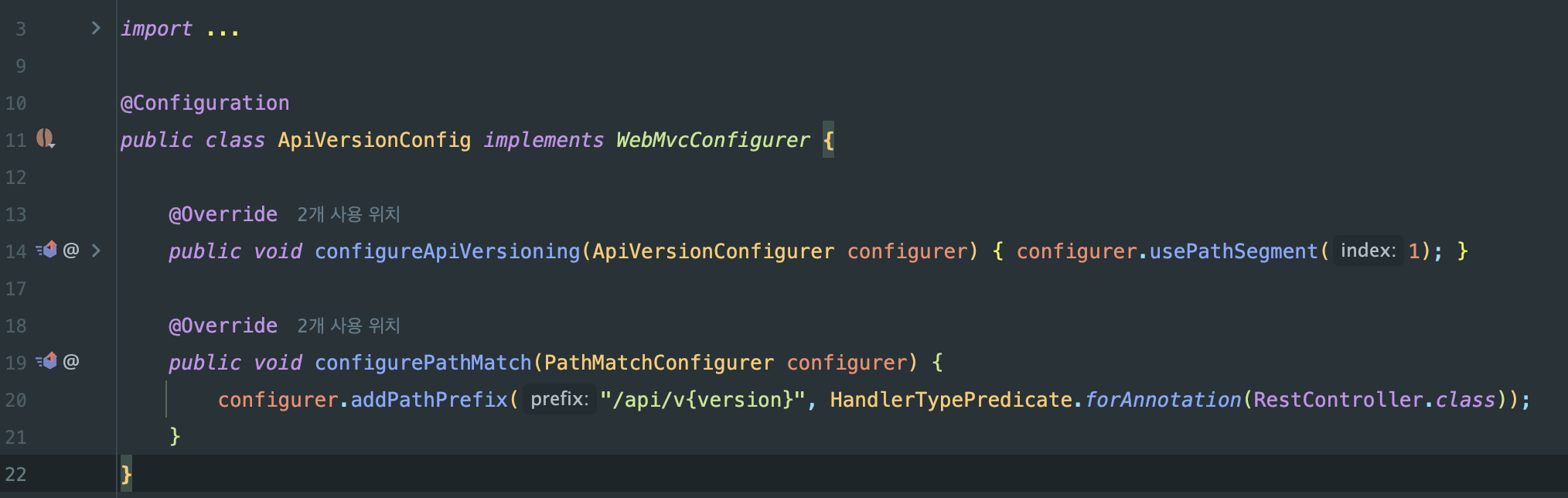
설정 파일
ApiVersionConfig.java
동작 원리 상세 설명
1) WebMvcConfigurer 인터페이스
Spring MVC의 설정을 커스터마이징할 수 있는 인터페이스입니다.
이 인터페이스를 구현하면 Spring MVC의 다양한 설정을 오버라이드할 수 있습니다.

2) configureApiVersioning 메서드

ApiVersionConfigurer의 주요 메서드:
| 메서드 | 설명 | 예시 |
|---|---|---|
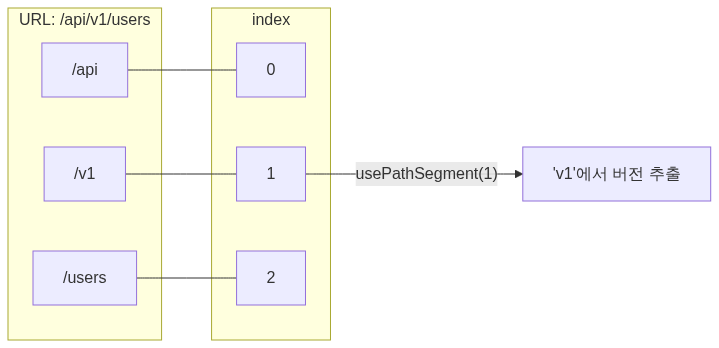
usePathSegment(int index) | URL 경로의 특정 위치에서 버전 추출 | /api/v1/users → index 1에서 “v1” |
useRequestHeader(String) | HTTP 헤더에서 버전 추출 | X-API-Version: 1 |
useQueryParam(String) | 쿼리 파라미터에서 버전 추출 | ?version=1 |
useMediaTypeParameter() | Accept 헤더의 미디어타입에서 추출 | Accept: application/vnd.api.v1+json |
setDefaultVersion(String) | 버전 미지정 시 기본값 | setDefaultVersion("1") |
addSupportedVersions() | 지원하는 버전 목록 정의 | addSupportedVersions("1", "2") |
usePathSegment(1)의 의미:
3) configurePathMatch 메서드

동작 과정:
1. HandlerTypePredicate.forAnnotation(RestController.class)
@RestController가 붙은 모든 클래스를 대상으로 함
2. addPathPrefix("/api/v{version}", ...)
- 해당 컨트롤러들의 모든 엔드포인트 앞에
/api/v{version}프리픽스 추가
3. {version}
- 동적 버전 플레이스홀더
변환 예시:
| 원본 Controller 매핑 | 실제 URL |
|---|---|
@GetMapping("/users") | /api/v1/users |
@PostMapping("/auth/login") | /api/v1/auth/login |
@DeleteMapping("/posts/{id}") | /api/v1/posts/{id} |
전체 요청 흐름
클라이언트 요청: GET /api/v1/users
1. Spring MVC DispatcherServlet 요청 수신
2. PathMatchConfigurer 적용
- /api/v{version} 패턴 매칭
- {version} = “v1” 추출
3. ApiVersionConfigurer 적용
- usePathSegment(1) → “v1” 버전 파싱
- 버전 정보를 요청 컨텍스트에 저장
4. version 속성 매칭
- 컨트롤러에
@RequestMapping(version = "1")있으면 해당 버전만 매칭 - 없으면 모든 버전에서 동작
5. Controller 메서드 실행
- UserController.getUsers() 호출
Controller에서 버전 지정하기
Spring Boot 4.0에서는 @RequestMapping과 @GetMapping 등에 version 속성이 추가됐습니다.
클래스 레벨에서 버전 지정
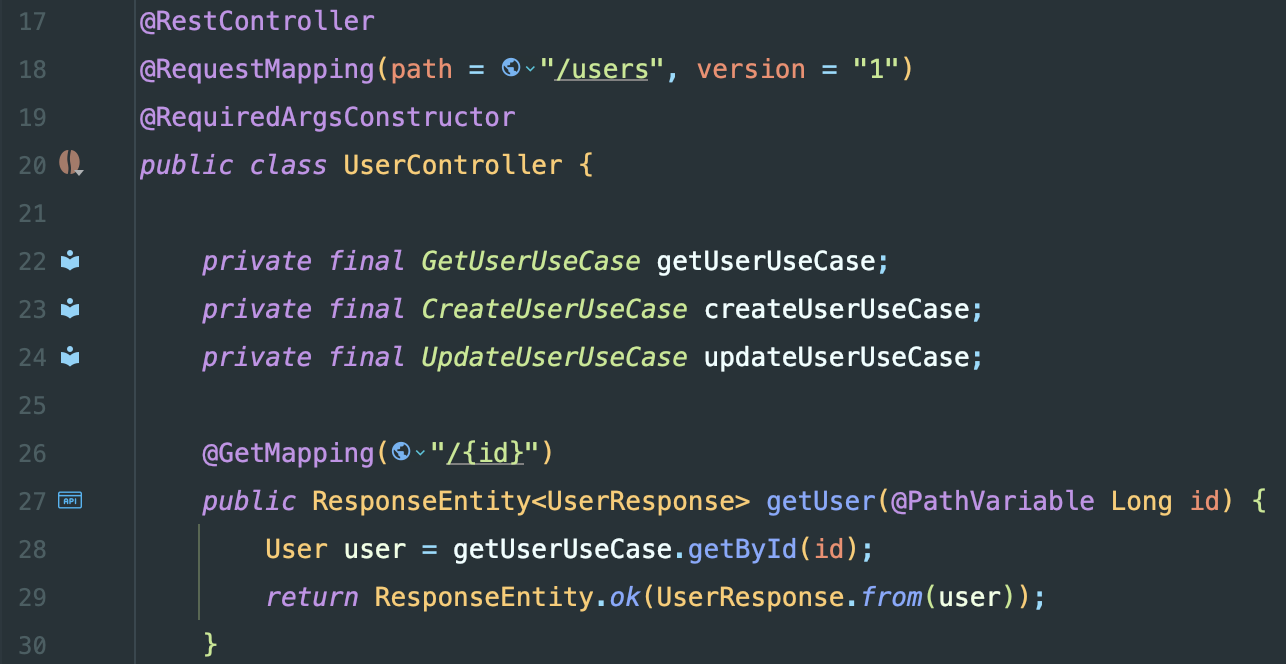
이 컨트롤러의 모든 엔드포인트는 v1에서만 동작
메서드 레벨에서 버전 지정

버전 범위 지정

버전 관리 전략 비교
| 전략 | 설정 메서드 | URL/헤더 예시 | 장점 | 단점 |
|---|---|---|---|---|
| Path Segment | usePathSegment() | /api/v1/users | 명확함, 캐시 친화적 | URL이 길어짐 |
| Query Param | useQueryParam() | /api/users?version=1 | 간단함 | 캐시 키 복잡 |
| Header | useRequestHeader() | X-API-Version: 1 | URL 깔끔 | 브라우저 테스트 어려움 |
| Media Type | useMediaTypeParameter() | Accept: application/vnd.api.v1+json | RESTful | 구현 복잡 |
Path Segment 방식이 가장 직관적이고 캐시 친화적이어서 선택했다
Path Segment를 선택한 이유
4가지 전략 중 Path Segment (/api/v1/users)를 선택했습니다.
URL만 보고 버전을 바로 알 수 있어서 디버깅이 쉽고, CDN/프록시 캐싱이 자연스럽게 동작하며, 브라우저에서 직접 테스트할 수 있습니다.
URL이 길어진다는 비판이 있지만, 모바일 앱 전용 API라 외부 공개가 아니어서 크게 문제되지 않습니다.
Header 방식(X-API-Version)은 URL이 깔끔하지만 브라우저 테스트가 어렵고 로그 분석에 불리합니다.
Media Type 방식은 가장 RESTful하지만 구현이 복잡하고 클라이언트 설정이 번거롭습니다.
Query Parameter 방식은 캐시 키가 복잡해지는 문제가 있습니다.
초기에는 단일 버전으로 시작하되, Breaking Change가 예상될 때 버전을 올리는 게 현실적입니다.
참고 자료
- Spring Boot 4 API Versioning - Dan Vega
- Spring Boot Built-in API Versioning - Piotr Minkowski
- ApiVersionConfigurer 공식 문서
Starting from Spring Boot 4.0 / Spring Framework 7.0, API versioning is officially supported at the framework level.
Configuration File
ApiVersionConfig.java
Detailed Explanation of How It Works
1) WebMvcConfigurer Interface
This is an interface for customizing Spring MVC configuration.
Implementing this interface allows you to override various Spring MVC settings.
2) configureApiVersioning Method
Key methods of ApiVersionConfigurer:
| Method | Description | Example |
|---|---|---|
usePathSegment(int index) | Extract version from a specific URL path position | /api/v1/users -> “v1” at index 1 |
useRequestHeader(String) | Extract version from HTTP header | X-API-Version: 1 |
useQueryParam(String) | Extract version from query parameter | ?version=1 |
useMediaTypeParameter() | Extract from Accept header media type | Accept: application/vnd.api.v1+json |
setDefaultVersion(String) | Default value when version is not specified | setDefaultVersion("1") |
addSupportedVersions() | Define list of supported versions | addSupportedVersions("1", "2") |
What usePathSegment(1) means:
3) configurePathMatch Method
How it works:
1. HandlerTypePredicate.forAnnotation(RestController.class)
- Targets all classes annotated with
@RestController
2. addPathPrefix("/api/v{version}", ...)
- Adds the
/api/v{version}prefix to all endpoints of those controllers
3. {version}
- A dynamic version placeholder
Transformation examples:
| Original Controller Mapping | Actual URL |
|---|---|
@GetMapping("/users") | /api/v1/users |
@PostMapping("/auth/login") | /api/v1/auth/login |
@DeleteMapping("/posts/{id}") | /api/v1/posts/{id} |
Full Request Flow
Client Request: GET /api/v1/users
1. Spring MVC DispatcherServlet receives the request
2. PathMatchConfigurer is applied
- Matches the /api/v{version} pattern
- Extracts {version} = “v1”
3. ApiVersionConfigurer is applied
- usePathSegment(1) -> parses “v1” version
- Stores version info in the request context
4. version attribute matching
- If the controller has
@RequestMapping(version = "1"), only that version matches - If not specified, it works for all versions
5. Controller method execution
- UserController.getUsers() is called
Specifying Versions in Controllers
In Spring Boot 4.0, a version attribute was added to @RequestMapping, @GetMapping, and other mapping annotations.
Class-Level Version Specification
All endpoints in this controller only work on v1
Method-Level Version Specification
Version Range Specification
Versioning Strategy Comparison
| Strategy | Config Method | URL/Header Example | Pros | Cons |
|---|---|---|---|---|
| Path Segment | usePathSegment() | /api/v1/users | Clear, cache-friendly | URL gets longer |
| Query Param | useQueryParam() | /api/users?version=1 | Simple | Complex cache keys |
| Header | useRequestHeader() | X-API-Version: 1 | Clean URLs | Hard to test in browser |
| Media Type | useMediaTypeParameter() | Accept: application/vnd.api.v1+json | RESTful | Complex to implement |
Path Segment was chosen because it is the most intuitive and cache-friendly
Why Path Segment Was Chosen
Among the four strategies, Path Segment (/api/v1/users) was chosen.
The version is immediately visible from the URL alone, making debugging easy. CDN/proxy caching works naturally, and you can test directly in the browser. Some criticize the longer URLs, but since this is a mobile app-exclusive API and not publicly exposed, it is not a significant concern.
The Header approach (X-API-Version) keeps URLs clean but makes browser testing difficult and log analysis less convenient. The Media Type approach is the most RESTful but is complex to implement and cumbersome for client configuration. The Query Parameter approach has the issue of complex cache keys.
Starting with a single version initially and incrementing when a breaking change is expected is the most practical approach.
References

댓글
댓글 수정/삭제는 GitHub Discussions에서 가능합니다.