Spring Boot 4 API Versioning과 Swagger UI의 충돌
목차
문제 상황
Spring Boot 4.0.1 + Spring Framework 7.0.2 환경에서 새롭게 도입된 API Versioning 기능을 사용하려고 했습니다.
그런데 Swagger UI (/swagger-ui.html)에 접근하면 HTTP 400 에러가 발생했습니다.
InvalidApiVersionException: 400 BAD_REQUEST "Invalid API version: 'No path segment at index 1'."Spring Boot 4에서 처음 도입된 기능이라 레퍼런스가 거의 없었습니다.
구글링해도 대부분 Spring Boot 3 이하 버전 기준의 글들뿐이었습니다.
환경
- Spring Boot 4.0.1
- Spring Framework 7.0.2
- springdoc-openapi-starter-webmvc-ui 3.0.1
- Java 25
첫 번째 시도: SecurityConfig에 Swagger 경로 추가
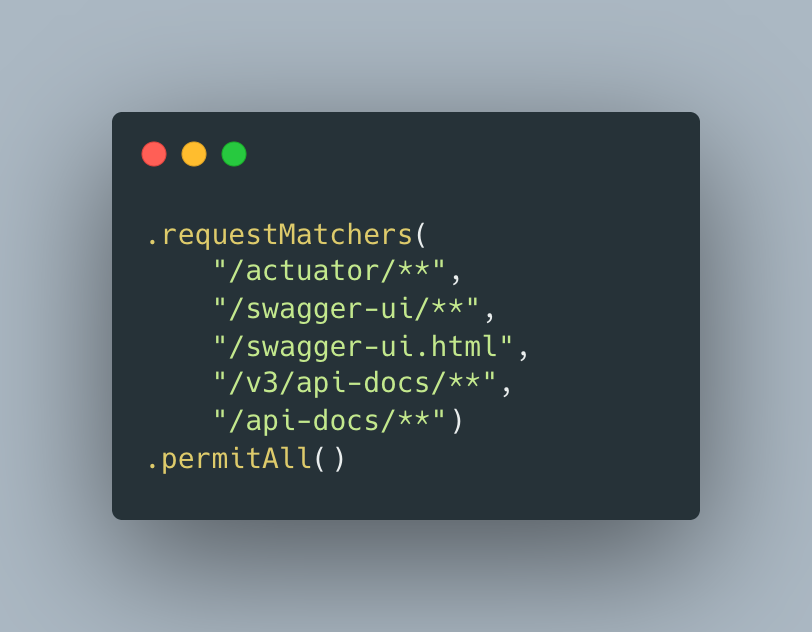
처음에는 단순히 Spring Security에서 막는 건가 싶었습니다. SecurityConfig에 Swagger 관련 경로를 permitAll로 추가해봤습니다.
결과: 실패
여전히 같은 에러가 발생했습니다.
에러 메시지를 다시 보니 InvalidApiVersionException이라고 되어 있었습니다.
Security가 아니라 API Versioning 쪽 문제였습니다.
두 번째 시도: WebConfig로 springdoc 패키지 제외
“Spring Boot 4 API versioning springdoc swagger”로 검색해봤습니다.
springdoc-openapi GitHub에서 이슈 #3163을 발견했습니다.
나랑 똑같은 문제를 겪고 있는 사람이 있었습니다.
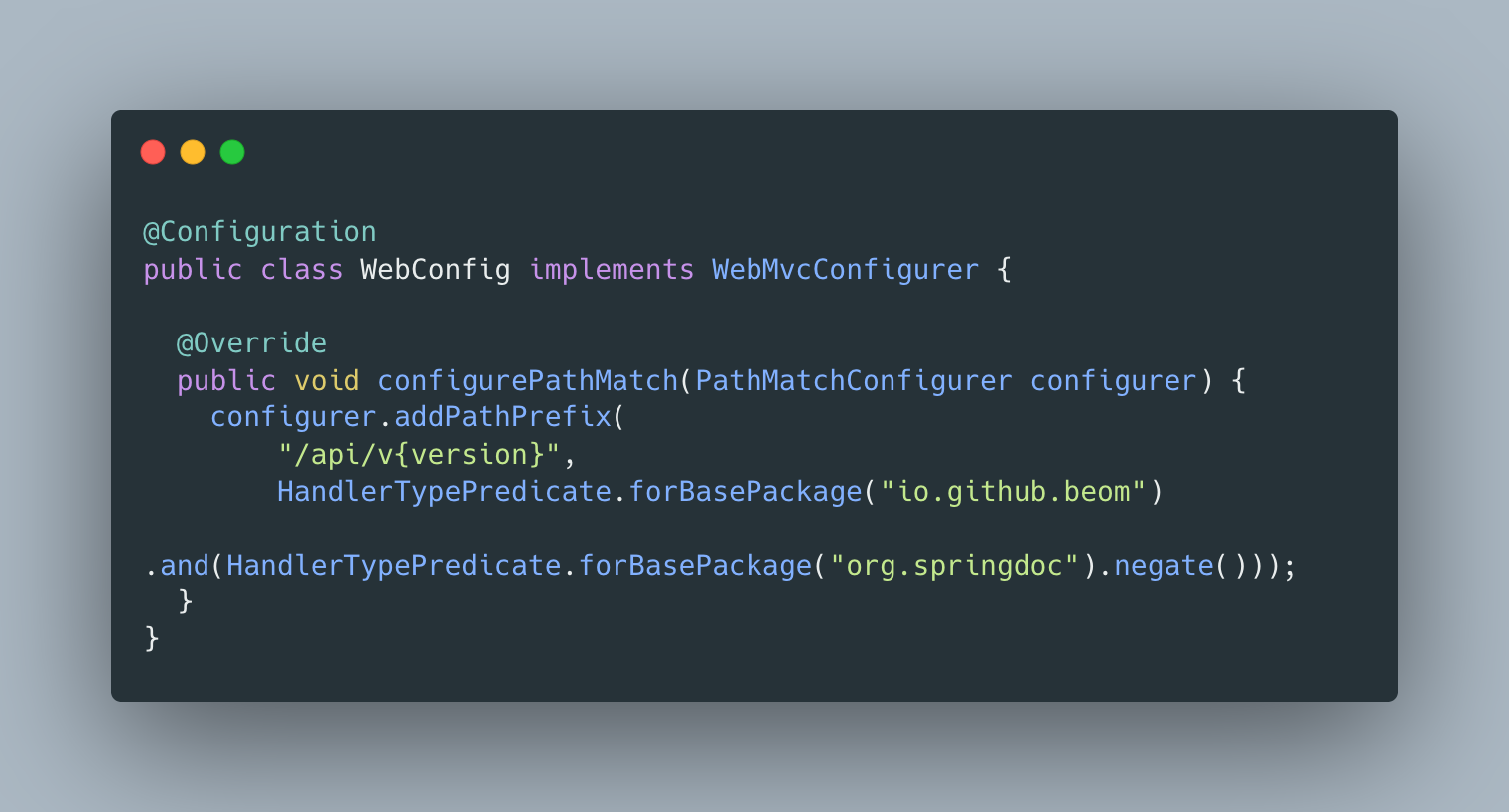
이슈에서 maintainer가 제안한 해결책은 WebMvcConfigurer의 addPathPrefix에서 springdoc을 제외하라는 것이었습니다.
WebConfig를 만들어서 springdoc 패키지를 API versioning에서 제외하려고 했습니다.
결과: 실패
addPathPrefix는 URL prefix만 관리하는 거지, API version parsing 자체를 제어하지 않았습니다.
에러 메시지가 조금 바뀌긴 했지만 여전히 400 에러였습니다.
GitHub 이슈를 다시 읽어보니, addPathPrefix 외에 커스텀 ApiVersionParser도 언급되어 있었습니다.
Swagger UI 리소스(.html, .css, .js)에 대해서는 버전 파싱 자체를 건너뛰어야 한다고 했습니다.
세 번째 시도: 기존 ApiVersionConfig 수정
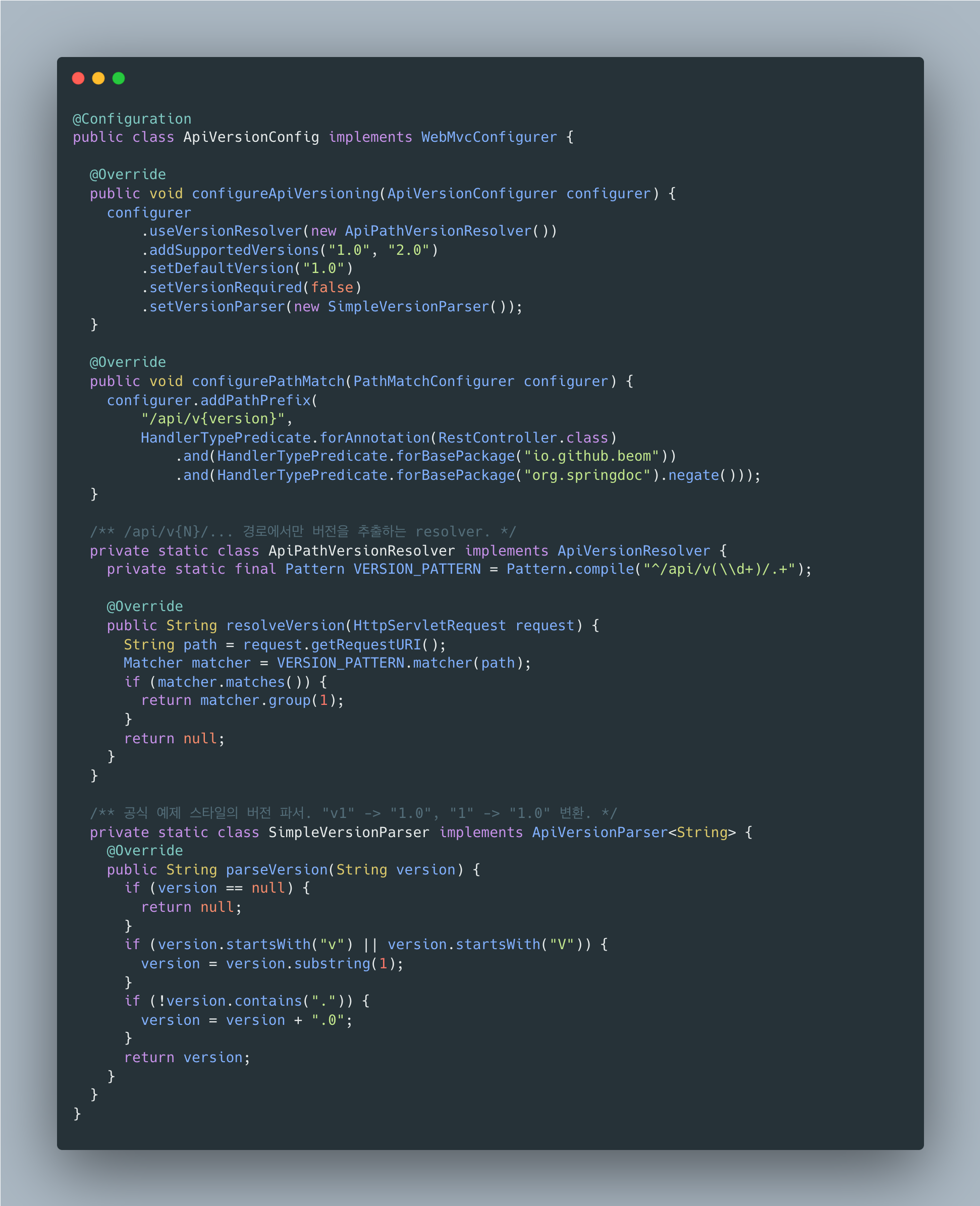
WebConfig파일을 삭제하고 다시 기존 파일을 수정하는 방향으로 갔습니다.
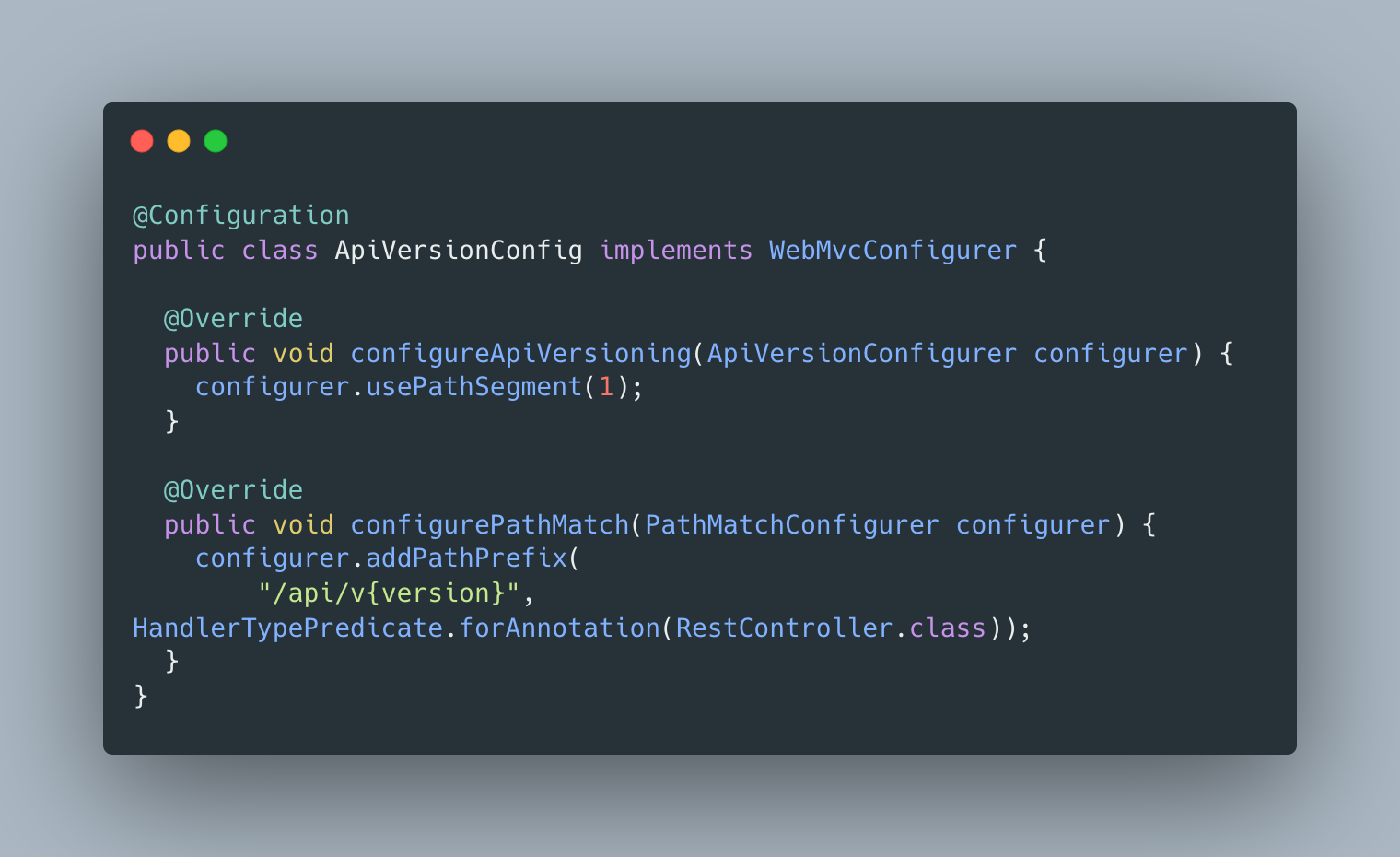
여기서 configureApiVersioning으로 path segment versioning을 활성화하고 있었습니다.
문제는 모든 요청에 대해 버전 파싱을 시도한다는 것입니다.
/swagger-ui.html 같은 요청도 path segment index 1에서 버전을 찾으려고 하니 당연히 실패합니다.
네 번째 시도: 커스텀 ApiVersionResolver로 Swagger 경로 제외 (블랙리스트 방식)
Spring Framework 공식 문서를 찾아봤습니다.
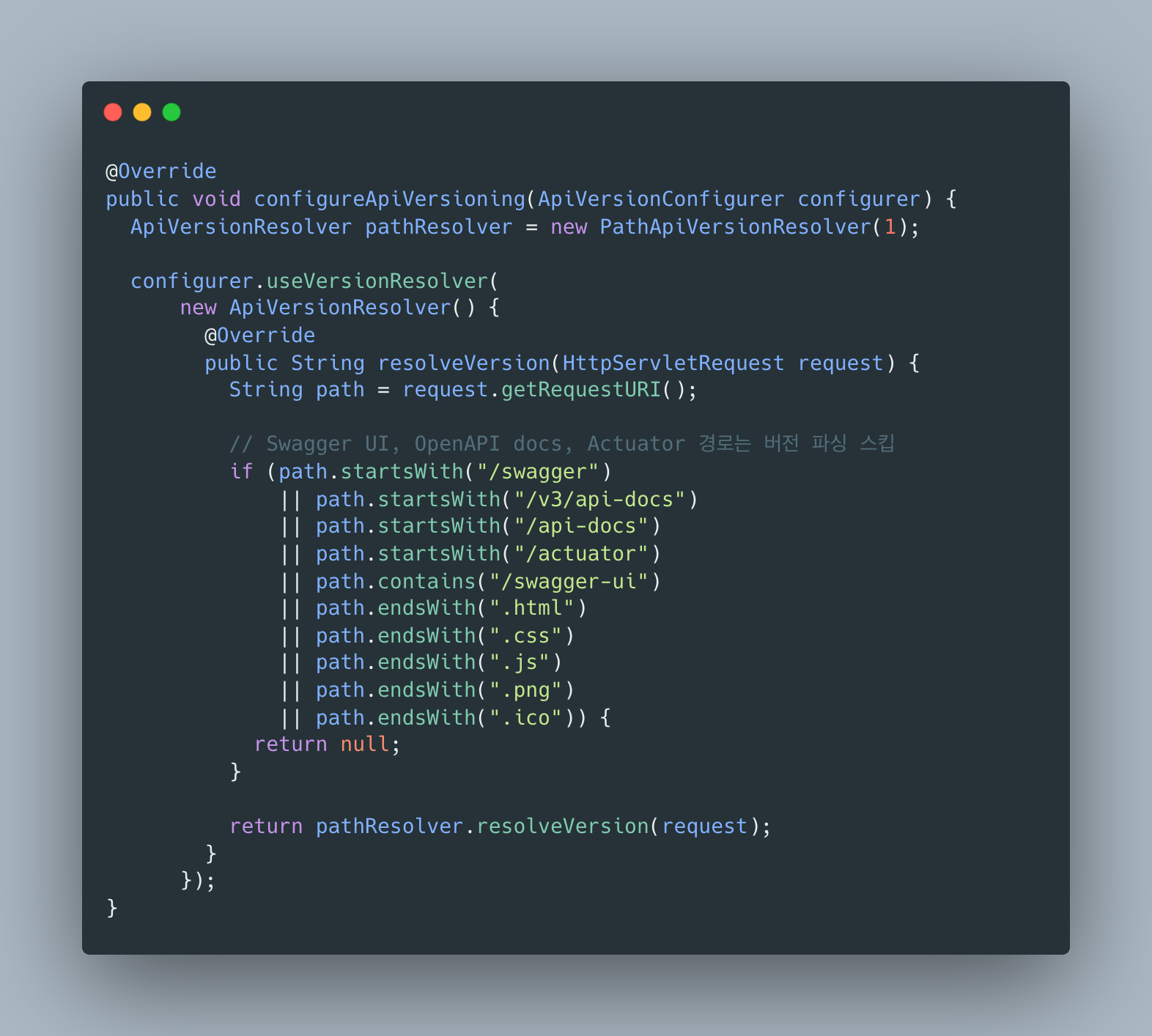
ApiVersionResolver라는 인터페이스가 있고, 요청에서 버전을 추출하는 역할을 한다고 되어 있었습니다.
그리고 Dan Vega의 블로그에서 useVersionResolver()로 커스텀 resolver를 설정할 수 있다는 걸 알게 됐습니다.
GitHub 이슈의 힌트와 조합해서, Swagger 경로에 대해서는 null을 반환하면 버전 파싱을 스킵할 수 있지 않을까 싶었습니다.
결과: 부분 성공
Swagger UI 경로는 해결됐지만, 새로운 에러가 나왔습니다.
InvalidApiVersionException: 400 BAD_REQUEST "Invalid API version: 'auth'."블랙리스트 방식의 문제점이 드러났습니다. /auth/login/google 같은 경로에서 auth를 버전으로 파싱하려다가 실패한 것입니다.
제외해야 할 경로가 계속 늘어나면서 관리가 어려워졌습니다.
다섯 번째 시도: 화이트리스트 방식으로 전환
블랙리스트(제외할 경로 나열)보다 화이트리스트(API 경로만 버전 추출) 방식이 더 깔끔하다는 걸 깨달았습니다.
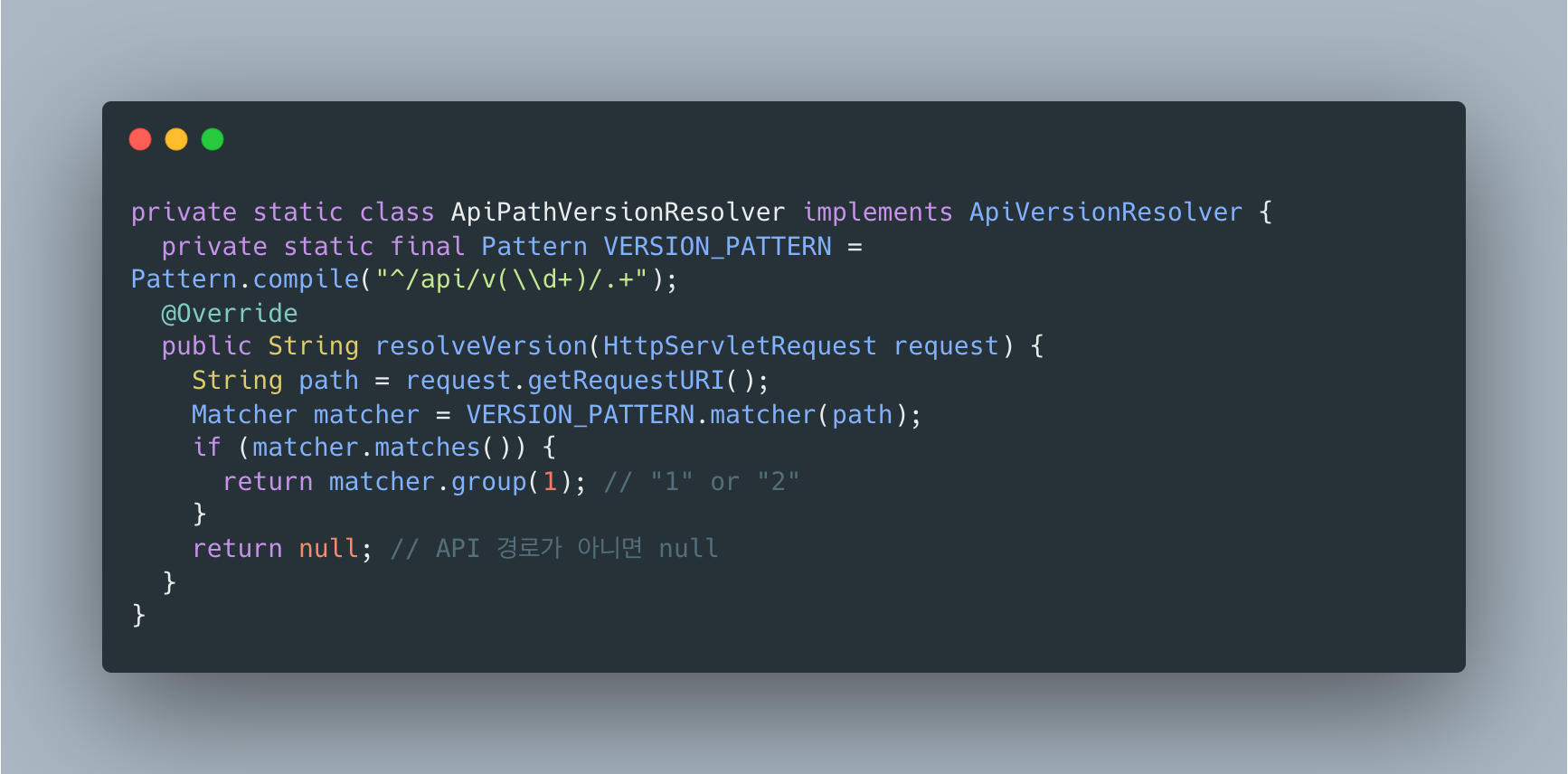
/api/v{N}/... 패턴에 매칭되는 경로에서만 버전을 추출하고, 나머지는 모두 null을 반환하도록 변경했습니다.
정규표현식 설명
^/api/v(\d+)/.+가 뭔지 궁금할 수 있습니다.
| 부분 | 의미 |
|---|---|
^ | 문자열 시작 |
/api/v | 리터럴 문자 /api/v |
(\d+) | 숫자 1개 이상 캡처 (그룹1) |
/ | 리터럴 / |
.+ | 아무 문자 1개 이상 |
매칭 예시:
| 경로 | 매칭? | 캡처된 버전 |
|---|---|---|
/api/v1/users | O | 1 |
/api/v2/auth/login | O | 2 |
/swagger-ui.html | X | - |
/api/v1 | X | (/ 뒤에 뭔가 있어야 함) |
결과: 실패
MissingApiVersionException: 400 BAD_REQUEST "API version is required."null을 반환해도 DefaultApiVersionStrategy가 버전이 필수라고 판단해서 예외를 던지고 있었습니다.
여섯 번째 시도: setVersionRequired(false) 추가
다시 Spring Framework 문서와 Piotr’s TechBlog를 찾아봤습니다.
By default, a version is required when API versioning is enabled, and MissingApiVersionException is raised resulting in a 400 response if not present. You can make it optional…
아, 기본적으로 버전이 필수로 설정되어 있었습니다.
null을 반환해도 “버전 없음”으로 처리되니까 예외가 발생하는 것이었습니다.
ApiVersionConfigurer에 setVersionRequired(false)를 추가해서 버전이 없는 요청도 허용하도록 했습니다.
결과: Swagger UI 로드 성공, 하지만 API 목록이 비어있음
No operations defined in spec!Swagger가 버전별 API를 제대로 인식하지 못하고 있었습니다.
일곱 번째 시도: OpenApiConfig에 GroupedOpenApi 설정
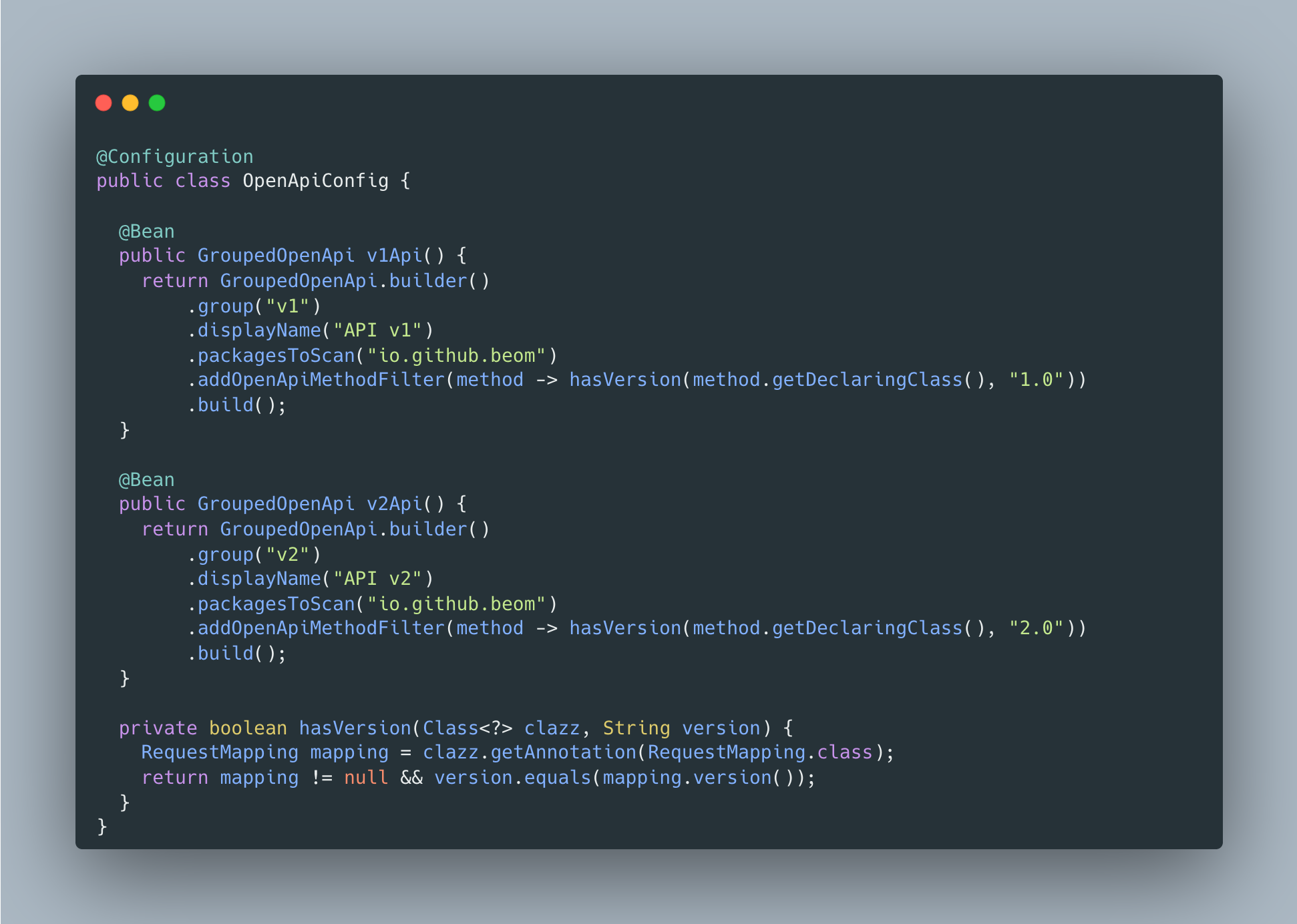
springdoc이 @RequestMapping(version = "1.0") 어노테이션을 인식해서 버전별로 API를 그룹화하도록 설정해야 했습니다.
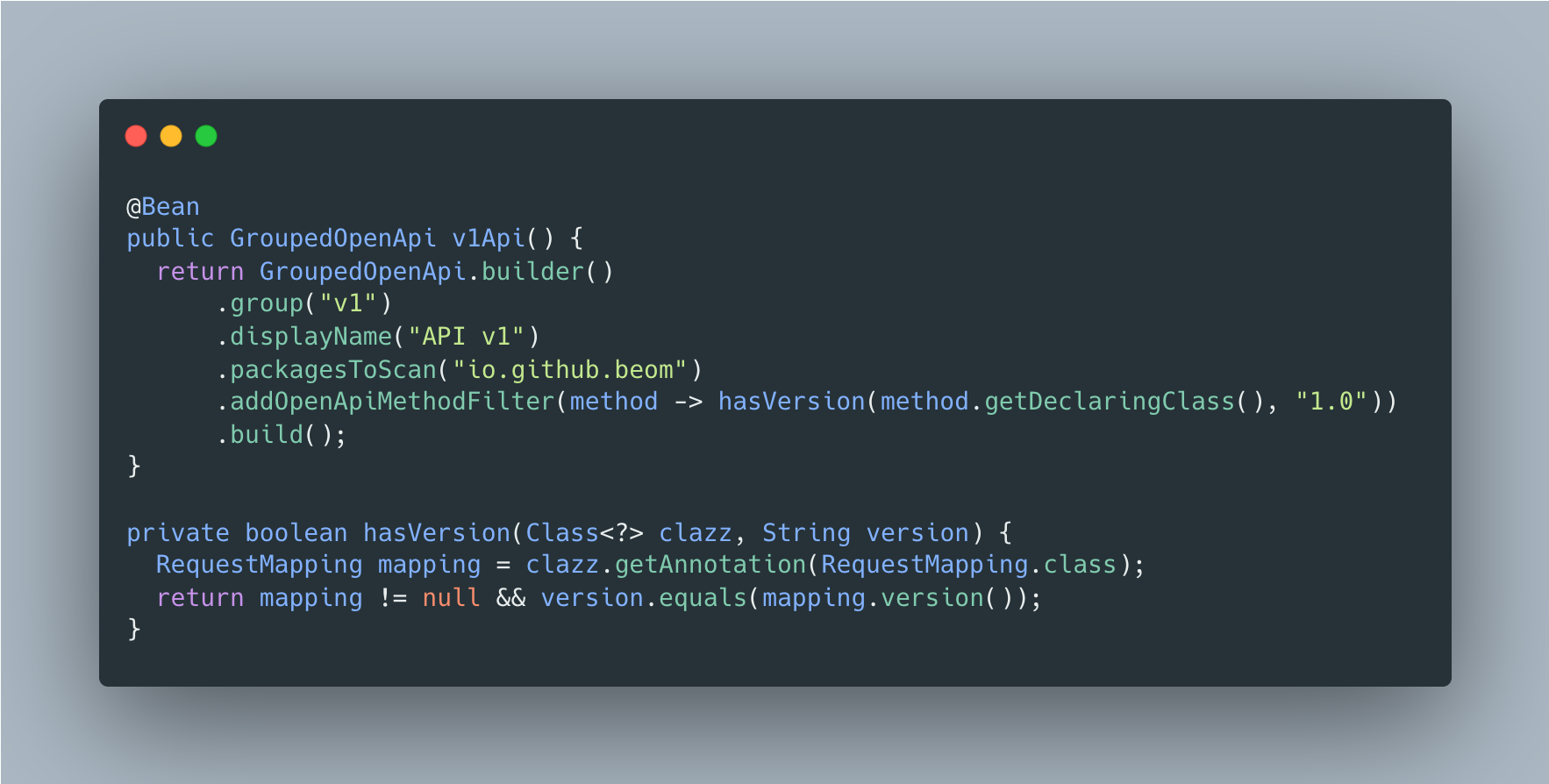
결과: 성공!
드디어 Swagger UI에서 API v1 / API v2 그룹을 선택할 수 있게 됐습니다.
여덟 번째 시도 (최종): 공식 예제 스타일 ApiVersionParser 적용
처음에는 addSupportedVersions("1", "2") 형태로 사용했는데, Spring Framework 공식 예제를 보니 시맨틱 버저닝("1.0", "2.0")을 사용하고 있었습니다.
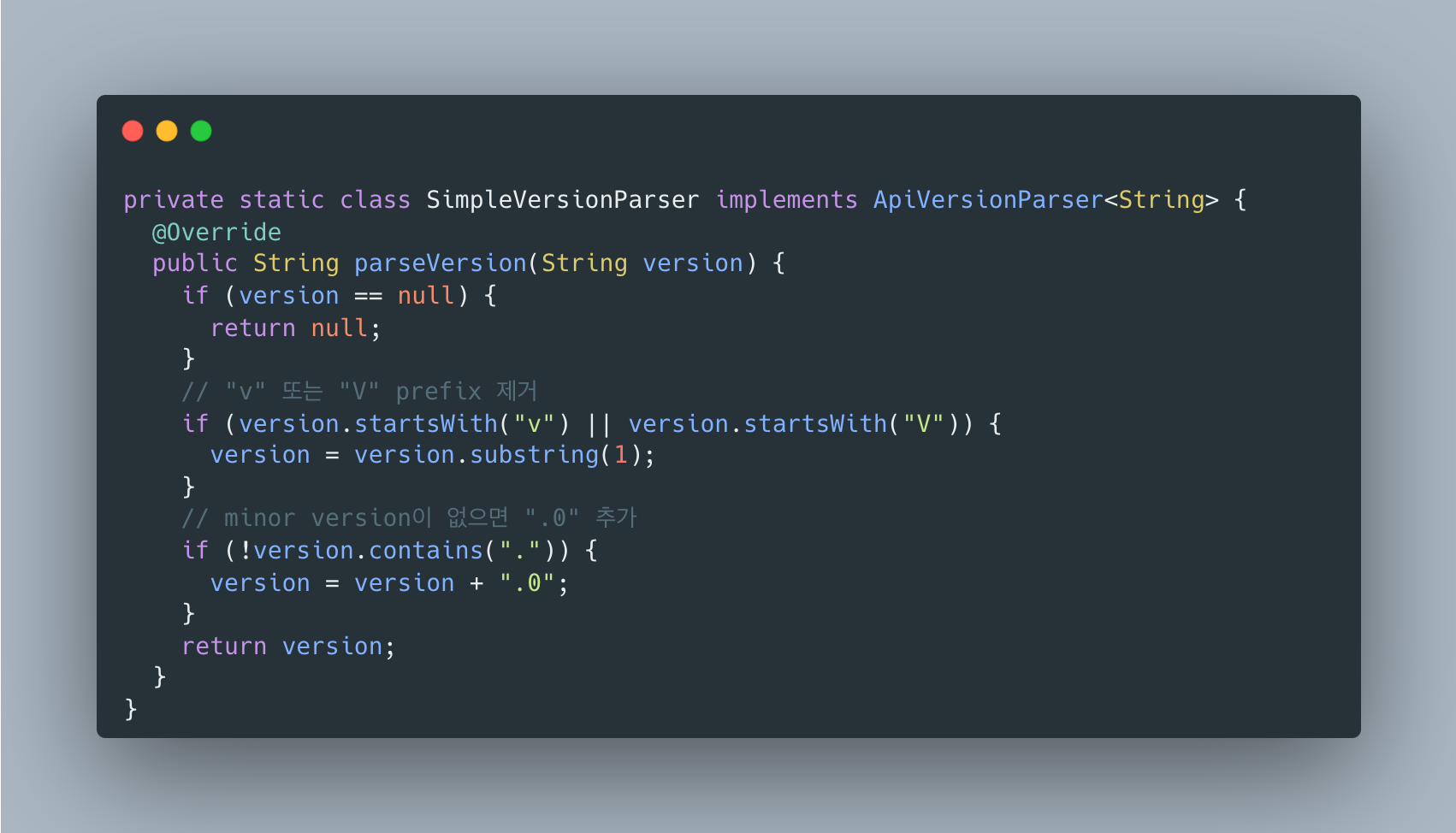
공식 스타일에 맞춰서 SimpleVersionParser를 추가했습니다.
이 파서는 v1 → 1.0, 1 → 1.0으로 변환해줍니다.
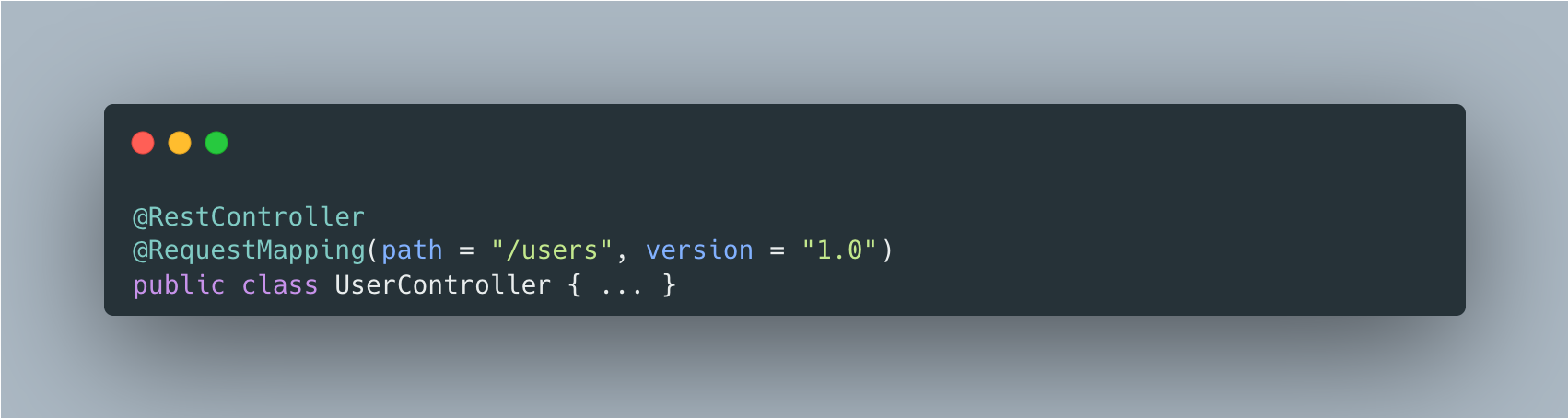
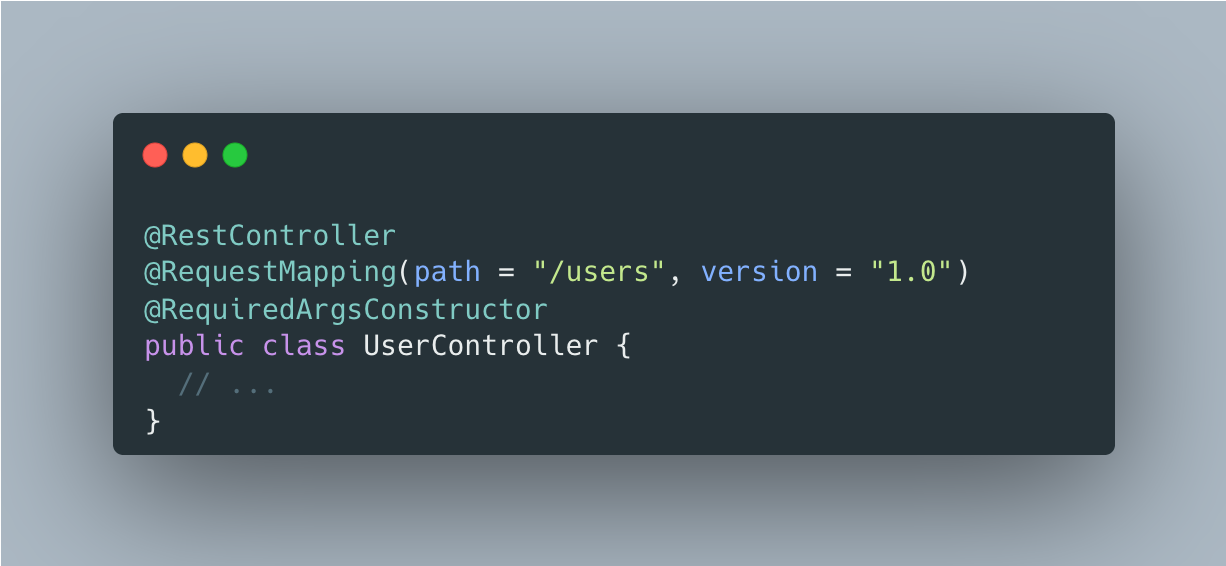
컨트롤러의 버전 어노테이션도 "1.0" 형태로 변경:
결과 : 성공
최종 코드
ApiVersionConfig.java
OpenApiConfig.java (버전별 그룹 설정)
컨트롤러 예시
핵심 포인트 정리
| 설정 | 역할 |
|---|---|
ApiPathVersionResolver | /api/v{N}/... 패턴에서만 버전 추출 (화이트리스트 방식) |
SimpleVersionParser | v1 → 1.0 변환 (공식 예제 스타일) |
setVersionRequired(false) | Swagger 등 버전 없는 경로 허용 |
addPathPrefix + negate() | springdoc 패키지는 prefix에서 제외 |
GroupedOpenApi | Swagger에서 v1/v2 API 그룹 선택 가능 |
블랙리스트 vs 화이트리스트
이 문제를 해결하는 방법은 크게 두 가지가 있습니다.
블랙리스트 방식 (springdoc 이슈에서 제안)
springdoc GitHub 이슈 #3163에서 제안된 방식입니다.
제외할 경로를 하나씩 나열합니다.
public class ApiVersionParser implements org.springframework.web.accept.ApiVersionParser { @Override public Comparable parseVersion(String version) { if("api-docs".equals(version) || "swagger-ui-bundle.js".equals(version)) return null; return version; }}단점: Swagger, actuator, 에러 페이지 등 제외할 경로가 계속 늘어납니다.
화이트리스트 방식 (내가 선택한 방식)
공식 문서나 다른 블로그에서 명시적으로 권장하는 방식은 아니지만, /api/v{N}/... 패턴만 버전 추출하는 방식이 더 깔끔합니다.
private static final Pattern VERSION_PATTERN = Pattern.compile("^/api/v(\\d+)/.+");장점: 새로운 경로가 추가돼도 수정할 필요가 없습니다.
참고: Spring Framework 공식 문서에는 화이트리스트/블랙리스트 필터링에 대한 명시적인 가이드가 없다. 커스텀
ApiVersionResolver를 사용할 수 있다는 것만 언급되어 있다.
삽질하면서 배운 것들
-
블랙리스트보다 화이트리스트: Swagger, actuator, 에러 페이지 등 제외할 경로가 계속 늘어납니다.
/api/v{N}/...패턴만 버전 추출하는 화이트리스트 방식이 훨씬 깔끔합니다. -
addPathPrefix만으로는 부족합니다: URL prefix 설정과 API version parsing은 완전히 별개의 기능입니다. prefix를 제외해도 version parsing은 여전히 모든 요청에 적용됩니다. -
커스텀 ApiVersionResolver가 핵심: API 경로에서만 버전을 추출하고 나머지는
null을 반환해서 버전 파싱 자체를 우회해야 합니다. -
setVersionRequired(false)필수: 이게 제일 찾기 어려웠습니다.null을 반환해도 기본 설정상 버전이 필수라서MissingApiVersionException이 발생합니다. -
GroupedOpenApi로 버전별 API 문서 분리:
addOpenApiMethodFilter에서@RequestMapping(version = "X.0")을 체크해서 버전별로 API를 그룹화합니다. -
공식 예제 스타일 따르기:
"1"대신"1.0"시맨틱 버저닝을 사용하고,SimpleVersionParser로 변환하는 게 표준적인 방법입니다. -
Spring Boot 4 + springdoc은 아직 불안정합니다: 이건 나만 겪는 문제가 아니라 알려진 호환성 이슈입니다. springdoc 쪽에서 fix가 나올 수도 있지만, 당분간은 이런 workaround가 필요합니다.
참고 자료
- HTTP 400 with Spring Boot 4 API versioning enabled - springdoc/springdoc-openapi#3163
- First-Class API Versioning in Spring Boot 4 - Dan Vega
- Spring Boot Built-in API Versioning - Piotr’s TechBlog
- API Versioning :: Spring Framework
The Problem
In a Spring Boot 4.0.1 + Spring Framework 7.0.2 environment, I tried to use the newly introduced API Versioning feature.
However, accessing Swagger UI (/swagger-ui.html) resulted in an HTTP 400 error.
InvalidApiVersionException: 400 BAD_REQUEST "Invalid API version: 'No path segment at index 1'."Since this was a feature first introduced in Spring Boot 4, there was almost no reference material available.
Searching online only turned up articles written for Spring Boot 3 and earlier.
Environment
- Spring Boot 4.0.1
- Spring Framework 7.0.2
- springdoc-openapi-starter-webmvc-ui 3.0.1
- Java 25
First Attempt: Adding Swagger Paths to SecurityConfig
At first, I thought it might simply be blocked by Spring Security. I tried adding Swagger-related paths as permitAll in the SecurityConfig.
Result: Failed
The same error persisted. Looking at the error message again, it said InvalidApiVersionException.
It was an API Versioning issue, not a Security issue.
Second Attempt: Excluding the springdoc Package via WebConfig
I searched for “Spring Boot 4 API versioning springdoc swagger.”
I found issue #3163 on the springdoc-openapi GitHub.
Someone was experiencing the exact same problem as me.
The maintainer’s suggested solution in the issue was to exclude springdoc from WebMvcConfigurer’s addPathPrefix.
I created a WebConfig to try excluding the springdoc package from API versioning.
Result: Failed
addPathPrefix only manages URL prefixes; it does not control API version parsing itself.
The error message changed slightly but the 400 error persisted.
Re-reading the GitHub issue, I noticed that in addition to addPathPrefix, a custom ApiVersionParser was also mentioned.
It said that version parsing itself should be skipped for Swagger UI resources (.html, .css, .js).
Third Attempt: Modifying the Existing ApiVersionConfig
I deleted the WebConfig file and went back to modifying the existing file.
Path segment versioning was being enabled via configureApiVersioning.
The problem was that it attempted version parsing on every request.
A request like /swagger-ui.html would naturally fail when trying to find a version at path segment index 1.
Fourth Attempt: Custom ApiVersionResolver to Exclude Swagger Paths (Blacklist Approach)
I looked at the Spring Framework official documentation.
There was an interface called ApiVersionResolver responsible for extracting the version from a request.
From Dan Vega’s blog, I learned that a custom resolver could be configured using useVersionResolver().
Combining this with hints from the GitHub issue, I thought that returning null for Swagger paths might skip version parsing.
Result: Partial Success
The Swagger UI path was resolved, but a new error appeared.
InvalidApiVersionException: 400 BAD_REQUEST "Invalid API version: 'auth'."The problem with the blacklist approach became apparent. It tried to parse auth as a version from paths like /auth/login/google.
The list of paths to exclude kept growing, making it unmanageable.
Fifth Attempt: Switching to a Whitelist Approach
I realized that a whitelist (extract version only from API paths) approach was cleaner than a blacklist (listing paths to exclude).
I changed it to extract the version only from paths matching the /api/v{N}/... pattern and return null for everything else.
Regex Explanation
You might be wondering what ^/api/v(\d+)/.+ means.
| Part | Meaning |
|---|---|
^ | Start of string |
/api/v | Literal characters /api/v |
(\d+) | Capture one or more digits (group 1) |
/ | Literal / |
.+ | One or more of any character |
Matching examples:
| Path | Matches? | Captured Version |
|---|---|---|
/api/v1/users | Yes | 1 |
/api/v2/auth/login | Yes | 2 |
/swagger-ui.html | No | - |
/api/v1 | No | (needs something after /) |
Result: Failed
MissingApiVersionException: 400 BAD_REQUEST "API version is required."Even when returning null, the DefaultApiVersionStrategy determined that a version was required and threw an exception.
Sixth Attempt: Adding setVersionRequired(false)
I went back to the Spring Framework documentation and Piotr’s TechBlog.
By default, a version is required when API versioning is enabled, and MissingApiVersionException is raised resulting in a 400 response if not present. You can make it optional…
Ah, so the version is set to required by default.
Even when returning null, it gets treated as “no version,” triggering the exception.
I added setVersionRequired(false) to the ApiVersionConfigurer to allow requests without a version.
Result: Swagger UI loaded successfully, but the API list was empty
No operations defined in spec!Swagger was not properly recognizing versioned APIs.
Seventh Attempt: GroupedOpenApi Configuration in OpenApiConfig
I needed to configure springdoc to recognize @RequestMapping(version = "1.0") annotations and group APIs by version.
Result: Success!
Finally, I could select API v1 / API v2 groups in Swagger UI.
Eighth Attempt (Final): Applying the Official Example-Style ApiVersionParser
Initially I used addSupportedVersions("1", "2"), but looking at the Spring Framework official examples, they used semantic versioning ("1.0", "2.0").
I added a SimpleVersionParser to match the official style. This parser converts v1 to 1.0 and 1 to 1.0.
The version annotations in controllers were also changed to the "1.0" format:
Result: Success
Final Code
ApiVersionConfig.java
OpenApiConfig.java (Version Group Configuration)
Controller Example
Key Points Summary
| Setting | Role |
|---|---|
ApiPathVersionResolver | Extracts version only from /api/v{N}/... patterns (whitelist approach) |
SimpleVersionParser | Converts v1 to 1.0 (official example style) |
setVersionRequired(false) | Allows paths without a version, such as Swagger |
addPathPrefix + negate() | Excludes springdoc package from the prefix |
GroupedOpenApi | Enables v1/v2 API group selection in Swagger |
Blacklist vs Whitelist
There are two main approaches to solving this problem.
Blacklist Approach (Suggested in the springdoc Issue)
This is the approach suggested in springdoc GitHub issue #3163.
Paths to exclude are listed one by one.
public class ApiVersionParser implements org.springframework.web.accept.ApiVersionParser { @Override public Comparable parseVersion(String version) { if("api-docs".equals(version) || "swagger-ui-bundle.js".equals(version)) return null; return version; }}Drawback: The list of paths to exclude (Swagger, actuator, error pages, etc.) keeps growing.
Whitelist Approach (My Choice)
While not explicitly recommended in official documentation or other blogs, the approach of extracting versions only from /api/v{N}/... patterns is cleaner.
private static final Pattern VERSION_PATTERN = Pattern.compile("^/api/v(\\d+)/.+");Advantage: No modifications needed when new paths are added.
Note: The Spring Framework official documentation does not provide explicit guidance on whitelist/blacklist filtering. It only mentions that a custom
ApiVersionResolvercan be used.
Lessons Learned from the Troubleshooting
-
Whitelist over blacklist: Paths to exclude (Swagger, actuator, error pages, etc.) keep growing. A whitelist approach that extracts versions only from
/api/v{N}/...patterns is much cleaner. -
addPathPrefixalone is not enough: URL prefix configuration and API version parsing are completely separate features. Even if you exclude the prefix, version parsing still applies to all requests. -
Custom ApiVersionResolver is the key: You need to extract versions only from API paths and return
nullfor everything else to bypass version parsing entirely. -
setVersionRequired(false)is essential: This was the hardest to find. Even when returningnull, the default setting treats the version as required, causingMissingApiVersionException. -
Separate API documentation by version with GroupedOpenApi: Use
addOpenApiMethodFilterto check@RequestMapping(version = "X.0")and group APIs by version. -
Follow the official example style: Use
"1.0"semantic versioning instead of"1", and convert withSimpleVersionParserfor the standard approach. -
Spring Boot 4 + springdoc is still unstable: This is not a problem unique to me; it is a known compatibility issue. A fix may come from the springdoc side, but for now this kind of workaround is necessary.
References

댓글
댓글 수정/삭제는 GitHub Discussions에서 가능합니다.