파일 업로드 시스템에서의 고아파일 정리
목차
파일 업로드 시스템에서 더 이상 참조되지 않는 고아 파일을 자동으로 정리하는 범용 시스템입니다.
현재는 프로필 이미지에 적용되어 있지만, 게시글 이미지, 채팅 첨부파일 등 모든 업로드 파일에 동일하게 적용 가능합니다.
개요
파일 업로드 후 교체/삭제 시 기존 파일이 R2 스토리지에 고아 파일로 남게 됩니다.
이를 방지하기 위해 Soft Delete + 배치 정리 방식을 사용했습니다.
핵심 설계 원칙
uploads 테이블의 deleted_at 컬럼 하나로 모든 파일 정리를 통합 관리
- 프로필 이미지 교체 → deleted_at 마킹
- 게시글 이미지 삭제 → deleted_at 마킹
- 채팅 첨부파일 만료 → deleted_at 마킹
-> 배치 스케줄러가 deleted_at 기준으로 일괄 정리 (코드 변경 없음)
새로운 파일 타입이 추가돼도 정리 로직을 수정할 필요가 없습니다.
deleted_at만 마킹하면 자동으로 정리 대상이 되고, 단일 배치로 모든 파일 타입을 처리합니다.
왜 즉시 삭제하지 않는가?
“그냥 프로필 이미지 변경할 때 바로 R2에서 삭제하면 되는 거 아니야?”라는 의문이 생길 수 있습니다.
1. 트랜잭션 정합성 문제
@Transactionalpublic User updateProfile(..., Long newImageId) { user.updateProfileImage(newImageId); // ① DB 업데이트 (트랜잭션 내) r2Service.deleteFile(oldImagePath); // ② R2 삭제 (외부 시스템) return userRepository.save(user); // ③ 커밋}문제 시나리오:
- ①②가 성공 → ③에서 DB 예외 발생 → 롤백
- 하지만 R2에서는 이미 파일이 삭제됨 → 데이터 불일치
R2, S3 같은 외부 스토리지는 DB 트랜잭션에 포함되지 않습니다.
2. API 응답 속도 저하
프로필 수정 API 응답 시간:├── DB 업데이트: 5ms├── R2 파일 삭제: 100~500ms (네트워크 I/O)└── 총: 105~505ms
Soft Delete 방식:├── DB 업데이트: 5ms├── deleted_at 마킹: 1ms└── 총: 6ms사용자 입장에서 “이전 프로필 이미지 삭제”는 관심 없습니다. 일단 빠른 응답이 더 중요합니다.
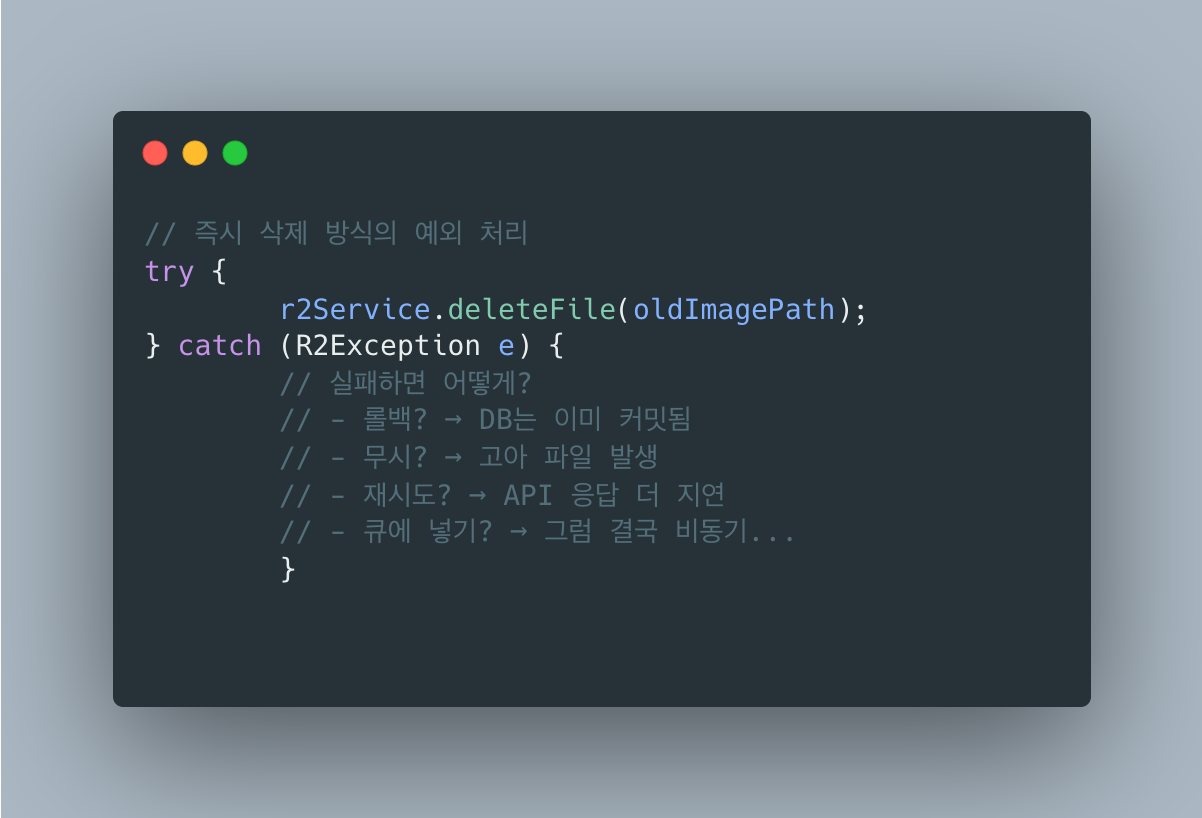
3. 실패 시 복잡한 예외 처리
4. 복구 가능성
- 실수로 이미지 변경 → 7일 내 관리자가
deleted_at = NULL로 복구 가능 - 즉시 삭제하면 복구 불가능
왜 Soft Delete인가?
즉시 삭제는 단순하지만 트랜잭션 불일치와 API 지연, 복구 불가 문제가 있습니다.
비동기 삭제로 응답 속도는 해결되지만 트랜잭션 문제는 여전합니다.
Soft Delete + 배치 방식은 트랜잭션 안전하고 응답이 빠르며 7일간 복구도 가능합니다.
스토리지를 7일간 추가로 사용하는 비용이 있지만, 삭제 실패가 핵심 비즈니스에 영향을 주지 않고 트래픽 적은 새벽에 일괄 처리할 수 있어서 현업에서도 일반적인 방식입니다.
스토리지 비용 관점:
Cloudflare R2 기준으로 저장 비용은 월 $0.015/GB입니다. 프로필 이미지가 평균 500KB이고 일일 교체가 100건이면 7일 유예 기간 동안 추가 스토리지는 약 350MB($0.005/월)로 무시할 수 있는 수준입니다. 반면 즉시 삭제 실패로 인한 재처리 로직, 보상 트랜잭션 구현 비용은 개발 시간으로 환산하면 훨씬 비쌉니다.
인프라 현황 및 기술 선택 배경
왜 RabbitMQ를 사용하지 않았나?
RabbitMQ가 이미 인프라에 있지만, 이 기능에는 Spring ApplicationEvent를 선택했습니다.
이 기능에 RabbitMQ가 과한 이유
현재 SpringBoot 서버 1대에서 User 모듈과 Upload 모듈이 같은 JVM에서 실행되므로 서버 간 통신이 필요 없습니다.
soft delete가 실패해도 배치에서 처리되니 치명적이지 않고, 결제처럼 “반드시 처리되어야 하는” 작업도 아닙니다.
RabbitMQ를 쓰려면 ConnectionFactory, Exchange/Queue/Binding 설정, 직렬화 로직, 재연결 처리 등이 추가로 필요한데, Spring Event는 @EventListener 하나면 됩니다.
ARM 1 OCPU / 6GB RAM 환경에서 불필요한 네트워크 hop도 낭비입니다.
언제 RabbitMQ로 전환해야 하나?
다음 상황이 되면 RabbitMQ 사용을 고려:
| 상황 | 이유 |
|---|---|
| 서버 스케일 아웃 | SpringBoot 서버가 2대 이상이면 이벤트 공유 필요 |
| 실패 시 재시도 필수 | DLQ + 재시도 정책이 필요한 중요 작업 |
| 비동기 처리 대기열 | 대량 요청을 큐에 쌓아두고 순차 처리 |
| 외부 서비스 연동 | 알림 서버, 결제 서버 등과 통신 |
현재 구조에서 스케일 아웃 시 전환 예시:

왜 이벤트 기반으로 구현했나?
이벤트로 하는 일: deleted_at 마킹
이벤트는 R2 삭제가 아니라 soft delete(deleted_at 마킹)를 처리합니다.
프로필 이미지 변경 시 흐름
- UserService.updateProfile() 에서 이벤트를 발행합니다
-> 이벤트 발행 : ProfileImageChangedEvent(oldImageId) - ProfileImageChangedeventListener (트랜잭션 커밋 후)
-> uploadSErvice.softDeleteByPublicId(oldImageId)
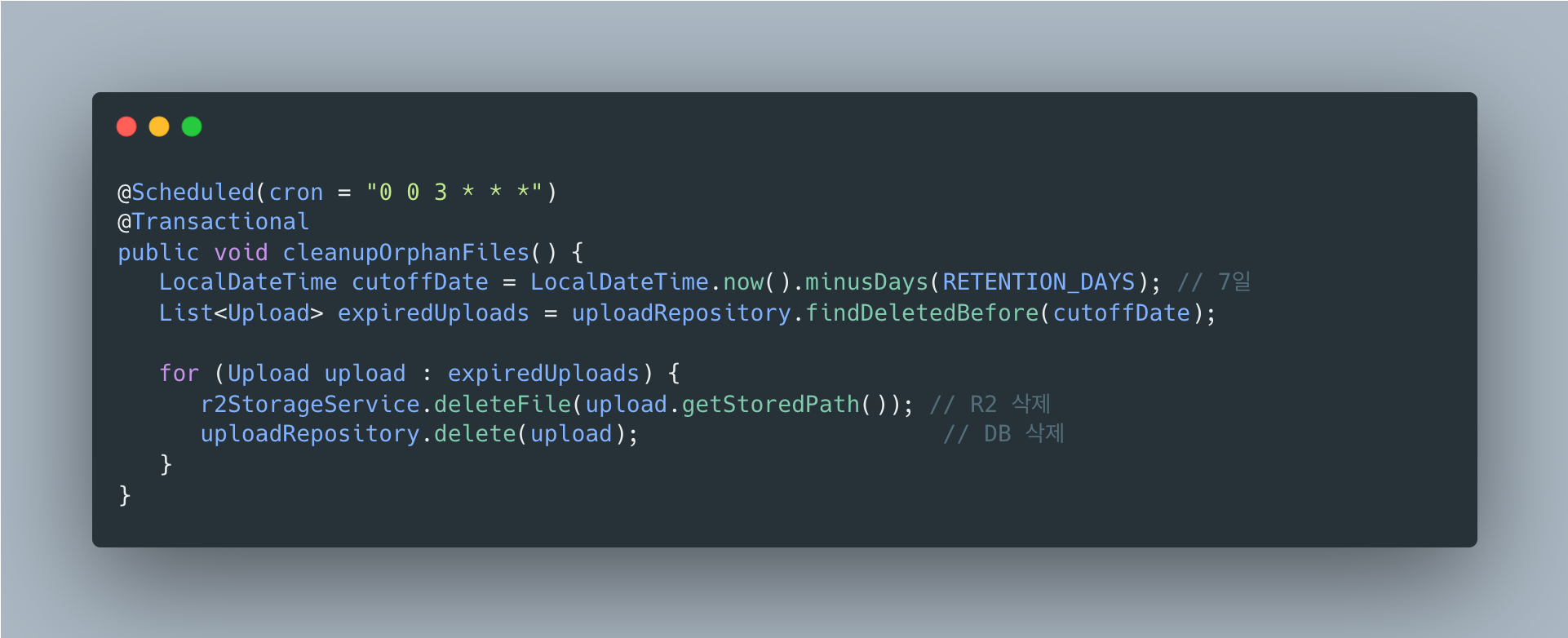
-> upload.setDeletedAt(LocalDateTime.now()) <- 여기 - OrphanFileCleanupScheduler (매일 새벽 3시)
-> R2 파일 삭제 + DB 메타데이터 삭제
즉,
- 이벤트: deleted_at 마킹 (soft delete)
- 스케줄러: R2 삭제 + DB 삭제 (hard delete)
왜 이벤트로 deleted_at을 마킹하나?
UserService에서 직접 uploadService.softDeleteByPublicId()를 호출하면 되지 않나요?
문제: 모듈 간 순환 의존성
직접 호출 방식:
User 모듈 ──depends──▶ Upload 모듈 (softDeleteByPublicId 호출)Upload 모듈 ──depends──▶ User 모듈 (업로더 정보 조회 등)→ 순환 의존성!이벤트 기반 해결:
User 모듈 ──depends──▶ Core 모듈 (이벤트 정의)Upload 모듈 ──depends──▶ Core 모듈 (이벤트 리스너)→ 순환 없음!@TransactionalEventListener 사용 이유
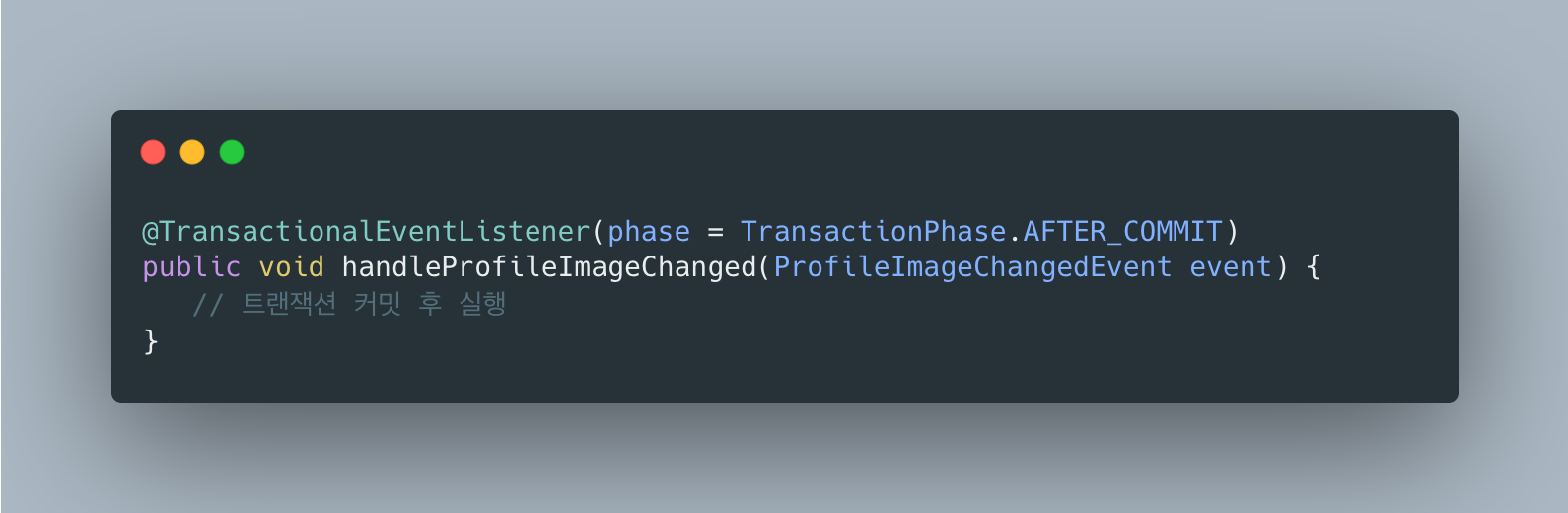
- AFTER_COMMIT: 프로필 업데이트가 성공한 후에만 soft delete 실행
- 프로필 업데이트 롤백 시 → 이벤트 리스너 실행 안됨 → 이전 이미지 유지
- 데이터 정합성 보장
AFTER_COMMIT에서 DB 업데이트가 안 되는 문제
프로필 이미지 변경 기능을 구현하다가 이상한 버그를 만났습니다.
이전 이미지를 soft delete 처리하는 이벤트 리스너를 만들었는데, 분명히 save()를 호출했는데도 deleted_at이 DB에 저장되지 않는 것입니다.
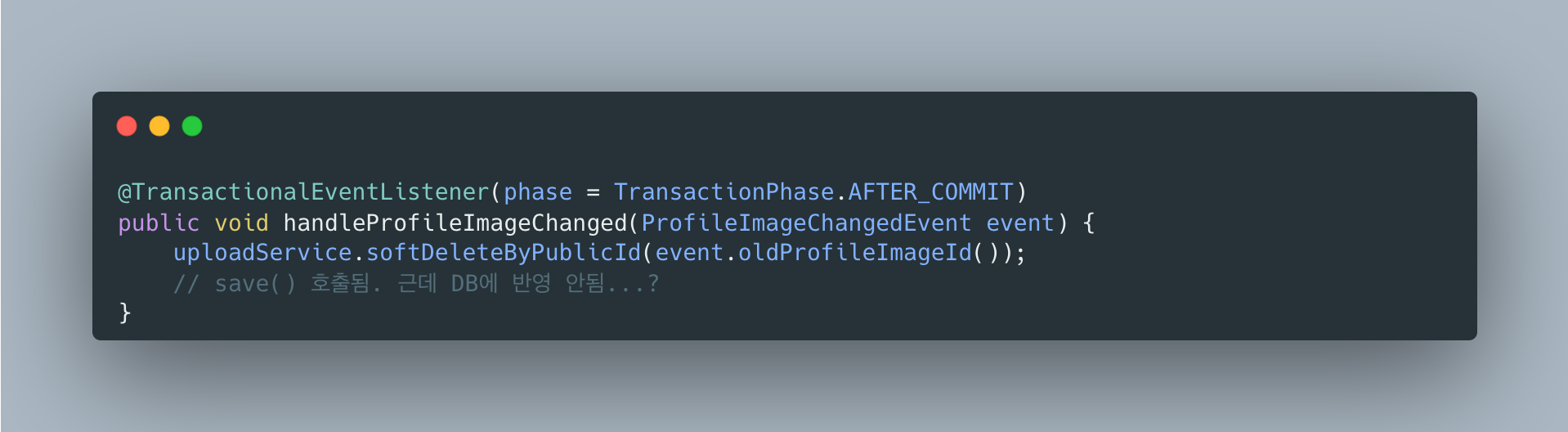
처음엔 내 코드가 잘못된 줄 알고 한참을 헤맸습니다.
그러다 관련 글을 찾아보면서 원인을 알게 됐는데, 생각보다 깊은 내용이었습니다.
원인: DB 트랜잭션과 스프링 트랜잭션 컨텍스트는 다르다
AFTER_COMMIT이니까 당연히 트랜잭션이 끝난 상태라고 생각했습니다.
근데 정확히 말하면 DB 트랜잭션만 끝난 것이고, 스프링 트랜잭션 컨텍스트는 아직 살아있습니다.
Spring의 processCommit() 메서드를 까보면 이렇게 돌아갑니다:
1. prepareForCommit()2. triggerBeforeCommit()3. doCommit() <-- 여기서 DB 커밋! DB 트랜잭션 종료4. triggerAfterCommit() <-- AFTER_COMMIT 리스너 실행 (바로 여기)5. triggerAfterCompletion()6. cleanupAfterCompletion() <-- 스프링 트랜잭션 컨텍스트 정리doCommit() 이후에 triggerAfterCommit()이 호출되는데, 이 시점에서 DB 트랜잭션은 끝났지만 스프링 트랜잭션 컨텍스트는 cleanupAfterCompletion()이 호출되기 전까지 살아있습니다.
그래서 뭐가 문제냐면
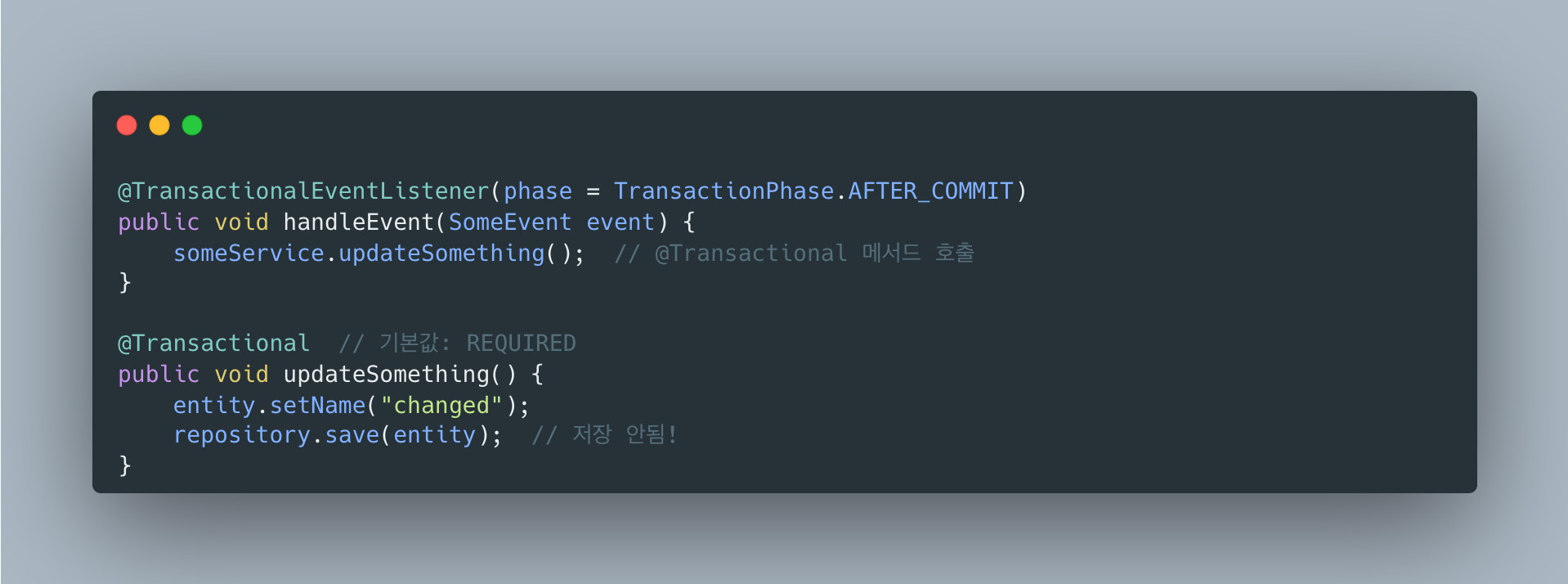
@Transactional의 기본 propagation이 REQUIRED인데, 이건 “기존 트랜잭션이 있으면 참여하라”는 뜻입니다.
스프링이 보기엔 트랜잭션 컨텍스트가 아직 있으니까 “오 트랜잭션 있네, 참여해야지!” 하고 기존 트랜잭션에 참여합니다.
근데 DB 트랜잭션은 이미 커밋되어 종료된 상태.
결과적으로 DB에 아무것도 반영되지 않습니다.
더 골치아픈 건
영속성 컨텍스트 때문에 성공한 것처럼 보인다:
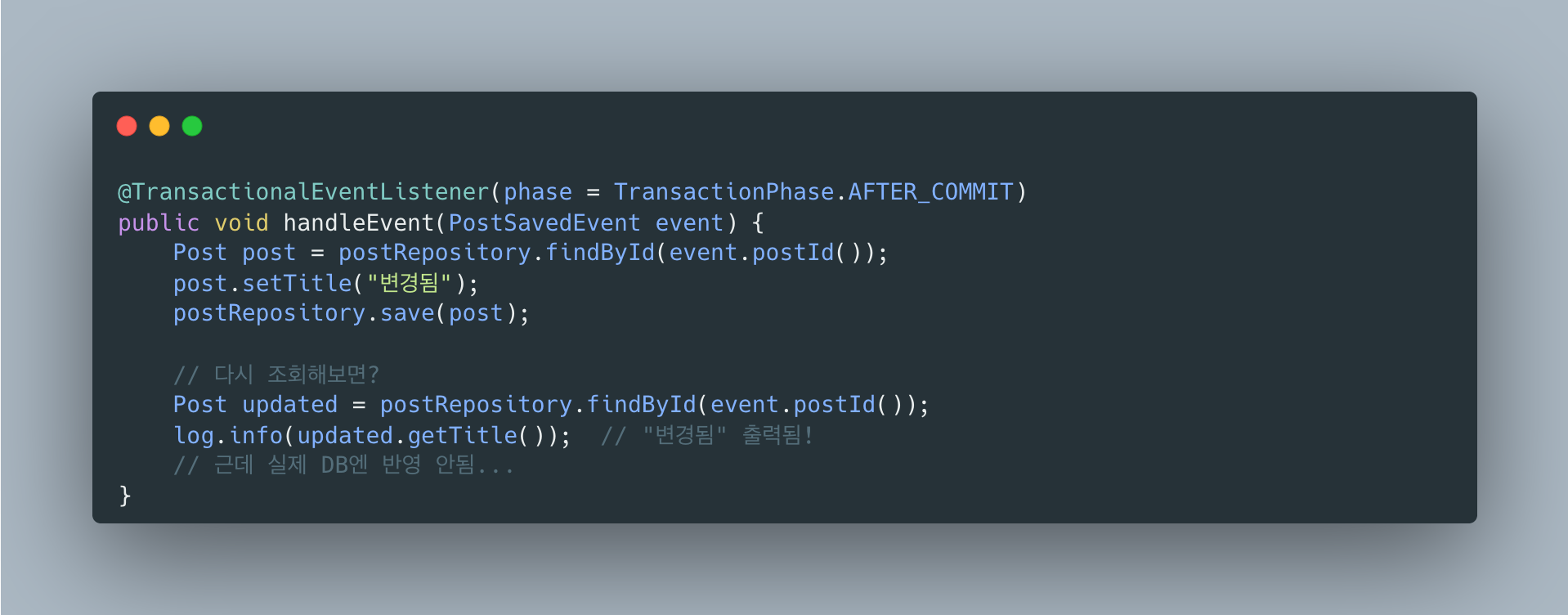
영속성 컨텍스트(1차 캐시)에서 조회되니까 코드상으로는 변경이 잘 된 것처럼 보입니다.
하지만 DB에 직접 쿼리를 날려보면 값이 안 바뀌어 있습니다.
이게 디버깅을 어렵게 만듭니다.
해결책
REQUIRES_NEW로 새 트랜잭션 시작
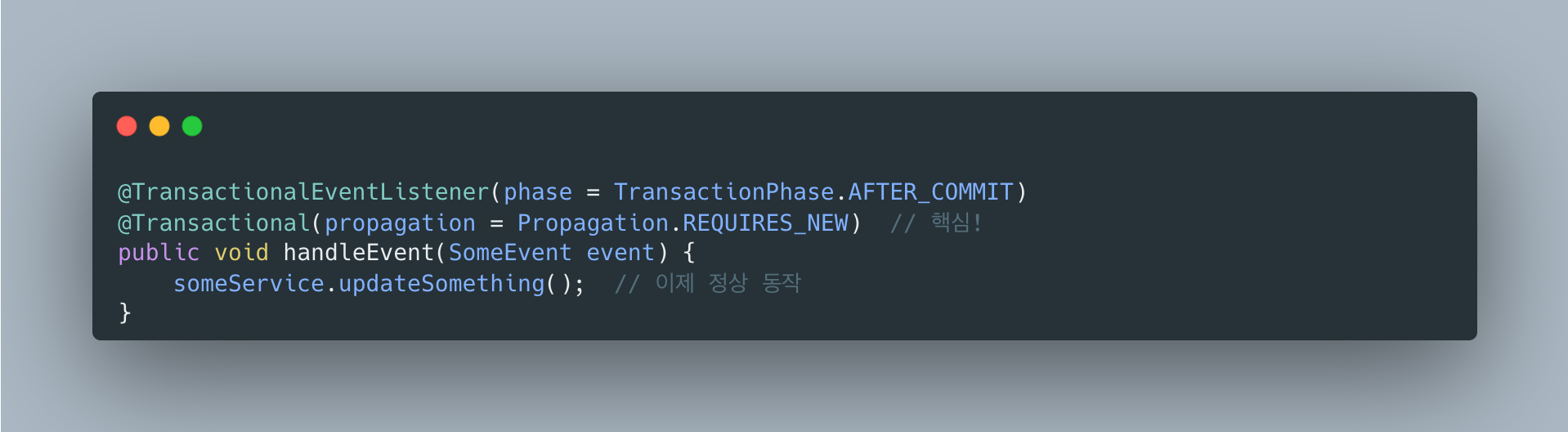
REQUIRES_NEW는 기존 트랜잭션과 상관없이 새 트랜잭션을 만듭니다.
완전히 새로운 DB 트랜잭션이 시작되니까 정상적으로 저장됩니다.
왜 @Async는 안 썼나?
@Async를 쓰면 별도 스레드에서 실행되니까 트랜잭션 컨텍스트가 전파되지 않아서 문제가 해결되긴 합니다.
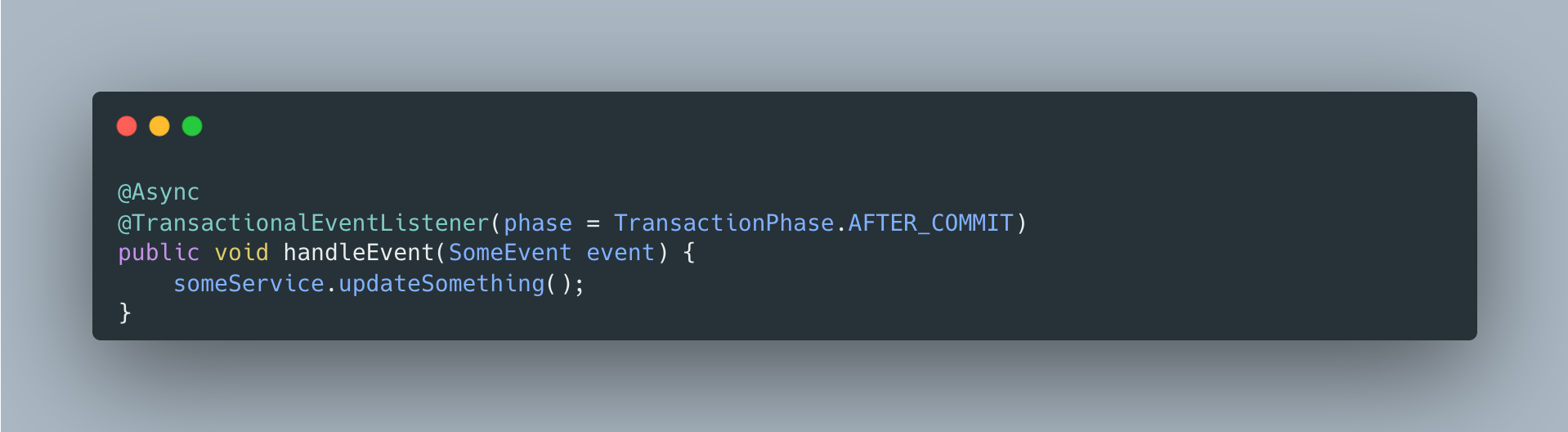
근데 이 프로젝트에서는 @Async를 안 썼습니다. 이유는:
-
soft delete는 금방 끝남 -
deleted_at마킹은 단순 UPDATE 하나라 몇 ms면 끝납니다. 비동기로 할 이유가 없습니다. -
동기 실행이 디버깅에 유리 - 비동기면 로그 추적이 복잡해지고, 예외 발생 시 어디서 터졌는지 파악하기 어렵습니다.
-
REQUIRES_NEW로 충분 - 문제의 본질은 “새 DB 트랜잭션이 필요하다”인데,
REQUIRES_NEW가 정확히 그걸 해결합니다.
@Async는 “이 작업이 오래 걸려서 응답을 기다리기 싫을 때” 쓰는 것입니다.
예를 들어 이메일 발송, 푸시 알림 같은 외부 API 호출이 여기에 해당합니다. soft delete는 해당하지 않습니다.
정리
| 상황 | 결과 | 비고 |
|---|---|---|
AFTER_COMMIT + @Transactional (기본 REQUIRED) | DB 반영 안됨 | 이미 종료된 트랜잭션에 참여 시도 |
AFTER_COMMIT + @Transactional(REQUIRES_NEW) | 정상 동작 | 이 프로젝트에서 사용 |
AFTER_COMMIT + @Async + @Transactional | 정상 동작 | 별도 스레드, 오래 걸리는 작업에 적합 |
BEFORE_COMMIT + @Transactional (기본 REQUIRED) | 정상 동작 | 아직 트랜잭션 진행 중 |
참고한 글들:
- Spring puzzler: the @TransactionalEventListener - 원인을 가장 잘 설명한 글
- Spring Framework GitHub Issue #26974 - 공식 이슈
- Spring 공식 문서
- curiousjinan 블로그
아키텍처

주요 컴포넌트
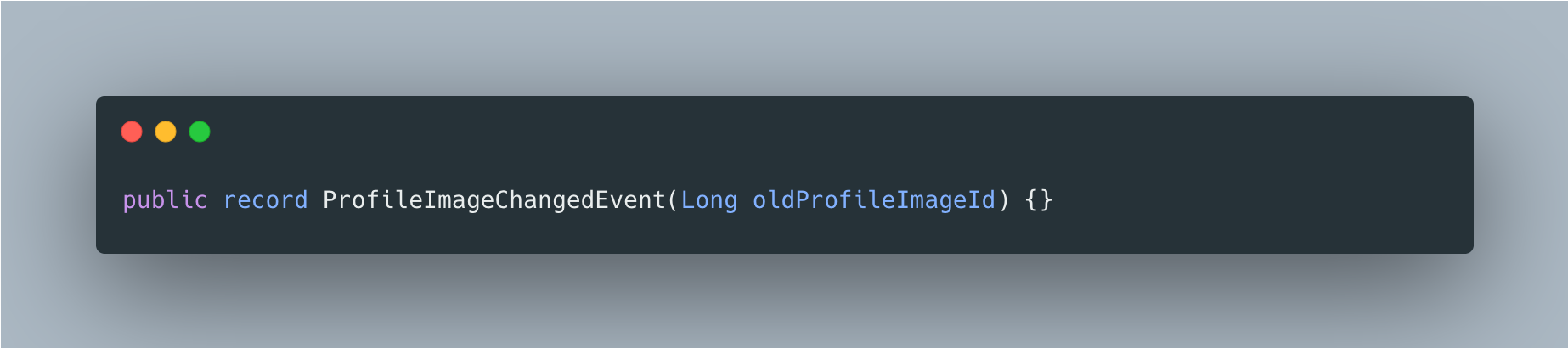
1. ProfileImageChangedEvent (Core 모듈)
이벤트 정의. User와 Upload 모듈 간 순환 의존성 방지를 위해 Core에 위치.
2. UserService (User 모듈)
프로필 이미지 변경 시 이벤트 발행.
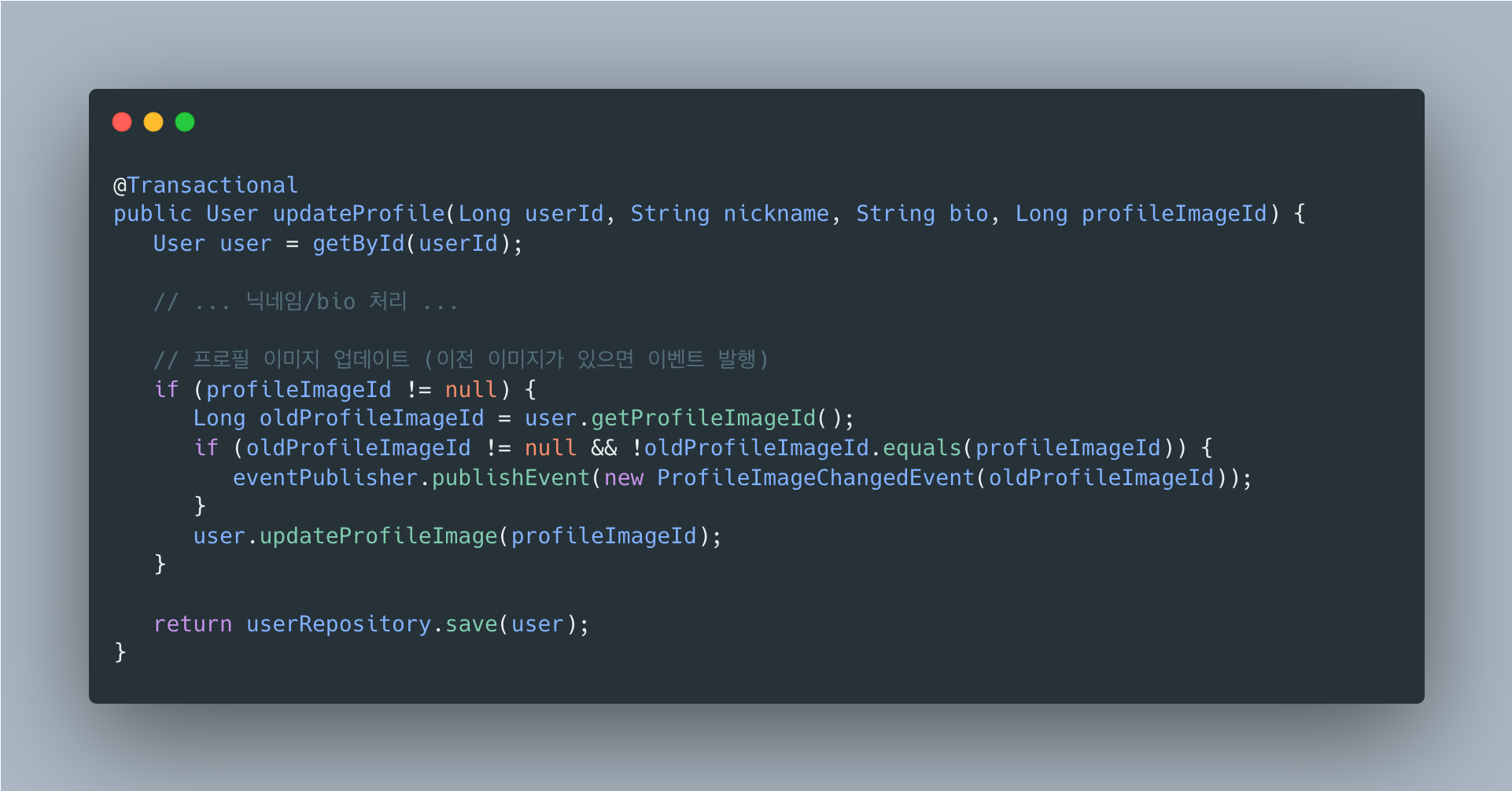
3. ProfileImageChangedEventListener (Upload 모듈)
이벤트 수신 후 Soft Delete 처리. 트랜잭션 커밋 후 실행.
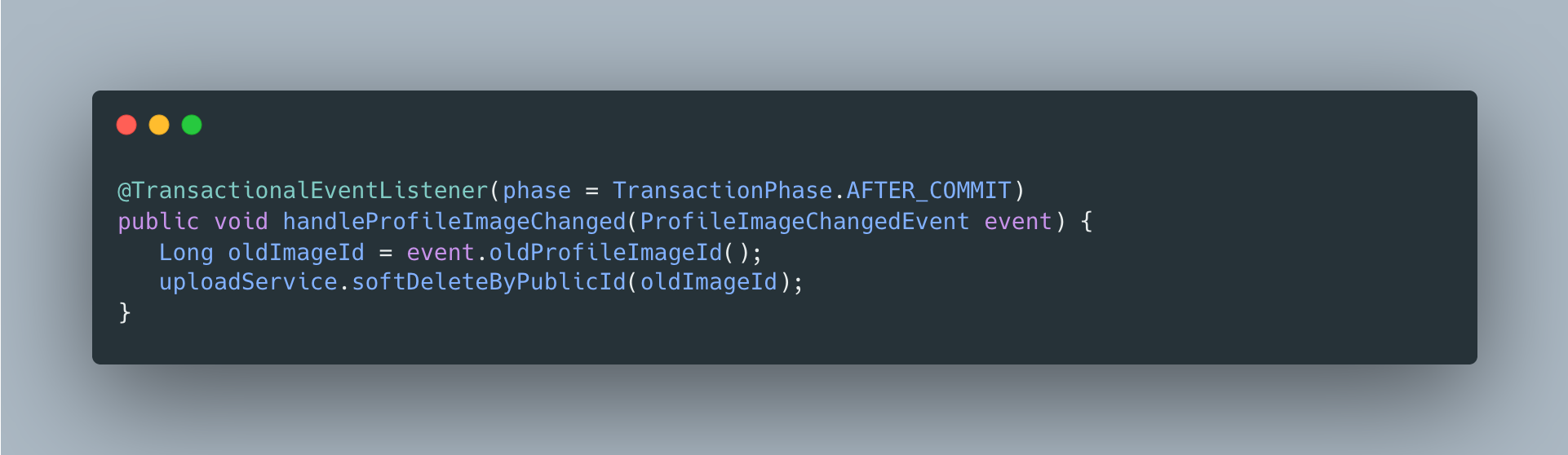
4. OrphanFileCleanupScheduler (Upload 모듈)
매일 새벽 3시에 7일 지난 삭제 파일 정리.
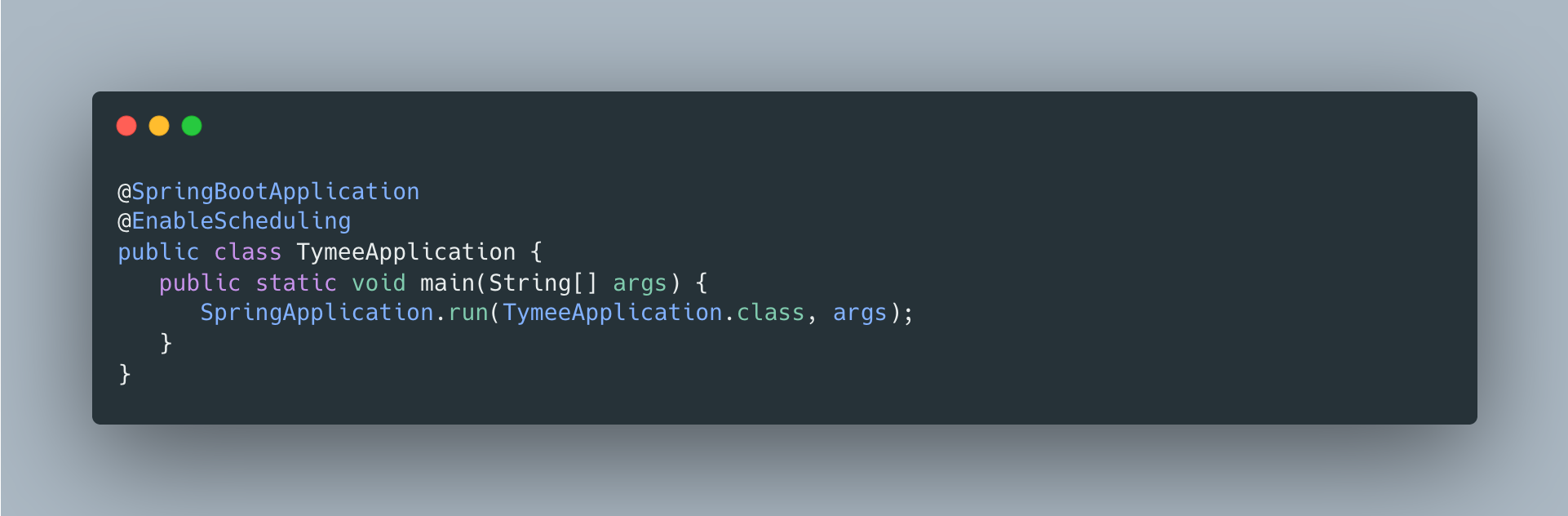
설정
@EnableScheduling
스케줄러 활성화를 위해 메인 애플리케이션에 추가.
보존 기간 변경
OrphanFileCleanupScheduler.RETENTION_DAYS 상수 수정.
private static final int RETENTION_DAYS = 7; // 기본 7일스케줄러 실행 시간 변경
cron 표현식 수정.
@Scheduled(cron = "0 0 3 * * *") // 매일 새벽 3시@Scheduled(cron = "0 0 4 * * *") // 매일 새벽 4시로 변경@Scheduled(cron = "0 0 3 * * SUN") // 매주 일요일 새벽 3시모니터링
로그 출력
INFO 고아 파일 정리 시작: 15건 대상DEBUG 파일 삭제 완료: publicId=7321847264891904001, path=prod/profiles/images/abc123.jpgINFO 고아 파일 정리 완료: 성공=14건, 실패=1건ERROR 파일 삭제 실패: publicId=7321847264891904002, path=..., error=...실패 시 동작
- R2 삭제 실패: 해당 파일만 스킵, 다음 배치에서 재시도
- DB 삭제 실패: 트랜잭션 롤백, 로그 기록
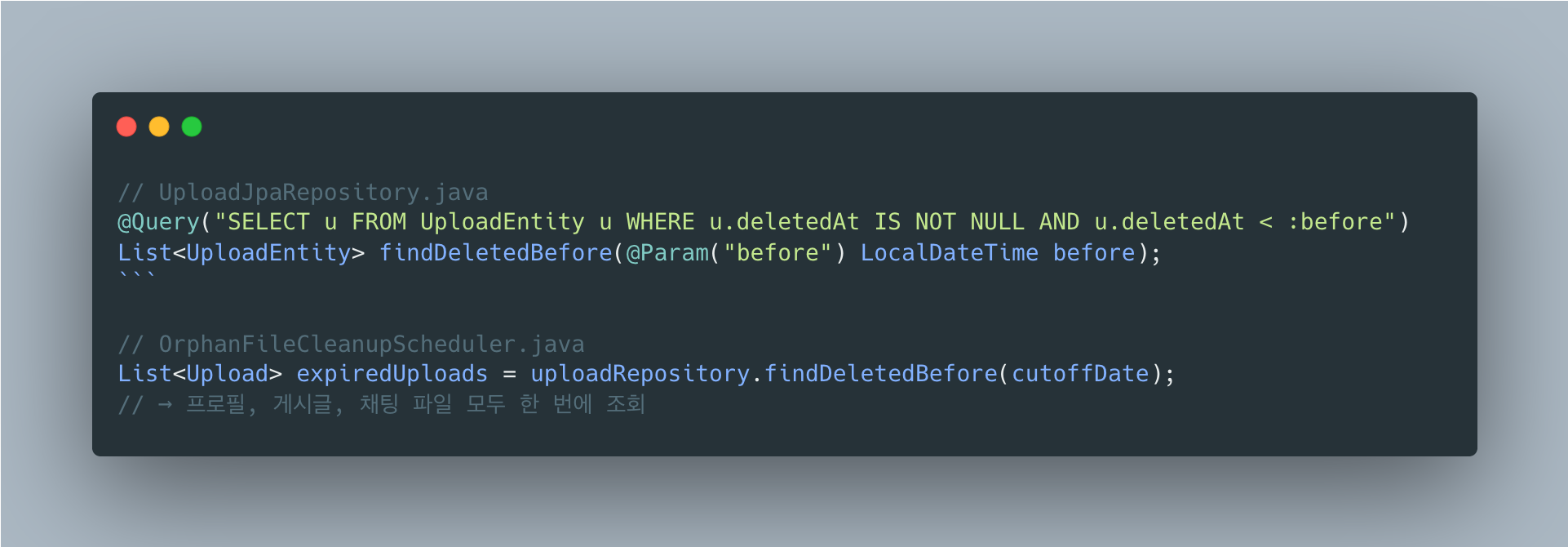
확장성: 다른 파일 타입에도 동일하게 적용
배치 스케줄러의 범용성
현재 배치 스케줄러는 파일 타입이나 카테고리와 무관하게 deleted_at 기준으로만 정리합니다.
새로운 기능 추가 시 해야 할 일
| 기능 | 추가할 코드 | 배치 스케줄러 수정 |
|---|---|---|
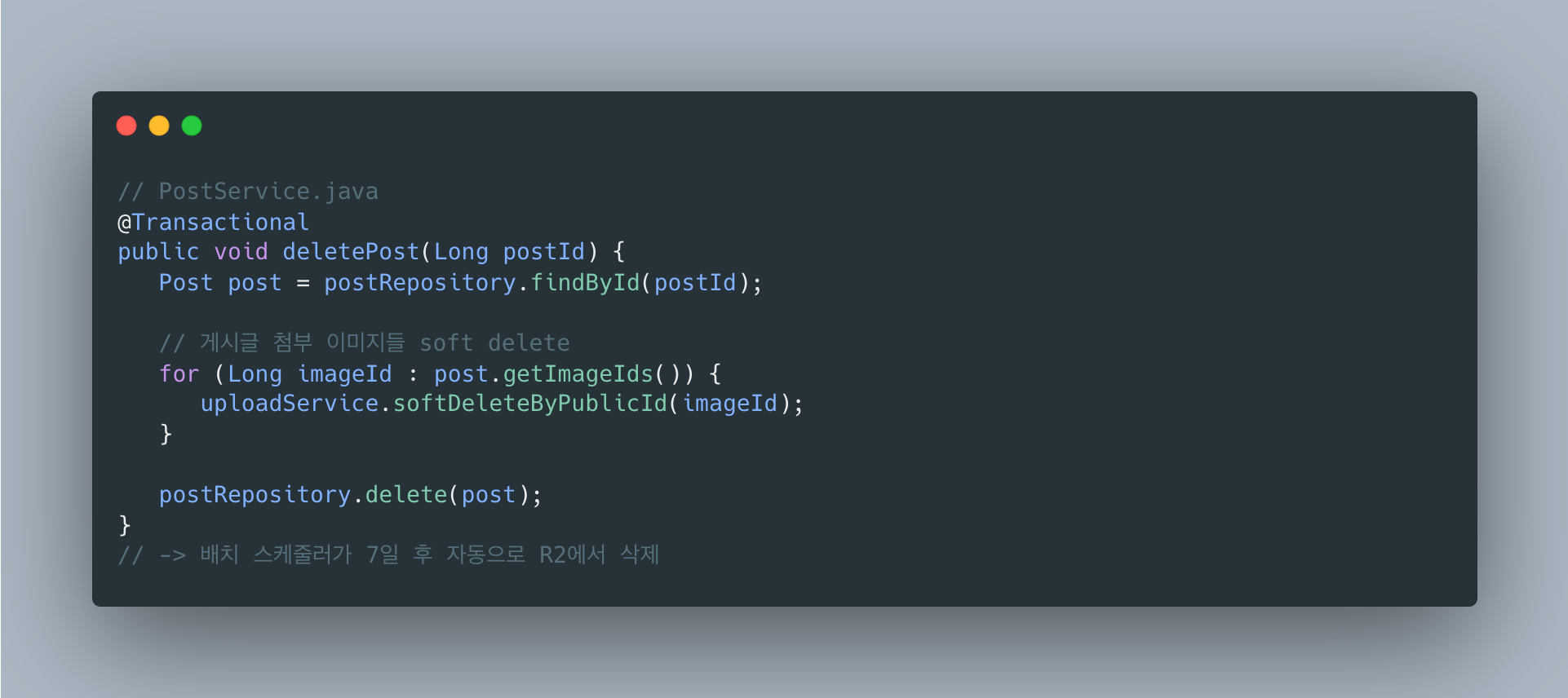
| 게시글 이미지 삭제 | uploadService.softDeleteByPublicId(imageId) | 불필요 |
| 게시글 수정 시 이미지 교체 | 이전 이미지 deleted_at 마킹 | 불필요 |
| 채팅방 삭제 시 첨부파일 정리 | 해당 파일들 deleted_at 마킹 | 불필요 |
| 사용자 탈퇴 시 모든 파일 삭제 | 해당 사용자 파일 deleted_at 마킹 | 불필요 |
예시: 게시글 이미지 삭제 추가
설계의 핵심
“deleted_at만 마킹하기”
비즈니스 로직에서는 deleted_at만 설정
실제 삭제는 배치 스케줄러가 일괄 처리
-> 새로운 기능 추가 시 배치 코드 수정 불필요
-> 모든 파일 타입에 동일한 7일 유예 기간 적용
-> 단일 쿼리로 모든 삭제 대상 조회 (성능 이점)
배운 점
가장 크게 배운 건 “트랜잭션의 경계”입니다.
R2/S3 같은 외부 스토리지는 DB 트랜잭션에 포함되지 않습니다.
프로필 업데이트 중 R2 파일을 먼저 삭제했는데 DB 커밋에서 예외가 터지면, 파일은 삭제됐는데 DB는 롤백되는 불일치가 생깁니다.
@TransactionalEventListener(AFTER_COMMIT)으로 DB 커밋 성공 후에만 파일 작업을 하도록 해결했습니다.
AFTER_COMMIT 시점의 함정도 있었습니다.
@Transactional 메서드를 호출하면 새 트랜잭션이 시작될 줄 알았는데, DB 트랜잭션은 종료됐지만 스프링 트랜잭션 컨텍스트는 아직 정리 전이라 기본 전파 속성(REQUIRED)이 “이미 종료된 트랜잭션에 참여”를 시도했습니다.
REQUIRES_NEW로 명시적으로 새 트랜잭션을 시작해야 한다는 걸 이 과정에서 알게 됐습니다.
A generic system that automatically cleans up orphan files no longer referenced in a file upload system.
Currently applied to profile images, but equally applicable to post images, chat attachments, and all other uploaded files.
Overview
When files are replaced or deleted after upload, the old files remain as orphan files in R2 storage.
To prevent this, a Soft Delete + batch cleanup approach was used.
Core Design Principle
All file cleanup is managed through a single deleted_at column in the uploads table.
- Profile image replacement ->
deleted_atmarking - Post image deletion ->
deleted_atmarking - Chat attachment expiration ->
deleted_atmarking
-> The batch scheduler cleans up everything based on deleted_at (no code changes needed)
Even when new file types are added, the cleanup logic does not need modification. Just marking deleted_at automatically makes it a cleanup target, and a single batch handles all file types.
Why Not Delete Immediately?
You might wonder, “Can’t we just delete from R2 right when the profile image changes?“
1. Transaction Consistency Issue
@Transactionalpublic User updateProfile(..., Long newImageId) { user.updateProfileImage(newImageId); // ① DB update (within transaction) r2Service.deleteFile(oldImagePath); // ② R2 deletion (external system) return userRepository.save(user); // ③ Commit}Problem scenario:
- ① and ② succeed -> exception at ③ -> rollback
- But the file is already deleted from R2 -> data inconsistency
External storage like R2 and S3 is not included in DB transactions.
2. API Response Time Degradation
Profile update API response time:├── DB update: 5ms├── R2 file deletion: 100~500ms (network I/O)└── Total: 105~505ms
Soft Delete approach:├── DB update: 5ms├── deleted_at marking: 1ms└── Total: 6msFrom the user’s perspective, “deleting the old profile image” is irrelevant. A fast response matters more.
3. Complex Exception Handling on Failure
4. Recovery Possibility
- Accidentally changed image -> admin can recover within 7 days by setting
deleted_at = NULL - Immediate deletion makes recovery impossible
Why Soft Delete?
Immediate deletion is simple but has issues with transaction inconsistency, API latency, and inability to recover. Asynchronous deletion solves the response time problem but the transaction issue remains.
The Soft Delete + batch approach is transaction-safe, fast in response, and allows 7-day recovery. While there is an additional storage cost for 7 days, deletion failures do not impact core business, and bulk processing can be done during low-traffic early morning hours, making this a common practice in production.
Storage Cost Perspective:
On Cloudflare R2, storage costs $0.015/GB per month. If profile images average 500KB and there are 100 daily replacements, the additional storage during the 7-day grace period is about 350MB ($0.005/month) — negligible. In contrast, implementing retry logic and compensating transactions for immediate deletion failures costs far more in development time.
Infrastructure Context and Technology Choice
Why RabbitMQ Was Not Used
RabbitMQ is already in the infrastructure, but Spring ApplicationEvent was chosen for this feature.
Why RabbitMQ Is Overkill for This Feature
Currently, the User module and Upload module run in the same JVM on a single SpringBoot server, so inter-server communication is unnecessary. Even if soft delete fails, the batch handles it, so it is not critical. It is also not a “must-process” task like payments. Using RabbitMQ would require additional ConnectionFactory, Exchange/Queue/Binding configuration, serialization logic, and reconnection handling, whereas Spring Event only needs a single @EventListener. On an ARM 1 OCPU / 6GB RAM environment, an unnecessary network hop is wasteful.
When to Switch to RabbitMQ
Consider using RabbitMQ when the following situations arise:
| Situation | Reason |
|---|---|
| Server scale-out | When there are 2+ SpringBoot servers, event sharing is needed |
| Retry required on failure | Critical tasks needing DLQ + retry policies |
| Async processing queue | Queuing large volumes of requests for sequential processing |
| External service integration | Communication with notification servers, payment servers, etc. |
Example of switching when scaling out from the current architecture:
Why Event-Driven Implementation?
What the Event Does: deleted_at Marking
The event handles soft delete (deleted_at marking), not R2 deletion.
Flow when changing profile image:
- UserService.updateProfile() publishes an event
-> Event published: ProfileImageChangedEvent(oldImageId) - ProfileImageChangedEventListener (after transaction commit)
-> uploadService.softDeleteByPublicId(oldImageId)
-> upload.setDeletedAt(LocalDateTime.now()) <- here - OrphanFileCleanupScheduler (daily at 3 AM)
-> R2 file deletion + DB metadata deletion
In other words:
- Event:
deleted_atmarking (soft delete) - Scheduler: R2 deletion + DB deletion (hard delete)
Why Mark deleted_at via Events?
Can’t UserService just call uploadService.softDeleteByPublicId() directly?
Problem: Circular Dependency Between Modules
Direct call approach:
User module ──depends──▶ Upload module (softDeleteByPublicId call)Upload module ──depends──▶ User module (uploader info lookup, etc.)→ Circular dependency!Event-driven solution:
User module ──depends──▶ Core module (event definition)Upload module ──depends──▶ Core module (event listener)→ No circular dependency!Reason for Using @TransactionalEventListener
- AFTER_COMMIT: Soft delete executes only after the profile update succeeds
- If profile update rolls back -> event listener does not execute -> previous image is preserved
- Ensures data consistency
The Problem of DB Updates Not Working in AFTER_COMMIT
While implementing the profile image change feature, I encountered a strange bug. I created an event listener to soft-delete the previous image, and even though save() was clearly called, deleted_at was not being persisted to the database.
At first I spent a long time thinking my code was wrong. Then I found related articles and discovered the cause, which turned out to be deeper than expected.
Cause: DB Transaction and Spring Transaction Context Are Different Things
Since it is AFTER_COMMIT, I naturally assumed the transaction was over. But strictly speaking, only the DB transaction has ended; the Spring transaction context is still alive.
Looking into Spring’s processCommit() method, this is how it works:
1. prepareForCommit()2. triggerBeforeCommit()3. doCommit() <-- DB commits here! DB transaction ends4. triggerAfterCommit() <-- AFTER_COMMIT listener executes (right here)5. triggerAfterCompletion()6. cleanupAfterCompletion() <-- Spring transaction context cleanuptriggerAfterCommit() is called after doCommit(). At this point, the DB transaction has ended, but the Spring transaction context remains alive until cleanupAfterCompletion() is called.
So What Is the Problem?
The default propagation of @Transactional is REQUIRED, which means “join an existing transaction if one exists.” From Spring’s perspective, the transaction context still exists, so it thinks “Oh, there’s a transaction, let me join!” and participates in the existing transaction.
But the DB transaction has already been committed and terminated. As a result, nothing gets persisted to the database.
What Makes It Worse
Due to the persistence context, it appears to have succeeded:
Since it reads from the persistence context (first-level cache), the change appears to have been applied correctly in code. But querying the database directly reveals that the value has not changed. This is what makes debugging difficult.
Solution
Start a New Transaction with REQUIRES_NEW
REQUIRES_NEW creates a new transaction regardless of the existing one. Since an entirely new DB transaction is started, the data is persisted correctly.
Why @Async Was Not Used
Using @Async would run the code in a separate thread, preventing transaction context propagation and thereby solving the problem.
However, @Async was not used in this project. The reasons are:
-
Soft delete finishes quickly - Marking
deleted_atis a simple single UPDATE that completes in a few milliseconds. There is no reason to make it asynchronous. -
Synchronous execution is better for debugging - With async, log tracing becomes complex, and it is harder to identify where an exception occurred.
-
REQUIRES_NEW is sufficient - The essence of the problem is “a new DB transaction is needed,” and
REQUIRES_NEWsolves exactly that.
@Async is for “when the task takes a long time and you don’t want to wait for the response.” For example, sending emails or push notifications via external API calls. Soft delete does not fall into this category.
Summary
| Scenario | Result | Notes |
|---|---|---|
AFTER_COMMIT + @Transactional (default REQUIRED) | Not persisted to DB | Attempts to join an already-terminated transaction |
AFTER_COMMIT + @Transactional(REQUIRES_NEW) | Works correctly | Used in this project |
AFTER_COMMIT + @Async + @Transactional | Works correctly | Separate thread, suitable for long-running tasks |
BEFORE_COMMIT + @Transactional (default REQUIRED) | Works correctly | Transaction is still in progress |
Referenced articles:
- Spring puzzler: the @TransactionalEventListener - Best explanation of the cause
- Spring Framework GitHub Issue #26974 - Official issue
- Spring official documentation
- curiousjinan blog
Architecture
Key Components
1. ProfileImageChangedEvent (Core Module)
Event definition. Located in Core to prevent circular dependencies between User and Upload modules.
2. UserService (User Module)
Publishes an event when the profile image changes.
3. ProfileImageChangedEventListener (Upload Module)
Receives the event and performs soft delete. Executes after transaction commit.
4. OrphanFileCleanupScheduler (Upload Module)
Cleans up deleted files older than 7 days every day at 3 AM.
Configuration
@EnableScheduling
Added to the main application to enable the scheduler.
Changing the Retention Period
Modify the OrphanFileCleanupScheduler.RETENTION_DAYS constant.
private static final int RETENTION_DAYS = 7; // Default 7 daysChanging the Scheduler Execution Time
Modify the cron expression.
@Scheduled(cron = "0 0 3 * * *") // Every day at 3 AM@Scheduled(cron = "0 0 4 * * *") // Changed to every day at 4 AM@Scheduled(cron = "0 0 3 * * SUN") // Every Sunday at 3 AMMonitoring
Log Output
INFO Orphan file cleanup started: 15 targetsDEBUG File deletion complete: publicId=7321847264891904001, path=prod/profiles/images/abc123.jpgINFO Orphan file cleanup finished: success=14, failure=1ERROR File deletion failed: publicId=7321847264891904002, path=..., error=...Behavior on Failure
- R2 deletion failure: Only that file is skipped, retried in the next batch
- DB deletion failure: Transaction rollback, logged
Extensibility: Applying the Same Pattern to Other File Types
Batch Scheduler Generality
The current batch scheduler cleans up based solely on deleted_at, regardless of file type or category.
What to Do When Adding New Features
| Feature | Code to Add | Batch Scheduler Modification |
|---|---|---|
| Post image deletion | uploadService.softDeleteByPublicId(imageId) | Not needed |
| Image replacement on post edit | Mark previous image deleted_at | Not needed |
| Attachment cleanup on chat room deletion | Mark related files deleted_at | Not needed |
| Delete all files on user withdrawal | Mark user’s files deleted_at | Not needed |
Example: Adding Post Image Deletion
Core of the Design
“Just mark deleted_at”
Business logic only sets deleted_at.
Actual deletion is handled in bulk by the batch scheduler.
-> No batch code modification needed when adding new features
-> Same 7-day grace period applied to all file types
-> All deletion targets queried with a single query (performance benefit)
Lessons Learned
The biggest takeaway was “the boundary of transactions.” External storage like R2/S3 is not included in DB transactions. If you delete an R2 file during a profile update and then a DB commit exception occurs, the file is deleted but the DB is rolled back, creating an inconsistency. This was solved by using @TransactionalEventListener(AFTER_COMMIT) to perform file operations only after a successful DB commit.
There was also a pitfall with the AFTER_COMMIT timing. I assumed calling a @Transactional method would start a new transaction, but while the DB transaction had ended, the Spring transaction context had not yet been cleaned up, so the default propagation (REQUIRED) attempted to “join an already-terminated transaction.” Through this process, I learned that a new transaction must be explicitly started with REQUIRES_NEW.

댓글
댓글 수정/삭제는 GitHub Discussions에서 가능합니다.