제목, 태그, 카테고리로 검색

모든 글
약 35분 분량 이론

스프링 MVC는 왜 스레드를 최대 200개까지 사용할까
목차

동시 접속자 처리를 고민하다가 궁금해진 부분을 정리해봤어요.


들어가며

스프링 부트로 서버 만들 때 항상 신경 쓰이는 게 “이 서버가 과연 몇 명을 동시에 받을 수 있을까?”였어요. 설정 파일을 열어보면 톰캣 스레드 최대치가 200으로 박혀있는데, 이게 왜 200인지는 아무도 안 알려줍니다.

처음엔 그냥 “200명까지만 받을 수 있나?” 싶었는데, 찾아보니 생각보다 복잡한 이유가 있었어요.


옛날 옛적 CGI 시절 이야기

CGI: 프로세스 지옥의 시작

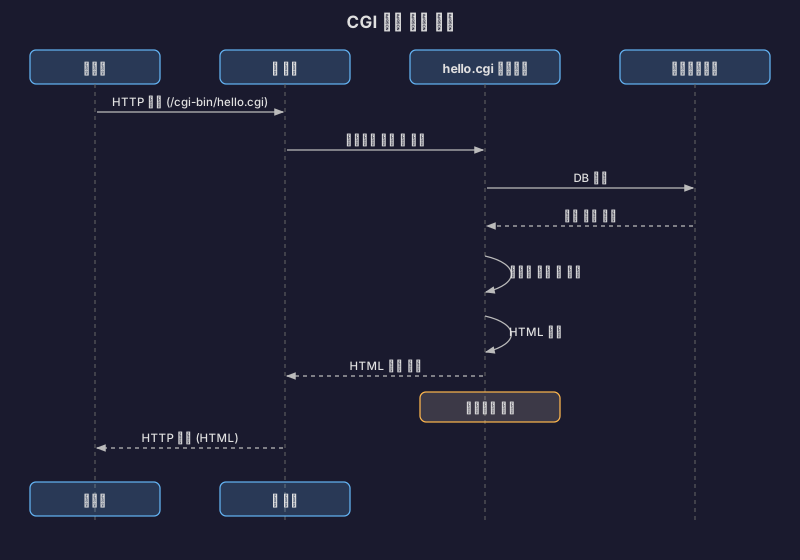
1990년대 초반, 웹은 정적인 HTML 파일만 보여주는 수준이었어요. 사용자 입력에 따라 동적으로 페이지를 만들 방법이 필요했고, CGI(Common Gateway Interface)가 등장했죠.

출처: Velog - CGI와 서블릿, JSP의 연관관계

CGI는 간단했어요. 요청이 오면 프로그램을 실행하고 결과를 HTML로 반환하면 끝이었죠.

문제는 성능이었어요.

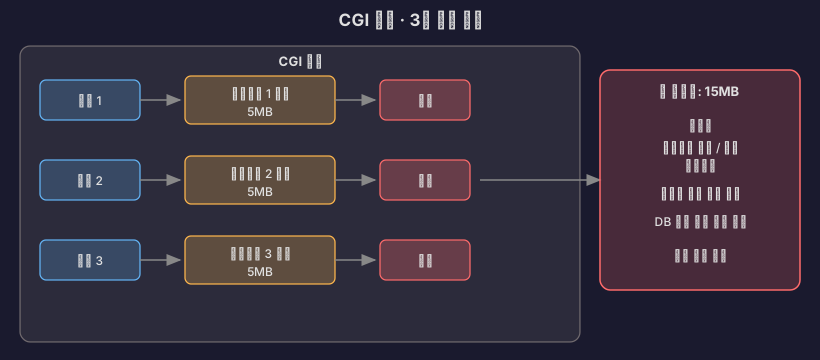
요청 하나당 프로세스 하나.

10명이 동시 접속하면 프로세스 10개, 100명이면 100개. 프로세스 생성하는데 수십 ms씩 걸렸고, 메모리는 프로세스마다 수 MB씩 먹었어요. 컨텍스트 스위칭도 무시할 수 없었고요.

동시 접속자 100명만 넘어가도 서버가 터졌어요.

출처: 80000coding - 웹 서버와 WAS, CGI

서블릿: 스레드 기반의 혁명

1997년, Sun이 해결책을 내놓았어요. Java Servlet이었죠.

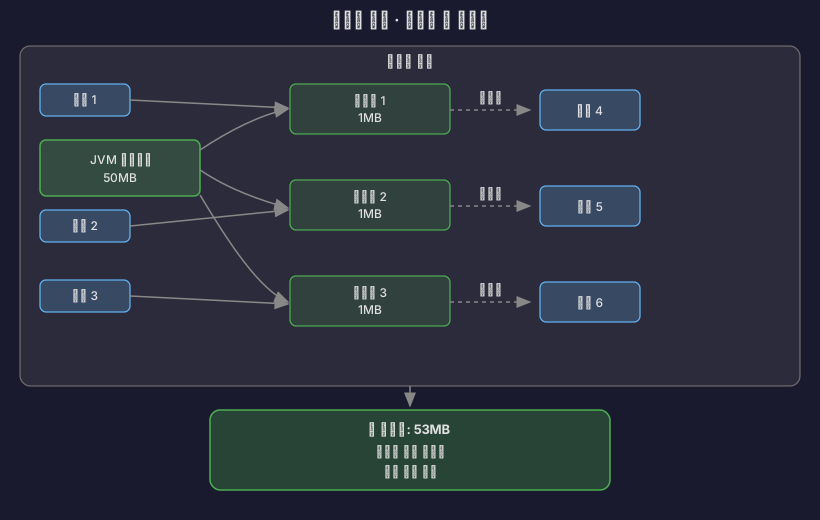
핵심 아이디어는 프로세스 대신 스레드를 쓰자는 것이었어요.

CGI 방식

서블릿 방식:

스레드는 프로세스보다 가볍고 빨랐어요. 생성 비용도 낮고 메모리도 덜 먹었고요. 무엇보다 스레드 풀을 만들어서 재사용할 수 있었어요.

출처: Wikipedia - 자바 서블릿, Pearson IT Certification - Servlet and JSP History

// 서블릿 컨테이너의 동작 방식
class ServletContainer {
ThreadPool pool = new ThreadPool(200); // 미리 생성
void handleRequest(HttpRequest request) {
Thread thread = pool.getThread(); // 풀에서 가져옴
thread.run(() -> {
servlet.service(request);
});
pool.returnThread(thread); // 다시 반환
}
}

이게 바로 톰캣의 시작이었어요. 1999년, Sun이 톰캣 코드를 Apache 재단에 기부하면서 Apache Tomcat이 탄생했죠.

출처: Apache Tomcat Heritage

서블릿의 내부 구조

서블릿이 프로세스보다 효율적인 이유를 좀 더 깊이 파헤쳐볼게요.

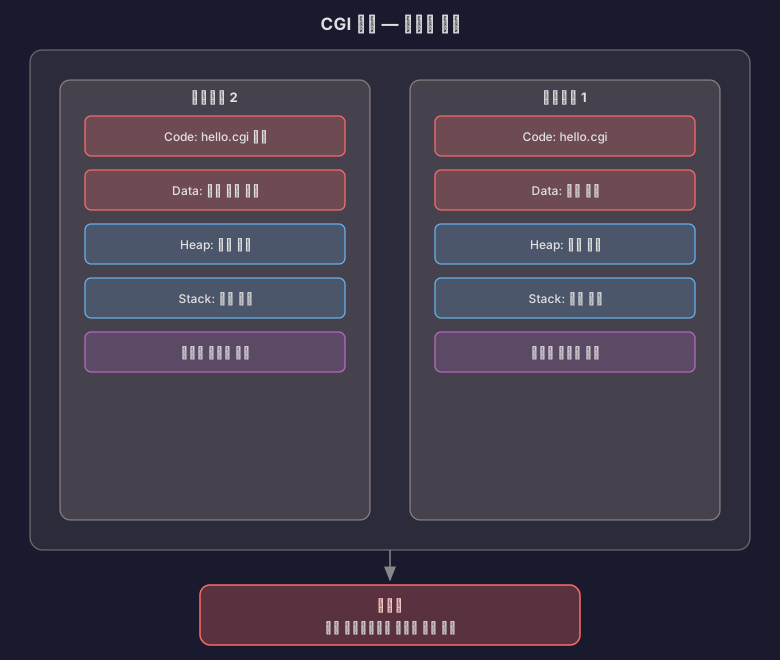
CGI vs 서블릿: 메모리 구조 비교

CGI 방식:

서블릿 방식:
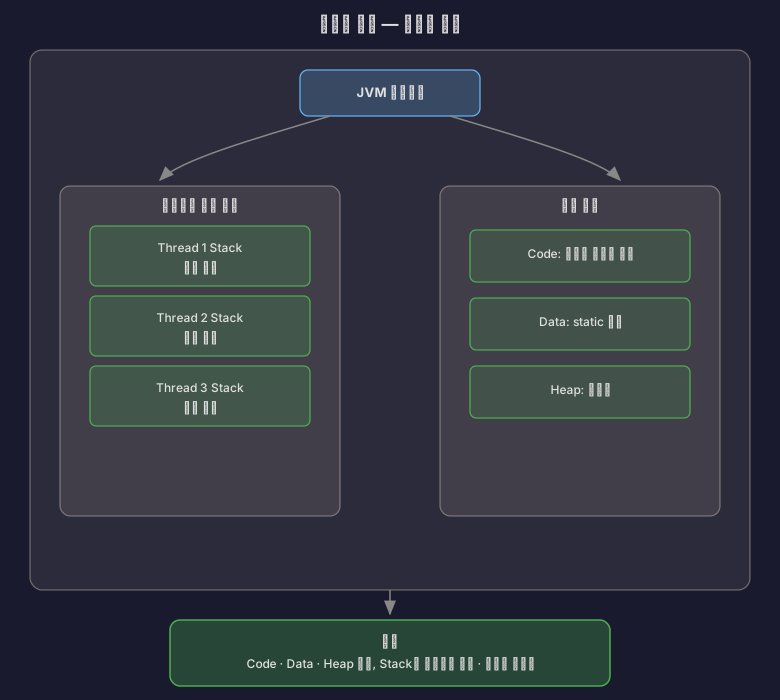
→ Code, Data, Heap은 공유하고 Stack만 따로!

핵심: 스레드는 Code, Data, Heap 영역을 공유하고 Stack만 각자 가져요. 메모리 효율이 압도적으로 좋죠.

출처: Velog - 자바 서블릿에 대해 알아보자

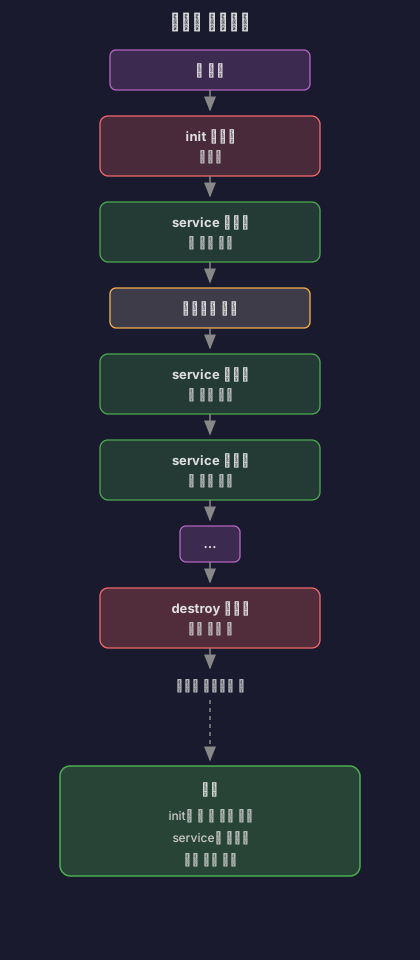
서블릿의 라이프사이클

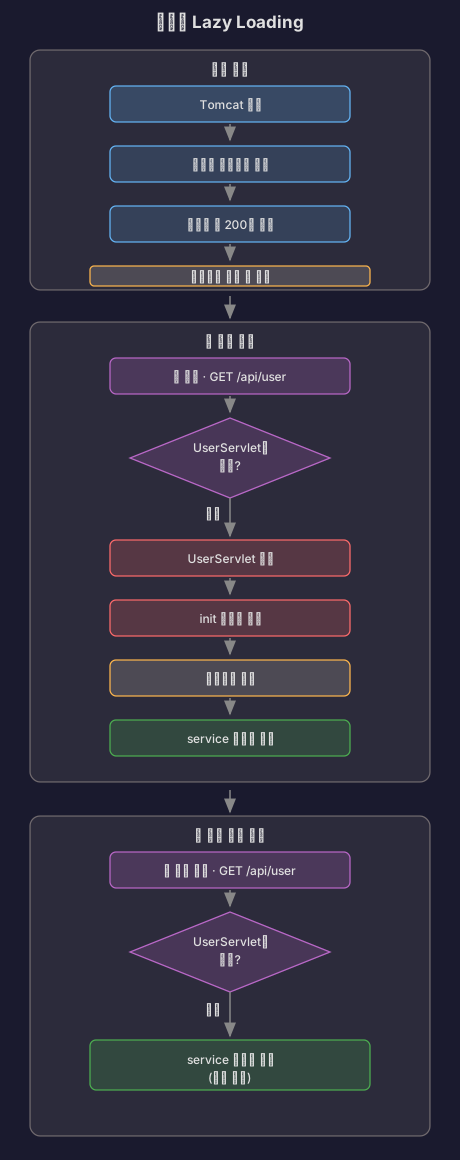
서블릿은 한 번 생성되면 메모리에 계속 남아있어요. 싱글톤 패턴처럼 동작하거든요.

// 서블릿 라이프사이클
public class MyServlet extends HttpServlet {
// 1. init(): 서블릿이 처음 생성될 때 단 한 번 호출
@Override
public void init(ServletConfig config) throws ServletException {
System.out.println("서블릿 초기화!");
// DB 커넥션 풀 초기화 등의 작업
}
// 2. service(): 요청이 올 때마다 호출 (멀티스레드로 동작)
@Override
protected void service(HttpServletRequest req, HttpServletResponse res)
throws ServletException, IOException {
// GET, POST 등 HTTP 메서드에 따라 분기
String method = req.getMethod();
if (method.equals("GET")) {
doGet(req, res);
} else if (method.equals("POST")) {
doPost(req, res);
}
}
// 3. destroy(): 서블릿이 제거될 때 단 한 번 호출
@Override
public void destroy() {
System.out.println("서블릿 종료!");
// 리소스 정리
}
}

중요한 점:

실제로 측정해보면 차이가 확연해요:

// 첫 번째 요청
GET http://localhost:8080/myServlet
// 응답 시간: 38.50ms (서블릿 초기화 포함)
// 두 번째 요청
GET http://localhost:8080/myServlet
// 응답 시간: 6.61ms (서블릿 재사용!)

출처: Velog - 자바 서블릿에 대해 알아보자

Lazy Loading: 필요할 때만 만든다

서블릿은 처음 접근할 때 생성돼요. 서버가 시작될 때 모든 서블릿을 만들지 않아요.

왜 이렇게 할까?

  • 서버 시작 시간 단축
  • 사용하지 않는 서블릿은 메모리를 차지하지 않음
  • 첫 요청만 조금 느리고, 이후는 빠름

싱글톤의 함정: 공유 메모리 문제

서블릿이 싱글톤이라는 건, 모든 스레드가 같은 서블릿 객체를 공유한다는 뜻이에요.

// 위험한 코드!
public class DangerousServlet extends HttpServlet {
private int count = 0; // 인스턴스 변수 (공유됨!)
@Override
protected void doGet(HttpServletRequest req, HttpServletResponse res)
throws ServletException, IOException {
count++; // 여러 스레드가 동시에 접근!
res.getWriter().write("Count: " + count);
}
}
// 시나리오:
// Thread 1: count++ (0 → 1)
// Thread 2: count++ (동시에 접근, 1 → 2가 아니라 1 → 1이 될 수도!)
// Thread 3: count++ (경쟁 조건 발생!)

해결책:

  1. 지역 변수만 사용
public class SafeServlet extends HttpServlet {
@Override
protected void doGet(HttpServletRequest req, HttpServletResponse res)
throws ServletException, IOException {
int count = 0; // 지역 변수 (스레드마다 Stack에 따로 생김)
count++;
res.getWriter().write("Count: " + count);
}
}
  1. 동기화 사용 (하지만 느려짐)
public class SynchronizedServlet extends HttpServlet {
private int count = 0;
@Override
protected synchronized void doGet(HttpServletRequest req, HttpServletResponse res)
throws ServletException, IOException {
count++; // 한 번에 하나의 스레드만 접근
res.getWriter().write("Count: " + count);
}
}

권장: 서블릿에서는 상태를 저장하지 말고, 요청 처리 후 바로 잊어버리는 게 좋아요.

출처: Velog - 자바 서블릿에 대해 알아보자

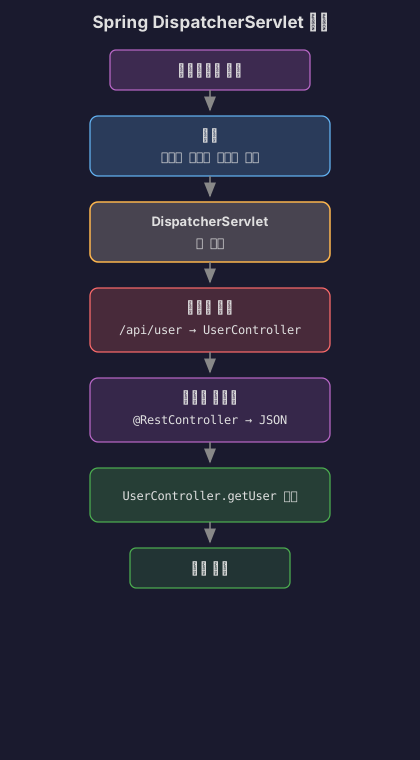
스프링의 DispatcherServlet

스프링은 단 하나의 서블릿으로 모든 요청을 처리해요.

// 스프링의 핵심: DispatcherServlet
public class DispatcherServlet extends FrameworkServlet {
@Override
protected void doService(HttpServletRequest req, HttpServletResponse res)
throws Exception {
// 1. 핸들러 매핑: 어떤 컨트롤러가 처리할지 찾기
HandlerExecutionChain handler = getHandler(req);
// GET /api/user → UserController.getUser()
// 2. 핸들러 어댑터: 컨트롤러 실행 방법 결정
HandlerAdapter adapter = getHandlerAdapter(handler);
// @RestController면 JSON 반환
// @Controller면 View 이름 반환
// 3. 실제 실행
ModelAndView mv = adapter.handle(req, res, handler);
// 4. 뷰 렌더링 (필요한 경우)
render(mv, req, res);
}
}

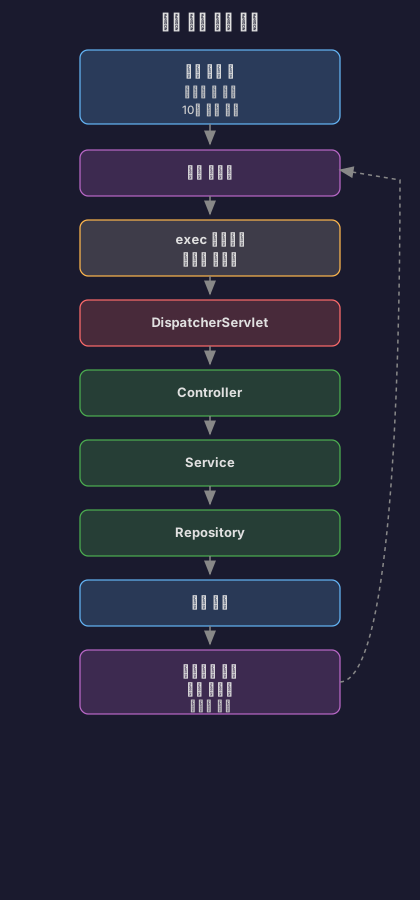
동작 흐름:

핵심: 개발자는 @RestController@Controller만 만들면 되고, 서블릿 코드는 스프링이 알아서 처리해줘요.

출처: Velog - 자바 서블릿에 대해 알아보자


톰캣의 진화: BIO에서 NIO로

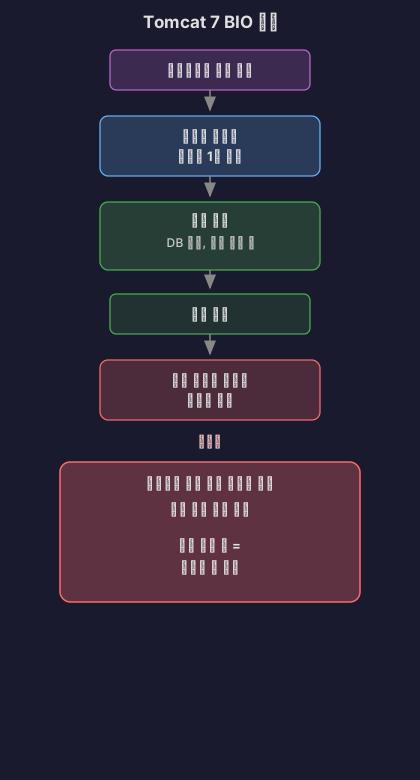
Tomcat 7 이전: BIO의 시대

초기 톰캣은 BIO(Blocking I/O) 커넥터를 기본으로 썼어요.

동작 방식은 이랬어요:

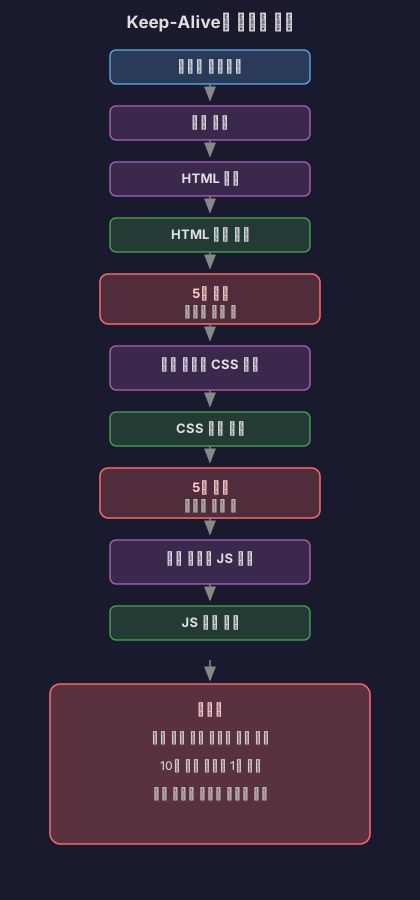
문제는 Keep-Alive였어요.

HTTP/1.1에서는 연결을 재사용해요. 요청 처리하고 나서도 연결을 끊지 않고 다음 요청을 기다리죠. 보통 5-30초 정도 기다려요.

BIO에서는 이 5초 동안 스레드가 아무것도 안 하고 대기해요. 스레드 풀이 200개면, 200명이 동시 접속하면 끝이었죠. 201번째 사용자는 누군가 연결을 끊을 때까지 기다려야 했어요.

출처: Velog - 아파치 톰캣의 NIO Connector와 BIO Connector

C10K 문제

1999년, Dan Kegel이 문제를 제기했어요. “10,000개 동시 연결을 어떻게 처리할 것인가?”

BIO 방식으로는 불가능했어요. 10,000개 스레드를 만들면:

메모리: 10,000 * 2MB = 20GB
컨텍스트 스위칭: 초당 수백만 번
CPU: 스레드 전환만 하다가 죽음

출처: Wikipedia - C10k problem

Tomcat 8: NIO로의 전환

2014년, Tomcat 8이 나오면서 NIO(Non-blocking I/O)가 기본이 됐어요.

NIO의 핵심은 Selector예요.

// NIO Connector의 동작 방식
class NioConnector {
Selector selector = Selector.open();
ThreadPool workerPool = new ThreadPool(200);
void acceptConnection(SocketChannel channel) {
// Selector에 등록만 하고 스레드는 할당 안 함
channel.register(selector, SelectionKey.OP_READ);
}
void pollLoop() {
while (true) {
// 여러 연결을 동시에 감시
selector.select();
for (SelectionKey key : selector.selectedKeys()) {
if (key.isReadable()) {
// 데이터가 있을 때만 워커 스레드 할당
SocketChannel ch = (SocketChannel) key.channel();
workerPool.submit(() -> processRequest(ch));
}
}
}
}
}

이제 연결 개수와 스레드 개수가 분리됐어요.

BIO:
200개 스레드 = 최대 200개 동시 연결
NIO:
200개 워커 스레드
+ Poller 스레드 2개
= 최대 8,192개 동시 연결 (Tomcat 8 기본값)

Keep-Alive 대기 중인 연결은 Selector가 관리하고, 실제로 데이터가 오면 그때 워커 스레드를 할당해요.

출처: Stack Overflow - Tomcat NIO thread pools

Tomcat 8.5/9: BIO 완전 제거

2016년, Tomcat 8.5와 9가 나오면서 BIO는 완전히 사라졌어요.

// Tomcat 8.5부터
<Connector protocol="HTTP/1.1" />
// → 자동으로 NIO 사용
// BIO를 명시적으로 설정해도
<Connector protocol="org.apache.coyote.http11.Http11Protocol" />
// → 경고 로그와 함께 NIO로 전환됨

출처: Apache Tomcat Migration Guide 8.5, Tomcat 9 Migration Guide


스프링 부트와 톰캣의 스레드 풀

기본 설정값

스프링 부트에 내장된 톰캣의 기본 설정은 이래요:

설정기본값설명
server.tomcat.threads.max200최대 워커 스레드 개수
server.tomcat.threads.min-spare10최소 유지 스레드 개수
server.tomcat.max-connections8192 (NIO), 10000 (NIO2)최대 동시 연결 수
server.tomcat.accept-count100대기 큐 크기

출처: Apache Tomcat 8.5 Configuration Reference, Datadog - Understanding Tomcat Architecture

NIO 커넥터의 스레드 구조

톰캣 NIO 커넥터는 여러 종류의 스레드를 써요:

http-nio-8080-Acceptor-0 (1개)
→ 연결 수락
http-nio-8080-ClientPoller-0 (2개)
http-nio-8080-ClientPoller-1
→ Selector로 연결 감시
http-nio-8080-exec-1 (10~200개)
http-nio-8080-exec-2
...
http-nio-8080-exec-200
→ 실제 요청 처리

Acceptor가 연결을 받으면 Poller에게 넘기고, Poller가 데이터를 감지하면 Exec 스레드에게 작업을 줘요.

출처: DZone - Understanding the Tomcat NIO Connector

요청 처리 흐름

스프링 부트는 이렇게 요청을 처리해요:

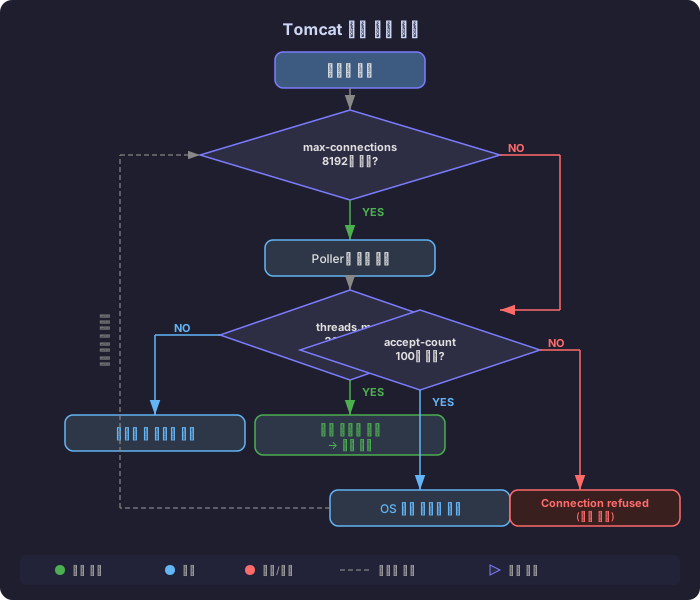
200개 스레드가 모두 사용 중이면:

1. max-connections (8192개) 내의 연결은 Poller가 관리
2. accept-count (100개) 까지는 OS 레벨 큐에서 대기
3. 두 제한을 모두 초과하면 connection timeout

출처: Velog - 스프링부트는 어떻게 다중 유저 요청을 처리할까?, HARIL - Spring MVC Traffic Testing


왜 하필 200개인가?

1. 메모리와의 균형

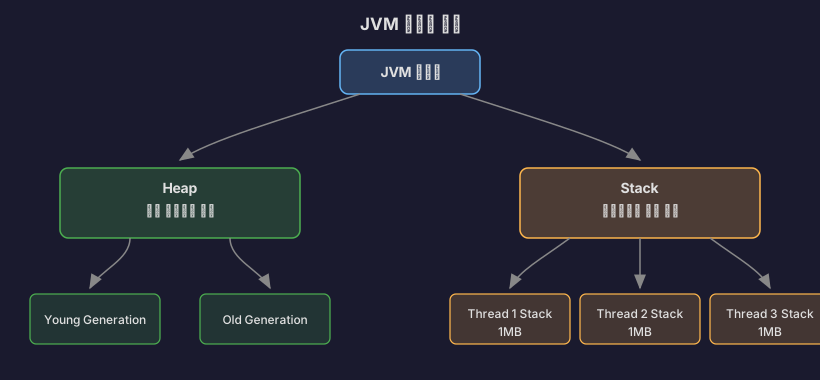
먼저 JVM 메모리 구조부터 이해해야 해요.

JVM 메모리 구조

Heap:

  • 모든 스레드가 공유하는 메모리 공간
  • 객체, 배열이 여기에 할당됨
  • -Xms, -Xmx 옵션으로 크기 설정

Stack:

  • 각 스레드마다 독립적인 스택 공간
  • 메서드 호출, 지역 변수, 파라미터 저장
  • -Xss 옵션으로 크기 설정 (기본 1MB)

출처: Baeldung - Stack Memory and Heap Space, Java Memory Model

스레드 메모리 계산

64비트 JVM에서 스레드 하나는 기본 1MB 스택을 먹어요.

실제로는 이래요:

스레드가 sleep 상태일 때: 약 16KB (물리 RAM)
스택을 실제로 쓸 때: 최대 1MB까지 증가

200개 스레드면:

스택 메모리:
- 최소: 200 * 16KB = 3.2MB
- 최대: 200 * 1MB = 200MB
전체 JVM:
- Heap: 예를 들어 2GB (-Xmx2g)
- Stack: 200MB (200 threads)
- Metaspace: 약 256MB
= 총 2.5GB 정도

이 정도면 일반적인 서버 메모리(4-8GB)에서 무리 없어요.

출처: Stack Overflow - Java thread memory calculation, DZone - How Much Memory Does a Java Thread Take?

2. 컨텍스트 스위칭 비용

현대 리눅스에서 컨텍스트 스위칭은 1-2 마이크로초 걸려요.

스레드 A 레지스터 저장 → 스레드 B 레지스터 복원 → TLB flush
= 약 1-2μs

200개 스레드가 공평하게 CPU를 나눠 쓴다면, CPU 4코어 기준으로 스레드 하나당:

4 / 200 = 0.02 (2%)

적당히 많으면서도 컨텍스트 스위칭 오버헤드가 크지 않은 수준이에요.

만약 2000개 스레드를 만들면:

4 / 2000 = 0.002 (0.2%)
CPU가 스레드 전환만 하다가 끝남

출처: Eli Bendersky - Measuring context switching, Medium - Context Switching Impact

3. 역사적 이유

초기 톰캣(1999년)이 나왔을 때 서버 스펙은 이랬어요:

CPU: Pentium III 500MHz
RAM: 128-512MB
동시 접속자: 수백 명 수준

이 환경에서 테스트하면서 “150-200개 정도가 적당하다”는 결론이 나왔어요. 그게 지금까지 기본값으로 남아있죠.

출처: Medium - Tomcat Why 200 Threads

실제로 톰캣 공식 문서를 보면:

“The default configuration is intended for medium load/complexity applications on average hardware.”

평범한 하드웨어에서 중간 규모 부하를 처리하도록 설계됐다는 뜻이에요.


실전 성능 테스트 결과

EC2 t4g.small 테스트

한 개발자가 EC2 t4g.small (2코어, 2GB RAM)에서 스프링 부트 3.1.5로 부하 테스트를 돌렸어요.

기본 설정 (threads.max=200):

300개 동시 요청: 정상 처리
10,000개 요청: timeout 발생

최적화 설정 (threads.max=2000, max-connections=50000):

15,000개 동시 요청: 정상 처리

서버 성능은 하드웨어와 설정에 크게 의존한다는 걸 보여주죠.

출처: HARIL - Spring MVC Traffic Testing

최적화 고려사항

너무 낮게 설정하면:

threads.max=50
→ 서버 리소스는 남는데 클라이언트는 대기
→ TPS 낮아짐

너무 높게 설정하면:

threads.max=2000
→ 메모리 부족 (2000 * 1MB = 2GB)
→ 컨텍스트 스위칭 과다
→ CPU는 100%인데 처리량은 낮음

적절한 값 찾기:

1. 애플리케이션 로직 복잡도 (CPU 사용률)
2. I/O 대기 시간 (DB, API 호출)
3. 예상 트래픽
4. 하드웨어 스펙 (코어 수, RAM)
5. DBCP 크기 (DB 커넥션 풀)

출처: F-lab - 스프링 서버의 스레드 풀 관리, Velog - 톰캣 Thread Pool 정리


스레드 풀 크기 계산 공식

이론적으로는 이 공식을 써요:

스레드 풀 크기 = CPU 코어 수 × (1 + 대기 시간 / 처리 시간)

예를 들어:

CPU: 4코어
평균 처리 시간: 100ms
평균 I/O 대기: 900ms (DB 쿼리)
스레드 풀 크기 = 4 × (1 + 900/100)
= 4 × 10
= 40

하지만 실제로는 부하 테스트로 찾아야 해요. 애플리케이션마다 특성이 다르기 때문이에요.

출처: Medium - 스레드 풀의 적절한 크기


설정 방법

application.yml

server:
tomcat:
threads:
max: 200 # 최대 워커 스레드
min-spare: 10 # 최소 유지 스레드
accept-count: 100 # 대기 큐 크기
max-connections: 8192 # 최대 동시 연결

버전별 속성명

Spring Boot 2.3 이후: server.tomcat.threads.max
Spring Boot 2.3 이전: server.tomcat.max-threads

출처: Baeldung - Configuring Thread Pools


톰캣 버전 히스토리

버전출시 연도주요 변경사항
Tomcat 3.01999Apache 재단 첫 릴리즈, BIO 기본
Tomcat 7.x2011BIO 기본, NIO 옵션 제공
Tomcat 8.02014NIO 기본으로 전환
Tomcat 8.52016BIO 완전 제거, NIO 전용
Tomcat 9.02017Servlet 4.0, HTTP/2 지원
Tomcat 10.12022Jakarta EE 9+ (패키지명 변경)

출처: Apache Tomcat Versions, endoflife.date - Apache Tomcat


서버는 언제 터지는가?

시나리오 1: OutOfMemoryError - unable to create new native thread

스레드를 너무 많이 만들면 JVM이 터져요.

java.lang.OutOfMemoryError: unable to create new native thread

중요한 사실: 이건 Heap 메모리 부족이 아니에요. 스레드는 Heap이 아니라 OS 네이티브 메모리에 생성돼요.

출처: Baeldung - OutOfMemoryError unable to create new native thread

왜 터지는가?

리눅스는 프로세스당 생성할 수 있는 스레드 개수를 제한해요.

Terminal window
# 확인 방법
ulimit -u # 최대 프로세스/스레드 개수
sysctl kernel.threads-max # 시스템 전체 최대 스레드
# 예시 출력
ulimit -u: 63488
kernel.threads-max: 131072

계산 공식:

최대 스레드 수 = 가용 메모리 / (스택 크기 * 1024 * 1024)

예를 들어:

서버 메모리: 4GB
JVM Heap: 2GB (-Xmx2g)
남은 메모리: 2GB
스레드 스택 크기: 1MB (-Xss1m)
이론적 최대 스레드: 2048개
실제 제한: ulimit -u (예: 1024)
→ 1024개까지만 생성 가능

출처: Baeldung - Maximum Threads per Process, Stack Overflow - Maximum threads in Linux

재현 시나리오

// 서버 터트리기 (절대 따라하지 마세요)
class ThreadBomb {
public static void main(String[] args) {
int count = 0;
try {
while (true) {
new Thread(() -> {
try {
Thread.sleep(Long.MAX_VALUE);
} catch (InterruptedException e) {
}
}).start();
count++;
System.out.println("Threads: " + count);
}
} catch (OutOfMemoryError e) {
System.err.println("터졌다! " + count + "개 스레드에서 사망");
// Threads: 12543
// java.lang.OutOfMemoryError: unable to create new native thread
}
}
}

시나리오 2: 스레드 고갈로 인한 응답 불가

스레드가 부족하면 새 요청을 받지 못해요.

톰캣 설정:
- threads.max: 200
- accept-count: 100
- max-connections: 8192
상황:
1. 200개 스레드 전부 DB 쿼리 대기 중 (각 10초씩)
2. accept-count 큐도 100개 꽉 참
3. 301번째 요청부터는 connection refused

로그:

org.apache.tomcat.util.threads.ThreadPoolExecutor
All threads (200) are currently busy

출처: Velog - 톰캣 스레드

실제 사례

라이브 스트리밍 서버에서 이런 식으로 터질 수 있어요:

@RestController
class StreamController {
@GetMapping("/api/stream/{id}")
public StreamResponse getStream(@PathVariable Long id) {
// DB 조회 - 평균 100ms
Stream stream = streamRepository.findById(id);
// 외부 API 호출 - 평균 500ms
User user = oauthClient.getUserInfo(stream.userId);
// Redis 조회 - 평균 10ms
ViewCount views = redisTemplate.get(stream.id);
return new StreamResponse(stream, user, views);
}
}

만약 OAuth API가 느려지면 (500ms → 5000ms):

1. 200개 스레드가 전부 OAuth 대기
2. 신규 요청은 큐에서 대기
3. 큐마저 꽉 차면 connection refused
4. 사용자는 "서버 점검 중" 페이지만 봄

시나리오 3: 메모리 누수로 인한 OOM

스레드가 메모리를 안 놓으면 Heap이 터져요.

java.lang.OutOfMemoryError: Java heap space

ThreadLocal 메모리 누수

// 위험한 코드
class UserContext {
private static final ThreadLocal<User> CURRENT_USER =
new ThreadLocal<>();
public static void setUser(User user) {
CURRENT_USER.set(user);
// remove() 안 하면 메모리 누수!
}
}
@RestController
class UserController {
@GetMapping("/api/user")
public UserResponse getUser() {
User user = userService.findUser();
UserContext.setUser(user); // 설정만 하고
return new UserResponse(user);
// remove() 안 함 → 스레드가 재사용될 때 남아있음
}
}

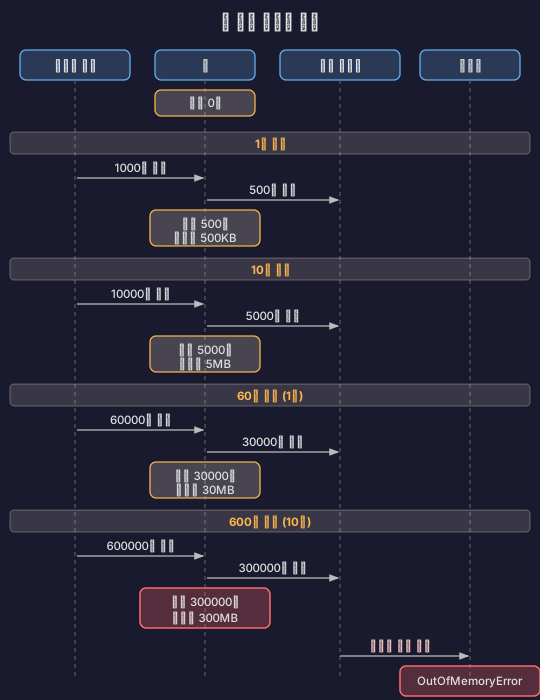
200개 스레드가 각각 User 객체(1KB)를 ThreadLocal에 들고 있으면:
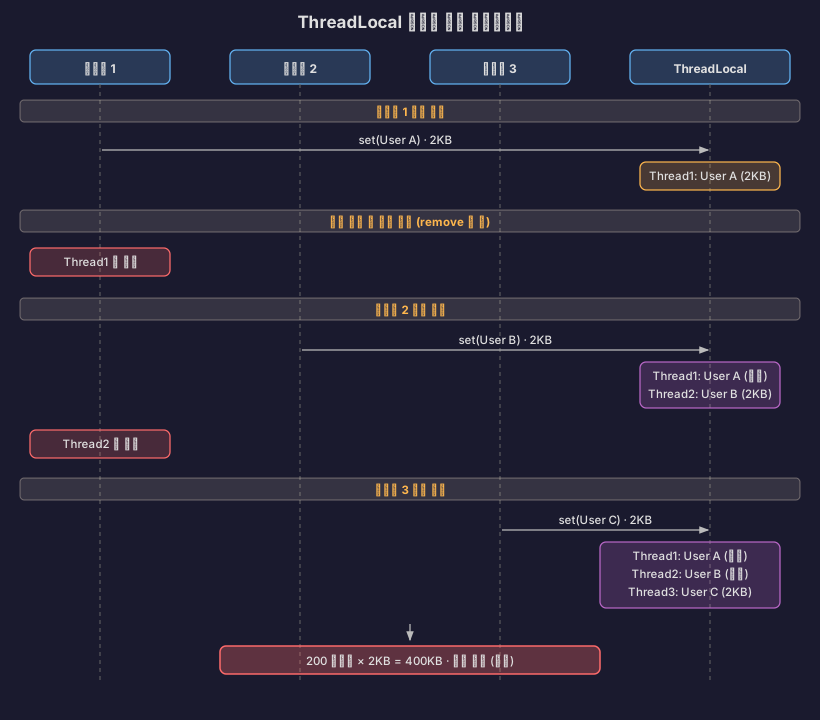
출처: madplay - 자바 ThreadLocal 사용법과 주의사항

대기열 무한 증가

// 위험한 코드
@Service
class EventProcessor {
private final Queue<Event> queue =
new LinkedBlockingQueue<>(); // 크기 제한 없음!
@Async
public void processEvent(Event event) {
queue.offer(event);
}
}

처리 속도보다 유입 속도가 빠르면:

출처: blog.ecsimsw - 대기열 사이즈와 OOM 문제

시나리오 4: OS 레벨 제한

리눅스 커널 파라미터가 부족하면 터져요.

Terminal window
# 주요 커널 파라미터
sysctl kernel.pid_max # 최대 프로세스 ID
sysctl vm.max_map_count # 메모리 맵 최대 개수
ulimit -n # 파일 디스크립터 최대 개수

예시:

Terminal window
# 기본값 (위험!)
kernel.pid_max = 32768
vm.max_map_count = 65530
ulimit -n = 1024
# 톰캣 threads.max=2000 설정
스레드 2000개 * 소켓 10개 = 20,000 file descriptors 필요
ulimit -n (1024) 초과
java.io.IOException: Too many open files

출처: Unix StackExchange - Thread limits

해결 방법

1. 스레드 스택 크기 줄이기:

Terminal window
java -Xss512k -jar app.jar
# 1MB → 512KB로 줄이면 2배 더 많은 스레드 생성 가능

2. OS 제한 늘리기:

/etc/security/limits.conf
* soft nofile 65536
* hard nofile 65536
* soft nproc 65536
* hard nproc 65536
# /etc/sysctl.conf
kernel.threads-max = 200000
vm.max_map_count = 262144

3. ThreadLocal 정리:

@RestController
class UserController {
@GetMapping("/api/user")
public UserResponse getUser() {
try {
User user = userService.findUser();
UserContext.setUser(user);
return new UserResponse(user);
} finally {
UserContext.remove(); // 꼭 정리!
}
}
}

4. 큐 크기 제한:

@Configuration
class AsyncConfig {
@Bean
public Executor taskExecutor() {
ThreadPoolTaskExecutor executor = new ThreadPoolTaskExecutor();
executor.setQueueCapacity(1000); // 크기 제한!
executor.setRejectedExecutionHandler(
new ThreadPoolExecutor.CallerRunsPolicy()
);
return executor;
}
}

출처: Baeldung - OutOfMemoryError Solutions


모니터링 지표

톰캣 스레드 풀을 모니터링할 때 봐야 할 지표예요:

요청 관련:
- requestCount: 처리된 총 요청 수
- processingTime: 누적 처리 시간
- maxTime: 최대 처리 시간
스레드 관련:
- currentThreadsBusy: 현재 사용 중인 스레드
- maxThreads: 최대 스레드 수
리소스 관련:
- HeapMemoryUsage: JVM 메모리 사용량
- CollectionCount: GC 횟수

출처: Datadog - Tomcat Performance Metrics


정리하면

톰캣 스레드 풀 200개의 이유

  1. 역사적 배경: 1999년 서버 환경에서 테스트한 결과 150-200이 적당했고, 그게 지금까지 유지됨
  2. 메모리 효율: 200개 스레드는 3.2MB ~ 200MB 정도로 일반 서버에서 무리 없음
  3. 컨텍스트 스위칭: 과도한 스레드로 인한 CPU 오버헤드 방지
  4. 범용성: 중간 규모 부하와 평범한 하드웨어에서 안정적으로 동작
  5. NIO와의 시너지: NIO 방식에서는 200개 워커 스레드로도 8192개 동시 연결 처리 가능

CGI → 서블릿 → NIO의 진화
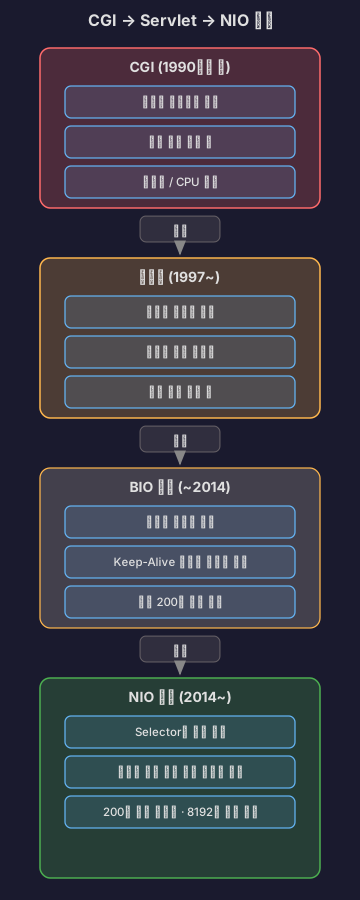
결국 답은

200이라는 숫자는 마법의 값이 아니에요. 애플리케이션 특성에 맞게 튜닝해야 해요.

I/O 작업 많으면 (DB 쿼리, API 호출):
→ 스레드 늘려도 됨 (500~1000)
CPU 작업 많으면 (이미지 처리, 암호화):
→ 코어 수 * 2 정도로 제한
동시 접속 만 명 이상:
→ Virtual Threads 고려 (Java 21+)

라이브 스트리밍 서버는 WebSocket, DB 쿼리, OAuth API 호출 전부 I/O bound라 스레드를 늘려도 될 것 같아요. 부하 테스트 돌려보고 최적값을 찾아봐야겠어요.


참고 자료

공식 문서

기술 블로그 및 아티클

한국어 기술 블로그

성능 측정 및 벤치마크

Stack Overflow 및 커뮤니티

기타 자료

I organized what I learned while thinking about handling concurrent connections.


Introduction

When building a server with Spring Boot, one question always comes to mind: “How many users can this server handle simultaneously?” If you open the configuration file, you’ll see the Tomcat max thread count fixed at 200, but nobody explains why it’s 200.

At first, I thought “So it can only handle 200 users at once?” But after researching, I found there were more complex reasons behind it.


The Old Days of CGI

CGI: The Beginning of Process Hell

In the early 1990s, the web could only serve static HTML files. A method for dynamically generating pages based on user input was needed, and CGI (Common Gateway Interface) was born.

Source: Velog - CGI and Servlet, JSP Relationships

CGI was simple. When a request came in, it executed a program and returned the result as HTML.

The problem was performance.

One process per request.

10 concurrent users meant 10 processes, 100 users meant 100 processes. Creating a process took tens of milliseconds each, and each process consumed several MB of memory. Context switching was also significant.

Once concurrent users exceeded 100, the server would crash.

Source: 80000coding - Web Server, WAS, and CGI

Servlet: The Thread-Based Revolution

In 1997, Sun presented a solution: Java Servlets.

The core idea was to use threads instead of processes.

CGI approach:

Servlet approach:

Threads were lighter and faster than processes. Creation costs were lower and they consumed less memory. Most importantly, thread pools could be created for reuse.

Sources: Wikipedia - Java Servlet, Pearson IT Certification - Servlet and JSP History

// How a servlet container works
class ServletContainer {
ThreadPool pool = new ThreadPool(200); // Pre-created
void handleRequest(HttpRequest request) {
Thread thread = pool.getThread(); // Get from pool
thread.run(() -> {
servlet.service(request);
});
pool.returnThread(thread); // Return to pool
}
}

This was the beginning of Tomcat. In 1999, Sun donated the Tomcat code to the Apache Foundation, giving birth to Apache Tomcat.

Source: Apache Tomcat Heritage

Internal Structure of Servlets

Let’s dig deeper into why servlets are more efficient than processes.

CGI vs Servlet: Memory Structure Comparison

CGI approach:

Servlet approach:

-> Code, Data, and Heap are shared; only the Stack is separate!

Key point: Threads share the Code, Data, and Heap regions and only have their own Stack. Memory efficiency is overwhelmingly better.

Source: Velog - Let’s Learn About Java Servlets

Servlet Lifecycle

Once created, a servlet stays in memory. It behaves like the singleton pattern.

// Servlet lifecycle
public class MyServlet extends HttpServlet {
// 1. init(): Called once when the servlet is first created
@Override
public void init(ServletConfig config) throws ServletException {
System.out.println("서블릿 초기화!");
// Tasks like DB connection pool initialization
}
// 2. service(): Called on every request (operates in multithreaded fashion)
@Override
protected void service(HttpServletRequest req, HttpServletResponse res)
throws ServletException, IOException {
// Branch based on HTTP method
String method = req.getMethod();
if (method.equals("GET")) {
doGet(req, res);
} else if (method.equals("POST")) {
doPost(req, res);
}
}
// 3. destroy(): Called once when the servlet is removed
@Override
public void destroy() {
System.out.println("서블릿 종료!");
// Resource cleanup
}
}

Important point:

The difference is clear when measured:

// First request
GET http://localhost:8080/myServlet
// Response time: 38.50ms (includes servlet initialization)
// Second request
GET http://localhost:8080/myServlet
// Response time: 6.61ms (servlet reused!)

Source: Velog - Let’s Learn About Java Servlets

Lazy Loading: Create Only When Needed

Servlets are created when first accessed. Not all servlets are created when the server starts.

Why do it this way?

  • Reduces server startup time
  • Unused servlets don’t occupy memory
  • Only the first request is slightly slower; subsequent ones are fast

The Singleton Trap: Shared Memory Issues

The fact that servlets are singletons means all threads share the same servlet object.

// Dangerous code!
public class DangerousServlet extends HttpServlet {
private int count = 0; // Instance variable (shared!)
@Override
protected void doGet(HttpServletRequest req, HttpServletResponse res)
throws ServletException, IOException {
count++; // Multiple threads access simultaneously!
res.getWriter().write("Count: " + count);
}
}
// Scenario:
// Thread 1: count++ (0 -> 1)
// Thread 2: count++ (concurrent access, could become 1 -> 1 instead of 1 -> 2!)
// Thread 3: count++ (race condition!)

Solutions:

  1. Use only local variables
public class SafeServlet extends HttpServlet {
@Override
protected void doGet(HttpServletRequest req, HttpServletResponse res)
throws ServletException, IOException {
int count = 0; // Local variable (created separately in each thread's Stack)
count++;
res.getWriter().write("Count: " + count);
}
}
  1. Use synchronization (but it becomes slower)
public class SynchronizedServlet extends HttpServlet {
private int count = 0;
@Override
protected synchronized void doGet(HttpServletRequest req, HttpServletResponse res)
throws ServletException, IOException {
count++; // Only one thread accesses at a time
res.getWriter().write("Count: " + count);
}
}

Recommendation: In servlets, don’t store state — process the request and forget about it immediately.

Source: Velog - Let’s Learn About Java Servlets

Spring’s DispatcherServlet

Spring handles all requests with a single servlet.

// The core of Spring: DispatcherServlet
public class DispatcherServlet extends FrameworkServlet {
@Override
protected void doService(HttpServletRequest req, HttpServletResponse res)
throws Exception {
// 1. Handler mapping: find which controller handles this
HandlerExecutionChain handler = getHandler(req);
// GET /api/user -> UserController.getUser()
// 2. Handler adapter: determine how to execute the controller
HandlerAdapter adapter = getHandlerAdapter(handler);
// @RestController returns JSON
// @Controller returns a View name
// 3. Actual execution
ModelAndView mv = adapter.handle(req, res, handler);
// 4. View rendering (if needed)
render(mv, req, res);
}
}

Request flow:

Key point: Developers only need to create @RestController or @Controller classes, and Spring handles the servlet code automatically.

Source: Velog - Let’s Learn About Java Servlets


Tomcat’s Evolution: From BIO to NIO

Before Tomcat 7: The BIO Era

Early Tomcat used the BIO (Blocking I/O) connector by default.

Here’s how it worked:

The problem was Keep-Alive.

HTTP/1.1 reuses connections. After processing a request, it doesn’t close the connection but waits for the next request. Typically it waits about 5-30 seconds.

With BIO, the thread sits idle doing nothing during those 5 seconds. If the thread pool has 200 threads, 200 concurrent connections was the limit. The 201st user had to wait until someone disconnected.

Source: Velog - Apache Tomcat’s NIO Connector and BIO Connector

The C10K Problem

In 1999, Dan Kegel raised the question: “How do we handle 10,000 concurrent connections?”

It was impossible with the BIO approach. Creating 10,000 threads would mean:

Memory: 10,000 * 2MB = 20GB
Context switching: millions of times per second
CPU: dies just from thread switching

Source: Wikipedia - C10k problem

Tomcat 8: The Shift to NIO

In 2014, Tomcat 8 was released and NIO (Non-blocking I/O) became the default.

The core of NIO is the Selector.

// How the NIO Connector works
class NioConnector {
Selector selector = Selector.open();
ThreadPool workerPool = new ThreadPool(200);
void acceptConnection(SocketChannel channel) {
// Just register with the Selector; no thread assigned
channel.register(selector, SelectionKey.OP_READ);
}
void pollLoop() {
while (true) {
// Monitor multiple connections simultaneously
selector.select();
for (SelectionKey key : selector.selectedKeys()) {
if (key.isReadable()) {
// Assign a worker thread only when data is available
SocketChannel ch = (SocketChannel) key.channel();
workerPool.submit(() -> processRequest(ch));
}
}
}
}
}

Now the number of connections and the number of threads were decoupled.

BIO:
200 threads = max 200 concurrent connections
NIO:
200 worker threads
+ 2 Poller threads
= max 8,192 concurrent connections (Tomcat 8 default)

Connections waiting on Keep-Alive are managed by the Selector, and a worker thread is assigned only when data actually arrives.

Source: Stack Overflow - Tomcat NIO thread pools

Tomcat 8.5/9: Complete Removal of BIO

In 2016, Tomcat 8.5 and 9 were released, and BIO was completely removed.

// From Tomcat 8.5
<Connector protocol="HTTP/1.1" />
// -> Automatically uses NIO
// Even if you explicitly set BIO
<Connector protocol="org.apache.coyote.http11.Http11Protocol" />
// -> Switches to NIO with a warning log

Sources: Apache Tomcat Migration Guide 8.5, Tomcat 9 Migration Guide


Spring Boot and Tomcat’s Thread Pool

Default Configuration Values

The default settings for Tomcat embedded in Spring Boot are:

SettingDefault ValueDescription
server.tomcat.threads.max200Maximum number of worker threads
server.tomcat.threads.min-spare10Minimum number of idle threads
server.tomcat.max-connections8192 (NIO), 10000 (NIO2)Maximum concurrent connections
server.tomcat.accept-count100Wait queue size

Sources: Apache Tomcat 8.5 Configuration Reference, Datadog - Understanding Tomcat Architecture

NIO Connector Thread Structure

The Tomcat NIO connector uses several types of threads:

http-nio-8080-Acceptor-0 (1)
-> Accepts connections
http-nio-8080-ClientPoller-0 (2)
http-nio-8080-ClientPoller-1
-> Monitors connections via Selector
http-nio-8080-exec-1 (10~200)
http-nio-8080-exec-2
...
http-nio-8080-exec-200
-> Processes actual requests

The Acceptor receives connections and passes them to Pollers. When a Poller detects data, it assigns the work to an Exec thread.

Source: DZone - Understanding the Tomcat NIO Connector

Request Processing Flow

Spring Boot processes requests like this:

When all 200 threads are in use:

1. Connections within max-connections (8192) are managed by the Poller
2. Up to accept-count (100) wait in the OS-level queue
3. When both limits are exceeded, connection timeout occurs

Sources: Velog - How Does Spring Boot Handle Multiple User Requests?, HARIL - Spring MVC Traffic Testing


Why Exactly 200?

1. Balance with Memory

First, you need to understand the JVM memory structure.

JVM Memory Structure

Heap:

  • Memory space shared by all threads
  • Objects and arrays are allocated here
  • Size configured with -Xms, -Xmx options

Stack:

  • Independent stack space for each thread
  • Stores method calls, local variables, and parameters
  • Size configured with -Xss option (default 1MB)

Sources: Baeldung - Stack Memory and Heap Space, Java Memory Model

Thread Memory Calculation

On a 64-bit JVM, a single thread consumes 1MB of stack by default.

In practice:

Thread in sleep state: ~16KB (physical RAM)
When stack is actively used: up to 1MB

With 200 threads:

Stack memory:
- Minimum: 200 * 16KB = 3.2MB
- Maximum: 200 * 1MB = 200MB
Total JVM:
- Heap: e.g., 2GB (-Xmx2g)
- Stack: 200MB (200 threads)
- Metaspace: ~256MB
= About 2.5GB total

This is manageable on typical server memory (4-8GB).

Sources: Stack Overflow - Java thread memory calculation, DZone - How Much Memory Does a Java Thread Take?

2. Context Switching Cost

On modern Linux, context switching takes 1-2 microseconds.

Save Thread A registers -> Restore Thread B registers -> TLB flush
= ~1-2 us

If 200 threads share CPU fairly, with 4 CPU cores, each thread gets:

4 / 200 = 0.02 (2%)

A reasonable number where context switching overhead isn’t excessive.

If you created 2,000 threads:

4 / 2000 = 0.002 (0.2%)
CPU spends all its time just switching threads

Sources: Eli Bendersky - Measuring context switching, Medium - Context Switching Impact

3. Historical Reasons

When early Tomcat (1999) was released, server specs looked like this:

CPU: Pentium III 500MHz
RAM: 128-512MB
Concurrent users: hundreds

Testing in this environment led to the conclusion that “about 150-200 is appropriate.” That value has remained as the default ever since.

Source: Medium - Tomcat Why 200 Threads

The Tomcat official documentation states:

“The default configuration is intended for medium load/complexity applications on average hardware.”

It was designed to handle medium-scale load on average hardware.


Real-World Performance Test Results

EC2 t4g.small Test

A developer ran load tests on an EC2 t4g.small (2 cores, 2GB RAM) with Spring Boot 3.1.5.

Default settings (threads.max=200):

300 concurrent requests: processed normally
10,000 requests: timeouts occurred

Optimized settings (threads.max=2000, max-connections=50000):

15,000 concurrent requests: processed normally

This demonstrates that server performance heavily depends on hardware and configuration.

Source: HARIL - Spring MVC Traffic Testing

Optimization Considerations

If set too low:

threads.max=50
-> Server resources are idle while clients wait
-> TPS decreases

If set too high:

threads.max=2000
-> Memory shortage (2000 * 1MB = 2GB)
-> Excessive context switching
-> CPU at 100% but throughput is low

Finding the right value:

1. Application logic complexity (CPU usage)
2. I/O wait time (DB, API calls)
3. Expected traffic
4. Hardware specs (number of cores, RAM)
5. DBCP size (DB connection pool)

Sources: F-lab - Spring Server Thread Pool Management, Velog - Tomcat Thread Pool Summary


Thread Pool Size Calculation Formula

Theoretically, this formula is used:

Thread pool size = CPU cores x (1 + wait time / processing time)

For example:

CPU: 4 cores
Average processing time: 100ms
Average I/O wait: 900ms (DB query)
Thread pool size = 4 x (1 + 900/100)
= 4 x 10
= 40

However, in practice you must find the value through load testing. Every application has different characteristics.

Source: Medium - A Rational Way to Find the Right Thread Pool Size


Configuration

application.yml

server:
tomcat:
threads:
max: 200 # Maximum worker threads
min-spare: 10 # Minimum idle threads
accept-count: 100 # Wait queue size
max-connections: 8192 # Maximum concurrent connections

Property Names by Version

Spring Boot 2.3+: server.tomcat.threads.max
Spring Boot before 2.3: server.tomcat.max-threads

Source: Baeldung - Configuring Thread Pools


Tomcat Version History

VersionRelease YearKey Changes
Tomcat 3.01999First Apache Foundation release, BIO default
Tomcat 7.x2011BIO default, NIO optional
Tomcat 8.02014NIO became default
Tomcat 8.52016BIO completely removed, NIO only
Tomcat 9.02017Servlet 4.0, HTTP/2 support
Tomcat 10.12022Jakarta EE 9+ (package name change)

Sources: Apache Tomcat Versions, endoflife.date - Apache Tomcat


When Does the Server Crash?

Scenario 1: OutOfMemoryError - unable to create new native thread

Creating too many threads crashes the JVM.

java.lang.OutOfMemoryError: unable to create new native thread

Important fact: This is not a heap memory shortage. Threads are created in OS native memory, not the heap.

Source: Baeldung - OutOfMemoryError unable to create new native thread

Why Does It Crash?

Linux limits the number of threads a process can create.

Terminal window
# How to check
ulimit -u # Maximum processes/threads
sysctl kernel.threads-max # System-wide maximum threads
# Example output
ulimit -u: 63488
kernel.threads-max: 131072

Calculation formula:

Maximum threads = Available memory / (Stack size * 1024 * 1024)

For example:

Server memory: 4GB
JVM Heap: 2GB (-Xmx2g)
Remaining memory: 2GB
Thread stack size: 1MB (-Xss1m)
Theoretical maximum threads: 2048
Actual limit: ulimit -u (e.g., 1024)
-> Can only create up to 1024

Sources: Baeldung - Maximum Threads per Process, Stack Overflow - Maximum threads in Linux

Reproduction Scenario

// Crashing the server (do NOT try this!)
class ThreadBomb {
public static void main(String[] args) {
int count = 0;
try {
while (true) {
new Thread(() -> {
try {
Thread.sleep(Long.MAX_VALUE);
} catch (InterruptedException e) {
}
}).start();
count++;
System.out.println("Threads: " + count);
}
} catch (OutOfMemoryError e) {
System.err.println("터졌다! " + count + "개 스레드에서 사망");
// Threads: 12543
// java.lang.OutOfMemoryError: unable to create new native thread
}
}
}

Scenario 2: Thread Exhaustion Leading to Unresponsiveness

When threads are insufficient, new requests cannot be accepted.

Tomcat settings:
- threads.max: 200
- accept-count: 100
- max-connections: 8192
Situation:
1. All 200 threads waiting on DB queries (10 seconds each)
2. accept-count queue is also full at 100
3. From the 301st request onward: connection refused

Log:

org.apache.tomcat.util.threads.ThreadPoolExecutor
All threads (200) are currently busy

Source: Velog - Tomcat Threads

Real-World Example

A live streaming server could crash like this:

@RestController
class StreamController {
@GetMapping("/api/stream/{id}")
public StreamResponse getStream(@PathVariable Long id) {
// DB query - average 100ms
Stream stream = streamRepository.findById(id);
// External API call - average 500ms
User user = oauthClient.getUserInfo(stream.userId);
// Redis query - average 10ms
ViewCount views = redisTemplate.get(stream.id);
return new StreamResponse(stream, user, views);
}
}

If the OAuth API slows down (500ms -> 5000ms):

1. All 200 threads waiting on OAuth
2. New requests wait in queue
3. When the queue is also full: connection refused
4. Users only see a "Server maintenance" page

Scenario 3: OOM Due to Memory Leak

If threads don’t release memory, the heap will crash.

java.lang.OutOfMemoryError: Java heap space

ThreadLocal Memory Leak

// Dangerous code
class UserContext {
private static final ThreadLocal<User> CURRENT_USER =
new ThreadLocal<>();
public static void setUser(User user) {
CURRENT_USER.set(user);
// Not calling remove() causes memory leak!
}
}
@RestController
class UserController {
@GetMapping("/api/user")
public UserResponse getUser() {
User user = userService.findUser();
UserContext.setUser(user); // Set but
return new UserResponse(user);
// remove() not called -> stays when thread is reused
}
}

If 200 threads each hold a User object (1KB) in ThreadLocal:

Source: madplay - Java ThreadLocal Usage and Caveats

Unbounded Queue Growth

// Dangerous code
@Service
class EventProcessor {
private final Queue<Event> queue =
new LinkedBlockingQueue<>(); // No size limit!
@Async
public void processEvent(Event event) {
queue.offer(event);
}
}

If the inflow rate exceeds the processing rate:

Source: blog.ecsimsw - Queue Size and OOM Issues

Scenario 4: OS-Level Limits

The server crashes when Linux kernel parameters are insufficient.

Terminal window
# Key kernel parameters
sysctl kernel.pid_max # Maximum process ID
sysctl vm.max_map_count # Maximum memory maps
ulimit -n # Maximum file descriptors

Example:

Terminal window
# Default values (dangerous!)
kernel.pid_max = 32768
vm.max_map_count = 65530
ulimit -n = 1024
# Tomcat threads.max=2000 setting
-> 2000 threads * 10 sockets = 20,000 file descriptors needed
-> Exceeds ulimit -n (1024)
-> java.io.IOException: Too many open files

Source: Unix StackExchange - Thread limits

Solutions

1. Reduce thread stack size:

Terminal window
java -Xss512k -jar app.jar
# Reducing from 1MB to 512KB allows twice as many threads

2. Increase OS limits:

/etc/security/limits.conf
* soft nofile 65536
* hard nofile 65536
* soft nproc 65536
* hard nproc 65536
# /etc/sysctl.conf
kernel.threads-max = 200000
vm.max_map_count = 262144

3. Clean up ThreadLocal:

@RestController
class UserController {
@GetMapping("/api/user")
public UserResponse getUser() {
try {
User user = userService.findUser();
UserContext.setUser(user);
return new UserResponse(user);
} finally {
UserContext.remove(); // Always clean up!
}
}
}

4. Limit queue size:

@Configuration
class AsyncConfig {
@Bean
public Executor taskExecutor() {
ThreadPoolTaskExecutor executor = new ThreadPoolTaskExecutor();
executor.setQueueCapacity(1000); // Size limit!
executor.setRejectedExecutionHandler(
new ThreadPoolExecutor.CallerRunsPolicy()
);
return executor;
}
}

Source: Baeldung - OutOfMemoryError Solutions


Monitoring Metrics

Metrics to watch when monitoring the Tomcat thread pool:

Request-related:
- requestCount: total requests processed
- processingTime: cumulative processing time
- maxTime: maximum processing time
Thread-related:
- currentThreadsBusy: currently active threads
- maxThreads: maximum thread count
Resource-related:
- HeapMemoryUsage: JVM memory usage
- CollectionCount: GC count

Source: Datadog - Tomcat Performance Metrics


Summary

Why Tomcat’s Thread Pool is 200

  1. Historical background: Testing in the 1999 server environment concluded that 150-200 was appropriate, and that has been maintained ever since
  2. Memory efficiency: 200 threads use about 3.2MB to 200MB, manageable on typical servers
  3. Context switching: Prevents CPU overhead from excessive threads
  4. Versatility: Operates stably under medium-scale load on average hardware
  5. Synergy with NIO: With NIO, 200 worker threads can handle 8,192 concurrent connections

The Evolution from CGI to Servlet to NIO

The Bottom Line

200 is not a magic number. You must tune it according to your application’s characteristics.

Heavy I/O operations (DB queries, API calls):
-> It's okay to increase threads (500~1000)
Heavy CPU operations (image processing, encryption):
-> Limit to about core count * 2
10,000+ concurrent connections:
-> Consider Virtual Threads (Java 21+)

Since a live streaming server involves WebSocket, DB queries, and OAuth API calls — all I/O-bound — it seems fine to increase the thread count. I need to run load tests and find the optimal value.


References

Official Documentation

Technical Blogs and Articles

Performance Measurement and Benchmarks

Stack Overflow and Community

Other Resources

Author
작성자 @범수

오늘의 노력이 내일의 전문성을 만든다고 믿습니다.

댓글