제목, 태그, 카테고리로 검색

모든 글
약 20분 분량 이론/JVM 메모리

JVM 메모리 ⑤: Elasticsearch 메모리 모델
목차

본 문서는 Elastic 공식 referenceElastic 엔지니어가 작성한 기술 블로그 를 1차 소스로 해요. 문서 버전은 Elasticsearch 8.x 기준이에요. 0~4편에서 쌓은 JVM/OS 이론을 Elasticsearch 운영 맥락 하나로 묶는 캡스톤 편이에요.

1. 왜 이 이론을 알아야 하는가

앞선 네 글(JVM Heap의 세대별 구조, JVM의 GC 알고리즘과 Stop-the-World, JVM Off-heap과 Direct Memory, OS Page Cache가 ES 성능을 결정하는 이유)를 Elasticsearch 맥락 하나로 묶는 글이에요.

Elasticsearch의 메모리 모델은 다음 네 가지 원칙을 모두 동시에 만족시키기 위한 설계예요.

  1. GC STW를 짧게 유지한다 → Heap을 너무 키우지 말자
  2. compressed oops를 유지한다 → Heap을 32GB 근처에서 끊자
  3. Lucene은 OS page cache에 얹어 쓴다 → RAM의 반은 OS에 주자
  4. OOM으로 노드가 죽지 않도록 한다 → circuit breaker로 요청 단위 보호

2. 원칙 1: Xms = Xmx, RAM의 50% 이하

Elastic 공식 문서의 직접 지시:

“Set Xms and Xmx to no more than 50% of the total memory available to each Elasticsearch node. Elasticsearch requires memory for purposes other than the JVM heap. For example, Elasticsearch uses off-heap buffers for efficient network communication and relies on the operating system’s filesystem cache for efficient access to files.” — Elastic — Advanced configuration

정리:

Xms = Xmx인가요? JVM이 실행 중에 Heap을 동적으로 늘렸다 줄였다 하면 reserved memory 재계산, GC region 재조정 등의 비용이 발생해요. ES는 이걸 피해요.

3. 원칙 2: Compressed OOPs와 32GB 한계

3-1. Compressed OOPs란?

OOP = Ordinary Object Pointer (Java 객체에 대한 참조 포인터).

64-bit JVM에서 포인터 하나가 원래 8바이트예요. 객체가 많으면 포인터 메모리 오버헤드가 엄청 커져요. Compressed OOPsheap 내부의 포인터를 4바이트로 저장하고 실제 접근 시 8바이트 주소로 디코딩하는 최적화예요.

OpenJDK HotSpot Wiki의 공식 설명을 기반으로 정확히 정리하면:

  1. HotSpot은 모든 객체를 8-byte alignment 에 맞춰 할당해요. 즉 객체 주소의 하위 3비트가 항상 000이에요.
  2. 그 3비트를 저장할 필요가 없으므로 32비트(narrow oop)로 저장하고, 접근할 때 << 3 (× 8) 연산으로 복원해요.
  3. 디코딩 공식:
    real_address = narrow_oop_base + (narrow_oop << 3) + field_offset
  4. 32비트로 표현 가능한 값의 수가 2^32 = 약 42억, 각 값이 8바이트 단위 주소를 가리키므로:
    2^32 × 8 byte = 32 GByte
    가 최대 addressable 힙이 돼요. (OpenJDK HotSpot — CompressedOops)

Elastic 엔지니어링 블로그 “A Heap of Trouble” 는 같은 내용을 다음과 같이 서술해요:

“keep all objects aligned on 8-byte boundaries and then we can assume the last three bits of 35-bit oops are zeros.” — Elastic Blog — A Heap of Trouble

여기서 “35-bit oops” 는 저장은 32비트지만 실제 표현하는 주소 공간이 2^35 = 32GB 이기 때문 에 나온 표현이에요. 저장 비트 수와 표현 가능한 주소 범위를 구분해서 이해해야 해요.

3-2. 32GB를 넘으면 무슨 일이 일어나는가

Heap이 32GB를 넘으면 JVM은 compressed oops를 끌 수밖에 없어요. 그 순간:

  • 모든 포인터가 4바이트 → 8바이트로 2배 늘어나요.
  • 그래서 예를 들어 33GB heap을 줬는데 실제 유효 공간은 30GB보다 작다 는 역전 현상이 발생해요.
  • “32GB를 넘기느니 차라리 31GB로 둬라” 가 여기서 나와요.

3-3. Zero-Based Compressed OOPs — 왜 26GB가 “안전한” 숫자인가

같은 Elastic 블로그에서 추가 최적화를 설명해요:

“a simple 3-bit shift is all that is needed for encoding and decoding between native 64-bit pointers and compressed oops.” — Elastic Blog — A Heap of Trouble

Heap이 주소 0부터 시작하면 압축 포인터 계산이 3-bit shift 하나로 끝나요(= zero-based compressed oops).

하지만 OS 메모리 할당 상황에 따라 JVM이 0번지에서 시작 못 하는 경우가 있고, 그러면:

“a null check” and additional arithmetic operations, causing “a significant drop in performance.” — 같은 출처

그래서 Elastic은 보수적으로 “26GB는 어디서든 안전, 30GB까지 가능” 이라고 권고해요:

“Set Xms and Xmx to no more than the threshold for compressed ordinary object pointers (oops). The exact threshold varies but 26GB is safe on most systems and can be as large as 30GB on some systems.” — Elastic — Advanced configuration

확인 방법: ES 기동 로그에 compressed ordinary object pointers [true] 가 찍히는지 봐요.

3-4. 두 제약의 교집합

실제 운영에서는 두 룰을 같이 적용해야 해요.

Xmx = min( RAM × 0.5, 30GB 근처 )

예:

  • RAM 64GB → min(32, 30) = 30GB
  • RAM 128GB → min(64, 30) = 30GB (남는 98GB는 전부 page cache로)

4. 원칙 3: Lucene 파일은 mmap으로 Page Cache에 얹는다

4-1. Store type: hybridfs (default)

Elastic 공식 문서:

“The default file system implementation … is currently hybridfs on all supported systems.” — Elastic — Index store settings

“The hybridfs type is a hybrid of niofs and mmapfs, which chooses the best file system type for each type of file based on the read access pattern. Currently only the Lucene term dictionary, norms and doc values files are memory mapped.” — 같은 출처

즉 Elasticsearch의 default는 Lucene의 일부 파일만 mmap 하고 나머지는 NIO로 읽는 하이브리드 전략이에요.

파일 타입접근 방식이유
Term dictionary (.tim, .tip)mmap랜덤 접근이 매우 많고, 반복 접근되므로 Page Cache에 올려두는 이득이 큼
Doc values (.dvd, .dvm)mmap정렬/집계 시 column-wise 랜덤 접근
Norms (.nvd, .nvm)mmap스코어링에 필수로 자주 접근
Postings, stored fieldsNIO(niofs)대부분 순차 접근, mmap 이점이 상대적으로 작음

4-2. 왜 mmap을 “일부만”에 쓰는가

  • mmap은 가상 주소 공간을 파일 크기만큼 차지해요. 전체를 다 mmap하면 주소 공간 압박이 커져요.
  • 용량이 큰 postings를 통째로 mmap하면 Page Cache 회전이 잦아져요. 오히려 NIO로 필요한 만큼만 읽는 게 유리한 경우가 있어요.

4-3. vm.max_map_count

Elasticsearch가 mmap 기반으로 동작하기 때문에 Linux 커널의 mmap 상한이 낮으면 문제가 돼요. ES 문서가 공식적으로 요구하는 설정:

sysctl -w vm.max_map_count=262144

이건 mmap으로 만들 수 있는 VMA(Virtual Memory Area)의 최대 개수예요. 대부분의 Linux 배포판 default는 6만대 수준(예: 65530)이고, 대형 인덱스나 샤드가 많을 때 부족해져요. 그래서 ES는 공식적으로 262144 이상을 요구해요. (Elastic — Virtual memory check)

5. 원칙 4: Circuit Breaker

Circuit breaker는 요청이 heap을 먹어치우는 걸 사전 차단하는 장치예요.

Elastic 공식 정의 (troubleshooting 문서):

“Elasticsearch uses circuit breakers to prevent nodes from running out of JVM heap memory. If Elasticsearch estimates an operation would exceed a circuit breaker, it stops the operation and returns an error.” — Elastic — Circuit breaker errors (Troubleshoot)

Reference 문서의 요약도 같은 취지로 다음과 같이 서술해요:

“Elasticsearch contains multiple circuit breakers used to prevent operations from using an excessive amount of memory. Each breaker tracks the memory used by certain operations and specifies a limit for how much memory it may track.” — Elastic — Circuit breaker settings

5-1. Circuit Breaker 종류와 default 값 (ES 8.x 기준)

아래 값은 Elasticsearch 현재 reference 문서에서 직접 확인했어요. (Elastic — Circuit breaker settings)

BreakerDefault 한계용도
ParentJVM heap의 95% (real memory 모드, default) / 70% (non-real memory)모든 하위 breaker의 상위 한계
Field dataJVM heap의 40%text 필드 sort/aggregation 등에서 fielddata 로드 시
RequestJVM heap의 60%단일 요청 처리에 필요한 메모리(집계 중간 결과 등)
In-flight requestsJVM heap의 100% (overhead 2)전송 중/대기 중인 요청
EQL sequenceJVM heap의 50%EQL 시퀀스 쿼리 실행 중 메모리
Machine learningJVM heap의 50%ML 작업 전용
Script compilation150회 / 5분 (비율 아님)스크립트 컴파일 폭주 방지
Regexscript.painless.regex.limit-factor 기반정규식 복잡도 제한
Synonymparent breaker 한계를 따름synonym 분석 로드 시

주의: 예전(7.x 초반) 문서에 있던 “Accounting circuit breaker”현재(8.x) 공식 breaker 목록에서 빠져 있어요. 7.x 시절 블로그/답변을 참고할 때 함께 따라오는 “accounting breaker = 100%” 라는 서술은 현재 문서 기준으로는 공식 값이 아니에요. 본 문서는 최신 docs에 기재된 breaker만 공식 표로 실어요.

5-2. indices.breaker.total.use_real_memory

“Determines whether the parent breaker should take real memory usage into account (true) or only consider the amount that is reserved by child circuit breakers (false). Defaults to true.” — Elastic — Circuit breaker settings

  • true (default): JVM이 실제로 쓰고 있는 메모리(HeapUsed)를 기반으로 판단 → 더 현실적.
  • false: 각 child breaker가 reserve한 값의 합만 보고 판단 → 실제 할당과 괴리.

현대적 ES 운영에서는 true가 default이며, 이걸 real memory circuit breaker 라고 불러요. Elastic 블로그: Improving Node Resiliency with the Real Memory Circuit Breaker.

5-3. 발동 시 동작

한계를 넘을 것으로 추정되면:

  • 해당 요청이 거절되고,
  • CircuitBreakingException이 클라이언트에 반환돼요.

이건 node를 보호하기 위한 의도된 실패예요. 에러 메시지에 circuit_breaking_exception 이 뜨면 로그·쿼리·집계·샤드 크기 중 뭐가 heap을 과소비하는지 추적해야 해요.

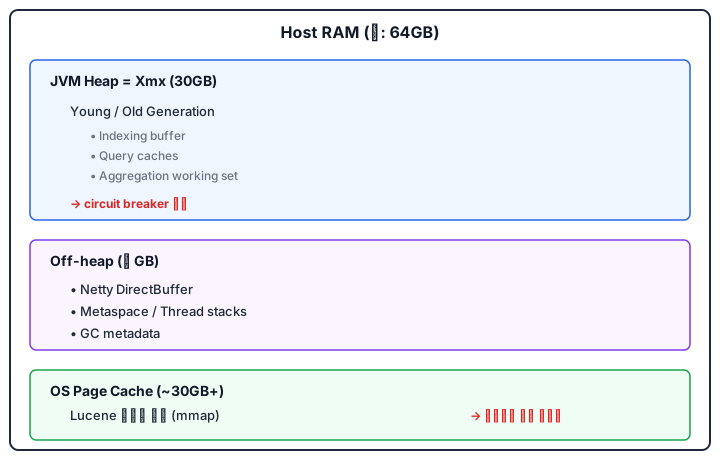
6. 전체 그림: ES 노드 한 대의 메모리 배분

Elasticsearch 노드 한 대의 Host RAM 메모리 배분 — JVM Heap, Off-heap, OS Page Cache

7. 자주 혼동되는 포인트

  • “heap을 키우면 검색이 빨라진다” — 틀렸어요. 오히려 Page Cache가 좁아져서 느려지고, GC STW가 길어져요.
  • “RAM 128GB면 heap도 64GB 주면 된다” — 틀렸어요. 30GB에서 끊어요. 나머지는 Page Cache로.
  • “fielddata는 off-heap이다” — 기본적으로 heap에 로드돼요. text 필드에 sort/aggs를 걸면 매우 위험한 이유예요.
  • “mmapfs가 무조건 빠르다” — 아니에요. 파일 종류별 trade-off 때문에 ES default는 hybridfs예요.

8. 1분 요약

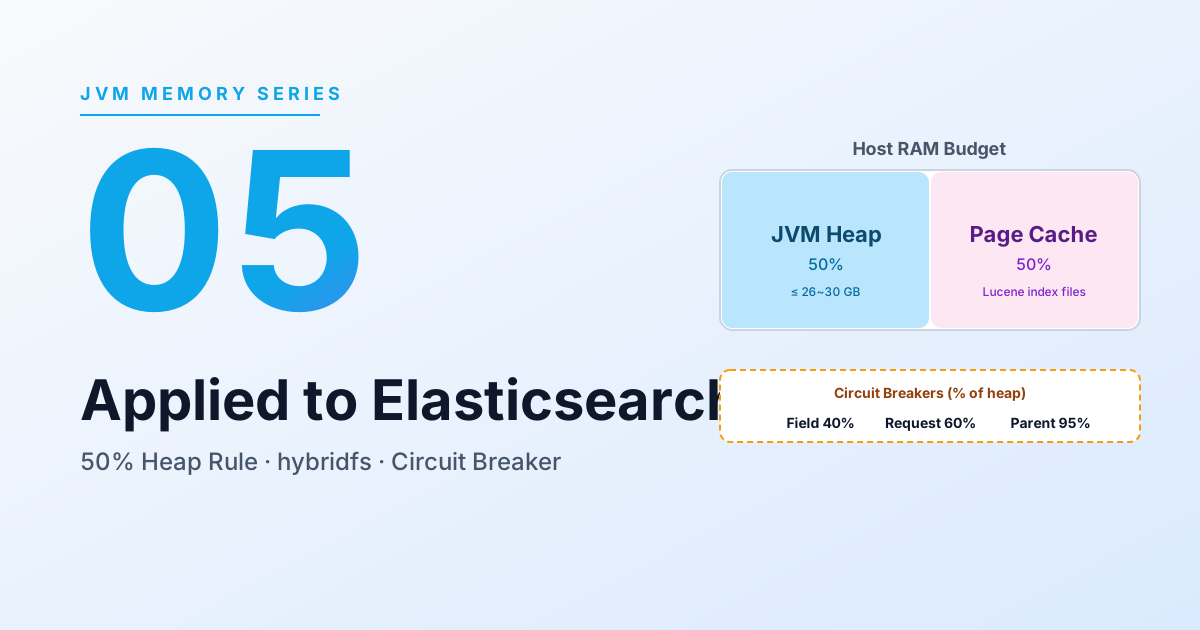
“Elasticsearch 노드의 메모리는 JVM Heap과 OS Page Cache로 양분해서 이해하고 있습니다. Heap은 인덱싱 버퍼, 쿼리 캐시, 집계 연산용으로 쓰이고 G1 GC의 대상이라 너무 크면 STW가 길어집니다. 또한 32GB를 넘으면 compressed oops 최적화가 꺼지기 때문에 실질적으로는 26~30GB가 상한입니다. 반면 Lucene 인덱스 파일은 hybridfs의 mmap을 통해 OS Page Cache에 올라가는데, 이 영역이 클수록 디스크 I/O 없이 검색이 가능하므로 ‘나머지 RAM 50%를 OS에 남겨야 한다’는 가이드가 나옵니다. 이 두 영역 사이의 예산 배분이 ES 튜닝의 핵심이고, 한 요청이 heap을 과점유하지 못하도록 field data · request · parent circuit breaker가 heap 기준 40/60/95%로 걸려 있습니다.”

참고 문헌 (1차 소스)

Elasticsearch 공식 reference

Elastic 엔지니어링 블로그

OpenJDK


앞선 글: OS Page Cache가 ES 성능을 결정하는 이유

같이 읽으면 좋은 글

Primary sources for this document are the Elastic official reference and engineering blog posts written by Elastic engineers. The doc version is Elasticsearch 8.x. This is the capstone that ties the JVM/OS theory built up in Parts 0-4 into the single context of Elasticsearch operations.

1. Why You Need This Theory

This post bundles the previous four (Generational Heap Structure on the JVM, GC Algorithms and Stop-the-World, JVM Off-heap and Direct Memory, Why OS Page Cache Decides ES Performance) into the single Elasticsearch context.

Elasticsearch’s memory model is a design that has to satisfy these four principles simultaneously:

  1. Keep GC STW short → do not grow Heap too much
  2. Preserve compressed oops → cap Heap near 32GB
  3. Lucene runs on top of the OS Page Cache → give half of RAM back to the OS
  4. Do not let nodes die from OOM → protect per-request via circuit breakers

2. Principle 1: Xms = Xmx, ≤ 50% of RAM

Direct instruction from Elastic’s official docs:

“Set Xms and Xmx to no more than 50% of the total memory available to each Elasticsearch node. Elasticsearch requires memory for purposes other than the JVM heap. For example, Elasticsearch uses off-heap buffers for efficient network communication and relies on the operating system’s filesystem cache for efficient access to files.” — Elastic — Advanced configuration

Summary:

Why Xms = Xmx? Letting the JVM expand and contract the Heap at runtime triggers reserved-memory recalculation, GC region reshuffling, etc. ES avoids that.

3. Principle 2: Compressed OOPs and the 32GB Limit

3-1. What Are Compressed OOPs?

OOP = Ordinary Object Pointer (a reference pointer to a Java object).

In a 64-bit JVM, one pointer is normally 8 bytes. With many objects, pointer overhead becomes huge. Compressed OOPs is the optimization that stores in-heap pointers as 4 bytes and decodes to an 8-byte address on access.

Precisely, based on the OpenJDK HotSpot Wiki:

  1. HotSpot allocates all objects on 8-byte alignment. So the bottom 3 bits of an object address are always 000.
  2. Since those 3 bits do not need to be stored, it stores 32 bits (narrow oop) and reconstructs by << 3 (× 8) on access.
  3. Decoding formula:
    real_address = narrow_oop_base + (narrow_oop << 3) + field_offset
  4. The number of values representable in 32 bits is 2^32 ≈ 4.2 billion, and each value points to an 8-byte-unit address, so:
    2^32 × 8 byte = 32 GByte
    is the maximum addressable heap. (OpenJDK HotSpot — CompressedOops)

Elastic’s engineering blog “A Heap of Trouble” describes the same thing as:

“keep all objects aligned on 8-byte boundaries and then we can assume the last three bits of 35-bit oops are zeros.” — Elastic Blog — A Heap of Trouble

The phrase “35-bit oops” comes from the fact that storage is 32 bits but the address space they actually represent is 2^35 = 32GB. You have to distinguish “bits stored” from “address range expressible.”

3-2. What Happens When Heap Exceeds 32GB

Beyond 32GB, the JVM has to disable compressed oops. The moment it does:

  • All pointers double from 4 → 8 bytes.
  • So you get the inversion where, e.g., giving 33GB heap leaves you with effective space smaller than 30GB.
  • Hence the rule “rather than crossing 32GB, leave it at 31GB.”

3-3. Zero-Based Compressed OOPs — Why 26GB Is the “Safe” Number

The same Elastic blog explains a further optimization:

“a simple 3-bit shift is all that is needed for encoding and decoding between native 64-bit pointers and compressed oops.” — Elastic Blog — A Heap of Trouble

If the Heap starts at address 0, compressed-pointer math comes down to a single 3-bit shift (= zero-based compressed oops).

But depending on the OS memory layout, the JVM may not be able to start at address 0, in which case you get:

“a null check” and additional arithmetic operations, causing “a significant drop in performance.” — same source

So Elastic conservatively recommends “26GB is safe everywhere; up to 30GB possible on some systems”:

“Set Xms and Xmx to no more than the threshold for compressed ordinary object pointers (oops). The exact threshold varies but 26GB is safe on most systems and can be as large as 30GB on some systems.” — Elastic — Advanced configuration

How to verify: check if compressed ordinary object pointers [true] shows up in the ES startup log.

3-4. Intersection of the Two Constraints

In real operations, you have to apply both rules together.

Xmx = min( RAM × 0.5, around 30GB )

Examples:

  • RAM 64GB → min(32, 30) = 30GB
  • RAM 128GB → min(64, 30) = 30GB (the remaining 98GB all goes to page cache)

4. Principle 3: Lucene Files Sit on the Page Cache via mmap

4-1. Store Type: hybridfs (default)

Elastic official docs:

“The default file system implementation … is currently hybridfs on all supported systems.” — Elastic — Index store settings

“The hybridfs type is a hybrid of niofs and mmapfs, which chooses the best file system type for each type of file based on the read access pattern. Currently only the Lucene term dictionary, norms and doc values files are memory mapped.” — same source

So Elasticsearch’s default is a hybrid strategy that mmaps only some Lucene files and reads the rest via NIO.

File typeAccessWhy
Term dictionary (.tim, .tip)mmapLots of random access, repeatedly accessed → big win from sitting in Page Cache
Doc values (.dvd, .dvm)mmapColumn-wise random access for sort/aggregation
Norms (.nvd, .nvm)mmapHit constantly during scoring
Postings, stored fields, etc.NIO (niofs)Mostly sequential access; mmap benefit is smaller

4-2. Why Use mmap for “Some Files Only”

  • mmap takes virtual address space equal to file size. mmap-ing everything strains the address space.
  • mmap-ing the entirety of large postings files churns the Page Cache rotation. Sometimes reading exactly what you need via NIO is better.

4-3. vm.max_map_count

Because Elasticsearch leans on mmap, a low Linux kernel mmap limit is a problem. The setting ES officially demands:

sysctl -w vm.max_map_count=262144

This is the maximum number of VMAs (Virtual Memory Areas) you can create with mmap. Default on most Linux distros is in the 60K range (e.g., 65530), and large indexes / many shards quickly run out. ES officially requires 262144 or higher. (Elastic — Virtual memory check)

5. Principle 4: Circuit Breakers

A circuit breaker is a mechanism that pre-blocks requests from chewing through the heap.

Elastic’s official definition (troubleshooting doc):

“Elasticsearch uses circuit breakers to prevent nodes from running out of JVM heap memory. If Elasticsearch estimates an operation would exceed a circuit breaker, it stops the operation and returns an error.” — Elastic — Circuit breaker errors (Troubleshoot)

The reference doc sums it up the same way:

“Elasticsearch contains multiple circuit breakers used to prevent operations from using an excessive amount of memory. Each breaker tracks the memory used by certain operations and specifies a limit for how much memory it may track.” — Elastic — Circuit breaker settings

5-1. Circuit Breaker Types and Defaults (ES 8.x)

The values below are confirmed directly against the current Elasticsearch reference docs. (Elastic — Circuit breaker settings)

BreakerDefault limitPurpose
Parent95% of JVM heap (real memory mode, default) / 70% (non-real memory)Upper bound across all child breakers
Field data40% of JVM heapWhen loading fielddata for text field sort/aggregation
Request60% of JVM heapMemory needed by a single request (intermediate aggregation results, etc.)
In-flight requests100% of JVM heap (overhead 2)Requests in-flight or queued
EQL sequence50% of JVM heapMemory used while running EQL sequence queries
Machine learning50% of JVM heapML jobs only
Script compilation150 / 5 min (not a ratio)Prevents script compilation from running away
Regexbased on script.painless.regex.limit-factorCaps regex complexity
Synonymfollows the parent breaker limitWhen loading synonym analysis

Note: the “Accounting circuit breaker” that appeared in older (early 7.x) docs is no longer in the current (8.x) official breaker list. When you read 7.x-era blog posts and they cite “accounting breaker = 100%”, that figure is not in the current docs. This post lists only the breakers documented in the latest docs.

5-2. indices.breaker.total.use_real_memory

“Determines whether the parent breaker should take real memory usage into account (true) or only consider the amount that is reserved by child circuit breakers (false). Defaults to true.” — Elastic — Circuit breaker settings

  • true (default): decisions based on actual memory usage (HeapUsed) → more realistic.
  • false: decisions based on the sum of values reserved by child breakers → can drift from actual allocation.

In modern ES operations, true is the default and is called the real memory circuit breaker. Elastic blog: Improving Node Resiliency with the Real Memory Circuit Breaker.

5-3. What Happens When It Fires

If the limit would be exceeded:

  • The request is rejected, and
  • A CircuitBreakingException is returned to the client.

This is an intentional failure to protect the node. When you see circuit_breaking_exception in the error message, you have to track down which of logs / queries / aggregations / shard size is over-consuming heap.

6. The Whole Picture: Memory Allocation on a Single ES Node

Memory allocation on a single Elasticsearch node — JVM Heap, off-heap, OS Page Cache

7. Commonly Confused Points

  • “Bigger heap = faster searches” — wrong. The Page Cache shrinks, searches slow down, and GC STW grows.
  • “With 128GB RAM I can give 64GB to heap” — wrong. Cap it at 30GB. The rest goes to the Page Cache.
  • “fielddata is off-heap” — by default, it loads into heap. That is exactly why sort/aggs on text fields is so dangerous.
  • “mmapfs is unconditionally faster” — no. Because of per-file-type trade-offs, the ES default is hybridfs.

8. One-Minute Summary

“I think of an Elasticsearch node’s memory as split between the JVM Heap and the OS Page Cache. Heap is used for indexing buffers, query cache, and aggregation work, and is the target of G1 GC, so making it too big means longer STW pauses. Beyond 32GB the compressed-oops optimization is disabled, so the practical ceiling is 26-30GB. Lucene index files, by contrast, ride on the OS Page Cache via hybridfs’s mmap, and the larger that area, the more search hits avoid disk I/O — that is the basis for the ‘leave 50% of RAM to the OS’ guideline. Budgeting between these two regions is the core of ES tuning, and field data / request / parent circuit breakers are pinned to 40/60/95% of heap to keep a single request from monopolizing it.”

References (Primary Sources)

Elasticsearch official reference

Elastic engineering blog

OpenJDK


Previous: Why OS Page Cache Decides ES Performance

Author
작성자 @범수

오늘의 노력이 내일의 전문성을 만든다고 믿습니다.

댓글

댓글 수정/삭제는 GitHub Discussions에서 가능합니다.