EEDGate - LLM 워크플로우의 자기 개선 평가 루프

목차
프로젝트 소개
EEDGate(eddgate)는 LLM 워크플로우를 위한 자기 개선 평가 루프 엔진입니다.
워크플로우를 실행하고, 실패 패턴을 분석하고, 규칙을 자동 생성하고, 다음 실행에 적용하고, 회귀 테스트로 품질을 보장하는 — 이 전체 루프를 하나의 도구로 닫습니다.
run → analyze → test → run (improved) → ...기간: 2026.03 - 진행 중
형태: 개인 프로젝트
기술 스택: TypeScript, Node.js, Ink (React TUI), neo-blessed, Zod, Commander.js
GitHub: github.com/dj258255/eddgate
왜 만들었나?
LLM을 활용한 다단계 작업(문서 요약, 코드 리뷰, 번역 등)을 반복하다 보면 항상 같은 문제에 부딪힙니다:
- 결과 품질이 들쭉날쭉 — 같은 프롬프트인데 어떤 날은 잘 되고, 어떤 날은 엉망
- 실패 원인을 모름 — 어떤 스텝에서, 왜 실패했는지 추적이 안 됨
- 개선이 수동 — 프롬프트를 고치고 “이번엔 나아졌겠지” 하고 기도
- 회귀를 모름 — 프롬프트 하나 바꿨는데 다른 데서 품질이 떨어져도 모름
Promptfoo는 평가만 하고, Braintrust는 모니터링만 하고, LangWatch는 추적만 합니다. 실패 분석 → 규칙 생성 → 실행 개선 루프를 닫는 도구가 없었습니다.
핵심 개념: 루프
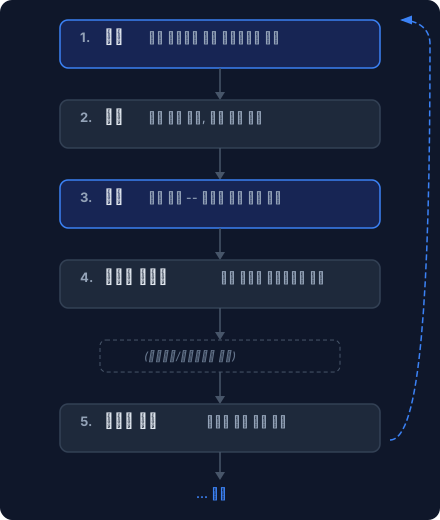
단순히 “실행 → 결과 확인”이 아니라, 실패가 다음 실행의 개선으로 자동 연결되는 것이 핵심입니다.
검증 게이트 (Validation Gates)
각 워크플로우 스텝 사이에 자동 품질 체크포인트가 삽입됩니다. 이전 스텝의 출력이 불량이면 다음 스텝으로 진행하지 않고 즉시 중단합니다.
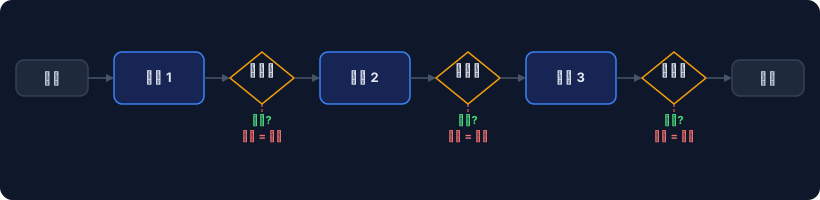
2단계 검증 시스템:
| 티어 | 방식 | 속도 | 오탐율 | 적용 시점 |
|---|---|---|---|---|
| Tier 1 | Zod 스키마 검증 | ~5ms | 0% | 모든 스텝 |
| Tier 2 | LLM-as-Judge | ~2-5s | ~15-20% | 핵심 전환점 |
Tier 1은 “필수 필드가 있는가”, “형식이 맞는가” 같은 결정론적 검사입니다. Tier 2는 “답변이 원문에 근거하는가(Groundedness)”, “질문에 적합한가(Relevance)” 같은 의미적 평가입니다.
TUI (풀스크린 터미널 UI)
eddgate 명령어만 실행하면 풀스크린 TUI가 열립니다. 모든 기능이 메뉴로 접근 가능합니다.
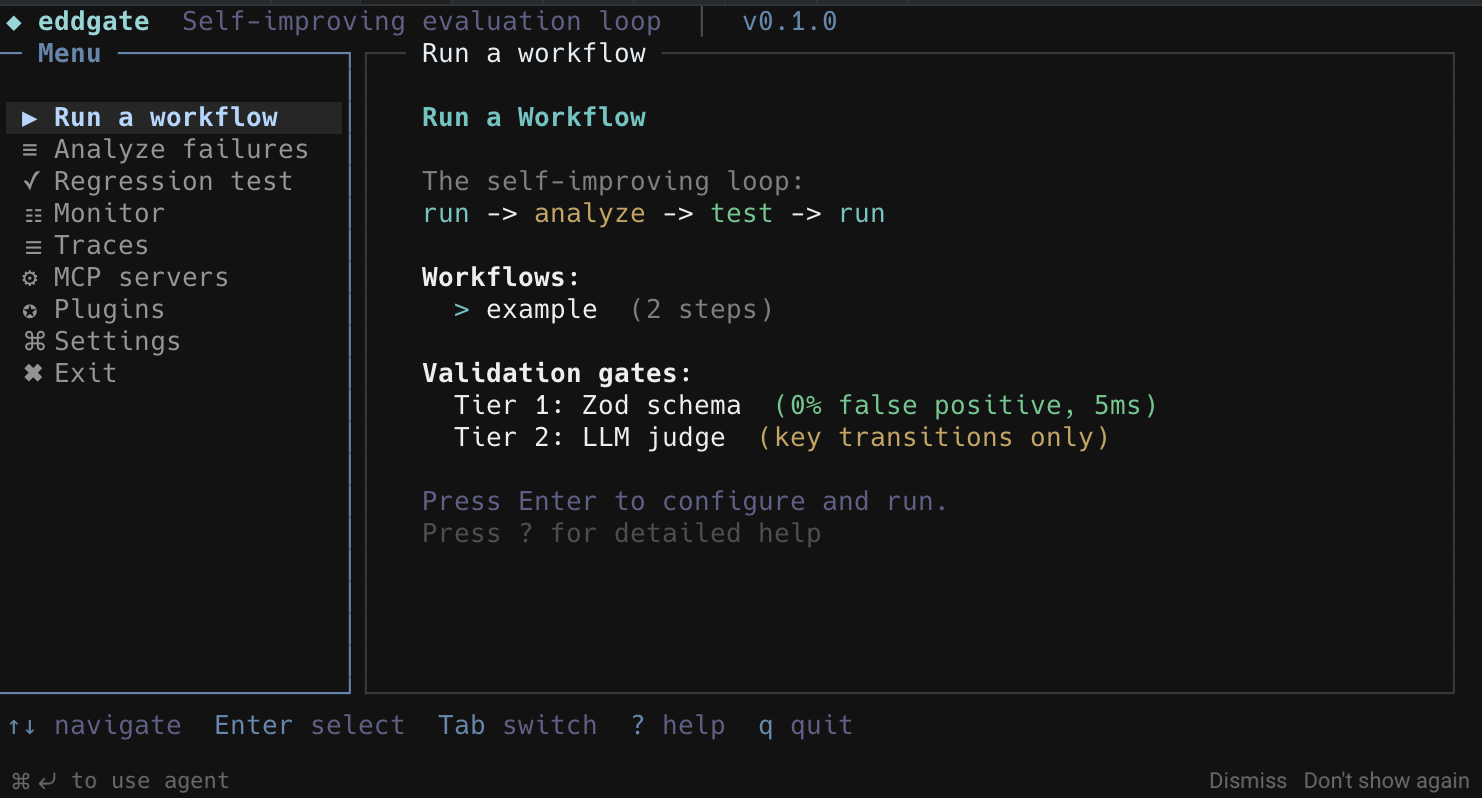
실행 대시보드
워크플로우 실행 중에는 라이브 오케스트레이션 대시보드가 표시됩니다:
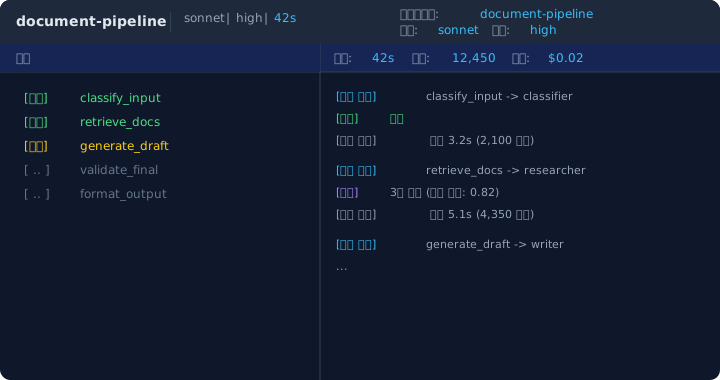
실패 분석 & 규칙 자동 생성
워크플로우를 실행한 후 결과가 좋지 않을 때, analyze 명령으로 트레이스 파일을 분석합니다.
eddgate analyze -d traces 105 failures in 2 patterns:
C1 Eval gate failed at "validate_final" (avg score: 0.75, 103 times) 103 occurrences (98%) Score range: 0.42 - 0.85 Fix: lower threshold or improve prompt specificity Rule: validate_final_adjusted_threshold.yaml
C2 Rate limit hit at "validate_final" (2 times) Fix: add delay between steps or reduce maxRetries--generate-rules 플래그를 추가하면 실패 패턴을 기반으로 YAML 규칙이 자동 생성되고, 다음 실행에 자동 적용됩니다.
회귀 테스트
파이프라인이 잘 동작하는 상태를 스냅샷으로 저장하고, 이후 프롬프트나 설정을 변경한 뒤 기존 품질이 유지되는지 비교합니다.
eddgate test snapshot -d traces # 베이스라인 저장# ... 프롬프트 수정 ...eddgate run my-workflow -i input.txt --trace-jsonl traces/new.jsonleddgate test diff -d traces # 베이스라인 대비 비교 REGRESSIONS (1): validate_final.evalScore before: 0.78 after: 0.65 → REGRESSIONCI에서 exit code 1을 반환하므로 GitHub Actions에 바로 연결할 수 있습니다.
내장 워크플로우
| 워크플로우 | 입력 | 출력 | 스텝 수 |
|---|---|---|---|
document-pipeline | 긴 문서 (.md, .txt) | [1] 인용이 포함된 구조화된 요약 | 6 |
code-review | diff 파일 (git diff > changes.txt) | 심각도별 이슈 목록 + 수정 제안 | 3 |
bug-fix | 에러 로그, 스택 트레이스 | 원인 분석 + 수정 제안 + 검증 | 4 |
api-design | 요구사항 문서 | OpenAPI 스타일 설계 + 예시 | 3 |
translation | 원문 텍스트 파일 | 번역 + 역번역 정확도 점수 | 3 |
rag-pipeline | 질문 텍스트 (문서 사전 인덱싱 필요) | 근거 기반 답변 + 출처 인용 + 환각 점수 | 4 |
추가 기능
컨텍스트 윈도우 프로파일러
어떤 스텝이 토큰(= 비용)을 가장 많이 소모하는지 분석합니다. 검증 스텝이 48번 재시도하면서 ~10만 토큰을 낭비하는 것 같은 문제를 잡아냅니다.
eddgate analyze -d traces --contextA/B 프롬프트 테스트
두 프롬프트 버전을 같은 입력에 대해 교차 실행하고 Welch’s t-test로 통계적 유의성을 검정합니다.
eddgate advanced ab-test \ --workflow document-pipeline \ --prompt-a templates/prompts/analyzer.md \ --prompt-b templates/prompts/analyzer.v2.md \ -i input.txt -n 3자동 프롬프트 개선
실패 패턴을 기반으로 LLM이 프롬프트 수정안을 생성하고, TUI에서 원본/수정안을 나란히 비교한 뒤 승인/수정/건너뛰기를 선택합니다.
크로스런 메모리
이전 실행에서 어떤 스텝이 실패했고, 어떤 점수를 받았는지를 자동 저장합니다. 다음 실행 때 이 정보가 시스템 프롬프트에 주입되어 AI가 이전 실수를 피하게 됩니다.
API 서버
eddgate serve --port 3000POST /run으로 워크플로우를 시작하고 GET /runs/:id로 결과를 폴링합니다. 외부 시스템(웹 앱, 슬랙 봇, 크론 잡)에서 트리거할 수 있습니다.
RAG 파이프라인
문서를 Pinecone MCP를 통해 인덱싱하고, 근거 기반 질의응답을 수행합니다. 환각 점수(Groundedness)로 답변 품질을 자동 검증합니다.
아키텍처
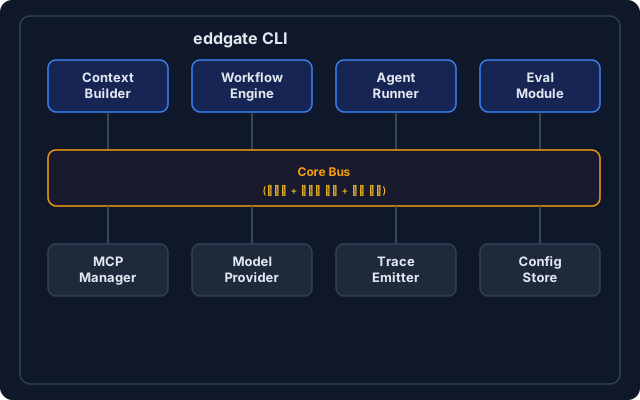
5개 핵심 모듈:
| 모듈 | 역할 |
|---|---|
| Context Builder | 워크플로우 정의, 역할, 프롬프트, 크로스런 메모리를 조합하여 실행 컨텍스트 생성 |
| Workflow Engine | 토폴로지 정렬, 병렬 실행, 비용 예산 추적, 재시도 정책 관리 |
| Agent Runner | 개별 스텝 실행, 지수 백오프 재시도, LLM 호출 |
| Eval Module | Tier 1 (Zod 스키마) + Tier 2 (LLM-as-Judge) 검증 게이트 |
| Trace Emitter | JSONL 이벤트 스트림, HTML 리포트, 선택적 Langfuse/OTel 연동 |
CI/CD 연동
name: eddgate loopon: push: paths: ['templates/prompts/**', 'templates/workflows/**']
jobs: eval: runs-on: ubuntu-latest steps: - uses: actions/checkout@v4 - uses: actions/setup-node@v4 with: { node-version: 22 } - run: npm ci && npm run build - run: node dist/cli/index.js doctor --ci -w templates/workflows - run: node dist/cli/index.js test diff -d traces - run: node dist/cli/index.js advanced gate --results eval-results.json --rules templates/gate-rules.yamltest diff는 회귀 시 exit code 1, gate는 임계값 미달 시 exit code 1을 반환하여 CI가 머지를 차단합니다.
설치 및 시작
npm install -g eddgateeddgate # TUI 실행요구사항: Node.js 20+, Claude CLI (아무 구독) 또는 ANTHROPIC_API_KEY
# CLI 모드eddgate init # 프로젝트 스캐폴딩eddgate doctor # 환경 점검eddgate run document-pipeline -i input.txt # 워크플로우 실행eddgate analyze -d traces # 실패 패턴 분석eddgate test snapshot -d traces # 베이스라인 저장eddgate test diff -d traces # 회귀 검출워크플로우 정의 예시
name: "My Pipeline"config: defaultModel: "sonnet" topology: "pipeline" onValidationFail: "block"
steps: - id: "analyze" type: "classify" context: identity: role: "analyzer" constraints: ["output JSON"] tools: [] validation: rules: - type: "required_fields" spec: { fields: ["topics"] } message: "topics required"
- id: "generate" type: "generate" dependsOn: ["analyze"] evaluation: enabled: true type: "groundedness" threshold: 0.7 onFail: "block"YAML 워크플로우 파일 하나로 스텝, 의존성, 검증 규칙, 평가 기준을 선언적으로 정의합니다.
테스트
Vitest 기반 219개 테스트로 핵심 모듈을 검증합니다:
- workflow-engine: 토폴로지 정렬, 순환 감지, 병렬 실행, 비용 예산
- tier1-rules: Zod 스키마 검증 규칙
- normalize-score: 0-1 / 0-100 점수 정규화
- trace-emitter: 이벤트 버퍼링, 비동기 에러 처리
- context-builder: 실행 컨텍스트 조합
- rag-pipeline: 청킹, 다양성 리랭킹
Mock LLM 어댑터를 사용하여 결정론적 테스트를 보장합니다.

Project Overview
EEDGate (eddgate) is a self-improving evaluation loop engine for LLM workflows.
It executes workflows, analyzes failure patterns, auto-generates rules, applies them on the next run, and ensures quality through regression testing — closing the entire loop with a single tool.
run → analyze → test → run (improved) → ...Duration: 2026.03 - Ongoing
Type: Personal Project
Tech Stack: TypeScript, Node.js, Ink (React TUI), neo-blessed, Zod, Commander.js
GitHub: github.com/dj258255/eddgate
Why I Built This
When repeating multi-step LLM tasks (document summarization, code review, translation, etc.), the same problems always come up:
- Inconsistent quality — Same prompt, sometimes great, sometimes terrible
- Unknown failure causes — No way to trace which step failed and why
- Manual improvement — Edit the prompt, pray it’s better this time
- Undetected regressions — Change one prompt, break something else without knowing
Promptfoo only evaluates. Braintrust only monitors. LangWatch only traces. No tool closed the loop from failure analysis → rule generation → execution improvement.
Core Concept: The Loop
The key isn’t just “run → check results” — failures automatically feed into improvements for the next run.
Validation Gates
Automatic quality checkpoints are inserted between each workflow step. If a step produces bad output, the pipeline stops immediately instead of proceeding to the next step.
Two-tier validation system:
| Tier | Method | Speed | False Positive Rate | When Applied |
|---|---|---|---|---|
| Tier 1 | Zod schema validation | ~5ms | 0% | Every step |
| Tier 2 | LLM-as-Judge | ~2-5s | ~15-20% | Key transitions |
Tier 1 performs deterministic checks like “are required fields present?” and “is the format correct?”. Tier 2 performs semantic evaluation like “is the answer grounded in the source?” (Groundedness) and “is it relevant to the question?” (Relevance).
TUI (Full-Screen Terminal UI)
Simply run eddgate to launch the full-screen TUI. All features are accessible from menus.

Execution Dashboard
During workflow execution, a live orchestration dashboard is displayed:
Failure Analysis & Auto Rule Generation
When workflow results are poor, use the analyze command to analyze trace files.
eddgate analyze -d traces 105 failures in 2 patterns:
C1 Eval gate failed at "validate_final" (avg score: 0.75, 103 times) 103 occurrences (98%) Score range: 0.42 - 0.85 Fix: lower threshold or improve prompt specificity Rule: validate_final_adjusted_threshold.yaml
C2 Rate limit hit at "validate_final" (2 times) Fix: add delay between steps or reduce maxRetriesAdding the --generate-rules flag auto-generates YAML rules based on failure patterns, which are automatically applied on the next run.
Regression Testing
Save a snapshot of the pipeline when it’s working well, then compare after modifying prompts or settings to ensure quality is maintained.
eddgate test snapshot -d traces # Save baseline# ... modify prompts ...eddgate run my-workflow -i input.txt --trace-jsonl traces/new.jsonleddgate test diff -d traces # Compare against baseline REGRESSIONS (1): validate_final.evalScore before: 0.78 after: 0.65 → REGRESSIONReturns exit code 1 on regression, so it plugs directly into GitHub Actions.
Built-in Workflows
| Workflow | Input | Output | Steps |
|---|---|---|---|
document-pipeline | Long documents (.md, .txt) | Structured summary with [1] citations | 6 |
code-review | Diff file (git diff > changes.txt) | Issue list by severity + fix suggestions | 3 |
bug-fix | Error logs, stack traces | Root cause analysis + fix proposal + verification | 4 |
api-design | Requirements doc | OpenAPI-style design + examples | 3 |
translation | Source text file | Translation + back-translation accuracy score | 3 |
rag-pipeline | Query text (docs must be indexed first) | Grounded answer + source citations + hallucination score | 4 |
Additional Features
Context Window Profiler
Analyzes which steps consume the most tokens (= cost). Catches issues like a validation step retrying 48 times and wasting ~100K tokens.
eddgate analyze -d traces --contextA/B Prompt Testing
Runs two prompt versions on the same input in interleaved order and uses Welch’s t-test to determine statistical significance.
eddgate advanced ab-test \ --workflow document-pipeline \ --prompt-a templates/prompts/analyzer.md \ --prompt-b templates/prompts/analyzer.v2.md \ -i input.txt -n 3Auto Prompt Improvement
The LLM generates prompt revision suggestions based on failure patterns. The TUI displays original and suggested versions side-by-side for approve/modify/skip decisions.
Cross-Run Memory
Automatically saves which steps failed and what scores were received from previous runs. On the next run, this information is injected into the system prompt so the AI avoids previous mistakes.
API Server
eddgate serve --port 3000Start workflows with POST /run and poll results with GET /runs/:id. Can be triggered from external systems (web apps, Slack bots, cron jobs).
RAG Pipeline
Index documents via Pinecone MCP and perform grounded Q&A. Automatically verifies answer quality with a Groundedness score.
Architecture
5 Core Modules:
| Module | Role |
|---|---|
| Context Builder | Assembles execution context from workflow definitions, roles, prompts, and cross-run memory |
| Workflow Engine | Topological sort, parallel execution, cost budget tracking, retry policy management |
| Agent Runner | Individual step execution, exponential backoff retries, LLM calls |
| Eval Module | Tier 1 (Zod schema) + Tier 2 (LLM-as-Judge) validation gates |
| Trace Emitter | JSONL event stream, HTML reports, optional Langfuse/OTel integration |
CI/CD Integration
name: eddgate loopon: push: paths: ['templates/prompts/**', 'templates/workflows/**']
jobs: eval: runs-on: ubuntu-latest steps: - uses: actions/checkout@v4 - uses: actions/setup-node@v4 with: { node-version: 22 } - run: npm ci && npm run build - run: node dist/cli/index.js doctor --ci -w templates/workflows - run: node dist/cli/index.js test diff -d traces - run: node dist/cli/index.js advanced gate --results eval-results.json --rules templates/gate-rules.yamltest diff returns exit code 1 on regression, gate returns exit code 1 on threshold failure, blocking the CI merge.
Installation & Getting Started
npm install -g eddgateeddgate # Launch TUIRequirements: Node.js 20+, Claude CLI (any subscription) or ANTHROPIC_API_KEY
# CLI modeeddgate init # Scaffold projecteddgate doctor # Check environmenteddgate run document-pipeline -i input.txt # Execute workfloweddgate analyze -d traces # Analyze failure patternseddgate test snapshot -d traces # Save baselineeddgate test diff -d traces # Detect regressionsWorkflow Definition Example
name: "My Pipeline"config: defaultModel: "sonnet" topology: "pipeline" onValidationFail: "block"
steps: - id: "analyze" type: "classify" context: identity: role: "analyzer" constraints: ["output JSON"] tools: [] validation: rules: - type: "required_fields" spec: { fields: ["topics"] } message: "topics required"
- id: "generate" type: "generate" dependsOn: ["analyze"] evaluation: enabled: true type: "groundedness" threshold: 0.7 onFail: "block"A single YAML workflow file declaratively defines steps, dependencies, validation rules, and evaluation criteria.
Testing
219 tests powered by Vitest verify the core modules:
- workflow-engine: Topological sort, cycle detection, parallel execution, cost budget
- tier1-rules: Zod schema validation rules
- normalize-score: 0-1 / 0-100 score normalization
- trace-emitter: Event buffering, async error handling
- context-builder: Execution context assembly
- rag-pipeline: Chunking, diversity reranking
Mock LLM adapters ensure deterministic testing.
댓글
댓글 수정/삭제는 GitHub Discussions에서 가능합니다.