AI 검색 요약 — RAG 파이프라인 + SSE 스트리밍 + 비용 모니터링
목차
이전 글
콘텐츠 필터링 — 운영 안전장치에서 Aho-Corasick 금칙어 필터링, 블라인드 게시글 검색 제외, Negative Caching, 자동완성 안전장치를 구축했습니다.
| 지표 | 결과 |
|---|---|
| 금칙어 필터링 | Aho-Corasick O(N+Z) 탐지, 16,090개 |
| 블라인드 | Occur.MUST_NOT blinded=true |
| Negative Caching | 빈 결과 30초 TTL (cache penetration 방지) |
검색 기능(품질, 인프라, 안전장치)이 모두 갖춰졌습니다. 이 글에서 검색 결과를 AI가 요약하여 사용자에게 직접적인 답변을 제공합니다.
1. 정상 상태 — 현재 검색 경험
프론트엔드에 “AI 요약” 섹션이 있지만, 현재 구현은 검색 결과와 무관하게 LLM에 쿼리만 전달하는 방식이다 — 검색된 문서를 컨텍스트로 주입하지 않으므로 할루시네이션 위험이 높고, 출처 인용이 불가능하다.
| 기존 구현 | RAG (이 글) | |
|---|---|---|
| 컨텍스트 | 쿼리만 전달 | 검색된 Top-5 문서 주입 |
| 할루시네이션 | 높음 (LLM 자체 지식에 의존) | 낮음 (문서 기반 답변 제한) |
| 출처 인용 | 불가 | [문서 N] 인용 + 게시글 링크 |
| 답변 품질 | LLM 학습 데이터 의존 | 실제 인덱스 문서 기반 |
검색 엔진의 AI 요약 트렌드
| 서비스 | AI 검색 기능 | 방식 |
|---|---|---|
| AI Overviews (SGE) | 검색 결과 상단에 AI 요약 | |
| Perplexity | 전체 응답이 AI 요약 | 검색 -> 요약 -> 출처 표시 |
| Bing | Copilot | 대화형 검색 + 출처 인용 |
| 네이버 | Cue: | AI 기반 답변 + 출처 |
2. 문제 상황 — 기존 검색의 한계
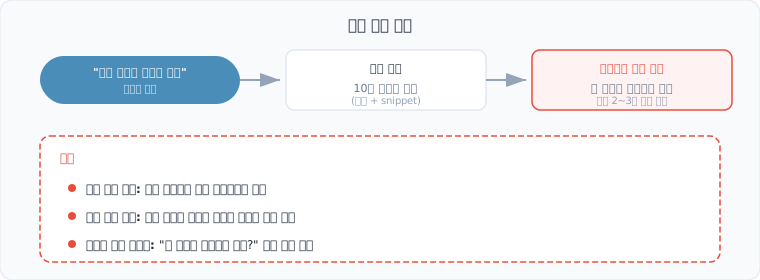
- 정보 탐색 비용: 10개 링크 중 어떤 게시글이 답을 포함하는지 모름
- 지식 종합 불가: “자바 GC 종류와 각각의 장단점”처럼 여러 문서에 분산된 정보를 하나로 종합할 수 없음
- 질문형 쿼리 미지원: “왜 자바는 포인터가 없나?”처럼 자연어 질문에 대한 직접 답변 불가
RAG로 해결
3. 대안 검토
LLM 선택
| 모델 | 장점 | 단점 | 판단 |
|---|---|---|---|
| OpenAI GPT-4o | 고품질, API 간편 | 유료, 외부 의존 | API 비용 고려 |
| Anthropic Claude | 긴 컨텍스트, 정확한 인용 | 유료, 외부 의존 | 대안 |
| Ollama (로컬 LLM) | 무료, 데이터 프라이버시 | 로컬 GPU 필요, 품질 제한 | Free Tier에서 GPU 없음 |
| Google Gemini | 무료 티어 존재, 한국어 우수 | API 제한 | 선택 |
선택: 외부 LLM API (Gemini 무료 티어) + Lucene 검색. Free Tier 서버에서 로컬 LLM은 불가(GPU 없음).
BM25 vs Dense Retrieval
| 방식 | Retrieval 품질 | 인프라 비용 | 판단 |
|---|---|---|---|
| BM25 (현재 Lucene) | 키워드 매칭 기반, 충분히 좋음 | 추가 비용 없음 | 선택 |
| Dense Retrieval (임베딩) | 의미 유사도 기반, 더 정확 | 임베딩 모델 + 벡터 DB 필요 | 후반 도입 검토 |
| Hybrid (BM25 + Dense) | 최상의 Retrieval | BM25 + 벡터 DB 모두 필요 | 최종 목표 |
BM25가 이 프로젝트에서 충분한 근거: wikiEngine은 나무위키/한국어 위키백과/영어 위키백과/뉴스/웹텍스트 데이터 기반으로 기술 용어 키워드 검색이 주 사용 패턴이다. RAG Retrieval 비교 실험에서 BM25는 키워드 전용 쿼리 NDCG 0.88로 Dense Retrieval(혼합 쿼리 0.65) 대비 우위를 보였다 (출처: BM25 vs Dense Retrievers 비교). 엔지니어링 로그, 금융 데이터, 법률/과학 문서 등 키워드가 명확한 도메인에서는 BM25가 Dense보다 나을 수 있다는 것이 Anthropic RAG 가이드의 평가이기도 하다. “AI” to “인공지능” 수준의 동의어는 쿼리 확장 구현의 DB 기반 쿼리 확장으로 이미 해결되었다.
Retrieval 개선 로드맵
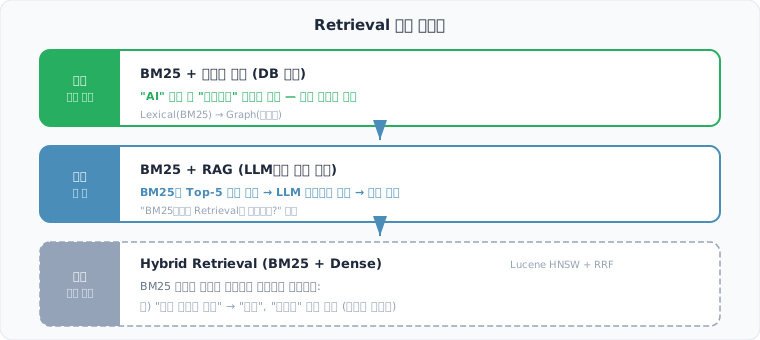
Eugene Yan의 “Search: Query Matching”에서 정리한 것처럼 검색 시스템은 Lexical(BM25) to Graph(동의어) to Embedding(벡터) 순서로 진화합니다.
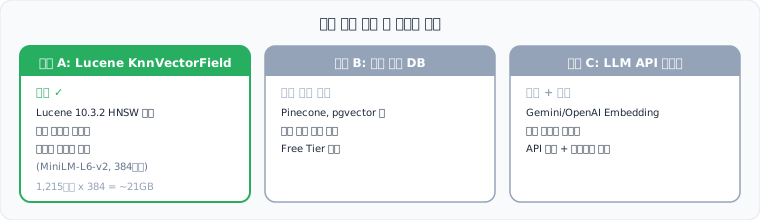
벡터 검색 도입 시 인프라:
4. 구현
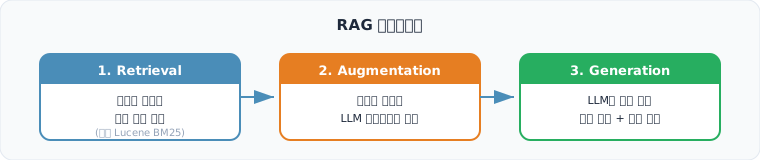
4-1. RAG 파이프라인
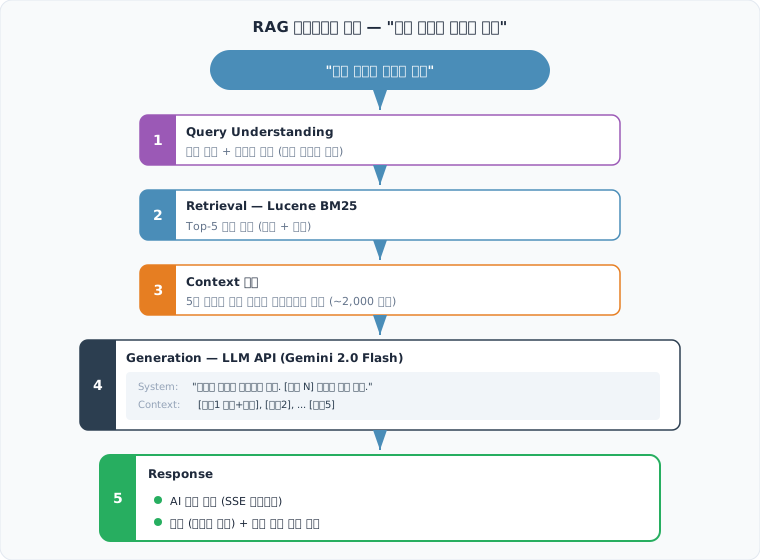
4-2. Context 구성
@Servicepublic class RAGContextBuilder {
private static final int MAX_CONTEXT_CHARS = 8000; // ~2000 토큰 private static final int MAX_DOCS = 5;
/** * 검색 결과 Top-N 문서에서 LLM 컨텍스트를 구성한다. * 문서당 최대 글자 수를 제한하여 컨텍스트 윈도우 내에 맞춘다. */ public String buildContext(List<PostSearchResult> results) { int perDocLimit = MAX_CONTEXT_CHARS / Math.min(results.size(), MAX_DOCS); StringBuilder context = new StringBuilder();
for (int i = 0; i < Math.min(results.size(), MAX_DOCS); i++) { PostSearchResult result = results.get(i); String truncated = truncate(result.getContent(), perDocLimit); context.append(String.format( "[문서 %d] 제목: %s\nID: %d\n내용: %s\n\n", i + 1, result.getTitle(), result.getId(), truncated )); } return context.toString(); }}4-3. LLM API 호출 — Spring AI 2.0
@Servicepublic class RagService {
// Spring AI 2.0.0-M4 + spring-ai-starter-model-google-genai (Gemini 2.0 Flash)
public AISummaryResponse summarize(String query, List<PostSearchResult> results) { String context = buildContext(results);
String systemPrompt = """ 당신은 검색 결과를 요약하는 AI 어시스턴트입니다. 아래 제공된 문서만을 참고하여 사용자의 질문에 답변하세요.
규칙: 1. 문서에 없는 내용은 답변하지 마세요. "제공된 문서에서 해당 정보를 찾을 수 없습니다"라고 답하세요. 2. 답변에 사용한 문서의 번호를 [문서 N] 형태로 인용하세요. 3. 한국어로 답변하세요. 4. 300자 이내로 요약하세요. """;
String userPrompt = String.format("검색 결과:\n%s\n\n질문: %s", context, query); String aiResponse = chatClient.prompt(systemPrompt, userPrompt).call().content();
return new AISummaryResponse( aiResponse, extractCitations(aiResponse, results), results ); }}4-4. SSE 스트리밍
LLM 응답은 1~5초 걸릴 수 있으므로, Server-Sent Events로 토큰 단위 스트리밍합니다.
@GetMapping(value = "/search/ai-summary", produces = MediaType.TEXT_EVENT_STREAM_VALUE)public SseEmitter aiSummaryStream(@RequestParam String q) { SseEmitter emitter = new SseEmitter(30_000L);
// Virtual Thread에서 비동기 실행 Thread.startVirtualThread(() -> { try { List<PostSearchResult> results = searchService.search(q); // SSE 이벤트: delta (토큰), citations (출처), done, skip, error ragService.streamSummary(q, results, emitter); } catch (Exception e) { emitter.complete(); } });
return emitter;}4-5. AI 요약 트리거 조건
모든 검색에 AI 요약을 제공하면 비용 낭비입니다. AiSummaryDecisionService에서 쿼리 의도를 분류한다:
- 네비게이션 의도 (“네이버”, “구글”, “위키백과”) -> AI 요약 스킵
- 거래 의도 (“구매”, “가격”) -> AI 요약 스킵
- 물음표 쿼리 (“자바 GC?”) -> 결과 1건이라도 AI 답변 (Google AI Overviews 동일: 질문형 출현율 28~38%)
- 일반 쿼리 -> 결과 3건 이상일 때만 AI 답변
4-6. 할루시네이션 방지
| 전략 | 설명 |
|---|---|
| 문서 기반 답변 제한 | 시스템 프롬프트에 “제공된 문서만 참고” 명시 |
| 인용 강제 | 답변에 [문서 N] 인용 필수, 인용 없는 문장 경고 |
| Retrieval 품질 확인 | 검색 결과 BM25 스코어가 임계값 미만이면 AI 요약 스킵 |
| 사용자 피드백 | ”이 답변이 도움이 되었나요?” 버튼으로 품질 모니터링 |
5. 비용 분석 + 모니터링
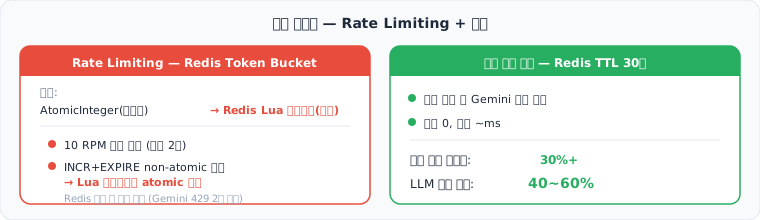
Rate Limiting — Redis Token Bucket
비용 추정
| 항목 | 추정 비용 |
|---|---|
| Gemini 2.0 Flash (무료 티어) | 15 RPM, 1,000 RPD, 250K TPM |
| Gemini 2.0 Flash (Tier 1 유료) | $0.10/1M input + $0.40/1M output |
| 예상 사용량 (일 1,000건 AI 검색) | ~1.2M input + ~0.3M output 토큰 |
| 월 비용 (Tier 1 유료) | ~$4.8/월 |
| 월 비용 (무료) | $0 (무료 티어 내, 일 1,000건 한계) |
토큰 수 산출 근거: Top-5 문서 x 500자 context = 2,500자. 약 1,000 토큰/건. 시스템 프롬프트(~200 토큰) + 쿼리(~10 토큰) = ~1,210 토큰/건. Output 평균 300자. 약 300 토큰/건.
피드백 시스템
CREATE TABLE ai_summary_feedback ( id BIGINT AUTO_INCREMENT PRIMARY KEY, query VARCHAR(500) NOT NULL, rating TINYINT NOT NULL, -- 1=up, 0=down created_at TIMESTAMP DEFAULT CURRENT_TIMESTAMP);- Micrometer 카운터: ai_summary_feedback_total{rating=up/down} -> Grafana 자동 노출
- 활용: thumbs_up_rate 추이 모니터링 -> 부정적 피드백 집중 쿼리 패턴 분석 -> 시스템 프롬프트 수동 개선
- RLHF는 불가 (자체 모델 아닌 외부 API). 외부 API 호출 서비스에서 피드백은 프롬프트 개선 + 품질 모니터링 용도
Grafana 대시보드
Spring Boot 대시보드에 “AI 요약” 섹션 추가 — 7개 패널:
- LLM 호출 RPM, 응답시간 avg/max, 토큰 사용량, 피드백 결과, 일별 토큰, 일별 비용 추정
- 비용 임계값: $1(노랑), $5(빨강) — Gemini 2.0 Flash 단가 기준
6. 검증 — Before/After
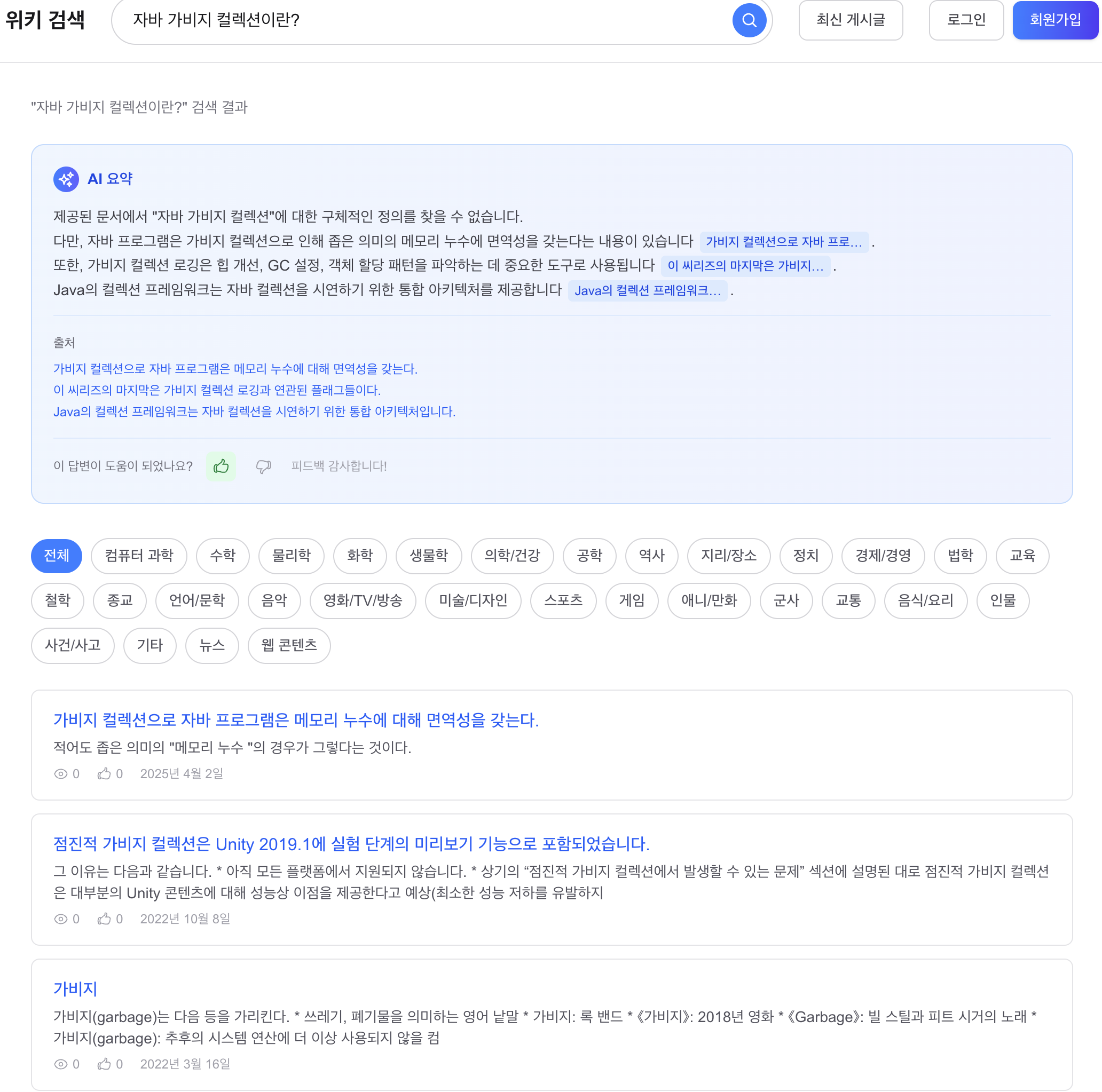
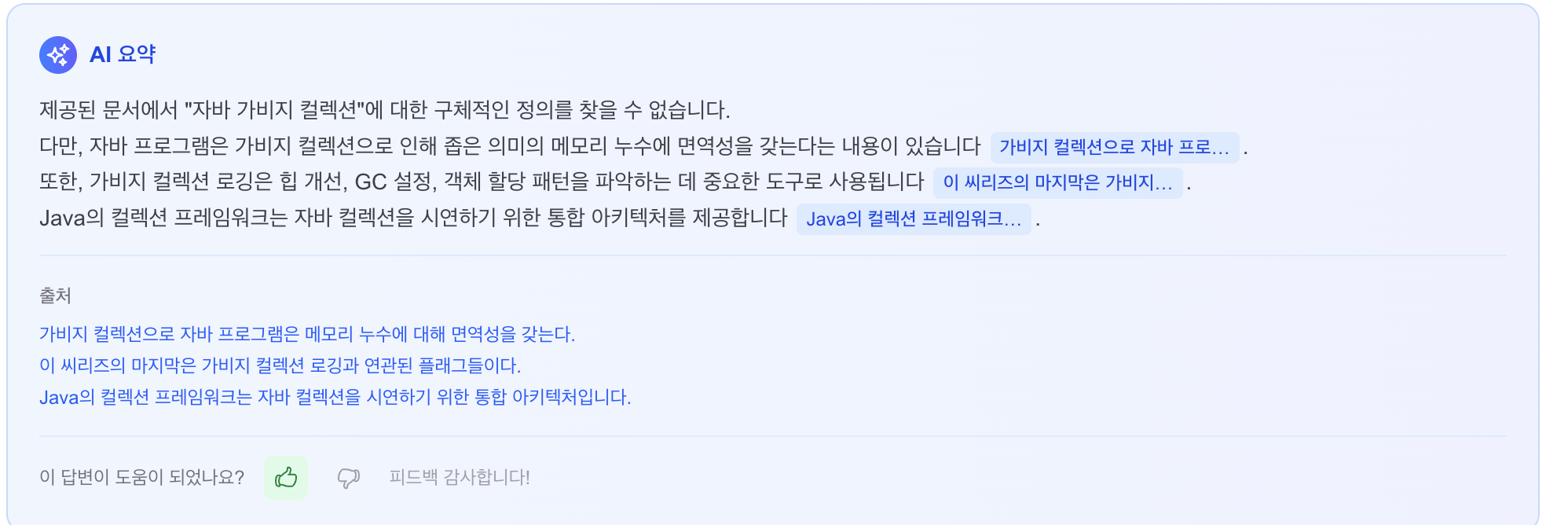
AI 요약 + 출처 + 피드백

AI 요약 전체 화면 (검색 결과와 함께)

AI 요약 전체 흐름 데모
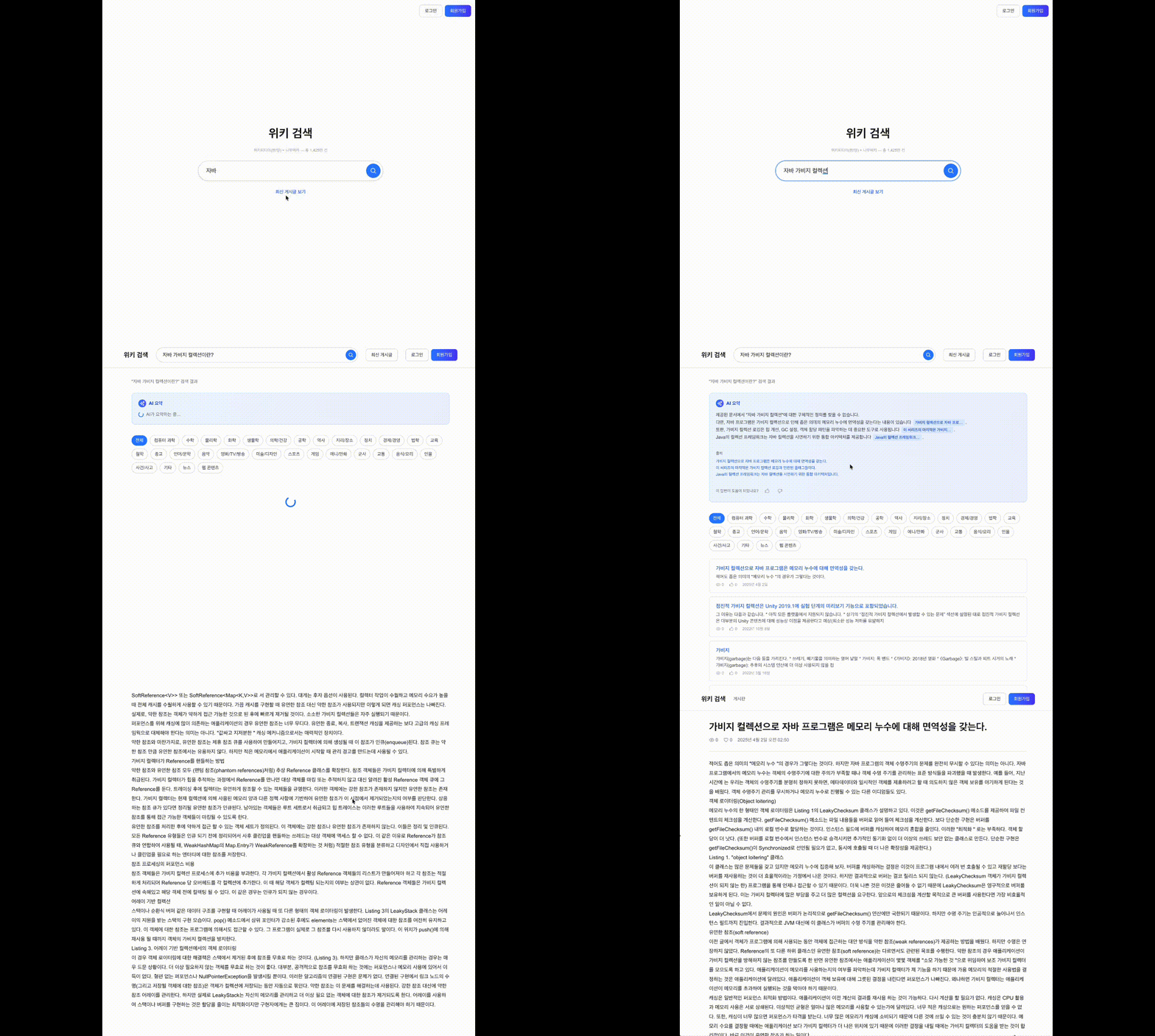
“자바” 검색 -> BM25 Top-5 문서 Retrieval -> Gemini 2.0 Flash SSE 스트리밍 -> 토큰 단위 타이핑 -> 인라인 출처 배지 + 하단 출처 링크 표시. 검색 결과는 즉시 렌더링되고, AI 요약은 별도 SSE 채널로 비동기 수신.
트리거 스킵 — 네비게이션 의도

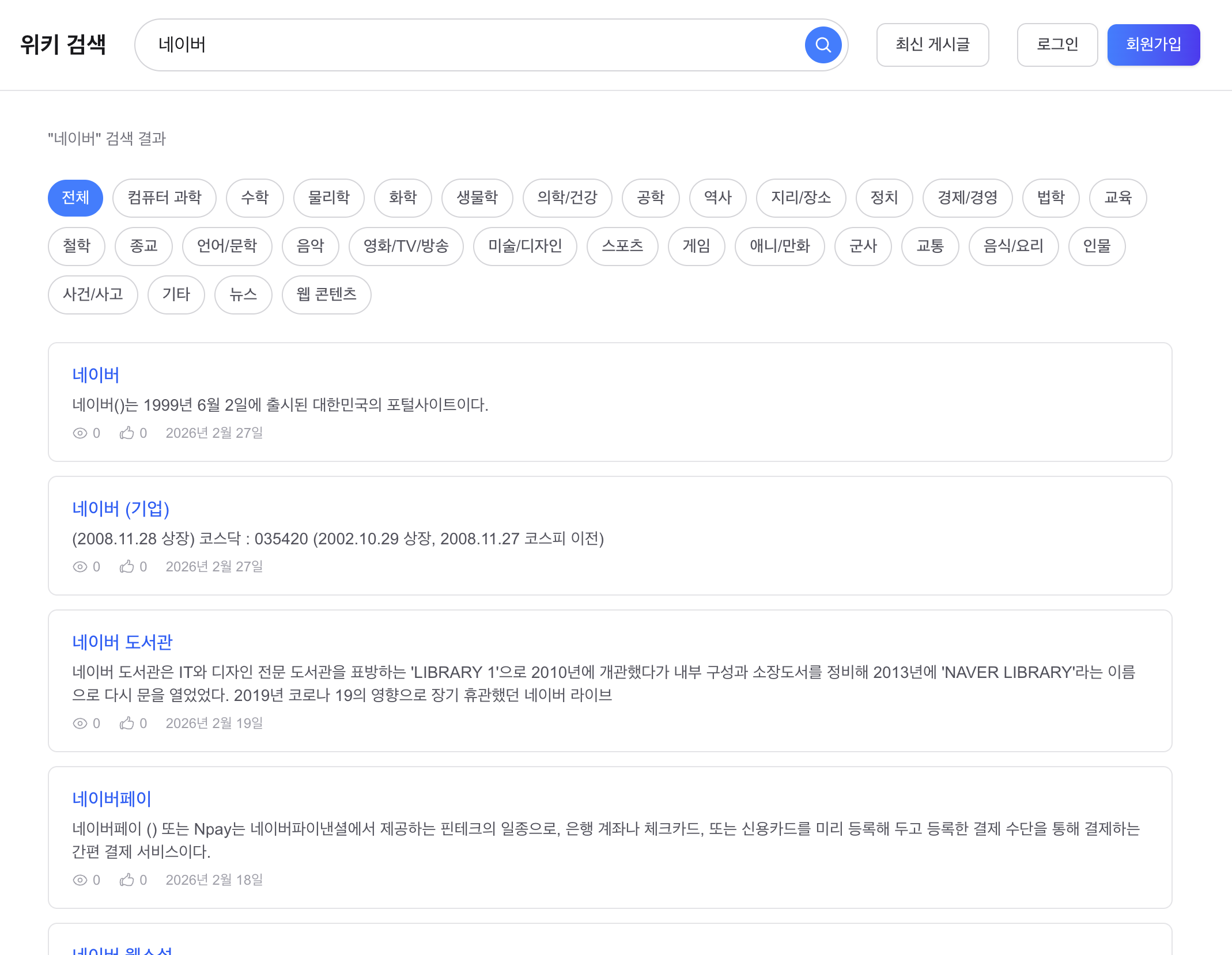
“네이버” 검색 시 AI 요약 미표시 (네비게이션 의도 — 사용자가 네이버에 가고 싶은 것이지, 네이버에 대한 설명을 원하는 게 아님).
자동완성 자모 매칭 + prefix 하이라이트
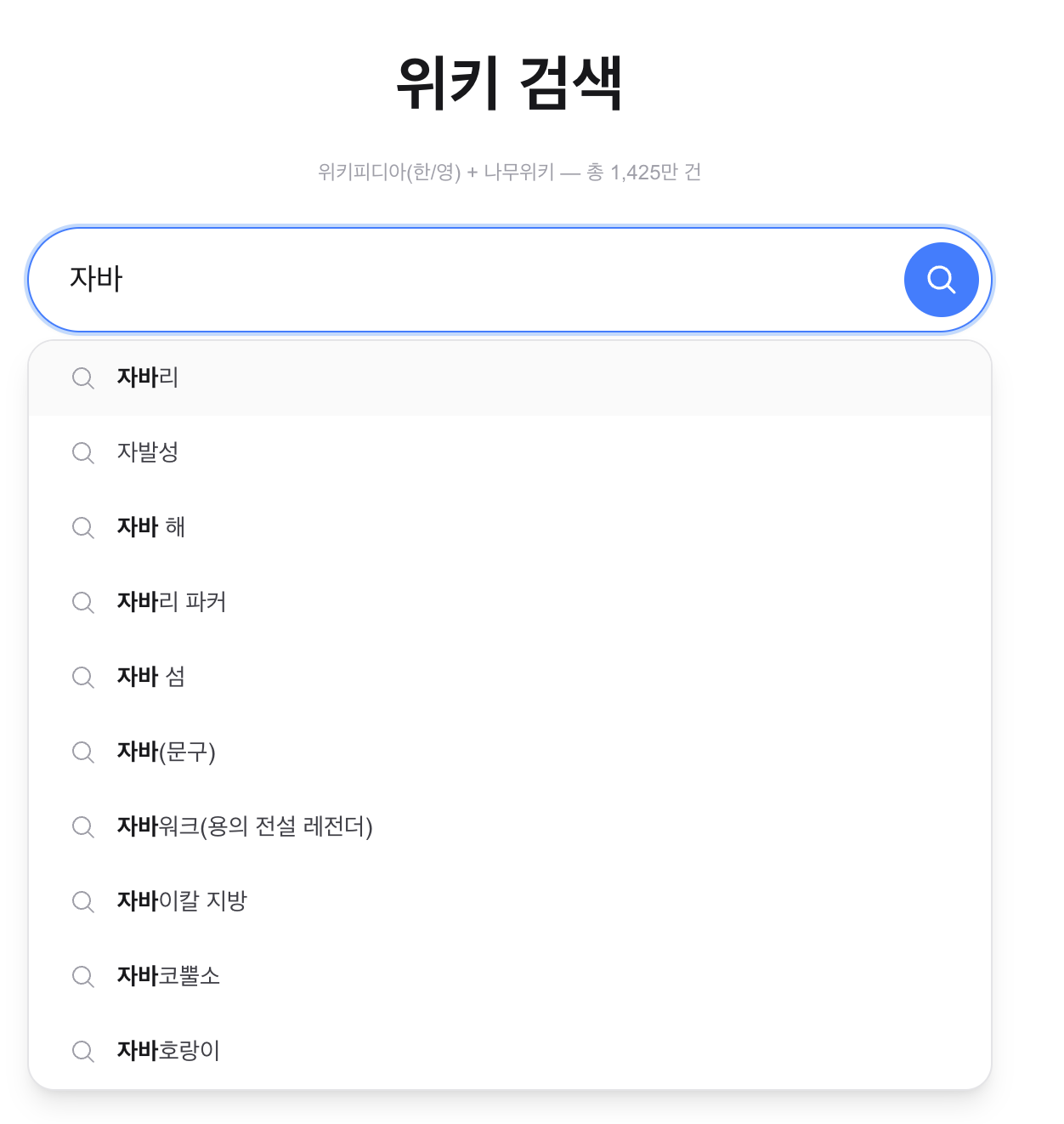
Grafana AI 요약 대시보드
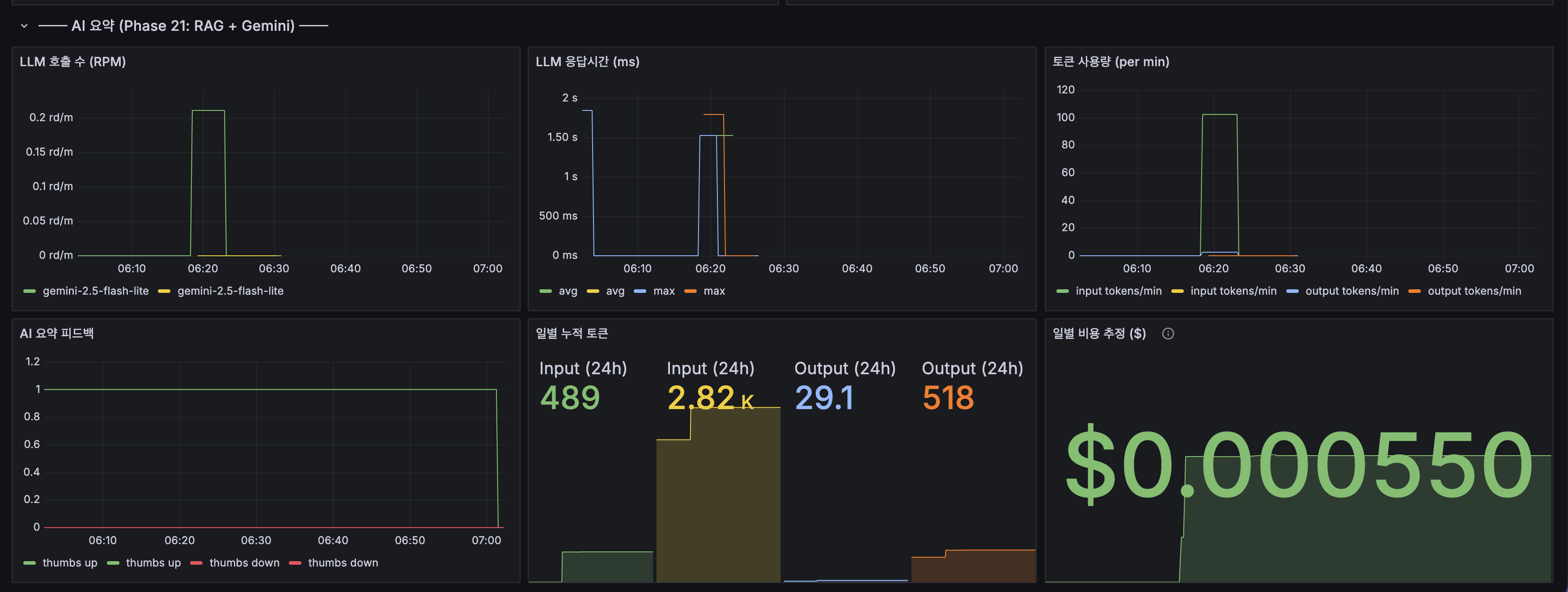
- LLM 호출 수 (RPM): gemini-2.5-flash-lite 모델별 분당 요청 수
- LLM 응답시간 (ms): avg ~1.5초, max ~2초
- 토큰 사용량 (per min): input ~100 tokens/min, output ~20 tokens/min
- AI 요약 피드백: thumbs up 1건 기록
7. 배포 이슈 및 해결
운영 환경 배포 시 발견된 문제들. 모두 로컬(ddl-auto: update)에서는 자동 처리되지만 운영(ddl-auto: validate + Flyway)에서는 수동 조치가 필요한 차이에서 기인합니다.
| # | 이슈 | 원인 | 해결 |
|---|---|---|---|
| 1 | ai_summary_feedback.rating 타입 불일치 | DB: TINYINT, Hibernate 기대: INTEGER | @Column(columnDefinition = “TINYINT”) 명시 |
| 2 | GEMINI_API_KEY 환경변수 미전달 | Ansible env 템플릿 + docker-compose에 누락 | docker-compose environment + .env.prod에 추가 |
| 3 | posts.blinded 컬럼 미존재 | Flyway V4 마이그레이션 누락 | V4 마이그레이션 추가 (idempotent SQL) |
| 4 | Flyway V4 실패 기록 잔존 | 이전 시도에서 실패 -> flyway_schema_history에 success=0 기록 | 수동 DELETE + idempotent SQL로 재실행 |
| 5 | Replica DB 스키마 불일치 | MySQL Replication 끊김 -> DDL 전파 안 됨 | banned_words, ai_summary_feedback 테이블 + blinded 컬럼 수동 추가 |
| 6 | Ansible 헬스체크 타임아웃 | 42GB Lucene 인덱스 로딩으로 부팅 3분+ | Docker restart policy로 자동 재시작 |
교훈
- 운영 배포 전 Flyway 마이그레이션 체크리스트 필요: 엔티티 변경 -> V 마이그레이션 작성 -> Replica 전파 확인
- docker-compose environment 블록에 새 환경변수 추가 누락 방지: Ansible 템플릿 변경 시 서버1(environment)/서버2(env_file) 차이 인지
- MySQL Replication 상태 모니터링 필요: 끊기면 Flyway DDL이 Replica에 전파 안 됨
8. snippetSource 개선 — Wikipedia CirrusSearch 패턴
문제
검색 결과에서 일부 문서의 snippet이 빈 문자열로 표시되는 현상.
"삼성전자" -> snippet 없음 (빈 문자열)"삼성전기 삼성SDI 삼성SDS 삼성코닝." -> snippet 정상 표시원인 분석
snippetSource stored field에 raw 위키 마크업이 그대로 저장되어 있었다:
snippetSource = "[include(틀:회원수정)]\n[include(틀:삼성)]\n[include(틀:삼성전자)]..."UnifiedHighlighter가 마크업 토큰에서 offset 불일치 -> 빈 snippet 반환.
현업 사례
| 시스템 | 접근법 |
|---|---|
| Wikipedia CirrusSearch | source_text(raw) + text(clean) 별도 필드. 검색/하이라이팅은 clean text 사용 |
| Elasticsearch 공식 | Ingest Pipeline html_strip processor로 target_field에 clean text 저장 |
| Solr | HTMLStripFieldUpdateProcessorFactory로 인덱스 타임에 정제 |
결론: raw 마크업을 stored field에 저장하고 쿼리 타임에 정리하는 것은 안티패턴. 인덱스 타임에 clean text를 저장하는 것이 업계 표준.
해결
LuceneIndexService.toDocument() 변경:
// Before: raw 위키 마크업 저장String snippetSource = content.substring(0, 500);
// After: clean plain text 저장 (Wikipedia CirrusSearch 패턴)String cleaned = PostSearchResponse.stripMarkup(content.substring(0, 1500));String snippetSource = cleaned.substring(0, Math.min(cleaned.length(), 500));마크업이 콘텐츠의 30~60%를 차지하므로, 원본 1500자에서 정리하여 500자 clean text 확보.
| 항목 | Before | After |
|---|---|---|
| snippetSource 내용 | raw 위키 마크업 | clean plain text |
| 유의미한 텍스트 밀도 | 40~70% (마크업 포함) | 100% |
| Highlighter 매칭 성공률 | 낮음 (마크업 토큰 간섭) | 높음 |
이전 글 전체 목록
이 글은 검색 고도화 시리즈의 마지막 글입니다:
| 순서 | 글 | 핵심 |
|---|---|---|
| 1 | 카테고리 검색 필터링 + Facet 집계 | Lucene FILTER 절, DB GROUP BY Facet |
| 2 | 쿼리 확장 + Query Understanding | 동의어, 오타 교정, UnifiedHighlighter, 재색인 인프라 |
| 3 | LTR 재랭킹 + 카테고리 자동 분류 | XGBoost LambdaMART, LLM-as-a-Judge, Facet 네이티브 전환 |
| 4 | 콘텐츠 필터링 — 운영 안전장치 | Aho-Corasick 금칙어, 블라인드, Negative Caching |
| 5 | AI 검색 요약 — RAG (이 글) | RAG 파이프라인, SSE, 비용 모니터링 |
다음 글
WikiEngine 총정리에서 26편 전체 시리즈의 아키텍처 진화, 핵심 수치, 자동완성 시스템 설계 이론과 실제 구현의 매핑을 정리합니다.
출처

- Anthropic RAG Guide
- BM25 vs Dense Retrievers — A Complete Practical Guide
- Eugene Yan — Search: Query Matching
- Wikipedia CirrusSearch — MediaWiki
- Elasticsearch Ingest Pipeline — html_strip
- Spring AI Documentation
Previous
In Content Filtering — Operational Safety we built Aho-Corasick banned-word filtering, blind exclusion of posts from search, Negative Caching, and autocomplete safety.
| Metric | Result |
|---|---|
| Banned-word filter | Aho-Corasick O(N+Z) detection, 16,090 entries |
| Blind | Occur.MUST_NOT blinded=true |
| Negative Caching | empty result 30s TTL (prevents cache penetration) |
Search functionality (quality, infra, safety) is fully in place. In this post we let an AI summarize the search results so users get a direct answer.
1. Steady State — Current Search Experience
The frontend has an “AI summary” section, but the current implementation just sends the query to the LLM regardless of the search results — no retrieved docs are injected as context, so hallucination risk is high and source citations are impossible.
| Current | RAG (this post) | |
|---|---|---|
| Context | query only | top-5 retrieved docs injected |
| Hallucination | high (relies on LLM’s own knowledge) | low (answers restricted to docs) |
| Citations | none | [doc N] inline + post link |
| Answer quality | depends on LLM training data | grounded in actual indexed docs |
AI summary trends in search engines
| Service | AI search feature | Approach |
|---|---|---|
| AI Overviews (SGE) | AI summary above search results | |
| Perplexity | the whole response is an AI summary | search → summary → sources |
| Bing | Copilot | conversational search + citations |
| Naver | Cue: | AI-driven answer + sources |
2. Problems — Limits of Plain Search
- Information-seeking cost: among 10 links, you do not know which one contains the answer
- No knowledge synthesis: queries like “Java GC types and pros/cons” cannot stitch information spread across multiple docs
- No support for question-form queries: natural-language questions like “Why does Java not have pointers?” cannot be answered directly
Solved by RAG
3. Alternatives
LLM choice
| Model | Pro | Con | Verdict |
|---|---|---|---|
| OpenAI GPT-4o | high quality, simple API | paid, external | considered for cost |
| Anthropic Claude | long context, accurate citation | paid, external | alternative |
| Ollama (local LLM) | free, data privacy | needs local GPU, quality limited | no GPU on Free Tier |
| Google Gemini | free tier exists, strong Korean | API limits | chosen |
Decision: external LLM API (Gemini free tier) + Lucene retrieval. Local LLM is impossible on Free Tier (no GPU).
BM25 vs Dense Retrieval
| Approach | Retrieval quality | Infra cost | Verdict |
|---|---|---|---|
| BM25 (current Lucene) | keyword-matching, good enough | no extra cost | chosen |
| Dense Retrieval (embeddings) | semantic similarity, more accurate | embedding model + vector DB | revisit later |
| Hybrid (BM25 + Dense) | best retrieval | needs both BM25 + vector DB | end-state goal |
Why BM25 is enough for this project: WikiEngine is built on Namuwiki / Korean Wikipedia / English Wikipedia / news / web text — usage skews toward technical-term keyword search. RAG retrieval comparisons show BM25 at NDCG 0.88 on keyword-only queries, ahead of Dense Retrieval (0.65 on mixed queries) (source). The Anthropic RAG Guide also notes that for keyword-clear domains (engineering logs, financial data, legal/scientific docs), BM25 can outperform Dense. Synonym expansion at the level of “AI” → “인공지능” is already covered by query expansion via DB-based query rewriting.
Retrieval improvement roadmap
As organized in Eugene Yan’s “Search: Query Matching”, search systems evolve Lexical (BM25) → Graph (synonyms) → Embedding (vector).
Infra when adopting vector search:
4. Implementation
4-1. RAG pipeline
4-2. Context construction
@Servicepublic class RAGContextBuilder {
private static final int MAX_CONTEXT_CHARS = 8000; // ~2000 tokens private static final int MAX_DOCS = 5;
/** * Build the LLM context from the top-N search results. * Cap per-doc characters to fit within the context window. */ public String buildContext(List<PostSearchResult> results) { int perDocLimit = MAX_CONTEXT_CHARS / Math.min(results.size(), MAX_DOCS); StringBuilder context = new StringBuilder();
for (int i = 0; i < Math.min(results.size(), MAX_DOCS); i++) { PostSearchResult result = results.get(i); String truncated = truncate(result.getContent(), perDocLimit); context.append(String.format( "[doc %d] title: %s\nID: %d\nbody: %s\n\n", i + 1, result.getTitle(), result.getId(), truncated )); } return context.toString(); }}4-3. LLM API call — Spring AI 2.0
@Servicepublic class RagService {
// Spring AI 2.0.0-M4 + spring-ai-starter-model-google-genai (Gemini 2.0 Flash)
public AISummaryResponse summarize(String query, List<PostSearchResult> results) { String context = buildContext(results);
String systemPrompt = """ You are an AI assistant that summarizes search results. Answer the user's question using ONLY the documents provided below.
Rules: 1. Do not answer with anything not in the documents. Reply "Could not find that information in the provided documents" if needed. 2. Cite the document numbers used in the answer as [doc N]. 3. Answer in Korean. 4. Summarize within 300 characters. """;
String userPrompt = String.format("Search results:\n%s\n\nQuestion: %s", context, query); String aiResponse = chatClient.prompt(systemPrompt, userPrompt).call().content();
return new AISummaryResponse( aiResponse, extractCitations(aiResponse, results), results ); }}4-4. SSE streaming
LLM responses can take 1-5 seconds, so we stream tokens via Server-Sent Events.
@GetMapping(value = "/search/ai-summary", produces = MediaType.TEXT_EVENT_STREAM_VALUE)public SseEmitter aiSummaryStream(@RequestParam String q) { SseEmitter emitter = new SseEmitter(30_000L);
// Run async on a Virtual Thread Thread.startVirtualThread(() -> { try { List<PostSearchResult> results = searchService.search(q); // SSE events: delta (token), citations (sources), done, skip, error ragService.streamSummary(q, results, emitter); } catch (Exception e) { emitter.complete(); } });
return emitter;}4-5. AI summary trigger conditions
Showing AI summary on every search wastes cost. AiSummaryDecisionService classifies query intent:
- Navigational intent (“Naver”, “Google”, “Wikipedia”) → skip AI summary
- Transactional intent (“buy”, “price”) → skip AI summary
- Question-mark queries (“Java GC?”) → AI answer even with 1 result (Google AI Overviews mirrors this: question-form occurrence 28-38%)
- Generic queries → AI answer only when there are 3+ results
4-6. Hallucination prevention
| Strategy | Description |
|---|---|
| Document-grounded answers | system prompt requires using only the provided docs |
| Forced citations | answers must include [doc N]; uncited sentences trigger a warning |
| Retrieval quality check | skip AI summary if BM25 scores fall below a threshold |
| User feedback | ”Was this answer helpful?” button for quality monitoring |
5. Cost Analysis + Monitoring
Rate limiting — Redis Token Bucket
Cost estimate
| Item | Estimate |
|---|---|
| Gemini 2.0 Flash (free tier) | 15 RPM, 1,000 RPD, 250K TPM |
| Gemini 2.0 Flash (paid Tier 1) | $0.10/1M input + $0.40/1M output |
| Expected usage (1,000 AI searches/day) | ~1.2M input + ~0.3M output tokens |
| Monthly cost (paid Tier 1) | ~$4.8/mo |
| Monthly cost (free) | $0 (within the free tier, 1,000/day cap) |
Token math basis: top-5 docs × 500-char context = 2,500 chars. ~1,000 tokens/req. System prompt (~200) + query (~10) = ~1,210 tokens/req. Output averages 300 chars. ~300 tokens/req.
Feedback system
CREATE TABLE ai_summary_feedback ( id BIGINT AUTO_INCREMENT PRIMARY KEY, query VARCHAR(500) NOT NULL, rating TINYINT NOT NULL, -- 1=up, 0=down created_at TIMESTAMP DEFAULT CURRENT_TIMESTAMP);- Micrometer counter:
ai_summary_feedback_total{rating=up/down}→ exposed automatically in Grafana - Use: track
thumbs_up_ratetrends → analyze patterns of negative-feedback queries → manual system-prompt improvement - RLHF is not possible (we are not running our own model). For services calling external APIs, feedback is for prompt improvement and quality monitoring.
Grafana dashboard
Added an “AI summary” section to the Spring Boot dashboard — 7 panels:
- LLM call RPM, response time avg/max, token usage, feedback outcomes, daily tokens, daily cost estimate
- Cost thresholds: $1 (yellow), $5 (red) — Gemini 2.0 Flash unit rate
6. Verification — Before/After
AI summary + sources + feedback

AI summary full screen (with search results)

Full-flow demo

Search “자바” → BM25 top-5 retrieval → Gemini 2.0 Flash SSE streaming → token-by-token typing → inline source badges + bottom source links. Search results render immediately; the AI summary streams in on a separate SSE channel.
Trigger skip — navigational intent

No AI summary on “네이버” (navigational intent — the user wants to go to Naver, not read about it).
Autocomplete jamo matching + prefix highlight

Grafana AI summary dashboard

- LLM calls (RPM): per-minute requests by model (gemini-2.5-flash-lite)
- LLM response time (ms): avg ~1.5s, max ~2s
- Token usage (per min): input ~100 tokens/min, output ~20 tokens/min
- AI summary feedback: 1 thumbs up recorded
7. Deployment Issues and Fixes
Issues found during production deployment. They all stem from the difference between local (ddl-auto: update) auto-handling vs production (ddl-auto: validate + Flyway) requiring manual action.
| # | Issue | Cause | Fix |
|---|---|---|---|
| 1 | ai_summary_feedback.rating type mismatch | DB: TINYINT, Hibernate expected: INTEGER | @Column(columnDefinition = "TINYINT") |
| 2 | GEMINI_API_KEY env var missing | omitted in Ansible env template + docker-compose | added to docker-compose environment + .env.prod |
| 3 | posts.blinded column missing | Flyway V4 migration omitted | added V4 migration (idempotent SQL) |
| 4 | Stale Flyway V4 failure record | previous attempt failed → flyway_schema_history row with success=0 | manual DELETE + idempotent SQL re-execution |
| 5 | Replica DB schema mismatch | MySQL Replication broke → DDL not propagated | manually added banned_words, ai_summary_feedback tables + blinded column |
| 6 | Ansible health-check timeout | 42GB Lucene index loading → boot 3+ min | Docker restart policy auto-restart |
Lessons
- Flyway pre-deploy checklist is needed: entity change → write a V migration → confirm Replica propagation
- Avoid missing new env vars in docker-compose
environment: when changing Ansible templates, be aware of server1 (environment) vs server2 (env_file) differences - Monitor MySQL Replication state: when broken, Flyway DDL does not reach the Replica
8. snippetSource Improvement — Wikipedia CirrusSearch Pattern
Problem
Some docs in search results show empty snippet strings.
"삼성전자" → no snippet (empty string)"삼성전기 삼성SDI 삼성SDS 삼성코닝." → snippet shown normallyRoot cause
The snippetSource stored field held raw wiki markup:
snippetSource = "[include(template:revision)]\n[include(template:Samsung)]\n[include(template:Samsung Electronics)]..."UnifiedHighlighter could not align offsets in markup tokens → returned an empty snippet.
Industry patterns
| System | Approach |
|---|---|
| Wikipedia CirrusSearch | separate source_text(raw) + text(clean). Search/highlight uses clean text |
| Elasticsearch official | Ingest Pipeline html_strip processor stores clean text into target_field |
| Solr | HTMLStripFieldUpdateProcessorFactory cleans at index time |
Conclusion: storing raw markup in a stored field and trying to clean at query time is an anti-pattern. Storing clean text at index time is the industry standard.
Fix
Change LuceneIndexService.toDocument():
// Before: store raw wiki markupString snippetSource = content.substring(0, 500);
// After: store clean plain text (Wikipedia CirrusSearch pattern)String cleaned = PostSearchResponse.stripMarkup(content.substring(0, 1500));String snippetSource = cleaned.substring(0, Math.min(cleaned.length(), 500));Markup occupies 30-60% of content, so we sanitize from a 1,500-char source down to ~500 chars of clean text.
| Item | Before | After |
|---|---|---|
snippetSource content | raw wiki markup | clean plain text |
| Useful text density | 40-70% (markup included) | 100% |
| Highlighter match success | low (markup token interference) | high |
Full Previous-Posts List
This post is the last in the search-enhancement series:
| # | Post | Core |
|---|---|---|
| 1 | Category search filtering + Facet aggregation | Lucene FILTER clause, DB GROUP BY Facet |
| 2 | Query expansion + Query Understanding | synonyms, typo correction, UnifiedHighlighter, reindex infra |
| 3 | LTR re-ranking + auto category classification | XGBoost LambdaMART, LLM-as-a-Judge, native Facet switch |
| 4 | Content filtering — operational safety | Aho-Corasick banned words, blind, Negative Caching |
| 5 | AI search summary — RAG (this post) | RAG pipeline, SSE, cost monitoring |
Next
In WikiEngine Retrospective we summarize the architectural evolution across the entire 26-post series, key numbers, and the mapping between the autocomplete system’s design theory and its actual implementation.
Sources
댓글
댓글 수정/삭제는 GitHub Discussions에서 가능합니다.