Prometheus + Grafana + Loki 모니터링 스택 구축
목차
한 줄 요약
장애를 사람이 SSH로 들어가서 확인하던 구조를 Prometheus(메트릭) + Loki(로그) + Grafana(시각화) + Alertmanager(알림)로 자동화해서 Critical 장애 감지를 ~85초 이내(scrape 15s + for 1m + group_wait 10s)로 줄였습니다.
문제 상황
모니터링을 붙이기 전에는 장애를 알아채는 방법이 두 가지뿐이었습니다.
사용자가 “안 돼요”라고 말하거나, 개발자가 직접 서버에 SSH로 접속해서 로그를 뒤져보는 것.
둘 다 수분에서 수시간이 걸렸습니다.
특히 힘들었던 건 로그 검색이었습니다.
Docker 컨테이너 로그를 docker logs | grep으로 찾는데, 컨테이너가 재시작되면 이전 로그가 사라집니다.
Kafka Consumer Lag이 쌓이고 있는지, DB 커넥션이 고갈되고 있는지 실시간으로 볼 수 있는 방법이 없었습니다.
7주 프로젝트에서 수동 모니터링으로 버틸 수 있었겠지만, Prometheus와 Grafana를 직접 구축해보는 경험을 쌓고 싶었습니다.
이게 솔직한 동기입니다.
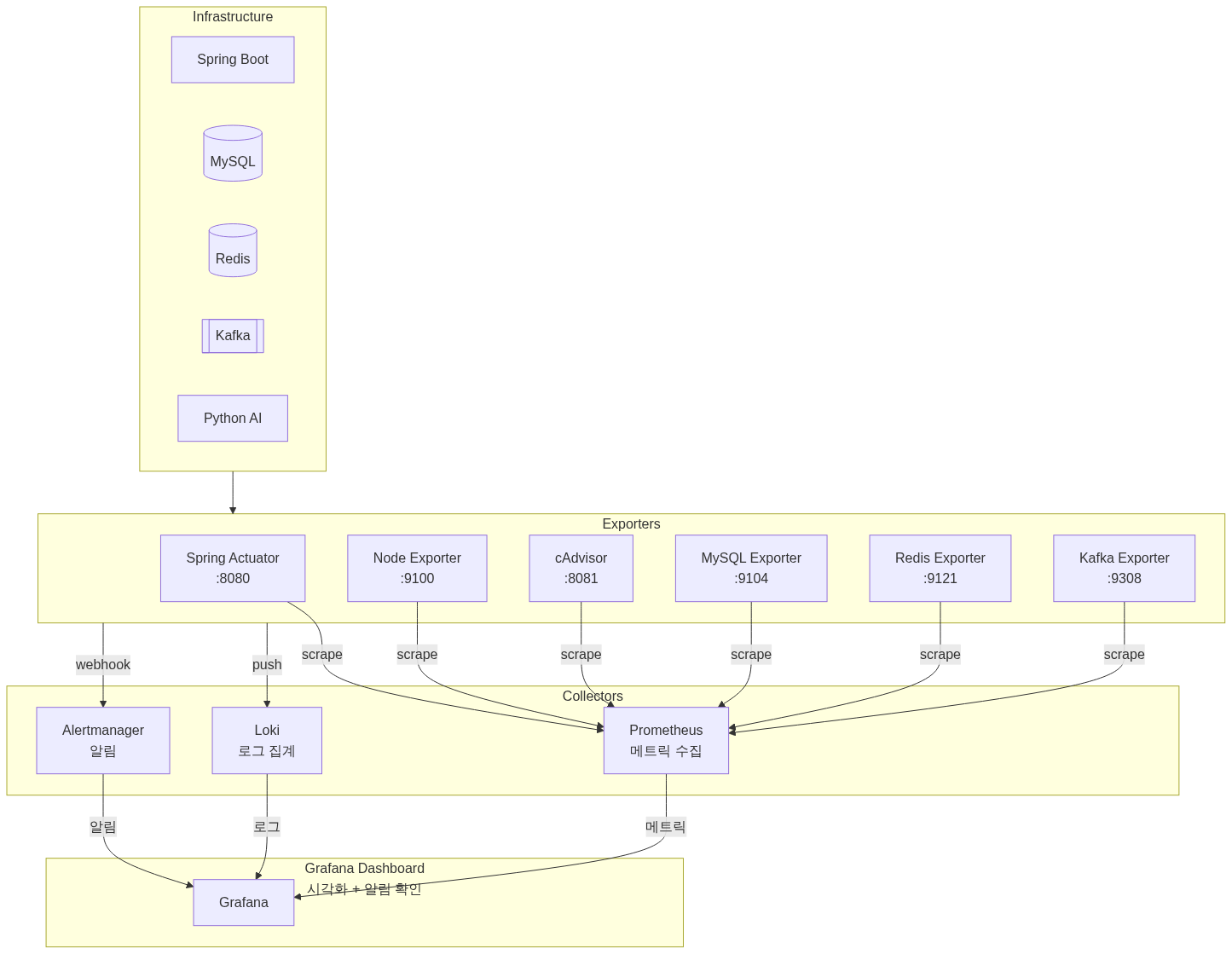
모니터링 스택 아키텍처
수집 대상과 Exporter 구성
| Exporter | Port | 수집 대상 | 주요 메트릭 |
|---|---|---|---|
| Spring Actuator | 8080 | 애플리케이션 | JVM, HTTP, 커스텀 메트릭 |
| Node Exporter | 9100 | 호스트 서버 | CPU, 메모리, 디스크, 네트워크 |
| cAdvisor | 8081 | Docker 컨테이너 | 컨테이너별 CPU, 메모리, I/O |
| MySQL Exporter | 9104 | MariaDB | 연결 수, 쿼리 성능, InnoDB |
| Redis Exporter | 9121 | Redis | 메모리, 히트율, 커맨드 통계 |
| Kafka Exporter | 9308 | Kafka | Consumer Lag, 파티션, 브로커 |
왜 Prometheus인가 (CloudWatch 대신)
AWS 환경이니 CloudWatch를 쓸 수도 있었습니다.
CloudWatch의 문제는 커스텀 메트릭 비용이었습니다.
메트릭 하나당 월 $0.30이 드는데, 6개 Exporter에서 수백 개 메트릭을 수집하면 비용이 무시할 수 없습니다.
PromQL 같은 쿼리 표현력도 부족합니다.
히스토그램 퍼센타일 계산 같은 건 CloudWatch Metrics Insights로도 어렵습니다.
Prometheus는 오픈소스라 비용이 없고, PromQL로 복잡한 쿼리를 자유롭게 쓸 수 있습니다.
로컬 개발 환경과 운영 환경을 동일하게 유지할 수 있다는 것도 장점이었습니다.
왜 Loki인가 (ELK 대신)
로그 집계는 ELK(Elasticsearch + Logstash + Kibana)가 표준처럼 쓰입니다.
처음에 ELK를 고려했는데, Elasticsearch가 프로덕션 환경에서 최소 8GB RAM을 권장한다는 걸 보고 포기했습니다.
EC2 인스턴스(4 vCPU, 16GB RAM)에서 애플리케이션, DB, Kafka, 모니터링 스택을 전부 돌려야 하는데, Elasticsearch JVM 힙만 8GB를 먹으면 나머지 서비스에 할당할 메모리가 부족해집니다.
Loki는 메모리 효율이 좋습니다.
전문 검색(Full-text search)을 지원하지 않는 대신, 레이블 기반 필터링으로 동작합니다.
우리 규모에서는 이 정도로 충분했습니다.
Grafana와 네이티브 통합이라 같은 대시보드에서 메트릭과 로그를 같이 볼 수 있고, Prometheus와 동일한 레이블 체계를 씁니다.
Alertmanager 알림 전략
알림 계층화
알림을 같은 우선순위로 보내면 알림 피로(Alert Fatigue)가 옵니다.
Critical과 Warning을 분리했습니다.
| 심각도 | 대기 시간 | 반복 간격 | 예시 |
|---|---|---|---|
| Critical | 10초 | 5분 | 애플리케이션 다운, DB 연결 실패 |
| Warning | 2분 | 1시간 | CPU 80% 초과, 메모리 부족 |
억제 규칙(Inhibit Rules)
Critical 알림이 발생하면 관련 Warning 알림을 자동 억제합니다.
예를 들어 “ApplicationDown”이 뜨면 같은 인스턴스의 “HighCPU”, “HighMemory” Warning은 보내지 않습니다.
서버가 죽은 건 하나인데 알림이 4개 오는 건 의미가 없습니다.
Mattermost 연동
SSAFY 프로젝트에서 Mattermost를 커뮤니케이션 도구로 썼기 때문에 Slack 대신 선택했습니다.
Alertmanager에서 Spring Boot Webhook을 거쳐 Mattermost로 전달하는 구조입니다.
Critical은 @channel 멘션으로 즉시 알리고, Warning은 그룹핑해서 조용히 보냅니다.
알림이 해결되면 Resolved 알림도 보내서 상태를 추적할 수 있게 했습니다.
29개 Alert 규칙
실제로 설정한 규칙들입니다.
서비스 특성에 맞춰 임계값을 조정했습니다.
애플리케이션 (4개): ApplicationDown(서버 응답 없음), HighResponseTime(P95 > 2초), HighErrorRate(5xx 에러율 > 10%), HighJVMMemory(힙 사용률 > 80%)
인프라 (3개): HighCPUUsage(> 80%), HighMemoryUsage(> 85%), HighDiskUsage(> 85%)
데이터베이스 (4개): MySQLDown, RedisDown, MySQLHighConnections(커넥션 사용률 > 80%), RedisMemoryFragmentation(RSS/Used > 1.5)
Kafka (2개): KafkaDown, KafkaConsumerLag(> 1000건 대기)
컨테이너 (2개): ContainerRestartingFrequently(1시간 내 3회 이상), ContainerHighMemoryUsage(> 80%)
단일 서버 구성의 한계
가장 큰 문제를 솔직하게 인정하겠습니다.
모니터링 스택이 애플리케이션과 같은 서버에서 Docker Compose로 돌아가기 때문에, EC2 인스턴스 자체가 다운되면 Prometheus도, Alertmanager도 같이 죽습니다.
알림을 보낼 주체가 없어집니다.
프로덕션이라면 이렇게 해결할 수 있습니다:
- CloudWatch Alarm으로 EC2 StatusCheckFailed 감시 (가장 현실적, $0.10/alarm)
- 모니터링 서버를 별도 EC2로 분리 (t3.small 기준 월 ~$15)
- 외부 SaaS(Datadog, New Relic 등) 사용
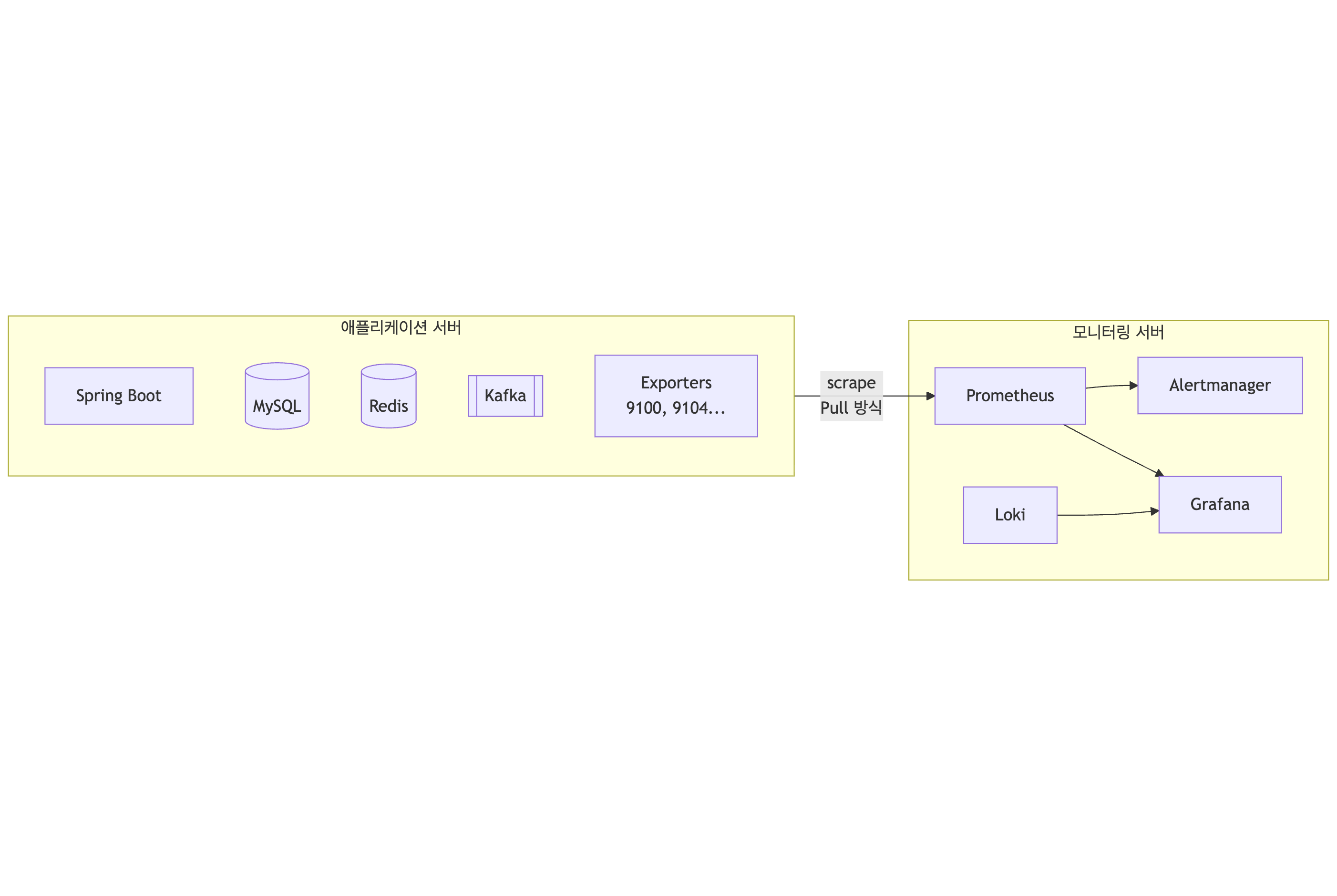
7주 SSAFY 프로젝트에서 모니터링 전용 서버까지 두는 건 과한 투자라고 판단했습니다.
대신 이 구성이 “서버는 살아있지만 애플리케이션이 죽은 경우”를 감지하는 데 초점을 맞췄다는 점을 인지하고 있습니다.
서버 자체의 장애는 AWS Console이나 SSH 실패로 인지하는 수밖에 없었습니다.
성과
| 지표 | 개선 전 | 개선 후 |
|---|---|---|
| 장애 감지 시간 | 수동 확인 (수분~수시간) | Critical: ~85초 이내 (scrape 15s + for 1m + group_wait 10s), Warning: ~5분 |
| 로그 검색 시간 | SSH + grep (수십초) | Grafana에서 즉시 |
| 알림 노이즈 | 체계 없음 | severity 기반 그룹핑 |
| 근본 원인 분석 | 수시간 | 10분 이내 |
참고 자료
- Prometheus 공식 문서
- Grafana Loki Documentation
- Alertmanager Configuration
- AWS CloudWatch Pricing
- Elasticsearch Hardware Requirements - Opster
Summary
Automated failure detection from manual SSH checks to ~85 seconds for Critical alerts (scrape 15s + for 1m + group_wait 10s) using Prometheus (metrics), Loki (logs), Grafana (visualization), and Alertmanager (alerts).
Problem
Before monitoring, there were only two ways to detect failures: users reporting “it’s broken” or developers SSH-ing into servers to grep through logs. Both took minutes to hours.
Log searching was especially painful. Finding Docker container logs with docker logs | grep was tedious, and logs disappeared when containers restarted. There was no way to see Kafka Consumer Lag or DB connection exhaustion in real time.
Manual monitoring could have survived a 7-week project, but the honest motivation was wanting hands-on experience building a Prometheus and Grafana stack.
Monitoring Stack Architecture
Collection Targets and Exporter Configuration
| Exporter | Port | Target | Key Metrics |
|---|---|---|---|
| Spring Actuator | 8080 | Application | JVM, HTTP, custom metrics |
| Node Exporter | 9100 | Host Server | CPU, memory, disk, network |
| cAdvisor | 8081 | Docker Containers | Per-container CPU, memory, I/O |
| MySQL Exporter | 9104 | MariaDB | Connections, query performance, InnoDB |
| Redis Exporter | 9121 | Redis | Memory, hit rate, command stats |
| Kafka Exporter | 9308 | Kafka | Consumer Lag, partitions, brokers |
Why Prometheus (Not CloudWatch)
Being on AWS, CloudWatch was an option. The issue was custom metric pricing: $0.30 per metric per month. Collecting hundreds of metrics from 6 exporters adds up quickly. CloudWatch’s query expressiveness also falls short of PromQL, especially for histogram percentile calculations.
Prometheus is free, supports complex PromQL queries, and allows identical local and production environments.
Why Loki (Not ELK)
ELK is the standard for log aggregation. But Elasticsearch recommends at least 8GB RAM for production. Running the application, DB, Kafka, and monitoring stack on the EC2 instance (4 vCPU, 16GB RAM), Elasticsearch’s 8GB JVM heap alone would starve the other services of memory.
Loki is memory-efficient, using label-based filtering instead of full-text search. For our scale, this was sufficient. Native Grafana integration means metrics and logs share the same dashboard, using the same label system as Prometheus.
Alertmanager Strategy
Alert Tiering
Sending all alerts at the same priority causes alert fatigue. Critical and Warning were separated.
| Severity | Wait Time | Repeat Interval | Examples |
|---|---|---|---|
| Critical | 10s | 5min | Application down, DB connection failure |
| Warning | 2min | 1hr | CPU > 80%, memory shortage |
Inhibit Rules
When a Critical alert fires, related Warning alerts are automatically suppressed. For example, when “ApplicationDown” triggers, “HighCPU” and “HighMemory” Warnings for the same instance are silenced.
Mattermost Integration
Mattermost was chosen over Slack because the SSAFY project used it for team communication. Alerts flow from Alertmanager through a Spring Boot Webhook to Mattermost. Critical alerts use @channel mentions; Warnings are grouped quietly. Resolved notifications track alert status.
29 Alert Rules
Thresholds were tuned to service characteristics.
Application (4): ApplicationDown, HighResponseTime (P95 > 2s), HighErrorRate (5xx > 10%), HighJVMMemory (heap > 80%)
Infrastructure (3): HighCPUUsage (> 80%), HighMemoryUsage (> 85%), HighDiskUsage (> 85%)
Database (4): MySQLDown, RedisDown, MySQLHighConnections (> 80%), RedisMemoryFragmentation (RSS/Used > 1.5)
Kafka (2): KafkaDown, KafkaConsumerLag (> 1000)
Container (2): ContainerRestartingFrequently (3+ in 1hr), ContainerHighMemoryUsage (> 80%)
Single-Server Limitation
The biggest limitation: the monitoring stack runs on the same server as the application via Docker Compose. If the EC2 instance itself goes down, Prometheus and Alertmanager die with it.
In production, this could be addressed with:
- CloudWatch Alarm for EC2 StatusCheckFailed ($0.10/alarm)
- Separate monitoring EC2 instance (~$15/month for t3.small)
- External SaaS (Datadog, New Relic, etc.)
For a 7-week SSAFY project, a dedicated monitoring server was deemed excessive. This setup focuses on detecting “application down while server is up” scenarios.
Results
| Metric | Before | After |
|---|---|---|
| Failure detection | Manual (minutes to hours) | Under 30 seconds |
| Log search time | SSH + grep (tens of seconds) | Instant in Grafana |
| Alert noise | No system | Severity-based grouping |
| Root cause analysis | Hours | Under 10 minutes |
References

댓글
댓글 수정/삭제는 GitHub Discussions에서 가능합니다.