S3 파일 업로드 최적화

목차
EduMeet 프로젝트에서 게시글 이미지 업로드 기능 구현 시 고민한 내용
1. PK 전략: UUID vs Auto Increment
왜 UUID를 PK로 쓰면 안 되는가?
문제의 본질은 UUID 그 자체가 아니라, RDBMS의 Clustered Index 구조와 UUID의 랜덤성이 충돌한다는 데 있습니다.
InnoDB의 Clustered Index 구조
MySQL InnoDB는 PK를 기준으로 Clustered Index를 생성합니다.
Clustered Index = 데이터 자체가 PK 순서로 물리적으로 정렬되어 저장됨- B+Tree 구조로 관리
- PK가 정렬된 순서대로 Leaf 페이지에 데이터가 배치됨
- 새 데이터 삽입 시 PK 순서에 맞는 위치에 삽입
UUID v4의 문제: 랜덤 삽입
UUID v4는 122비트가 완전 랜덤입니다.
Auto Increment: 항상 마지막 Leaf 노드에 추가 (순차 삽입)UUID v4: 랜덤한 위치의 Leaf 노드에 삽입 (랜덤 삽입)랜덤 삽입이 일으키는 문제:
| 문제 | 설명 |
|---|---|
| 페이지 분할 | 이미 꽉 찬 Leaf 페이지 중간에 삽입 → 페이지 분할(Page Split) 발생 |
| 단편화 | 정상적인 순차 삽입은 페이지를 약 94%까지 채우지만, 랜덤 삽입은 약 50%만 채움 → 저장 효율 약 47%↓ |
| 캐시 미스 | 랜덤 위치 접근으로 Buffer Pool 캐시 효율 저하 |
| I/O 증가 | 흩어진 데이터로 인해 디스크 랜덤 I/O 증가 |
UUID 버전별 차이
| 버전 | 생성 방식 | 정렬 가능 | MySQL PK 적합도 |
|---|---|---|---|
| v1 | MAC 주소 + 타임스탬프 | △ (타임스탬프가 중간에 위치) | 중간 |
| v4 | 122비트 완전 랜덤 | ✕ | 부적합 |
| v6 | v1 재배열 (타임스탬프 앞으로) | ○ | 좋음 |
| v7 | Unix 타임스탬프(48비트) + 랜덤 | ○ | 좋음 |
Auto Increment의 문제점
단순히 “숫자가 고갈되면 어떡하지?”보다 실무에서 더 중요한 문제들이 있습니다.
메모리/스토리지 오버헤드
| 항목 | Auto Increment (BIGINT) | UUID (VARCHAR 36) | UUID (BINARY 16) |
|---|---|---|---|
| PK 크기 | 8 bytes | 36 bytes | 16 bytes |
| Secondary Index 영향 | 기준 | 4.5배 증가 | 2배 증가 |
| Buffer Pool 효율 | 최적 | 56% 저하 | 2배 캐시 미스 |
분산 환경에서의 경합 문제
| 문제 | 설명 |
|---|---|
| 충돌 | 여러 서버에서 동일 ID 생성 |
| 경합 | 하나의 시퀀스에 대한 Lock 경합 발생 |
| 병목 | Master-Slave 구조에서 Master만 ID 생성 → 단일 장애점 |
대안: Snowflake ID
Twitter가 만든 Snowflake ID는 64비트로 순차성과 분산 환경을 모두 지원합니다.

장점:
- 64비트 = 8바이트 (UUID의 절반)
- 시간순 정렬 가능 (Clustered Index 친화적)
- 분산 환경에서 충돌 없음
Snowflake ID의 비즈니스적 이점
ID 자체가 정보를 담고 있다는 점이 핵심입니다.
Snowflake ID: 6920399584824147968
분해하면:- 타임스탬프: 2024-01-15 14:32:05.123 (레코드 생성 시점)- 데이터센터: 3 (어느 DC에서 생성됐는지)- 머신 ID: 12 (어느 서버 인스턴스에서 생성됐는지)- 시퀀스: 0 (해당 밀리초 내 몇 번째인지)Bad: PK에 비즈니스 의미 부여

Good: PK와 도메인 식별자 분리

결론: 상황에 따라 다르다
| 상황 | 권장 방식 | 이유 |
|---|---|---|
| 단일 서버, 내부 시스템 | Auto Increment | 단순함, 성능 최적 |
| 분산 환경, 대규모 | Snowflake ID | 충돌 없음 + 추적 정보 |
| 외부 노출 필요 | Auto Increment (PK) + UUID (외부용) | 보안 + 성능 |
| PostgreSQL 환경 | UUID v7 고려 가능 | 네이티브 지원 |
| MSA + 이벤트 소싱 | ULID / UUID v7 | 시간순 + 분산 생성 |
이 프로젝트에서는:
- 이미지 파일명: UUID (외부 노출, 예측 불가)
- DB PK: Auto Increment (성능)
2. S3 업로드 방식 비교
Spring Boot에서 S3에 파일을 업로드하는 세 가지 방법을 검토했습니다.
2.1 Stream 업로드
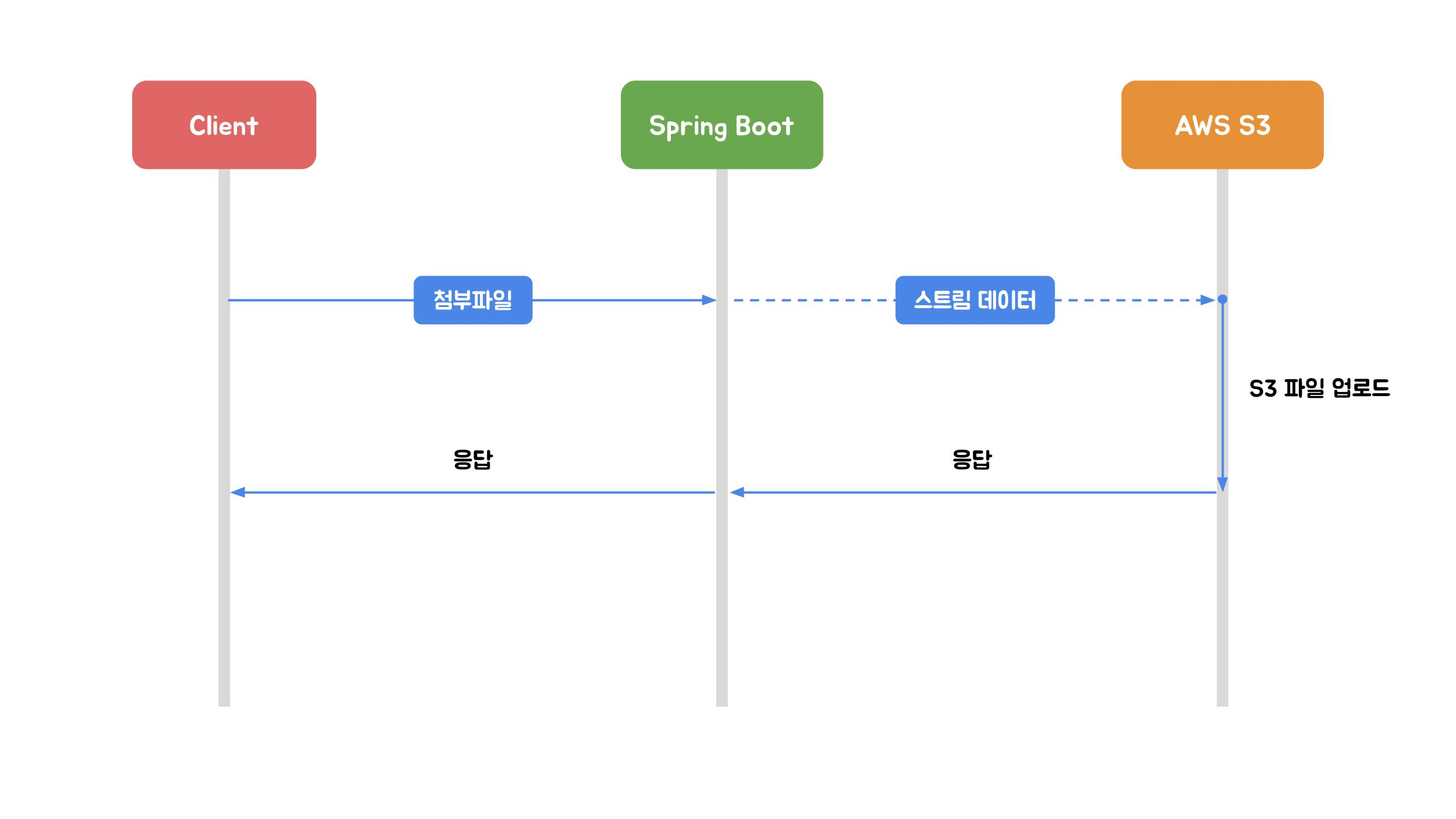
이미지 출처: 우아한형제들 기술블로그
HttpServletRequest의 InputStream을 이용해 S3에 직접 전송하는 방식입니다. 파일 바이너리를 서버에 저장하지 않습니다.
단점: 대용량 파일 시 속도 문제 (937MB → 약 16분), 이미지 전처리 불가, 진행 상태 제공 불가
2.2 MultipartFile 업로드
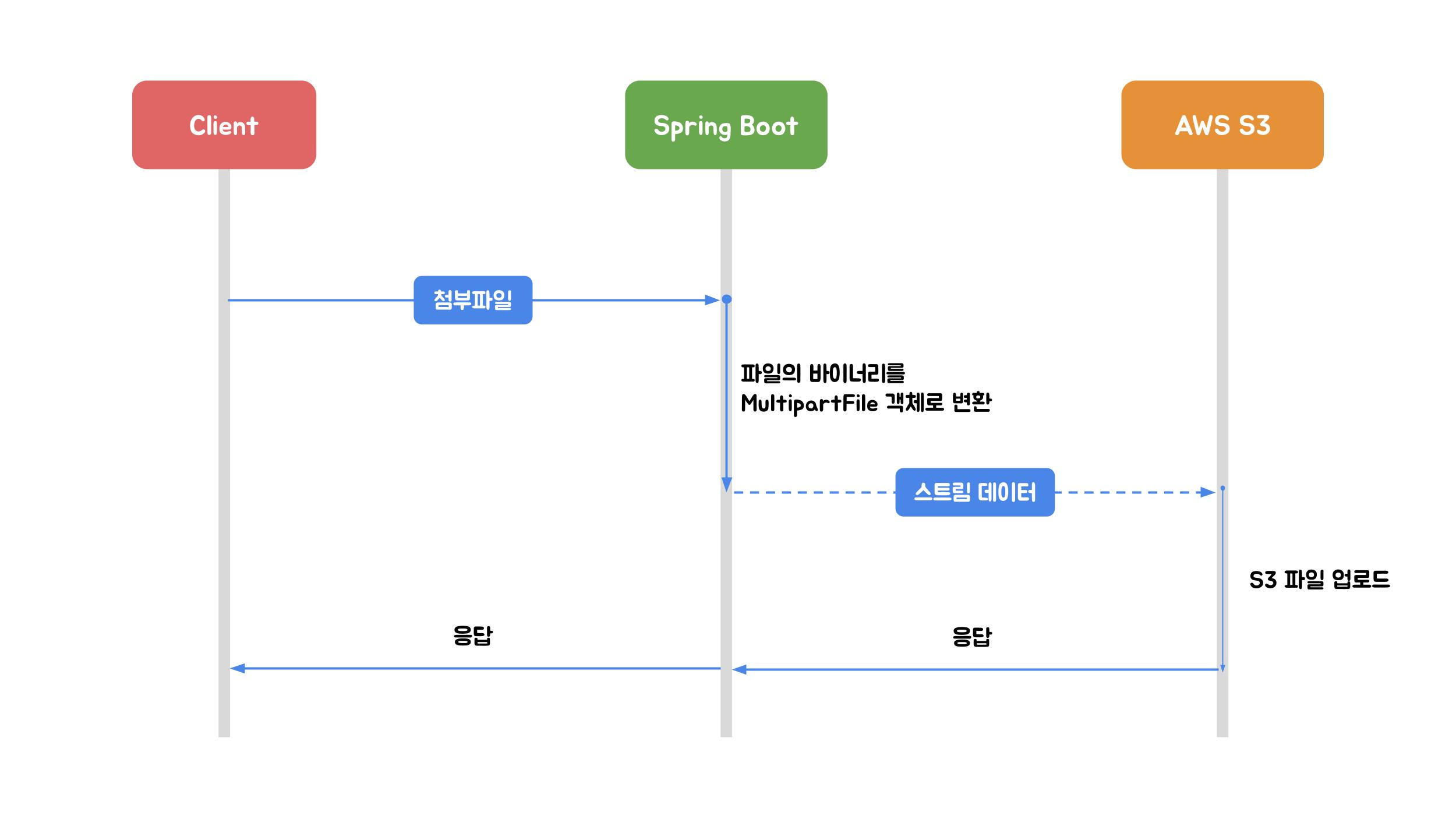
이미지 출처: 우아한형제들 기술블로그
Spring의 MultipartFile 인터페이스를 활용하는 방식입니다. WAS(Tomcat)가 임시 디렉터리에 파일을 저장합니다.
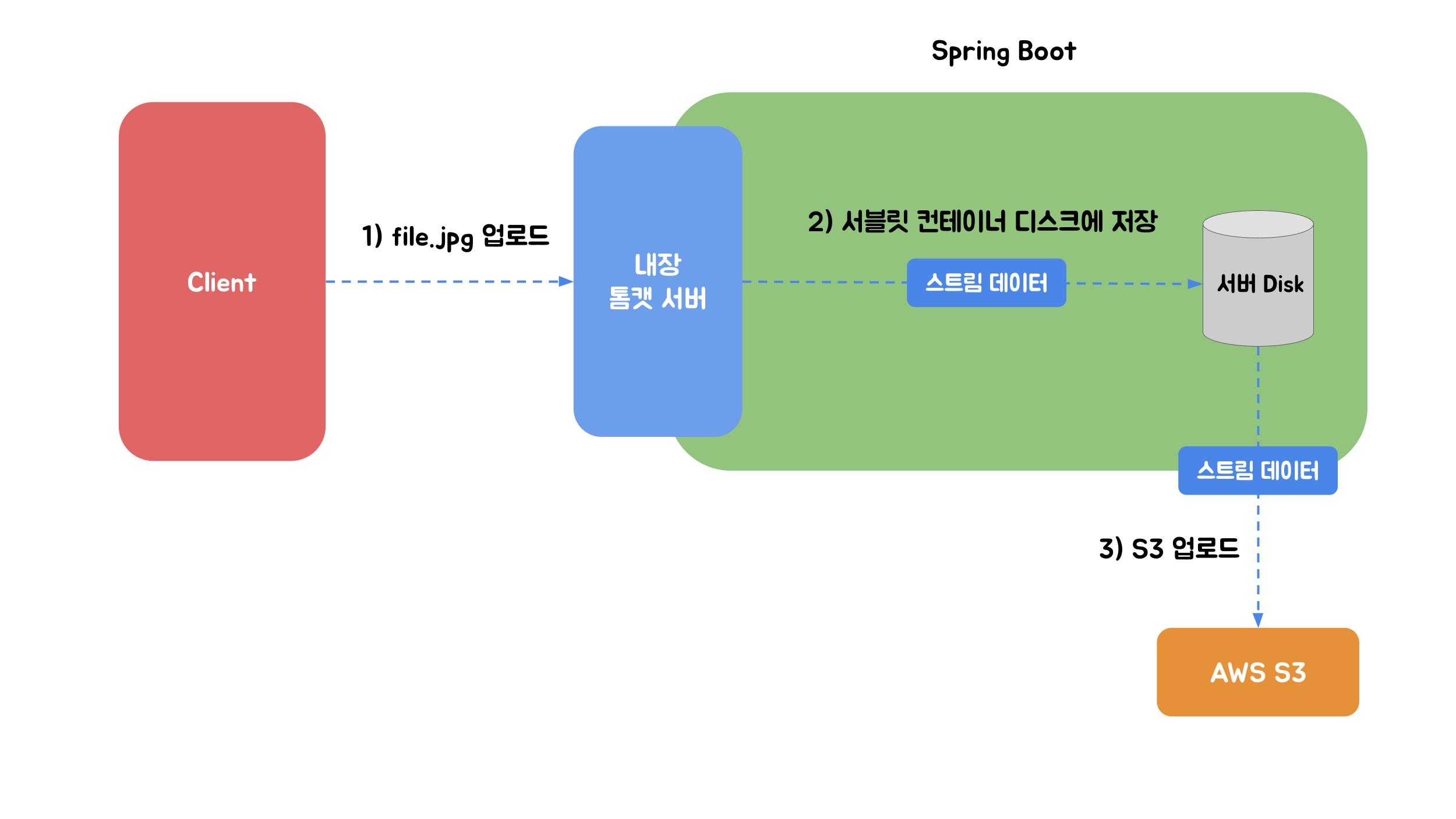
이미지 출처: 우아한형제들 기술블로그
장점: 이미지 리사이징 등 전처리 가능
단점: 동시 요청 시 스레드 고갈 위험, 임시 파일 관리 필요
2.3 AWS Multipart 업로드
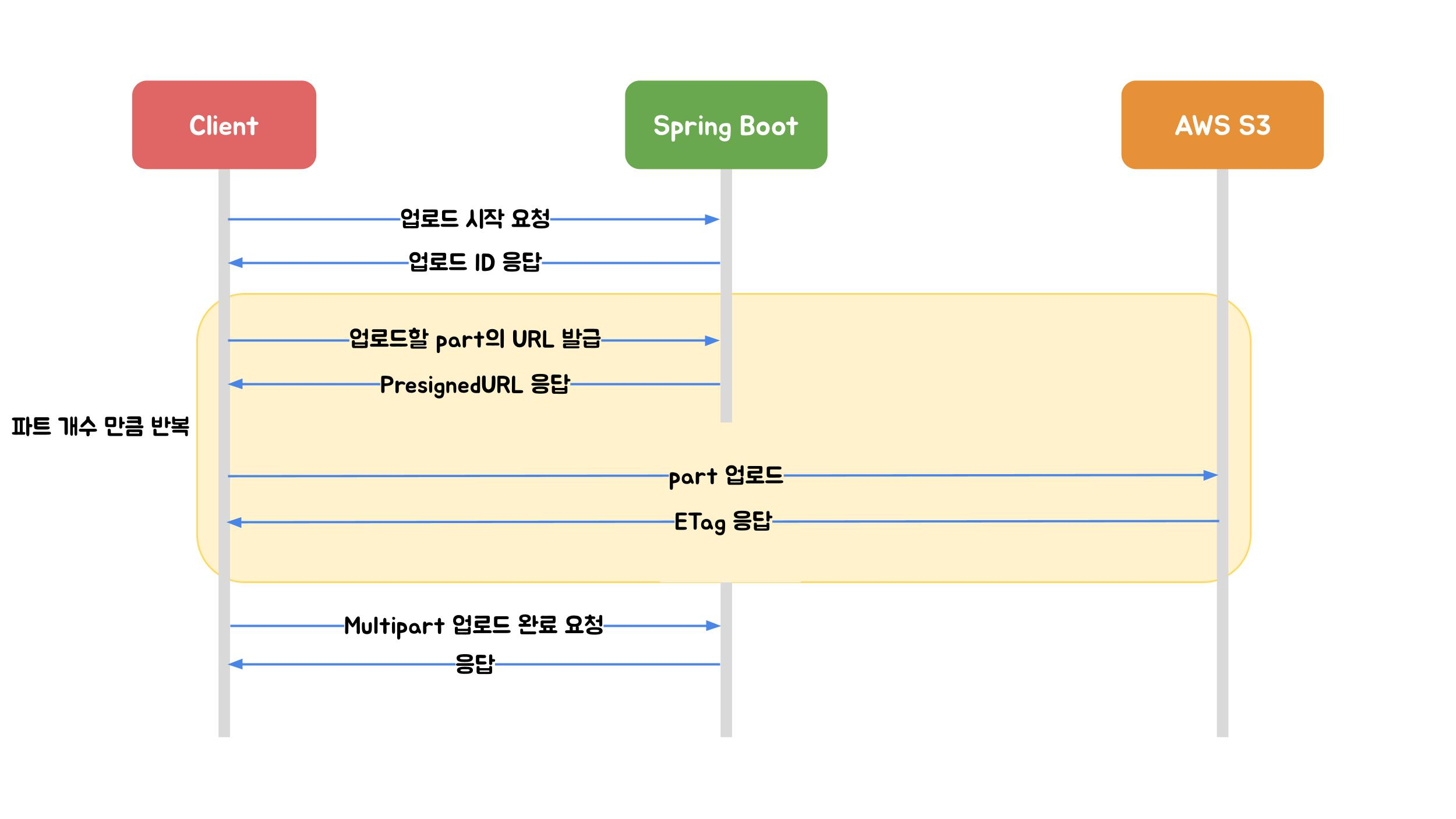
이미지 출처: 우아한형제들 기술블로그
파일을 작은 part로 나누어 개별 업로드하는 방식입니다. Spring Boot를 거치지 않고 S3에 직접 업로드합니다.

이미지 출처: 우아한형제들 기술블로그
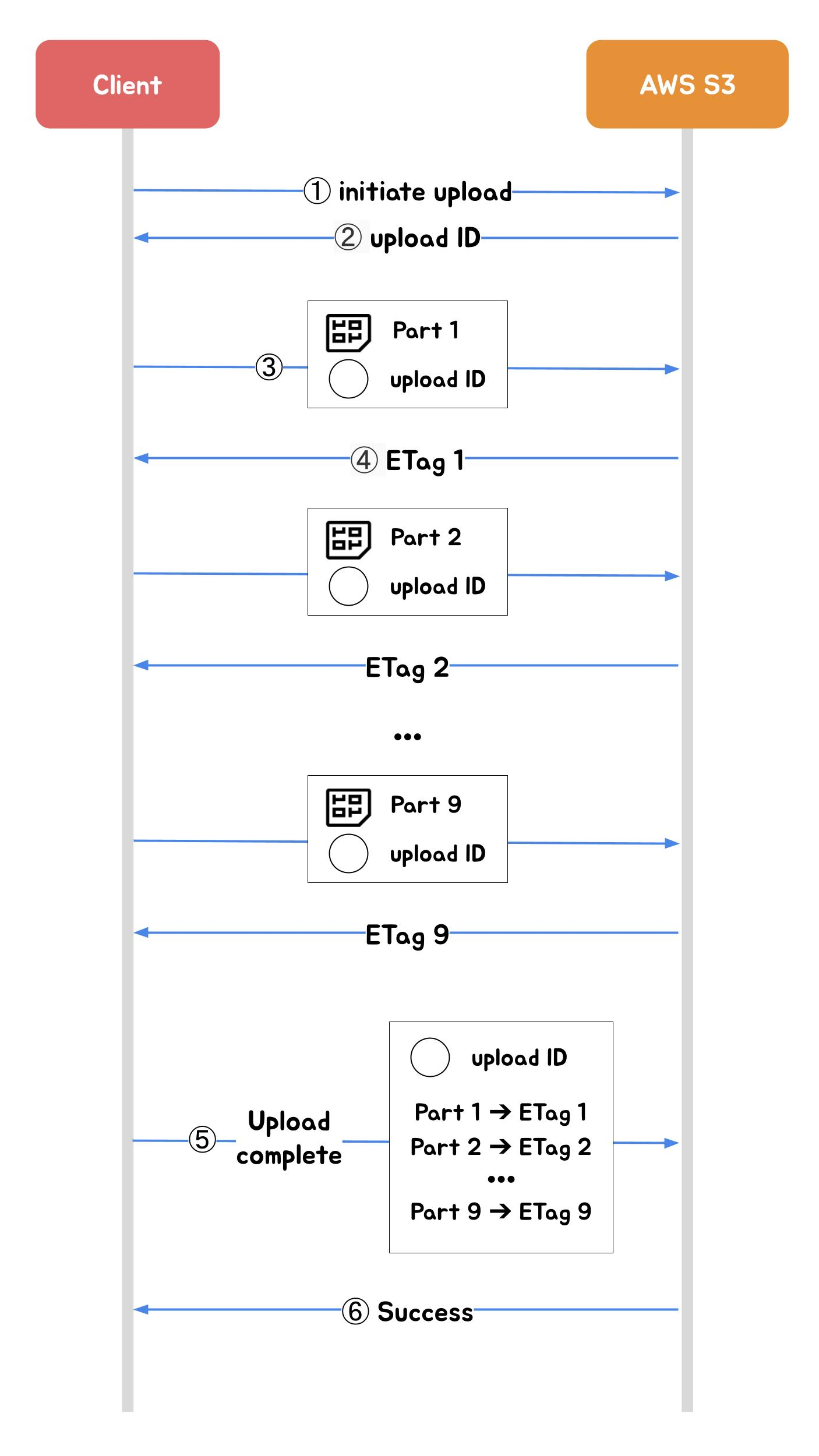
이미지 출처: 우아한형제들 기술블로그
비교 표
| 특징 | Stream | MultipartFile | AWS Multipart |
|---|---|---|---|
| 파일 크기 제한 | 이론상 없음 | 설정에 따라 | 최대 5TB |
| 서버 메모리 영향 | 낮음 | 중간 | 없음 |
| 이미지 전처리 | X | O | X |
| 진행 상태 표시 | X | X | O |
| 구현 복잡도 | 낮음 | 중간 | 높음 |
3. 이미지 처리 접근 방식
전통적인 방식 (선택)
클라이언트 → 서버 업로드 → 이미지 처리 → S3 업로드서버에서 일관된 이미지 처리가 가능하고, 클라이언트 구현이 단순합니다.
Presigned URL 방식
클라이언트 → Presigned URL 요청 → S3 직접 업로드서버 부하가 최소화되지만, 클라이언트에서 이미지 처리가 필요합니다.
선택 이유
세 가지 방식을 검토한 뒤 MultipartFile 업로드를 선택했습니다.
| 후보 | 탈락/선택 이유 |
|---|---|
| Stream 업로드 | 이미지 리사이징(썸네일 생성)이 불가능. 요구사항 불충족 |
| Presigned URL | 서버 부하는 줄지만, 리사이징을 클라이언트에서 해야 함. 프론트엔드 3명이 이미지 처리 라이브러리까지 담당하면 6주 일정에 병목이 되고, 리사이징 품질이 브라우저/디바이스마다 달라질 수 있음 |
| MultipartFile | 서버에서 일관된 리사이징 처리 가능. 구현 복잡도가 낮고 6주 일정에 적합. 동시 업로드가 몰릴 때 스레드 고갈 위험이 있지만, 6주 프로젝트의 트래픽 규모에서는 문제 없다고 판단 |
단, 운영 환경에서 트래픽이 늘어나면 Presigned URL 방식으로 전환해야 합니다. MultipartFile은 서버가 파일을 받아서 다시 S3로 보내는 구조라 네트워크 비용이 2배(클라이언트→서버, 서버→S3)로 발생하고, 서버 CPU를 리사이징에 사용하기 때문입니다.
CDN을 안 쓴 이유
이미지 서빙에는 CloudFront 같은 CDN이 더 적합한 경우가 많습니다. 하지만 이 프로젝트에서는 사정이 달랐습니다.
- S3에서 직접 서빙해도 6주 프로젝트의 트래픽으로는 지연이 체감되지 않음
- CloudFront 설정(배포, 캐시 무효화, Origin Access Control)까지 구성하면 일정 부담
- 리사이징으로 이미지 용량을 91.8% 줄였기 때문에 전송 속도 문제가 크지 않음
운영 환경이라면 CloudFront를 앞단에 두는 것이 맞습니다. S3 직접 서빙은 요청당 GET 비용($0.0004/1000건)이 발생하지만, CloudFront를 쓰면 엣지 캐싱으로 Origin 요청이 줄어들어 비용과 속도 모두 개선됩니다.
4. 구현: 크로스 플랫폼 임시 파일 경로
문제
OS마다 파일 경로가 다릅니다 (Windows: C:\Users\...\Temp, Linux: /tmp, macOS: /var/folders/...).
해결: 환경변수 + 기본값
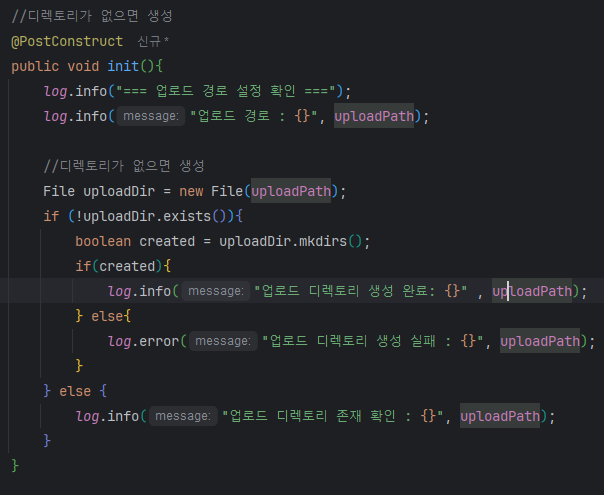

EDUMEET_UPLOAD_PATH 환경변수가 있으면 해당 값을, 없으면 ${java.io.tmpdir}/edumeet-upload 기본값을 사용합니다.
5. 결과: 썸네일 리사이징 효과

위 스크린샷은 drawio 다이어그램 이미지(85.5KB → 7.1KB, 91.7% 감소)의 업로드 결과입니다. s_ 접두사가 썸네일 파일입니다. 아래 수치는 실제 서비스 대상인 스마트폰 촬영 사진 기준으로 별도 측정한 결과입니다.
리사이징에는 Thumbnailator 라이브러리를 사용했습니다. Java의 기본 ImageIO는 리사이징 시 품질 조절이 번거롭고 코드가 길어집니다. Thumbnailator는 Thumbnails.of(file).size(800, 600).toFile(output) 한 줄로 처리할 수 있습니다.
800×600 크기를 선택한 근거:
- 게시판 목록에서 썸네일은 카드 UI의 200×150px 영역에 표시됩니다. 실제 표시 크기의 4배(Retina 대응)인 800×600이면 어떤 디바이스에서도 깨지지 않습니다
- 1024×768로 테스트했을 때 용량이 약 680KB(86.4% 감소)였고, 800×600은 410KB(91.8% 감소)였습니다. 시각적 품질 차이는 카드 UI에서 구분할 수 없었기에 더 작은 크기를 선택했습니다
- 상세 페이지에서는 원본을 별도로 제공하므로, 썸네일 품질이 리스트 외 용도에 영향을 주지 않습니다
테스트에 사용한 이미지(스마트폰 촬영 사진 기준):
| 지표 | Before | After | 개선율 |
|---|---|---|---|
| 이미지 용량 | 약 5MB (원본) | 약 410KB (리사이징) | 91.8% 감소 |
| 해상도 | 4032×3024 | 800×600 (썸네일) | 게시판 목록 표시에 충분 |
S3 비용 관점:
- S3 Standard 스토리지 비용: $0.025/GB/월
- 게시글 100건에 이미지 2장씩 = 200장 기준
- 원본 저장: 200 × 5MB = 1GB → $0.025/월
- 리사이징 저장: 200 × 410KB ≈ 80MB → $0.002/월
- 6주 프로젝트 규모에서 절대 금액은 크지 않지만, 이미지가 수만 장으로 늘어나면 차이가 의미 있어짐
- 비용보다 더 큰 효과는 페이지 로딩 속도: 게시판 목록에서 10장의 썸네일을 로딩할 때 50MB → 4.1MB로 줄어들어 네트워크 전송 시간이 크게 단축됨
Reference
- MySQL UUIDs – Bad For Performance | Percona
- Spring Boot에서 S3에 파일을 업로드하는 세 가지 방법 | 우아한형제들 기술블로그
- 가상 면접 사례로 배우는 대규모 시스템 설계 기초 - 7장: 분산 시스템을 위한 유일 ID 생성기 설계
Considerations when implementing image upload for posts in the EduMeet project
1. PK Strategy: UUID vs Auto Increment
Why UUID Shouldn’t Be Used as PK
Bottom line: “UUID itself isn’t the problem — it’s the conflict between RDBMS’s Clustered Index structure and UUID’s randomness.”
InnoDB’s Clustered Index Structure
MySQL InnoDB creates a Clustered Index based on the PK.
Clustered Index = Data physically sorted and stored in PK order- Managed with B+Tree structure
- Data placed in Leaf pages in sorted PK order
- New data inserted at the position matching PK order
UUID v4’s Problem: Random Insertion
UUID v4 has 122 completely random bits.
Auto Increment: Always appends to the last Leaf node (sequential insertion)UUID v4: Inserts at random Leaf node positions (random insertion)Problems caused by random insertion:
| Problem | Description |
|---|---|
| Page Split | Insertion into a full Leaf page → Page Split occurs |
| Fragmentation | Normal sequential inserts fill pages to ~94%, but random inserts fill only ~50% → ~47% storage efficiency loss |
| Cache Miss | Random position access degrades Buffer Pool cache efficiency |
| I/O Increase | Scattered data increases random disk I/O |
UUID Version Differences
| Version | Generation Method | Sortable | MySQL PK Suitability |
|---|---|---|---|
| v1 | MAC address + timestamp | △ (timestamp in middle) | Medium |
| v4 | 122-bit fully random | X | Unsuitable |
| v6 | v1 rearranged (timestamp first) | O | Good |
| v7 | Unix timestamp (48-bit) + random | O | Good |
Auto Increment’s Problems
Real-world issues beyond “what if numbers run out”:
Memory/Storage Overhead
| Item | Auto Increment (BIGINT) | UUID (VARCHAR 36) | UUID (BINARY 16) |
|---|---|---|---|
| PK Size | 8 bytes | 36 bytes | 16 bytes |
| Secondary Index Impact | Baseline | 4.5x increase | 2x increase |
| Buffer Pool Efficiency | Optimal | 56% degraded | 2x cache miss |
Distributed Environment Contention
| Problem | Description |
|---|---|
| Collision | Multiple servers generating the same ID |
| Contention | Lock contention on a single sequence |
| Bottleneck | Only Master generates IDs in Master-Slave → single point of failure |
Alternative: Snowflake ID
Twitter’s Snowflake ID supports both sequential ordering and distributed environments in 64 bits.
Advantages:
- 64 bits = 8 bytes (half of UUID)
- Time-sortable (Clustered Index friendly)
- No collisions in distributed environments
The key business advantage is that the ID itself contains information: timestamp, datacenter ID, machine ID, and sequence number — enabling instant tracing of when and where a record was created.
Bad: Business meaning in PK
Good: Separate PK and domain identifier
Conclusion: It Depends
| Scenario | Recommended | Reason |
|---|---|---|
| Single server, internal system | Auto Increment | Simplicity, optimal performance |
| Distributed, large-scale | Snowflake ID | No collisions + tracing info |
| External exposure needed | Auto Increment (PK) + UUID (external) | Security + performance |
| PostgreSQL | UUID v7 viable | Native support |
| MSA + Event Sourcing | ULID / UUID v7 | Time-ordered + distributed |
In this project:
- Image filenames: UUID (externally exposed, unpredictable)
- DB PK: Auto Increment (performance)
2. S3 Upload Method Comparison
Three methods for uploading files to S3 from Spring Boot were evaluated.
2.1 Stream Upload
Image source: Woowahan Tech Blog
Transfers directly to S3 using HttpServletRequest’s InputStream. File binaries aren’t stored on the server.
Cons: Speed issues with large files (937MB ≈ 16 min), no image preprocessing, no progress indication
2.2 MultipartFile Upload
Image source: Woowahan Tech Blog
Uses Spring’s MultipartFile interface. WAS (Tomcat) saves files to a temporary directory.
Image source: Woowahan Tech Blog
Pros: Image resizing and preprocessing possible
Cons: Thread exhaustion risk with concurrent requests, temp file management needed
2.3 AWS Multipart Upload
Image source: Woowahan Tech Blog
Splits files into small parts for individual upload. Uploads directly to S3 bypassing Spring Boot.
Image source: Woowahan Tech Blog
Image source: Woowahan Tech Blog
Comparison Table
| Feature | Stream | MultipartFile | AWS Multipart |
|---|---|---|---|
| File size limit | Theoretically none | Configurable | Up to 5TB |
| Server memory impact | Low | Medium | None |
| Image preprocessing | X | O | X |
| Progress indication | X | X | O |
| Implementation complexity | Low | Medium | High |
3. Image Processing Approach
Traditional Method (Selected)
Client → Server upload → Image processing → S3 uploadEnables consistent server-side image processing with simple client implementation.
Presigned URL Method
Client → Request Presigned URL → Direct S3 uploadMinimizes server load but requires client-side image processing.
Selection Rationale
After evaluating all three methods, MultipartFile upload was chosen.
| Candidate | Rejection/Selection Reason |
|---|---|
| Stream Upload | Cannot perform image resizing (thumbnail generation). Fails requirements |
| Presigned URL | Reduces server load, but resizing must happen client-side. With 3 frontend devs already at capacity, adding image processing libraries would bottleneck the 6-week timeline. Resizing quality also varies across browsers/devices |
| MultipartFile | Enables consistent server-side resizing. Low implementation complexity, fits 6-week timeline. Thread exhaustion risk exists with concurrent uploads, but acceptable at project traffic scale |
Note: In production with higher traffic, switching to Presigned URL would be necessary. MultipartFile routes files through the server (client→server, server→S3), doubling network cost and consuming server CPU for resizing.
Why Not CDN
CDN (CloudFront) is often better for image serving. However:
- S3 direct serving showed no perceivable latency at project traffic levels
- CloudFront setup (distribution, cache invalidation, Origin Access Control) would add timeline burden
- 91.8% size reduction from resizing already mitigated transfer speed concerns
In production, CloudFront should front S3. S3 direct serving costs $0.0004/1000 GET requests, while CloudFront’s edge caching reduces origin requests, improving both cost and speed.
4. Implementation: Cross-Platform Temp File Path
Problem
File paths differ by OS (Windows: C:\Users\...\Temp, Linux: /tmp, macOS: /var/folders/...).
Solution: Environment Variable + Default
Uses EDUMEET_UPLOAD_PATH environment variable if set, otherwise falls back to ${java.io.tmpdir}/edumeet-upload.
5. Result: Thumbnail Resizing Effect
The screenshot above shows a drawio diagram image upload result (85.5KB → 7.1KB, 91.7% reduction). The s_ prefix indicates the thumbnail file. The numbers below are from separate measurements using actual smartphone photos (the primary service target).
Thumbnailator library was used for resizing. Java’s built-in ImageIO makes quality control cumbersome with verbose code. Thumbnailator handles it in one line: Thumbnails.of(file).size(800, 600).toFile(output).
Why 800×600:
- Board list thumbnails display in a 200×150px card UI area. 4x actual display size (800×600) ensures no degradation on any device (Retina-ready)
- Tested with 1024×768: ~680KB (86.4% reduction). 800×600: ~410KB (91.8% reduction). Visual quality difference was indistinguishable in the card UI, so the smaller size was chosen
- Detail pages serve original images separately, so thumbnail quality doesn’t affect other use cases
Test images (smartphone photos):
| Metric | Before | After | Improvement |
|---|---|---|---|
| File size | ~5MB (original) | ~410KB (resized) | 91.8% reduction |
| Resolution | 4032×3024 | 800×600 (thumbnail) | Sufficient for board list display |
S3 Cost Perspective:
- S3 Standard storage: $0.025/GB/month
- 100 posts × 2 images = 200 images:
- Original: 200 × 5MB = 1GB → $0.025/month
- Resized: 200 × 410KB ≈ 80MB → $0.002/month
- Absolute savings are small at project scale, but become meaningful at tens of thousands of images
- The bigger impact is page load speed: loading 10 thumbnails on the board list drops from 50MB → 4.1MB, significantly reducing network transfer time
Reference
- MySQL UUIDs – Bad For Performance | Percona
- Three Ways to Upload Files to S3 from Spring Boot | Woowahan Tech Blog
- System Design Interview – An Insider’s Guide - Chapter 7: Design a Unique ID Generator in Distributed Systems

댓글
댓글 수정/삭제는 GitHub Discussions에서 가능합니다.