셀 입력 및 수식바 동기화 최적화
목차
최종 결론
오픈소스 스프레드시트들은 debounce/throttle 없이 즉시 동기화해요.
// 최종 구현 (오픈소스 방식)onInput={(e) => { const val = (e.target as HTMLInputElement).value; setFormulaBarValue(val); // 즉시 동기화, throttle/debounce 없음}}수정 히스토리
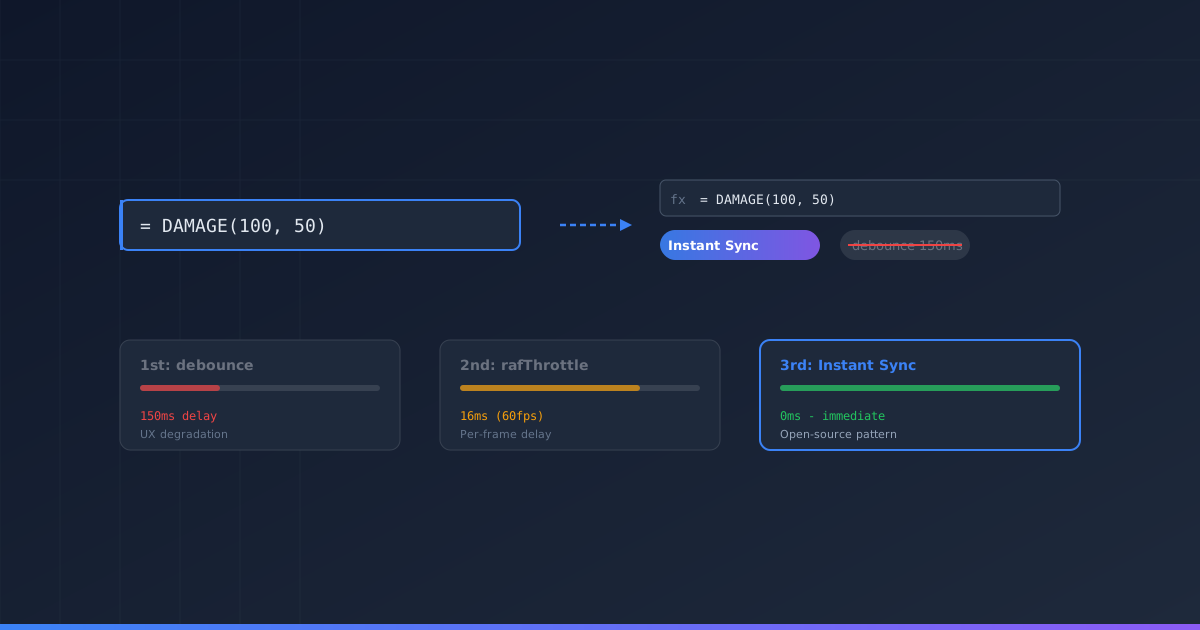
1차 수정: debounce 적용 (150ms)
문제 인식: 셀 입력 시 수식바 동기화로 인한 렌더링 부하
해결 시도:
// debounce 유틸리티 추가const debouncedSetFormulaBarValue = useMemo(  () => debounce((value: string) => {    setFormulaBarValue(value);  }, 150),  []);
onInput={(e) => { debouncedSetFormulaBarValue(val); // 150ms 후 동기화}}결과: 타이핑 후 150ms 지연이 발생했어요 → UX 저하
2차 수정: rafThrottle 적용 (60fps)
문제 인식: 150ms debounce가 너무 느림, Excel처럼 즉시 반영 필요
해결 시도:
// requestAnimationFrame 기반 throttleconst throttledSetFormulaBarValue = useMemo(  () => rafThrottle((value: string) => {    setFormulaBarValue(value);  }),  []);
onInput={(e) => { throttledSetFormulaBarValue(val); // 16ms(60fps) 간격 동기화}}결과: 더 빠르지만 여전히 프레임 단위 지연이 있었어요
3차 수정: 오픈소스 분석 후 즉시 동기화
문제 인식: “오픈소스들은 어떻게 하지?” → 직접 코드 분석
오픈소스 분석 결과:
| 라이브러리 | 핵심 방식 | throttle/debounce |
|---|---|---|
| Fortune-Sheet | 에디터 내용을 수식바에 직접 복사 | 없음 |
| Univer | RxJS Observable 공유 | 없음 |
| Luckysheet | jQuery로 에디터 내용을 수식바에 직접 복사 | 없음 |
Fortune-Sheet 실제 코드 (packages/core/src/modules/formula.ts):
// handleFormulaInput 함수 - 에디터 값을 수식바에 즉시 복사$editor.textContent = value;if ($copyTo) $copyTo.textContent = value;참고: 실제 Fortune-Sheet 코드는 HTML 콘텐츠 복사를 위해 DOM 프로퍼티를 직접 조작합니다.
최종 해결:
onInput={(e) => { const val = (e.target as HTMLInputElement).value; // 오픈소스 방식: 즉시 동기화 setFormulaBarValue(val);}}결과: Excel과 동일한 즉시 반영이 가능하고, 성능 문제도 없어요
왜 즉시 동기화가 성능 문제 없는가?
오픈소스가 즉시 동기화하는 이유: Fortune-Sheet, Luckysheet는 React를 사용하지 않고 DOM을 직접 조작하기 때문에 상태 관리 오버헤드 자체가 없어요. Univer는 RxJS Observable로 값을 공유하므로 리렌더링 없이 동기화돼요.
본 프로젝트에서 즉시 동기화가 가능한 이유:
- 수식바는 독립 컴포넌트라서 테이블 전체가 리렌더링되지 않아요
- React 18 batching 덕분에 여러 setState가 하나로 합쳐져요
- 문자열만 업데이트하기 때문에 연산 부하가 거의 없습니다
교훈
| 접근 방식 | 문제점 |
|---|---|
| 추측으로 최적화 | 불필요한 복잡성 추가 |
| 오픈소스 분석 | 검증된 패턴 발견 |
“premature optimization is the root of all evil” - 실제로 문제가 되는지 먼저 확인하고, 오픈소스에서 검증된 방식을 따르는 게 정답이에요.
참고한 오픈소스
- Fortune-Sheet -
packages/core/src/modules/formula.ts - Univer -
packages/sheets-ui/src/views/formula-bar/FormulaBar.tsx - Luckysheet -
src/controllers/menuButton.js
Final Conclusion
Open-source spreadsheets synchronize immediately without debounce/throttle.
// Final implementation (open-source approach)onInput={(e) => { const val = (e.target as HTMLInputElement).value; setFormulaBarValue(val); // Immediate sync, no throttle/debounce}}Revision History
1st Revision: debounce Applied (150ms)
Problem: Rendering load from formula bar sync during cell input
Attempted solution:
const debouncedSetFormulaBarValue = useMemo(  () => debounce((value: string) => {    setFormulaBarValue(value);  }, 150),  []);
onInput={(e) => { debouncedSetFormulaBarValue(val); // Sync after 150ms}}Result: 150ms delay after typing → UX degradation
2nd Revision: rafThrottle Applied (60fps)
Problem: 150ms debounce too slow, need instant reflection like Excel
Attempted solution:
const throttledSetFormulaBarValue = useMemo(  () => rafThrottle((value: string) => {    setFormulaBarValue(value);  }),  []);
onInput={(e) => { throttledSetFormulaBarValue(val); // 16ms (60fps) interval sync}}Result: Faster but still per-frame delay
3rd Revision: Immediate Sync After Open-Source Analysis
Problem: “How do open-source projects handle this?” → Direct code analysis
Open-source analysis results:
| Library | Core Approach | throttle/debounce |
|---|---|---|
| Fortune-Sheet | Direct copy from editor to formula bar | None |
| Univer | RxJS Observable sharing | None |
| Luckysheet | jQuery direct copy from editor to formula bar | None |
Fortune-Sheet actual code (packages/core/src/modules/formula.ts):
// handleFormulaInput function - immediate copy of editor value to formula bar$editor.textContent = value;if ($copyTo) $copyTo.textContent = value;Note: The actual Fortune-Sheet code uses direct DOM property manipulation to copy HTML content.
Final solution:
onInput={(e) => { const val = (e.target as HTMLInputElement).value; // Open-source approach: immediate sync setFormulaBarValue(val);}}Result: Same instant reflection as Excel, no performance issues
Why Immediate Sync Has No Performance Issues
Why open-source projects use immediate sync: Fortune-Sheet and Luckysheet don’t use React — they manipulate the DOM directly, so there’s no state management overhead. Univer shares values via RxJS Observables, achieving sync without re-renders.
Why immediate sync works in this project:
- Formula bar is an independent component - no full table re-render
- React 18 batching - multiple setStates merged into one
- String-only update - virtually no computational load
Lessons Learned
| Approach | Problem |
|---|---|
| Optimizing by assumption | Added unnecessary complexity |
| Open-source analysis | Discovered proven patterns |
“Premature optimization is the root of all evil” - First verify if it’s actually a problem, then follow proven approaches from open-source projects.
Referenced Open Source
- Fortune-Sheet -
packages/core/src/modules/formula.ts - Univer -
packages/sheets-ui/src/views/formula-bar/FormulaBar.tsx - Luckysheet -
src/controllers/menuButton.js

댓글
댓글 수정/삭제는 GitHub Discussions에서 가능합니다.