IME (한글·중국어·일본어) 입력 처리
목차
스프레드시트에서 IME(Input Method Editor) 입력을 올바르게 처리하기 위한 구현 방법을 정리해 봤어요.
문제 상황
셀 선택 상태에서 한글을 입력하면 자음/모음이 분리되는 현상이 발생했어요:
- 예: “안녕” 입력 시 → “ㅇㅏㄴㄴㅕㅇ” 으로 표시
원인
-
React Controlled Component 문제
<input value={state} onChange={...} />형태의 controlled component- IME 조합 중에 React가
value를 강제로 재설정 - 조합 컨텍스트가 끊어지면서 자음/모음 분리
-
편집 모드 전환 시 컴포넌트 재생성
compositionstart이벤트에서setEditingCell()호출- React가 새 input 컴포넌트를 렌더링
- 기존 IME 조합 상태 손실
해결 방법
1. Uncontrolled Component 사용
// 문제: controlled component<input  value={editValue}  onChange={(e) => setEditValue(e.target.value)}/>
// 해결: uncontrolled component<input  defaultValue={editValue}  onInput={(e) => {    // IME 조합 중이 아닐 때만 상태 업데이트    if (!isComposingRef.current) {      setFormulaBarValue(e.target.value);    }  }}/>
2. Composition 이벤트 추적
const isComposingRef = useRef(false);
<input  onCompositionStart={() => {    isComposingRef.current = true;  }}  onCompositionEnd={(e) => {    isComposingRef.current = false;    // 조합 완료 후 최종 값 동기화    setFormulaBarValue(e.currentTarget.value);  }}/>
3. 숨겨진 Input으로 초기 입력 처리 (Handsontable 패턴)
셀 선택 상태에서 바로 타이핑을 시작할 때 사용해요:
// 숨겨진 input (화면에 보이지 않음)<input ref={hiddenInputRef} style={{ position: 'fixed', top: -9999, left: -9999 }} onCompositionStart={() => { isComposingRef.current = true; }} onCompositionEnd={(e) => { isComposingRef.current = false; // 조합 완료 시 편집 모드 진입 + 값 전달 if (selectedCell && !editingCell) { const value = e.currentTarget.value; setEditingCell({ rowId: selectedCell.rowId, columnId: selectedCell.columnId }); setEditValue(value); e.currentTarget.value = ''; } }}/>4. 키보드 이벤트에서 IME 감지
const handleKeyDown = (e: KeyboardEvent) => {  // IME 조합 중이면 무시 (Enter 등 처리 방지)  if (e.nativeEvent.isComposing || e.keyCode === 229) {    return;  }
  // 일반 키 처리...};
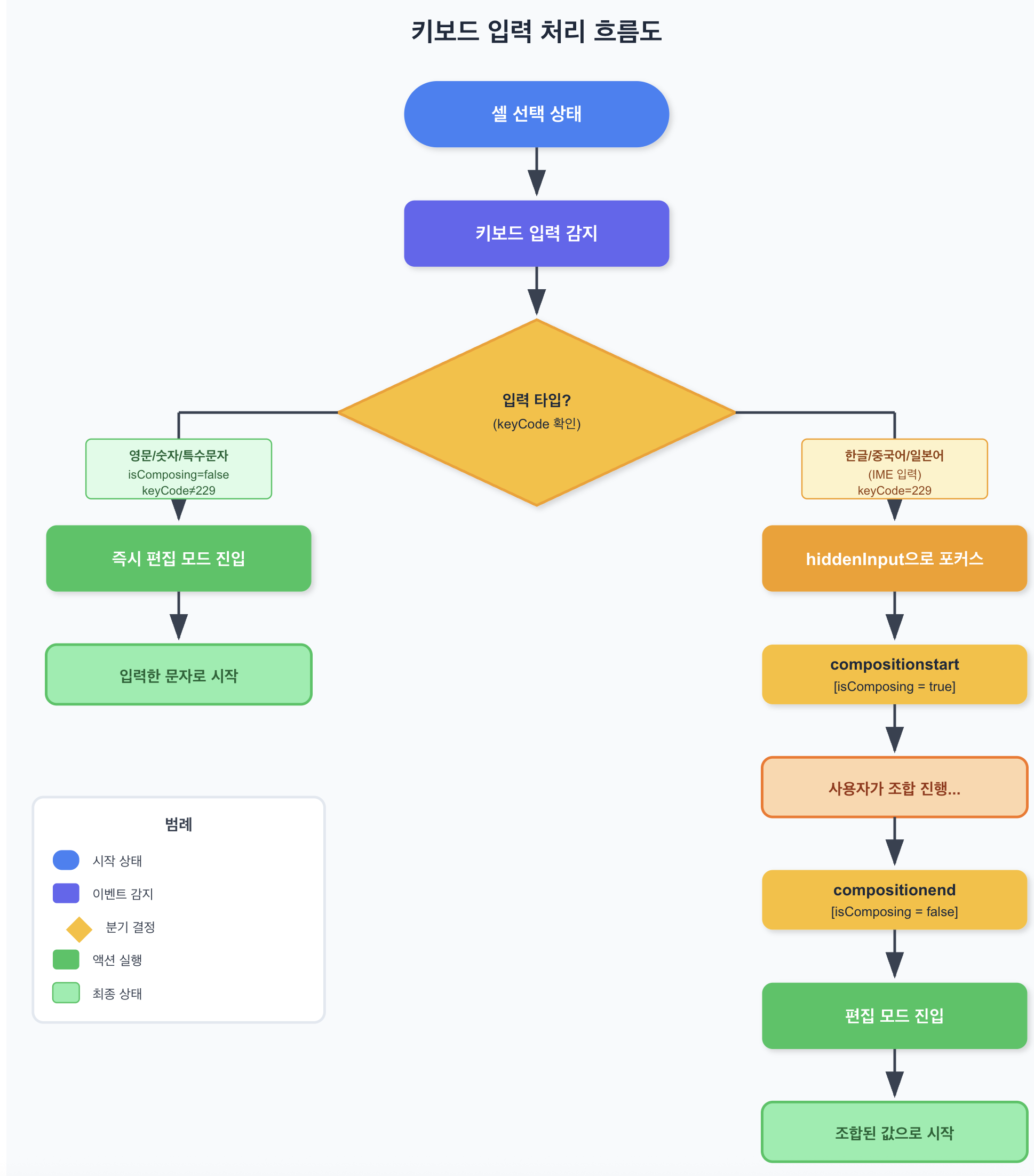
전체 흐름
참고 오픈소스
| 프로젝트 | 관련 기능 | 링크 |
|---|---|---|
| Handsontable | imeFastEdit 옵션 | GitHub |
| React | Composition Events 이슈 | #8683 |
| AG Grid | IME Support | Docs |
| Wijmo FlexGrid | imeEnabled 속성 | Docs |
주의사항
-
Enter 키 처리
- IME 조합 중 Enter는 조합 확정 용도예요
isComposing을 체크해서 폼 제출을 방지해야 해요
-
Blur 이벤트
- 포커스를 잃을 때
isComposingRef를 초기화해야 해요
- 포커스를 잃을 때
-
접근성
- 숨겨진 input 사용 시 스크린 리더 호환성을 고려해야 해요
aria-hidden="true",tabIndex={-1}설정
관련 파일
/src/components/sheet/SheetTable.tsx- 메인 구현hiddenInputRef- 숨겨진 inputisComposingRef- IME 조합 상태handleHiddenInputCompositionEnd- 조합 완료 핸들러
This documents the implementation for correctly handling IME (Input Method Editor) input in a spreadsheet.
Problem
When typing Korean in cell selection mode, consonants and vowels would separate:
- Example: Typing “안녕” → displayed as “ㅇㅏㄴㄴㅕㅇ”
Cause
-
React Controlled Component Issue
<input value={state} onChange={...} />controlled component- React forcefully resets
valueduring IME composition - Composition context breaks, causing character separation
-
Component Recreation on Edit Mode Transition
compositionstartevent triggerssetEditingCell()- React renders a new input component
- Existing IME composition state lost
Solution
1. Use Uncontrolled Component
// Problem: controlled component<input  value={editValue}  onChange={(e) => setEditValue(e.target.value)}/>
// Solution: uncontrolled component<input  defaultValue={editValue}  onInput={(e) => {    // Update state only when NOT composing    if (!isComposingRef.current) {      setFormulaBarValue(e.target.value);    }  }}/>
2. Track Composition Events
const isComposingRef = useRef(false);
<input  onCompositionStart={() => {    isComposingRef.current = true;  }}  onCompositionEnd={(e) => {    isComposingRef.current = false;    // Sync final value after composition    setFormulaBarValue(e.currentTarget.value);  }}/>
3. Hidden Input for Initial Input (Handsontable Pattern)
Used when typing starts immediately from cell selection state:
// Hidden input (not visible on screen)<input ref={hiddenInputRef} style={{ position: 'fixed', top: -9999, left: -9999 }} onCompositionStart={() => { isComposingRef.current = true; }} onCompositionEnd={(e) => { isComposingRef.current = false; // Enter edit mode + pass value on composition end if (selectedCell && !editingCell) { const value = e.currentTarget.value; setEditingCell({ rowId: selectedCell.rowId, columnId: selectedCell.columnId }); setEditValue(value); e.currentTarget.value = ''; } }}/>4. IME Detection in Keyboard Events
const handleKeyDown = (e: KeyboardEvent) => {  // Ignore during IME composition (prevent Enter handling)  if (e.nativeEvent.isComposing || e.keyCode === 229) {    return;  }
  // Normal key handling...};
Full Flow
Referenced Open Source
| Project | Related Feature | Link |
|---|---|---|
| Handsontable | imeFastEdit option | GitHub |
| React | Composition Events issue | #8683 |
| AG Grid | IME Support | Docs |
| Wijmo FlexGrid | imeEnabled property | Docs |
Caveats
-
Enter Key Handling
- Enter during IME composition is for confirming composition
- Check
isComposingto prevent form submission
-
Blur Event
- Need to reset
isComposingRefwhen losing focus
- Need to reset
-
Accessibility
- Consider screen reader compatibility when using hidden input
- Set
aria-hidden="true",tabIndex={-1}
Related Files
/src/components/sheet/SheetTable.tsx- Main implementationhiddenInputRef- Hidden inputisComposingRef- IME composition statehandleHiddenInputCompositionEnd- Composition end handler

댓글
댓글 수정/삭제는 GitHub Discussions에서 가능합니다.