제목, 태그, 카테고리로 검색

모든 글
약 35분 분량 이론

캐시와 버퍼: 속도 차이를 극복하는 두 가지 방법
목차

1. 들어가며

컴퓨터 시스템에서 ‘캐시(Cache)‘와 ‘버퍼(Buffer)‘는 모두 데이터를 임시로 저장하는 메모리 공간이에요. 하지만 그 목적과 동작 방식은 근본적으로 다릅니다. 캐시는 속도 향상을 위해 자주 사용되는 데이터를 빠른 메모리에 저장하고, 버퍼는 속도 차이 조절을 위해 생산자와 소비자 사이에서 데이터를 임시 보관해요.

이 두 개념은 CS 면접에서 자주 등장하는 주제이며, 실무에서도 성능 최적화와 시스템 설계에 필수적인 개념입니다.

출처: GeeksforGeeks - Difference between Cache and Buffer

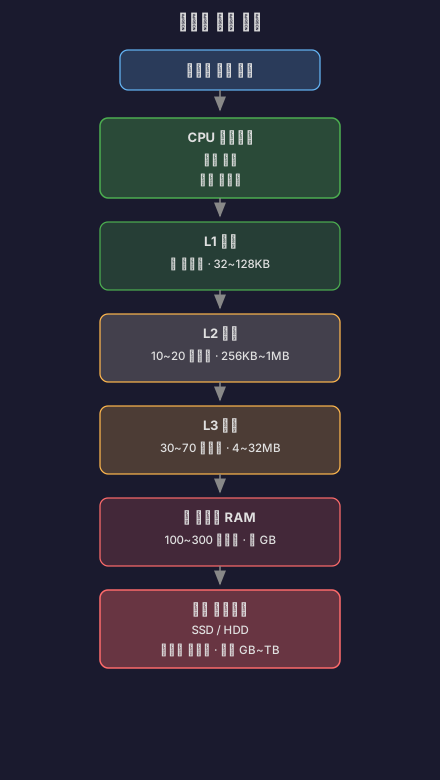
2. 메모리 계층 구조

컴퓨터의 메모리는 계층적 구조로 설계되어 있어요. CPU에 가까울수록 빠르지만 용량이 작고 비싸며, 멀어질수록 느리지만 용량이 크고 저렴합니다.

캐시는 이 계층 구조에서 상위 계층과 하위 계층 사이의 속도 차이를 줄이기 위해 존재합니다. 자주 접근하는 데이터를 빠른 메모리에 복사해두면, 느린 메모리에 접근하는 횟수를 줄일 수 있어요.

출처: Wikipedia - “Memory Hierarchy”

3. 캐시 메모리란

캐시의 목적

캐시는 데이터 접근 속도를 향상시키기 위한 고속 메모리예요. CPU가 메인 메모리(RAM)에서 데이터를 읽어오는 데는 상대적으로 많은 시간이 걸리거든요. 만약 자주 사용되는 데이터를 CPU와 더 가까운 곳에 복사해둔다면, 훨씬 빠르게 접근할 수 있습니다.

핵심 특징:

  • 원본 데이터의 복사본을 저장해요
  • 읽기 성능 향상이 주목적이에요
  • 데이터가 없어도 원본에서 다시 가져올 수 있어요
  • 투명하게 동작합니다 (애플리케이션이 의식하지 못함)

출처: 나무위키 - “캐시 메모리”

캐시 계층 (L1, L2, L3)

현대 CPU는 여러 단계의 캐시를 가지고 있어요.

L1 캐시 (Level 1 Cache)

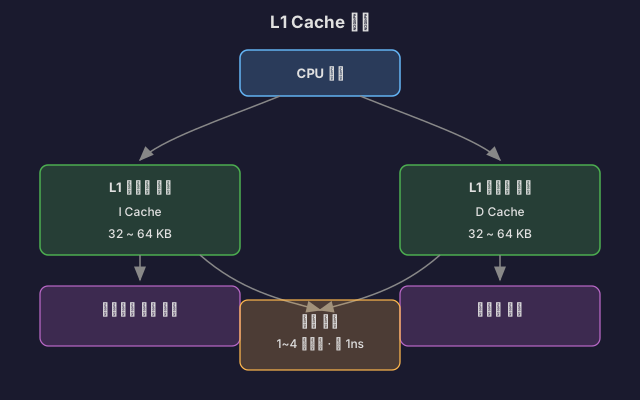
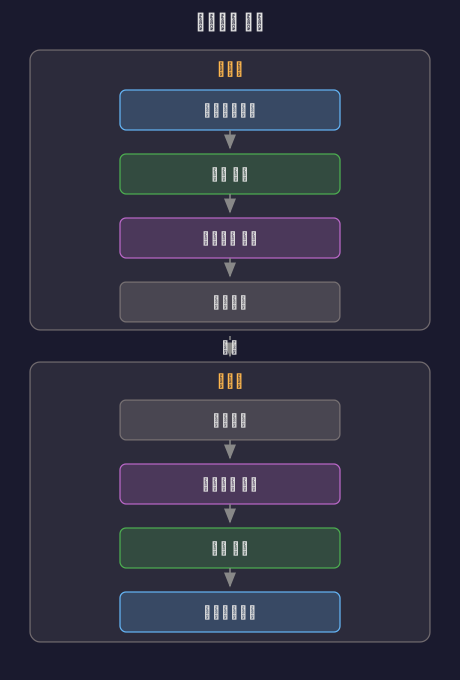
CPU 코어에 가장 가까운 캐시로, 명령어 캐시(I-Cache)와 데이터 캐시(D-Cache)로 분리되어 있어요.

L1 캐시 구조:

하버드 아키텍처(Harvard Architecture)를 따라 명령어와 데이터를 분리함으로써, CPU가 동시에 명령어를 읽고 데이터를 처리할 수 있습니다.

출처: Wikipedia - CPU Cache, GeeksforGeeks - Cache Memory in Computer Organization

L2 캐시 (Level 2 Cache)

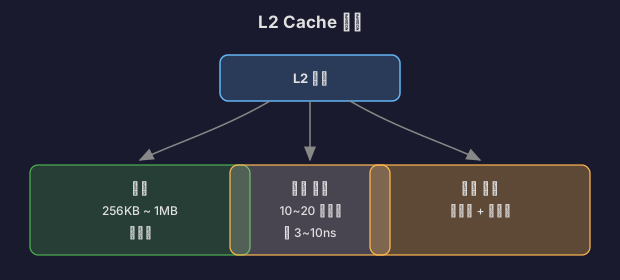
L1 캐시보다 크지만 약간 느린 캐시예요. 보통 각 CPU 코어마다 독립적으로 존재합니다.

출처: Intel - OpenCL Memory Hierarchy

L3 캐시 (Level 3 Cache)

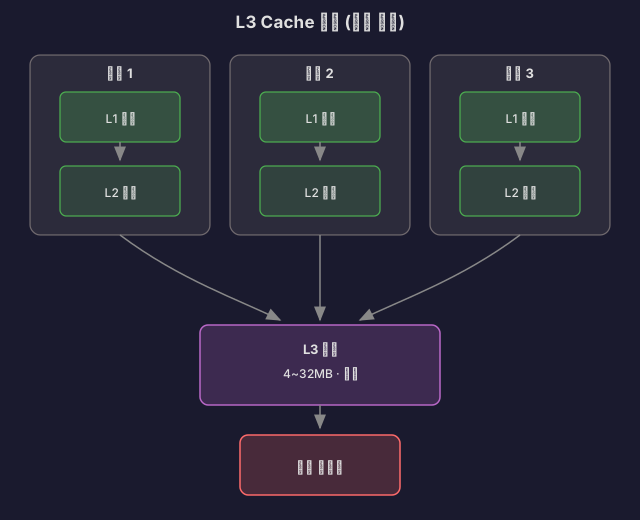
모든 CPU 코어가 공유하는 캐시예요. 가장 크지만 L1, L2보다 느립니다.

출처: GeeksforGeeks - “Cache Memory in Computer Organization”

지역성 원리 (Principle of Locality)

캐시가 효과적으로 동작하는 이유는 프로그램이 **지역성(Locality)**을 가지기 때문이에요.

시간 지역성 (Temporal Locality)

최근에 접근한 데이터는 가까운 미래에 다시 접근할 가능성이 높습니다.

// 시간 지역성 예시
int sum = 0;
for (int i = 0; i < 1000; i++) {
sum += array[i]; // sum 변수는 반복적으로 접근됨
}

변수 sum은 루프 동안 계속 재사용되므로, 캐시에 저장해두면 효율적이에요.

출처: Carnegie Mellon University - Introduction to Computer Systems (15-213 강의 자료)

공간 지역성 (Spatial Locality)

최근에 접근한 데이터의 주변 데이터에 접근할 가능성이 높아요.

// 공간 지역성 예시
int[] array = new int[1000];
for (int i = 0; i < 1000; i++) {
sum += array[i]; // 연속된 메모리 주소 접근
}

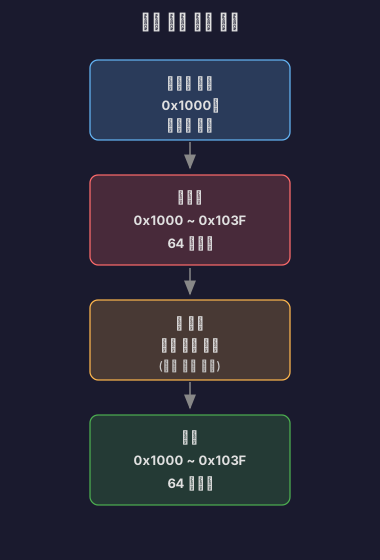
배열은 메모리에 연속적으로 저장되므로, array[0]을 캐시에 가져올 때 주변의 array[1], array[2]도 함께 가져옵니다 (캐시 라인 단위).

캐시 라인 (Cache Line): 캐시는 데이터를 개별 바이트가 아닌 블록 단위로 가져와요. 일반적으로 64바이트 단위의 캐시 라인을 사용합니다.

출처: Wikipedia - CPU Cache, GeeksforGeeks - Locality of Reference

4. 버퍼란

버퍼의 목적

버퍼는 속도 차이가 있는 두 장치 사이에서 데이터를 임시 저장하는 공간이에요. 생산자(Producer)가 데이터를 생성하는 속도와 소비자(Consumer)가 데이터를 처리하는 속도가 다를 때, 그 차이를 완충합니다.

핵심 특징:

  • 데이터의 이동을 관리해요 (복사가 아님)
  • 쓰기 성능 향상이 주목적이에요
  • 데이터 손실 방지
  • 명시적으로 관리됩니다 (애플리케이션이 의식함)

출처: GeeksforGeeks - What is Buffer in Computer Science?

버퍼의 종류

키보드 버퍼

사용자가 키를 누르는 속도와 프로그램이 입력을 처리하는 속도 사이의 간격을 메워줍니다.
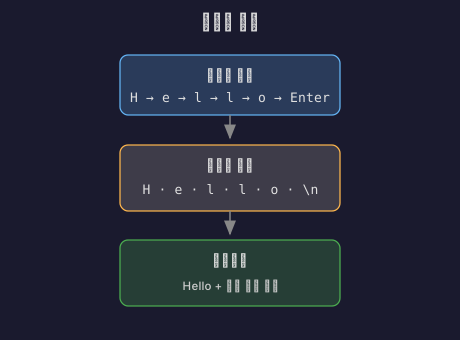
사용자 입력: H → e → l → l → o [Enter]
키보드 버퍼: [H][e][l][l][o][\n]
프로그램: "Hello\n" 읽기

키보드 버퍼가 없다면, 프로그램이 입력을 읽기 전에 사용자가 누른 키가 손실될 수 있어요.

출처: GeeksforGeeks - What is Buffer in Computer Science?

디스크 버퍼 (Disk Buffer)

디스크는 RAM보다 훨씬 느려요. 데이터를 디스크에 쓸 때마다 기다리면 프로그램이 멈추게 됩니다.

// 버퍼 없이 디스크 쓰기
for (int i = 0; i < 1000; i++) {
disk.write(data[i]); // 매번 디스크 접근 (매우 느림)
}
// 버퍼를 사용한 디스크 쓰기
BufferedWriter writer = new BufferedWriter(new FileWriter("file.txt"));
for (int i = 0; i < 1000; i++) {
writer.write(data[i]); // 버퍼에 쓰기 (빠름)
}
writer.flush(); // 버퍼의 내용을 한 번에 디스크로

버퍼를 사용하면 여러 번의 작은 쓰기를 모아서 한 번의 큰 쓰기로 처리할 수 있어요.

출처: Java Documentation - BufferedWriter, GeeksforGeeks - BufferedWriter in Java

네트워크 버퍼 (Network Buffer)

네트워크 통신에서 송신 버퍼와 수신 버퍼를 사용해요.

수신 버퍼는 네트워크에서 데이터가 도착하는 속도와 애플리케이션이 데이터를 읽는 속도의 차이를 흡수합니다.

// TCP 소켓 버퍼 크기 설정
Socket socket = new Socket();
socket.setSendBufferSize(65536); // 송신 버퍼: 64KB
socket.setReceiveBufferSize(65536); // 수신 버퍼: 64KB

출처: Java Documentation - Socket, GeeksforGeeks - Socket Programming in Java

링 버퍼 (Ring Buffer / Circular Buffer)

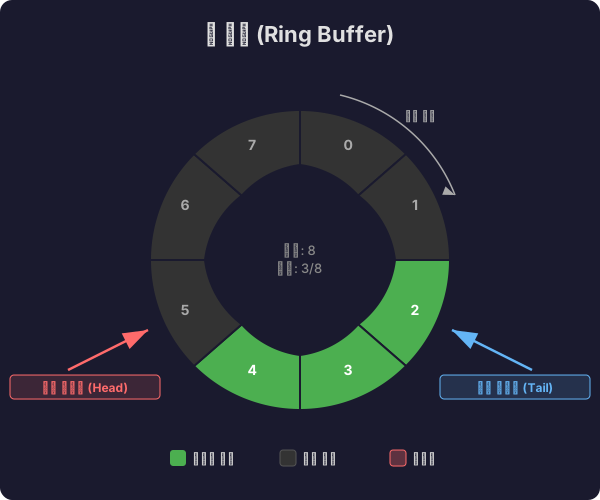
고정 크기의 버퍼를 원형으로 사용하는 자료구조예요.

링 버퍼는 포인터가 끝에 도달하면 처음으로 돌아가므로, 메모리를 재활용할 수 있습니다.

typedef struct {
char buffer[BUFFER_SIZE];
int read_pos;
int write_pos;
int count; // 현재 저장된 데이터 개수
} RingBuffer;
void ring_buffer_write(RingBuffer* rb, char data) {
if (rb->count < BUFFER_SIZE) {
rb->buffer[rb->write_pos] = data;
rb->write_pos = (rb->write_pos + 1) % BUFFER_SIZE;
rb->count++;
}
}
char ring_buffer_read(RingBuffer* rb) {
if (rb->count > 0) {
char data = rb->buffer[rb->read_pos];
rb->read_pos = (rb->read_pos + 1) % BUFFER_SIZE;
rb->count--;
return data;
}
return -1; // 버퍼가 비어있음
}

출처: Wikipedia - Circular Buffer, GeeksforGeeks - Circular Queue

5. 캐시 vs 버퍼: 핵심 차이

비교 항목캐시 (Cache)버퍼 (Buffer)
목적속도 향상 (느린 메모리 접근 줄이기)속도 차이 조절 (생산자-소비자 동기화)
데이터 특성원본 데이터의 복사본이동 중인 데이터
데이터 수명원본이 변경되면 무효화 가능읽으면 소비됨 (일회성)
크기상대적으로 작음 (용량 제약)상대적으로 유연함
관리 주체하드웨어/시스템 (자동)소프트웨어 (명시적)
주요 동작읽기(Read) 최적화쓰기(Write) 최적화
투명성투명함 (애플리케이션이 모름)명시적 (애플리케이션이 관리)
예시CPU 캐시, 브라우저 캐시, DNS 캐시키보드 버퍼, 디스크 버퍼, 네트워크 버퍼

출처: Stack Overflow - What is the difference between buffer and cache?, GeeksforGeeks - Difference between Cache and Buffer

메모리 관점에서의 차이

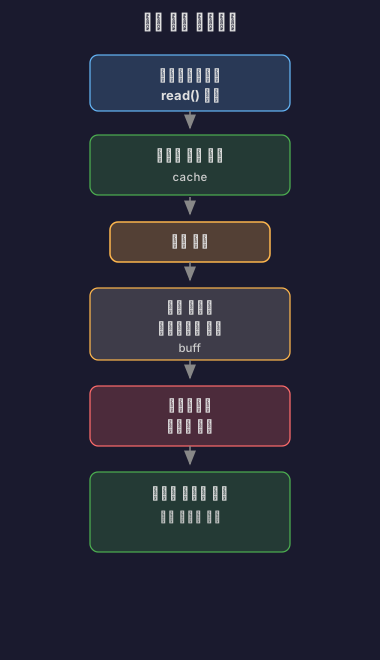
리눅스의 free 명령어를 실행하면 캐시와 버퍼가 별도로 표시돼요.

Terminal window
$ free -h
total used free shared buff/cache available
Mem: 15Gi 8.0Gi 2.0Gi 1.0Gi 5.0Gi 6.0Gi
Swap: 2.0Gi 0B 2.0Gi
  • buff: 블록 디바이스의 메타데이터 버퍼 (파일 시스템 메타데이터)
  • cache: 페이지 캐시 (파일 내용)

파일 읽기 과정:

출처: Linux man pages - free(1), Red Hat - Understanding Memory Usage on Linux

6. 캐시 동작 원리

Write-Through vs Write-Back

캐시에 데이터를 쓸 때 두 가지 정책이 있어요.

Write-Through (즉시 쓰기)

캐시와 메인 메모리에 동시에 씁니다.
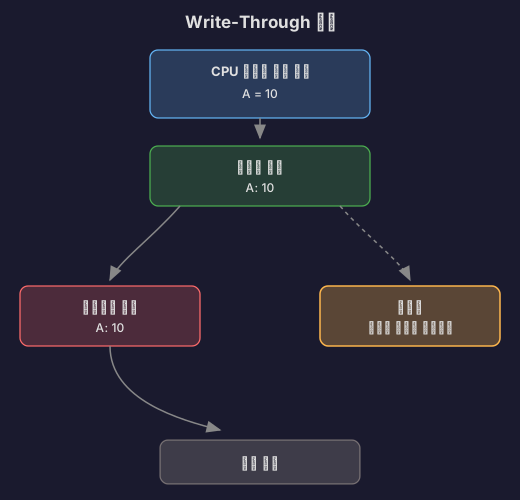
장점:

  • 데이터 일관성 유지 (캐시와 메모리가 항상 동일)
  • 간단한 구현

단점:

  • 쓰기가 느림 (매번 메모리 접근)
  • 쓰기 성능 저하

출처: GeeksforGeeks - Write Through and Write Back in Cache, Wikipedia - Cache (computing)

Write-Back (나중에 쓰기)

캐시에만 쓰고, 나중에 캐시 라인이 교체될 때 메모리에 씁니다.
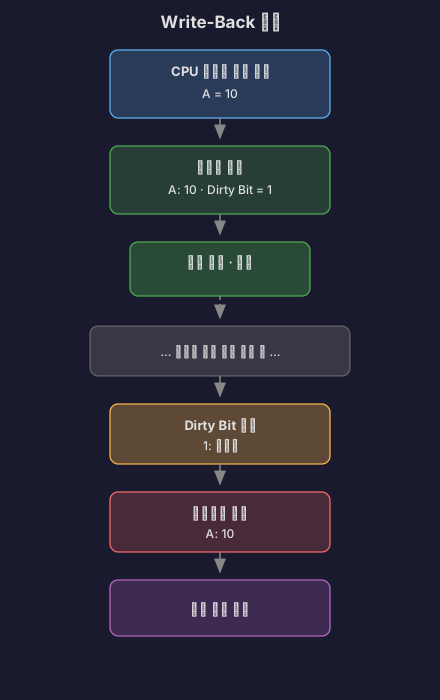
장점:

  • 쓰기가 빠름 (캐시에만 쓰면 완료)
  • 여러 번 쓰기를 한 번에 처리 가능

단점:

  • 데이터 불일치 가능 (캐시와 메모리가 다름)
  • Dirty Bit 관리 필요

출처: GeeksforGeeks - Write Through and Write Back in Cache, Carnegie Mellon University - Cache Memories

Dirty Bit

Dirty Bit는 캐시 라인이 수정되었는지 표시하는 플래그예요.

캐시 라인 구조:

동작 과정:

  1. 캐시 라인을 메모리에서 읽어올 때: Dirty Bit = 0 (Clean)
  2. CPU가 캐시 라인에 쓰기를 할 때: Dirty Bit = 1 (Dirty)
  3. 캐시 라인을 교체할 때:
    • Dirty Bit = 0: 그냥 교체 (메모리와 동일하므로)
    • Dirty Bit = 1: 메모리에 쓴 후 교체 (Write-Back)

출처: Wikipedia - Dirty Bit, GeeksforGeeks - Dirty Bit

7. 버퍼 동작 원리

Producer-Consumer 패턴

버퍼는 전형적으로 생산자-소비자 문제에서 사용돼요.

// 공유 버퍼
class SharedBuffer {
private Queue<Integer> buffer = new LinkedList<>();
private int capacity;
public SharedBuffer(int capacity) {
this.capacity = capacity;
}
// 생산자: 데이터 생성
public synchronized void produce(int data) throws InterruptedException {
while (buffer.size() == capacity) {
wait(); // 버퍼가 가득 찼으면 대기
}
buffer.add(data);
System.out.println("생산: " + data);
notifyAll(); // 소비자 깨우기
}
// 소비자: 데이터 소비
public synchronized int consume() throws InterruptedException {
while (buffer.isEmpty()) {
wait(); // 버퍼가 비었으면 대기
}
int data = buffer.poll();
System.out.println("소비: " + data);
notifyAll(); // 생산자 깨우기
return data;
}
}
// 생산자 스레드
class Producer extends Thread {
private SharedBuffer buffer;
public void run() {
for (int i = 0; i < 10; i++) {
try {
buffer.produce(i);
Thread.sleep(100);
} catch (InterruptedException e) {
e.printStackTrace();
}
}
}
}
// 소비자 스레드
class Consumer extends Thread {
private SharedBuffer buffer;
public void run() {
for (int i = 0; i < 10; i++) {
try {
buffer.consume();
Thread.sleep(200); // 생산자보다 느림
} catch (InterruptedException e) {
e.printStackTrace();
}
}
}
}

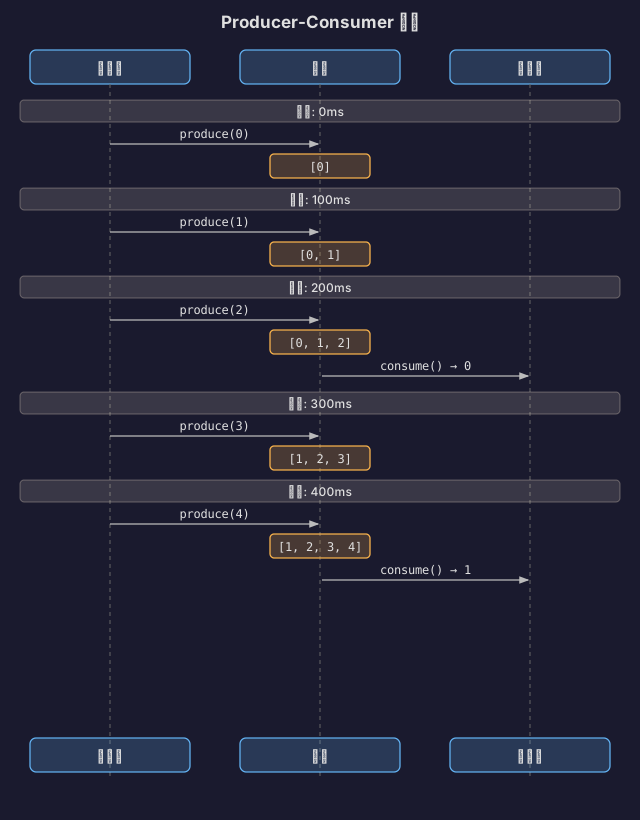
동작 흐름:

생산자가 소비자보다 빠르더라도, 버퍼가 중간에서 데이터를 보관하므로 손실 없이 처리할 수 있습니다.

출처: GeeksforGeeks - Producer Consumer Problem in Java, Oracle - Java Concurrency Utilities

버퍼 오버플로우 (Buffer Overflow)

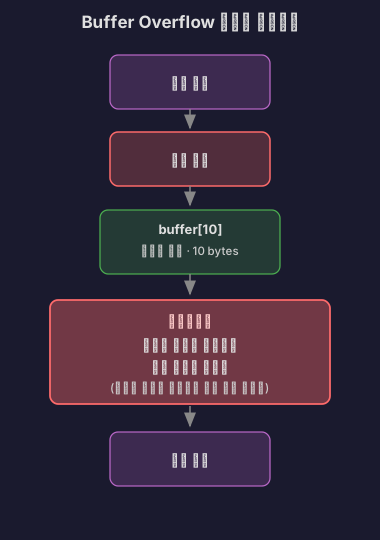
버퍼의 크기를 초과하여 데이터를 쓰면 버퍼 오버플로우가 발생해요.

char buffer[10];
strcpy(buffer, "This is a very long string"); // 버퍼 오버플로우!
// buffer[10]을 넘어서는 데이터가 인접 메모리를 덮어씀

메모리 구조:

버퍼 오버플로우는 심각한 보안 취약점으로, 공격자가 리턴 주소를 조작하여 악성 코드를 실행할 수 있습니다.

방어 기법:

// 안전한 방법 1: 크기 제한
strncpy(buffer, input, sizeof(buffer) - 1);
buffer[sizeof(buffer) - 1] = '\0';
// 안전한 방법 2: 경계 검사
if (strlen(input) < sizeof(buffer)) {
strcpy(buffer, input);
}
// 안전한 방법 3: 안전한 함수 사용
strlcpy(buffer, input, sizeof(buffer)); // BSD 시스템

출처: Wikipedia - Buffer Overflow, OWASP - Buffer Overflow

8. 실무에서의 사용 사례

캐시 사용 사례

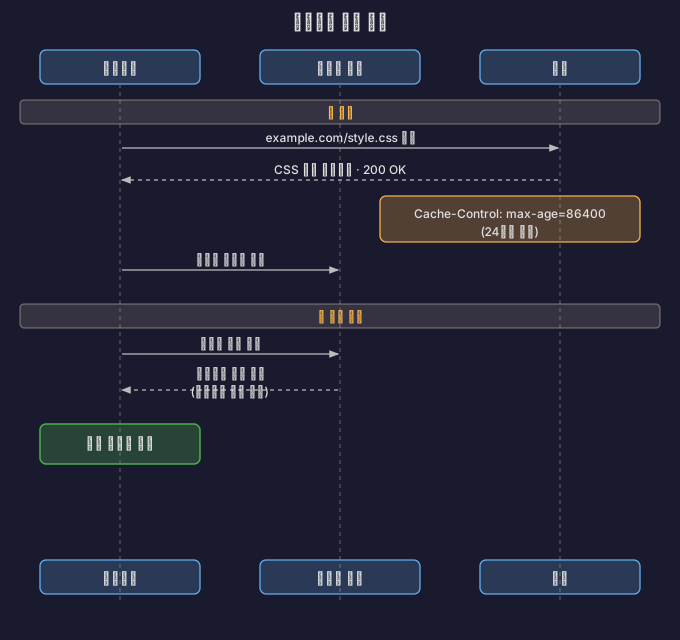
1. 웹 브라우저 캐시

출처: MDN Web Docs - HTTP Caching, web.dev - HTTP Caching

2. Redis 캐시

// 데이터베이스 조회 전 캐시 확인
public User getUserById(String userId) {
// 1. 캐시 확인
User user = redisTemplate.opsForValue().get("user:" + userId);
if (user != null) {
return user; // 캐시 히트
}
// 2. 캐시 미스: DB 조회
user = userRepository.findById(userId);
// 3. 캐시에 저장 (TTL: 1시간)
redisTemplate.opsForValue().set("user:" + userId, user, 1, TimeUnit.HOURS);
return user;
}

성능 개선:

  • 캐시 히트 시: 1-5ms
  • DB 조회: 50-200ms
  • 10배 이상 성능 향상

출처: Redis Documentation - Caching Patterns, Baeldung - Spring Cache with Redis

3. CDN (Content Delivery Network)

사용자 (한국) → 오리진 서버 (미국)
- 지연 시간: 200ms
- 대역폭 비용: 높음
CDN 도입 후:
사용자 (한국) → CDN 엣지 서버 (서울)
- 지연 시간: 10ms
- 대역폭 비용: 낮음
- 오리진 서버 부하 감소

출처: Cloudflare - What is a CDN?, AWS - What is a CDN?

버퍼 사용 사례

1. 로그 버퍼링

// 버퍼링 없이 로그 작성 (느림)
public void logWithoutBuffer(String message) {
fileWriter.write(message + "\n");
fileWriter.flush(); // 매번 디스크 쓰기
}
// 버퍼링을 사용한 로그 작성 (빠름)
public class BufferedLogger {
private BufferedWriter writer;
private int bufferSize = 8192; // 8KB 버퍼
public void log(String message) throws IOException {
writer.write(message + "\n");
// 버퍼가 가득 차면 자동으로 flush
}
public void close() throws IOException {
writer.flush(); // 남은 데이터를 디스크로
writer.close();
}
}

성능 비교:

  • 버퍼 없음: 10,000개 로그 → 5초
  • 버퍼 사용: 10,000개 로그 → 0.5초
  • 10배 성능 향상

출처: Oracle - Java Performance Tuning Guide, Baeldung - Java BufferedWriter

2. 비디오 스트리밍 버퍼

비디오 플레이어의 버퍼:
네트워크 ─────→ [재생 버퍼] ─────→ 화면
(5-10초분)
동작:
1. 초기 버퍼링: 5초분 데이터 다운로드
2. 재생 시작
3. 재생하면서 계속 버퍼 채우기
4. 네트워크 느려지면: 버퍼의 데이터로 계속 재생
5. 버퍼 소진: "버퍼링 중..." 표시

버퍼가 없다면 네트워크 속도가 조금만 느려져도 재생이 끊기게 됩니다.

출처: Medium - Video Streaming Buffering Strategies, Netflix Tech Blog - Per-Title Encode Optimization

3. 데이터베이스 Batch Insert

// 버퍼 없이 개별 INSERT (느림)
for (User user : users) {
jdbcTemplate.update("INSERT INTO users VALUES (?, ?)",
user.getId(), user.getName());
}
// 1,000개 INSERT → 10초
// 버퍼를 사용한 Batch INSERT (빠름)
jdbcTemplate.batchUpdate(
"INSERT INTO users VALUES (?, ?)",
new BatchPreparedStatementSetter() {
public void setValues(PreparedStatement ps, int i) {
ps.setString(1, users.get(i).getId());
ps.setString(2, users.get(i).getName());
}
public int getBatchSize() {
return users.size();
}
}
);
// 1,000개 INSERT → 1초

개별 쿼리를 버퍼에 모았다가 한 번에 전송하면 네트워크 왕복 시간을 줄일 수 있어요.

출처: Spring Framework Documentation - Batch Operations, Baeldung - Batch Insert/Update with Hibernate

9. 기술 업계 실전 사례

우리가 겪은 문제는 이미 다른 회사들도 겪었던 문제예요. 어떻게 해결했는지 살펴보겠습니다.

1. 카카오톡의 캐시 서버 진화 - 물리 서버 256대를 어떻게 줄였나

카카오톡은 초당 400만 건의 데이터 접근 요청을 처리해요. 처음에는 Memcached 물리 서버 256대를 운영했는데, 문제가 있었어요. 데이터는 적은데 트래픽 분산을 위해 노드를 늘리다 보니, 캐시 클러스터가 60개 노드인데 각 노드가 32GB 중 겨우 300MB만 쓰는 상황이 됐거든요.

게다가 물리 서버라 장애가 나면 대응이 느렸습니다. 개발자가 로그 알림으로 장애를 감지하고, 클라이언트 설정에서 해당 노드를 제거하고, 인프라팀에 새 장비를 요청하고, 새 노드를 설정에 추가하는 과정을 수동으로 했어요.

이걸 Redis + Kubernetes로 바꿨습니다. Sentinel로 자동 Failover를 구성하고, 내부 도구(Ban)를 만들어서 전체 과정을 자동화했어요. 이제는 노드 장애가 나도 자동으로 감지되고 복구돼요.

출처: 카카오 기술블로그 - if(kakao)2020 카카오톡 캐싱 시스템의 진화


2. Cache Stampede 문제와 해결법

인기 있는 데이터의 캐시가 만료되는 순간, 수천 개의 요청이 동시에 DB를 조회하는 현상이에요. 캐시가 만료되는 시각 T에 요청 1000개가 동시에 들어오면, 모두 캐시 미스가 나고, 1000개가 전부 DB를 조회합니다. DB가 감당을 못 하고 죽어버려요.

해결 방법 1: 분산 락

첫 번째 요청만 DB를 조회하고 나머지는 대기시킵니다.

suspend fun getWithLock(key: String): String? {
val cached = redis.opsForValue().get(key)
if (cached != null) return cached
val lockKey = "lock:$key"
val acquired = redis.opsForValue().setIfAbsent(lockKey, "1", 5, TimeUnit.SECONDS)
if (acquired == true) {
try {
val data = database.query(...)
redis.opsForValue().set(key, data, 1, TimeUnit.HOURS)
return data
} finally {
redis.delete(lockKey)
}
} else {
delay(100)
return redis.opsForValue().get(key)
}
}

해결 방법 2: PER(Probabilistic Early Recomputation) 알고리즘

TTL이 얼마 안 남았으면 미리 백그라운드에서 갱신해요. 2015년 VLDB 컨퍼런스에 발표된 방법입니다.

fun getWithEarlyExpiration(key: String): String {
val cached = redis.opsForValue().get(key)
val ttl = redis.getExpire(key, TimeUnit.SECONDS)
if (ttl < TTL * 0.1) {
CoroutineScope(Dispatchers.IO).launch {
val fresh = database.query(...)
redis.opsForValue().set(key, fresh, TTL, TimeUnit.SECONDS)
}
}
return cached ?: database.query(...)
}

DB 동시 쿼리가 1000회에서 1회로 줄어들어요. DB CPU 사용률도 90%에서 10%로 떨어집니다.

참고: 토스 기술블로그 - 캐시 문제 해결 가이드


3. 조회수 같은 Write-Heavy 데이터 처리

유튜브 같은 서비스에서 동영상 조회수를 매번 DB에 쓰면 어떻게 될까요? 조회 1만 건/초면 MySQL UPDATE도 1만 건/초예요. DB가 버틸 수 없습니다.

Redis에 먼저 쓰고, 1분마다 배치로 MySQL에 동기화하는 방식으로 해결해요.

// 조회수 증가: Redis에만 (빠름)
fun incrementViewCount(videoId: Long) {
redis.opsForValue().increment("view:$videoId")
}
// 1분마다 MySQL에 동기화
@Scheduled(fixedRate = 60000)
fun syncViewCounts() {
val keys = redis.keys("view:*")
val counts = redis.opsForValue().multiGet(keys)
jdbcTemplate.batchUpdate(
"UPDATE videos SET view_count = view_count + ? WHERE video_id = ?",
// ... batch update
)
redis.delete(keys)
}

DB Write가 10,000건/초에서 100건/분으로 줄어들어요. 6,000배 감소입니다.


4. 안정 해시로 캐시 서버 추가해도 안정적으로

캐시 서버가 3대에서 4대로 늘어나면 어떻게 될까요? 일반적인 해시 함수(hash(key) % server_count)를 쓰면 모든 키의 위치가 바뀌어요.

키 "user:1": hash = 12345
Before: 12345 % 3 = 0 (서버 0)
After: 12345 % 4 = 1 (서버 1)

모든 키가 재배치되니 캐시 미스율이 100%가 됩니다. DB에 갑자기 엄청난 트래픽이 몰려요.

안정 해시(Consistent Hashing)를 쓰면 서버를 추가해도 평균적으로 k/n개의 키만 재배치돼요. 서버 3대에서 4대로 늘어나면 25%만 재배치됩니다.

해시 링에 서버와 키를 배치하고, 키 위치에서 시계방향으로 가장 먼저 만나는 서버에 저장하는 방식이에요. 가상 노드(Virtual Node)를 150개 정도 만들어서 데이터가 고르게 분산되도록 합니다.

아마존 DynamoDB, 카산드라, 디스코드 채팅 등에서 이 방식을 쓰고 있어요.


5. 토스의 웹 캐싱 전략

토스 프론트엔드 팀은 웹 성능을 높이기 위해 HTTP 캐시를 적극적으로 활용해요.

HTML 파일:

Cache-Control: max-age=0, s-maxage=31536000

브라우저는 항상 서버에 재검증을 요청하고(max-age=0), CDN은 1년 동안 캐싱합니다(s-maxage=31536000). 배포할 때마다 CDN Invalidation을 실행해서 CDN이 새 HTML을 받아오게 해요.

JS/CSS 파일:

빌드할 때마다 URL에 버전 번호를 붙여서 고유한 URL을 만들어요.

/v1234/main.js
/v1235/main.js

이런 파일은 절대 바뀌지 않으니 max-age를 최대치로 설정합니다.

Cache-Control: max-age=31536000

HTTP 캐시를 효율적으로 관리하려면 Cache-Control 헤더를 섬세하게 조절해야 한다는 게 토스 팀의 노하우예요.

출처: 토스 기술블로그 - 웹 서비스 캐시 똑똑하게 다루기


10. 정리

캐시와 버퍼는 모두 임시 저장 공간이지만, 목적과 사용 방식이 달라요.

캐시 (Cache):

  • 목적: 느린 메모리 접근을 줄여 속도 향상
  • 특징: 원본 데이터의 복사본, 읽기 최적화, 투명한 동작
  • 예시: CPU 캐시, 브라우저 캐시, Redis, CDN
  • 핵심 원리: 지역성 (Temporal & Spatial Locality)

버퍼 (Buffer):

  • 목적: 속도 차이가 있는 장치 사이의 데이터 이동 조절
  • 특징: 이동 중인 데이터, 쓰기 최적화, 명시적 관리
  • 예시: 키보드 버퍼, 디스크 버퍼, 네트워크 버퍼, 스트리밍 버퍼
  • 핵심 원리: Producer-Consumer 패턴

두 개념을 정확히 이해하면 시스템 성능을 최적화하고, 면접에서도 명확하게 설명할 수 있습니다.

11. 참고 자료

공식 문서 및 표준

기술 자료

웹 개발 및 최적화

성능 최적화

네트워크 및 스트리밍

보안

한글 자료

한국 기술 블로그

1. Introduction

In computer systems, both “Cache” and “Buffer” are memory spaces that temporarily store data. However, their purposes and behaviors are fundamentally different. A cache stores frequently used data in fast memory for speed improvement, while a buffer temporarily holds data between a producer and consumer to regulate speed differences.

These two concepts are frequently covered in CS interviews and are essential for performance optimization and system design in practice.

Source: GeeksforGeeks - Difference between Cache and Buffer

2. Memory Hierarchy

Computer memory is designed in a hierarchical structure. The closer to the CPU, the faster but smaller and more expensive; the farther, the slower but larger and cheaper.

Caches exist in this hierarchy to bridge the speed gap between upper and lower layers. By copying frequently accessed data to faster memory, the number of accesses to slower memory can be reduced.

Source: Wikipedia - “Memory Hierarchy”

3. What Is Cache Memory?

Purpose of Cache

A cache is high-speed memory designed to improve data access speed. It takes a relatively long time for the CPU to read data from main memory (RAM). If frequently used data is copied closer to the CPU, it can be accessed much faster.

Key characteristics:

  • Stores a copy of the original data
  • Primarily improves read performance
  • Even if data is missing, it can be fetched again from the original source
  • Operates transparently (applications are unaware of it)

Source: Namu Wiki - “Cache Memory”

Cache Levels (L1, L2, L3)

Modern CPUs have multiple levels of cache.

L1 Cache (Level 1 Cache)

The cache closest to the CPU core, split into an instruction cache (I-Cache) and a data cache (D-Cache).

L1 cache structure:

By following the Harvard Architecture to separate instructions and data, the CPU can simultaneously read instructions and process data.

Source: Wikipedia - CPU Cache, GeeksforGeeks - Cache Memory in Computer Organization

L2 Cache (Level 2 Cache)

Larger but slightly slower than the L1 cache. Typically exists independently for each CPU core.

Source: Intel - OpenCL Memory Hierarchy

L3 Cache (Level 3 Cache)

A cache shared by all CPU cores. The largest, but slower than L1 and L2.

Source: GeeksforGeeks - “Cache Memory in Computer Organization”

Principle of Locality

The reason caches work effectively is that programs exhibit locality.

Temporal Locality

Data that was recently accessed is likely to be accessed again in the near future.

// Temporal locality example
int sum = 0;
for (int i = 0; i < 1000; i++) {
sum += array[i]; // The variable sum is accessed repeatedly
}

The variable sum is continuously reused throughout the loop, so storing it in cache is efficient.

Source: Carnegie Mellon University - Introduction to Computer Systems (15-213 lecture materials)

Spatial Locality

Data near recently accessed data is likely to be accessed soon.

// Spatial locality example
int[] array = new int[1000];
for (int i = 0; i < 1000; i++) {
sum += array[i]; // Accessing consecutive memory addresses
}

Since arrays are stored contiguously in memory, when array[0] is loaded into cache, nearby elements like array[1] and array[2] are also fetched together (in cache line units).

Cache Line: Caches fetch data not in individual bytes but in block units. Typically, 64-byte cache lines are used.

Source: Wikipedia - CPU Cache, GeeksforGeeks - Locality of Reference

4. What Is a Buffer?

Purpose of Buffers

A buffer is a space that temporarily stores data between two devices with different speeds. When the speed at which a producer generates data differs from the speed at which a consumer processes it, the buffer absorbs that difference.

Key characteristics:

  • Manages data movement (not copying)
  • Primarily improves write performance
  • Prevents data loss
  • Managed explicitly (applications are aware of it)

Source: GeeksforGeeks - What is Buffer in Computer Science?

Types of Buffers

Keyboard Buffer

Bridges the gap between the speed at which users press keys and the speed at which programs process input.

User input: H -> e -> l -> l -> o [Enter]
Keyboard buffer: [H][e][l][l][o][\n]
Program: reads "Hello\n"

Without a keyboard buffer, keystrokes could be lost before the program reads the input.

Source: GeeksforGeeks - What is Buffer in Computer Science?

Disk Buffer

Disk is much slower than RAM. If the program waits every time data is written to disk, it stalls.

// Writing to disk without buffer
for (int i = 0; i < 1000; i++) {
disk.write(data[i]); // Disk access every time (very slow)
}
// Writing to disk with buffer
BufferedWriter writer = new BufferedWriter(new FileWriter("file.txt"));
for (int i = 0; i < 1000; i++) {
writer.write(data[i]); // Write to buffer (fast)
}
writer.flush(); // Flush buffer contents to disk at once

Using a buffer allows multiple small writes to be aggregated into a single large write.

Source: Java Documentation - BufferedWriter, GeeksforGeeks - BufferedWriter in Java

Network Buffer

Network communication uses send buffers and receive buffers.

The receive buffer absorbs the speed difference between data arriving from the network and the application reading the data.

// TCP socket buffer size configuration
Socket socket = new Socket();
socket.setSendBufferSize(65536); // Send buffer: 64KB
socket.setReceiveBufferSize(65536); // Receive buffer: 64KB

Source: Java Documentation - Socket, GeeksforGeeks - Socket Programming in Java

Ring Buffer (Circular Buffer)

A data structure that uses a fixed-size buffer in a circular fashion.

Since the pointer wraps around to the beginning when it reaches the end, memory can be reused.

typedef struct {
char buffer[BUFFER_SIZE];
int read_pos;
int write_pos;
int count; // Number of currently stored data items
} RingBuffer;
void ring_buffer_write(RingBuffer* rb, char data) {
if (rb->count < BUFFER_SIZE) {
rb->buffer[rb->write_pos] = data;
rb->write_pos = (rb->write_pos + 1) % BUFFER_SIZE;
rb->count++;
}
}
char ring_buffer_read(RingBuffer* rb) {
if (rb->count > 0) {
char data = rb->buffer[rb->read_pos];
rb->read_pos = (rb->read_pos + 1) % BUFFER_SIZE;
rb->count--;
return data;
}
return -1; // Buffer is empty
}

Source: Wikipedia - Circular Buffer, GeeksforGeeks - Circular Queue

5. Cache vs Buffer: Key Differences

ComparisonCacheBuffer
PurposeSpeed improvement (reduce slow memory accesses)Speed difference regulation (producer-consumer synchronization)
Data natureCopy of original dataData in transit
Data lifespanCan be invalidated when original changesConsumed once read (one-time use)
SizeRelatively small (capacity-constrained)Relatively flexible
ManagementHardware/system (automatic)Software (explicit)
Primary operationRead optimizationWrite optimization
TransparencyTransparent (applications are unaware)Explicit (applications manage it)
ExamplesCPU cache, browser cache, DNS cacheKeyboard buffer, disk buffer, network buffer

Source: Stack Overflow - What is the difference between buffer and cache?, GeeksforGeeks - Difference between Cache and Buffer

Differences from a Memory Perspective

Running the Linux free command shows cache and buffer displayed separately.

Terminal window
$ free -h
total used free shared buff/cache available
Mem: 15Gi 8.0Gi 2.0Gi 1.0Gi 5.0Gi 6.0Gi
Swap: 2.0Gi 0B 2.0Gi
  • buff: Block device metadata buffer (filesystem metadata)
  • cache: Page cache (file contents)

File reading process:

Source: Linux man pages - free(1), Red Hat - Understanding Memory Usage on Linux

6. How Caches Work

Write-Through vs Write-Back

There are two policies for writing data to cache.

Write-Through (Immediate Write)

Data is written to both the cache and main memory simultaneously.

Pros:

  • Maintains data consistency (cache and memory are always identical)
  • Simple implementation

Cons:

  • Writes are slow (memory access every time)
  • Write performance degradation

Source: GeeksforGeeks - Write Through and Write Back in Cache, Wikipedia - Cache (computing)

Write-Back (Deferred Write)

Data is written only to the cache, and written to memory later when the cache line is evicted.

Pros:

  • Writes are fast (writing to cache completes the operation)
  • Multiple writes can be batched into one

Cons:

  • Data inconsistency possible (cache and memory differ)
  • Dirty bit management required

Source: GeeksforGeeks - Write Through and Write Back in Cache, Carnegie Mellon University - Cache Memories

Dirty Bit

The dirty bit is a flag indicating whether a cache line has been modified.

Cache line structure:

Operation flow:

  1. When a cache line is loaded from memory: Dirty Bit = 0 (Clean)
  2. When the CPU writes to the cache line: Dirty Bit = 1 (Dirty)
  3. When the cache line is evicted:
    • Dirty Bit = 0: Simply evict (identical to memory)
    • Dirty Bit = 1: Write back to memory, then evict (Write-Back)

Source: Wikipedia - Dirty Bit, GeeksforGeeks - Dirty Bit

7. How Buffers Work

Producer-Consumer Pattern

Buffers are typically used in the producer-consumer problem.

// Shared buffer
class SharedBuffer {
private Queue<Integer> buffer = new LinkedList<>();
private int capacity;
public SharedBuffer(int capacity) {
this.capacity = capacity;
}
// Producer: generates data
public synchronized void produce(int data) throws InterruptedException {
while (buffer.size() == capacity) {
wait(); // Wait if buffer is full
}
buffer.add(data);
System.out.println("Produced: " + data);
notifyAll(); // Wake up consumers
}
// Consumer: consumes data
public synchronized int consume() throws InterruptedException {
while (buffer.isEmpty()) {
wait(); // Wait if buffer is empty
}
int data = buffer.poll();
System.out.println("Consumed: " + data);
notifyAll(); // Wake up producers
return data;
}
}
// Producer thread
class Producer extends Thread {
private SharedBuffer buffer;
public void run() {
for (int i = 0; i < 10; i++) {
try {
buffer.produce(i);
Thread.sleep(100);
} catch (InterruptedException e) {
e.printStackTrace();
}
}
}
}
// Consumer thread
class Consumer extends Thread {
private SharedBuffer buffer;
public void run() {
for (int i = 0; i < 10; i++) {
try {
buffer.consume();
Thread.sleep(200); // Slower than producer
} catch (InterruptedException e) {
e.printStackTrace();
}
}
}
}

Operation flow:

Even when the producer is faster than the consumer, the buffer holds data in between so nothing is lost.

Source: GeeksforGeeks - Producer Consumer Problem in Java, Oracle - Java Concurrency Utilities

Buffer Overflow

When data is written beyond the buffer’s size, a buffer overflow occurs.

char buffer[10];
strcpy(buffer, "This is a very long string"); // Buffer overflow!
// Data beyond buffer[10] overwrites adjacent memory

Memory structure:

Buffer overflow is a serious security vulnerability that allows attackers to manipulate return addresses and execute malicious code.

Defense techniques:

// Safe method 1: Size limiting
strncpy(buffer, input, sizeof(buffer) - 1);
buffer[sizeof(buffer) - 1] = '\0';
// Safe method 2: Bounds checking
if (strlen(input) < sizeof(buffer)) {
strcpy(buffer, input);
}
// Safe method 3: Using safe functions
strlcpy(buffer, input, sizeof(buffer)); // BSD systems

Source: Wikipedia - Buffer Overflow, OWASP - Buffer Overflow

8. Practical Use Cases

Cache Use Cases

1. Web Browser Cache

Source: MDN Web Docs - HTTP Caching, web.dev - HTTP Caching

2. Redis Cache

// Check cache before querying the database
public User getUserById(String userId) {
// 1. Check cache
User user = redisTemplate.opsForValue().get("user:" + userId);
if (user != null) {
return user; // Cache hit
}
// 2. Cache miss: Query DB
user = userRepository.findById(userId);
// 3. Store in cache (TTL: 1 hour)
redisTemplate.opsForValue().set("user:" + userId, user, 1, TimeUnit.HOURS);
return user;
}

Performance improvement:

  • Cache hit: 1-5ms
  • DB query: 50-200ms
  • 10x or more performance improvement

Source: Redis Documentation - Caching Patterns, Baeldung - Spring Cache with Redis

3. CDN (Content Delivery Network)

User (Korea) -> Origin server (USA)
- Latency: 200ms
- Bandwidth cost: High
After CDN deployment:
User (Korea) -> CDN edge server (Seoul)
- Latency: 10ms
- Bandwidth cost: Low
- Origin server load reduced

Source: Cloudflare - What is a CDN?, AWS - What is a CDN?

Buffer Use Cases

1. Log Buffering

// Writing logs without buffer (slow)
public void logWithoutBuffer(String message) {
fileWriter.write(message + "\n");
fileWriter.flush(); // Disk write every time
}
// Writing logs with buffer (fast)
public class BufferedLogger {
private BufferedWriter writer;
private int bufferSize = 8192; // 8KB buffer
public void log(String message) throws IOException {
writer.write(message + "\n");
// Automatically flushes when buffer is full
}
public void close() throws IOException {
writer.flush(); // Flush remaining data to disk
writer.close();
}
}

Performance comparison:

  • Without buffer: 10,000 logs -> 5 seconds
  • With buffer: 10,000 logs -> 0.5 seconds
  • 10x performance improvement

Source: Oracle - Java Performance Tuning Guide, Baeldung - Java BufferedWriter

2. Video Streaming Buffer

Video player buffer:
Network -------> [Playback buffer] -------> Screen
(5-10 seconds worth)
Operation:
1. Initial buffering: Download 5 seconds of data
2. Start playback
3. Continue filling buffer while playing
4. When network slows: Continue playback using buffered data
5. Buffer exhausted: Display "Buffering..."

Without a buffer, even a slight network slowdown would cause playback interruptions.

Source: Medium - Video Streaming Buffering Strategies, Netflix Tech Blog - Per-Title Encode Optimization

3. Database Batch Insert

// Individual INSERTs without buffer (slow)
for (User user : users) {
jdbcTemplate.update("INSERT INTO users VALUES (?, ?)",
user.getId(), user.getName());
}
// 1,000 INSERTs -> 10 seconds
// Batch INSERT with buffer (fast)
jdbcTemplate.batchUpdate(
"INSERT INTO users VALUES (?, ?)",
new BatchPreparedStatementSetter() {
public void setValues(PreparedStatement ps, int i) {
ps.setString(1, users.get(i).getId());
ps.setString(2, users.get(i).getName());
}
public int getBatchSize() {
return users.size();
}
}
);
// 1,000 INSERTs -> 1 second

By accumulating individual queries in a buffer and sending them all at once, network round-trip time can be reduced.

Source: Spring Framework Documentation - Batch Operations, Baeldung - Batch Insert/Update with Hibernate

9. Real-World Industry Case Studies

The problems we face have already been encountered by other companies. Let us look at how they solved them.

1. KakaoTalk’s Cache Server Evolution - How They Reduced 256 Physical Servers

KakaoTalk handles 4 million data access requests per second. Initially, they operated 256 physical Memcached servers, but there was a problem. Despite having little data, they kept adding nodes for traffic distribution, resulting in a situation where a 60-node cache cluster had each node using only 300MB out of 32GB.

Furthermore, since these were physical servers, incident response was slow. Developers had to manually detect failures from log alerts, remove the affected node from client configuration, request new hardware from the infrastructure team, and add the new node to the configuration.

They migrated to Redis + Kubernetes. They configured automatic failover with Sentinel and built an internal tool (Ban) to automate the entire process. Now node failures are automatically detected and recovered.

Source: Kakao Tech Blog - if(kakao)2020 KakaoTalk Caching System Evolution


2. The Cache Stampede Problem and Solutions

This is a phenomenon where thousands of requests simultaneously query the DB the moment a popular data item’s cache expires. At time T when the cache expires, if 1,000 requests arrive simultaneously, they all experience a cache miss and all 1,000 query the DB. The DB cannot handle it and goes down.

Solution 1: Distributed Lock

Only the first request queries the DB; the rest wait.

suspend fun getWithLock(key: String): String? {
val cached = redis.opsForValue().get(key)
if (cached != null) return cached
val lockKey = "lock:$key"
val acquired = redis.opsForValue().setIfAbsent(lockKey, "1", 5, TimeUnit.SECONDS)
if (acquired == true) {
try {
val data = database.query(...)
redis.opsForValue().set(key, data, 1, TimeUnit.HOURS)
return data
} finally {
redis.delete(lockKey)
}
} else {
delay(100)
return redis.opsForValue().get(key)
}
}

Solution 2: PER (Probabilistic Early Recomputation) Algorithm

If the TTL is running low, proactively refresh in the background. This method was presented at the VLDB Conference in 2015.

fun getWithEarlyExpiration(key: String): String {
val cached = redis.opsForValue().get(key)
val ttl = redis.getExpire(key, TimeUnit.SECONDS)
if (ttl < TTL * 0.1) {
CoroutineScope(Dispatchers.IO).launch {
val fresh = database.query(...)
redis.opsForValue().set(key, fresh, TTL, TimeUnit.SECONDS)
}
}
return cached ?: database.query(...)
}

Concurrent DB queries drop from 1,000 to 1. DB CPU usage also falls from 90% to 10%.

Reference: Toss Tech Blog - Cache Problem Resolution Guide


3. Handling Write-Heavy Data Like View Counts

What happens if a service like YouTube writes video view counts to the DB every time? At 10,000 views per second, that means 10,000 MySQL UPDATEs per second. The DB cannot sustain this.

The solution is to write to Redis first, then synchronize to MySQL in batches every minute.

// Increment view count: Redis only (fast)
fun incrementViewCount(videoId: Long) {
redis.opsForValue().increment("view:$videoId")
}
// Sync to MySQL every minute
@Scheduled(fixedRate = 60000)
fun syncViewCounts() {
val keys = redis.keys("view:*")
val counts = redis.opsForValue().multiGet(keys)
jdbcTemplate.batchUpdate(
"UPDATE videos SET view_count = view_count + ? WHERE video_id = ?",
// ... batch update
)
redis.delete(keys)
}

DB writes drop from 10,000/sec to 100/min — a 6,000x reduction.


4. Stable Cache Server Scaling with Consistent Hashing

What happens when cache servers grow from 3 to 4? With a typical hash function (hash(key) % server_count), the location of every key changes.

Key "user:1": hash = 12345
Before: 12345 % 3 = 0 (Server 0)
After: 12345 % 4 = 1 (Server 1)

All keys are redistributed, causing a 100% cache miss rate. The DB suddenly gets hit with massive traffic.

With Consistent Hashing, when a server is added, only an average of k/n keys are redistributed. Going from 3 to 4 servers means only 25% redistribution.

Servers and keys are placed on a hash ring, and each key is stored on the first server encountered clockwise from the key’s position. Around 150 virtual nodes are created to ensure even data distribution.

Amazon DynamoDB, Cassandra, and Discord chat all use this approach.


5. Toss’s Web Caching Strategy

Toss’s frontend team aggressively leverages HTTP caching to improve web performance.

HTML files:

Cache-Control: max-age=0, s-maxage=31536000

The browser always sends a revalidation request to the server (max-age=0), while the CDN caches for 1 year (s-maxage=31536000). CDN Invalidation is executed with every deployment so the CDN fetches the new HTML.

JS/CSS files:

A version number is appended to the URL with every build to create unique URLs.

/v1234/main.js
/v1235/main.js

Since these files never change, max-age is set to the maximum.

Cache-Control: max-age=31536000

The Toss team’s know-how is that managing HTTP cache effectively requires fine-tuning Cache-Control headers.

Source: Toss Tech Blog - Smart Web Service Cache Management


10. Summary

Both caches and buffers are temporary storage spaces, but their purposes and usage differ.

Cache:

  • Purpose: Speed improvement by reducing slow memory accesses
  • Characteristics: Copy of original data, read optimization, transparent operation
  • Examples: CPU cache, browser cache, Redis, CDN
  • Core principle: Locality (Temporal & Spatial)

Buffer:

  • Purpose: Regulating data movement between devices with different speeds
  • Characteristics: Data in transit, write optimization, explicit management
  • Examples: Keyboard buffer, disk buffer, network buffer, streaming buffer
  • Core principle: Producer-Consumer pattern

Understanding both concepts accurately enables system performance optimization and clear explanations in interviews.

11. References

Official Documentation and Standards

Technical Resources

Web Development and Optimization

Performance Optimization

Networking and Streaming

Security

Korean Resources

Korean Tech Blogs

Author
작성자 @범수

오늘의 노력이 내일의 전문성을 만든다고 믿습니다.

댓글