MySQL 용량이 부족할 때 — 콘텐츠 저장 아키텍처 탐구
목차
1. 들어가며 — 디스크가 꽉 찰 뻔한 이야기
1,477만 건, 122GB의 위키 데이터를 MySQL에 넣고 검색 인덱스를 만들려고 했어요.
로컬 디스크: 994GB 중 960GB 사용 (34GB 여유)MySQL data 볼륨: 122GB → 인덱스 생성 중 287.8GB (165GB 증가, 아직 진행 중)CREATE FULLTEXT INDEX ft_title_content ON posts(title, content) WITH PARSER ngram;을 실행한 결과:
- 600초 후 MySQL Workbench 연결 끊김 (Error 2013: Lost connection)
SHOW PROCESSLIST로 확인 → State:altering table(진행 중)- 디스크 꽉 찰 위험 →
KILL로 강제 종료 - 종료 후에도 볼륨: 249.6GB (부분 정리만 된 상태)
디스크를 많이 먹는 건 콘텐츠(122GB)가 아니라 FULLTEXT ngram 인덱스(100GB+)였어요. 이 사실에서 “그렇다면 콘텐츠 저장 방식을 바꿔야 하나? 현업은 어떻게 하나?”라는 의문이 생겼고, 이 글은 그 탐구의 결과예요.
2. 뭐가 용량을 먹는 건가 — 콘텐츠 vs 인덱스
| 대상 | 문서당 평균 토큰 수 | 총 토큰 수 | 인덱스 추정 크기 |
|---|---|---|---|
| title만 | 26개 | ~3.8억 개 | 1~3 GB |
| content만 | 6,585개 | ~973억 개 | 50~150 GB+ |
| title + content | ~6,611개 | ~976억 개 | 100~200 GB+ |
content가 전체 토큰의 99.6%를 차지해요. ngram 파서는 텍스트를 n글자 단위로 분할하므로, 원본 텍스트 대비 토큰 수가 폭발적으로 증가해요. 예를 들어 ‘안녕하세요’라는 5글자 텍스트는 ngram_token_size=2 기준으로 4개의 토큰(‘안녕’, ‘녕하’, ‘하세’, ‘세요’)이 생성돼요. 이것이 FULLTEXT ngram 인덱스 크기가 원본 데이터보다 커지는 근본적인 이유예요.
여기서 핵심적인 구분이 필요해요:
- 콘텐츠 데이터 자체: 122GB — 이건 원본 텍스트
- FULLTEXT 인덱스: 100GB+ — 이건 검색을 위한 역색인 자료구조
콘텐츠를 압축하거나 Object Storage로 옮겨도 인덱스 크기는 그대로예요. 핵심 문제가 해결되지 않는다는 뜻이에요. 그래도 콘텐츠 저장 방식 자체가 궁금했기에, 현업이 어떻게 하는지 알아봤어요.
3. 현업은 콘텐츠를 어디에 저장하나
3-1. 주요 플랫폼의 콘텐츠 저장 방식
| 서비스 | DB | 콘텐츠 저장 | 규모 | 특이사항 |
|---|---|---|---|---|
| WordPress | MySQL | wp_posts.post_content 직접 저장 | 수천~수백만 건 | 리비전도 같은 테이블에 저장 |
| Discourse | PostgreSQL | posts.raw 직접 저장 | 월 4M+ 신규 포스트 | TOAST가 자동 압축 처리 |
| Stack Overflow | SQL Server | 직접 저장 | 200M+ 요청/일 | 384GB RAM + 4TB PCIe SSD 2대 |
| PostgreSQL | 직접 저장 | 100K+ 읽기/초 | Aurora PostgreSQL + 샤딩 | |
| Notion | PostgreSQL | 블록 단위 직접 저장 | 2,000억+ 블록 | 480 논리 샤드 / 96 물리 인스턴스 |
| Confluence | DB | Vertical Partitioning | 수백만 건 | CONTENT + BODYCONTENT 분리 |
| Wikipedia | MySQL | 별도 text 테이블 + External Storage | TB급 리비전 이력 | delta 압축 → 원본의 2% 이하 |
출처: WordPress DB Structure, Discourse PostgreSQL, Stack Overflow Architecture 2016, Notion Sharding, Wikipedia External Storage
거의 모든 플랫폼이 콘텐츠를 DB에 직접 저장해요. Object Storage로 이동하는 건 Wikipedia처럼 리비전 이력이 TB급일 때만 발생하는 예외적 패턴이에요.
3-2. 각 플랫폼에서 배울 점
Stack Overflow — 하드웨어로 해결:
SQL Server Cluster 1: Dell R720xd — 384GB RAM, 4TB PCIe SSD, 2x12 coresSQL Server Cluster 2: Dell R730xd — 768GB RAM, 6TB PCIe SSD, 2x8 cores200M+ 요청/일을 SQL Server 2대로 처리해요. Elastic과 Redis는 읽기 캐시 역할이지, 콘텐츠의 원천은 SQL Server예요. 전체 DB에 stored procedure는 1개뿐이고, Dapper(Micro-ORM)로 직접 쿼리해요.
교훈: 잘 튜닝된 RDBMS + 충분한 RAM + SSD면 콘텐츠를 DB 밖으로 뺄 필요가 없어요.
Notion — 샤딩으로 2,000억 블록 처리:
| 시점 | 물리 인스턴스 | 논리 샤드 | 총 블록 수 |
|---|---|---|---|
| 2021 | 32대 | - | 수십억 |
| 2023 | 96대 | 480개 | 2,000억+ |
workspace_id 기준 샤딩으로 수백 TB급 텍스트 데이터를 PostgreSQL에서 처리해요. Object Storage로 빼지 않아요.
출처: Notion Sharding, Storing 200 Billion Entities — ByteByteGo
Wikipedia — 유일한 External Storage 사례:
Wikipedia만이 텍스트를 DB 밖으로 뺐어요. 이유는 리비전 이력이 TB급이기 때문이에요.
text 테이블 → 포인터 ("DB://cluster1/12345") ↓External Storage 클러스터 (별도 MySQL DB의 blobs 테이블) ↓delta 압축: 첫 리비전=전문, 이후=차분만, 배치 gzip → 전체 이력이 원본의 2% 이하비압축 덤프 3TB+를 초과하는 규모에서만 External Storage가 정당화돼요.
4. Object Storage(R2/S3)로 빼면 해결될까?
4-1. 비용 분석
| 스토리지 유형 | $/GB/월 | 100GB 비용 |
|---|---|---|
| AWS RDS (gp3) | $0.115 | $11.50 |
| AWS EBS (gp3) | $0.08 | $8.00 |
| AWS S3 Standard | $0.023 | $2.30 |
| Cloudflare R2 | $0.015 | $1.50 |
| S3 Glacier | $0.004 | $0.40 |
RDS 스토리지는 S3 대비 5배 비싸요. 하지만 122GB 규모에서 차액은 월 $11 수준이에요. 이게 아키텍처 변경을 정당화할 만큼의 차이인지 생각해봐야 해요.
4-2. 숨겨진 비용 — 스토리지 비용만이 전부가 아니다
| 문제 | 설명 |
|---|---|
| 트랜잭션 일관성 | DB INSERT 성공 + S3 PUT 실패 시 데이터 불일치 |
| JOIN 불가 | DB 행과 S3 오브젝트를 JOIN할 수 없음 |
| ORM 투명성 깨짐 | post.getContent()가 S3 HTTP 호출로 변질 |
| FULLTEXT 검색 불가 | S3 오브젝트에 MATCH...AGAINST를 실행할 수 없음 |
| 레이턴시 증가 | S3 GET: 50~200ms (Standard S3 같은 리전 기준. S3 Express One Zone은 single-digit ms 가능) vs DB Buffer Pool: sub-ms |
| Atomic UPDATE 불가 | 콘텐츠 수정 + 포인터 업데이트가 원자적이지 않음 |
월 $11을 절감하려고 트랜잭션 일관성, JOIN, ORM 투명성을 포기하는 건 합리적이지 않아요. 현업 커뮤니티 플랫폼(Discourse, WordPress, Stack Overflow) 중 콘텐츠를 Object Storage로 뺀 곳은 없어요.
| 플랫폼 | 콘텐츠 저장 | Object Storage |
|---|---|---|
| Discourse | PostgreSQL 직접 | 안 함 |
| XenForo | MySQL 직접 | 안 함 |
| WordPress | MySQL 직접 | 안 함 |
| Stack Overflow | SQL Server 직접 | 안 함 |
5. InnoDB 압축 — ROW_FORMAT=COMPRESSED
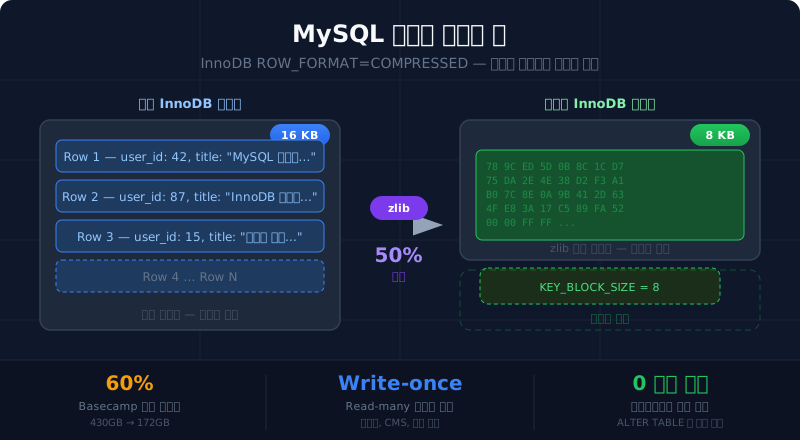
콘텐츠를 DB에 유지하면서 용량을 줄이는 방법이 있어요. InnoDB 테이블 압축이에요.
5-1. MySQL 압축 두 가지 방식
이름이 비슷하지만 완전히 다른 두 가지 압축이 있어요.
| ROW_FORMAT=COMPRESSED (테이블 압축) | COMPRESSION= (페이지 압축) | |
|---|---|---|
| 도입 | MySQL 5.1 InnoDB Plugin (MySQL 5.5+ 기본 내장) | MySQL 5.7.8+ |
| 동작 | InnoDB 내부에서 zlib으로 작은 페이지 생성 | OS 파일시스템의 sparse file + hole punching |
| 펀치 홀 필요 | 아니오 | 예 (OS + 하드웨어 지원 필수) |
| 파일 복사 | 정상 동작 | cp 시 hole이 채워져 원본 크기로 복원됨 |
| Buffer Pool | 압축본 + 원본 이중 저장 | 원본만 저장 (메모리 효율 좋음) |
| 프로덕션 | 성숙, 안정적 | Percona: “프로덕션에 추천하기 어렵다” |
사용할 방식은 ROW_FORMAT=COMPRESSED예요. 펀치 홀과 무관하고, InnoDB 내부에서 완결되는 전통적 압축이에요.
참고: MySQL 8.0에서 InnoDB 압축 관련 설정에 대해 “향후 MySQL 릴리스에서 제거될 수 있습니다”라는 경고가 있다. 새 프로젝트에서는 페이지 압축(COMPRESSION=‘zlib’)이나 외부 저장소 분리를 검토하는 것이 바람직하다.
5-2. 동작 원리
InnoDB 내부에서 zlib으로 16KB 페이지를 더 작은 크기로 압축하여 디스크에 저장해요.
적용은 ALTER TABLE 한 줄이에요:
ALTER TABLE post_contents ROW_FORMAT=COMPRESSED KEY_BLOCK_SIZE=8;주의: 대용량 테이블에 ALTER TABLE을 실행하면 테이블 전체가 재구축되며, 디스크 공간이 임시로 2배 필요하고 장시간 락이 걸릴 수 있다. 프로덕션에서는 pt-online-schema-change나 gh-ost 같은 온라인 DDL 도구 사용을 권장한다.
애플리케이션 코드 변경은 전혀 필요 없어요. SELECT content FROM post_contents가 자동으로 압축 해제된 원본을 반환합니다.
5-3. KEY_BLOCK_SIZE 선택
KEY_BLOCK_SIZE는 압축된 페이지의 목표 크기(KB)예요. InnoDB 기본 페이지 16KB를 얼마나 줄일지 결정해요.
| KEY_BLOCK_SIZE | 목표 압축률 | 특징 |
|---|---|---|
| 16 | 없음 | 압축 안 함 (기본 페이지와 동일) |
| 8 | 50% | 일반적 선택, 텍스트 데이터에 적합 |
| 4 | 75% | 공격적 압축, 실패율 높아질 수 있음 |
| 2, 1 | 87~94% | 대부분 실패 → 이중 저장으로 오히려 손해 |
압축 실패가 중요한 이유: 16KB를 8KB로 압축하는데 실패하면, 페이지 스플릿이 발생하고 Buffer Pool에 압축본 + 원본 둘 다 저장돼요. 실패율이 높으면 오히려 메모리를 더 써요.
최적 값을 찾으려면 인덱스별 압축 통계를 확인해야 해요:
-- 인덱스별 압축 통계 활성화 (테스트 시에만 ON)SET GLOBAL innodb_cmp_per_index_enabled = ON;
-- KEY_BLOCK_SIZE별 테스트 테이블 생성CREATE TABLE test_compress_8 LIKE post_contents;ALTER TABLE test_compress_8 ROW_FORMAT=COMPRESSED KEY_BLOCK_SIZE=8;
-- 샘플 데이터 삽입INSERT INTO test_compress_8 SELECT * FROM post_contents LIMIT 10000;
-- 압축 성공률 확인SELECT database_name, table_name, index_name, compress_ops, -- 압축 시도 횟수 compress_ops_ok, -- 압축 성공 횟수 ROUND(compress_ops_ok / compress_ops * 100, 1) AS success_rateFROM INFORMATION_SCHEMA.INNODB_CMP_PER_INDEX;| 성공률 | 판단 |
|---|---|
| 90%+ | 해당 KEY_BLOCK_SIZE 적합 |
| 70~90% | 사용 가능하지만 모니터링 필요 |
| 70% 미만 | 한 단계 큰 값으로 올려야 함 |
5-4. CRUD 패턴별 압축 적합도
핵심 원칙: 읽기마다 해제, 쓰기마다 재압축이 반복되면 CPU 병목이 돼요. 따라서 데이터의 사용 패턴이 압축 적합도를 결정해요.
| CRUD 패턴 | 압축 적합도 | 이유 |
|---|---|---|
| INSERT-only (로그/감사) | 최적 | 한번 쓰면 변경 없음. 재압축 없음 |
| Write-once, Read-many (블로그/CMS) | 적합 | 쓰기 적어 재압축 빈도 낮음 |
| 빈번한 UPDATE (카운터) | 부적합 | 매 UPDATE마다 재압축 + page split 위험 |
| 위키/협업 편집 | 조건부 | 현재 버전: 주의 필요, 리비전 이력: 최적 |
Basecamp 사례 (프로덕션 검증):
- 가장 큰 테이블: ~430GB → ROW_FORMAT=COMPRESSED 적용 후: 172GB (60% 절감)
- 새 레코드 평균 40% 축소
- 슬로우 쿼리가 “거의 제거됨” — I/O 감소 + 메모리 압박 해소
출처: Scaling Your Database via InnoDB Table Compression — Signal v. Noise (Basecamp)
5-5. PostgreSQL TOAST와 비교
PostgreSQL을 쓰는 Discourse나 Reddit이 별도 압축 없이도 되는 이유는 TOAST 메커니즘 때문이에요.
| 항목 | PostgreSQL TOAST | MySQL InnoDB COMPRESSED |
|---|---|---|
| 동작 | 행이 ~2KB 초과 시 자동 압축 + out-of-line 저장 | ALTER TABLE로 명시적 활성화 |
| 알고리즘 | pglz (기본), LZ4 (PG 14+) | zlib |
| 투명성 | 완전 투명 | 완전 투명 |
| 압축 조건 | TOAST 임계값(약 2KB) 이하로 줄일 수 있거나 의미 있게 크기가 줄어들 때 | 항상 시도 (실패 시 이중 저장) |
핵심 차이: PostgreSQL은 별도 설정 없이 TOAST가 자동으로 작동해요. MySQL은 명시적으로 적용해야 해요.
6. Vertical Partitioning — 무거운 TEXT 분리
6-1. 왜 분리하나
MySQL의 TEXT/BLOB은 overflow page(16KB 청크)에 저장돼요. 이로 인해:
- 1MB TEXT를 읽으려면 64개 overflow page × 16KB = 64 read IOPs 필요
- TEXT가 결과에 포함되면 디스크 기반 임시 테이블 강제 (MEMORY 엔진이 TEXT 미지원)
- 목록 조회에서 10,000행 스캔 시 불필요한 overflow page까지 읽을 수 있음
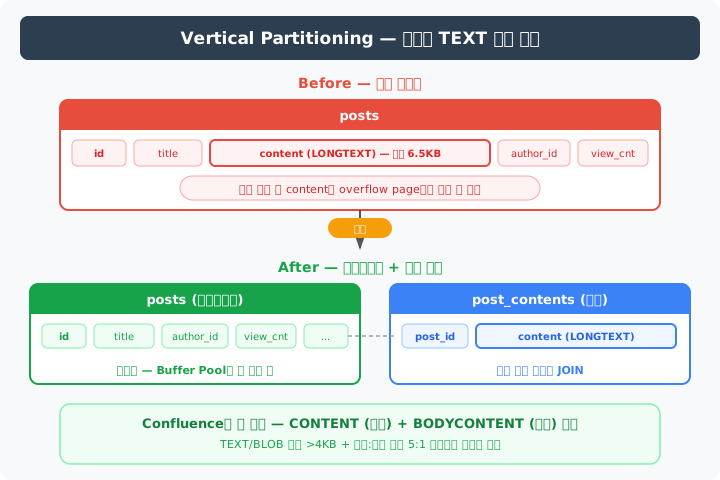
분리하면 메타데이터 테이블만 스캔하므로, 한 페이지에 더 많은 행이 들어가고 Buffer Pool 효율이 올라가요.
출처: Why Everyone Avoids TEXT Fields in MySQL — Leapcell, How InnoDB Handles TEXT/BLOB — Percona
6-2. 분리하지 않아도 되는 경우
- 단건 상세 조회가 대부분이고, 목록 조회가 적은 경우
- 데이터 크기가 수GB 이하인 경우
- 경험 법칙: TEXT/BLOB 평균 >4KB이고, 목록:상세 비율이 5:1 이상이면 분리가 이득
Confluence 사례: CONTENT 테이블(메타데이터) + BODYCONTENT 테이블(본문)로 분리. 엔터프라이즈 위키의 대표적 Vertical Partitioning 사례예요.
6-3. binlog_row_image=NOBLOB — 테이블 분리 없이 복제 최적화
Master-Slave 구성에서 LONGTEXT가 복제에 부담을 줄 수 있어요.
view_count UPDATE (+1) → binlog_row_image=FULL (기본값) → binlog에 content(LONGTEXT) 포함 전체 행 기록 → 바뀐 건 view_count 하나뿐인데 LONGTEXT가 매번 Slave로 전송해결은 설정 한 줄이에요:
SET GLOBAL binlog_row_image = 'NOBLOB';| 설정 | binlog 기록 |
|---|---|
FULL (기본) | 모든 컬럼 — content가 매 UPDATE마다 포함 |
NOBLOB | BLOB/TEXT는 변경된 경우만 포함 |
MINIMAL | 변경된 컬럼 + PK만 |
복제(replication) 트래픽 측면에서는 대형 컬럼 데이터 전송을 줄이는 유사한 효과가 있어요. 단, Vertical Partitioning의 핵심 이점인 목록 조회 시 Buffer Pool 효율 향상이나 임시 테이블 최적화는 해결되지 않아요.
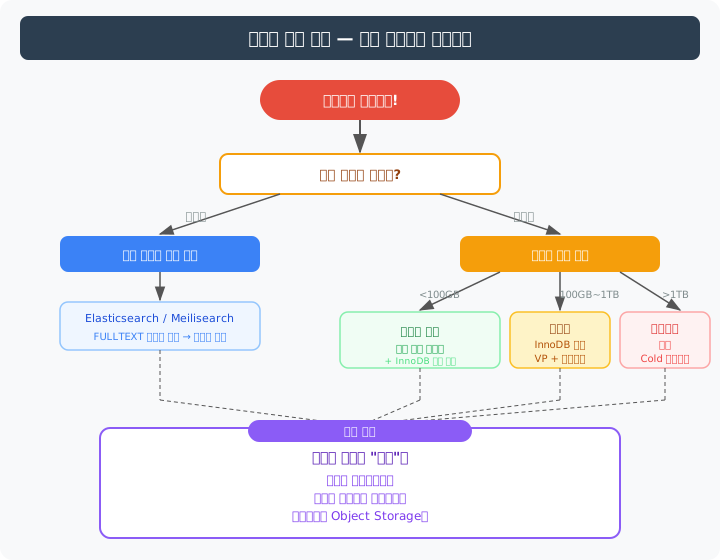
7. 데이터가 계속 커지면? — 현업의 대응 패턴
디스크를 무한정 늘릴 수는 없어요. 현업에서는 분리 전략을 써요.
| 전략 | 설명 | 적용 시점 |
|---|---|---|
| 검색 엔진 분리 | DB에서 FULLTEXT 인덱스 제거, 외부 검색엔진 담당 | 인덱스 크기가 부담될 때 |
| 테이블 파티셔닝 | 시간 기준 물리적 분리 | 행 수가 수천만 이상 |
| 콜드 데이터 아카이빙 | 오래된 데이터를 아카이브로 이동 | 활성/비활성 구분 가능할 때 |
| Object Storage 분리 | content를 S3/R2로 이동 | TB급 + 리비전 이력 관리 필요 시 |
| 샤딩 | tenant 기준 DB 분할 | 단일 DB 성능 한계 도달 시 |
핵심: 압축이 아니라 “분리”예요. 검색은 검색엔진으로, 오래된 데이터는 아카이브로, 첨부파일은 Object Storage로.
CRUD 패턴별 최적 저장소
데이터의 읽기:쓰기 비율이 저장소 선택의 핵심 기준이에요.
| 워크로드 | 읽기:쓰기 | 최적 저장소 |
|---|---|---|
| 로그/감사 | 1:100+ | S3/R2 + Parquet, 시계열 DB |
| 블로그/CMS | 100:1+ | RDBMS 직접 저장 + CDN |
| 위키/협업 | 10:1~50:1 | RDBMS + 리비전 테이블 |
| 채팅/메시징 | 5:1~20:1 | ScyllaDB, Cassandra |
| E-commerce 상품 | 1000:1+ | RDBMS + Redis/CDN 캐시 |
출처: Database Workload Read-Write Ratio — Benchant, Data Store Choice Criteria — Azure Architecture Center
8. 종합 결론
의사결정 매트릭스
| 기준 | RDBMS 직접 저장 | Vertical Partitioning | Object Storage 이동 |
|---|---|---|---|
| 데이터 규모 | <100GB | 10GB~10TB | >1TB |
| 검색 필요 | O (FULLTEXT 가능) | O | X (별도 인덱스 필요) |
| 트랜잭션 | 필요 | 필요 | 불필요 |
| 복잡도 | 낮음 | 낮음~중간 | 높음 |
검토했으나 현 시점에서 불필요한 것들
| 방안 | 결론 | 이유 |
|---|---|---|
| Object Storage 이동 | 제외 | 트랜잭션 깨짐, 핵심 문제(인덱스 크기) 해결 안 됨, 월 $11 절감 |
| 페이지 압축 (COMPRESSION=) | 제외 | 펀치 홀 의존, 프로덕션 비추천 |
| 앱 레벨 gzip 압축 | 제외 | FULLTEXT 검색 불가, ORM 투명성 깨짐 |
| NoSQL 전환 | 제외 | 스키마 고정적, 트랜잭션/JOIN 필요, 현 규모에서 RDBMS 충분 |
| InnoDB 압축 | 보류 | 핵심 문제(인덱스 크기)에 영향 없으나, 데이터 절감이 필요할 때 재검토 |
| Vertical Partitioning | 보류 | binlog_row_image=NOBLOB로 복제 부담 해결 가능, 목록 쿼리 비율 확인 후 결정 |
결론
콘텐츠 122GB → DB 직접 저장 유지 콘텐츠 저장 방식 변경 불필요FULLTEXT ngram 인덱스 100GB+ 검색 인덱스를 외부로 분리디스크 여유 부족 디스크 확장이 가장 비용 효율적디스크를 많이 먹는 건 콘텐츠가 아니라 ngram 인덱스예요. 콘텐츠를 압축하거나 옮기는 게 아니라, 검색 인덱스를 외부 검색엔진으로 분리하는 것이 근본적인 해결이에요.
참고 자료
플랫폼 아키텍처:
- WordPress Database Structure — WP STAGING
- Stack Overflow Architecture 2016 — Nick Craver
- Discourse PostgreSQL — Discourse Blog
- Notion Sharding
- Wikipedia External Storage — Wikitech
- Confluence Data Model — Atlassian
MySQL/PostgreSQL 기술:
- On MySQL InnoDB Row Formats and Compression — Carson Ip
- Scaling via InnoDB Table Compression — Basecamp
- How InnoDB Handles TEXT/BLOB — Percona
- PostgreSQL TOAST Documentation
비용/클라우드:
기타:

1. Introduction — Nearly Running Out of Disk
I had 14.77 million wiki documents totaling 122GB in MySQL and tried to create a search index.
Local disk: 960GB used out of 994GB (34GB free)MySQL data volume: 122GB → 287.8GB during index creation (165GB increase, still in progress)After running CREATE FULLTEXT INDEX ft_title_content ON posts(title, content) WITH PARSER ngram;:
- MySQL Workbench disconnected after 600 seconds (Error 2013: Lost connection)
SHOW PROCESSLISTshowed State:altering table(still running)- Risk of filling disk completely → force killed with
KILL - Volume after termination: 249.6GB (only partially cleaned up)
What was eating disk wasn’t the content (122GB) — it was the FULLTEXT ngram index (100GB+). This realization sparked the question: “Should we change how content is stored? How do production systems handle this?” This post is the result of that investigation.
2. What’s Actually Eating Storage — Content vs Index
| Target | Avg Tokens per Doc | Total Tokens | Estimated Index Size |
|---|---|---|---|
| title only | 26 | ~380M | 1~3 GB |
| content only | 6,585 | ~97.3B | 50~150 GB+ |
| title + content | ~6,611 | ~97.6B | 100~200 GB+ |
Content accounts for 99.6% of all tokens. The ngram parser splits text into n-character units, causing an explosive increase in token count compared to the original text. For example, a 5-character text ‘안녕하세요’ with ngram_token_size=2 generates 4 tokens (‘안녕’, ‘녕하’, ‘하세’, ‘세요’). This is the fundamental reason why the FULLTEXT ngram index grows larger than the original data.
A critical distinction is needed here:
- Content data itself: 122GB — the raw text
- FULLTEXT index: 100GB+ — the inverted index data structure for search
Even if you compress or move content to Object Storage, the index size remains the same. The core problem wouldn’t be solved. Still, I was curious about content storage patterns themselves, so I researched how production systems handle it.
3. Where Do Production Platforms Store Content?
3-1. Content Storage Patterns of Major Platforms
| Service | DB | Content Storage | Scale | Notes |
|---|---|---|---|---|
| WordPress | MySQL | Direct in wp_posts.post_content | Thousands to millions | Revisions stored in same table |
| Discourse | PostgreSQL | Direct in posts.raw | 4M+ new posts/month | TOAST handles compression automatically |
| Stack Overflow | SQL Server | Direct storage | 200M+ requests/day | 384GB RAM + 4TB PCIe SSD × 2 |
| PostgreSQL | Direct storage | 100K+ reads/sec | Aurora PostgreSQL + sharding | |
| Notion | PostgreSQL | Direct block-level storage | 200B+ blocks | 480 logical shards / 96 physical instances |
| Confluence | DB | Vertical Partitioning | Millions of docs | CONTENT + BODYCONTENT separation |
| Wikipedia | MySQL | Separate text table + External Storage | TB-scale revision history | Delta compression → less than 2% of original |
Sources: WordPress DB Structure, Discourse PostgreSQL, Stack Overflow Architecture 2016, Notion Sharding, Wikipedia External Storage
Nearly every platform stores content directly in the database. Moving to Object Storage is an exceptional pattern that only occurs when revision history reaches TB scale, like Wikipedia.
3-2. Lessons from Each Platform
Stack Overflow — Solving It with Hardware:
SQL Server Cluster 1: Dell R720xd — 384GB RAM, 4TB PCIe SSD, 2x12 coresSQL Server Cluster 2: Dell R730xd — 768GB RAM, 6TB PCIe SSD, 2x8 coresThey handle 200M+ requests/day with just 2 SQL Server machines. Elastic and Redis serve as read caches, but the source of truth for content is SQL Server. The entire database has only 1 stored procedure — they query directly with Dapper (Micro-ORM).
Takeaway: With a well-tuned RDBMS + sufficient RAM + SSD, there’s no need to move content out of the DB.
Source: Stack Overflow Hardware 2016
Notion — Handling 200 Billion Blocks with Sharding:
| Timeline | Physical Instances | Logical Shards | Total Blocks |
|---|---|---|---|
| 2021 | 32 | - | Billions |
| 2023 | 96 | 480 | 200B+ |
They handle hundreds of TB of text data in PostgreSQL using workspace_id-based sharding. They don’t move content to Object Storage.
Sources: Notion Sharding, Storing 200 Billion Entities — ByteByteGo
Wikipedia — The Only External Storage Case:
Wikipedia is the only platform that moved text content outside the DB. The reason is clear — revision history is TB-scale.
text table → pointer ("DB://cluster1/12345") ↓External Storage cluster (blobs table in separate MySQL DB) ↓Delta compression: first revision=full text, subsequent=diffs only, batch gzip → entire history compressed to less than 2% of originalExternal Storage is only justified at scales exceeding 3TB+ uncompressed dumps.
Source: External Storage — Wikitech
4. Would Moving to Object Storage (R2/S3) Solve It?
4-1. Cost Analysis
| Storage Type | $/GB/month | 100GB Cost |
|---|---|---|
| AWS RDS (gp3) | $0.115 | $11.50 |
| AWS EBS (gp3) | $0.08 | $8.00 |
| AWS S3 Standard | $0.023 | $2.30 |
| Cloudflare R2 | $0.015 | $1.50 |
| S3 Glacier | $0.004 | $0.40 |
Sources: AWS RDS Pricing, Cloudflare R2 Pricing
RDS storage is 5x more expensive than S3. But at 122GB scale, the difference is only ~$11/month. You need to consider whether that justifies an architecture change.
4-2. Hidden Costs — Storage Cost Isn’t Everything
| Problem | Description |
|---|---|
| Transaction consistency | DB INSERT succeeds + S3 PUT fails → data inconsistency |
| No JOIN | Cannot JOIN DB rows with S3 objects |
| ORM transparency broken | post.getContent() becomes an S3 HTTP call |
| No FULLTEXT search | Cannot run MATCH...AGAINST on S3 objects |
| Increased latency | S3 GET: 50~200ms (Standard S3, same region. S3 Express One Zone offers single-digit ms) vs DB Buffer Pool: sub-ms |
| No atomic UPDATE | Content modification + pointer update are not atomic |
Sacrificing transaction consistency, JOINs, and ORM transparency to save $11/month is not rational. None of the production community platforms (Discourse, WordPress, Stack Overflow) move content to Object Storage.
| Platform | Content Storage | Object Storage |
|---|---|---|
| Discourse | PostgreSQL direct | No |
| XenForo | MySQL direct | No |
| WordPress | MySQL direct | No |
| Stack Overflow | SQL Server direct | No |
5. InnoDB Compression — ROW_FORMAT=COMPRESSED
There’s a way to reduce storage while keeping content in the DB: InnoDB table compression.
5-1. Two Types of MySQL Compression
There are two compression methods with similar names but completely different mechanisms.
| ROW_FORMAT=COMPRESSED (Table Compression) | COMPRESSION= (Page Compression) | |
|---|---|---|
| Introduced | MySQL 5.1 InnoDB Plugin (built-in from MySQL 5.5+) | MySQL 5.7.8+ |
| Mechanism | InnoDB internally creates smaller pages with zlib | OS filesystem sparse file + hole punching |
| Hole punching required | No | Yes (OS + hardware support required) |
| File copy | Works normally | cp fills holes, restoring original size |
| Buffer Pool | Stores both compressed + uncompressed | Stores only uncompressed (better memory efficiency) |
| Production readiness | Mature, stable | Percona: “hard to recommend for serious production” |
The method to use is ROW_FORMAT=COMPRESSED. It’s independent of hole punching and completes entirely within InnoDB.
Note: In MySQL 8.0, InnoDB compression-related settings carry a warning that they “may be removed in a future MySQL release.” For new projects, consider page compression (COMPRESSION=‘zlib’) or external storage separation.
Source: On MySQL InnoDB Row Formats and Compression — Carson Ip
5-2. How It Works
InnoDB internally compresses 16KB pages to smaller sizes using zlib and stores them on disk.
Applying it is a single ALTER TABLE statement:
ALTER TABLE post_contents ROW_FORMAT=COMPRESSED KEY_BLOCK_SIZE=8;No application code changes needed. SELECT content FROM post_contents automatically returns the decompressed original.
5-3. Choosing KEY_BLOCK_SIZE
KEY_BLOCK_SIZE is the target size (KB) for compressed pages. It determines how much to reduce from the default 16KB InnoDB page.
| KEY_BLOCK_SIZE | Target Compression | Characteristics |
|---|---|---|
| 16 | None | No compression (same as default page) |
| 8 | 50% | Common choice, suitable for text data |
| 4 | 75% | Aggressive compression, higher failure rate |
| 2, 1 | 87~94% | Most attempts fail → dual storage actually wastes space |
Why compression failure matters: If compressing 16KB to 8KB fails, a page split occurs and Buffer Pool stores both compressed + uncompressed versions. High failure rates actually increase memory usage.
To find the optimal value, check per-index compression statistics:
-- Enable per-index compression stats (ON only during testing)SET GLOBAL innodb_cmp_per_index_enabled = ON;
-- Create test table with specific KEY_BLOCK_SIZECREATE TABLE test_compress_8 LIKE post_contents;ALTER TABLE test_compress_8 ROW_FORMAT=COMPRESSED KEY_BLOCK_SIZE=8;
-- Insert sample dataINSERT INTO test_compress_8 SELECT * FROM post_contents LIMIT 10000;
-- Check compression success rateSELECT database_name, table_name, index_name, compress_ops, -- compression attempts compress_ops_ok, -- successful compressions ROUND(compress_ops_ok / compress_ops * 100, 1) AS success_rateFROM INFORMATION_SCHEMA.INNODB_CMP_PER_INDEX;| Success Rate | Verdict |
|---|---|
| 90%+ | KEY_BLOCK_SIZE is appropriate |
| 70~90% | Usable but monitor closely |
| Below 70% | Increase to next larger value |
5-4. Compression Suitability by CRUD Pattern
Core principle: If decompression on every read and recompression on every write keeps repeating, CPU becomes the bottleneck. Therefore, data access patterns determine compression suitability.
| CRUD Pattern | Suitability | Reason |
|---|---|---|
| INSERT-only (logs/audit) | Optimal | Write once, never modified. No recompression |
| Write-once, Read-many (blog/CMS) | Suitable | Low write frequency means rare recompression |
| Frequent UPDATEs (counters) | Unsuitable | Recompression + page split risk on every UPDATE |
| Wiki/collaborative editing | Conditional | Current version: caution needed, Revision history: optimal |
Basecamp case study (production-verified):
- Largest table: ~430GB → After ROW_FORMAT=COMPRESSED: 172GB (60% reduction)
- New records averaged 40% smaller
- Slow queries “virtually eliminated” — reduced I/O + relieved memory pressure
Source: Scaling Your Database via InnoDB Table Compression — Signal v. Noise (Basecamp)
5-5. Comparison with PostgreSQL TOAST
The reason Discourse and Reddit work without explicit compression is PostgreSQL’s TOAST mechanism.
| Aspect | PostgreSQL TOAST | MySQL InnoDB COMPRESSED |
|---|---|---|
| Behavior | Automatic compression + out-of-line storage when row exceeds ~2KB | Explicit activation via ALTER TABLE |
| Algorithm | pglz (default), LZ4 (PG 14+) | zlib |
| Transparency | Fully transparent | Fully transparent |
| Compression condition | When data can be reduced below the TOAST threshold (~2KB) or meaningfully shrunk in size | Always attempts (dual storage on failure) |
Key difference: PostgreSQL TOAST works automatically without configuration. MySQL requires explicit activation.
Source: PostgreSQL TOAST Documentation
6. Vertical Partitioning — Separating Heavy TEXT Columns
6-1. Why Separate?
MySQL TEXT/BLOB is stored in overflow pages (16KB chunks). This causes:
- Reading a 1MB TEXT requires 64 overflow pages × 16KB = 64 read IOPs
- TEXT in results forces disk-based temporary tables (MEMORY engine doesn’t support TEXT)
- Scanning 10,000 rows in list queries may read unnecessary overflow pages
After separation, only the metadata table is scanned, so more rows fit per page and Buffer Pool efficiency improves.
Sources: Why Everyone Avoids TEXT Fields in MySQL — Leapcell, How InnoDB Handles TEXT/BLOB — Percona
6-2. When Separation Isn’t Needed
- When single-row detail queries dominate and list queries are rare
- When data size is under a few GB
- Rule of thumb: Separation pays off when TEXT/BLOB averages >4KB and list:detail ratio exceeds 5:1
Confluence case: CONTENT table (metadata) + BODYCONTENT table (body content). A classic enterprise wiki Vertical Partitioning example.
6-3. binlog_row_image=NOBLOB — Replication Optimization Without Table Separation
In Master-Slave setups, LONGTEXT can burden replication.
view_count UPDATE (+1) → binlog_row_image=FULL (default) → binlog records entire row including content (LONGTEXT) → Only view_count changed, but LONGTEXT is transmitted to Slave every timeThe fix is a single setting:
SET GLOBAL binlog_row_image = 'NOBLOB';| Setting | binlog Records |
|---|---|
FULL (default) | All columns — content included on every UPDATE |
NOBLOB | BLOB/TEXT included only when changed |
MINIMAL | Only changed columns + PK |
In terms of replication traffic, this achieves a similar effect by reducing large column data transmission. However, it does not address the core benefits of Vertical Partitioning — improved Buffer Pool efficiency during list queries and temporary table optimization.
7. What Happens When Data Keeps Growing? — Production Response Patterns
You can’t increase disk indefinitely. Production systems use separation strategies.
| Strategy | Description | When to Apply |
|---|---|---|
| Search engine separation | Remove FULLTEXT index from DB, delegate to external search engine | When index size becomes burdensome |
| Table partitioning | Physical separation by time range | When row count exceeds tens of millions |
| Cold data archiving | Move old data to archive | When active/inactive data can be distinguished |
| Object Storage separation | Move content to S3/R2 | TB-scale + revision history management needed |
| Sharding | Split DB by tenant | When single DB performance limit is reached |
The key is not compression — it’s “separation.” Search goes to search engines, old data to archives, attachments to Object Storage.
Optimal Storage by CRUD Pattern
The read:write ratio is the key criterion for storage selection.
| Workload | Read:Write | Optimal Storage |
|---|---|---|
| Logs/Audit | 1:100+ | S3/R2 + Parquet, Time-series DB |
| Blog/CMS | 100:1+ | RDBMS direct + CDN |
| Wiki/Collaboration | 10:1~50:1 | RDBMS + Revision table |
| Chat/Messaging | 5:1~20:1 | ScyllaDB, Cassandra |
| E-commerce Products | 1000:1+ | RDBMS + Redis/CDN cache |
Sources: Database Workload Read-Write Ratio — Benchant, Data Store Choice Criteria — Azure Architecture Center
8. Comprehensive Conclusion
Decision Matrix
| Criteria | RDBMS Direct | Vertical Partitioning | Object Storage Migration |
|---|---|---|---|
| Data Scale | <100GB | 10GB~10TB | >1TB |
| Search Needed | Yes (FULLTEXT available) | Yes | No (separate index needed) |
| Transactions | Required | Required | Not required |
| Complexity | Low | Low~Medium | High |
Options Reviewed but Unnecessary at This Point
| Option | Verdict | Reason |
|---|---|---|
| Object Storage migration | Excluded | Breaks transactions, doesn’t solve core problem (index size), saves only $11/month |
| Page compression (COMPRESSION=) | Excluded | Depends on hole punching, not recommended for production |
| App-level gzip compression | Excluded | Breaks FULLTEXT search and ORM transparency |
| NoSQL migration | Excluded | Fixed schema, transactions/JOINs needed, RDBMS sufficient at current scale |
| InnoDB compression | Deferred | Doesn’t affect core problem (index size), revisit when data reduction is needed |
| Vertical Partitioning | Deferred | binlog_row_image=NOBLOB solves replication burden, decide after analyzing list query ratio |
Conclusion
Content 122GB → Keep direct DB storage No content storage change neededFULLTEXT ngram index 100GB+ Separate search index externallyLow disk headroom Disk expansion is most cost-effectiveWhat eats disk isn’t the content — it’s the ngram index. The fundamental solution is not compressing or moving content, but separating the search index to an external search engine.
References
Platform Architecture:
- WordPress Database Structure — WP STAGING
- Stack Overflow Architecture 2016 — Nick Craver
- Discourse PostgreSQL — Discourse Blog
- Notion Sharding
- Wikipedia External Storage — Wikitech
- Confluence Data Model — Atlassian
MySQL/PostgreSQL Technical:
- On MySQL InnoDB Row Formats and Compression — Carson Ip
- Scaling via InnoDB Table Compression — Basecamp
- How InnoDB Handles TEXT/BLOB — Percona
- PostgreSQL TOAST Documentation
Cost/Cloud:
Other:
댓글
댓글 수정/삭제는 GitHub Discussions에서 가능합니다.