Redis와 캐싱, 왜 필요하고 어떻게 써야 할까
목차
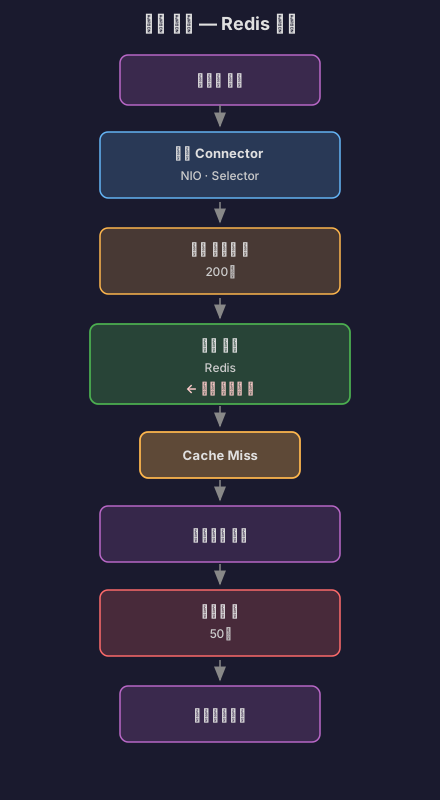
이전 글(캐시와 버퍼: 속도 차이를 극복하는 두 가지 방법)에서 캐시의 기본 개념과 CPU 캐시, 웹 브라우저 캐시, Redis 캐시 등을 살펴봤어요. 특히 Redis를 이용한 캐싱 예제를 보면서 DB 조회(50-200ms)를 캐시 조회(1-5ms)로 바꿔 10배 이상 성능을 향상시킬 수 있다는 걸 확인했죠.
그런데 막상 라이브 스트리밍 프로젝트에 적용하려고 보니 궁금한 게 너무 많았어요. Redis는 왜 Memcached보다 빠를까? 어떤 자료구조를 제공할까? Spring Boot에서는 어떻게 쓸까? 캐시 전략은 뭐가 있고, 주의할 점은? 실제 서비스에서는 어떻게 쓸까?
그래서 Redis와 캐싱에 대해 제대로 파헤쳐 보기로 했어요.
1. 왜 캐싱이 필요할까?
1.1 반복되는 조회의 문제
라이브 스트리밍 서비스를 만들면서 이런 상황을 마주했어요.
@RestControllerclass StreamController { @Autowired private StreamRepository streamRepository;
@GetMapping("/api/streams/popular") List<Stream> getPopularStreams() { // 매번 DB 조회 return streamRepository.findTop10ByOrderByViewersDesc(); }}문제점:
- 인기 방송 목록은 초당 수백 번 조회된다
- 하지만 데이터는 1분에 한 번 정도만 바뀐다
- 매번 DB에 접근하면 불필요한 부하 발생
1초 동안의 처리:- 요청 500개- DB 쿼리 500번 (각 10ms)- 총 DB 시간: 5000ms (5초!)- 커넥션 풀 고갈 위험
실제로는:- 데이터가 1분마다 바뀜- 59초 동안은 같은 데이터를 반복 조회- 499번은 불필요한 쿼리!1.2 캐시의 등장
이런 부류의 문제를 해결하기 위해 캐시(Cache) 개념이 등장했어요.
// 간단한 메모리 캐시class SimpleCache { private Map<String, Object> cache = new HashMap<>(); private Map<String, Long> expireTime = new HashMap<>();
void put(String key, Object value, long ttlSeconds) { cache.put(key, value); expireTime.put(key, System.currentTimeMillis() + (ttlSeconds * 1000)); }
Object get(String key) { // 만료 확인 Long expire = expireTime.get(key); if (expire != null && System.currentTimeMillis() > expire) { cache.remove(key); expireTime.remove(key); return null; } return cache.get(key); }}효과:
캐시 적용 후:- 첫 번째 요청: DB 조회 (10ms) + 캐시 저장- 2~500번째 요청: 캐시 조회 (0.01ms)- 총 시간: 10ms + (499 × 0.01ms) = 15ms- 성능 향상: 약 333배!1.3 CPU 캐시에서 배우는 교훈
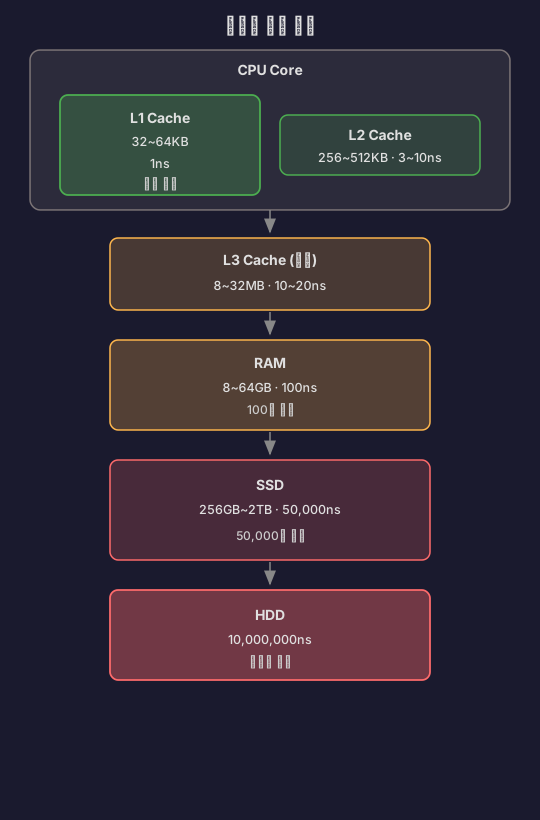
캐싱은 소프트웨어보다 하드웨어에서 먼저 발전했어요.

핵심 원리: 자주 쓰는 데이터를 빠른 곳에 두자!
이것이 바로 캐싱의 근본 원리예요.
2. 캐싱의 역사와 Redis의 탄생
2.1 초기 캐싱 방법들 (2000년대 초반)
로컬 메모리 캐시
// 2000년대 초반 스타일class LocalCache { private static Map<String, Object> cache = new HashMap<>();
static Object get(String key) { return cache.get(key); }
static void put(String key, Object value) { cache.put(key, value); }}문제점:
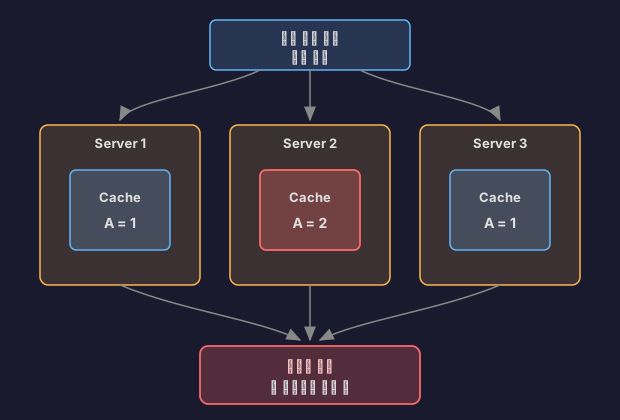
- 서버가 여러 대면? → 각 서버마다 다른 캐시
- 서버 재시작하면? → 캐시 전부 날아감
- 메모리 관리는? → 무한정 증가
Memcached (2003년)
Brad Fitzpatrick이 LiveJournal을 위해 만든 분산 메모리 캐시 시스템이었어요.
// Memcached 사용MemcachedClient client = new MemcachedClient( new InetSocketAddress("localhost", 11211));
// 저장 (10분 TTL)client.set("user:123", 600, userObject);
// 조회User user = (User) client.get("user:123");장점:
- 분산 캐시 가능 (여러 서버 공유)
- 빠름 (메모리 기반)
- 간단함
한계:
- 문자열만 저장 가능 (단순 key-value)
- 영속성 없음 (재시작하면 데이터 손실)
- 복잡한 자료구조 지원 안 함
2.2 Redis의 탄생 (2009년)
2009년, Salvatore Sanfilippo는 실시간 웹 로그 분석 시스템을 만들고 있었어요. MySQL로는 성능이 안 나왔고, Memcached로는 필요한 기능(리스트, 정렬)이 없었죠. 그래서 직접 만들기로 했어요.
Redis (REmote DIctionary Server)의 설계 철학:
- 다양한 자료구조: String, List, Set, Sorted Set, Hash
- 영속성: 메모리 + 디스크 저장
- 단순함: 모든 명령은 원자적(Atomic)
- 빠름: C 언어로 작성, 싱글 스레드 이벤트 루프
Redis의 성능:- GET/SET: 초당 100,000 ops- Memcached: 초당 60,000 ops- MySQL: 초당 1,000 ops
100배 이상 차이!Redis가 Memcached보다 나은 점
// Memcached: 문자열만client.set("counter", "100");String val = (String) client.get("counter");int counter = Integer.parseInt(val) + 1; // 애플리케이션에서 계산client.set("counter", String.valueOf(counter));
// Redis: 원자적 연산 지원redis.incr("counter"); // 한 번에 증가!// Memcached: 리스트 직접 구현List<String> list = (List<String>) client.get("list");list.add("new item");client.set("list", list);
// Redis: 리스트 자료구조 내장redis.lpush("list", "new item"); // 리스트 왼쪽에 추가2.3 Spring Boot + Redis (2014년~)
Spring Boot가 Redis를 1급 시민으로 채택하면서 사용이 폭발적으로 증가했어요.
# Spring Boot 설정spring: redis: host: localhost port: 6379 cache: type: redis@Configuration@EnableCachingpublic class CacheConfig { @Bean public CacheManager cacheManager(RedisConnectionFactory factory) { return RedisCacheManager.builder(factory).build(); }}
@Serviceclass UserService { @Cacheable("users") // 자동 캐싱! public User getUser(Long id) { return userRepository.findById(id).orElseThrow(); }}3. Redis 자료구조 완벽 가이드
3.1 String (가장 기본)
// 단순 값 저장redis.set("user:123:name", "홍길동");String name = redis.get("user:123:name");
// TTL 설정 (10분)redis.setex("session:abc", 600, "user-data");
// 원자적 증가redis.incr("page:views"); // 1 증가redis.incrby("page:views", 5); // 5 증가사용 사례:
- 세션 저장
- 캐싱
- 카운터 (조회수, 좋아요)
3.2 List (순서 있는 리스트)
// 최근 본 방송 10개redis.lpush("user:123:recent-streams", "stream-1");redis.lpush("user:123:recent-streams", "stream-2");redis.lpush("user:123:recent-streams", "stream-3");
// 최근 10개만 유지redis.ltrim("user:123:recent-streams", 0, 9);
// 조회List<String> recent = redis.lrange("user:123:recent-streams", 0, 9);사용 사례:
- 최근 활동 기록
- 채팅 메시지 임시 저장
- 작업 큐
3.3 Set (중복 없는 집합)
// 온라인 사용자redis.sadd("online-users", "user:123");redis.sadd("online-users", "user:456");
// 멤버인지 확인 (O(1))boolean isOnline = redis.sismember("online-users", "user:123");
// 전체 온라인 사용자 수long count = redis.scard("online-users");
// 집합 연산Set<String> commonFriends = redis.sinter("user:123:friends", "user:456:friends");사용 사례:
- 태그 시스템
- 온라인 사용자 추적
- 중복 제거
3.4 Sorted Set (정렬된 집합)
// 실시간 순위 (점수, 멤버)redis.zadd("stream-ranking", 1000, "stream-1"); // 시청자 1000명redis.zadd("stream-ranking", 500, "stream-2"); // 시청자 500명redis.zadd("stream-ranking", 2000, "stream-3"); // 시청자 2000명
// Top 10 조회 (높은 순)Set<String> top10 = redis.zrevrange("stream-ranking", 0, 9);// 결과: [stream-3, stream-1, stream-2]
// 순위 조회long rank = redis.zrevrank("stream-ranking", "stream-1"); // 1 (2등)
// 점수 증가redis.zincrby("stream-ranking", 100, "stream-2"); // 500 → 600사용 사례:
- 리더보드 (게임 순위)
- 실시간 인기 방송
- 시간순 정렬
3.5 Hash (객체 저장)
// 사용자 정보 저장Map<String, String> user = new HashMap<>();user.put("name", "홍길동");user.put("age", "25");user.put("email", "hong@example.com");
redis.hset("user:123", user);
// 특정 필드만 조회String name = redis.hget("user:123", "name");
// 전체 조회Map<String, String> userData = redis.hgetall("user:123");
// 필드 하나만 업데이트redis.hset("user:123", "age", "26");사용 사례:
- 객체 캐싱
- 설정값 저장
- 세션 데이터
4. Spring Boot에서 Redis 사용하기
4.1 의존성 추가
dependencies { implementation 'org.springframework.boot:spring-boot-starter-data-redis' implementation 'org.springframework.boot:spring-boot-starter-cache'}4.2 기본 설정
spring: redis: host: localhost port: 6379 password: # 비밀번호 (선택) timeout: 3000ms lettuce: pool: max-active: 10 # 최대 커넥션 max-idle: 10 # 유휴 커넥션 min-idle: 2 # 최소 커넥션 cache: type: redis redis: time-to-live: 600000 # 10분 (밀리초)4.3 RedisTemplate 사용
@Configurationpublic class RedisConfig {
@Bean public RedisTemplate<String, Object> redisTemplate( RedisConnectionFactory connectionFactory) { RedisTemplate<String, Object> template = new RedisTemplate<>(); template.setConnectionFactory(connectionFactory);
// JSON 직렬화 Jackson2JsonRedisSerializer<Object> serializer = new Jackson2JsonRedisSerializer<>(Object.class);
template.setKeySerializer(new StringRedisSerializer()); template.setValueSerializer(serializer); template.setHashKeySerializer(new StringRedisSerializer()); template.setHashValueSerializer(serializer);
return template; }}@Serviceclass StreamService { @Autowired private RedisTemplate<String, Object> redisTemplate;
// 인기 방송 캐싱 public List<Stream> getPopularStreams() { String key = "popular-streams";
// 1. 캐시 확인 List<Stream> cached = (List<Stream>) redisTemplate.opsForValue().get(key); if (cached != null) { return cached; // 캐시 히트! }
// 2. DB 조회 List<Stream> streams = streamRepository.findTop10ByOrderByViewersDesc();
// 3. 캐시 저장 (5분) redisTemplate.opsForValue().set(key, streams, 5, TimeUnit.MINUTES);
return streams; }}4.4 @Cacheable 어노테이션 사용
@Configuration@EnableCachingpublic class CacheConfig {
@Bean public CacheManager cacheManager(RedisConnectionFactory factory) { RedisCacheConfiguration config = RedisCacheConfiguration.defaultCacheConfig() .entryTtl(Duration.ofMinutes(10)) // 기본 TTL: 10분 .serializeKeysWith( RedisSerializationContext.SerializationPair .fromSerializer(new StringRedisSerializer()) ) .serializeValuesWith( RedisSerializationContext.SerializationPair .fromSerializer(new Jackson2JsonRedisSerializer<>(Object.class)) );
return RedisCacheManager.builder(factory) .cacheDefaults(config) .build(); }}@Serviceclass UserService {
// 캐시에 저장 (키: users::123) @Cacheable(value = "users", key = "#id") public User getUser(Long id) { return userRepository.findById(id) .orElseThrow(() -> new UserNotFoundException(id)); }
// 캐시 업데이트 @CachePut(value = "users", key = "#user.id") public User updateUser(User user) { return userRepository.save(user); }
// 캐시 삭제 @CacheEvict(value = "users", key = "#id") public void deleteUser(Long id) { userRepository.deleteById(id); }
// 전체 캐시 삭제 @CacheEvict(value = "users", allEntries = true) public void deleteAllUsers() { userRepository.deleteAll(); }}5. Redis 없이 캐싱하기 - 로컬 캐시
5.1 “꼭 Redis를 써야 할까?”
Redis를 공부하고 나서 모든 걸 Redis로 캐싱하려고 했어요. 그런데 문득 이런 생각이 들었거든요.
“서버 1대만 쓰는데, 굳이 Redis를 띄워야 할까?”
로그인 기능을 만들면서 이런 상황이 있었어요.
@Serviceclass CategoryService { @Cacheable("categories") public List<Category> getAllCategories() { // 카테고리는 거의 안 바뀜 (한 달에 한 번?) // 하지만 매 페이지마다 조회됨 return categoryRepository.findAll(); }}고민:
- 카테고리는 모든 서버에서 동일한 데이터를 봐야 함… 은 아니다 (변경이 거의 없으니까)
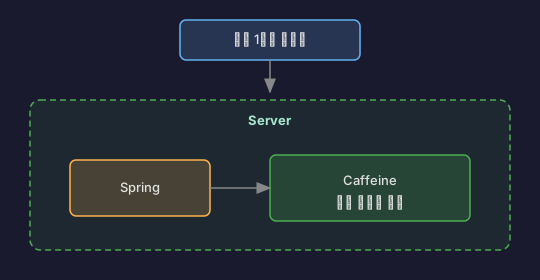
- 서버가 1대면? Redis 없이 메모리에만 캐싱해도 충분하지 않을까?
- Redis 설치/관리 비용이 아깝다
찾아보니 스프링은 Redis 없이도 캐싱을 지원했어요. 바로 로컬 캐시죠.
5.2 Spring의 캐시 추상화
스프링의 캐시 추상화가 강력한 이유는 구현체를 바꿔도 코드는 그대로라는 점이에요.
// 이 코드는 Redis든, Caffeine이든, EhCache든 똑같이 동작@Cacheable("users")public User getUser(Long id) { return userRepository.findById(id).orElseThrow();}
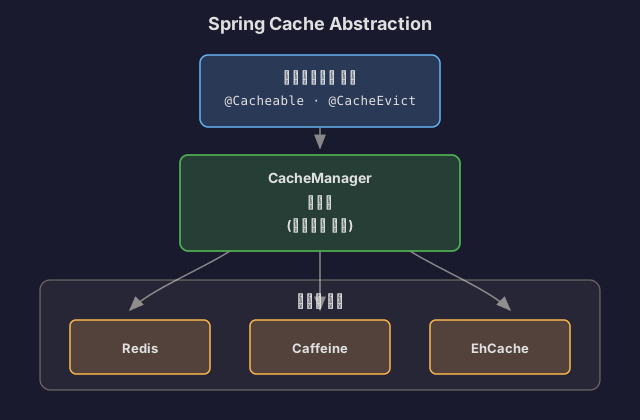
설정만 바꾸면 구현체가 바뀌어요. 이게 추상화의 힘이죠.
5.3 Caffeine Cache 사용하기
Caffeine은 구글의 Guava Cache를 개선해서 만든 고성능 로컬 캐시 라이브러리예요. 벤치마크 결과 기존 캐시 라이브러리들보다 빠르다고 해서 써보기로 했어요.
의존성 추가
dependencies { implementation 'org.springframework.boot:spring-boot-starter-cache' implementation 'com.github.ben-manes.caffeine:caffeine:3.1.8'}설정
@Configuration@EnableCachingpublic class CacheConfig {
@Bean public CacheManager cacheManager() { CaffeineCacheManager cacheManager = new CaffeineCacheManager(); cacheManager.setCaffeine(Caffeine.newBuilder() .initialCapacity(100) // 초기 용량 .maximumSize(1000) // 최대 1000개 .expireAfterWrite(10, TimeUnit.MINUTES) // 10분 후 만료 .recordStats()); // 통계 기록
return cacheManager; }}# application.yml (간단 버전)spring: cache: type: caffeine caffeine: spec: maximumSize=1000,expireAfterWrite=10m cache-names: - users - categories - streams사용
@Serviceclass CategoryService {
@Cacheable("categories") public List<Category> getAllCategories() { // 첫 요청: DB 조회 후 로컬 메모리에 저장 // 이후 10분간: 메모리에서 즉시 반환 return categoryRepository.findAll(); }
@CacheEvict(value = "categories", allEntries = true) public void refreshCategories() { // 관리자가 카테고리 변경 시 캐시 초기화 }}성능 테스트를 해봤다:
@Testvoid cachePerformanceTest() { // 첫 요청 (Cache Miss) long start1 = System.currentTimeMillis(); categoryService.getAllCategories(); long time1 = System.currentTimeMillis() - start1;
// 두 번째 요청 (Cache Hit) long start2 = System.currentTimeMillis(); categoryService.getAllCategories(); long time2 = System.currentTimeMillis() - start2;
System.out.println("첫 요청: " + time1 + "ms"); // 15ms System.out.println("캐시 히트: " + time2 + "ms"); // 0ms}로컬 메모리라 네트워크 비용이 없어서 거의 0ms예요.
5.4 로컬 캐시 고급 설정
Caffeine은 다양한 만료 정책을 지원해요.
@Beanpublic CacheManager cacheManager() { CaffeineCacheManager cacheManager = new CaffeineCacheManager();
// 캐시별로 다른 설정 가능 Map<String, CaffeineCache> caches = new HashMap<>();
// 사용자 정보: 접근 후 10분간 유지 caches.put("users", buildCache(Caffeine.newBuilder() .expireAfterAccess(10, TimeUnit.MINUTES) .maximumSize(1000)));
// 카테고리: 쓰기 후 1시간 유지 caches.put("categories", buildCache(Caffeine.newBuilder() .expireAfterWrite(1, TimeUnit.HOURS) .maximumSize(100)));
// 인기 방송: 크기 기반 만료 (최대 500개) caches.put("popular-streams", buildCache(Caffeine.newBuilder() .maximumSize(500) .expireAfterWrite(1, TimeUnit.MINUTES)));
cacheManager.setCacheNames(caches.keySet()); return cacheManager;}
private CaffeineCache buildCache(Caffeine<Object, Object> builder) { return new CaffeineCache("cache", builder.build());}만료 정책 비교
// expireAfterWrite: 작성 후 10분Caffeine.newBuilder() .expireAfterWrite(10, TimeUnit.MINUTES) // 시간: 0분 -> 조회 -> 5분 -> 조회 -> 11분 // 결과: 0분에 캐싱, 11분에 만료 (조회 무관)
// expireAfterAccess: 마지막 접근 후 10분Caffeine.newBuilder() .expireAfterAccess(10, TimeUnit.MINUTES) // 시간: 0분 -> 조회 -> 5분 -> 조회 -> 11분 -> 조회 // 결과: 5분에 조회했으니 15분까지 유지 (계속 연장됨)
// 커스텀 만료: 동적 TTLCaffeine.newBuilder() .expireAfter(new Expiry<String, User>() { public long expireAfterCreate(String key, User user, long currentTime) { // VIP는 1시간, 일반은 10분 return user.isVip() ? TimeUnit.HOURS.toNanos(1) : TimeUnit.MINUTES.toNanos(10); } })5.5 로컬 캐시 vs Redis, 언제 뭘 쓸까?
이제 두 가지 옵션이 있어요. 언제 뭘 써야 할까? 처음엔 혼란스러웠는데, 직접 써보니 명확해졌어요.
서버 1대 환경

로컬 캐시를 쓴다:
- 서버가 1대뿐이면 데이터 불일치 문제 없음
- Redis 설치/관리 비용 불필요
- 속도도 더 빠름 (네트워크 비용 0)
실제로 내 프로젝트 초기에는 서버 1대였어요. Caffeine으로 시작했고, 나중에 서버를 늘리면서 Redis로 마이그레이션했죠. 코드는 하나도 안 바꿨어요. 설정만 바꿨어요.
서버 여러 대 환경


Redis를 쓴다:
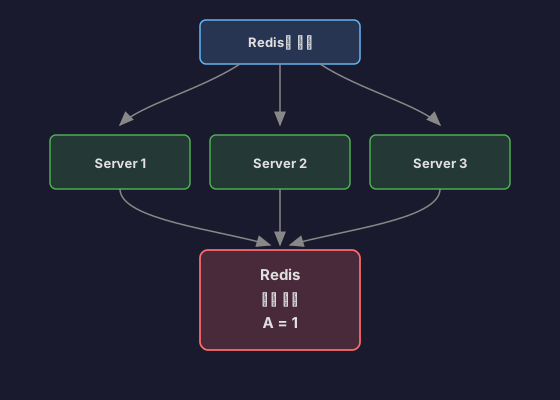
- 모든 서버가 같은 데이터를 봐야 함
- 세션 정보 같은 건 필수로 공유해야 함
하지만 꼭 모든 걸 Redis로 캐싱할 필요는 없어요. 저는 이렇게 섞어 써요.
실무 전략: 하이브리드
@Configuration@EnableCachingpublic class CacheConfig {
@Bean @Primary // 기본은 Redis public CacheManager redisCacheManager(RedisConnectionFactory factory) { return RedisCacheManager.builder(factory) .cacheDefaults(RedisCacheConfiguration.defaultCacheConfig() .entryTtl(Duration.ofMinutes(10))) .build(); }
@Bean public CacheManager localCacheManager() { CaffeineCacheManager cacheManager = new CaffeineCacheManager(); cacheManager.setCaffeine(Caffeine.newBuilder() .maximumSize(1000) .expireAfterWrite(10, TimeUnit.MINUTES)); return cacheManager; }}@Serviceclass CachingService {
// 로컬 캐시: 변경 거의 없고, 서버마다 달라도 괜찮음 @Cacheable(value = "categories", cacheManager = "localCacheManager") public List<Category> getCategories() { return categoryRepository.findAll(); }
// Redis: 서버 간 공유 필요 @Cacheable(value = "users", cacheManager = "redisCacheManager") public User getUser(Long id) { return userRepository.findById(id).orElseThrow(); }}내가 실무에서 쓰는 기준:
| 데이터 종류 | 캐시 선택 | 이유 |
|---|---|---|
| 카테고리, 설정값 | Caffeine (로컬) | 변경 거의 없음, 빠른 속도 필요 |
| 사용자 세션 | Redis | 서버 간 공유 필수 |
| 인기 방송 순위 | Redis | 실시간 동기화 필요 |
| 정적 컨텐츠 메타데이터 | Caffeine (로컬) | 읽기 전용, 서버마다 달라도 됨 |
성능 비교를 해봤다
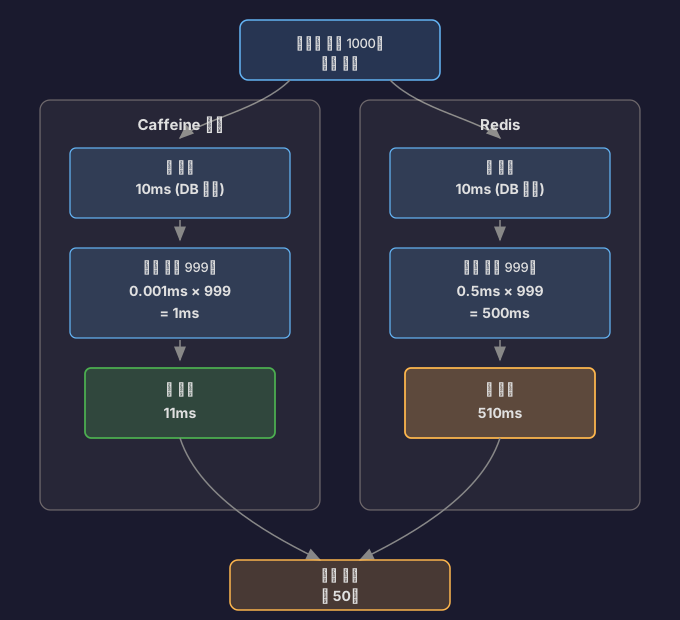
로컬 캐시가 압도적으로 빨라요. 하지만 데이터 일관성이 더 중요하면 Redis를 써야 해요.
출처: F-lab Redis와 Spring Boot 통합, Spring Cache 이해하기, Spring Boot Caffeine 캐시 적용
5.6 캐시 통계 확인하기
Caffeine은 캐시 히트율을 확인할 수 있어요.
@Configuration@EnableCachingpublic class CacheConfig {
@Bean public CacheManager cacheManager() { CaffeineCacheManager manager = new CaffeineCacheManager(); manager.setCaffeine(Caffeine.newBuilder() .maximumSize(1000) .expireAfterWrite(10, TimeUnit.MINUTES) .recordStats()); // 통계 기록 활성화 return manager; }}@RestControllerclass CacheStatsController {
@Autowired private CacheManager cacheManager;
@GetMapping("/cache/stats") public Map<String, CacheStats> getCacheStats() { Map<String, CacheStats> stats = new HashMap<>();
for (String cacheName : cacheManager.getCacheNames()) { Cache cache = cacheManager.getCache(cacheName); if (cache instanceof CaffeineCache) { CaffeineCache caffeineCache = (CaffeineCache) cache; com.github.benmanes.caffeine.cache.Cache<Object, Object> nativeCache = caffeineCache.getNativeCache();
CacheStats cacheStats = nativeCache.stats(); stats.put(cacheName, cacheStats); } }
return stats; }}// 결과{ "categories": { "hitCount": 9850, "missCount": 150, "hitRate": 0.985, // 98.5% 히트율! "evictionCount": 0 }}히트율이 높으면 캐싱이 잘 되고 있다는 뜻이에요. 제 경우 카테고리 캐시는 98% 이상 히트율을 보였어요.
6. 캐싱 전략
6.1 Cache-Aside (Lazy Loading)
가장 흔한 패턴이에요.
@Serviceclass ProductService { @Autowired private RedisTemplate<String, Product> redis;
@Autowired private ProductRepository repository;
public Product getProduct(Long id) { String key = "product:" + id;
// 1. 캐시 확인 Product cached = redis.opsForValue().get(key); if (cached != null) { return cached; // Cache Hit }
// 2. DB 조회 (Cache Miss) Product product = repository.findById(id) .orElseThrow(() -> new NotFoundException(id));
// 3. 캐시 저장 redis.opsForValue().set(key, product, 1, TimeUnit.HOURS);
return product; }}장점:
- 필요한 데이터만 캐싱
- 캐시 장애 시 DB로 fallback 가능
단점:
- 첫 요청은 느림 (Cache Miss)
- 캐시 만료 시점에 부하 집중 (Thundering Herd)
6.2 Write-Through
데이터 쓸 때 캐시도 함께 업데이트해요.
@Serviceclass ProductService { public Product updateProduct(Product product) { // 1. DB 업데이트 Product saved = repository.save(product);
// 2. 캐시 업데이트 String key = "product:" + product.getId(); redis.opsForValue().set(key, saved, 1, TimeUnit.HOURS);
return saved; }}장점:
- 캐시가 항상 최신 상태
- 읽기 성능 좋음
단점:
- 쓰기 성능 저하 (캐시 + DB)
- 안 쓰는 데이터도 캐싱
6.3 Write-Behind (Write-Back)
캐시에만 쓰고, 나중에 DB에 반영해요.
@Serviceclass ViewCountService { @Autowired private RedisTemplate<String, Long> redis;
// 조회수 증가 (캐시만) public void incrementView(Long streamId) { String key = "stream:" + streamId + ":views"; redis.opsForValue().increment(key); }
// 주기적으로 DB 반영 (1분마다) @Scheduled(fixedDelay = 60000) public void syncToDatabase() { Set<String> keys = redis.keys("stream:*:views");
for (String key : keys) { Long streamId = extractStreamId(key); Long views = redis.opsForValue().get(key);
// DB 업데이트 streamRepository.updateViews(streamId, views);
// 캐시 삭제 redis.delete(key); } }}장점:
- 쓰기 성능 매우 좋음
- DB 부하 감소
단점:
- 데이터 유실 위험 (Redis 장애 시)
- 구현 복잡도 높음
출처: AWS - Caching Strategies, Microsoft - Cache-Aside Pattern
7. 주의해야 할 문제들
7.1 Thundering Herd (Cache Stampede)
문제: 캐시 만료 시점에 동시에 많은 요청이 DB로 몰림
// 문제 상황@Cacheable(value = "popular", key = "'streams'")public List<Stream> getPopularStreams() { // TTL 10분 return streamRepository.findTop10ByOrderByViewersDesc();}
// 10분 후 캐시 만료// → 동시에 100개 요청 들어옴// → 100개 모두 DB 조회!// → DB 폭발!해결: Lock을 사용한 Single Flight 패턴
@Serviceclass StreamService { private final LoadingCache<String, List<Stream>> cache = Caffeine.newBuilder() .expireAfterWrite(10, TimeUnit.MINUTES) .build(key -> { // 여러 요청이 동시에 와도 // 첫 번째만 실행됨! return streamRepository.findTop10ByOrderByViewersDesc(); });
public List<Stream> getPopularStreams() { return cache.get("popular-streams"); }}또는 Redis Lock 사용:
@Serviceclass StreamService { public List<Stream> getPopularStreams() { String cacheKey = "popular-streams"; String lockKey = "lock:popular-streams";
// 1. 캐시 확인 List<Stream> cached = redis.get(cacheKey); if (cached != null) return cached;
// 2. Lock 획득 시도 (5초 대기) Boolean acquired = redis.setIfAbsent(lockKey, "1", 5, TimeUnit.SECONDS);
if (Boolean.TRUE.equals(acquired)) { try { // Lock 획득 성공 → DB 조회 List<Stream> streams = streamRepository.findTop10(); redis.set(cacheKey, streams, 10, TimeUnit.MINUTES); return streams; } finally { redis.delete(lockKey); } } else { // Lock 획득 실패 → 잠시 대기 후 재시도 Thread.sleep(100); return getPopularStreams(); } }}7.2 Cache Penetration (존재하지 않는 데이터 조회)
문제: 없는 데이터를 계속 조회하면 매번 DB까지 접근
// 공격 시나리오for (int i = 0; i < 10000; i++) { getUser(9999999 + i); // 존재하지 않는 사용자 // → 캐시 Miss // → DB 조회 // → 데이터 없음 // → 캐시 안 함 // → 반복!}해결 1: Null 값도 캐싱
@Serviceclass UserService { public User getUser(Long id) { String key = "user:" + id;
// 캐시 확인 if (redis.hasKey(key)) { User cached = redis.get(key); if (cached == null) { throw new UserNotFoundException(id); } return cached; }
// DB 조회 Optional<User> user = repository.findById(id);
if (user.isPresent()) { // 있으면 1시간 캐싱 redis.set(key, user.get(), 1, TimeUnit.HOURS); return user.get(); } else { // 없어도 5분 캐싱 (null) redis.set(key, null, 5, TimeUnit.MINUTES); throw new UserNotFoundException(id); } }}해결 2: Bloom Filter
@Serviceclass UserService { private BloomFilter<Long> userIds = BloomFilter.create( Funnels.longFunnel(), 1000000, // 예상 개수 0.01 // 오류율 1% );
@PostConstruct void init() { // 시작 시 모든 사용자 ID 로딩 List<Long> ids = repository.findAllIds(); ids.forEach(userIds::put); }
public User getUser(Long id) { // Bloom Filter 확인 if (!userIds.mightContain(id)) { // 100% 없음! throw new UserNotFoundException(id); }
// 나머지는 기존 로직 // (Bloom Filter: 있다고 했지만 실제로 없을 수 있음, 1% 확률) return getUserFromCacheOrDB(id); }}7.3 Cache Avalanche (대량 만료)
문제: 대량의 캐시가 동시에 만료되면 DB 폭발
// 문제 코드for (Product product : products) { redis.set("product:" + product.getId(), product, 1, TimeUnit.HOURS); // 모두 같은 TTL!}
// 1시간 후// → 모든 캐시 동시 만료// → DB에 동시에 수천 개 쿼리// → 장애!해결: TTL에 랜덤 값 추가
@Serviceclass ProductService { public void cacheProduct(Product product) { // 1시간 + 랜덤(0~10분) long ttl = 3600 + ThreadLocalRandom.current().nextInt(0, 600);
redis.set("product:" + product.getId(), product, ttl, TimeUnit.SECONDS); }}8. 실제 사용 사례
8.1 YouTube: 실시간 조회수
@Serviceclass VideoViewService { // 조회수 증가 (Redis에만 저장, 초당 수만 건) public void incrementView(String videoId) { redis.incr("video:" + videoId + ":views"); }
// 1분마다 DB에 배치 업데이트 @Scheduled(fixedDelay = 60000) public void syncToDatabase() { Set<String> keys = redis.keys("video:*:views");
List<VideoView> updates = new ArrayList<>(); for (String key : keys) { String videoId = extractVideoId(key); Long views = redis.getAndDelete(key); // 가져오고 삭제
updates.add(new VideoView(videoId, views)); }
// 배치 업데이트 (1번의 쿼리로) videoRepository.batchUpdateViews(updates); }}8.2 Instagram: 피드 캐싱
@Serviceclass FeedService { // 사용자 피드 생성 (무거운 작업) public List<Post> generateFeed(Long userId) { String key = "feed:" + userId;
// 캐시 확인 (15분 TTL) List<Post> cached = redis.get(key); if (cached != null) return cached;
// 피드 생성 (팔로우한 사람들의 최근 게시물) List<Long> following = followRepository.findFollowingIds(userId); List<Post> posts = postRepository.findRecentByUserIds(following, 50);
// 좋아요/댓글 수 추가 (N+1 방지) Map<Long, PostStats> stats = getStatsFromCache(posts); posts.forEach(post -> post.setStats(stats.get(post.getId())));
redis.set(key, posts, 15, TimeUnit.MINUTES); return posts; }
// 새 게시물 작성 시 팔로워들의 캐시 무효화 public void invalidateFollowerFeeds(Long userId) { List<Long> followers = followRepository.findFollowerIds(userId);
for (Long followerId : followers) { redis.delete("feed:" + followerId); } }}8.3 Twitter: 실시간 트렌드
@Serviceclass TrendService { // 해시태그 카운트 증가 public void trackHashtag(String hashtag) { String key = "trend:" + getCurrentHour(); // trend:2024-11-09-15
redis.zincrby(key, 1, hashtag); // Sorted Set 점수 증가
// 1시간 후 자동 삭제 redis.expire(key, 1, TimeUnit.HOURS); }
// 현재 시간 Top 10 트렌드 public List<String> getTopTrends() { String key = "trend:" + getCurrentHour();
// 상위 10개 (높은 점수 순) return redis.zrevrange(key, 0, 9); }}8.4 게임: 실시간 리더보드
@Serviceclass LeaderboardService { // 점수 업데이트 public void updateScore(Long userId, int score) { redis.zadd("leaderboard", score, "user:" + userId); }
// Top 100 조회 public List<RankEntry> getTop100() { Set<TypedTuple<String>> top = redis.zrevrangeWithScores("leaderboard", 0, 99);
int rank = 1; List<RankEntry> result = new ArrayList<>(); for (TypedTuple<String> entry : top) { result.add(new RankEntry( rank++, entry.getValue(), entry.getScore().intValue() )); } return result; }
// 내 순위 조회 public RankEntry getMyRank(Long userId) { String key = "user:" + userId;
Long rank = redis.zrevrank("leaderboard", key); // 순위 Double score = redis.zscore("leaderboard", key); // 점수
if (rank == null) { return new RankEntry(-1, key, 0); // 순위권 밖 }
return new RankEntry(rank.intValue() + 1, key, score.intValue()); }}출처: Instagram Engineering at Meta, Twitter’s Infrastructure Behind Scale
9. Redis vs Memcached
| 특징 | Redis | Memcached |
|---|---|---|
| 자료구조 | String, List, Set, Sorted Set, Hash | String만 |
| 영속성 | RDB, AOF 지원 | 없음 (재시작 시 데이터 손실) |
| 복제 | Master-Slave 지원 | 없음 |
| 트랜잭션 | 지원 (MULTI/EXEC) | 없음 |
| Pub/Sub | 지원 | 없음 |
| Lua Script | 지원 | 없음 |
| 멀티스레드 | 싱글 스레드 (Redis 6.0부터 I/O 멀티스레드) | 멀티스레드 |
| 메모리 효율 | 약간 낮음 | 높음 |
| 성능 | 초당 100K ops | 초당 60K ops |
언제 Memcached를 쓸까?
- 단순 key-value만 필요
- 영속성 불필요
- 메모리 효율이 중요
언제 Redis를 쓸까?
- 복잡한 자료구조 필요
- 영속성 필요
- Pub/Sub, 트랜잭션 등 고급 기능 필요
- 대부분의 경우!
출처: Redis vs Memcached, Stack Overflow - How We Do App Caching
10. 정리
10.1 핵심 요약
-
캐싱은 필수다
- 같은 데이터를 반복 조회하면 캐싱하자
- 성능 향상: 100배~1000배
-
Redis가 최고다
- 다양한 자료구조
- 영속성 지원
- Pub/Sub, 트랜잭션 등 풍부한 기능
-
적절한 캐싱 전략 선택
- Cache-Aside: 일반적인 경우
- Write-Through: 항상 최신 데이터 필요
- Write-Behind: 쓰기 성능 중요
-
주의할 점
- Thundering Herd: Lock 사용
- Cache Penetration: Null 캐싱 또는 Bloom Filter
- Cache Avalanche: TTL 랜덤화
-
Spring Boot에서 쉽게 사용
- @Cacheable 어노테이션
- RedisTemplate
- 설정 간단
10.2 실제 설정 예시
spring: redis: host: localhost port: 6379 timeout: 3000ms lettuce: pool: max-active: 10 max-idle: 10 min-idle: 2 cache: type: redis redis: time-to-live: 600000 # 10분 cache-null-values: true # null도 캐싱// 사용 예시@Serviceclass StreamService {
@Cacheable(value = "streams", key = "#id") public Stream getStream(Long id) { return streamRepository.findById(id).orElseThrow(); }
@CachePut(value = "streams", key = "#stream.id") public Stream updateStream(Stream stream) { return streamRepository.save(stream); }
@CacheEvict(value = "streams", key = "#id") public void deleteStream(Long id) { streamRepository.deleteById(id); }}10.3 마치며
스레드 풀, 커넥션 풀에 이어 캐싱까지 공부하고 나니, 이제 라이브 스트리밍 서버의 성능 최적화 전체 그림이 보여요.

다음에는 메시지 큐와 비동기 처리를 공부해서, 더욱 확장 가능한 시스템을 만들어 봐야겠어요.
참고 자료
공식 문서
- Redis Official Documentation - Redis 공식 문서
- Spring Data Redis - Spring Data Redis 가이드
- Lettuce Reference - Lettuce Redis 클라이언트
기술 블로그
- 카카오 - Redis 사용 사례 - 카카오의 Redis 활용
- 우아한형제들 - 빼빼로데이 이벤트 - 배민 Redis 사용 사례
- NHN - Redis 튜토리얼 - Redis 성능 최적화
- Line - Redis Lua Script 활용 - Redis 클러스터 관리
한글 자료
- 향로 - Redis 기본 개념 - Redis 기초
- 망나니개발자 - Spring Redis 캐싱 - Spring에서 Redis 캐싱
- Hudi - Redis 분산 락 - Redis 자료구조 설명
책
- The Little Redis Book - Redis 입문서 (무료)
- Redis in Action - Redis 실전 가이드

In the previous article (Cache and Buffer: Two Approaches to Overcoming Speed Differences), we explored the basic concepts of caching, including CPU cache, web browser cache, and Redis cache. In particular, through a Redis caching example, we confirmed that converting DB lookups (50-200ms) to cache lookups (1-5ms) can improve performance by more than 10x.
However, when I tried to apply this to my live streaming project, I had so many questions. Why is Redis faster than Memcached? What data structures does it offer? How do you use it with Spring Boot? What caching strategies exist, and what are the pitfalls? How is it used in production services?
So I decided to dig deep into Redis and caching.
1. Why Is Caching Needed?
1.1 The Problem of Repeated Queries
While building a live streaming service, I encountered this situation.
@RestControllerclass StreamController { @Autowired private StreamRepository streamRepository;
@GetMapping("/api/streams/popular") List<Stream> getPopularStreams() { // Query DB every time return streamRepository.findTop10ByOrderByViewersDesc(); }}Problems:
- The popular streams list is queried hundreds of times per second
- But the data only changes about once per minute
- Hitting the DB every time causes unnecessary load
Processing in 1 second:- 500 requests- 500 DB queries (10ms each)- Total DB time: 5000ms (5 seconds!)- Risk of connection pool exhaustion
In reality:- Data changes every minute- For 59 seconds, the same data is queried repeatedly- 499 queries are unnecessary!1.2 Enter the Cache
The concept of cache was introduced to solve this type of problem.
// Simple in-memory cacheclass SimpleCache { private Map<String, Object> cache = new HashMap<>(); private Map<String, Long> expireTime = new HashMap<>();
void put(String key, Object value, long ttlSeconds) { cache.put(key, value); expireTime.put(key, System.currentTimeMillis() + (ttlSeconds * 1000)); }
Object get(String key) { // Check expiration Long expire = expireTime.get(key); if (expire != null && System.currentTimeMillis() > expire) { cache.remove(key); expireTime.remove(key); return null; } return cache.get(key); }}Result:
After applying cache:- First request: DB query (10ms) + cache store- Requests 2-500: Cache lookup (0.01ms)- Total time: 10ms + (499 x 0.01ms) = 15ms- Performance improvement: ~333x!1.3 Lessons from CPU Cache
Caching evolved in hardware before software.

Core principle: Keep frequently used data in a fast location!
This is the fundamental principle of caching.
2. The History of Caching and the Birth of Redis
2.1 Early Caching Methods (Early 2000s)
Local Memory Cache
// Early 2000s styleclass LocalCache { private static Map<String, Object> cache = new HashMap<>();
static Object get(String key) { return cache.get(key); }
static void put(String key, Object value) { cache.put(key, value); }}Problems:
- Multiple servers? Each server has a different cache
- Server restart? All cache data is lost
- Memory management? Grows indefinitely
Memcached (2003)
A distributed in-memory cache system created by Brad Fitzpatrick for LiveJournal.
// Using MemcachedMemcachedClient client = new MemcachedClient( new InetSocketAddress("localhost", 11211));
// Store (10-minute TTL)client.set("user:123", 600, userObject);
// RetrieveUser user = (User) client.get("user:123");Advantages:
- Distributed caching (shared across servers)
- Fast (memory-based)
- Simple
Limitations:
- Can only store strings (simple key-value)
- No persistence (data lost on restart)
- No complex data structure support
2.2 The Birth of Redis (2009)
In 2009, Salvatore Sanfilippo was building a real-time web log analytics system. MySQL was not performant enough, and Memcached lacked the features he needed (lists, sorting). So he decided to build his own.
Redis (REmote DIctionary Server) Design Philosophy:
- Diverse data structures: String, List, Set, Sorted Set, Hash
- Persistence: Memory + disk storage
- Simplicity: Every command is atomic
- Speed: Written in C, single-threaded event loop
Redis Performance:- GET/SET: 100,000 ops/sec- Memcached: 60,000 ops/sec- MySQL: 1,000 ops/sec
More than 100x difference!How Redis Is Better Than Memcached
// Memcached: Strings onlyclient.set("counter", "100");String val = (String) client.get("counter");int counter = Integer.parseInt(val) + 1; // Computed in the applicationclient.set("counter", String.valueOf(counter));
// Redis: Atomic operations supportedredis.incr("counter"); // Increment in one step!// Memcached: Manually implement listsList<String> list = (List<String>) client.get("list");list.add("new item");client.set("list", list);
// Redis: Built-in list data structureredis.lpush("list", "new item"); // Add to the left of the listSource: Redis Official Docs, The Little Redis Book
2.3 Spring Boot + Redis (2014~)
When Spring Boot adopted Redis as a first-class citizen, usage exploded.
# Spring Boot configurationspring: redis: host: localhost port: 6379 cache: type: redis@Configuration@EnableCachingpublic class CacheConfig { @Bean public CacheManager cacheManager(RedisConnectionFactory factory) { return RedisCacheManager.builder(factory).build(); }}
@Serviceclass UserService { @Cacheable("users") // Automatic caching! public User getUser(Long id) { return userRepository.findById(id).orElseThrow(); }}3. The Complete Guide to Redis Data Structures
3.1 String (The Most Basic)
// Simple value storageredis.set("user:123:name", "홍길동");String name = redis.get("user:123:name");
// TTL setting (10 minutes)redis.setex("session:abc", 600, "user-data");
// Atomic incrementredis.incr("page:views"); // Increment by 1redis.incrby("page:views", 5); // Increment by 5Use Cases:
- Session storage
- Caching
- Counters (view counts, likes)
3.2 List (Ordered List)
// Recent 10 streams viewedredis.lpush("user:123:recent-streams", "stream-1");redis.lpush("user:123:recent-streams", "stream-2");redis.lpush("user:123:recent-streams", "stream-3");
// Keep only the most recent 10redis.ltrim("user:123:recent-streams", 0, 9);
// RetrieveList<String> recent = redis.lrange("user:123:recent-streams", 0, 9);Use Cases:
- Recent activity logs
- Temporary chat message storage
- Task queues
3.3 Set (Unique Collection)
// Online usersredis.sadd("online-users", "user:123");redis.sadd("online-users", "user:456");
// Check membership (O(1))boolean isOnline = redis.sismember("online-users", "user:123");
// Total online user countlong count = redis.scard("online-users");
// Set operationsSet<String> commonFriends = redis.sinter("user:123:friends", "user:456:friends");Use Cases:
- Tag systems
- Online user tracking
- Deduplication
3.4 Sorted Set (Sorted Collection)
// Real-time ranking (score, member)redis.zadd("stream-ranking", 1000, "stream-1"); // 1000 viewersredis.zadd("stream-ranking", 500, "stream-2"); // 500 viewersredis.zadd("stream-ranking", 2000, "stream-3"); // 2000 viewers
// Top 10 (descending)Set<String> top10 = redis.zrevrange("stream-ranking", 0, 9);// Result: [stream-3, stream-1, stream-2]
// Get ranklong rank = redis.zrevrank("stream-ranking", "stream-1"); // 1 (2nd place)
// Increment scoreredis.zincrby("stream-ranking", 100, "stream-2"); // 500 → 600Use Cases:
- Leaderboards (game rankings)
- Real-time popular streams
- Time-based sorting
3.5 Hash (Object Storage)
// Store user informationMap<String, String> user = new HashMap<>();user.put("name", "홍길동");user.put("age", "25");user.put("email", "hong@example.com");
redis.hset("user:123", user);
// Retrieve a specific fieldString name = redis.hget("user:123", "name");
// Retrieve all fieldsMap<String, String> userData = redis.hgetall("user:123");
// Update a single fieldredis.hset("user:123", "age", "26");Use Cases:
- Object caching
- Configuration value storage
- Session data
4. Using Redis with Spring Boot
4.1 Add Dependencies
dependencies { implementation 'org.springframework.boot:spring-boot-starter-data-redis' implementation 'org.springframework.boot:spring-boot-starter-cache'}4.2 Basic Configuration
spring: redis: host: localhost port: 6379 password: # Password (optional) timeout: 3000ms lettuce: pool: max-active: 10 # Max connections max-idle: 10 # Idle connections min-idle: 2 # Min connections cache: type: redis redis: time-to-live: 600000 # 10 minutes (milliseconds)4.3 Using RedisTemplate
@Configurationpublic class RedisConfig {
@Bean public RedisTemplate<String, Object> redisTemplate( RedisConnectionFactory connectionFactory) { RedisTemplate<String, Object> template = new RedisTemplate<>(); template.setConnectionFactory(connectionFactory);
// JSON serialization Jackson2JsonRedisSerializer<Object> serializer = new Jackson2JsonRedisSerializer<>(Object.class);
template.setKeySerializer(new StringRedisSerializer()); template.setValueSerializer(serializer); template.setHashKeySerializer(new StringRedisSerializer()); template.setHashValueSerializer(serializer);
return template; }}@Serviceclass StreamService { @Autowired private RedisTemplate<String, Object> redisTemplate;
// Popular stream caching public List<Stream> getPopularStreams() { String key = "popular-streams";
// 1. Check cache List<Stream> cached = (List<Stream>) redisTemplate.opsForValue().get(key); if (cached != null) { return cached; // Cache hit! }
// 2. Query DB List<Stream> streams = streamRepository.findTop10ByOrderByViewersDesc();
// 3. Store in cache (5 minutes) redisTemplate.opsForValue().set(key, streams, 5, TimeUnit.MINUTES);
return streams; }}4.4 Using the @Cacheable Annotation
@Configuration@EnableCachingpublic class CacheConfig {
@Bean public CacheManager cacheManager(RedisConnectionFactory factory) { RedisCacheConfiguration config = RedisCacheConfiguration.defaultCacheConfig() .entryTtl(Duration.ofMinutes(10)) // Default TTL: 10 minutes .serializeKeysWith( RedisSerializationContext.SerializationPair .fromSerializer(new StringRedisSerializer()) ) .serializeValuesWith( RedisSerializationContext.SerializationPair .fromSerializer(new Jackson2JsonRedisSerializer<>(Object.class)) );
return RedisCacheManager.builder(factory) .cacheDefaults(config) .build(); }}@Serviceclass UserService {
// Store in cache (key: users::123) @Cacheable(value = "users", key = "#id") public User getUser(Long id) { return userRepository.findById(id) .orElseThrow(() -> new UserNotFoundException(id)); }
// Update cache @CachePut(value = "users", key = "#user.id") public User updateUser(User user) { return userRepository.save(user); }
// Delete from cache @CacheEvict(value = "users", key = "#id") public void deleteUser(Long id) { userRepository.deleteById(id); }
// Clear all cache entries @CacheEvict(value = "users", allEntries = true) public void deleteAllUsers() { userRepository.deleteAll(); }}5. Caching Without Redis - Local Cache
5.1 “Do I Really Need Redis?”
After learning about Redis, I tried to cache everything with it. But then I had this thought:
“If I’m only using one server, do I really need to spin up Redis?”
While building a login feature, I had this situation:
@Serviceclass CategoryService { @Cacheable("categories") public List<Category> getAllCategories() { // Categories barely change (once a month?) // But they're queried on every page return categoryRepository.findAll(); }}Considerations:
- All servers need to see the same category data… or do they? (since changes are rare)
- With just one server, isn’t caching only in memory sufficient?
- The cost of installing and managing Redis seems wasteful
It turns out Spring supports caching without Redis. It’s called local cache.
5.2 Spring’s Cache Abstraction
The reason Spring’s cache abstraction is powerful: the code stays the same even when you swap implementations.
// This code works the same whether it's Redis, Caffeine, or EhCache@Cacheable("users")public User getUser(Long id) { return userRepository.findById(id).orElseThrow();}
Just change the configuration and the implementation switches. That is the power of abstraction.
Source: Spring Cache Abstraction, Spring Cache Abstraction (Korean)
5.3 Using Caffeine Cache
Caffeine is a high-performance local cache library that improves upon Google’s Guava Cache. Benchmarks show it’s faster than existing cache libraries, so I decided to give it a try.
Add Dependencies
dependencies { implementation 'org.springframework.boot:spring-boot-starter-cache' implementation 'com.github.ben-manes.caffeine:caffeine:3.1.8'}Configuration
@Configuration@EnableCachingpublic class CacheConfig {
@Bean public CacheManager cacheManager() { CaffeineCacheManager cacheManager = new CaffeineCacheManager(); cacheManager.setCaffeine(Caffeine.newBuilder() .initialCapacity(100) // Initial capacity .maximumSize(1000) // Maximum 1000 entries .expireAfterWrite(10, TimeUnit.MINUTES) // Expire after 10 minutes .recordStats()); // Record statistics
return cacheManager; }}# application.yml (simple version)spring: cache: type: caffeine caffeine: spec: maximumSize=1000,expireAfterWrite=10m cache-names: - users - categories - streamsUsage
@Serviceclass CategoryService {
@Cacheable("categories") public List<Category> getAllCategories() { // First request: Query DB, store in local memory // Next 10 minutes: Return immediately from memory return categoryRepository.findAll(); }
@CacheEvict(value = "categories", allEntries = true) public void refreshCategories() { // Clear cache when admin changes categories }}I ran a performance test:
@Testvoid cachePerformanceTest() { // First request (Cache Miss) long start1 = System.currentTimeMillis(); categoryService.getAllCategories(); long time1 = System.currentTimeMillis() - start1;
// Second request (Cache Hit) long start2 = System.currentTimeMillis(); categoryService.getAllCategories(); long time2 = System.currentTimeMillis() - start2;
System.out.println("First request: " + time1 + "ms"); // 15ms System.out.println("Cache hit: " + time2 + "ms"); // 0ms}Since it’s local memory with no network cost, it’s nearly 0ms.
5.4 Advanced Local Cache Configuration
Caffeine supports various expiration policies.
@Beanpublic CacheManager cacheManager() { CaffeineCacheManager cacheManager = new CaffeineCacheManager();
// Different settings per cache Map<String, CaffeineCache> caches = new HashMap<>();
// User info: Retain for 10 minutes after last access caches.put("users", buildCache(Caffeine.newBuilder() .expireAfterAccess(10, TimeUnit.MINUTES) .maximumSize(1000)));
// Categories: Retain for 1 hour after write caches.put("categories", buildCache(Caffeine.newBuilder() .expireAfterWrite(1, TimeUnit.HOURS) .maximumSize(100)));
// Popular streams: Size-based eviction (max 500) caches.put("popular-streams", buildCache(Caffeine.newBuilder() .maximumSize(500) .expireAfterWrite(1, TimeUnit.MINUTES)));
cacheManager.setCacheNames(caches.keySet()); return cacheManager;}
private CaffeineCache buildCache(Caffeine<Object, Object> builder) { return new CaffeineCache("cache", builder.build());}Expiration Policy Comparison
// expireAfterWrite: 10 minutes after writeCaffeine.newBuilder() .expireAfterWrite(10, TimeUnit.MINUTES) // Timeline: 0min -> read -> 5min -> read -> 11min // Result: Cached at 0min, expired at 11min (reads don't matter)
// expireAfterAccess: 10 minutes after last accessCaffeine.newBuilder() .expireAfterAccess(10, TimeUnit.MINUTES) // Timeline: 0min -> read -> 5min -> read -> 11min -> read // Result: Read at 5min, so valid until 15min (keeps extending)
// Custom expiration: Dynamic TTLCaffeine.newBuilder() .expireAfter(new Expiry<String, User>() { public long expireAfterCreate(String key, User user, long currentTime) { // VIP: 1 hour, Regular: 10 minutes return user.isVip() ? TimeUnit.HOURS.toNanos(1) : TimeUnit.MINUTES.toNanos(10); } })5.5 Local Cache vs Redis: When to Use What?
Now we have two options. When should you use which? I was confused at first, but after hands-on experience, it became clear.
Single Server Environment

Use local cache:
- With only one server, there’s no data inconsistency issue
- No Redis installation/management cost
- Even faster (zero network cost)
In my project’s early stages, I had just one server. I started with Caffeine and later migrated to Redis as I scaled up. I didn’t change a single line of code. Only the configuration changed.
Multi-Server Environment


Use Redis:
- All servers must see the same data
- Session information must be shared
But you don’t need to cache everything with Redis. Here’s how I mix them.
Production Strategy: Hybrid Approach
@Configuration@EnableCachingpublic class CacheConfig {
@Bean @Primary // Default is Redis public CacheManager redisCacheManager(RedisConnectionFactory factory) { return RedisCacheManager.builder(factory) .cacheDefaults(RedisCacheConfiguration.defaultCacheConfig() .entryTtl(Duration.ofMinutes(10))) .build(); }
@Bean public CacheManager localCacheManager() { CaffeineCacheManager cacheManager = new CaffeineCacheManager(); cacheManager.setCaffeine(Caffeine.newBuilder() .maximumSize(1000) .expireAfterWrite(10, TimeUnit.MINUTES)); return cacheManager; }}@Serviceclass CachingService {
// Local cache: Rarely changes, OK if different per server @Cacheable(value = "categories", cacheManager = "localCacheManager") public List<Category> getCategories() { return categoryRepository.findAll(); }
// Redis: Needs to be shared across servers @Cacheable(value = "users", cacheManager = "redisCacheManager") public User getUser(Long id) { return userRepository.findById(id).orElseThrow(); }}My production criteria:
| Data Type | Cache Choice | Reason |
|---|---|---|
| Categories, settings | Caffeine (local) | Rarely changes, needs fast speed |
| User sessions | Redis | Must be shared across servers |
| Popular stream rankings | Redis | Needs real-time synchronization |
| Static content metadata | Caffeine (local) | Read-only, OK if different per server |
I Ran a Performance Comparison

Local cache is overwhelmingly faster. But when data consistency matters more, you should use Redis.
Source: F-lab Redis and Spring Boot Integration, Understanding Spring Cache, Spring Boot Caffeine Cache Application
5.6 Checking Cache Statistics
Caffeine lets you check cache hit rates.
@Configuration@EnableCachingpublic class CacheConfig {
@Bean public CacheManager cacheManager() { CaffeineCacheManager manager = new CaffeineCacheManager(); manager.setCaffeine(Caffeine.newBuilder() .maximumSize(1000) .expireAfterWrite(10, TimeUnit.MINUTES) .recordStats()); // Enable statistics recording return manager; }}@RestControllerclass CacheStatsController {
@Autowired private CacheManager cacheManager;
@GetMapping("/cache/stats") public Map<String, CacheStats> getCacheStats() { Map<String, CacheStats> stats = new HashMap<>();
for (String cacheName : cacheManager.getCacheNames()) { Cache cache = cacheManager.getCache(cacheName); if (cache instanceof CaffeineCache) { CaffeineCache caffeineCache = (CaffeineCache) cache; com.github.benmanes.caffeine.cache.Cache<Object, Object> nativeCache = caffeineCache.getNativeCache();
CacheStats cacheStats = nativeCache.stats(); stats.put(cacheName, cacheStats); } }
return stats; }}// Result{ "categories": { "hitCount": 9850, "missCount": 150, "hitRate": 0.985, // 98.5% hit rate! "evictionCount": 0 }}A high hit rate means caching is working well. In my case, the category cache showed over 98% hit rate.
6. Caching Strategies
6.1 Cache-Aside (Lazy Loading)
This is the most common pattern.
@Serviceclass ProductService { @Autowired private RedisTemplate<String, Product> redis;
@Autowired private ProductRepository repository;
public Product getProduct(Long id) { String key = "product:" + id;
// 1. Check cache Product cached = redis.opsForValue().get(key); if (cached != null) { return cached; // Cache Hit }
// 2. Query DB (Cache Miss) Product product = repository.findById(id) .orElseThrow(() -> new NotFoundException(id));
// 3. Store in cache redis.opsForValue().set(key, product, 1, TimeUnit.HOURS);
return product; }}Advantages:
- Only caches data that is actually needed
- Falls back to DB if cache fails
Disadvantages:
- First request is slow (Cache Miss)
- Load concentration at cache expiration (Thundering Herd)
6.2 Write-Through
Updates the cache when data is written.
@Serviceclass ProductService { public Product updateProduct(Product product) { // 1. Update DB Product saved = repository.save(product);
// 2. Update cache String key = "product:" + product.getId(); redis.opsForValue().set(key, saved, 1, TimeUnit.HOURS);
return saved; }}Advantages:
- Cache is always up to date
- Good read performance
Disadvantages:
- Write performance degradation (cache + DB)
- Caches data that may never be read
6.3 Write-Behind (Write-Back)
Writes only to cache and syncs to DB later.
@Serviceclass ViewCountService { @Autowired private RedisTemplate<String, Long> redis;
// Increment view count (cache only) public void incrementView(Long streamId) { String key = "stream:" + streamId + ":views"; redis.opsForValue().increment(key); }
// Periodically sync to DB (every minute) @Scheduled(fixedDelay = 60000) public void syncToDatabase() { Set<String> keys = redis.keys("stream:*:views");
for (String key : keys) { Long streamId = extractStreamId(key); Long views = redis.opsForValue().get(key);
// Update DB streamRepository.updateViews(streamId, views);
// Delete from cache redis.delete(key); } }}Advantages:
- Excellent write performance
- Reduces DB load
Disadvantages:
- Risk of data loss (if Redis fails)
- High implementation complexity
Source: AWS - Caching Strategies, Microsoft - Cache-Aside Pattern
7. Problems to Watch Out For
7.1 Thundering Herd (Cache Stampede)
Problem: When cache expires, many requests simultaneously hit the DB
// Problem scenario@Cacheable(value = "popular", key = "'streams'")public List<Stream> getPopularStreams() { // TTL 10 minutes return streamRepository.findTop10ByOrderByViewersDesc();}
// After 10 minutes, cache expires// → 100 requests come in simultaneously// → All 100 query the DB!// → DB overload!Solution: Single Flight pattern using a Lock
@Serviceclass StreamService { private final LoadingCache<String, List<Stream>> cache = Caffeine.newBuilder() .expireAfterWrite(10, TimeUnit.MINUTES) .build(key -> { // Even if multiple requests come in simultaneously, // only the first one executes! return streamRepository.findTop10ByOrderByViewersDesc(); });
public List<Stream> getPopularStreams() { return cache.get("popular-streams"); }}Or using a Redis Lock:
@Serviceclass StreamService { public List<Stream> getPopularStreams() { String cacheKey = "popular-streams"; String lockKey = "lock:popular-streams";
// 1. Check cache List<Stream> cached = redis.get(cacheKey); if (cached != null) return cached;
// 2. Attempt to acquire lock (5-second wait) Boolean acquired = redis.setIfAbsent(lockKey, "1", 5, TimeUnit.SECONDS);
if (Boolean.TRUE.equals(acquired)) { try { // Lock acquired → Query DB List<Stream> streams = streamRepository.findTop10(); redis.set(cacheKey, streams, 10, TimeUnit.MINUTES); return streams; } finally { redis.delete(lockKey); } } else { // Lock not acquired → Wait briefly and retry Thread.sleep(100); return getPopularStreams(); } }}7.2 Cache Penetration (Querying Non-Existent Data)
Problem: Continuously querying non-existent data hits the DB every time
// Attack scenariofor (int i = 0; i < 10000; i++) { getUser(9999999 + i); // Non-existent user // → Cache Miss // → DB query // → No data // → Not cached // → Repeat!}Solution 1: Cache null values
@Serviceclass UserService { public User getUser(Long id) { String key = "user:" + id;
// Check cache if (redis.hasKey(key)) { User cached = redis.get(key); if (cached == null) { throw new UserNotFoundException(id); } return cached; }
// Query DB Optional<User> user = repository.findById(id);
if (user.isPresent()) { // If found, cache for 1 hour redis.set(key, user.get(), 1, TimeUnit.HOURS); return user.get(); } else { // If not found, cache null for 5 minutes redis.set(key, null, 5, TimeUnit.MINUTES); throw new UserNotFoundException(id); } }}Solution 2: Bloom Filter
@Serviceclass UserService { private BloomFilter<Long> userIds = BloomFilter.create( Funnels.longFunnel(), 1000000, // Expected count 0.01 // 1% false positive rate );
@PostConstruct void init() { // Load all user IDs at startup List<Long> ids = repository.findAllIds(); ids.forEach(userIds::put); }
public User getUser(Long id) { // Check Bloom Filter if (!userIds.mightContain(id)) { // 100% not present! throw new UserNotFoundException(id); }
// Proceed with existing logic // (Bloom Filter: may say "present" when actually absent, 1% probability) return getUserFromCacheOrDB(id); }}7.3 Cache Avalanche (Mass Expiration)
Problem: When a large number of cache entries expire simultaneously, the DB gets overwhelmed
// Problematic codefor (Product product : products) { redis.set("product:" + product.getId(), product, 1, TimeUnit.HOURS); // All have the same TTL!}
// After 1 hour// → All caches expire at the same time// → Thousands of queries hit the DB simultaneously// → Outage!Solution: Add random jitter to TTL
@Serviceclass ProductService { public void cacheProduct(Product product) { // 1 hour + random(0~10 minutes) long ttl = 3600 + ThreadLocalRandom.current().nextInt(0, 600);
redis.set("product:" + product.getId(), product, ttl, TimeUnit.SECONDS); }}Source: Redis Best Practices, Caching Gotchas
8. Real-World Use Cases
8.1 YouTube: Real-Time View Counts
@Serviceclass VideoViewService { // Increment view count (stored only in Redis, tens of thousands per second) public void incrementView(String videoId) { redis.incr("video:" + videoId + ":views"); }
// Batch update to DB every minute @Scheduled(fixedDelay = 60000) public void syncToDatabase() { Set<String> keys = redis.keys("video:*:views");
List<VideoView> updates = new ArrayList<>(); for (String key : keys) { String videoId = extractVideoId(key); Long views = redis.getAndDelete(key); // Get and delete
updates.add(new VideoView(videoId, views)); }
// Batch update (single query) videoRepository.batchUpdateViews(updates); }}8.2 Instagram: Feed Caching
@Serviceclass FeedService { // Generate user feed (heavy operation) public List<Post> generateFeed(Long userId) { String key = "feed:" + userId;
// Check cache (15-minute TTL) List<Post> cached = redis.get(key); if (cached != null) return cached;
// Generate feed (recent posts from followed users) List<Long> following = followRepository.findFollowingIds(userId); List<Post> posts = postRepository.findRecentByUserIds(following, 50);
// Add like/comment counts (prevent N+1) Map<Long, PostStats> stats = getStatsFromCache(posts); posts.forEach(post -> post.setStats(stats.get(post.getId())));
redis.set(key, posts, 15, TimeUnit.MINUTES); return posts; }
// Invalidate followers' caches when a new post is created public void invalidateFollowerFeeds(Long userId) { List<Long> followers = followRepository.findFollowerIds(userId);
for (Long followerId : followers) { redis.delete("feed:" + followerId); } }}8.3 Twitter: Real-Time Trends
@Serviceclass TrendService { // Increment hashtag count public void trackHashtag(String hashtag) { String key = "trend:" + getCurrentHour(); // trend:2024-11-09-15
redis.zincrby(key, 1, hashtag); // Increment Sorted Set score
// Auto-delete after 1 hour redis.expire(key, 1, TimeUnit.HOURS); }
// Current hour's Top 10 trends public List<String> getTopTrends() { String key = "trend:" + getCurrentHour();
// Top 10 (descending by score) return redis.zrevrange(key, 0, 9); }}8.4 Gaming: Real-Time Leaderboard
@Serviceclass LeaderboardService { // Update score public void updateScore(Long userId, int score) { redis.zadd("leaderboard", score, "user:" + userId); }
// Get Top 100 public List<RankEntry> getTop100() { Set<TypedTuple<String>> top = redis.zrevrangeWithScores("leaderboard", 0, 99);
int rank = 1; List<RankEntry> result = new ArrayList<>(); for (TypedTuple<String> entry : top) { result.add(new RankEntry( rank++, entry.getValue(), entry.getScore().intValue() )); } return result; }
// Get my rank public RankEntry getMyRank(Long userId) { String key = "user:" + userId;
Long rank = redis.zrevrank("leaderboard", key); // Rank Double score = redis.zscore("leaderboard", key); // Score
if (rank == null) { return new RankEntry(-1, key, 0); // Not ranked }
return new RankEntry(rank.intValue() + 1, key, score.intValue()); }}Source: Instagram Engineering at Meta, Twitter’s Infrastructure Behind Scale
9. Redis vs Memcached
| Feature | Redis | Memcached |
|---|---|---|
| Data Structures | String, List, Set, Sorted Set, Hash | String only |
| Persistence | RDB, AOF support | None (data lost on restart) |
| Replication | Master-Slave support | None |
| Transactions | Supported (MULTI/EXEC) | None |
| Pub/Sub | Supported | None |
| Lua Script | Supported | None |
| Multithreading | Single-threaded (I/O multithreading from Redis 6.0) | Multithreaded |
| Memory Efficiency | Slightly lower | Higher |
| Performance | 100K ops/sec | 60K ops/sec |
When to use Memcached?
- Only need simple key-value
- No persistence required
- Memory efficiency is critical
When to use Redis?
- Need complex data structures
- Need persistence
- Need advanced features like Pub/Sub, transactions
- Most cases!
Source: Redis vs Memcached, Stack Overflow - How We Do App Caching
10. Summary
10.1 Key Takeaways
-
Caching is essential
- If the same data is queried repeatedly, cache it
- Performance improvement: 100x~1000x
-
Redis is king
- Diverse data structures
- Persistence support
- Rich features: Pub/Sub, transactions, and more
-
Choose the right caching strategy
- Cache-Aside: General use case
- Write-Through: When you always need the latest data
- Write-Behind: When write performance matters
-
Watch out for pitfalls
- Thundering Herd: Use locks
- Cache Penetration: Cache null values or use Bloom Filters
- Cache Avalanche: Randomize TTL
-
Easy to use with Spring Boot
- @Cacheable annotation
- RedisTemplate
- Simple configuration
10.2 Practical Configuration Example
spring: redis: host: localhost port: 6379 timeout: 3000ms lettuce: pool: max-active: 10 max-idle: 10 min-idle: 2 cache: type: redis redis: time-to-live: 600000 # 10 minutes cache-null-values: true # Cache null values too// Usage example@Serviceclass StreamService {
@Cacheable(value = "streams", key = "#id") public Stream getStream(Long id) { return streamRepository.findById(id).orElseThrow(); }
@CachePut(value = "streams", key = "#stream.id") public Stream updateStream(Stream stream) { return streamRepository.save(stream); }
@CacheEvict(value = "streams", key = "#id") public void deleteStream(Long id) { streamRepository.deleteById(id); }}10.3 Closing Thoughts
After studying thread pools, connection pools, and now caching, I can see the full picture of performance optimization for a live streaming server.

Next, I plan to study message queues and asynchronous processing to build an even more scalable system.
References
Official Documentation
- Redis Official Documentation - Redis official docs
- Spring Data Redis - Spring Data Redis guide
- Lettuce Reference - Lettuce Redis client
Tech Blogs
- Kakao - Redis Use Cases - Kakao’s Redis usage
- Woowa Brothers - Pepero Day Event - Baemin Redis use case
- NHN - Redis Tutorial - Redis performance optimization
- Line - Redis Lua Script Usage - Redis cluster management
Korean Resources
- Jojoldu - Redis Basics - Redis fundamentals
- Mangkyu - Spring Redis Caching - Redis caching in Spring
- Hudi - Redis Distributed Lock - Redis data structure explanation
Books
- The Little Redis Book - Redis introduction (free)
- Redis in Action - Practical Redis guide